This topic is in the 2021 archive. You can read it and like its posts here. It is read only.
Archive 2021Personal review of DXO Photolab 5
p.3 #1Personal review of DXO Photolab 5
I am not a power user, just a weekend warrior, and would very much like to use DxO (with NIK) exclusively. I just upgraded to ver 5, but I also recently swapped camera gear from Sony to the new Oly OM-1 system (incredible gear BTW - small, light, very advanced tech, weatherproof). No problem with LR and Photoshop, but DXO does not recognize the new RAW extension .ORF. I asked them when and got the "it's on the list but no date" reply. I would think software companies would be used to adding new RAW support, there must be hundreds of variations by now.
Very frustrating.
Very frustrating.
Apr 02, 2022 at 08:02 AM
p.3 #2Personal review of DXO Photolab 5
DXO is indeed slower than C1 and LR to release their updates for camera bodies and lenses. Apparently they make calculations for distorsion and vignetting for every camera. So I guess that after making their neutral profile for the new camera, they also have to check the behavior of the lenses, they don't just copy paste their previous measurements. And they don't use the manufacturer profiles for distorsion and vignetting. Be careful however, they won't hesitate to make you pay for the future DPL6 to get that update even if the camera is already a few months old...
dulebohn wrote:
I am not a power user, just a weekend warrior, and would very much like to use DxO (with NIK) exclusively. I just upgraded to ver 5, but I also recently swapped camera gear from Sony to the new Oly OM-1 system (incredible gear BTW - small, light, very advanced tech, weatherproof). No problem with LR and Photoshop, but DXO does not recognize the new RAW extension .ORF. I asked them when and got the "it's on the list but no date" reply. I would think software companies would be used to adding new RAW support, there must be hundreds...Show more →
Apr 03, 2022 at 04:30 AM
p.3 #3Personal review of DXO Photolab 5
Chris Dees wrote:
Nice write-up. 👍🏻
I upgraded from PL4 to PL5 and found an issue.
With PL5 I can’t see my ratings (stars) anymore, so it’s more or less unusable for previous processed images.
I put a support request, but after 4 weeks still nothing.
Do you guys have any idea what I’m doing wrong?
My problems with PL5 are finally solved.
For the time being I was working with a special test-version and since the latest update it’s for everyone now.
Apr 03, 2022 at 05:05 AM
p.3 #4Personal review of DXO Photolab 5
Ayoul wrote:
DXO is indeed slower than C1 and LR to release their updates for camera bodies and lenses. Apparently they make calculations for distorsion and vignetting for every camera. So I guess that after making their neutral profile for the new camera, they also have to check the behavior of the lenses, they don't just copy paste their previous measurements. And they don't use the manufacturer profiles for distorsion and vignetting. Be careful however, they won't hesitate to make you pay for the future DPL6 to get that update even if the camera is already a few months old...
Very frustrating.
Or RAW support. Yes they are conveniently just slow enough to wait it out until the next annual fall upgrade and make you pay for it
DXO is indeed slower than C1 and LR to release their updates for camera bodies and lenses. Apparently they make calculations for distorsion and vignetting for every camera. So I guess that after making their neutral profile for the new camera, they also have to check the behavior of the lenses, they don't just copy paste their previous measurements. And they don't use the manufacturer profiles for distorsion and vignetting. Be careful however, they won't hesitate to make you pay for the future DPL6 to get that update even if the camera is already a few months old...
dulebohn wrote
I am not a power user, just a weekend warrior, and would very much like to use DxO (with NIK) exclusively. I just upgraded to ver 5, but I also recently swapped camera gear from Sony to the new Oly OM-1 system (incredible gear BTW - small, light, very advanced tech, weatherproof). No problem with LR and Photoshop, but DXO does not recognize the new RAW extension .ORF. I asked them when and got the "it's on the list but no date" reply. I would think software companies would be used to adding new RAW support, there must be hundreds of variations by now.Very frustrating.
Or RAW support. Yes they are conveniently just slow enough to wait it out until the next annual fall upgrade and make you pay for it
Apr 06, 2022 at 04:37 AM
p.3 #5Personal review of DXO Photolab 5
But in contrast to Capture One, their upgrades are reasonably priced.
Apr 06, 2022 at 12:06 PM
p.3 #6Personal review of DXO Photolab 5
Zenon Char wrote:
Very frustrating.Or RAW support. Yes they are conveniently just slow enough to wait it out until the next annual fall upgrade and make you pay for it
Drifting off topic a but but - does anyone know a way to fool Photolab 5 into processing a RAW from the OM-1? I tried running it through Lightroom and exporting the DNG, then process the DNG file in PL5, but it does not see the DNG as RAW (just guessing) as I could not use Prime/DeepPrime. I was hoping to move my main Post processing to PL but it is not looking to good right now.
Ayoul wrote
DXO is indeed slower than C1 and LR to release their updates for camera bodies and lenses. Apparently they make calculations for distorsion and vignetting for every camera. So I guess that after making their neutral profile for the new camera, they also have to check the behavior of the lenses, they don't just copy paste their previous measurements. And they don't use the manufacturer profiles for distorsion and vignetting. Be careful however, they won't hesitate to make you pay for the future DPL6 to get that update even if the camera is already a few months old...dulebohn wrote
I am not a power user, just a weekend warrior, and would very much like to use DxO (with NIK) exclusively. I just upgraded to ver 5, but I also recently swapped camera gear from Sony to the new Oly OM-1 system (incredible gear BTW - small, light, very advanced tech, weatherproof). No problem with LR and Photoshop, but DXO does not recognize the new RAW extension .ORF. I asked them when and got the "it's on the list but no date" reply. I would think software companies would be used to adding new RAW support, there must be hundreds of variations by now.Very frustrating.
Drifting off topic a but but - does anyone know a way to fool Photolab 5 into processing a RAW from the OM-1? I tried running it through Lightroom and exporting the DNG, then process the DNG file in PL5, but it does not see the DNG as RAW (just guessing) as I could not use Prime/DeepPrime. I was hoping to move my main Post processing to PL but it is not looking to good right now.
Apr 06, 2022 at 12:49 PM
p.3 #7Personal review of DXO Photolab 5
Use Adobe DNG converter to convert to a DNG
then open in PL5
then open in PL5
Apr 06, 2022 at 01:34 PM
p.3 #8Personal review of DXO Photolab 5
rattlebonez wrote:
Use Adobe DNG converter to convert to a DNG
then open in PL5
I also tried this with no luck. Have you done it and it worked? I may have made a mistake somewhere, as my DNG converter had not been used for quite a while.
Use Adobe DNG converter to convert to a DNG
then open in PL5
I also tried this with no luck. Have you done it and it worked? I may have made a mistake somewhere, as my DNG converter had not been used for quite a while.
Apr 06, 2022 at 02:18 PM
p.3 #9Personal review of DXO Photolab 5
It won’t work. I tried it with an unsupported camera and it didn’t work. Turns out Photolab requires the original Raw file be supported in order to support the DNG made from it.
https://support.dxo.com/hc/en-us/articles/360048489291-What-DNG-files-are-supported-by-DxO-PhotoLab-as-input-
dulebohn wrote:
then open in PL5I also tried this with no luck. Have you done it and it worked? I may have made a mistake somewhere, as my DNG converter had not been used for quite a while.
https://support.dxo.com/hc/en-us/articles/360048489291-What-DNG-files-are-supported-by-DxO-PhotoLab-as-input-
dulebohn wrote:
rattlebonez wrote
Use Adobe DNG converter to convert to a DNGthen open in PL5
Apr 06, 2022 at 03:14 PM
p.3 #10Personal review of DXO Photolab 5
no, I avoid Adobe Ligjtroom
but use PL5
currently I do not have a computer as I am tranitioning back to Mac OS. otherwise I would test it
but use PL5
currently I do not have a computer as I am tranitioning back to Mac OS. otherwise I would test it
Apr 06, 2022 at 03:16 PM
p.3 #11Personal review of DXO Photolab 5
dulebohn wrote:
Very frustrating.Or RAW support. Yes they are conveniently just slow enough to wait it out until the next annual fall upgrade and make you pay for it Drifting off topic a but but - does anyone know a way to fool Photolab 5 into processing a RAW from the OM-1? I tried running it through Lightroom and exporting the DNG, then process the DNG file in PL5, but it does not see the DNG as RAW (just guessing) as I could not use Prime/DeepPrime. I was hoping to move my main Post processing to PL but it is not looking to good right now.
I think that it's going to be difficult to find a workaround. In the past, I suceeded to fool DPL by renaming the camera in the exifs into a similar camera (with a similar sensor from the same brand), but the sensor inside the OM-1 is totally new, so it's probably not an option here... You just have to wait for update, and pray that it won't be a paid upgrade ^^
Zenon Char wrote
Ayoul wrote
DXO is indeed slower than C1 and LR to release their updates for camera bodies and lenses. Apparently they make calculations for distorsion and vignetting for every camera. So I guess that after making their neutral profile for the new camera, they also have to check the behavior of the lenses, they don't just copy paste their previous measurements. And they don't use the manufacturer profiles for distorsion and vignetting. Be careful however, they won't hesitate to make you pay for the future DPL6 to get that update even if the camera is already a few months old...dulebohn wrote
I am not a power user, just a weekend warrior, and would very much like to use DxO (with NIK) exclusively. I just upgraded to ver 5, but I also recently swapped camera gear from Sony to the new Oly OM-1 system (incredible gear BTW - small, light, very advanced tech, weatherproof). No problem with LR and Photoshop, but DXO does not recognize the new RAW extension .ORF. I asked them when and got the "it's on the list but no date" reply. I would think software companies would be used to adding new RAW support, there must be hundreds of variations by now.Very frustrating.
I think that it's going to be difficult to find a workaround. In the past, I suceeded to fool DPL by renaming the camera in the exifs into a similar camera (with a similar sensor from the same brand), but the sensor inside the OM-1 is totally new, so it's probably not an option here... You just have to wait for update, and pray that it won't be a paid upgrade ^^
Apr 07, 2022 at 09:51 AM
p.3 #12Personal review of DXO Photolab 5
rattlebonez wrote:
I just did a comparison of ON1 Photo RAW 2022 vs DXO Photolab 5
I have used both for a few years. I was very surprised I could now get better images from ON1 Photo RAW 2022 when processing the same images in both applications. The new nonoise built in to ON1 Photo Raw 2022 is very good.

I just did too. I decided to try ON1 and DXO before upgrading my Capture One.
I also found, surprisingly, that I usually liked the images out of ON1 better. The denoising might have been just a bit better with DXO, but not by enough to make me choose it over ON1. I thought shadow recovery was better on ON1. I was surprised to see that perspective correction was missing in DXO and is apparently an addon?
I just did a comparison of ON1 Photo RAW 2022 vs DXO Photolab 5
I have used both for a few years. I was very surprised I could now get better images from ON1 Photo RAW 2022 when processing the same images in both applications. The new nonoise built in to ON1 Photo Raw 2022 is very good.
I just did too. I decided to try ON1 and DXO before upgrading my Capture One.
I also found, surprisingly, that I usually liked the images out of ON1 better. The denoising might have been just a bit better with DXO, but not by enough to make me choose it over ON1. I thought shadow recovery was better on ON1. I was surprised to see that perspective correction was missing in DXO and is apparently an addon?
Apr 10, 2022 at 10:12 PM
p.3 #13Personal review of DXO Photolab 5
Morg wrote:
I was surprised to see that perspective correction was missing in DXO and is apparently an addon?
Yes, it's called DXO Viewpoint. Once you buy it, it's fully integrated to DPL (and a little bit better than LR and C1), but it's not natively a part of DPL...
I was surprised to see that perspective correction was missing in DXO and is apparently an addon?
Yes, it's called DXO Viewpoint. Once you buy it, it's fully integrated to DPL (and a little bit better than LR and C1), but it's not natively a part of DPL...
Apr 11, 2022 at 08:48 AM
p.3 #14Personal review of DXO Photolab 5
Thanks for a great highly detailed write up. I have been a DxO PL user for a number of years and have been very happy with the upgrades over time. I shoot MU43 and the upgrade to DeepPrime breathed new life into my cameras. I shoot at much higher ISO's than I ever did in the past.
Apr 22, 2022 at 03:00 PM
p.3 #15Personal review of DXO Photolab 5
Toddster wrote:
Thanks for a great highly detailed write up. I have been a DxO PL user for a number of years and have been very happy with the upgrades over time. I shoot MU43 and the upgrade to DeepPrime breathed new life into my cameras. I shoot at much higher ISO's than I ever did in the past.
Yep, it really changes the way you can shoot indoor (or outdoor with a fast shutter speed). For me, as a wedding photographer, it was a game changer a few years ago. I keep an eye on the competitors (ON1 Nonoise AI, Topaz Denoise), but nothing is a convincing as Deep Prime. At least when I checked for the last time a few months ago.
Apr 23, 2022 at 03:01 PM
p.3 #16Personal review of DXO Photolab 5
Hi guys. I played a little bit with the new DPL 6, and here is what I can say about it, in case anyone is interested.
I will focus of course only on the new things. I will probably add/modify my initial review to include them when I will have time for this
Deep Prime XD :
Ok, that's the new star of the show. It's supposed to be even better than Deep Prime. The main novelty compared to Deep Prime is that Deep Prime XD tries to guess, on a larger scale, where are the areas of details that have to be sharpened a little bit more, and what are on the opposite the area of low details, uniform colors or bokeh that can benefit from being smoothed a little bit more. Most of the time, it will be spot on. The wildlife photographer will probably like it a lot. It will smooth the background a little bit more effectively than Deep Prime and sharpen the fur or the feathers a little bit more.
But what about more complex subjects, where areas of details and areas that can benefit from being smoothed a little bit more are not that obvious, not that well separated from each other ? What about faces in low light ?
Well, Deep Prime XD creates sometimes a few unwanted artifacts while Deep Prime doesn't.
First sample :
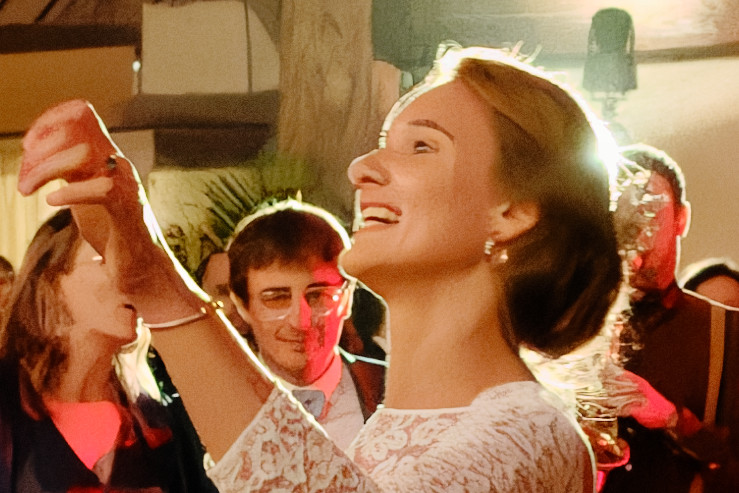
This is a shot from my portfolio. I took it at an insane 64K iso, but I like it, so I kept it. On screen size, it's still ok for my taste.

Let's zoom in on the bride :
Deep Prime, 40 luminance :

Deep Prime XD, 40 luminance :

Ok, sure, she was not totally sharp right from the beginning. But there is a strange artifact on her mouth, slightly present with Deep Prime but way more visible with Deep Prime XD with default settings. Changing the "Noise model" slider to – 100 mitigate the effect, but not entirely :
Deep Prime XD Noise Model -100, 40 luminance :
Another face :
Deep Prime, 40 luminance :

Deep Prime XD, 40 luminance :

Nothing is right. Some areas of his face are strangely sharpened, not to mention the other people on the picture. Deep Prime XD even try to recover some non really existent details on the roof on the top right of the face. I much prefer the Deep Prime version here. There is undoubtly no more details on it, but sometimes it's better to let noise in areas than trying to guess what is details and what is not. You can play with the sharpness sliders to mitigate the effects of Deep Prime XD, but the harm is done.
Deep Prime XD Noise Model -100, 40 luminance :

The artifacts are gone, but the smoothing is too severe everywhere in the picture. It's not a solution for me.
In my opinion, Deep Prime XD is a step in the Topaz Denoise territory, where I can often see this kind of artifact. What is noise, what is details ? The software guesses for you. Undoubtly, Deep Prime allow more noise in the final picture than Deep Prime XD. But I trust Deep Prime more. Its intervention stays near the pixel level. With Deep Prime XD, I have the strange feeling that a little guy inside my computer is looking at my picture, and while he drinks a few beers, says : "hmmm this is noise, let's remove it" "Hohooo, this is some details that I don't want to lose, let's enhance it!".
Imho, It's not meant to replace Deep Prime but to complement it. As a wedding photographer, I won't use it. All my pictures benefit from Deep Prime, I know that. All my pictures are converted to DNG using Deep Prime, and I finish the job in C1. I just can't use Deep Prime XD with the same regularity, because it will harm some parts of the picture.
Edited on Nov 03, 2022 at 03:29 PM · View previous versions
I will focus of course only on the new things. I will probably add/modify my initial review to include them when I will have time for this
Deep Prime XD :
Ok, that's the new star of the show. It's supposed to be even better than Deep Prime. The main novelty compared to Deep Prime is that Deep Prime XD tries to guess, on a larger scale, where are the areas of details that have to be sharpened a little bit more, and what are on the opposite the area of low details, uniform colors or bokeh that can benefit from being smoothed a little bit more. Most of the time, it will be spot on. The wildlife photographer will probably like it a lot. It will smooth the background a little bit more effectively than Deep Prime and sharpen the fur or the feathers a little bit more.
But what about more complex subjects, where areas of details and areas that can benefit from being smoothed a little bit more are not that obvious, not that well separated from each other ? What about faces in low light ?
Well, Deep Prime XD creates sometimes a few unwanted artifacts while Deep Prime doesn't.
First sample :
This is a shot from my portfolio. I took it at an insane 64K iso, but I like it, so I kept it. On screen size, it's still ok for my taste.
Let's zoom in on the bride :
Deep Prime, 40 luminance :
Deep Prime XD, 40 luminance :
Ok, sure, she was not totally sharp right from the beginning. But there is a strange artifact on her mouth, slightly present with Deep Prime but way more visible with Deep Prime XD with default settings. Changing the "Noise model" slider to – 100 mitigate the effect, but not entirely :
Deep Prime XD Noise Model -100, 40 luminance :
Another face :
Deep Prime, 40 luminance :
Deep Prime XD, 40 luminance :
Nothing is right. Some areas of his face are strangely sharpened, not to mention the other people on the picture. Deep Prime XD even try to recover some non really existent details on the roof on the top right of the face. I much prefer the Deep Prime version here. There is undoubtly no more details on it, but sometimes it's better to let noise in areas than trying to guess what is details and what is not. You can play with the sharpness sliders to mitigate the effects of Deep Prime XD, but the harm is done.
Deep Prime XD Noise Model -100, 40 luminance :
The artifacts are gone, but the smoothing is too severe everywhere in the picture. It's not a solution for me.
In my opinion, Deep Prime XD is a step in the Topaz Denoise territory, where I can often see this kind of artifact. What is noise, what is details ? The software guesses for you. Undoubtly, Deep Prime allow more noise in the final picture than Deep Prime XD. But I trust Deep Prime more. Its intervention stays near the pixel level. With Deep Prime XD, I have the strange feeling that a little guy inside my computer is looking at my picture, and while he drinks a few beers, says : "hmmm this is noise, let's remove it" "Hohooo, this is some details that I don't want to lose, let's enhance it!".
Imho, It's not meant to replace Deep Prime but to complement it. As a wedding photographer, I won't use it. All my pictures benefit from Deep Prime, I know that. All my pictures are converted to DNG using Deep Prime, and I finish the job in C1. I just can't use Deep Prime XD with the same regularity, because it will harm some parts of the picture.
Edited on Nov 03, 2022 at 03:29 PM · View previous versions
Nov 03, 2022 at 02:55 PM
p.3 #17Personal review of DXO Photolab 5
The new colorspace :
There is a new colorspace in DPL6. With DPL5, we were stuck with AdobeRGB only as a working profile. Now, there is the new DXO Wide Gamut, which could be close to Rec 2020 if believe this thread on the DXO Forum.
It's probably a good news for the rendition of some colors, but my screen is sRGB, so I didn't investigate this. You can follow the thread on DXO if you're interested.
Consequence of the new colorspace on the color rendering panel :
Funny thing, if you chose this new color space, you lose a lot of color profiles in the generic rendering color panel. You have what is now called the Dxo camera profile, and a single "Neutral Color" profile, which looks close to the neutral color, neutral tonality v2 of the old color space :

All the camera body rendering, positive film, negative film, etc, are still there. It may indicate that their lut/profiles were build on top of that profile after all.
If you still use the "Classic (Legacy)" Working Color Space, all the old rendering of this panel are still there. But the neutral color, realistic tonality (the very flat one) from DPL 5 has been renamed... Neutral Color. But he's way flatter than the "Neutral Color" displayed when using the new colorspace. Go figure why they have the same name...
Edited on Nov 03, 2022 at 03:04 PM · View previous versions
There is a new colorspace in DPL6. With DPL5, we were stuck with AdobeRGB only as a working profile. Now, there is the new DXO Wide Gamut, which could be close to Rec 2020 if believe this thread on the DXO Forum.
It's probably a good news for the rendition of some colors, but my screen is sRGB, so I didn't investigate this. You can follow the thread on DXO if you're interested.
Consequence of the new colorspace on the color rendering panel :
Funny thing, if you chose this new color space, you lose a lot of color profiles in the generic rendering color panel. You have what is now called the Dxo camera profile, and a single "Neutral Color" profile, which looks close to the neutral color, neutral tonality v2 of the old color space :
All the camera body rendering, positive film, negative film, etc, are still there. It may indicate that their lut/profiles were build on top of that profile after all.
If you still use the "Classic (Legacy)" Working Color Space, all the old rendering of this panel are still there. But the neutral color, realistic tonality (the very flat one) from DPL 5 has been renamed... Neutral Color. But he's way flatter than the "Neutral Color" displayed when using the new colorspace. Go figure why they have the same name...
Edited on Nov 03, 2022 at 03:04 PM · View previous versions
Nov 03, 2022 at 02:57 PM
p.3 #18Personal review of DXO Photolab 5
A new soft proofing mode :
I don't print a lot, so I won't be a great help here. I know that a lot of people asked for it. It's there...
I don't print a lot, so I won't be a great help here. I know that a lot of people asked for it. It's there...
Nov 03, 2022 at 02:58 PM
p.3 #19Personal review of DXO Photolab 5
The new retouching tool :
A lot of communication from DXO about this tool. You can either clone the source area or just repair the area, like you can in LR. The fancy thing is that you can also modify the source area, make it bigger than the area that you try to repair (which of course stay of the same size, that's the clever thing). You can even rotate or flip horizontally or vertically the source area. It may be useful. But of course, all of this is done in a tiny window on the bottom left that you can't move...
An example with a bigger (and flipped) source area, and the annoying window :

Edited on Nov 03, 2022 at 03:05 PM · View previous versions
A lot of communication from DXO about this tool. You can either clone the source area or just repair the area, like you can in LR. The fancy thing is that you can also modify the source area, make it bigger than the area that you try to repair (which of course stay of the same size, that's the clever thing). You can even rotate or flip horizontally or vertically the source area. It may be useful. But of course, all of this is done in a tiny window on the bottom left that you can't move...
An example with a bigger (and flipped) source area, and the annoying window :
Edited on Nov 03, 2022 at 03:05 PM · View previous versions
Nov 03, 2022 at 02:59 PM
p.3 #20Personal review of DXO Photolab 5
Projects :
A reminder : projects are like the collections in LR or C1. You can now make project groups (I think that it's self explanatory). That's better. Previously, you could just make projects, include files inside them, and that's all. I can now make a "2022 weddings galleries" project group, and put all my 2022 weddings galleries inside.
I didn't write it in my DPL5 review, but adding a picture to a group is very cumbersome . You have to :
select one or several pictures
right click on them
choose add your selection to a project
choose your group (if your project is inside a group)
then finally select your project...
As far as I know, there is no way to make a project your current project, destination project or whatever, and just use a one click solution (LR) or keyboard shortcut (C1) to include the picture inside your group. Once again, the implementation is way off...
Crop tool "improvement" :
All right. Decades after the other softwares, the guys at DXO decided that a crop and rotate tool is useful. Even on my new computer, the rotation is very slow, it's not smooth at all, but it's there. You can with the same tool rotate and crop your picture. Yipee.
Like in DPL5, if you click on Crop : anto based on keystoning / horizon, you can automatically avoid black parts of your rotated picture to be included in your final image. But as soon as you crop manually, in their logic, this item goes back to "manual" and if you don't pay attention, you can include black parts of the pictures. I repeat what I said in my review: ideally, somewhere there should be a on/off button to choose to allow or forbid the inclusion of black parts in your final picture. But no, right now, you can (finally) rotate manually by draging with your mouse and not worry about black parts, but you can't crop manally and avoid black parts automatically.
A small step in the right direction, but still the worse tool of the three main raw convertors.
Perspective correction tools :
They finally realized that it was not revolutionnary anymore, so now the perspective tool is natively inside DPL6.
But as far as I know, the volume deformation that I like a lot is still a part of DXO Viewpoint. They released a V4 version, which includes a "reshape tool" which allows to warp some areas of the picture. I didn't buy it, I have Photoshop for this kind of thing, so I will stay with ViewPoint V3.
Others:
They apparently improved color labels, exif, IPTC, etc, but I never used DPL6 for that, so I don't really care about that
That's all for now. Like I said, I may include all of this to update my initial review of DPL5. I hope that it can be useful.
Edited on Nov 03, 2022 at 05:00 PM · View previous versions
Nov 03, 2022 at 02:59 PM