This topic is in the 2021 archive. You can read it and like its posts here. It is read only.
Archive 2021CaptureOne broken for A1.
p.2 #1CaptureOne broken for A1.
Daran wrote:
Those dots are actually in the RAW data. So they are neither CO's fault, nor should the lens matter. You can also see them with e.g. RawDigger. The areas with the artifacts seem to have a blue value of zero in common. Which makes little sense as no pixel nearby has that little blue. E.g. for the yellow leaves the black pixels sit between blue values of ca 2050 on one and 350 on the other side. So this is caused by the camera and it looks very much like a processing artifact. E.g. contrast enhancing features could cause this....Show more →
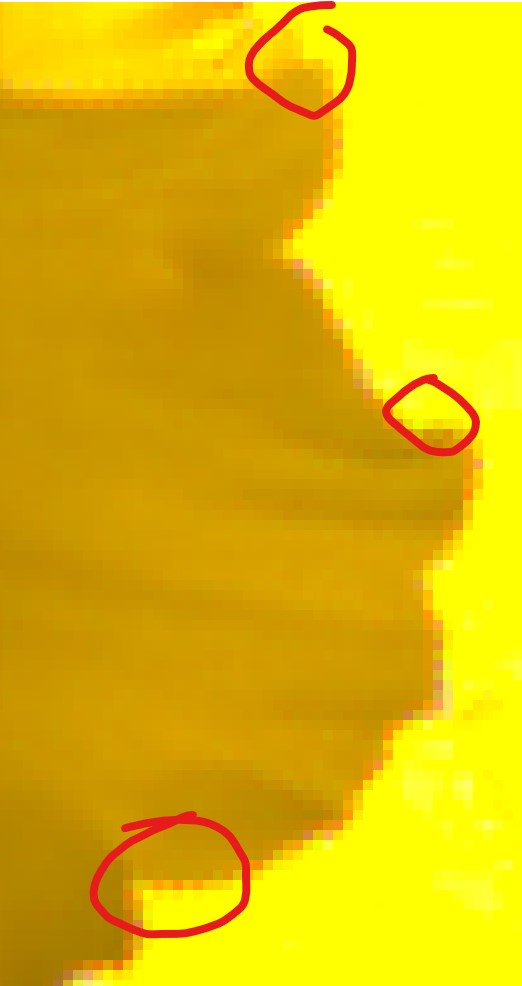
For clarification, when you refer to "those dots" and say you "can see them with e.g. RawDigger" you don't literally mean you actually see black dots. If I understand this correctly, you see some corrupt data. I am not an expert in this at all. Purely out of curiosity I looked at the daffodils in RawDigger and I cannot say that I recognize the dots. The attached figure illustrates what I see. I circled the areas where the original post displays the black dots.
Those dots are actually in the RAW data. So they are neither CO's fault, nor should the lens matter. You can also see them with e.g. RawDigger. The areas with the artifacts seem to have a blue value of zero in common. Which makes little sense as no pixel nearby has that little blue. E.g. for the yellow leaves the black pixels sit between blue values of ca 2050 on one and 350 on the other side. So this is caused by the camera and it looks very much like a processing artifact. E.g. contrast enhancing features could cause this....Show more →
For clarification, when you refer to "those dots" and say you "can see them with e.g. RawDigger" you don't literally mean you actually see black dots. If I understand this correctly, you see some corrupt data. I am not an expert in this at all. Purely out of curiosity I looked at the daffodils in RawDigger and I cannot say that I recognize the dots. The attached figure illustrates what I see. I circled the areas where the original post displays the black dots.
Aug 02, 2021 at 06:01 PM
p.2 #2CaptureOne broken for A1.
ruthenium wrote:
PS: I imagine many here would also like to know which settings are baked into the RAW data, in order to avoid them.For clarification, when you refer to "those dots" and say you "can see them with e.g. RawDigger" you don't literally mean you actually see black dots. If I understand this correctly, you see some corrupt data. I am not an expert in this at all. Purely out of curiosity I looked at the daffodils in RawDigger and I cannot say that I recognize the dots. The attached figure illustrates what I see. I circled the areas where the original post displays the black dots.
Be prepared to be shocked. In RawDigger: Set Raw Curve to linear (button at the bottom left, then enable "Linear Raw Curve") and display only the blue channel (button top right under "Display"). Zoom to 100% and scroll to the flowers.
EDIT:
It looks worse than it probably is, the standard compression algorithm tends to turn individual black pixels into short strips. That part can be fixed by using lossless compression (or uncompressed, but that's needlessly big).
I experimented with creative look and it did not seem to affect the RAW data, at least not obviously.
A long shot: have you disabled pixel mapping or are you using silent mode (rather then merely electronic shutter)?
EDIT2:
https://live.staticflickr.com/65535/51352943412_9ca9e89b65_o.png
Daran wrote
Those dots are actually in the RAW data. So they are neither CO's fault, nor should the lens matter. You can also see them with e.g. RawDigger. The areas with the artifacts seem to have a blue value of zero in common. Which makes little sense as no pixel nearby has that little blue. E.g. for the yellow leaves the black pixels sit between blue values of ca 2050 on one and 350 on the other side. So this is caused by the camera and it looks very much like a processing artifact. E.g. contrast enhancing features could cause this. While these should not affect the RAW data, Sony is known to bake some of those "improvements" irreversibly into the RAW data itself. Think vignetting correction for some lenses or the infamous star eater. It may be something you can (and should) disable in your camera. The EXIF has e.g. "Contrast=High" or "Saturation=High", that I'd try resetting. By modifying any such non-neutral settings and reshooting you should be able to identify the settings actually affecting / causing the artifacts.PS: I imagine many here would also like to know which settings are baked into the RAW data, in order to avoid them.
Be prepared to be shocked. In RawDigger: Set Raw Curve to linear (button at the bottom left, then enable "Linear Raw Curve") and display only the blue channel (button top right under "Display"). Zoom to 100% and scroll to the flowers.
EDIT:
It looks worse than it probably is, the standard compression algorithm tends to turn individual black pixels into short strips. That part can be fixed by using lossless compression (or uncompressed, but that's needlessly big).
I experimented with creative look and it did not seem to affect the RAW data, at least not obviously.
A long shot: have you disabled pixel mapping or are you using silent mode (rather then merely electronic shutter)?
EDIT2:
https://live.staticflickr.com/65535/51352943412_9ca9e89b65_o.png
Aug 02, 2021 at 06:19 PM
p.2 #3CaptureOne broken for A1.
I have seen some artifacts in compressed raw for Astro photos. Might try lossless compression and see if that helps.
Aug 02, 2021 at 06:52 PM
p.2 #4CaptureOne broken for A1.
Daran wrote:
PS: I imagine many here would also like to know which settings are baked into the RAW data, in order to avoid them.For clarification, when you refer to "those dots" and say you "can see them with e.g. RawDigger" you don't literally mean you actually see black dots. If I understand this correctly, you see some corrupt data. I am not an expert in this at all. Purely out of curiosity I looked at the daffodils in RawDigger and I cannot say that I recognize the dots. The attached figure illustrates what I see. I circled the areas where the original post displays the black dots.Be prepared to be shocked. In RawDigger: Set Raw Curve to linear (button at the bottom left, then enable "Linear Raw Curve") and display only the blue channel (button top right under "Display"). Zoom to 100% and scroll to the flowers.
EDIT:
It looks worse than it probably is, the standard compression algorithm tends to turn individual black pixels into short strips. That part can be fixed by using lossless compression (or uncompressed, but that's needlessly big).
I experimented with creative look and it did not seem to affect the RAW data, at least not obviously.
A long shot: have you disabled pixel mapping...Show more →
Very instructive. Thank you for explaining - I appreciate this!
ruthenium wrote
Daran wrote
Those dots are actually in the RAW data. So they are neither CO's fault, nor should the lens matter. You can also see them with e.g. RawDigger. The areas with the artifacts seem to have a blue value of zero in common. Which makes little sense as no pixel nearby has that little blue. E.g. for the yellow leaves the black pixels sit between blue values of ca 2050 on one and 350 on the other side. So this is caused by the camera and it looks very much like a processing artifact. E.g. contrast enhancing features could cause this. While these should not affect the RAW data, Sony is known to bake some of those "improvements" irreversibly into the RAW data itself. Think vignetting correction for some lenses or the infamous star eater. It may be something you can (and should) disable in your camera. The EXIF has e.g. "Contrast=High" or "Saturation=High", that I'd try resetting. By modifying any such non-neutral settings and reshooting you should be able to identify the settings actually affecting / causing the artifacts.PS: I imagine many here would also like to know which settings are baked into the RAW data, in order to avoid them.
EDIT:
It looks worse than it probably is, the standard compression algorithm tends to turn individual black pixels into short strips. That part can be fixed by using lossless compression (or uncompressed, but that's needlessly big).
I experimented with creative look and it did not seem to affect the RAW data, at least not obviously.
A long shot: have you disabled pixel mapping...Show more →
Very instructive. Thank you for explaining - I appreciate this!
Aug 02, 2021 at 07:06 PM
p.2 #5CaptureOne broken for A1.
Thanks again.
I have silent shooting off and auto pixel mapping on. I shoot using ES obviously .
I don't know why RawDigger also shows those black pixels, but if I understood correctly it shows them in the Blue channel only. If so, demosaicing should take care of those I think and they shoould not come out as completely black in the final image. This is also reinforced by the fact that when going over the black pixels in CO you don't see such color values... Also, only CO exhibits this problem. Even the free RawTherapee produces perfectly acceptable jpegs in this case...
It's of course possible that all the other RAW processors do some sort of masking or special handling for this case, but I think it's less probable than CO processing simply being bugged.
I also tried the other RAW formats and the effect is still there, if it's any better it's hard to tell as it's very, very similar. Some of the shots in my link are in lossless or uncompressed, with some corrections disabled. I'll try to find a good target today and shoot with all corrections disabled in uncompressed RAW and default STD "Creative Look" to minimize the number of variables that might be causing this .
Edit: Uncompressed, no corrections in-cam, STD default Creative Look, Sigma 24-70DN @50mm f2.8, 100% crop this time so you need to take a closer look to see the black dots/streaks (DSC00221 on my shared gdrive above)
https://photos.smugmug.com/photos/i-w7z2m4x/0/d3fdd2dd/O/i-w7z2m4x.png
Oops, this was actually a screen grab from CO, not the exported JPEG, but it looks mostly (minus color) the same after export:
https://photos.smugmug.com/photos/i-JDQ84vG/0/bde3b14c/O/i-JDQ84vG.png
I have silent shooting off and auto pixel mapping on. I shoot using ES obviously
.I don't know why RawDigger also shows those black pixels, but if I understood correctly it shows them in the Blue channel only. If so, demosaicing should take care of those I think and they shoould not come out as completely black in the final image. This is also reinforced by the fact that when going over the black pixels in CO you don't see such color values... Also, only CO exhibits this problem. Even the free RawTherapee produces perfectly acceptable jpegs in this case...
It's of course possible that all the other RAW processors do some sort of masking or special handling for this case, but I think it's less probable than CO processing simply being bugged.
I also tried the other RAW formats and the effect is still there, if it's any better it's hard to tell as it's very, very similar. Some of the shots in my link are in lossless or uncompressed, with some corrections disabled. I'll try to find a good target today and shoot with all corrections disabled in uncompressed RAW and default STD "Creative Look" to minimize the number of variables that might be causing this
. Edit: Uncompressed, no corrections in-cam, STD default Creative Look, Sigma 24-70DN @50mm f2.8, 100% crop this time so you need to take a closer look to see the black dots/streaks (DSC00221 on my shared gdrive above)
https://photos.smugmug.com/photos/i-w7z2m4x/0/d3fdd2dd/O/i-w7z2m4x.png
Oops, this was actually a screen grab from CO, not the exported JPEG, but it looks mostly (minus color) the same after export:
https://photos.smugmug.com/photos/i-JDQ84vG/0/bde3b14c/O/i-JDQ84vG.png
Aug 03, 2021 at 12:45 AM
p.2 #7CaptureOne broken for A1.
I don't believe it is a Sony issue, as any other RAW processor I can think of is capable of producing jpegs without those artifacts .
So, I reported it to CO supoport 3 months ago but they didn't do a thing about it. I think they don't care since I'm probably the only person who reported this issue and there are probably not that many A1 + CO users in the end...
k-h.a.w wrote:
Reported to Sony?
K-H.
.So, I reported it to CO supoport 3 months ago but they didn't do a thing about it. I think they don't care since I'm probably the only person who reported this issue and there are probably not that many A1 + CO users in the end...
k-h.a.w wrote:
Reported to Sony?
K-H.
Aug 03, 2021 at 12:00 PM
p.2 #8CaptureOne broken for A1.
j4nu wrote:
I don't believe it is a Sony issue, as any other RAW processor I can think of is capable of producing jpegs without those artifacts .
So, I reported it to CO supoport 3 months ago but they didn't do a thing about it. I think they don't care since I'm probably the only person who reported this issue and there are probably not that many A1 + CO users in the end...
K-H.
Thank you for the clarification.
From the discussion above I thought it was an A1 issue.
My mistake. Sorry.
K-H.
I don't believe it is a Sony issue, as any other RAW processor I can think of is capable of producing jpegs without those artifacts
.So, I reported it to CO supoport 3 months ago but they didn't do a thing about it. I think they don't care since I'm probably the only person who reported this issue and there are probably not that many A1 + CO users in the end...
k-h.a.w wrote
Reported to Sony?K-H.
Thank you for the clarification.
From the discussion above I thought it was an A1 issue.
My mistake. Sorry.
K-H.
Aug 03, 2021 at 12:13 PM
p.2 #9CaptureOne broken for A1.
j4nu wrote:
I don't believe it is a Sony issue, as any other RAW processor I can think of is capable of producing jpegs without those artifacts .
So, I reported it to CO supoport 3 months ago but they didn't do a thing about it. I think they don't care since I'm probably the only person who reported this issue and there are probably not that many A1 + CO users in the end...
I think you are barking up the wrong tree. Those pixels have no business being zero in the blue channel. If I were a RAW processor, I'd also estimate black as resultant color for those pixels.
This could be due to (decreasing likelihood):
I can't see how this would be Capture One to blame as converting a zero valued blue bayer-mask tint into a black RGB pixel is mathematically correct. Given the scene and the surrounding pixel values I also don't see any plausible way to interpret the zero values as noise.
I don't believe it is a Sony issue, as any other RAW processor I can think of is capable of producing jpegs without those artifacts
.So, I reported it to CO supoport 3 months ago but they didn't do a thing about it. I think they don't care since I'm probably the only person who reported this issue and there are probably not that many A1 + CO users in the end...
I think you are barking up the wrong tree. Those pixels have no business being zero in the blue channel. If I were a RAW processor, I'd also estimate black as resultant color for those pixels.
This could be due to (decreasing likelihood):
- an artifact caused by specific camera settings
- a firmware issue with in camera RAW data fudging, e.g. while masking PDAF pixels or during compression
- a defective camera
- a general hardware limitation
I can't see how this would be Capture One to blame as converting a zero valued blue bayer-mask tint into a black RGB pixel is mathematically correct. Given the scene and the surrounding pixel values I also don't see any plausible way to interpret the zero values as noise.
Aug 03, 2021 at 01:15 PM
p.2 #10CaptureOne broken for A1.
Daran wrote:
.
So, I reported it to CO supoport 3 months ago but they didn't do a thing about it. I think they don't care since I'm probably the only person who reported this issue and there are probably not that many A1 + CO users in the end...I think you are barking up the wrong tree. Those pixels have no business being zero in the blue channel. If I were a RAW processor, I'd also estimate black as resultant color for those pixels.
This could be due to (decreasing likelihood):
I can't see how this would be Capture One to blame as converting a zero valued blue bayer-mask tint into a black RGB pixel is mathematically correct. Given the scene and the...Show more →
Vielen Dank Daran.
Schöne Grüße nach Berlin, Karl-Heinz.
j4nu wrote
I don't believe it is a Sony issue, as any other RAW processor I can think of is capable of producing jpegs without those artifacts .So, I reported it to CO supoport 3 months ago but they didn't do a thing about it. I think they don't care since I'm probably the only person who reported this issue and there are probably not that many A1 + CO users in the end...
This could be due to (decreasing likelihood):
- an artifact caused by specific camera settings
- a firmware issue with in camera RAW data fudging, e.g. while masking PDAF pixels or during compression
- a defective camera
- a general hardware limitation
I can't see how this would be Capture One to blame as converting a zero valued blue bayer-mask tint into a black RGB pixel is mathematically correct. Given the scene and the...Show more →
Vielen Dank Daran.
Schöne Grüße nach Berlin, Karl-Heinz.
Aug 03, 2021 at 06:55 PM
p.2 #11CaptureOne broken for A1.
Daran wrote:
.
So, I reported it to CO supoport 3 months ago but they didn't do a thing about it. I think they don't care since I'm probably the only person who reported this issue and there are probably not that many A1 + CO users in the end...I think you are barking up the wrong tree. Those pixels have no business being zero in the blue channel. If I were a RAW processor, I'd also estimate black as resultant color for those pixels.
This could be due to (decreasing likelihood):
I can't see how this would be Capture One to blame as converting a zero valued blue bayer-mask tint into a black RGB pixel is mathematically correct. Given the scene and the...Show more →
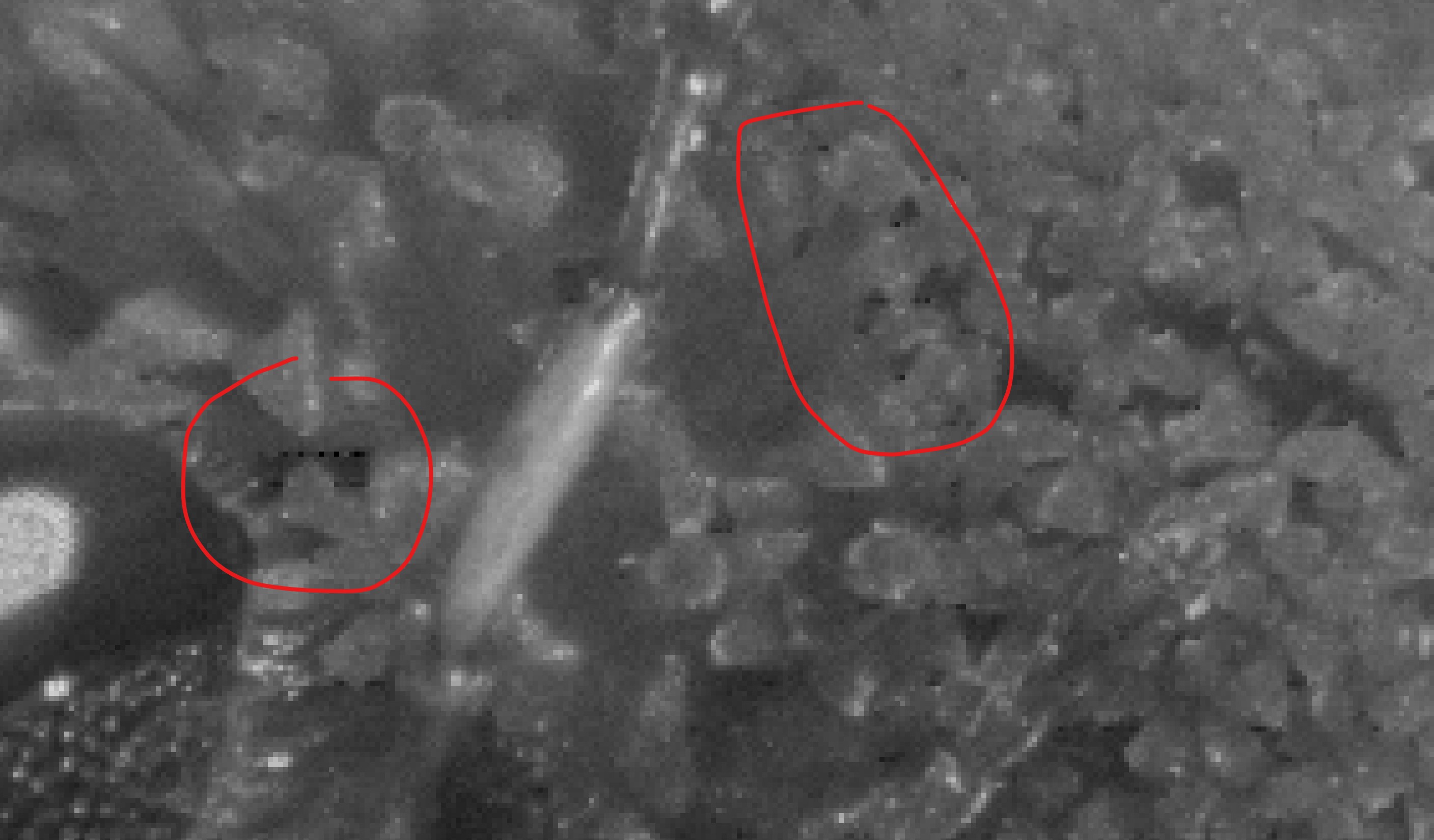
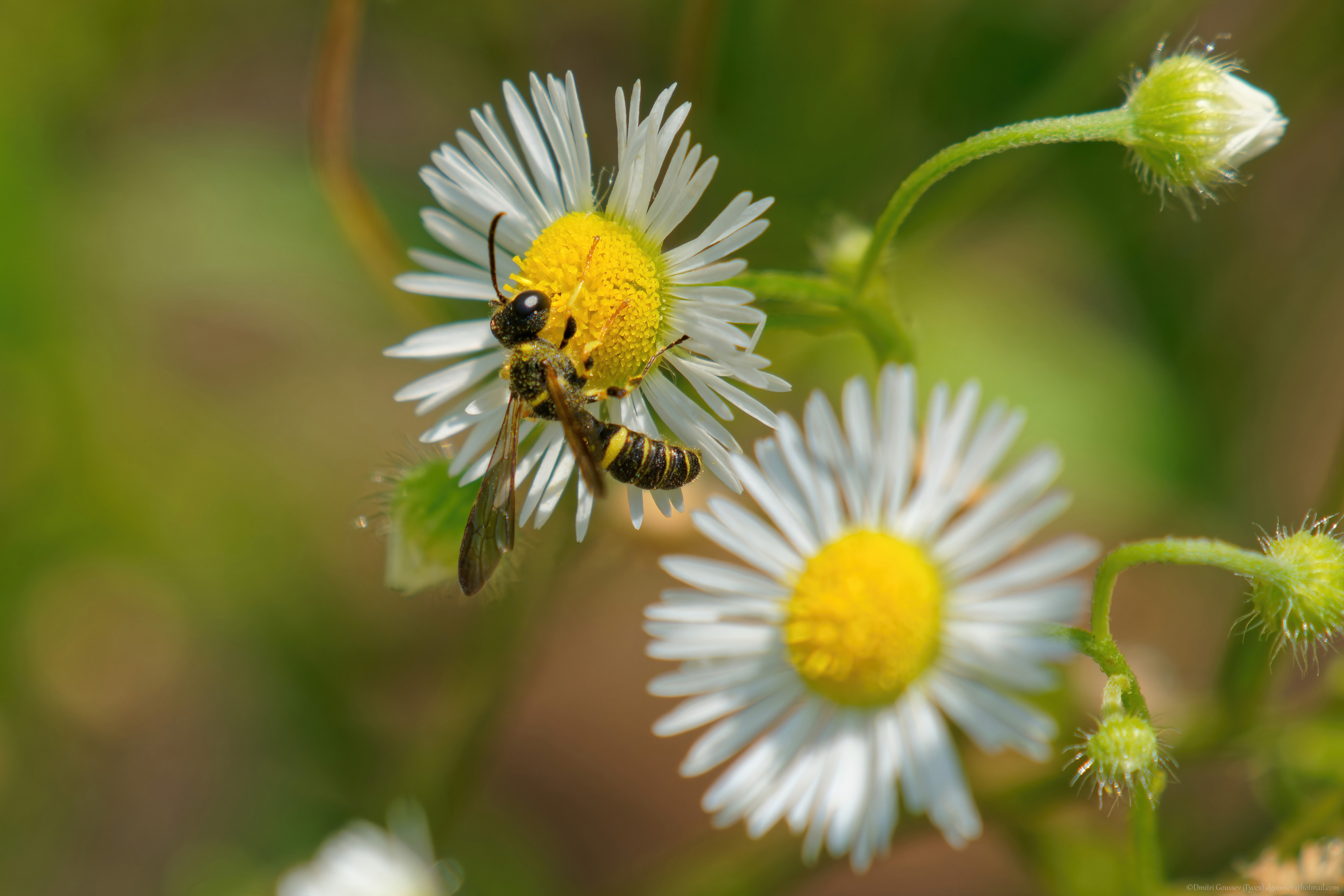
Well, I decided to check whether there are the mysterious black dots in the RAW files produced by my A1. I selected a contrasty one (see the full image below). And, sure they are there - also only in the blue channel. The images are given below. Since I don't use Capture One, I didn't know about these artifacts. Thus, perhaps this issue is not about a defective camera (unless, by chance, j4nu and I both have defective cameras).
j4nu wrote
I don't believe it is a Sony issue, as any other RAW processor I can think of is capable of producing jpegs without those artifacts .So, I reported it to CO supoport 3 months ago but they didn't do a thing about it. I think they don't care since I'm probably the only person who reported this issue and there are probably not that many A1 + CO users in the end...
This could be due to (decreasing likelihood):
- an artifact caused by specific camera settings
- a firmware issue with in camera RAW data fudging, e.g. while masking PDAF pixels or during compression
- a defective camera
- a general hardware limitation
I can't see how this would be Capture One to blame as converting a zero valued blue bayer-mask tint into a black RGB pixel is mathematically correct. Given the scene and the...Show more →
Well, I decided to check whether there are the mysterious black dots in the RAW files produced by my A1. I selected a contrasty one (see the full image below). And, sure they are there - also only in the blue channel. The images are given below. Since I don't use Capture One, I didn't know about these artifacts. Thus, perhaps this issue is not about a defective camera (unless, by chance, j4nu and I both have defective cameras).
Aug 03, 2021 at 07:30 PM
p.2 #12CaptureOne broken for A1.
Even without going into the details (but I'll do that as it's been a while since I did any reading on demosaicing ) of the processing, the mere fact that most (if not all) other RAW processors do not have this issue disproves your theory.
Daran wrote:
I can't see how this would be Capture One to blame as converting a zero valued blue bayer-mask tint into a black RGB pixel is mathematically correct. Given the scene and the surrounding pixel values I also don't see any plausible way to interpret the zero values as noise.
) of the processing, the mere fact that most (if not all) other RAW processors do not have this issue disproves your theory.Daran wrote:
I can't see how this would be Capture One to blame as converting a zero valued blue bayer-mask tint into a black RGB pixel is mathematically correct. Given the scene and the surrounding pixel values I also don't see any plausible way to interpret the zero values as noise.
Aug 03, 2021 at 11:45 PM
p.2 #13CaptureOne broken for A1.
j4nu wrote:
Even without going into the details (but I'll do that as it's been a while since I did any reading on demosaicing ) of the processing, the mere fact that most (if not all) other RAW processors do not have this issue disproves your theory.
I'm not sure about being proven wrong. I have actually written software for de-bayering. A raw processor can certainly filter outliers, or otherwise smooth over the data. But the fact remains that those pixels are implausibly dark. A raw processor that hides these will also hide other stuff that is not artificial.
Even without going into the details (but I'll do that as it's been a while since I did any reading on demosaicing
) of the processing, the mere fact that most (if not all) other RAW processors do not have this issue disproves your theory.Daran wrote
I can't see how this would be Capture One to blame as converting a zero valued blue bayer-mask tint into a black RGB pixel is mathematically correct. Given the scene and the surrounding pixel values I also don't see any plausible way to interpret the zero values as noise.I'm not sure about being proven wrong. I have actually written software for de-bayering. A raw processor can certainly filter outliers, or otherwise smooth over the data. But the fact remains that those pixels are implausibly dark. A raw processor that hides these will also hide other stuff that is not artificial.
Aug 04, 2021 at 07:44 AM
p.2 #14CaptureOne broken for A1.
ruthenium wrote:
.
So, I reported it to CO supoport 3 months ago but they didn't do a thing about it. I think they don't care since I'm probably the only person who reported this issue and there are probably not that many A1 + CO users in the end...I think you are barking up the wrong tree. Those pixels have no business being zero in the blue channel. If I were a RAW processor, I'd also estimate black as resultant color for those pixels.
This could be due to (decreasing likelihood):
I can't see how this would be Capture One to blame as converting a zero valued blue bayer-mask tint into a black RGB pixel is mathematically correct. Given the scene and the surrounding pixel values I also don't see any plausible way to interpret the zero values as noise.Well, I decided to check whether there are the mysterious black dots in the RAW files produced by my A1. I selected a contrasty one (see the full image below). And, sure they are there - also only in the blue channel. The images are given below. Since I don't use Capture One, I didn't know about these artifacts. Thus, perhaps this issue is not about a defective camera (unless, by chance, j4nu and I both have defective cameras).
Interesting. They do look similar, but seem less pronounced. Except for the left group they look less like an artificial artifact. May be the same thing, not sure. Are the blue tints actually zero or merely dark? Care to post a raw somewhere?
Daran wrote
j4nu wrote
I don't believe it is a Sony issue, as any other RAW processor I can think of is capable of producing jpegs without those artifacts .So, I reported it to CO supoport 3 months ago but they didn't do a thing about it. I think they don't care since I'm probably the only person who reported this issue and there are probably not that many A1 + CO users in the end...
This could be due to (decreasing likelihood):
- an artifact caused by specific camera settings
- a firmware issue with in camera RAW data fudging, e.g. while masking PDAF pixels or during compression
- a defective camera
- a general hardware limitation
I can't see how this would be Capture One to blame as converting a zero valued blue bayer-mask tint into a black RGB pixel is mathematically correct. Given the scene and the surrounding pixel values I also don't see any plausible way to interpret the zero values as noise.
Interesting. They do look similar, but seem less pronounced. Except for the left group they look less like an artificial artifact. May be the same thing, not sure. Are the blue tints actually zero or merely dark? Care to post a raw somewhere?
Aug 04, 2021 at 07:51 AM
p.2 #15CaptureOne broken for A1.
I appreciate your input, but you have not answered my main argument:
that other RAW processors do not show the problem.
I agree that they might have some special handling of these pixels, but I think it's more probable that simply CO's debayering algorithm is at fault here...
Not sure about others, but I'd prefer to not have those black pixels in my jpegs, even if this means RAW data is "manipulated" by the RAW processor.
Daran wrote:
) of the processing, the mere fact that most (if not all) other RAW processors do not have this issue disproves your theory.
I'm not sure about being proven wrong. I have actually written software for de-bayering. A raw processor can certainly filter outliers, or otherwise smooth over the data. But the fact remains that those pixels are implausibly dark. A raw processor that hides these will also hide other stuff that is not artificial.
that other RAW processors do not show the problem.
I agree that they might have some special handling of these pixels, but I think it's more probable that simply CO's debayering algorithm is at fault here...
Not sure about others, but I'd prefer to not have those black pixels in my jpegs, even if this means RAW data is "manipulated" by the RAW processor.
Daran wrote:
j4nu wrote
Even without going into the details (but I'll do that as it's been a while since I did any reading on demosaicing ) of the processing, the mere fact that most (if not all) other RAW processors do not have this issue disproves your theory.Daran wrote
I can't see how this would be Capture One to blame as converting a zero valued blue bayer-mask tint into a black RGB pixel is mathematically correct. Given the scene and the surrounding pixel values I also don't see any plausible way to interpret the zero values as noise.Aug 04, 2021 at 07:58 AM
p.2 #16CaptureOne broken for A1.
sebbe wrote:
It surprises me you want to tell Phase One to handle artifacts that are within a RAW file. Isn't a RAW converter made to visualize a RAW file? With all it's flaws?
The information to convert RAW-numbers into colors is written in the profile. Adobe-Profiles do a lot of compression on bright colors to reduce as much issues with overexposion as possible. I think this is the reason why you don't see the artifacts within lightroom. Some may call this a good thing. I don't. And it's one of the main reasons why I use C1.
Please don't push Phase One...Show more →
I don't really want this to get too philosophical but of course I respect your opinion, even though I don't agree with it.
So you are saying it's A1 sensor that is at fault?
I actually never noticed it with my previous cam - A7III, so I don't know if it happens with other sensors (maybe high resolution ones, e.g A7RIV or only stacked ones - A9).
My other question is how to deal with this? As I said I wasn't able to eliminate those black pixels in CO, only distortion correction slider had any effect on them... I'll repeat also that CO does not display the numerical color values of these spots as black... EDIT: Correction, they *do* have near 0 blue value.
Again don't want to get too philosphical, but the reality is that there are no such black spots on the flower so I think after demosaicing the RAW data, they should also not be visible...
Edited on Aug 04, 2021 at 08:44 AM · View previous versions
Aug 04, 2021 at 08:31 AM
p.2 #17CaptureOne broken for A1.
Daran wrote:
.
So, I reported it to CO supoport 3 months ago but they didn't do a thing about it. I think they don't care since I'm probably the only person who reported this issue and there are probably not that many A1 + CO users in the end...I think you are barking up the wrong tree. Those pixels have no business being zero in the blue channel. If I were a RAW processor, I'd also estimate black as resultant color for those pixels.
This could be due to (decreasing likelihood):
I can't see how this would be Capture One to blame as converting a zero valued blue bayer-mask tint into a black RGB pixel is mathematically correct. Given the scene and the surrounding pixel values I also don't see any plausible way to interpret the zero values as noise.Well, I decided to check whether there are the mysterious black dots in the RAW files produced by my A1. I selected a contrasty one (see the full image below). And, sure they are there - also only in the blue channel. The images are given below. Since I don't use Capture One, I didn't know about these artifacts. Thus, perhaps this issue is not about a defective camera (unless, by chance, j4nu and I both have defective cameras).Interesting. They do look similar, but seem less pronounced. Except for the left group they look less like an artificial artifact. May be the same thing, not sure. Are the blue tints actually zero or merely dark? Care to post a raw somewhere?
I hope the link should work (for some reason, you have to select the whole link, then paste)
https://1drv.ms/u/s!Am5chmswMfBkgYo7Y9ZRymFlmeXybw?e=eXWPOP
Regarding the numerical values, you are right (and I should have checked this) - they are actually a mix. Most have low values and just appear black. Yet a few (circled on the left) are zeroes. In general, I wonder whether this is possible for the combined signal (i.e. including the noise) to be so low as to become digitized as 0? I don't believe this should be true, as I believe the sensor must return some noise even when there is no light. I am not an expert on this to make a definitive statement.
ruthenium wrote
Daran wrote
j4nu wrote
I don't believe it is a Sony issue, as any other RAW processor I can think of is capable of producing jpegs without those artifacts .So, I reported it to CO supoport 3 months ago but they didn't do a thing about it. I think they don't care since I'm probably the only person who reported this issue and there are probably not that many A1 + CO users in the end...
This could be due to (decreasing likelihood):
- an artifact caused by specific camera settings
- a firmware issue with in camera RAW data fudging, e.g. while masking PDAF pixels or during compression
- a defective camera
- a general hardware limitation
I can't see how this would be Capture One to blame as converting a zero valued blue bayer-mask tint into a black RGB pixel is mathematically correct. Given the scene and the surrounding pixel values I also don't see any plausible way to interpret the zero values as noise.
I hope the link should work (for some reason, you have to select the whole link, then paste)
https://1drv.ms/u/s!Am5chmswMfBkgYo7Y9ZRymFlmeXybw?e=eXWPOP
Regarding the numerical values, you are right (and I should have checked this) - they are actually a mix. Most have low values and just appear black. Yet a few (circled on the left) are zeroes. In general, I wonder whether this is possible for the combined signal (i.e. including the noise) to be so low as to become digitized as 0? I don't believe this should be true, as I believe the sensor must return some noise even when there is no light. I am not an expert on this to make a definitive statement.
Aug 04, 2021 at 08:40 AM
p.2 #18CaptureOne broken for A1.
Cant help here folks I do not have the A1. I do not believe Phase is doing anything to alter your raws but making a profile for the A1. And in turn giving you the tools to make all the adjustments you may need for the look you want. Ive been using C1 since maybe day 1 it was made. actually Canon 1ds that was awhile ago paid 500 too
Aug 04, 2021 at 08:47 AM
p.2 #19CaptureOne broken for A1.
j4nu wrote:
The information to convert RAW-numbers into colors is written in the profile. Adobe-Profiles do a lot of compression on bright colors to reduce as much issues with overexposion as possible. I think this is the reason why you don't see the artifacts within lightroom. Some may call this a good thing. I don't. And it's one of the main reasons why I use C1.
Please don't push Phase One to handle artifacts within raw files in C1 with some black-box-algorithms.I don't really want this to get too philosophical but of course I respect your opinion, even though I don't agree with it.
So you are saying it's A1 sensor that is at fault?
I actually never noticed it with my previous cam - A7III, so I don't know if it happens with other sensors (maybe high resolution ones, e.g A7RIV or only stacked ones - A9).
My other question is how to deal with this? As I said I wasn't able to eliminate those black pixels in CO, only distortion correction slider had any effect on them... I'll repeat also that CO...Show more →
I don't say it's A1 sensors fault. but Daran showed the artifacts in the RAW file. Therefore the issue is made BEFORE the RAW conversion. Wether it is A1 sensors fault, wrong settings or the user I don't know.
On the other hand there is still the possibility that C1s profile of the A1 does handle the RAW file wrong and makes a small artifact into a big one. This could be checked with the the general profile "no color correction".
sebbe wrote
It surprises me you want to tell Phase One to handle artifacts that are within a RAW file. Isn't a RAW converter made to visualize a RAW file? With all it's flaws?The information to convert RAW-numbers into colors is written in the profile. Adobe-Profiles do a lot of compression on bright colors to reduce as much issues with overexposion as possible. I think this is the reason why you don't see the artifacts within lightroom. Some may call this a good thing. I don't. And it's one of the main reasons why I use C1.
Please don't push Phase One to handle artifacts within raw files in C1 with some black-box-algorithms.
So you are saying it's A1 sensor that is at fault?
I actually never noticed it with my previous cam - A7III, so I don't know if it happens with other sensors (maybe high resolution ones, e.g A7RIV or only stacked ones - A9).
My other question is how to deal with this? As I said I wasn't able to eliminate those black pixels in CO, only distortion correction slider had any effect on them... I'll repeat also that CO...Show more →
I don't say it's A1 sensors fault. but Daran showed the artifacts in the RAW file. Therefore the issue is made BEFORE the RAW conversion. Wether it is A1 sensors fault, wrong settings or the user I don't know.
On the other hand there is still the possibility that C1s profile of the A1 does handle the RAW file wrong and makes a small artifact into a big one. This could be checked with the the general profile "no color correction".
Aug 04, 2021 at 08:54 AM
p.2 #20CaptureOne broken for A1.
I'm trying to remain open-minded, so if you could tell me how this can be caused by the user (me ) or the settings, then I'd honestly appreciate.
Uncompressed RAW, no corrections in-cam, STD default Creative Look, Sigma 24-70DN @50mm f2.8, 100% crop from exported JPEG with ICC profile: No Color Correction and Curve: Linear Response (DSC00221 on my shared gdrive above):
https://photos.smugmug.com/photos/i-TnRqCnc/0/67bdd9ef/O/i-TnRqCnc.png
EDIT: interesting observation, on ICC profile No Color Correction, the black pixels do *not* show near 0 values in blue channel in CO anymore. So not sure how it's "No Color Correction" if in RAWDigger these are 0...
sebbe wrote:
The information to convert RAW-numbers into colors is written in the profile. Adobe-Profiles do a lot of compression on bright colors to reduce as much issues with overexposion as possible. I think this is the reason why you don't see the artifacts within lightroom. Some may call this a good thing. I don't. And it's one of the main reasons why I use C1.
Please don't push Phase One to handle artifacts within raw files in C1 with some black-box-algorithms.I don't really want this to get too philosophical but of course I respect your opinion, even though I don't agree with it.
So you are saying it's A1 sensor that is at fault?
I actually never noticed it with my previous cam - A7III, so I don't know if it happens with other sensors (maybe high resolution ones, e.g A7RIV or only stacked ones - A9).
My other question is how to deal with this? As I said I wasn't able to eliminate those black pixels in CO, only distortion correction slider had any effect on them... I'll repeat also that CO does not display the numerical color values of these spots as black... EDIT: Correction, they *do* have near 0 blue value.
Again don't want to get too philosphical, but the reality is that there are no such black spots on the flower so I think after demosaicing the RAW data, they should also not be visible...I don't say it's A1 sensors fault. but Daran showed the artifacts in the RAW file. Therefore the issue is made BEFORE the RAW conversion. Wether it is A1 sensors fault, wrong settings or the user I don't know.
On the other hand there is still the possibility that C1s profile of the A1 does handle the RAW file wrong and makes a small artifact into a big one. This could be checked with the the general profile "no color correction".
) or the settings, then I'd honestly appreciate.Uncompressed RAW, no corrections in-cam, STD default Creative Look, Sigma 24-70DN @50mm f2.8, 100% crop from exported JPEG with ICC profile: No Color Correction and Curve: Linear Response (DSC00221 on my shared gdrive above):
https://photos.smugmug.com/photos/i-TnRqCnc/0/67bdd9ef/O/i-TnRqCnc.png
EDIT: interesting observation, on ICC profile No Color Correction, the black pixels do *not* show near 0 values in blue channel in CO anymore. So not sure how it's "No Color Correction" if in RAWDigger these are 0...
sebbe wrote:
j4nu wrote
sebbe wrote
It surprises me you want to tell Phase One to handle artifacts that are within a RAW file. Isn't a RAW converter made to visualize a RAW file? With all it's flaws?The information to convert RAW-numbers into colors is written in the profile. Adobe-Profiles do a lot of compression on bright colors to reduce as much issues with overexposion as possible. I think this is the reason why you don't see the artifacts within lightroom. Some may call this a good thing. I don't. And it's one of the main reasons why I use C1.
Please don't push Phase One to handle artifacts within raw files in C1 with some black-box-algorithms.
So you are saying it's A1 sensor that is at fault?
I actually never noticed it with my previous cam - A7III, so I don't know if it happens with other sensors (maybe high resolution ones, e.g A7RIV or only stacked ones - A9).
My other question is how to deal with this? As I said I wasn't able to eliminate those black pixels in CO, only distortion correction slider had any effect on them... I'll repeat also that CO does not display the numerical color values of these spots as black... EDIT: Correction, they *do* have near 0 blue value.
Again don't want to get too philosphical, but the reality is that there are no such black spots on the flower so I think after demosaicing the RAW data, they should also not be visible...
On the other hand there is still the possibility that C1s profile of the A1 does handle the RAW file wrong and makes a small artifact into a big one. This could be checked with the the general profile "no color correction".
Aug 04, 2021 at 09:10 AM