LeeHUK wrote:
OK, I have the Sony profile pack and must say I am very disappointed.
The profiles seems exactly the same as I am getting out of Lumariver Profile Designer and the color checker images available over at imaging resource.
I will post some examples tonight.
Hi, I'm Raamiel, the creator of the Cobalt profiles.
The technical soul of the project if we want to say.
I analyzed the color difference between the photo developed with the Cobalt Standard profile and the Color Fidelity profile, which I assume is the one you got through the data found by ImageResource and Lumariver.
Raamiel wrote:
Hi, I'm Raamiel, the creator of the Cobalt profiles.
The technical soul of the project if we want to say.
I analyzed the color difference between the photo developed with the Cobalt Standard profile and the Color Fidelity profile, which I assume is the one you got through the data found by ImageResource and Lumariver.
I understand your point, but I can't say anything about whether or not the red is right.
I wait to see the results of the profile obtained by Lumariver.
Raamiel wrote:
I understand your point, but I can't say anything about whether or not the red is right.
I wait to see the results of the profile obtained by Lumariver.
Thanks for the feedback.
You are doing good work, maybe I am doing something wrong in my workflow.
I am very interested in using the Cobalt profiles. In reading through this thread, I may have missed something, but can someone elaborate on Cobalt's basic profiles for the M10 as compared to Adobe's?
The Kodachrome,and Mono CCD & CMOS emulations all look very intruiging.
bobby350z wrote:
To me looks like C1 is already doing a good job. When these profiles are compared to Lr, I see bigger improvements. Am I correct?
I would tend to agree. I too see more improvement with LR profiles. While I see some improvement with C1, and specifically DNG files, the results are far more subtle. In some I have seen I really don’t care for the results, but I also know there is rarely a s8ngle answer to solve everything. With the C1 profile I see some improvements in the reds and a bit in things like a green shift in shadows. But, I’ve also seen some shift in reds that are strange to my eye and away from the eye sees. It may simply be the “raw” color vs what the human eye sees, I really don’t know. I am not a color expert.
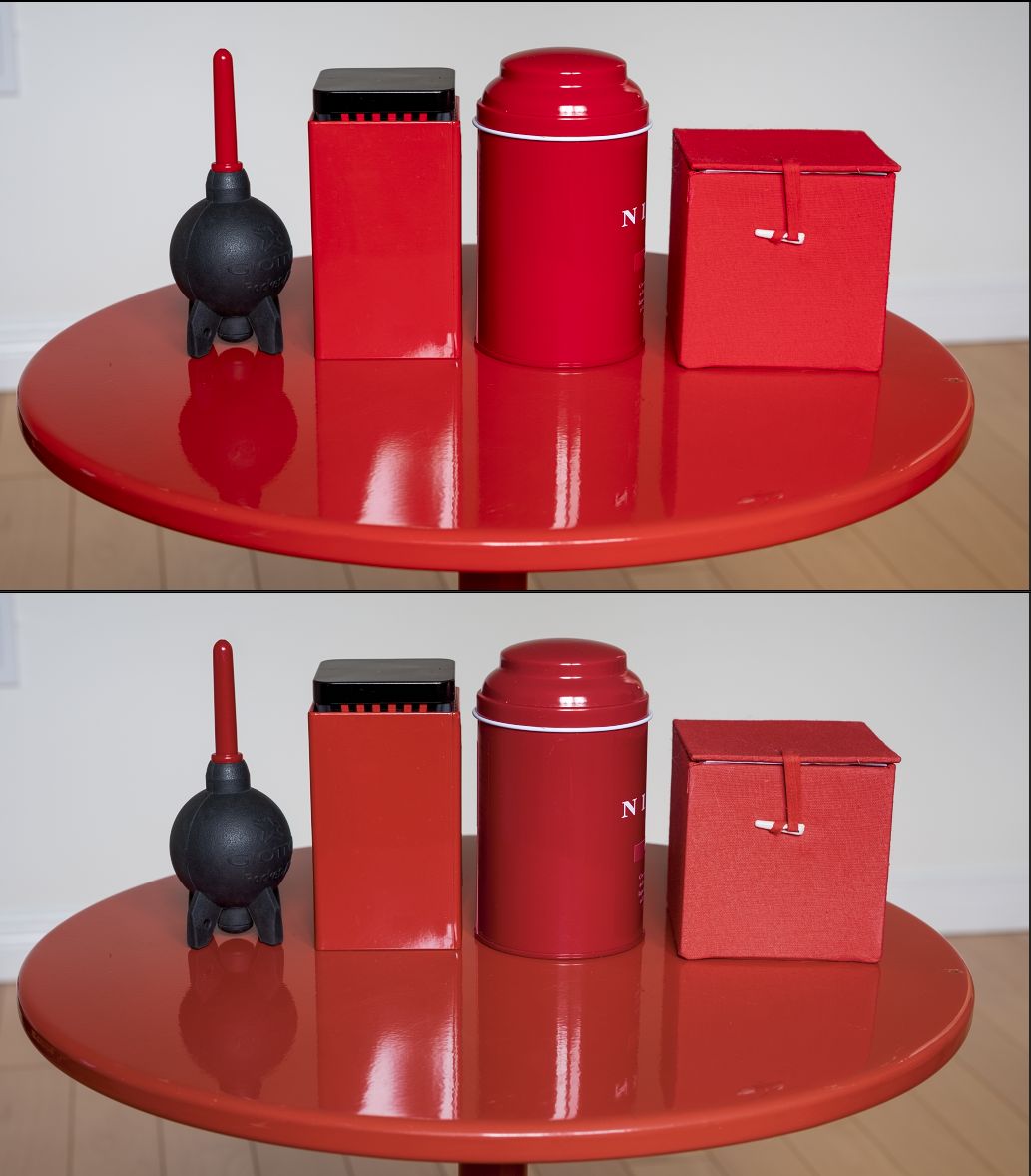
Here are some red objects illuminated by indirect daylight on an overcast day.
The top image is Adobe Color. To give you a sense for how different the reds are, the bottom image in this pair is done in Adobe Monochrome.
In this next pair, top is Adobe Color and bottom is Cobalt Standard. In this example, on my monitor, Cobalt Standard is more faithful to how these things look to my eyes in reality. The two tea cans in the middle are very different reds (see monochrome example), but to my eyes Adobe Color doesn't show that as well as Cobalt Standard.
The Cobalt Kodachrome profiles are a different story. Adobe Color is on top again, and Kodachrome 4x5 Bright (Std curve) is on the bottom. Kodachrome film definitely renders red in a distinctive way (based on my own slides), but to my eye the red hue in the Cobalt Kodachrome profiles is on its way to being orange in this example. I've tried it with many different red objects in different light, and with different Kodachrome profiles; they all exhibit this to varying degrees.
I've mentioned this to Giuseppe and he's added it to the to-do list for when he gets back from some time away.
Anyway, like I said, red is hard. And it's hard to make any progress on an Internet forum because we're all using different monitors, and unless we're all using Color Checkers, only the person who made the photo has a hope of being able to say "that is the correct red".
To me the reds looks like an error caused by incorrect chromatic adaptation somewhere in the creation of the profiles. There is also a slight magenta cast to all images even with correct WB, maybe we need to understand more from Raamiel as to his goals when developing the profiles. The Modular profile seems the best and most accurate, but to me this makes no sense.
For many reasons; in order: Collect solid data for characterization, Calculating first stage profile, Chromatic Adaptation need to jump on D50, Manage the output-referred stage.
On the DNG Adobe architecture, this is particularly. DNG pipeline is a hybrid with scene-referred (Forward-Matrix) and output-referred (HueSatMap 2.5D that are RIMM relative).
Actual Adobe profiles (Adobe Standard) use some limited ForwardMatrix to avoid clipping, like non-negative multipliers, then the HueSatMap relocate colorimetric coordinates on the right place, but also take into account the gamut compression.
This is a good idea for some aspects and a terrible idea for some others. On reds this is clearly visible in losting gradients and nuances.
Cobalt profiles using a proprietary chromatic adaptation that results in a less negative multipliers for ForwardMatrix, HueSatMap are less stressful trying to relocate colorimetric coordinates and the gamut compression are not present at this stage.
The pros are a wider gamut coverage and better color separations, the cons are an higher probability to have gamut clipping at this stage.
In short terms, I think Adobe make this choice to get more robust profiles on cheap monitors that have many difficulties showing a gamut larger than a little sRGB. Cobalt are intended for professional or enthusiasts photographer, supposed to had some invest in decent monitor
Raamiel wrote:
In short terms, I think Adobe make this choice to get more robust profiles on cheap monitors that have many difficulties showing a gamut larger than a little sRGB. Cobalt are intended for professional or enthusiasts photographer, supposed to had some invest in decent monitor
Interesting. You may be on to something. I have a very good monitor (not the best, but not cheap consumer) and the difference between your Standard and "Standard ==> RGB" profiles is easily visible.
Any examples people are posting here of any picture are in sRGB, which introduces another variable that will lead people to seeing different things.
Anyway, I invested in your software in part because you folks are talking to users on forums like this and are continually working to improve the tools. I like seeing that. Keep up the good work!
So it's the monitor's fault that the profiles look poor
I use a ASUS ProArt PA27UCX 99.5% AdobeRGB, calibrated with a spectroradiometer, and whatever I do I cannot recover reds in way that is not detrimental to the image.
rdeloe wrote:
The Cobalt Kodachrome profiles are a different story. Adobe Color is on top again, and Kodachrome 4x5 Bright (Std curve) is on the bottom. Kodachrome film definitely renders red in a distinctive way (based on my own slides), but to my eye the red hue in the Cobalt Kodachrome profiles is on its way to being orange in this example. I've tried it with many different red objects in different light, and with different Kodachrome profiles; they all exhibit this to varying degrees.
Uhm, isn't the whole point with film simulations that they are not accurate?
LeeHUK wrote:
So it's the monitor's fault that the profiles look poor
I use a ASUS ProArt PA27UCX 99.5% AdobeRGB, calibrated with a spectroradiometer, and whatever I do I cannot recover reds in way that is not detrimental to the image.
Of course it can be the user's fault that results from a particular camera profile seem poor. If your monitor isn't calibrated, nothing is going to look right. If your monitor doesn't have the gamut to display the colours properly, you won't see what you're supposed to see.
I'm not suggesting your issue with these profiles is your monitor. It could easily be the profiles. Case in point is the Kodachrome profiles. I have Kodachrome slides in my collection. Reds have a distinctive signature, but it's not that much orange.
rdeloe wrote:
What do you mean by "accurate"? Compared to what? Are you saying you would not expect a Kodachrome film simulation to look like Kodachrome?
Sorry if I was unclear, I meant compared to reality. And I suppose real Kodachrome would have looked different depending on exposure, light temperature, development and how long it was stored, and so on. Not to mention if it was scanned, digitally processed and shown on a computer screen.
Since there is no unused Kodachrome (or at least no way to develop it after exposure), it is of course not possible to replicate it exactly either.
The little I've seen of Kodachrome has actually had very "warm" reds, towards orange.
Makten wrote:
Sorry if I was unclear, I meant compared to reality. And I suppose real Kodachrome would have looked different depending on exposure, light temperature, development and how long it was stored, and so on. Not to mention if it was scanned, digitally processed and shown on a computer screen.
Since there is no unused Kodachrome (or at least no way to develop it after exposure), it is of course not possible to replicate it exactly either.
The little I've seen of Kodachrome has actually had very "warm" reds, towards orange.
Ah, I see what you mean.
I think you're absolutely right regarding matching a profile for digital to a film that doesn't exist anymore. All we have is slides made with different emulsions of Kodachrome at different times, under different light, with different processing...
I made the mistake of posting a few examples on another forum and soon had all kinds of people who used to shoot Kodachrome back in the day ripping into them because they didn't match their memories.

 Archive 2021 · Cobalt Profiles