buffalowolff wrote:
To the note on ISO invariance, that in effect means we should just shoot at ISO 500 and push in post? Or is it better to trust the gain push on the camera? Maybe a topic for me to do my own research on :-)
Yes for the stuff we shoot I wouldn't ever go below 500. On my A9II I only use ISO 640 and above. On the A7RIV only ISO 320 and above (although I rarely get down that low). Now for my A1 I'm just going to disable below ISO 500 as I don't use Auto-ISO and like to just scroll back to ISO 500 and not any further. Of course there are times when I could shoot at ISO 100 and not have to push past ISO 320 but usually ISO 500 is good enough and I don't crave the lower ISOs.
Yes I shoot the A9 at 640 and the A74 at 320 all the time - no matter the lighting...and do my own adjustments in post.
So it seems reasonable that the new A1 has an optimum ISO for high ISO shooting...500 = no need to shoot at 64000 or some crazy ISO and let the camera do processing for you. You will do better (the image will look better) by shooting an the native (optimum) high ISO and doing the post processing yourself (and not in-camera by Sony)
1) Barred owl is on the list for Eye-AF not working....that is strange to me as on the A9II Barred Owl is one of the birds that does work even though the A9II doesn't have Bird Eye-AF per se. In fact, it is probably the species I found to work the most consistently but does require the owl to be a decent size in the frame. Maybe if you switch the A1 to Animal it will pick up the Barred Owl.
2) IS being so much more stable than he is used to with the other Sony cameras. That is interesting as nothing has improved on the spec sheet. I will test this out as I find once I handhold 840mm I see myself unsteady where as at 600mm it is pretty rock solid on the A9II/A7RIV.
buffalowolff wrote:
To the note on ISO invariance, that in effect means we should just shoot at ISO 500 and push in post? Or is it better to trust the gain push on the camera? Maybe a topic for me to do my own research on :-)
That's right. If you can shoot at base ISO do that, but ISO 500 actually outperforms all other ISOs above 200, so switch to that when you need to based on your exposure needs. One positive I see is that the A1 at ISO 500 performs better for DR vs. the other Sony options that use ISO 640 as their second base ISO (and the A1 at 640 about equals their ISO 640 performance). To me, this means that those shooting the A1 at moderate ISOs will see the best DR performance of any Sony Alpha camera.
It seems exposure settings effect eye detect. It seems to detect eyes more easily if they are well exposed, and also the bigger in the frame the easier it seems. Unfortunately well exposed eyes sometimes may mean something else is blown. Once the eye is detected it seem to stick to it easier however. This is just couple quick observations trying it on a computer screen.
rdcny wrote:
Yes I shoot the A9 at 640 and the A74 at 320 all the time - no matter the lighting...and do my own adjustments in post.
So it seems reasonable that the new A1 has an optimum ISO for high ISO shooting...500 = no need to shoot at 64000 or some crazy ISO and let the camera do processing for you. You will do better (the image will look better) by shooting an the native (optimum) high ISO and doing the post processing yourself (and not in-camera by Sony)
I'm confused. If shooting moving subjects in lower light you would need to underexpose by quite a bit to keep shutter speeds up to avoid motion blur. Is this what you're doing and how are you handling noise when raising exposure in post by shooting so underexposed, if so?
Yes - I keep the ISO at say 320 for the A7R4 - no matter how dim the light.
I shoot a bird in flight at 1/2500 sec and as close to wide open (F2.8 on my 400mm lens or F5 on the same lens with 1.4x converter)
Image below was a low light shot...though I used a tripod in this case. Let me look around and find an image I've taken recently where I use a fast shutter speed and the lighting is minimal...
I should add that at "normal" (sufficient) light conditions I shoot at 100iso...
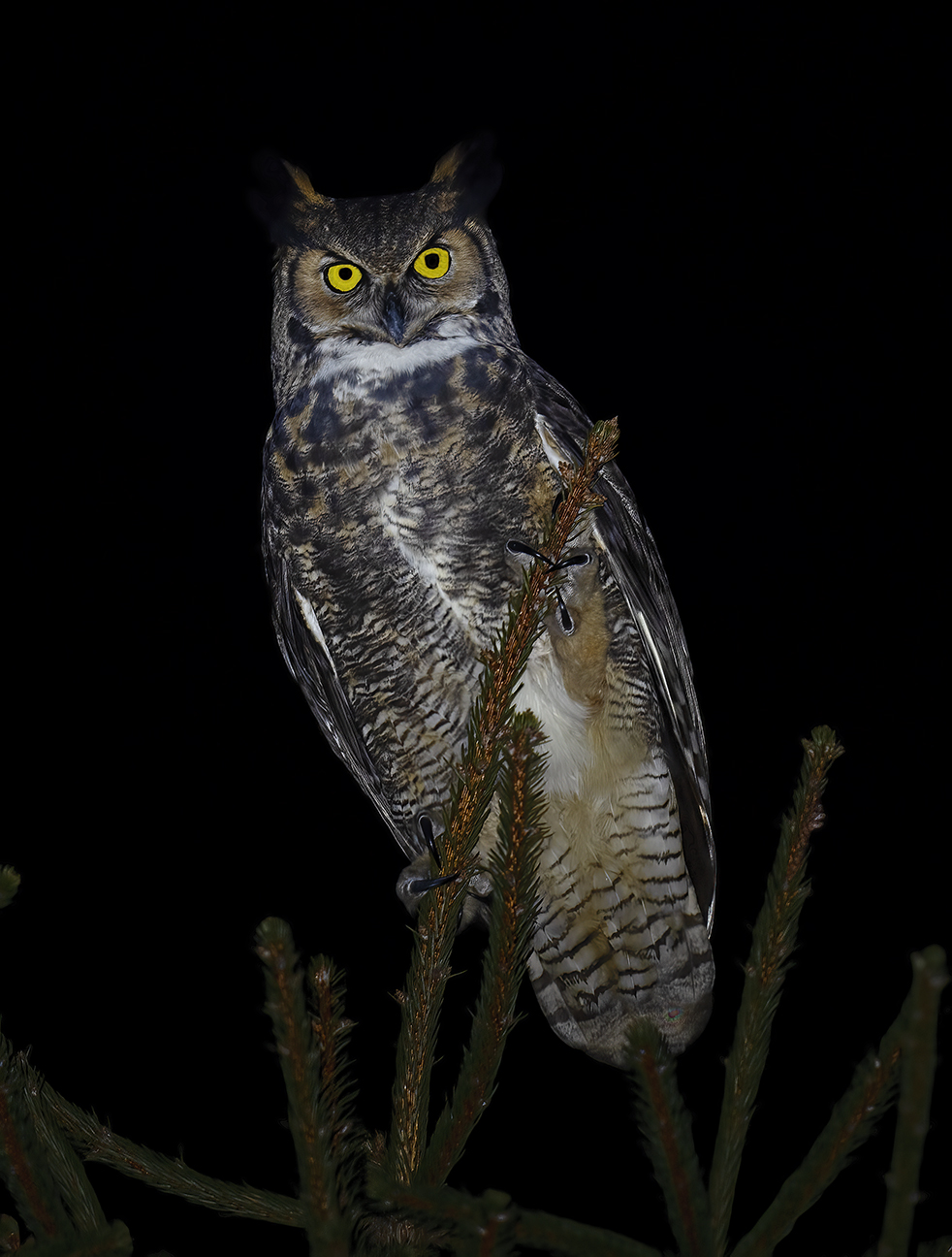
Great Horned Owl in Orange County NY on 25 Jan 2021
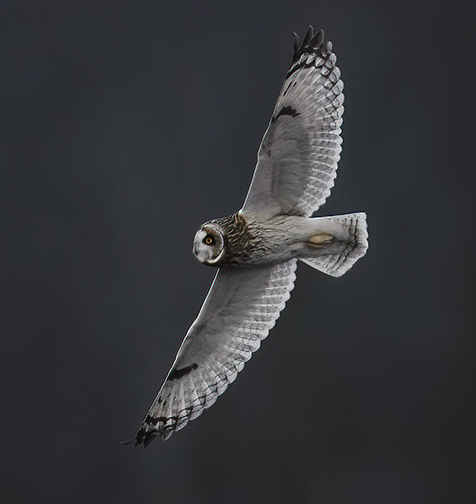
Short-eared Owl 21 January 2021
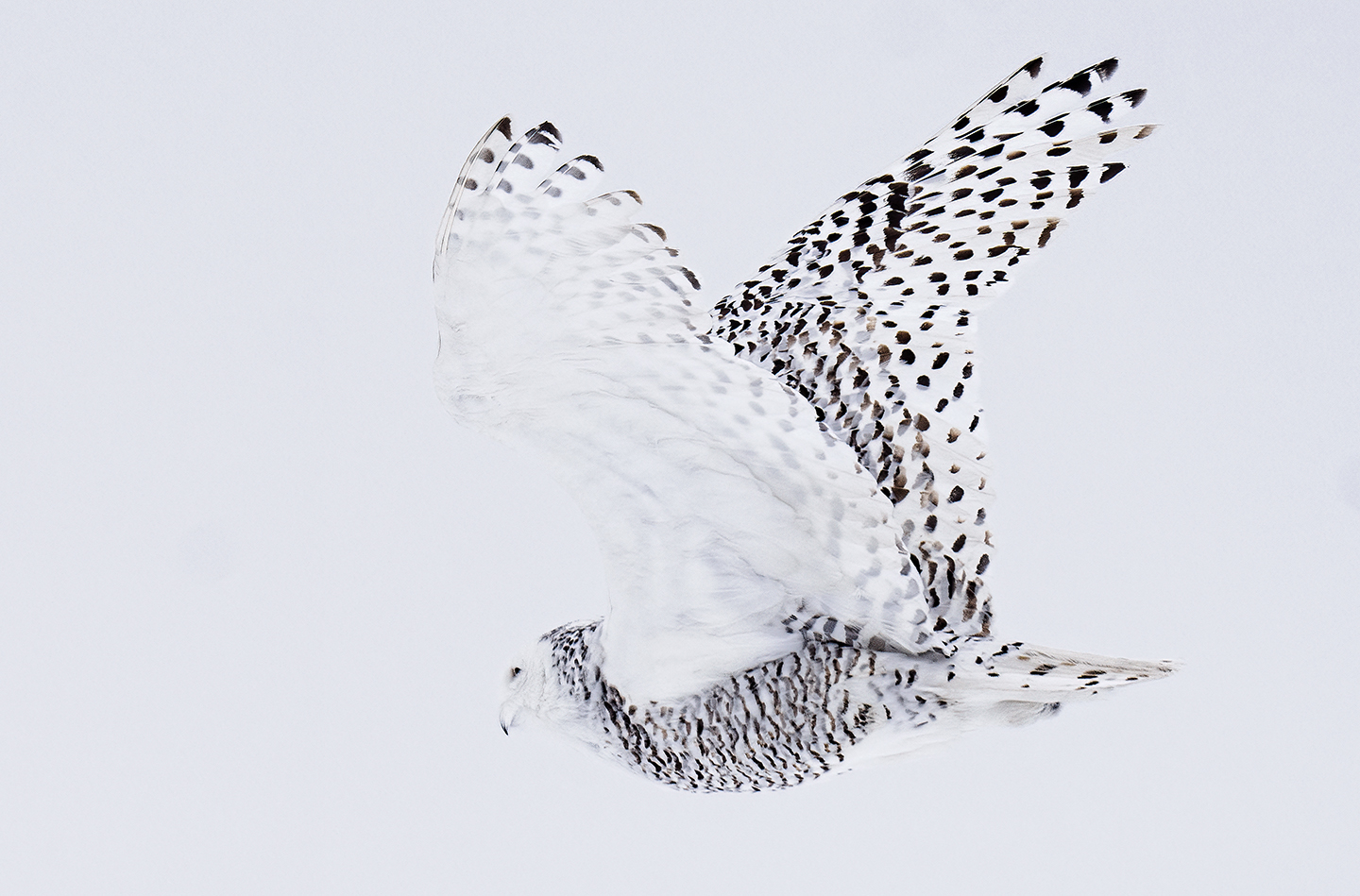
Snowy Owl at Point Peninsula New York on 23 Feb 2021
rdcny wrote:
Yes - I keep the ISO at say 320 for the A7R4 - no matter how dim the light.
I shoot a bird in flight at 1/2500 sec and as close to wide open (F2.8 on my 400mm lens or F5 on the same lens with 1.4x converter)
Image below was a low light shot...though I used a tripod in this case. Let me look around and find an image I've taken recently where I use a fast shutter speed and the lighting is minimal...
I should add that at "normal" (sufficient) light conditions I shoot at 100iso...
So how much did you have to "push" the owls in post to get the correct exposure? And how much did you have to lower the exposure in post on the Snowy Owl?
I'm using an a7r III today for mostly landscape and hiking photography but there are two things I'm missing right now. I've started to get more into video and the a7r III is simply not that great at video, the worst thing being the 4K crop. I also want the newer real time tracking features.
I did buy an a7r IV but decided to return it since I didn't like the tradeoff in high ISO performance. Could the A1 be the camera that would give me the best of two worlds? High MP count but also nice video features and excellent AF? I find it a bit hard to get a grip on how the image quality compares to the a7r III.
well...I wish the EXIF data would show the histogram of the original photo!
The Short-eared Owl was probably shot at 5pm or so...and if you could see the original there is lighter colored beak/feet and a black background. I'd say that was lifted 4 stops in post.
The Snowy Owl - overcast day...grey...snowing lightly and late afternoon. I'd say that image is lifted 1.5 stops.
Anyway, if the exposures look good remember when I started processing these images (except the Snowy) they were what some would say "unusable". Even the Great Horned Owl was a jam of data on the left of the histogram (yes background is all dark that would help)...but my point in all of this is that you can raise images quite a lot in post...and do it better than Sony can in-camera. This allows you to forget about ISO and just adjust shutter speed in low-light conditions. I really prefer 1/2500 sec for flying birds...but the two owl flight shots I had to come down to 1/2000 to get just a bit more light to make the image usable...
Read others' accounts of shooting at a "native" ISO and then pushing in post...rather than shooting at 3200 or 6400 or some other high ISO and allowing Sony to do the processing in camera for you...Try it both ways and see what you think - with your own eyes.
AJay wrote:
1. No way to assign a button to enable tracking. Tracking can only be enabled by touching the back display/touchpad. This is a problem especially when using the viewfinder and have to reach down to tap the display. If you are wearing gloves or housed in a case for underwater filming, just forget about it.
1) Changing the setting for [Focus Area] to [Tracking] temporarily ([Tracking On] under [Custom Key Setting])
Even [Focus Area] is set to other than [Tracking], you can temporarily change the setting for [Focus Area] to [Tracking] while pressing and holding the key to which you have assigned [Tracking On] function.
Assign the [Tracking On] function to a desired key using [Custom Key Setting] in advance.
This function is available in still image shooting mode.
This function is available when the focus mode dial is set to AF-C (Continuous AF).
2) Temporarily pausing the tracking function
By pressing the key to which you assigned [Tracking-Off Hold] or [Tracking-Off Toggle] using [Custom Key Setting], you can temporarily pause the tracking function.
1) Changing the setting for [Focus Area] to [Tracking] temporarily ([Tracking On] under [Custom Key Setting])
Even [Focus Area] is set to other than [Tracking], you can temporarily change the setting for [Focus Area] to [Tracking] while pressing and holding the key to which you have assigned [Tracking On] function.
Assign the [Tracking On] function to a desired key using [Custom Key Setting] in advance.
This function is available in still image shooting mode.
This function is available when the focus mode dial is set to AF-C (Continuous AF).
2) Temporarily pausing the tracking function
By pressing the key to which you assigned [Tracking-Off Hold] or [Tracking-Off Toggle] using [Custom Key Setting], you can temporarily pause the tracking function....Show more →
randomguy wrote:
It seems exposure settings effect eye detect. It seems to detect eyes more easily if they are well exposed, and also the bigger in the frame the easier it seems. Unfortunately well exposed eyes sometimes may mean something else is blown. Once the eye is detected it seem to stick to it easier however. This is just couple quick observations trying it on a computer screen.
Yes, well the algorithm is properly reading from the live view stream which is also based on the jpeg settings. I wonder if setting a high d-range with boosted shadows could help. As long as we are shooting RAW, we can go nuts with those jpeg settings / picture style stuff.
rdcny wrote:
well...I wish the EXIF data would show the histogram of the original photo!
The Short-eared Owl was probably shot at 5pm or so...and if you could see the original there is lighter colored beak/feet and a black background. I'd say that was lifted 4 stops in post.
The Snowy Owl - overcast day...grey...snowing lightly and late afternoon. I'd say that image is lifted 1.5 stops.
Anyway, if the exposures look good remember when I started processing these images (except the Snowy) they were what some would say "unusable". Even the Great Horned Owl was a jam of data on the left of the histogram (yes background is all dark that would help)...but my point in all of this is that you can raise images quite a lot in post...and do it better than Sony can in-camera. This allows you to forget about ISO and just adjust shutter speed in low-light conditions. I really prefer 1/2500 sec for flying birds...but the two owl flight shots I had to come down to 1/2000 to get just a bit more light to make the image usable...
Read others' accounts of shooting at a "native" ISO and then pushing in post...rather than shooting at 3200 or 6400 or some other high ISO and allowing Sony to do the processing in camera for you...Try it both ways and see what you think - with your own eyes.
I've never found a camera where pushing in post was better than selecting the correct ISO for a proper brightness level in camera. I've found some cameras to be about equal. Usually they are equal for a 2-3 stop push but 4+ always looks better if selecting the correct ISO to give correct brightness.
The PTP charts show the camera to be ISO-less from ISO 500 to the end of the range. However, I've still found in many cameras that 4+ stop push still favors in camera ISO even when the Shadow Improvement graph is perfectly flat for more than 4 stops.
The new DPR ISO Invariance studio scene shows it is equal from ISO 800 to ISO 6400...so three stops (I really can't tell much difference between the native 6400 and the ISO800,1600 and 3200 pushes). But you can't use that widget to compare a larger push as the ISO 400 is below the ISO 500 so looks much worse than native ISO 6400. I would like to see a push from ISO 500 to 6400 or 12800 and compare to in camera 6400 and 12800.
arbitrage wrote:
I've never found a camera where pushing in post was better than selecting the correct ISO for a proper brightness level in camera. I've found some cameras to be about equal. Usually they are equal for a 2-3 stop push but 4+ always looks better if selecting the correct ISO to give correct brightness.
The PTP charts show the camera to be ISO-less from ISO 500 to the end of the range. However, I've still found in many cameras that 4+ stop push still favors in camera ISO even when the Shadow Improvement graph is perfectly flat for more than 4 stops.
The new DPR ISO Invariance studio scene shows it is equal from ISO 800 to ISO 6400...so three stops (I really can't tell much difference between the native 6400 and the ISO800,1600 and 3200 pushes). But you can't use that widget to compare a larger push as the ISO 400 is below the ISO 500 so looks much worse than native ISO 6400. I would like to see a push from ISO 500 to 6400 or 12800 and compare to in camera 6400 and 12800....Show more →
I agree with you, you can underexpose by maybe a couple stops to save the highlights but underexposing way too much by staying at like ISO 500 all the time will lose information in the dark areas or even clip them entirely.
I'm going to play with this this weekend on the a7R IV. One example where I can't see how this would work well is a common merganser or bufflehead. I have trouble getting good blacks and whites in strong light as it stands using correct-ish exposure. I can't see how it won't completely lose the blacks by underexposing, but I want to see it for myself. I'll try and mix it up so I can compare.
arbitrage wrote:
I've never found a camera where pushing in post was better than selecting the correct ISO for a proper brightness level in camera. I've found some cameras to be about equal. Usually they are equal for a 2-3 stop push but 4+ always looks better if selecting the correct ISO to give correct brightness.
The PTP charts show the camera to be ISO-less from ISO 500 to the end of the range. However, I've still found in many cameras that 4+ stop push still favors in camera ISO even when the Shadow Improvement graph is perfectly flat for more than 4 stops.
The new DPR ISO Invariance studio scene shows it is equal from ISO 800 to ISO 6400...so three stops (I really can't tell much difference between the native 6400 and the ISO800,1600 and 3200 pushes). But you can't use that widget to compare a larger push as the ISO 400 is below the ISO 500 so looks much worse than native ISO 6400. I would like to see a push from ISO 500 to 6400 or 12800 and compare to in camera 6400 and 12800....Show more →
TopPixel wrote:
I agree with you, you can underexpose by maybe a couple stops to save the highlights but underexposing way too much by staying at like ISO 500 all the time will lose information in the dark areas or even clip them entirely.