This topic is in the 2020 archive. You can read it and like its posts here. It is read only.
Archive 2020Lightroom Classic 10.0 is out, adds color grading wheels
p.3 #1Lightroom Classic 10.0 is out, adds color grading wheels
Here is DPP Standard Profile on the left, LrC 9.x Adobe Color in the middle and LrC 10 Adobe Color on the right
9 was too dark, 10 is too light....but likely depends on what DPP Profile I select...anyways would rather have LrC 10 as a starting point over 9.
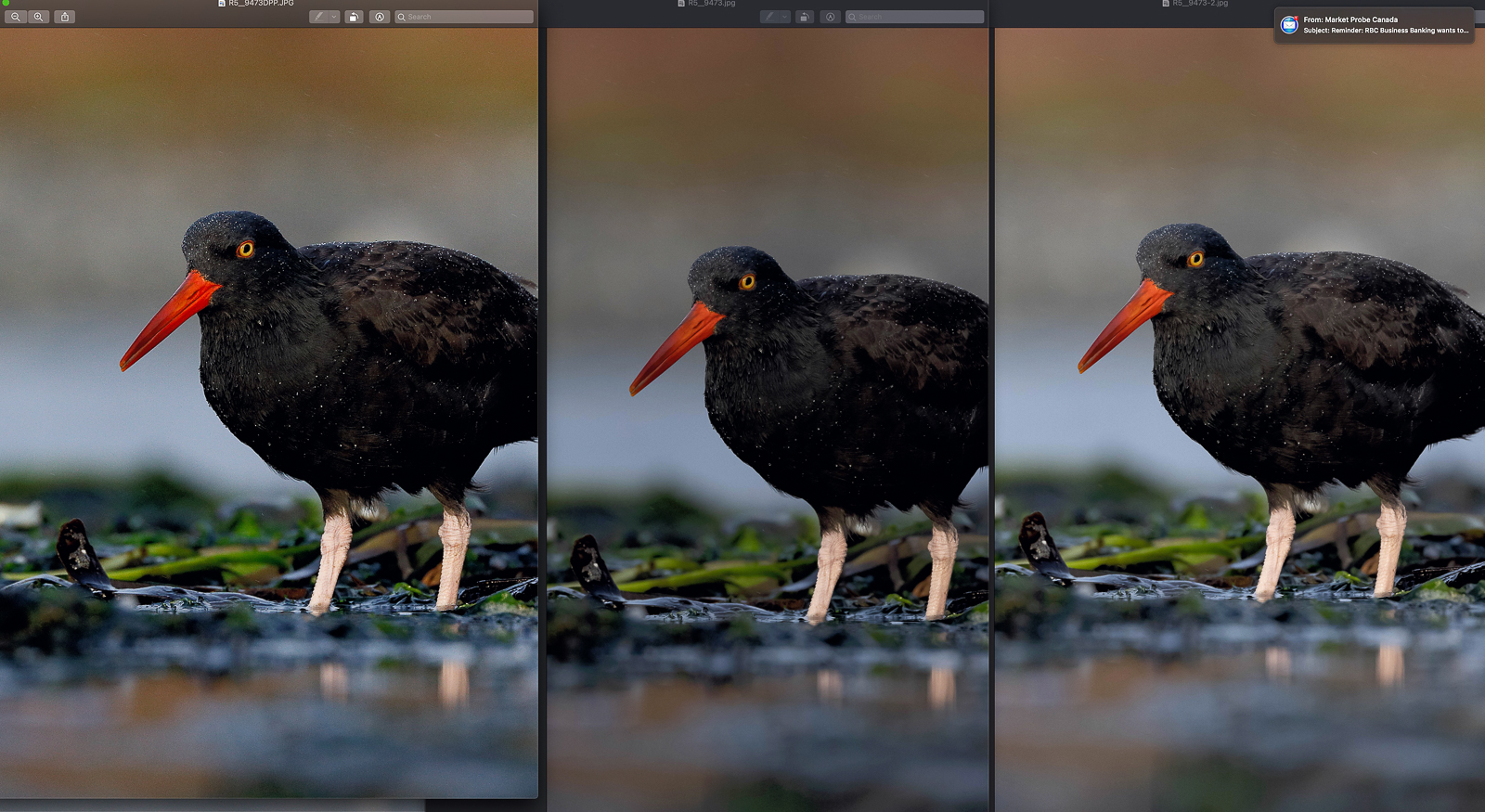
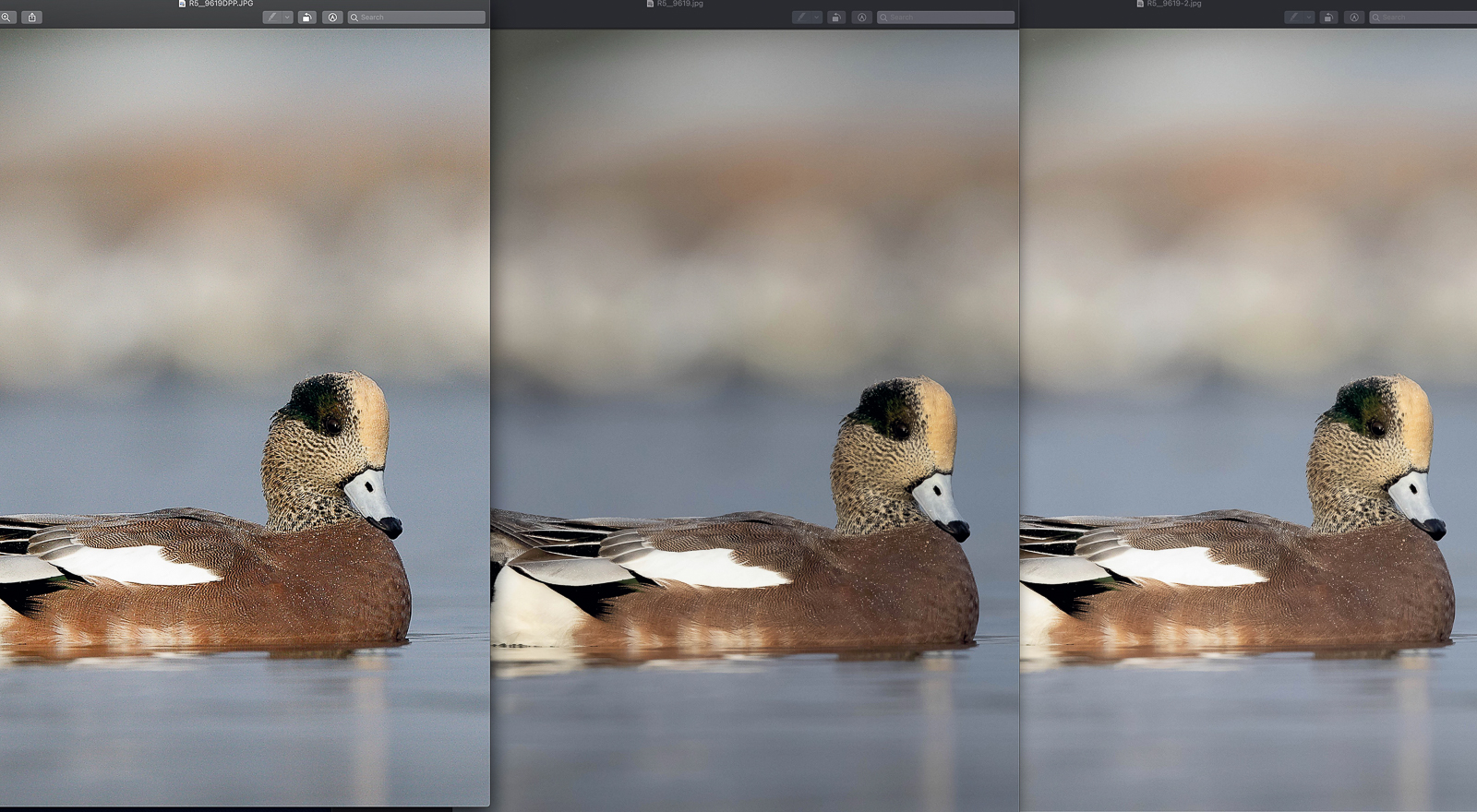
9 was too dark, 10 is too light....but likely depends on what DPP Profile I select...anyways would rather have LrC 10 as a starting point over 9.
Oct 23, 2020 at 08:20 AM
p.3 #2Lightroom Classic 10.0 is out, adds color grading wheels
arbitrage wrote:
Here is DPP Standard Profile on the left, LrC 9.x Adobe Color in the middle and LrC 10 Adobe Color on the right
9 was too dark, 10 is too light....but likely depends on what DPP Profile I select...anyways would rather have LrC 10 as a starting point over 9.
Yes 10 is a better starting point. Is ALO on in the DPP file? Also have tried Auto? My guess is it will reduce exposure a bit.
Oct 23, 2020 at 08:41 AM
p.3 #3Lightroom Classic 10.0 is out, adds color grading wheels
Zenon Char wrote:
9 was too dark, 10 is too light....but likely depends on what DPP Profile I select...anyways would rather have LrC 10 as a starting point over 9.Yes 10 is a better starting point. Is ALO on in the DPP file? Also have tried Auto? My guess is it will reduce exposure a bit.
Sorry I meant ALO.
arbitrage wrote
Here is DPP Standard Profile on the left, LrC 9.x Adobe Color in the middle and LrC 10 Adobe Color on the right9 was too dark, 10 is too light....but likely depends on what DPP Profile I select...anyways would rather have LrC 10 as a starting point over 9.
Sorry I meant ALO.
Oct 23, 2020 at 09:46 AM
p.3 #4Lightroom Classic 10.0 is out, adds color grading wheels
LR10 on the left with no adjustments. DPP with no ALO in the middle. DPP with ALO on the right. The ALO version is slightly darker. I think ALO is on by default in camera but I'm not sure. When I get a new body I immediately turn off all the in Boyd processing so I don't pay that much attention to it.
I do feel like the LR10 version overall may be slightly brighter than what I'm used to but that may be because I have ben looking at darker images for a while.
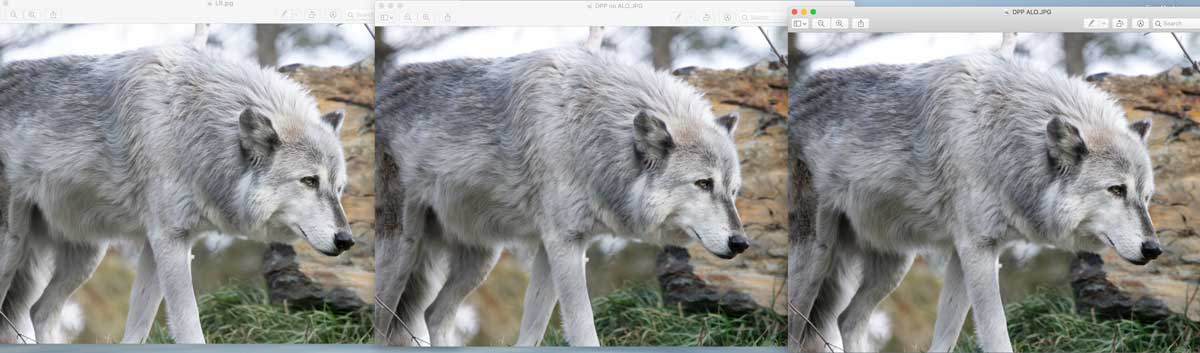
I do feel like the LR10 version overall may be slightly brighter than what I'm used to but that may be because I have ben looking at darker images for a while.
Oct 23, 2020 at 10:01 AM
p.3 #5Lightroom Classic 10.0 is out, adds color grading wheels
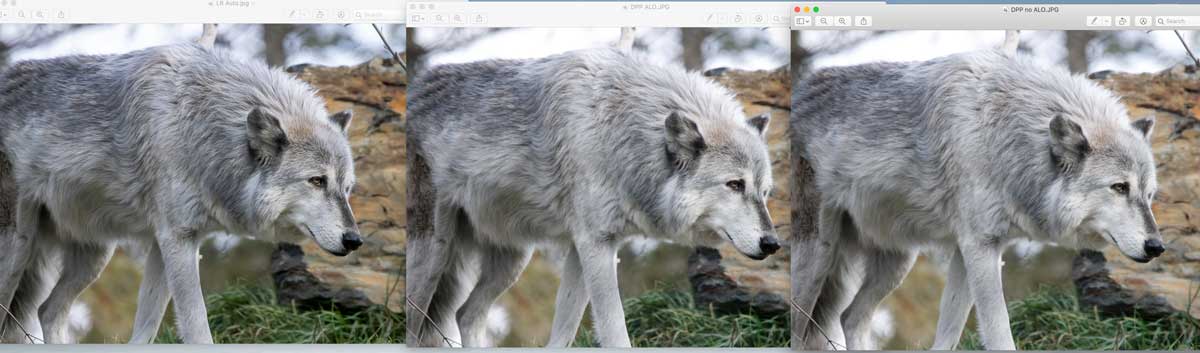
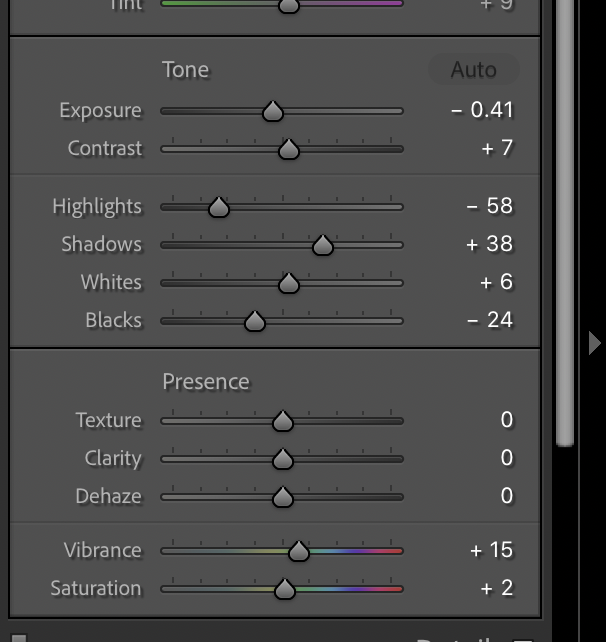
Seeing it as a film strip LR is slightly brighter and I agree definitely not an issue now. Out of curiosity here is what Auto (Sensei) thinks. LR10 Auto on left. It reduced exposure by 0.41. DPP with ALO in the middle. DPP no ALO on the right. Full Auto settings below.
Oct 23, 2020 at 10:12 AM
p.3 #6Lightroom Classic 10.0 is out, adds color grading wheels
Zenon Char wrote:
9 was too dark, 10 is too light....but likely depends on what DPP Profile I select...anyways would rather have LrC 10 as a starting point over 9.Yes 10 is a better starting point. Is ALO on in the DPP file? Also have tried Auto? My guess is it will reduce exposure a bit.Sorry I meant ALO.
Just checked and ALO was OFF. I've turned every sort of in camera adjustment OFF and shoot in Standard with added sharpening to 6.
Zenon Char wrote
arbitrage wrote
Here is DPP Standard Profile on the left, LrC 9.x Adobe Color in the middle and LrC 10 Adobe Color on the right9 was too dark, 10 is too light....but likely depends on what DPP Profile I select...anyways would rather have LrC 10 as a starting point over 9.
Just checked and ALO was OFF. I've turned every sort of in camera adjustment OFF and shoot in Standard with added sharpening to 6.
Oct 23, 2020 at 06:17 PM
p.3 #7Lightroom Classic 10.0 is out, adds color grading wheels
Well the coffee hasn't done it's thing this morning... ALO ??
Oct 24, 2020 at 06:58 AM
p.3 #8Lightroom Classic 10.0 is out, adds color grading wheels
schlotz wrote:
Well the coffee hasn't done it's thing this morning... ALO ??
Auto lighting optimizer in DPP. It's on the first tab that opens on the tool palette.
EBH
Well the coffee hasn't done it's thing this morning... ALO ??
Auto lighting optimizer in DPP. It's on the first tab that opens on the tool palette.
EBH
Oct 24, 2020 at 07:17 AM
p.3 #9Lightroom Classic 10.0 is out, adds color grading wheels
Thought I'd give Adobe a little smack reminder. Last post. Maybe Simon Chen will respond again. 
https://feedback.photoshop.com/conversations/lightroom-classic/lightroom-ecosystem-sensei-noise-reduction-feature-request/5f5f46144b561a3d427295da
https://feedback.photoshop.com/conversations/lightroom-classic/lightroom-ecosystem-sensei-noise-reduction-feature-request/5f5f46144b561a3d427295da
Oct 25, 2020 at 10:19 AM
p.3 #10Lightroom Classic 10.0 is out, adds color grading wheels
Anyone else getting poor responsive performance in LrC 10 like I am and like many others on this discussion board? Laggy Library grid view scrolling, just laggy doing most things.
https://feedback.photoshop.com/conversations/lightroom-classic/lightroom-classic-v10-ui-very-slow-after-upgrading/5f91bbf7917fbb3a9935742e
https://feedback.photoshop.com/conversations/lightroom-classic/lightroom-classic-v10-ui-very-slow-after-upgrading/5f91bbf7917fbb3a9935742e
Oct 26, 2020 at 09:00 AM
p.3 #11Lightroom Classic 10.0 is out, adds color grading wheels
Just fine on my Windows PC.
Oct 26, 2020 at 09:04 AM
p.3 #12Lightroom Classic 10.0 is out, adds color grading wheels
Anyone else not able to zoom in on images in the IMPORT view anymore? I know these were never full resolution prior to import, but in past versions of LR, I was able to at least zoom into whatever res it was pulling into that preview and get a pretty good idea of which shots were completely OOF and which were pretty sharp and thus should be imported for editing. I can't seem to do this now. AFAIK I didn't change anything...
Oct 31, 2020 at 01:34 PM
p.3 #13Lightroom Classic 10.0 is out, adds color grading wheels
I've never tried that before but next time I import files I'll try it. I use Canon's DPP, Quick Check, Full Screen mode to cull and delete unusable and unwanted files before importing to LR. I just press X for files I don't want and at the end I select Edit - Rating - Select rejected images only. Then File - Move to Trash. There is even a 1X option that goes to 100% and percentage options
DPP's downsizing algorithm for 'fit to screen' display is very good - contrasty which creates the illusion of sharpness. It is like looking at a final precessed jpeg. If you shoot Canon that could be a temporary option unit Adobe fixes it.
DPP's downsizing algorithm for 'fit to screen' display is very good - contrasty which creates the illusion of sharpness. It is like looking at a final precessed jpeg. If you shoot Canon that could be a temporary option unit Adobe fixes it.
Nov 01, 2020 at 12:59 PM
p.3 #14Lightroom Classic 10.0 is out, adds color grading wheels
FWIW, changing the iMac's Display Profile to one of the native ones and not one of my i1Display Pro generated ICC ones fixed all my lag issues. Buttery smooth now in LrC 10.
Nov 01, 2020 at 04:42 PM
p.3 #15Lightroom Classic 10.0 is out, adds color grading wheels
arbitrage wrote:
FWIW, changing the iMac's Display Profile to one of the native ones and not one of my i1Display Pro generated ICC ones fixed all my lag issues. Buttery smooth now in LrC 10.
Isn't that interesting. I tried the native profile on the iMac and it is still choppy in Library mode. Develop is smooth. Hopefully Adobe will have an update for that soon.
Nov 02, 2020 at 10:37 AM
p.3 #16Lightroom Classic 10.0 is out, adds color grading wheels
Zenon Char wrote:
Isn't that interesting. I tried the native profile on the iMac and it is still choppy in Library mode. Develop is smooth. Hopefully Adobe will have an update for that soon.
Buttery smooth may have been a premature evaluation. It is now similar to what I see in LrC 9.4.
But oddly after playing around, going back and forth a few times between my i1Display profiles and iMac and P3Display it actually seemed to be scrolling okay even with the i1Display ones....I don't know
I guess I will keep playing around with it.
I don't like the iMac or P3Display profiles so hopefully I can use my custom ones.
arbitrage wrote
FWIW, changing the iMac's Display Profile to one of the native ones and not one of my i1Display Pro generated ICC ones fixed all my lag issues. Buttery smooth now in LrC 10.Buttery smooth may have been a premature evaluation. It is now similar to what I see in LrC 9.4.
But oddly after playing around, going back and forth a few times between my i1Display profiles and iMac and P3Display it actually seemed to be scrolling okay even with the i1Display ones....I don't know
I guess I will keep playing around with it.
I don't like the iMac or P3Display profiles so hopefully I can use my custom ones.
Nov 02, 2020 at 11:46 AM
p.3 #17Lightroom Classic 10.0 is out, adds color grading wheels
EB-1 wrote:
Auto lighting optimizer in DPP. It's on the first tab that opens on the tool palette.
EBH
OK, my coffee hasn't kicked in either. What's DPP?
schlotz wrote
Well the coffee hasn't done it's thing this morning... ALO ??EBH
OK, my coffee hasn't kicked in either. What's DPP?
Nov 02, 2020 at 01:07 PM
p.3 #18Lightroom Classic 10.0 is out, adds color grading wheels
DPP is the Canon software.
What is Lightroom Clavic?
EBH
What is Lightroom Clavic?
EBH
Nov 02, 2020 at 03:21 PM
p.3 #19Lightroom Classic 10.0 is out, adds color grading wheels
EB-1 wrote:
DPP is the Canon software.
What is Lightroom Clavic?
EBH
It’s a new product that will be released soon. You weren’t supposed to tell anyone. 😀
Nov 02, 2020 at 06:29 PM
p.3 #20Lightroom Classic 10.0 is out, adds color grading wheels
arbitrage wrote:
Anyone else getting poor responsive performance in LrC 10 like I am and like many others on this discussion board? Laggy Library grid view scrolling, just laggy doing most things.
https://feedback.photoshop.com/conversations/lightroom-classic/lightroom-classic-v10-ui-very-slow-after-upgrading/5f91bbf7917fbb3a9935742e
Yes. I found it completely unusable. I downgraded back to 9.4. I was getting spinning beach ball for 5-10 seconds with every click. Just complete garbage. I have a 2013 Mac Pro / 6 core / 32GB RAM / Mojave.
Nov 05, 2020 at 03:20 PM