This topic is in the 2020 archive. You can read it and like its posts here. It is read only.
Archive 2020Lightroom Classic 10.0 is out, adds color grading wheels
p.4 #1Lightroom Classic 10.0 is out, adds color grading wheels
kurt765 wrote:
https://feedback.photoshop.com/conversations/lightroom-classic/lightroom-classic-v10-ui-very-slow-after-upgrading/5f91bbf7917fbb3a9935742eYes. I found it completely unusable. I downgraded back to 9.4. I was getting spinning beach ball for 5-10 seconds with every click. Just complete garbage. I have a 2013 Mac Pro / 6 core / 32GB RAM / Mojave.
Try switching your monitor profile to a default one like Adobe RGB to see if that helps. It seems that custom profiles are contributing to the lag and other issues. But I'm not sure if it is correcting things for everyone. Also people have found that if you create a new Custom Profile (say from i1Display Pro) after LR 10 is installed then it doesn't slow down. This seems to have greatly improved things for me. My scrolling is now about the same as it was in LR 9.4 (which has never been perfect on my 5K iMac screen). I wasn't getting a lot of spinning beachballs but did get some.
arbitrage wrote
Anyone else getting poor responsive performance in LrC 10 like I am and like many others on this discussion board? Laggy Library grid view scrolling, just laggy doing most things.https://feedback.photoshop.com/conversations/lightroom-classic/lightroom-classic-v10-ui-very-slow-after-upgrading/5f91bbf7917fbb3a9935742e
Try switching your monitor profile to a default one like Adobe RGB to see if that helps. It seems that custom profiles are contributing to the lag and other issues. But I'm not sure if it is correcting things for everyone. Also people have found that if you create a new Custom Profile (say from i1Display Pro) after LR 10 is installed then it doesn't slow down. This seems to have greatly improved things for me. My scrolling is now about the same as it was in LR 9.4 (which has never been perfect on my 5K iMac screen). I wasn't getting a lot of spinning beachballs but did get some.
Nov 05, 2020 at 03:55 PM
p.4 #2Lightroom Classic 10.0 is out, adds color grading wheels
arbitrage wrote:
https://feedback.photoshop.com/conversations/lightroom-classic/lightroom-classic-v10-ui-very-slow-after-upgrading/5f91bbf7917fbb3a9935742eYes. I found it completely unusable. I downgraded back to 9.4. I was getting spinning beach ball for 5-10 seconds with every click. Just complete garbage. I have a 2013 Mac Pro / 6 core / 32GB RAM / Mojave.Try switching your monitor profile to a default one like Adobe RGB to see if that helps. It seems that custom profiles are contributing to the lag and other issues. But I'm not sure if it is correcting things for everyone. Also people have found that if you create a new Custom Profile (say from i1Display Pro) after LR 10 is installed then it doesn't slow down. This seems to have greatly improved things for me. My scrolling is now about the same as it was in LR 9.4 (which has never been perfect on my 5K iMac screen). I...Show more →
I have no monitor profile installed on my Macbook Pro 16 (with 64GB of RAM and AMD 5500m GPU), scrolling is absolutely unusable. It is so slow I cannot believe it.
kurt765 wrote
arbitrage wrote
Anyone else getting poor responsive performance in LrC 10 like I am and like many others on this discussion board? Laggy Library grid view scrolling, just laggy doing most things.https://feedback.photoshop.com/conversations/lightroom-classic/lightroom-classic-v10-ui-very-slow-after-upgrading/5f91bbf7917fbb3a9935742e
I have no monitor profile installed on my Macbook Pro 16 (with 64GB of RAM and AMD 5500m GPU), scrolling is absolutely unusable. It is so slow I cannot believe it.
Nov 05, 2020 at 04:21 PM
p.4 #3Lightroom Classic 10.0 is out, adds color grading wheels
Jesse Evans wrote:
https://feedback.photoshop.com/conversations/lightroom-classic/lightroom-classic-v10-ui-very-slow-after-upgrading/5f91bbf7917fbb3a9935742eYes. I found it completely unusable. I downgraded back to 9.4. I was getting spinning beach ball for 5-10 seconds with every click. Just complete garbage. I have a 2013 Mac Pro / 6 core / 32GB RAM / Mojave.Try switching your monitor profile to a default one like Adobe RGB to see if that helps. It seems that custom profiles are contributing to the lag and other issues. But I'm not sure if it is correcting things for everyone. Also people have found that if you create a new Custom Profile (say from i1Display Pro) after LR 10 is installed then it doesn't slow down. This seems to have greatly improved things for me. My scrolling is now about the same as it was in LR 9.4 (which has never been perfect on my 5K iMac screen). I wasn't getting a lot of spinning beachballs but did get some.I have no monitor profile installed on my Macbook Pro 16 (with 64GB of RAM and AMD 5500m GPU), scrolling is absolutely unusable. It is so slow I cannot believe it.
Which profile is your display using? It has to be using something. Try Adobe RGB and see if it makes a difference. Also try going with and without graphics card support. Also worth clearing the cache, increasing the cache size and rebooting LR to clear memory leaks. One last thing is to check Activity Monitor and see if anything else is holding onto a lot of system memory. Although with 64GBs on your computer it would be strange if memory was an issue.
arbitrage wrote
kurt765 wrote
arbitrage wrote
Anyone else getting poor responsive performance in LrC 10 like I am and like many others on this discussion board? Laggy Library grid view scrolling, just laggy doing most things.https://feedback.photoshop.com/conversations/lightroom-classic/lightroom-classic-v10-ui-very-slow-after-upgrading/5f91bbf7917fbb3a9935742e
Which profile is your display using? It has to be using something. Try Adobe RGB and see if it makes a difference. Also try going with and without graphics card support. Also worth clearing the cache, increasing the cache size and rebooting LR to clear memory leaks. One last thing is to check Activity Monitor and see if anything else is holding onto a lot of system memory. Although with 64GBs on your computer it would be strange if memory was an issue.
Nov 05, 2020 at 04:25 PM
p.4 #4Lightroom Classic 10.0 is out, adds color grading wheels
arbitrage wrote:
https://feedback.photoshop.com/conversations/lightroom-classic/lightroom-classic-v10-ui-very-slow-after-upgrading/5f91bbf7917fbb3a9935742eYes. I found it completely unusable. I downgraded back to 9.4. I was getting spinning beach ball for 5-10 seconds with every click. Just complete garbage. I have a 2013 Mac Pro / 6 core / 32GB RAM / Mojave.Try switching your monitor profile to a default one like Adobe RGB to see if that helps. It seems that custom profiles are contributing to the lag and other issues. But I'm not sure if it is correcting things for everyone. Also people have found that if you create a new Custom Profile (say from i1Display Pro) after LR 10 is installed then it doesn't slow down. This seems to have greatly improved things for me. My scrolling is now about the same as it was in LR 9.4 (which has never been perfect on my 5K iMac screen). I wasn't getting a lot of spinning beachballs but did get some.I have no monitor profile installed on my Macbook Pro 16 (with 64GB of RAM and AMD 5500m GPU), scrolling is absolutely unusable. It is so slow I cannot believe it.Which profile is your display using? It has to be using something. Try Adobe RGB and see if it makes a difference. Also try going with and without graphics card support. Also worth clearing the cache, increasing the cache size and rebooting LR to clear memory leaks. One last thing is to check Activity Monitor and see if anything else is holding onto a lot of system memory. Although with 64GBs on your computer it would be strange if memory was an issue.
I am using the Color LCD profile that comes with each Macbook and iMac. I'll give Adobe RGB a try, but that will inherently be less optimized for the Display P3 calibrated screen.
I have not made any of the other changes you are suggesting, so I will give all of these things a try and report back.
Jesse Evans wrote
arbitrage wrote
kurt765 wrote
arbitrage wrote
Anyone else getting poor responsive performance in LrC 10 like I am and like many others on this discussion board? Laggy Library grid view scrolling, just laggy doing most things.https://feedback.photoshop.com/conversations/lightroom-classic/lightroom-classic-v10-ui-very-slow-after-upgrading/5f91bbf7917fbb3a9935742e
I am using the Color LCD profile that comes with each Macbook and iMac. I'll give Adobe RGB a try, but that will inherently be less optimized for the Display P3 calibrated screen.
I have not made any of the other changes you are suggesting, so I will give all of these things a try and report back.
Nov 05, 2020 at 04:30 PM
p.4 #5Lightroom Classic 10.0 is out, adds color grading wheels
Jesse Evans wrote:
https://feedback.photoshop.com/conversations/lightroom-classic/lightroom-classic-v10-ui-very-slow-after-upgrading/5f91bbf7917fbb3a9935742eYes. I found it completely unusable. I downgraded back to 9.4. I was getting spinning beach ball for 5-10 seconds with every click. Just complete garbage. I have a 2013 Mac Pro / 6 core / 32GB RAM / Mojave.Try switching your monitor profile to a default one like Adobe RGB to see if that helps. It seems that custom profiles are contributing to the lag and other issues. But I'm not sure if it is correcting things for everyone. Also people have found that if you create a new Custom Profile (say from i1Display Pro) after LR 10 is installed then it doesn't slow down. This seems to have greatly improved things for me. My scrolling is now about the same as it was in LR 9.4 (which has never been perfect on my 5K iMac screen). I wasn't getting a lot of spinning beachballs but did get some.I have no monitor profile installed on my Macbook Pro 16 (with 64GB of RAM and AMD 5500m GPU), scrolling is absolutely unusable. It is so slow I cannot believe it.Which profile is your display using? It has to be using something. Try Adobe RGB and see if it makes a difference. Also try going with and without graphics card support. Also worth clearing the cache, increasing the cache size and rebooting LR to clear memory leaks. One last thing is to check Activity Monitor and see if anything else is holding onto a lot of system memory. Although with 64GBs on your computer it would be strange if memory was an issue.I am using the Color LCD profile that comes with each Macbook and iMac. I'll give Adobe RGB a try, but that will inherently be less optimized for the Display P3 calibrated screen.
I have not made any of the other changes you are suggesting, so I will give all of these things a try and report back.
I would think Color LCD would be fine. The Display P3 profile was laggy for me. The default iMac profile was good like Adobe RGB.
arbitrage wrote
Jesse Evans wrote
arbitrage wrote
kurt765 wrote
arbitrage wrote
Anyone else getting poor responsive performance in LrC 10 like I am and like many others on this discussion board? Laggy Library grid view scrolling, just laggy doing most things.https://feedback.photoshop.com/conversations/lightroom-classic/lightroom-classic-v10-ui-very-slow-after-upgrading/5f91bbf7917fbb3a9935742e
I have not made any of the other changes you are suggesting, so I will give all of these things a try and report back.
I would think Color LCD would be fine. The Display P3 profile was laggy for me. The default iMac profile was good like Adobe RGB.
Nov 05, 2020 at 04:43 PM
p.4 #6Lightroom Classic 10.0 is out, adds color grading wheels
arbitrage wrote:
Try switching your monitor profile to a default one like Adobe RGB to see if that helps. It seems that custom profiles are contributing to the lag and other issues. But I'm not sure if it is correcting things for everyone. Also people have found that if you create a new Custom Profile (say from i1Display Pro) after LR 10 is installed then it doesn't slow down. This seems to have greatly improved things for me. My scrolling is now about the same as it was in LR 9.4 (which has never been perfect on my 5K iMac screen). I wasn't getting a lot of spinning beachballs but did get some.I have no monitor profile installed on my Macbook Pro 16 (with 64GB of RAM and AMD 5500m GPU), scrolling is absolutely unusable. It is so slow I cannot believe it.Which profile is your display using? It has to be using something. Try Adobe RGB and see if it makes a difference. Also try going with and without graphics card support. Also worth clearing the cache, increasing the cache size and rebooting LR to clear memory leaks. One last thing is to check Activity Monitor and see if anything else is holding onto a lot of system memory. Although with 64GBs on your computer it would be strange if memory was an issue.I am using the Color LCD profile that comes with each Macbook and iMac. I'll give Adobe RGB a try, but that will inherently be less optimized for the Display P3 calibrated screen.
I have not made any of the other changes you are suggesting, so I will give all of these things a try and report back.I would think Color LCD would be fine. The Display P3 profile was laggy for me. The default iMac profile was good like Adobe RGB.
I switched between Adobe RGB and Color LCD. No discernable difference.
Purging cache made no difference. It is set to 100GB.
Scrolling in library and moving between photos is not just slow and choppy, every time I begin scrolling there is about a 0.5 second delay.
There is about 48GB of available RAM. CPU and GPU usage is extremely low, and NvME access is almost 0, so it's not a performance bottleneck of the system.
I'm sure they'll fix the bug. People seem to be reporting it pretty broadly.
Jesse Evans wrote
arbitrage wrote
Jesse Evans wrote
arbitrage wrote
kurt765 wrote
Yes. I found it completely unusable. I downgraded back to 9.4. I was getting spinning beach ball for 5-10 seconds with every click. Just complete garbage. I have a 2013 Mac Pro / 6 core / 32GB RAM / Mojave.I have not made any of the other changes you are suggesting, so I will give all of these things a try and report back.
I switched between Adobe RGB and Color LCD. No discernable difference.
Purging cache made no difference. It is set to 100GB.
Scrolling in library and moving between photos is not just slow and choppy, every time I begin scrolling there is about a 0.5 second delay.
There is about 48GB of available RAM. CPU and GPU usage is extremely low, and NvME access is almost 0, so it's not a performance bottleneck of the system.
I'm sure they'll fix the bug. People seem to be reporting it pretty broadly.
Nov 05, 2020 at 04:56 PM
p.4 #7Lightroom Classic 10.0 is out, adds color grading wheels
Jesse Evans wrote:
I have no monitor profile installed on my Macbook Pro 16 (with 64GB of RAM and AMD 5500m GPU), scrolling is absolutely unusable. It is so slow I cannot believe it.Which profile is your display using? It has to be using something. Try Adobe RGB and see if it makes a difference. Also try going with and without graphics card support. Also worth clearing the cache, increasing the cache size and rebooting LR to clear memory leaks. One last thing is to check Activity Monitor and see if anything else is holding onto a lot of system memory. Although with 64GBs on your computer it would be strange if memory was an issue.I am using the Color LCD profile that comes with each Macbook and iMac. I'll give Adobe RGB a try, but that will inherently be less optimized for the Display P3 calibrated screen.
I have not made any of the other changes you are suggesting, so I will give all of these things a try and report back.I would think Color LCD would be fine. The Display P3 profile was laggy for me. The default iMac profile was good like Adobe RGB.I switched between Adobe RGB and Color LCD. No discernable difference.
Purging cache made no difference. It is set to 100GB.
Scrolling in library and moving between photos is not just slow and choppy, every time I begin scrolling there is about a 0.5 second delay.
There is about 48GB of available RAM. CPU and GPU usage is extremely low, and NvME access is almost 0, so it's not a performance bottleneck of the system.
I'm sure they'll fix the bug. People seem to be reporting it pretty broadly.
Yes Adobe is actively working on it according to Adobe employees that have posted replies in that thread. I was even contacted by one to send them some info on my particular system.
arbitrage wrote
Jesse Evans wrote
arbitrage wrote
Jesse Evans wrote
arbitrage wrote
Try switching your monitor profile to a default one like Adobe RGB to see if that helps. It seems that custom profiles are contributing to the lag and other issues. But I'm not sure if it is correcting things for everyone. Also people have found that if you create a new Custom Profile (say from i1Display Pro) after LR 10 is installed then it doesn't slow down. This seems to have greatly improved things for me. My scrolling is now about the same as it was in LR 9.4 (which has never been perfect on my 5K iMac screen). I wasn't getting a lot of spinning beachballs but did get some.I have not made any of the other changes you are suggesting, so I will give all of these things a try and report back.
Purging cache made no difference. It is set to 100GB.
Scrolling in library and moving between photos is not just slow and choppy, every time I begin scrolling there is about a 0.5 second delay.
There is about 48GB of available RAM. CPU and GPU usage is extremely low, and NvME access is almost 0, so it's not a performance bottleneck of the system.
I'm sure they'll fix the bug. People seem to be reporting it pretty broadly.
Yes Adobe is actively working on it according to Adobe employees that have posted replies in that thread. I was even contacted by one to send them some info on my particular system.
Nov 05, 2020 at 05:16 PM
p.4 #8Lightroom Classic 10.0 is out, adds color grading wheels
I've been invited to try a pre-release LR by Adobe. I guess I have to sign an NDA but they haven't sent that yet, nor the download. I won't be able to discuss it on here once I sign that but just to let people know they are actively working on the issues on Macs.
Nov 06, 2020 at 05:52 AM
p.4 #9Lightroom Classic 10.0 is out, adds color grading wheels
That is so weird. I don’t have these issues on my 2015 MacBook Air with 2GB of ram. It’s never been a rocket ship but it didn’t get worse or become unusable with v10. Hope Adobe corrects it soon.
Nov 06, 2020 at 06:56 AM
p.4 #10Lightroom Classic 10.0 is out, adds color grading wheels
arbitrage wrote:
I've been invited to try a pre-release LR by Adobe. I guess I have to sign an NDA but they haven't sent that yet, nor the download. I won't be able to discuss it on here once I sign that but just to let people know they are actively working on the issues on Macs.
How did you get an invite?
Nov 06, 2020 at 06:56 AM
p.4 #11Lightroom Classic 10.0 is out, adds color grading wheels
Zenon Char wrote:
That is so weird. I don’t have these issues on my 2015 MacBook Air with 2GB of ram. It’s never been a rocket ship but it didn’t get worse or become unusable with v10. Hope Adobe corrects it soon.
I don't have any issues on my 2012 rMBP either. I've always found the laggy scrolling depends on the display. If I drag LR over to my old 2009 iMac (used as a 2nd display in Target Display Mode) the scrolling is way smoother. If I maximize LR on my 5K iMac it gets more laggy than running a smaller window.
It seems like most of the complaints are people running 5K iMacs, 16" MBPs and MacPros (probably with 4K screens?)
I just received an email from Adobe about the pre-release. Last week I'd received an email about sending some details about my system. They just reached out to me because I'd left a comment on that long thread on the Adobe Support forums.
Nov 06, 2020 at 07:01 AM
p.4 #12Lightroom Classic 10.0 is out, adds color grading wheels
Cool. Actually I just read there is a supplemental update to Catalina 10.15.7 at this site. I also see the update warning in the system preferences and sure enough it is there. I haven't installed it yet.
4th post says it improved it.
https://www.lightroomqueen.com/community/threads/lrc-update-on-macos.41453/
4th post says it improved it.
https://www.lightroomqueen.com/community/threads/lrc-update-on-macos.41453/
Nov 06, 2020 at 07:09 AM
p.4 #13Lightroom Classic 10.0 is out, adds color grading wheels
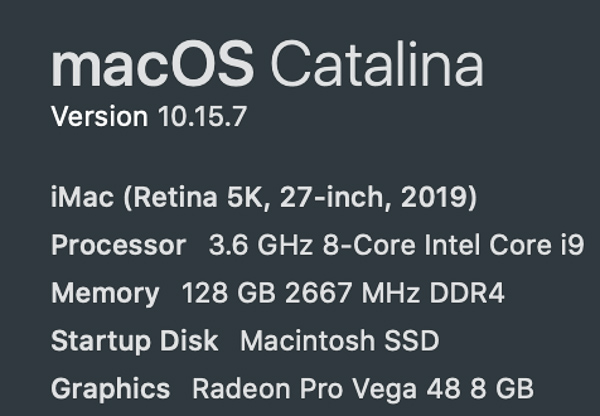
FWIW. No LR 10 performance issues whatsoever on my iMac 2019 5K 27" In fact, its pretty snappy all around.
I specifically loaded up this mac for content processing so not the average specs. I am also using a M.2 NVMe (PCIe 3.0) external SSD through Thunderbolt 3 to store and operate my very large LR catalog. *I've set LR10 Performance to use the Graphics Processor. Performance set to "Auto"
Maybe the problem noted on this thread is with older Macs/iMacs? Either way, if Adobe comes out with even more macOS performance enhancements thats a good thing.
* Many of you already know this, but just in case, switching from storing images on internal or external HDD to SSD can make a significant difference in performance.
Edited on Nov 06, 2020 at 07:18 AM · View previous versions
I specifically loaded up this mac for content processing so not the average specs. I am also using a M.2 NVMe (PCIe 3.0) external SSD through Thunderbolt 3 to store and operate my very large LR catalog. *I've set LR10 Performance to use the Graphics Processor. Performance set to "Auto"
Maybe the problem noted on this thread is with older Macs/iMacs? Either way, if Adobe comes out with even more macOS performance enhancements thats a good thing.
* Many of you already know this, but just in case, switching from storing images on internal or external HDD to SSD can make a significant difference in performance.
Edited on Nov 06, 2020 at 07:18 AM · View previous versions
Nov 06, 2020 at 07:11 AM
p.4 #14Lightroom Classic 10.0 is out, adds color grading wheels
LBJ2 wrote:
FWIW. No LR 10 performance issues whatsoever on my iMac 2019 5K 27" In fact, its pretty snappy all around.
I specifically loaded up this mac for content processing so not the average specs. I am also using a M.2 NVMe (PCIe 3.0) external SSD through Thunderbolt 3 to store and operate my very large LR catalog. *I've set LR10 Performance to use the Graphics Processor. Performance set to "Auto"
Maybe the problem noted on this thread is with older Macs/iMacs? Either way, if Adobe comes out with even more macOS performance enhancements thats a good thing.
My 2019 iMac is a tad choppy in the library module when I increase the view to 100% and move it around. Slightly annoying but usable. Scrolling is fast. Smooth in the Develop module.
Nov 06, 2020 at 07:15 AM
p.4 #15Lightroom Classic 10.0 is out, adds color grading wheels
LBJ2 wrote:
FWIW. No LR 10 performance issues whatsoever on my iMac 2019 5K 27" In fact, its pretty snappy all around.
I specifically loaded up this mac for content processing so not the average specs. I am also using a M.2 NVMe (PCIe 3.0) external SSD through Thunderbolt 3 to store and operate my very large LR catalog. *I've set LR10 Performance to use the Graphics Processor. Performance set to "Auto"
Maybe the problem noted on this thread is with older Macs/iMacs? Either way, if Adobe comes out with even more macOS performance enhancements thats a good thing.
* Many of you already...Show more →
I have SSD on both my desk and laptop but store my files on an external spinny disk. I get good performance but one day I’ll get around to buying an external SSD.
Nov 06, 2020 at 07:31 AM
p.4 #16Lightroom Classic 10.0 is out, adds color grading wheels
After installing the supplemental 10.15.7 update moving a file around at 100% in the Library module seems better but is still not buttery like the Develop module.
Nov 06, 2020 at 07:42 AM
p.4 #17Lightroom Classic 10.0 is out, adds color grading wheels
Zenon Char wrote:
After installing the supplemental 10.15.7 update moving a file around at 100% in the Library module seems better but is still not buttery like the Develop module.
Looking at it again it is definitely better in the Library module.
After installing the supplemental 10.15.7 update moving a file around at 100% in the Library module seems better but is still not buttery like the Develop module.
Looking at it again it is definitely better in the Library module.
Nov 06, 2020 at 07:45 AM
p.4 #18Lightroom Classic 10.0 is out, adds color grading wheels
Zenon Char wrote:
I specifically loaded up this mac for content processing so not the average specs. I am also using a M.2 NVMe (PCIe 3.0) external SSD through Thunderbolt 3 to store and operate my very large LR catalog. *I've set LR10 Performance to use the Graphics Processor. Performance set to "Auto"
Maybe the problem noted on this thread is with older Macs/iMacs? Either way, if Adobe comes out with even more macOS performance enhancements thats a good thing.
* Many of you already know this, but just in case, switching from storing images on internal or external HDD to SSD can make a significant difference in performance.I have SSD on both my desk and laptop but store my files on an external spinny disk. I get good performance but one day I’ll get around to buying an external SSD.
SSD alone can produce a dramatic increase in performance. Also, consider there are different SSD technologies too. Some faster than others and Thunderbolt 3 for external connection can also be another significant performance bump.
LBJ2 wrote
FWIW. No LR 10 performance issues whatsoever on my iMac 2019 5K 27" In fact, its pretty snappy all around.I specifically loaded up this mac for content processing so not the average specs. I am also using a M.2 NVMe (PCIe 3.0) external SSD through Thunderbolt 3 to store and operate my very large LR catalog. *I've set LR10 Performance to use the Graphics Processor. Performance set to "Auto"
Maybe the problem noted on this thread is with older Macs/iMacs? Either way, if Adobe comes out with even more macOS performance enhancements thats a good thing.
* Many of you already know this, but just in case, switching from storing images on internal or external HDD to SSD can make a significant difference in performance.
SSD alone can produce a dramatic increase in performance. Also, consider there are different SSD technologies too. Some faster than others and Thunderbolt 3 for external connection can also be another significant performance bump.
Nov 06, 2020 at 08:03 AM
p.4 #19Lightroom Classic 10.0 is out, adds color grading wheels
LBJ2 wrote:
Zenon Char wrote
LBJ2 wrote
FWIW. No LR 10 performance issues whatsoever on my iMac 2019 5K 27" In fact, its pretty snappy all around.I specifically loaded up this mac for content processing so not the average specs. I am also using a M.2 NVMe (PCIe 3.0) external SSD through Thunderbolt 3 to store and operate my very large LR catalog. *I've set LR10 Performance to use the Graphics Processor. Performance set to "Auto"
Maybe the problem noted on this thread is with older Macs/iMacs? Either way, if Adobe comes out with even more macOS performance enhancements thats a good thing.
* Many of you already know this, but just in case, switching from storing images on internal or external HDD to SSD can make a significant difference in performance.
Thanks.
Nov 06, 2020 at 08:07 AM
p.4 #20Lightroom Classic 10.0 is out, adds color grading wheels
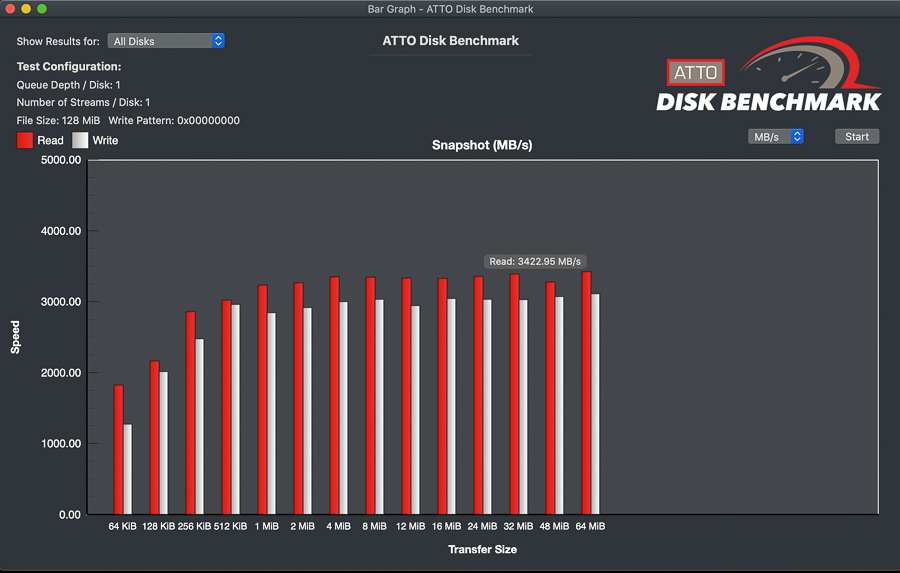
Disk Benchmark results through my external M.2 NVMe (PCIe 3.0) OWCSSD going through Thunderbolt 3.
Nov 06, 2020 at 08:38 AM