This topic is in the 2019 archive. You can read it and like its posts here. It is read only.
Archive 2019Any thoughts on use of Topaz DeNoise AI?
p.1 #1Any thoughts on use of Topaz DeNoise AI?
Asking here because this is where I hang out most of the time and I posted this question in the Post Processing forum and didn't get much of a response. Apologies if this is .
My situation is that I have been using my Sony A9 and 200-600 zoom with 1.4x TC for bird photography. Is a fine setup and exceptional for the money. But, due to the relatively slow aperture (especially when using the TC), when shooting BIF in anything other than full light I find that my ISO creeps up to relatively high levels rather quickly (3000+) due to the need to keep the shutter speed very short (1/2000 or faster). I try to use slower speeds when possible, but for BIF that isn't possible very often.
When the ISO creeps up into the 3000+ range, the images typically show a moderate amount of noise, especially if cropped at all. I have been using the noise reduction feature in Lightroom develop module to try to tame this noise, and it works reasonably well, but at the cost of some loss of sharpness in the image.
I heard about Topaz DeNoise AI on the interwebs and they claim that they are able to use "AI" to reduce image noise while retaining image sharpness. Nice trick, if it works.
I downloaded the Trial software and tried it out on a few images and it actually seems pretty good. But before I spring for the $80 purchase price I wondered if anyone else has had more experience using this software and could share their experiences with me. Is this technology legit? Is the end result consistently better than what Lightroom can do to justify the price and the added complexity of the workflow and the additional time involved compared to just doing it in Lightroom?
Anyone with hands on experience willing to share thoughts would be appreciated. Thanks in advance.
Nov 10, 2019 at 07:17 PM
p.1 #2Any thoughts on use of Topaz DeNoise AI?
I’m definitely no expert at Post Processing, but I’ve been satisfied using both Denoise AI and Sharpen AI. I purchased both packages.
Edit: I use C1, not LR. My workflow process is admittedly not the most efficient as I use C1, Denoise and Sharpen as separate, standalone, steps.
Edited on Nov 10, 2019 at 07:29 PM · View previous versions
Edit: I use C1, not LR. My workflow process is admittedly not the most efficient as I use C1, Denoise and Sharpen as separate, standalone, steps.
Edited on Nov 10, 2019 at 07:29 PM · View previous versions
Nov 10, 2019 at 07:26 PM
p.1 #3Any thoughts on use of Topaz DeNoise AI?
It’s now part of my LR workflow for when I need heavy duty on some of my A7rIV files. Like you I saw the results compared to LR when I tried the Topaz DeNoise AI trial version.
Nov 10, 2019 at 07:29 PM

p.1 #4Any thoughts on use of Topaz DeNoise AI?
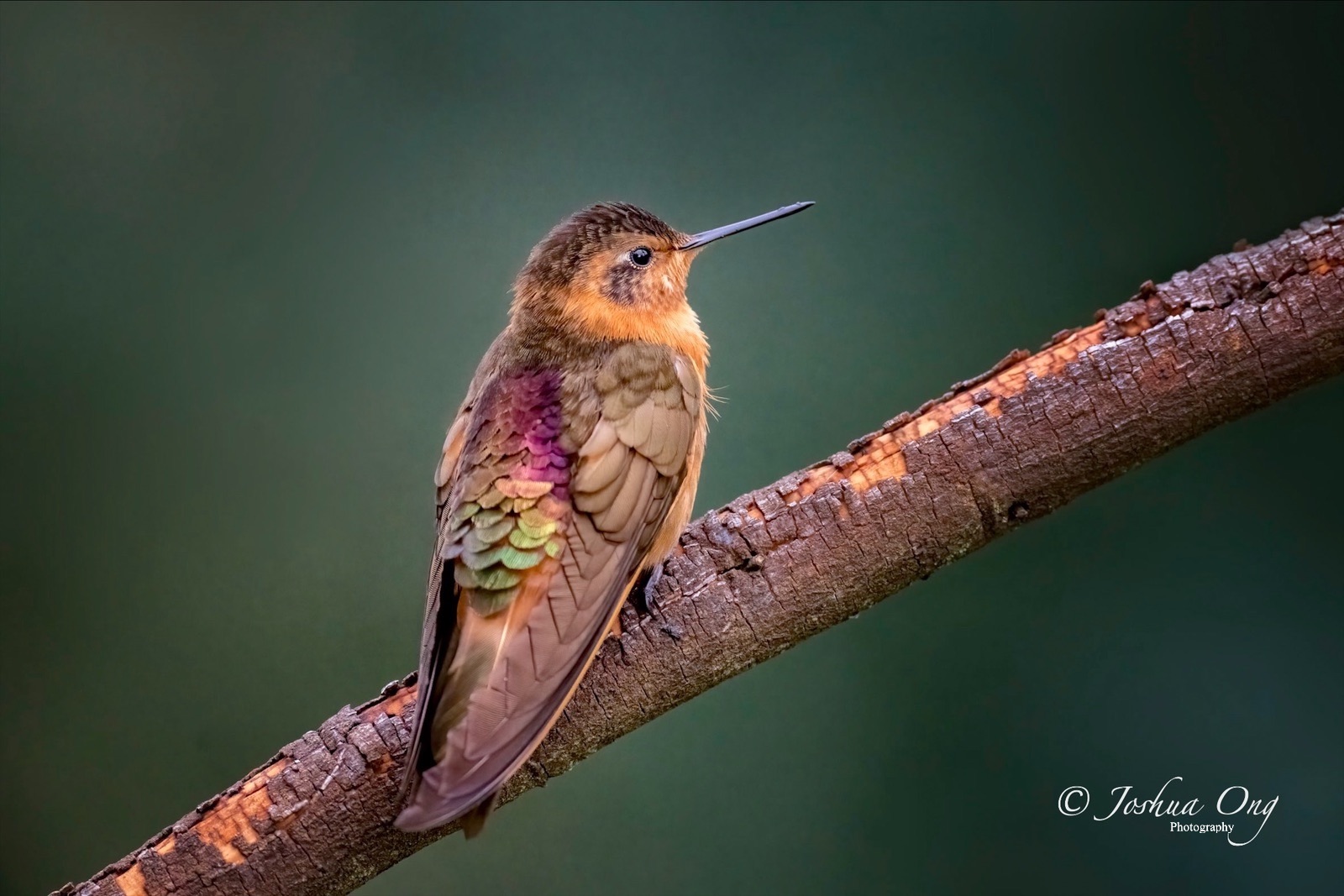
This is an image from Ecuador captured at ISO 12800 where the lighting conditions were low, especially late in the afternoon like this. A moderate setting using the DeNoise AI (I believe at 15% or so) was used here...
Edited on Nov 10, 2019 at 08:17 PM · View previous versions
 |
||
 |
||
 |
Edited on Nov 10, 2019 at 08:17 PM · View previous versions
Nov 10, 2019 at 08:15 PM
p.1 #5Any thoughts on use of Topaz DeNoise AI?
I use it all the time. It’s awesome. Highly and I mean highly recommended. Check out my Flickr page. Almost all my a6400 images are processed with this in the workflow
Nov 10, 2019 at 08:16 PM
p.1 #6Any thoughts on use of Topaz DeNoise AI?
While I don't need to denoise often, when I do, topaz denoise is my weapon of choice.
lunar module wrote:
Asking here because this is where I hang out most of the time and I posted this question in the Post Processing forum and didn't get much of a response. Apologies if this is .
My situation is that I have been using my Sony A9 and 200-600 zoom with 1.4x TC for bird photography. Is a fine setup and exceptional for the money. But, due to the relatively slow aperture (especially when using the TC), when shooting BIF in anything other than full light I find that my ISO creeps up to relatively high levels rather quickly (3000+) due...Show more →
Nov 10, 2019 at 08:23 PM
p.1 #7Any thoughts on use of Topaz DeNoise AI?
Thank you all SO much for the feedback. Exactly what I was hoping to hear. Really appreciate it.
Nov 10, 2019 at 09:10 PM
p.1 #8Any thoughts on use of Topaz DeNoise AI?
I use DeNoise AI . Within DeNoise AI is AI Clear, which I really like .
Birdie
Birdie
Nov 10, 2019 at 10:05 PM
p.1 #9Any thoughts on use of Topaz DeNoise AI?
One other hint. Check your email before you buy it. I think I got an email from them at some point in the 30 day trial offering me a discounted purchase price of $59 (IIRC). May have been a special they were running, but I think they just discount it to get you in the door.
Like others, I've been extremely happy with what DeNoise (and the older AI Clear, which is bundled into the program) can do with my files. Much better than what Capture One is capable of. And ISO 3000? - to paraphrase Crocodile Dundee "noise? that's no noise! now THIS, this is noise!" I know, different needs and quality desired, but I'm using it because I shoot hs football, frequently at ISO 25,600!!!! (because I don't have a 400GM and am using slower glass usually).
Like others, I've been extremely happy with what DeNoise (and the older AI Clear, which is bundled into the program) can do with my files. Much better than what Capture One is capable of. And ISO 3000?
- to paraphrase Crocodile Dundee "noise? that's no noise! now THIS, this is noise!" I know, different needs and quality desired, but I'm using it because I shoot hs football, frequently at ISO 25,600!!!! (because I don't have a 400GM and am using slower glass usually).Nov 11, 2019 at 02:16 PM
p.1 #10Any thoughts on use of Topaz DeNoise AI?
dshao1 wrote:
I’m definitely no expert at Post Processing, but I’ve been satisfied using both Denoise AI and Sharpen AI. I purchased both packages.
Edit: I use C1, not LR. My workflow process is admittedly not the most efficient as I use C1, Denoise and Sharpen as separate, standalone, steps.
How to you get the image back and forth between C1 and Denoise/Sharpen? Do you save the processed image from C1 as a tiff or something? and then open it in Denoise/Sharpen?
Nov 11, 2019 at 02:33 PM
p.1 #11Any thoughts on use of Topaz DeNoise AI?
Today’s cameras, resizing to a smaller size can be the best noise reduction tool for someone like me who hardly ever prepares his images for anything other than web sizes 
Nov 11, 2019 at 02:33 PM
p.1 #12Any thoughts on use of Topaz DeNoise AI?
nandadevieast wrote:
Today’s cameras, resizing to a smaller size can be the best noise reduction tool for someone like me who hardly ever prepares his images for anything other than web sizes
It is more for personal satisfaction, I would say. I really don’t like seeing much noise on my images on the screen, regardless whether I end up posting that image or not.
Nov 11, 2019 at 02:44 PM
p.1 #13Any thoughts on use of Topaz DeNoise AI?
I love the AI bundle with the exception of adjust. Denoise AI can occasionally miss-identify the subject and leave noise (in between wingtip feathers as an example).
One thing I've done a few times is to use it via photoshop instead of LR, and copy then denoise or sharpen a layer, then blend the two layers back together to control over-sharpening..etc. This is great because you can make an eye super sharp without making the rest too crunchy.
One thing I've done a few times is to use it via photoshop instead of LR, and copy then denoise or sharpen a layer, then blend the two layers back together to control over-sharpening..etc. This is great because you can make an eye super sharp without making the rest too crunchy.
Nov 11, 2019 at 02:56 PM
p.1 #14Any thoughts on use of Topaz DeNoise AI?
mike1812 wrote:
One other hint. Check your email before you buy it. I think I got an email from them at some point in the 30 day trial offering me a discounted purchase price of $59 (IIRC). May have been a special they were running, but I think they just discount it to get you in the door.
Thanks for the tip. I got a PM from another FMer indicating the same thing.
I'll play "hard to get" for a few weeks and see if a discounted offer shows up.
Nov 11, 2019 at 04:05 PM
p.1 #15Any thoughts on use of Topaz DeNoise AI?
lunar module wrote:
Thanks for the tip. I got a PM from another FMer indicating the same thing.
I'll play "hard to get" for a few weeks and see if a discounted offer shows up.
I had a trial version for a different product in their lineup but I didn’t end up buying it. They sent me a code to buy it for some 15% less. And the code is valid for the dNoise that I ended up buying. Not a whole lot of discount but better than paying full price. Even without the discount it would be worth it, I would say.
mike1812 wrote
One other hint. Check your email before you buy it. I think I got an email from them at some point in the 30 day trial offering me a discounted purchase price of $59 (IIRC). May have been a special they were running, but I think they just discount it to get you in the door.I'll play "hard to get" for a few weeks and see if a discounted offer shows up.
I had a trial version for a different product in their lineup but I didn’t end up buying it. They sent me a code to buy it for some 15% less. And the code is valid for the dNoise that I ended up buying. Not a whole lot of discount but better than paying full price
. Even without the discount it would be worth it, I would say.Nov 11, 2019 at 04:13 PM
p.1 #16Any thoughts on use of Topaz DeNoise AI?
Boy, that's one powerful app. I had Tapaz Denoise but had never used it. Just tried the Denoise AL on some of the images at ISO3200 from the A7RIV, it's almost too smooth!
Nov 11, 2019 at 04:52 PM
p.1 #17Any thoughts on use of Topaz DeNoise AI?
Minatureman13 wrote:
Edit: I use C1, not LR. My workflow process is admittedly not the most efficient as I use C1, Denoise and Sharpen as separate, standalone, steps.How to you get the image back and forth between C1 and Denoise/Sharpen? Do you save the processed image from C1 as a tiff or something? and then open it in Denoise/Sharpen?
Hi, Topaz recommends using their products first, so I use Denoise/Sharpen and then save as a DNG file for import into C1. (If I find the pictures processed through Denoise/Sharpen to be good enough for my needs, I will end my processing there.)
I use DNG vs. TIFF just because I also use SonyPixelShift2DNG on occasion and just like to keep my file formats the same when possible.
dshao1 wrote
I’m definitely no expert at Post Processing, but I’ve been satisfied using both Denoise AI and Sharpen AI. I purchased both packages.Edit: I use C1, not LR. My workflow process is admittedly not the most efficient as I use C1, Denoise and Sharpen as separate, standalone, steps.
Hi, Topaz recommends using their products first, so I use Denoise/Sharpen and then save as a DNG file for import into C1. (If I find the pictures processed through Denoise/Sharpen to be good enough for my needs, I will end my processing there.)
I use DNG vs. TIFF just because I also use SonyPixelShift2DNG on occasion and just like to keep my file formats the same when possible.
Nov 11, 2019 at 06:20 PM
p.1 #18Any thoughts on use of Topaz DeNoise AI?
I think it's a pretty good app, but it depends on what you use.
Now that I've moved back from LR CC to C1 12 (and soon C1 20), I think C1's noise reduction is inferior to LR, so I'll be using Topaz.
If I was still using LR, I'd probably just stick with LR, since it does a decent job of basic NR, especially if you combine it with a bit of -clarity or -texture and brushes, etc.
(of course this could also be the case with C1 layers -- I haven't experimented with that yet).
Nov 11, 2019 at 07:03 PM
p.1 #19Any thoughts on use of Topaz DeNoise AI?
Started using this with the A7RIV and have been pleasantly surprised by the results. It's not perfect all the time, but I'd say the majority of time it cleans up the noise in the raw files while leaving the details mostly intact. I was not sure about keeping the A7Riv until I started using this program.
Nov 12, 2019 at 02:28 AM
p.1 #20Any thoughts on use of Topaz DeNoise AI?
I have been using AI Denoise, saving it then going back and using AI Clear on the same photo with great results. However I have been processing in LR first and I guess they recommend using Denoise first before processing. Will have to give that a try. Regardless and especially with the R4 it has come in very handy and seems to do a great job.
Nov 12, 2019 at 06:05 AM