polylepis wrote:
Thanks for the all the great information!
I can add that the K&F L/R - L/M adapter works fine with TAP.
I'm curious what solutions other users have found for a quick release plate. The several L-brackets listed may not interfere with the TAP but do any provide enough clearance to allow for clamping to a tripod head? I've asked Techart and am waiting on a reply about their L-bracket.
Thank you! I've added the K&F LR->M adapter to the FAQ.
Slalom wrote:
Yes +1 the L bracket LB-A7M2 is no longer a Quick release, For landscape less than 2cm/1" on the side to slide in, then the other side has the hand grip. The Bracket ends just short <1 mm before the TAP with a gap of 2-3mm, so any L bracket to work, would need to be considerably deeper or offset backwards on the camera. Now moving backwards would bump into the Camera tripod thread at about the same time it protruded the thickness of a protective screen beyond the rear display.
So unless any current L bracket works the engineering of this looks very tricky.
Vertical is not compromised but turning the tripod to Portrait to get Landscape is not a precise art on my ball heads....Show more →
I ordered an LB-A7M2 bracket three weeks ago so I'm hoping for delivery in the next few days. Once I receive it, I'll post a report with pictures of the bracket on various tripod heads.
This is a nice bracket (I have it) but requires an additional plate to clear the TAP. Has anyone found a one-step solution, like a piggy-backed plate that can remain on the bracket when removed from the camera?
Techartpro sent me a picture of their bracket which looks very much like the LB-A7M2 on the base. It has a tapped hole for attaching a plate.
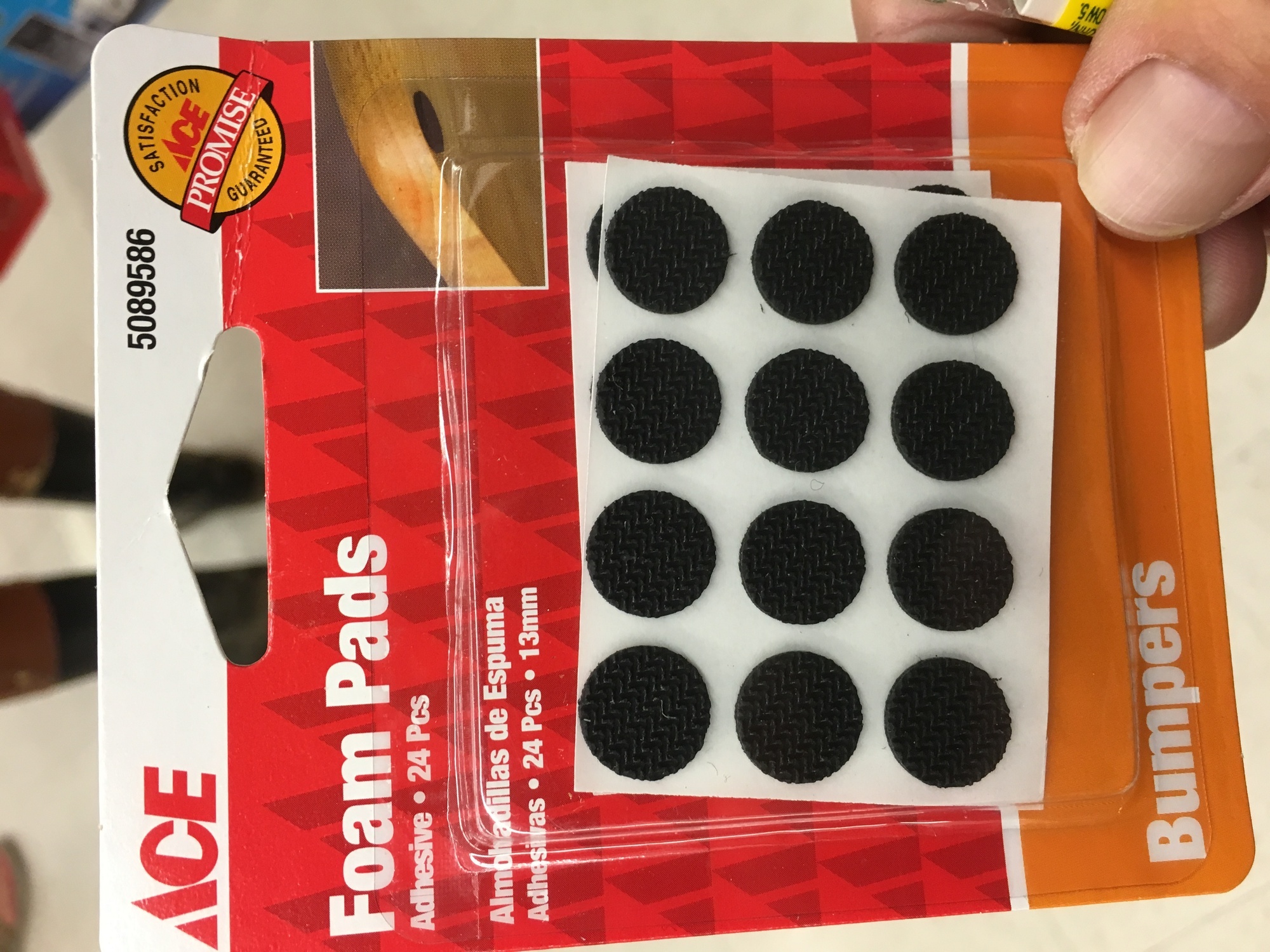
I just put rubber pads between camera and plate and use a little longer screw and I don't need any additional plate at all. You can buy them at Ace hardware they call them felt pads but they have rubber. I double stacked them and it works great. I use a Arca Swiss Z2 ball head with the flip lock.
I would say they atabout 1/16 each so about 1/8 total. I applied them on the full length of the plate so it's even pressure everywhere. Maybe a 3/4 inch screw
Has anyone tried the TAP and Sony's Lens Compensation App? Apparently that will now write the lens data into Exif on some bodies, but I'm curious how it'll mix with the info coming off of the TAP...
Only one way to find out. I'll purchase the app this morning and give it a try.
Mathieu18 wrote:
Has anyone tried the TAP and Sony's Lens Compensation App? Apparently that will now write the lens data into Exif on some bodies, but I'm curious how it'll mix with the info coming off of the TAP...
I must have tried a dozen times but I'm having no success in installing the app on an A7R II via Safari on a Mac Pro running OS X El Capitan (10.11.6). When I click the button to approve the PayPal purchase I get an error message stating that "An internal error has occurred."
[Edited] I tried using Internet Explorer on Windows 7 and got the same error. In both cases, The A7R II was seen and verified as compatible with the app.
genji wrote:
I must have tried a dozen times but I'm having no success in installing the app on an A7R II via Safari on a Mac Pro running OS X El Capitan (10.11.6). When I click the button to approve the PayPal purchase I get an error message stating that "An internal error has occurred."
[Edited] I tried using Internet Explorer on Windows 7 and got the same error. In both cases, The A7R II was seen and verified as compatible with the app.
I have had more success installing these apps from the camera.
Click on Account and add a credit card (Or PayPal email address)
Once you do that, you can purchased apps from your Sony camera and it will be charged to whatever payment method you added to your account.
I could never get it to work from the computer before, but the most recent versions of play memories for OSX seems to work fine. And if it works, it's much less hassle installing apps via the computer than entering codes on the back of the camera...
Click on Account and add a credit card (Or PayPal email address)
Once you do that, you can purchased apps from your Sony camera and it will be charged to whatever payment method you added to your account.
I already had an account so I connected the camera to my WiFi network and went through the steps to purchase the app but, when I clicked the button to confirm the purchase, I got exactly the same error message: "An internal error has occurred."
So far I've tried to install via Mac OS, Windows 7, and the A7R II camera, getting the same error message in each case. I've tried to pay using both PayPal and a credit card and again got the error message. I tried to add funds to a Sony wallet and failed. I might try again tomorrow.
Mathieu18 wrote:
I've installed 3-4 from a PC no problem, but I got the same Internal Error. I think they're having trouble with payment processing, but just a guess.
That seems most likely, given that I've tried multiple connection and payment methods...