This topic is in the 2015 archive. You can read it and like its posts here. It is read only.
Archive 2015Possible issues with Zeiss 35mm f1.4ZM or need to shim Hawk's Factory He...
p.5 #1Possible issues with Zeiss 35mm f1.4ZM or need to shim Hawk's Factory Helicoid
I have now found at least one difference in the settings between my Camera and Mike's that is probably responsable for some of the difference in color between the 2 cameras. That is my camera is set at sRGB and Mike's camera is set as AdobeRGB. That could account for some difference in color between the cameras but probably not the lenses.
What should I have my camera set on for Color space- sRGB or AdobeRGB?
I will have to rerun some of the tests once the weather improves.
I finally found Lens Comp. For the A7r cameras it is in Gear -5. Both cameras are set to Auto for shading and Lens aberr. and off for Distortion Comp.
Rich
What should I have my camera set on for Color space- sRGB or AdobeRGB?
I will have to rerun some of the tests once the weather improves.
I finally found Lens Comp. For the A7r cameras it is in Gear -5. Both cameras are set to Auto for shading and Lens aberr. and off for Distortion Comp.
Rich
Feb 03, 2016 at 02:07 PM
p.5 #2Possible issues with Zeiss 35mm f1.4ZM or need to shim Hawk's Factory Helicoid
naturephoto1 wrote:
I have now found at least one difference in the settings between my Camera and Mike's that is probably responsable for some of the difference in color between the 2 cameras. That is my camera is set at sRGB and Mike's camera is set as AdobeRGB. That could account for some difference in color between the cameras but probably not the lenses.
What should I have my camera set on for Color space- sRGB or AdobeRGB?
I will have to rerun some of the tests once the weather improves.
I finally found Lens Comp. For the A7r cameras it is in Gear -5....Show more →
If you are shooting raw, it technically does not matter (and will not affect your results) as that is decided during raw conversion (and set in your raw software). For jpeg of course AdobeRGB is a wider gamut space and would be better to use than sRGB.
I have now found at least one difference in the settings between my Camera and Mike's that is probably responsable for some of the difference in color between the 2 cameras. That is my camera is set at sRGB and Mike's camera is set as AdobeRGB. That could account for some difference in color between the cameras but probably not the lenses.
What should I have my camera set on for Color space- sRGB or AdobeRGB?
I will have to rerun some of the tests once the weather improves.
I finally found Lens Comp. For the A7r cameras it is in Gear -5....Show more →
If you are shooting raw, it technically does not matter (and will not affect your results) as that is decided during raw conversion (and set in your raw software). For jpeg of course AdobeRGB is a wider gamut space and would be better to use than sRGB.
Feb 03, 2016 at 03:01 PM
p.5 #3Possible issues with Zeiss 35mm f1.4ZM or need to shim Hawk's Factory Helicoid
Below are comparisons of my A7rM with my Zeis 35mm f1.4 Distagon ZM and Mike's older A7rM with the same lens.
The first 2 images compare my camera with the Adobe Standard Profile for the first image and the Camera Standard Profile for the second image.
The second 2 images compare Mike's camera with the Adobe Standard Profile for the first image and the Camera Standard Profile for the second image.
Rich
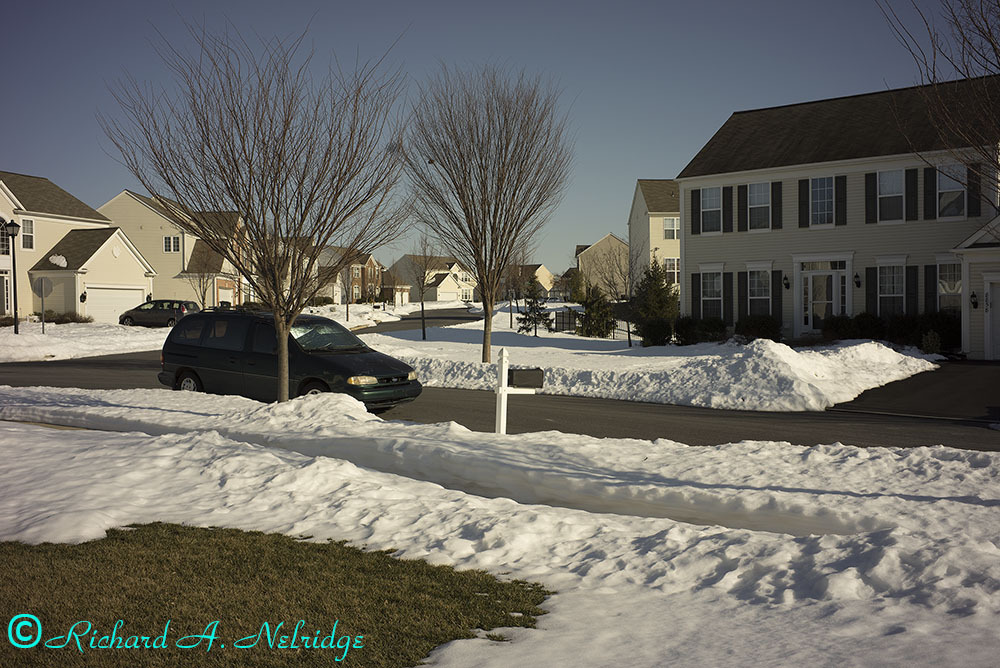
Rich's A7rM 35mm Distagon ZM Adobe Standard Profile
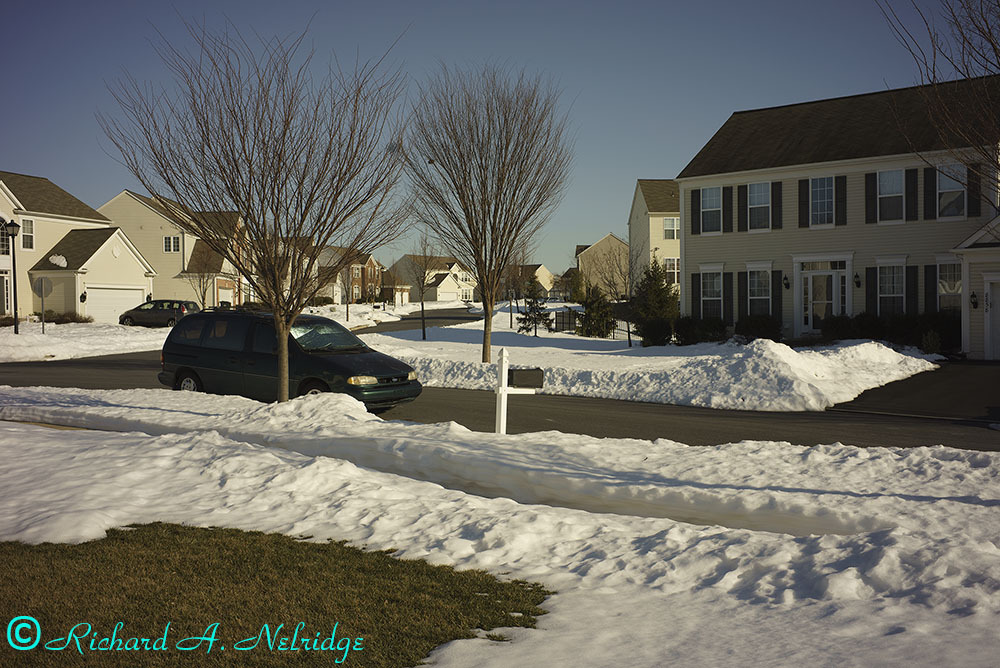
Rich's A7rM 35mm Distagon ZM Camera Standard Profile
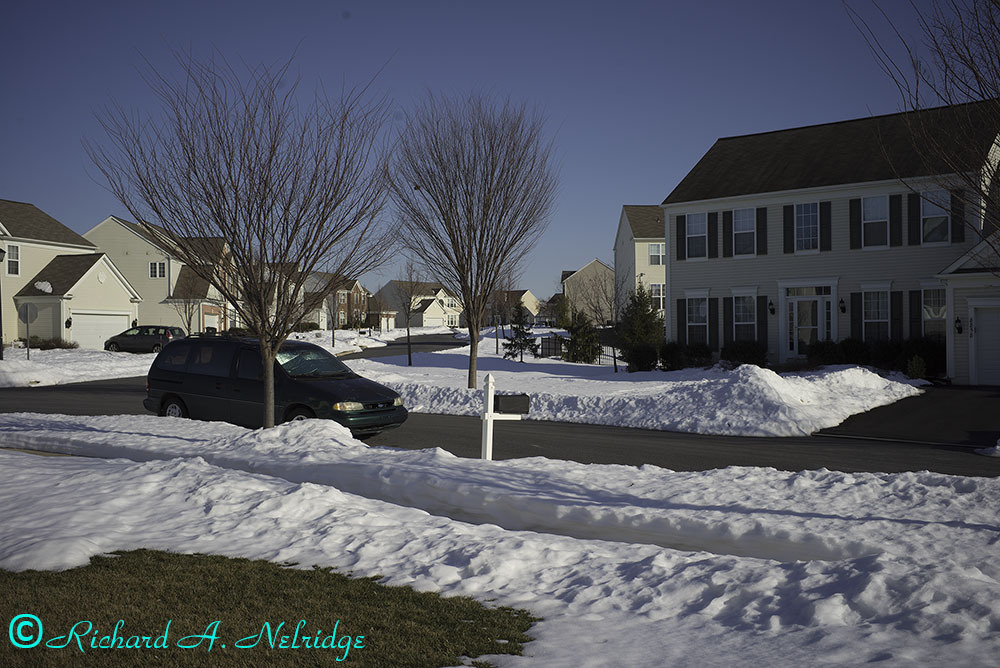
Mike's A7rN 35mm Distagon ZM Adobe Standard Profile
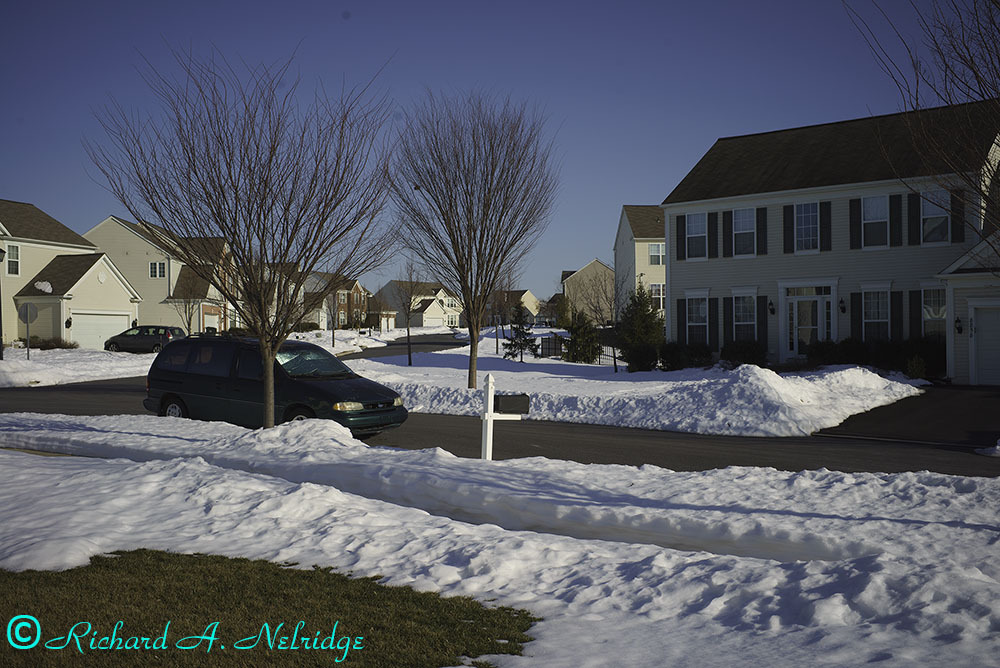
Mike's A7rM 35mm Distagon ZM Camera Standard Profile
Edited on Feb 03, 2016 at 06:19 PM · View previous versions
The first 2 images compare my camera with the Adobe Standard Profile for the first image and the Camera Standard Profile for the second image.
The second 2 images compare Mike's camera with the Adobe Standard Profile for the first image and the Camera Standard Profile for the second image.
Rich
Rich's A7rM 35mm Distagon ZM Adobe Standard Profile
Rich's A7rM 35mm Distagon ZM Camera Standard Profile
Mike's A7rN 35mm Distagon ZM Adobe Standard Profile
Mike's A7rM 35mm Distagon ZM Camera Standard Profile
Edited on Feb 03, 2016 at 06:19 PM · View previous versions
Feb 03, 2016 at 06:08 PM
p.5 #4Possible issues with Zeiss 35mm f1.4ZM or need to shim Hawk's Factory Helicoid
Below are comparisons of my A7rM with my Leica M 24mm f3.8 Elmar Ashp and Mike's older A7rM with the same lens.
The first 2 images compare my camera with the Adobe Standard Profile for the first image and the Camera Standard Profile for the second image.
The second 2 images compare Mike's camera with the Adobe Standard Profile for the first image and the Camera Standard Profile for the second image.
Rich
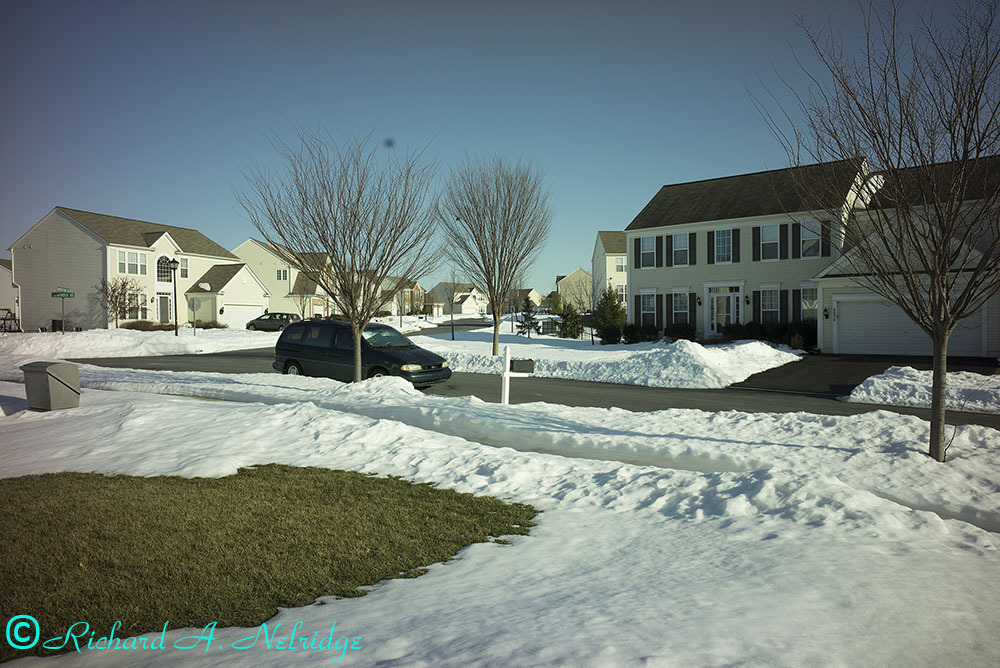
Rich's A7rM 24mm f3.8 Asph Adobe Standard Profile
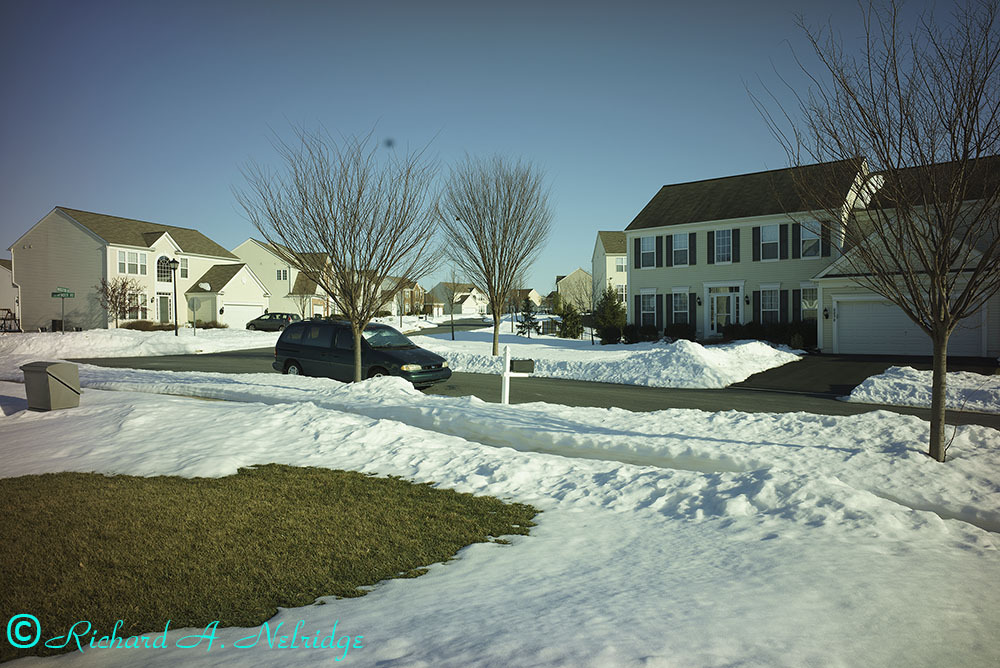
Rich's A7rM 24mm f3.8 Asph Camera Standard Profile
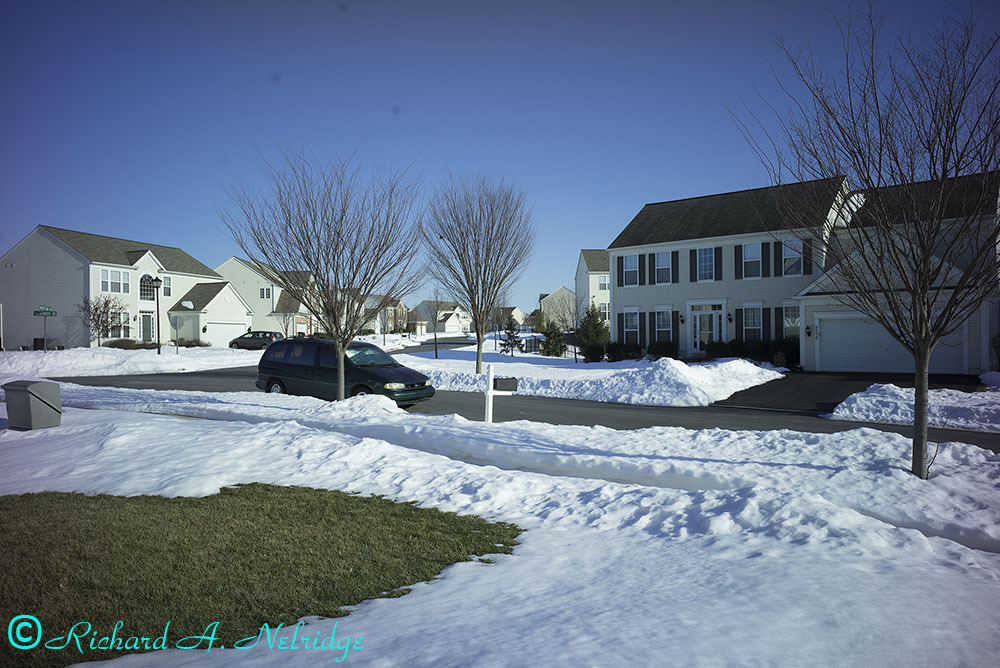
Mike's A7rM 24mm f3.8 Asph Adobe Standard Profile
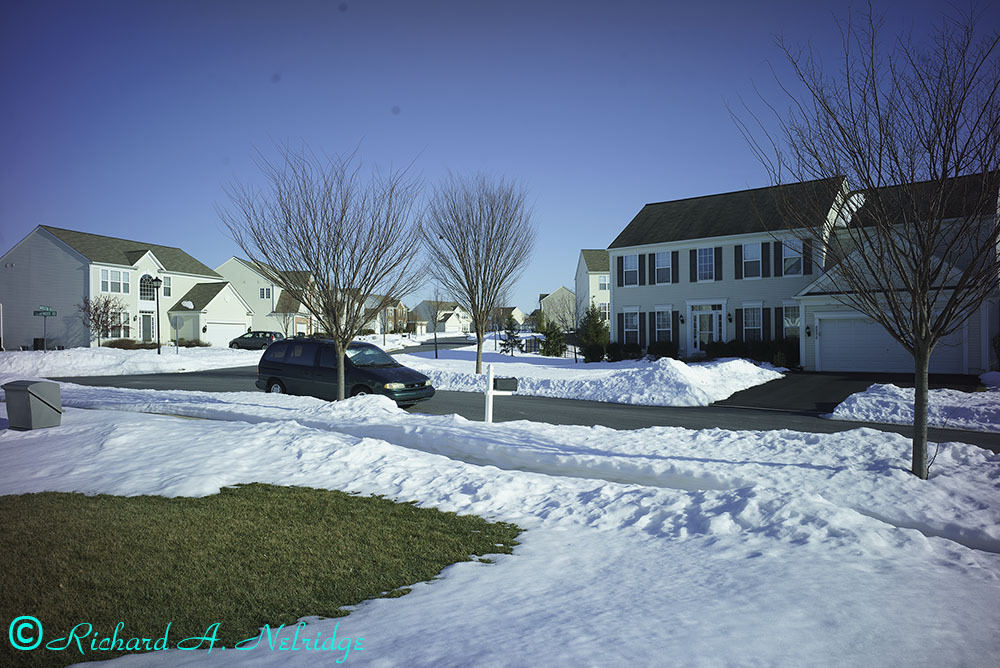
Mike's A7rM 24mm f3.8 Asph Camera Standard Profile
The first 2 images compare my camera with the Adobe Standard Profile for the first image and the Camera Standard Profile for the second image.
The second 2 images compare Mike's camera with the Adobe Standard Profile for the first image and the Camera Standard Profile for the second image.
Rich
Rich's A7rM 24mm f3.8 Asph Adobe Standard Profile
Rich's A7rM 24mm f3.8 Asph Camera Standard Profile
Mike's A7rM 24mm f3.8 Asph Adobe Standard Profile
Mike's A7rM 24mm f3.8 Asph Camera Standard Profile
Feb 03, 2016 at 06:15 PM

p.5 #5Possible issues with Zeiss 35mm f1.4ZM or need to shim Hawk's Factory Helicoid
Thanks for these examples, Rich. I think they show that with the A7r mod you will still need corner fix or a plug in to correct for colour cast for both these lenses (or at least I would want that). You likely wouldn't need that for an A7rII mod. They also show that different mods will need different overall corrections. You mod certainly has more cyan in the sky and Mike's has more purple. I wouldn't really be happy with either lens with either profile without a fair bit of correction. It is striking how this correction would be different for the different versions of the mod, however.
Feb 04, 2016 at 06:26 AM
p.5 #6Possible issues with Zeiss 35mm f1.4ZM or need to shim Hawk's Factory Helicoid
Rich, thank you for this latest round. It seems that with the ZM 35, the V3 mod seems to get closer to what it would look like on a stock Sony. Still not sure about the Elmar. Did you turn the Lens Comp. off? Again, I think as the Phigment adapter reports an EXIF data, that would automatically kick in for the Elmar.
Feb 04, 2016 at 11:18 AM
p.5 #7Possible issues with Zeiss 35mm f1.4ZM or need to shim Hawk's Factory Helicoid
hiepphotog wrote:
Rich, thank you for this latest round. It seems that with the ZM 35, the V3 mod seems to get closer to what it would look like on a stock Sony. Still not sure about the Elmar. Did you turn the Lens Comp. off? Again, I think as the Phigment adapter reports an EXIF data, that would automatically kick in for the Elmar.
Hi Hiep,
I will try to run some test a little later. I will only use the Hawk's Factory Helicoid for the 2 M mount lenses. I am also going to thow my R 50mm f2 Summicron into the mix to basically act as a "control"
Rich
Rich, thank you for this latest round. It seems that with the ZM 35, the V3 mod seems to get closer to what it would look like on a stock Sony. Still not sure about the Elmar. Did you turn the Lens Comp. off? Again, I think as the Phigment adapter reports an EXIF data, that would automatically kick in for the Elmar.
Hi Hiep,
I will try to run some test a little later. I will only use the Hawk's Factory Helicoid for the 2 M mount lenses. I am also going to thow my R 50mm f2 Summicron into the mix to basically act as a "control"
Rich
Feb 04, 2016 at 11:22 AM
p.5 #8Possible issues with Zeiss 35mm f1.4ZM or need to shim Hawk's Factory Helicoid
I ran some additional tests today under cloudy conditions. Since Hiep has suggested that my Phigment Adapter may be sending some color from my Leica M 24mm f3.8 Elmar Asph, I tested both my Zeiss 35mm f1.4 Distagon ZM and my Leica M 24mm f3.8 Asph lenses mounted to my Hawk's Factory V5 Helicoid. Additionally, I also ran tests with my Leica R 50mm f2 Summicron to act as a contol and as a non RF WA lens.
At least under these conditions and using the Hawk's Factory Helicoid, the Leica M 24mm f3.8 Elmar Asph lens color rendering appears to more in keeping with my Zeiss 35mm f1.4 Distagon lens.
I am going to again pair the results between my new A7rM and compare it to Mike's older A7rM camera.
The first image is with my A7rM and my 35mm f1.4 Distagon ZM and the second image is with Mike's A7rM and the same lens.
Rich
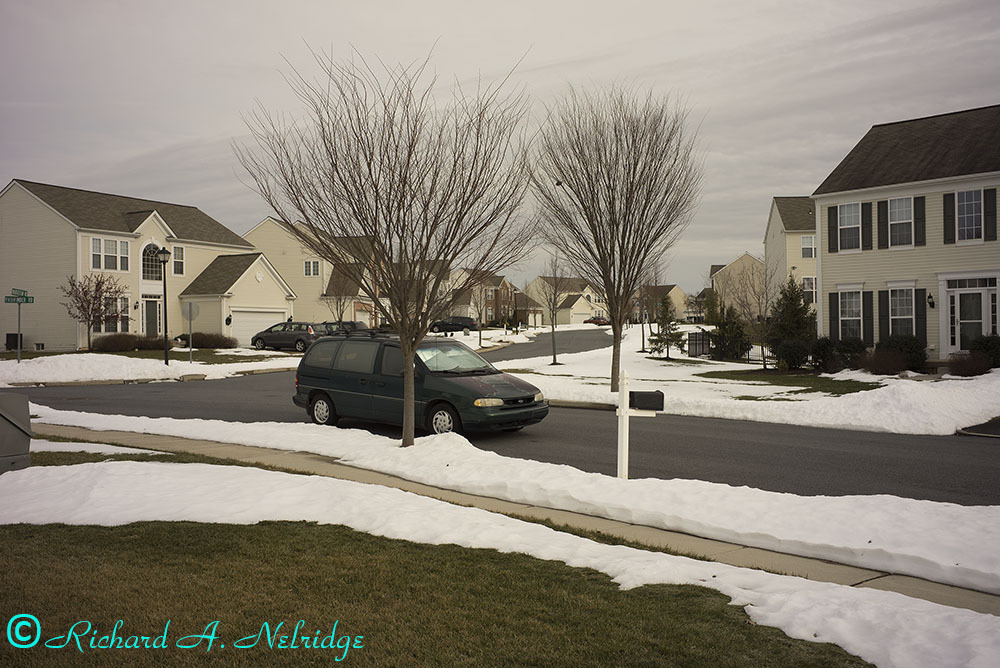
Rich's A7rM Zeiss 35mm Distagon ISO 100 f8 1/250 sec
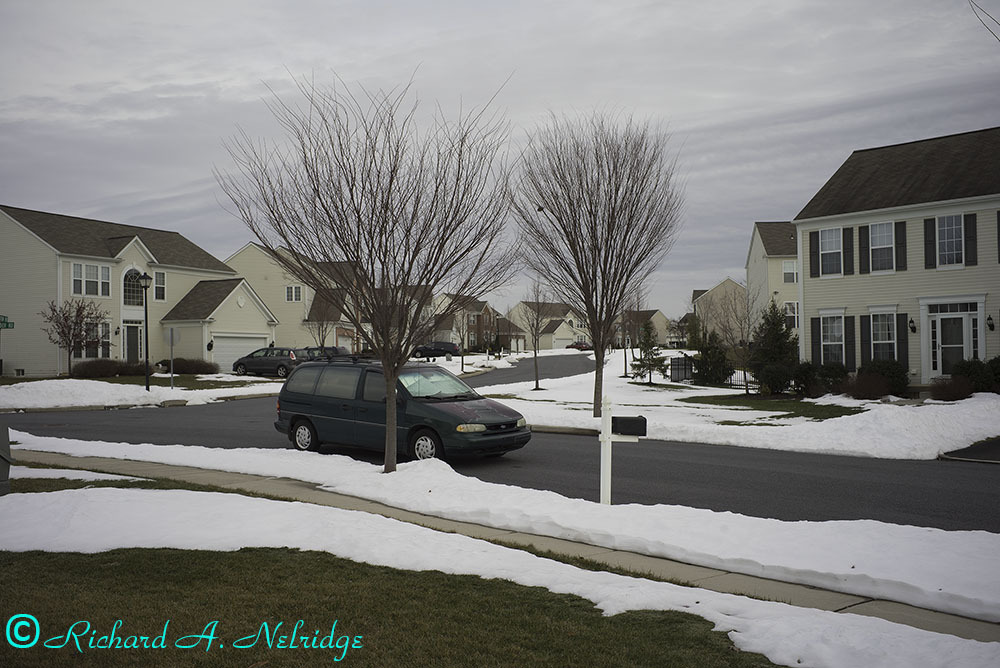
Mike's A7rM Zeiss 35mm Distagon ISO 100 f8 1/200 sec
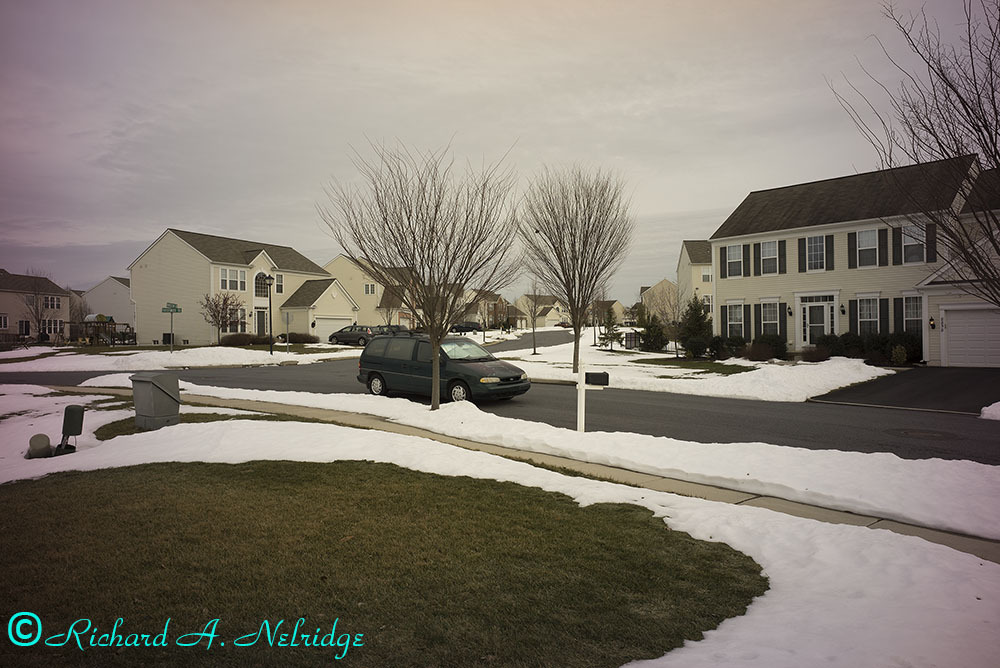
Rich's A7rM Leica 24mm Asph ISO 100 f8 1/200 sec
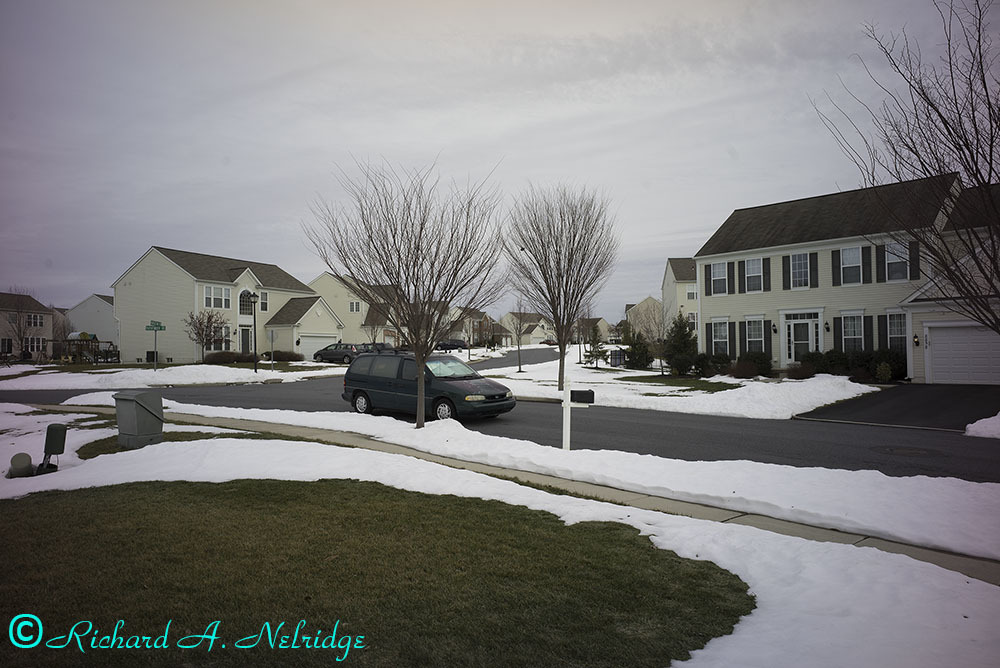
Mike's A7rM Leica 24mm Asph ISO 100 f8 1/200
At least under these conditions and using the Hawk's Factory Helicoid, the Leica M 24mm f3.8 Elmar Asph lens color rendering appears to more in keeping with my Zeiss 35mm f1.4 Distagon lens.
I am going to again pair the results between my new A7rM and compare it to Mike's older A7rM camera.
The first image is with my A7rM and my 35mm f1.4 Distagon ZM and the second image is with Mike's A7rM and the same lens.
Rich
Rich's A7rM Zeiss 35mm Distagon ISO 100 f8 1/250 sec
Mike's A7rM Zeiss 35mm Distagon ISO 100 f8 1/200 sec
Rich's A7rM Leica 24mm Asph ISO 100 f8 1/200 sec
Mike's A7rM Leica 24mm Asph ISO 100 f8 1/200
Feb 04, 2016 at 03:49 PM
p.5 #9Possible issues with Zeiss 35mm f1.4ZM or need to shim Hawk's Factory Helicoid
The last 2 photos compare my A7rM with Mikes's A7rM with my Leica R 50mm f2 Summicron lens.
The first image is with my A7rM with my Leica R 50mm Summicron and the second image is Mike's A7rM with my Leica R 50mm Summicron.
Rich
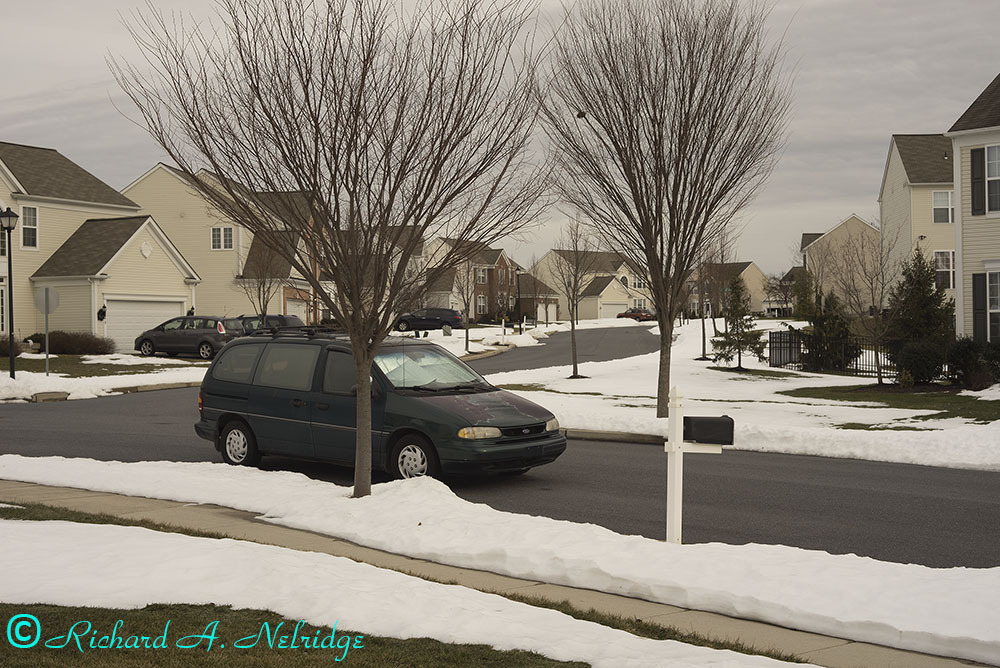
Rich's A7rM Leica 50mm Summicron ISO 100 f8 1/200 sec
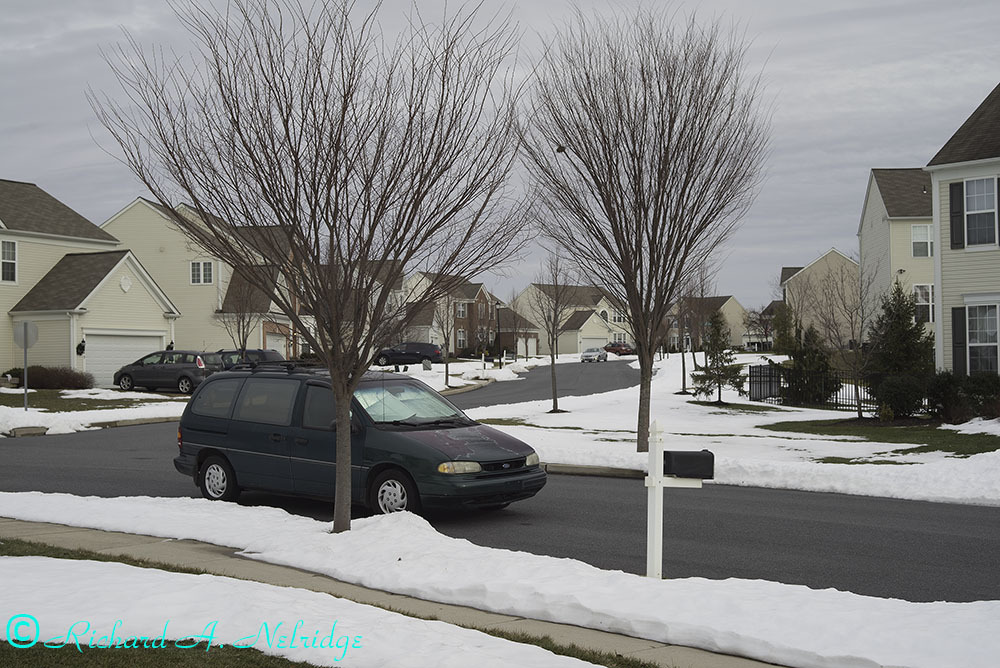
Mike's A7rM Leica 50mm Summicron ISO f8 1/160 sec
The first image is with my A7rM with my Leica R 50mm Summicron and the second image is Mike's A7rM with my Leica R 50mm Summicron.
Rich
Rich's A7rM Leica 50mm Summicron ISO 100 f8 1/200 sec
Mike's A7rM Leica 50mm Summicron ISO f8 1/160 sec
Feb 04, 2016 at 03:55 PM
p.5 #10Possible issues with Zeiss 35mm f1.4ZM or need to shim Hawk's Factory Helicoid
Interesting result Rich, it looks like the lenses may have an overall WB that will work with one profile (aside from the caste that needs correcting on the 24 and 35). The 'cron looks a little more blue than the other 2 lenses.
I dumped screenshots of the 'cron images into PS and compared the snow on both, I got 172/167/156 on yours and 165/164/165 on mine looking at the mound of snow under the front wheel of the car, using the 101 average colour sampler. The distagon looks pretty usable once you have a WB that works, and I sampled that image (same spot) and got 157/152/138 so at 1st blush it seems like the WB is similar (a little less blue though) between the 2 lenses (in the center of course). Lastly the 24mm on your camera gave me 155/151/136. Also a little less blue than the 'cron but quite similar to the Elmar.
Mike
I dumped screenshots of the 'cron images into PS and compared the snow on both, I got 172/167/156 on yours and 165/164/165 on mine looking at the mound of snow under the front wheel of the car, using the 101 average colour sampler. The distagon looks pretty usable once you have a WB that works, and I sampled that image (same spot) and got 157/152/138 so at 1st blush it seems like the WB is similar (a little less blue though) between the 2 lenses (in the center of course). Lastly the 24mm on your camera gave me 155/151/136. Also a little less blue than the 'cron but quite similar to the Elmar.
Mike
Feb 05, 2016 at 04:37 AM
p.5 #11Possible issues with Zeiss 35mm f1.4ZM or need to shim Hawk's Factory Helicoid
BTW have you tried Charlie's suggestion yet? I assume this is the LR lens profile.
" .... e.g. the ZM wants to be the pre-asph 21/2.8, then the RAWs come out clean"
https://www.fredmiranda.com/forum/topic/1399489/3#13402277
" .... e.g. the ZM wants to be the pre-asph 21/2.8, then the RAWs come out clean"
https://www.fredmiranda.com/forum/topic/1399489/3#13402277
Feb 05, 2016 at 04:42 AM
p.5 #12Possible issues with Zeiss 35mm f1.4ZM or need to shim Hawk's Factory Helicoid
mcbroomf wrote:
Interesting result Rich, it looks like the lenses may have an overall WB that will work with one profile (aside from the caste that needs correcting on the 24 and 35). The 'cron looks a little more blue than the other 2 lenses.
I dumped screenshots of the 'cron images into PS and compared the snow on both, I got 172/167/156 on yours and 165/164/165 on mine looking at the mound of snow under the front wheel of the car, using the 101 average colour sampler. The distagon looks pretty usable once you have a WB that works, and I sampled...Show more →
---------------------------------------------
mcbroomf wrote:
BTW have you tried Charlie's suggestion yet? I assume this is the LR lens profile.
" .... e.g. the ZM wants to be the pre-asph 21/2.8, then the RAWs come out clean"
https://www.fredmiranda.com/forum/topic/1399489/3#13402277
Hi Mike,
The latest tests showed the results in with the Adobe Standard Profiles. Everything was as unadulterated as possible with all of the lenses relying on the LR defaults. If you want, I can also run these as the Camera Standard Profiles for comparison.
The previous sets, I went back and compared the Adobe Standard Profiles with the Camera Standard Profiles:
https://www.fredmiranda.com/forum/topic/1399489/4#13402941
https://www.fredmiranda.com/forum/topic/1399489/4#13402949
In none of the tests have I used the LR lens profiles, but they could be if you wanted.
All of the lenses have profiles in LR and should have them in PS as well. I don't know how the profiles affect the colors but I do know at least in part how they affect the corners, etc. at least for some of the lenses like my WATE.
As to my R 50mm Summicron, I have had this lens since 1984 and it just came back from Leica USA for a CLA with a clean bill of health. I am sure that the coatings have changed since the lens was made 30 years ago which may account for some of the differences in the colors between it and the 24mm Elmar and the 35mm Distagon lenses.
Hopefully today or tomorrow we will have sunnier weather so that I can run tsts again on the cameras and lenses to check ageain for more Daylight rather than cloudy conditions.
I will also download and install the DNG flat field Plugin for LR shortly.
Rich
Interesting result Rich, it looks like the lenses may have an overall WB that will work with one profile (aside from the caste that needs correcting on the 24 and 35). The 'cron looks a little more blue than the other 2 lenses.
I dumped screenshots of the 'cron images into PS and compared the snow on both, I got 172/167/156 on yours and 165/164/165 on mine looking at the mound of snow under the front wheel of the car, using the 101 average colour sampler. The distagon looks pretty usable once you have a WB that works, and I sampled...Show more →
---------------------------------------------
mcbroomf wrote:
BTW have you tried Charlie's suggestion yet? I assume this is the LR lens profile.
" .... e.g. the ZM wants to be the pre-asph 21/2.8, then the RAWs come out clean"
https://www.fredmiranda.com/forum/topic/1399489/3#13402277
Hi Mike,
The latest tests showed the results in with the Adobe Standard Profiles. Everything was as unadulterated as possible with all of the lenses relying on the LR defaults. If you want, I can also run these as the Camera Standard Profiles for comparison.
The previous sets, I went back and compared the Adobe Standard Profiles with the Camera Standard Profiles:
https://www.fredmiranda.com/forum/topic/1399489/4#13402941
https://www.fredmiranda.com/forum/topic/1399489/4#13402949
In none of the tests have I used the LR lens profiles, but they could be if you wanted.
All of the lenses have profiles in LR and should have them in PS as well. I don't know how the profiles affect the colors but I do know at least in part how they affect the corners, etc. at least for some of the lenses like my WATE.
As to my R 50mm Summicron, I have had this lens since 1984 and it just came back from Leica USA for a CLA with a clean bill of health. I am sure that the coatings have changed since the lens was made 30 years ago which may account for some of the differences in the colors between it and the 24mm Elmar and the 35mm Distagon lenses.
Hopefully today or tomorrow we will have sunnier weather so that I can run tsts again on the cameras and lenses to check ageain for more Daylight rather than cloudy conditions.
I will also download and install the DNG flat field Plugin for LR shortly.
Rich
Feb 05, 2016 at 06:07 AM
p.5 #13Possible issues with Zeiss 35mm f1.4ZM or need to shim Hawk's Factory Helicoid
Yes, not surprised the 'cron is a little different. With any luck when you create colour profile for the new cover glass you can use the same one for all lenses and just use one slider to match them after or during import.
I tried looking at the file from the ZM and your camera with the Leica 21/2.8 lens profile in LR as Charlie suggested but LR won't give the full list of profiles for a tif, jpg or a dng converted from the tif. The list is pretty small in fact and completely different to the long list available for raw files. I never knew that. If the lens profile is a good one (for the ZM) it could save having to develop your own flatfield file for the plugin.
I tried looking at the file from the ZM and your camera with the Leica 21/2.8 lens profile in LR as Charlie suggested but LR won't give the full list of profiles for a tif, jpg or a dng converted from the tif. The list is pretty small in fact and completely different to the long list available for raw files. I never knew that. If the lens profile is a good one (for the ZM) it could save having to develop your own flatfield file for the plugin.
Feb 05, 2016 at 07:13 AM
p.5 #14Possible issues with Zeiss 35mm f1.4ZM or need to shim Hawk's Factory Helicoid
mcbroomf wrote:
Yes, not surprised the 'cron is a little different. With any luck when you create colour profile for the new cover glass you can use the same one for all lenses and just use one slider to match them after or during import.
I tried looking at the file from the ZM and your camera with the Leica 21/2.8 lens profile in LR as Charlie suggested but LR won't give the full list of profiles for a tif, jpg or a dng converted from the tif. The list is pretty small in fact and completely different to the long list available...Show more →
Hi Mike,
There is a profile in LR and I presume for PS (I have not checked it myself; I have the latest RAW for PS) for the Zeiss 35mm f1.4 Distagon ZM). I would think that it would be the most appropriate profile to use. If need be I can try to somehow send you the RAW file to your e-mail address.
Rich
Yes, not surprised the 'cron is a little different. With any luck when you create colour profile for the new cover glass you can use the same one for all lenses and just use one slider to match them after or during import.
I tried looking at the file from the ZM and your camera with the Leica 21/2.8 lens profile in LR as Charlie suggested but LR won't give the full list of profiles for a tif, jpg or a dng converted from the tif. The list is pretty small in fact and completely different to the long list available...Show more →
Hi Mike,
There is a profile in LR and I presume for PS (I have not checked it myself; I have the latest RAW for PS) for the Zeiss 35mm f1.4 Distagon ZM). I would think that it would be the most appropriate profile to use. If need be I can try to somehow send you the RAW file to your e-mail address.
Rich
Feb 05, 2016 at 07:16 AM
p.5 #15Possible issues with Zeiss 35mm f1.4ZM or need to shim Hawk's Factory Helicoid
Yes for raws, but there are no Leica or Zeiss lens profiles listed for a tif or a jpg file when imported into LR, or a tif converted to a dng. I see the ZM profile for any of my raw files but when I did a screenshot of your image and converted it to a tif there are only about 8 lens makes listed. I've never tried that before (I typically do not bring jpgs or tifs back into LR), so I only just found that out. I tried the Open As (a raw file) in PS (to open the tif into ACR) but I got an error, hence trying LR. The file was saved as a 16 bit tif with Prophoto. Anyway it's easy for you to see if the lens profile helps on the original raw.
Feb 05, 2016 at 07:34 AM
p.5 #16Possible issues with Zeiss 35mm f1.4ZM or need to shim Hawk's Factory Helicoid
mcbroomf wrote:
Yes for raws, but there are no Leica or Zeiss lens profiles listed for a tif or a jpg file when imported into LR, or a tif converted to a dng. I see the ZM profile for any of my raw files but when I did a screenshot of your image and converted it to a tif there are only about 8 lens makes listed. I've never tried that before (I typically do not bring jpgs or tifs back into LR), so I only just found that out. I tried the Open As (a raw file) in PS (to open...Show more →
Hi Mike,
I think that I just sent you the RAW file to your e-mail address.
Rich
Yes for raws, but there are no Leica or Zeiss lens profiles listed for a tif or a jpg file when imported into LR, or a tif converted to a dng. I see the ZM profile for any of my raw files but when I did a screenshot of your image and converted it to a tif there are only about 8 lens makes listed. I've never tried that before (I typically do not bring jpgs or tifs back into LR), so I only just found that out. I tried the Open As (a raw file) in PS (to open...Show more →
Hi Mike,
I think that I just sent you the RAW file to your e-mail address.
Rich
Feb 05, 2016 at 07:41 AM
p.5 #17Possible issues with Zeiss 35mm f1.4ZM or need to shim Hawk's Factory Helicoid
Got it Rich,
1) The 21mm/2.8 Pre-Asph is not listed ... Charlie, where did you find the profile?
2) I tried pretty much all the other M WA lenses and none of them helped with the colour caste
1) The 21mm/2.8 Pre-Asph is not listed ... Charlie, where did you find the profile?
2) I tried pretty much all the other M WA lenses and none of them helped with the colour caste
Feb 05, 2016 at 07:51 AM
p.5 #18Possible issues with Zeiss 35mm f1.4ZM or need to shim Hawk's Factory Helicoid
On the other hand it looks like it's not too difficult to fix manually. Here's a pretty basic radial filter that evens out the edge caste and vignetting (not the overall WB as I don't know what it should be). It does a good job on the right but leaves the left a little blue. Easy enough to erase the filter on the left and create a 2nd that will fix the left separately (erasing the right)
http://m4.i.pbase.com/o9/63/551663/1/162499774.Nlj18DwA.ZM35KolV3.jpg
Original
http://i.pbase.com/o9/63/551663/1/162499786.iYQIIm8z.V3ZM.jpg
http://m4.i.pbase.com/o9/63/551663/1/162499774.Nlj18DwA.ZM35KolV3.jpg
Original
http://i.pbase.com/o9/63/551663/1/162499786.iYQIIm8z.V3ZM.jpg
Feb 05, 2016 at 08:06 AM
p.5 #19Possible issues with Zeiss 35mm f1.4ZM or need to shim Hawk's Factory Helicoid
mcbroomf wrote:
On the other hand it looks like it's not too difficult to fix manually. Here's a pretty basic radial filter that evens out the edge caste and vignetting (not the overall WB as I don't know what it should be). It does a good job on the right but leaves the left a little blue. Easy enough to erase the filter on the left and create a 2nd that will fix the left separately (erasing the right)
http://m4.i.pbase.com/o9/63/551663/1/162499774.Nlj18DwA.ZM35KolV3.jpg
Original
http://i.pbase.com/o9/63/551663/1/162499786.iYQIIm8z.V3ZM.jpg
Hi Mike,
Is that using the Lens Profile for the Zeiss 35mm f1.4 Distagon ZM? If so, unless I have made an error somehow, is this the color that the camera would show using the Lens Profile? Or is this a change of the color with the radial filter or the radial filter using the lens profile?
Rich
On the other hand it looks like it's not too difficult to fix manually. Here's a pretty basic radial filter that evens out the edge caste and vignetting (not the overall WB as I don't know what it should be). It does a good job on the right but leaves the left a little blue. Easy enough to erase the filter on the left and create a 2nd that will fix the left separately (erasing the right)
http://m4.i.pbase.com/o9/63/551663/1/162499774.Nlj18DwA.ZM35KolV3.jpg
Original
http://i.pbase.com/o9/63/551663/1/162499786.iYQIIm8z.V3ZM.jpg
Hi Mike,
Is that using the Lens Profile for the Zeiss 35mm f1.4 Distagon ZM? If so, unless I have made an error somehow, is this the color that the camera would show using the Lens Profile? Or is this a change of the color with the radial filter or the radial filter using the lens profile?
Rich
Feb 05, 2016 at 08:16 AM
p.5 #20Possible issues with Zeiss 35mm f1.4ZM or need to shim Hawk's Factory Helicoid
Rich, no, this is not using a lens profile. This is just using the radial filter tool.
Oops, I realize that I DID have a lens profile loaded by mistake but it made no difference (a very slight distortion change only, no colour change). It was actually the Leica M 50/2 APO which is the top of the list. You can turn it on and off and verify that it has no effect on colour.
Oops, I realize that I DID have a lens profile loaded by mistake but it made no difference (a very slight distortion change only, no colour change). It was actually the Leica M 50/2 APO which is the top of the list. You can turn it on and off and verify that it has no effect on colour.
Feb 05, 2016 at 08:26 AM