This topic is in the 2015 archive. You can read it and like its posts here. It is read only.
Archive 2015Sony A7Rii compared with Sony A7R and Canon 5DSr
p.10 #1Sony A7Rii compared with Sony A7R and Canon 5DSr
retrofocus wrote:
http://static.timparkin.co.uk/onlandscape/SonyLakes/dynamic-range-example.jpgModern digital cameras provide tremendous dynamic range and latitude for adjustment/recovery in post, and being able to significantly push shadows is very useful. I often have to do this — in fact, I often plan on doing so when I make my exposures.
Here is another example: http://www.gdanmitchell.com/2012/12/22/post-processing-a-shadow-recovery-example
Starting with this:
http://i1.wp.com/www.gdanmitchell.com/images/kolob/01KolobRaw.jpg
Another here: http://www.gdanmitchell.com/2015/08/04/photographic-myths-and-platitudes-that-noise-is-awful
Starting with this:
http://i0.wp.com/www.gdanmitchell.com/wp-content/uploads/2015/07/02DarkestExposure.jpg
And ending up with this:
http://i0.wp.com/www.gdanmitchell.com/wp-content/uploads/2015/07/03ExposureAdjustments.jpg
Dan

Excellent post retro. Worked all evening on that reply, did you?
gdanmitchell wrote
timparkin wrote
p.s. For those of you who have suggested a six stop push is ridiculous, here's an example from my business partner Joe Cornish.http://static.timparkin.co.uk/onlandscape/SonyLakes/dynamic-range-example.jpg
Here is another example: http://www.gdanmitchell.com/2012/12/22/post-processing-a-shadow-recovery-example
Starting with this:
http://i1.wp.com/www.gdanmitchell.com/images/kolob/01KolobRaw.jpg
Another here: http://www.gdanmitchell.com/2015/08/04/photographic-myths-and-platitudes-that-noise-is-awful
Starting with this:
http://i0.wp.com/www.gdanmitchell.com/wp-content/uploads/2015/07/02DarkestExposure.jpg
And ending up with this:
http://i0.wp.com/www.gdanmitchell.com/wp-content/uploads/2015/07/03ExposureAdjustments.jpg
Dan
Excellent post retro. Worked all evening on that reply, did you?
Aug 06, 2015 at 06:08 PM
p.10 #2Sony A7Rii compared with Sony A7R and Canon 5DSr
retrofocus wrote:
http://static.timparkin.co.uk/onlandscape/SonyLakes/dynamic-range-example.jpgModern digital cameras provide tremendous dynamic range and latitude for adjustment/recovery in post, and being able to significantly push shadows is very useful. I often have to do this — in fact, I often plan on doing so when I make my exposures.
Here is another example: http://www.gdanmitchell.com/2012/12/22/post-processing-a-shadow-recovery-example
Starting with this:
http://i1.wp.com/www.gdanmitchell.com/images/kolob/01KolobRaw.jpg
Another here: http://www.gdanmitchell.com/2015/08/04/photographic-myths-and-platitudes-that-noise-is-awful
Starting with this:
http://i0.wp.com/www.gdanmitchell.com/wp-content/uploads/2015/07/02DarkestExposure.jpg
And ending up with this:
http://i0.wp.com/www.gdanmitchell.com/wp-content/uploads/2015/07/03ExposureAdjustments.jpg
Dan
+1, it was not even one challenge DR in those samples, even my 300D rebel can map that recovery easily. Try meter the tip of the candle light from any canon body in the dark then recover the surrounding shadows and see what you get
gdanmitchell wrote
timparkin wrote
p.s. For those of you who have suggested a six stop push is ridiculous, here's an example from my business partner Joe Cornish.http://static.timparkin.co.uk/onlandscape/SonyLakes/dynamic-range-example.jpg
Here is another example: http://www.gdanmitchell.com/2012/12/22/post-processing-a-shadow-recovery-example
Starting with this:
http://i1.wp.com/www.gdanmitchell.com/images/kolob/01KolobRaw.jpg
Another here: http://www.gdanmitchell.com/2015/08/04/photographic-myths-and-platitudes-that-noise-is-awful
Starting with this:
http://i0.wp.com/www.gdanmitchell.com/wp-content/uploads/2015/07/02DarkestExposure.jpg
And ending up with this:
http://i0.wp.com/www.gdanmitchell.com/wp-content/uploads/2015/07/03ExposureAdjustments.jpg
Dan
+1, it was not even one challenge DR in those samples, even my 300D rebel can map that recovery easily. Try meter the tip of the candle light from any canon body in the dark then recover the surrounding shadows and see what you get
Aug 06, 2015 at 06:48 PM
p.10 #3Sony A7Rii compared with Sony A7R and Canon 5DSr
timparkin wrote:
p.s. For those of you who have suggested a six stop push is ridiculous, here's an example from my business partner Joe Cornish.
Tim, how do you handle the noise/gain when processing your .ARW's? Noiseware? Solely by eye in LR? I am finding A7 II and A7r files to have a lot of fine chroma and luma noise. True or not, I read one has to really nail exposure to reduce A7 noise. Any thoughts? Thanks.
Aug 06, 2015 at 08:54 PM
p.10 #4Sony A7Rii compared with Sony A7R and Canon 5DSr
Fred Miranda wrote:
Sorry guys, pushed images at web resolution don't mean much. Show us the 1:1 crops.
No problem Fred :-)
http://static.timparkin.co.uk/onlandscape/SonyLakes/dynamic-range-crop.jpg
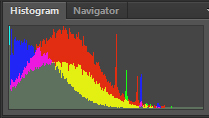
p.s. Please pay attention to the original histogram on that file..
Edited on Aug 07, 2015 at 01:04 AM · View previous versions
Sorry guys, pushed images at web resolution don't mean much. Show us the 1:1 crops.
No problem Fred :-)
http://static.timparkin.co.uk/onlandscape/SonyLakes/dynamic-range-crop.jpg
p.s. Please pay attention to the original histogram on that file..
Edited on Aug 07, 2015 at 01:04 AM · View previous versions
Aug 07, 2015 at 12:59 AM
p.10 #5Sony A7Rii compared with Sony A7R and Canon 5DSr
Paul Mo wrote:
Tim, how do you handle the noise/gain when processing your .ARW's? Noiseware? Solely by eye in LR? I am finding A7 II and A7r files to have a lot of fine chroma and luma noise. True or not, I read one has to really nail exposure to reduce A7 noise. Any thoughts? Thanks.
Yes I do like Imagenomic Noiseware for both film scans and digital files. I hate the 'plastic' look that detail protection gives too so avoid that like the plague.
There is typically chroma noise but it smooths out well - I sometimes will use a color layer and manually play with an area if it's a real problem but only rarely.
The biggest problem is usually colour shifts to magenta in the very deep shadows. These involve using a curve with lots of control points on it and injecting green into the shadows (before any shadow recovery!!! if you do shadow recovery first your tonal relationships screwup).
Tim
timparkin wrote
p.s. For those of you who have suggested a six stop push is ridiculous, here's an example from my business partner Joe Cornish.Yes I do like Imagenomic Noiseware for both film scans and digital files. I hate the 'plastic' look that detail protection gives too so avoid that like the plague.
There is typically chroma noise but it smooths out well - I sometimes will use a color layer and manually play with an area if it's a real problem but only rarely.
The biggest problem is usually colour shifts to magenta in the very deep shadows. These involve using a curve with lots of control points on it and injecting green into the shadows (before any shadow recovery!!! if you do shadow recovery first your tonal relationships screwup).
Tim
Aug 07, 2015 at 01:02 AM

p.10 #6Sony A7Rii compared with Sony A7R and Canon 5DSr
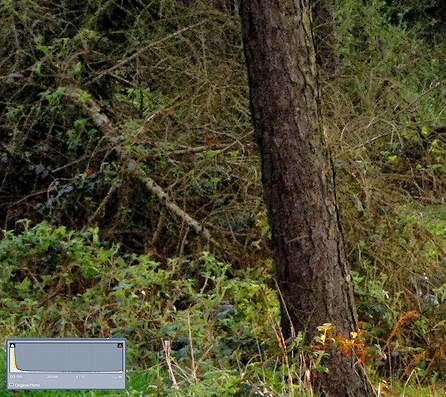
Some pp tweaking from where Tim left off. Presented 50% size reduction to "hide" some noise from pixel peeping, yet illustrate even if it would mean a smaller print. Again, bearing in mind where this one started.
Would be curious to see the sooc next to it to see just how far the diff is (vs. reading histo for diff).
Edited on Aug 07, 2015 at 09:22 AM · View previous versions
Would be curious to see the sooc next to it to see just how far the diff is (vs. reading histo for diff).
 |
||
 |
||
|
Edited on Aug 07, 2015 at 09:22 AM · View previous versions
Aug 07, 2015 at 08:07 AM
p.10 #7Sony A7Rii compared with Sony A7R and Canon 5DSr
timparkin wrote:
The biggest problem is usually colour shifts to magenta in the very deep shadows. These involve using a curve with lots of control points on it and injecting green into the shadows (before any shadow recovery!!! if you do shadow recovery first your tonal relationships screwup).
Tim
I am confused. Would you mind sharing the workflow on that. You don't do the shadow recovery in LR as part of the raw conversion? Or are you saying that you adjust the tone curve in LR prior to adjusting the LR recovery sliders? I would really appreciate any tips on that. Thanks!
David
The biggest problem is usually colour shifts to magenta in the very deep shadows. These involve using a curve with lots of control points on it and injecting green into the shadows (before any shadow recovery!!! if you do shadow recovery first your tonal relationships screwup).
Tim
I am confused. Would you mind sharing the workflow on that. You don't do the shadow recovery in LR as part of the raw conversion? Or are you saying that you adjust the tone curve in LR prior to adjusting the LR recovery sliders? I would really appreciate any tips on that. Thanks!
David
Aug 07, 2015 at 08:13 AM
p.10 #8Sony A7Rii compared with Sony A7R and Canon 5DSr
timparkin wrote:
No problem Fred :-)
http://static.timparkin.co.uk/onlandscape/SonyLakes/dynamic-range-crop.jpg
p.s. Please pay attention to the original histogram on that file..
Really nice. Thanks Tim.
Fred Miranda wrote
Sorry guys, pushed images at web resolution don't mean much. Show us the 1:1 crops.http://static.timparkin.co.uk/onlandscape/SonyLakes/dynamic-range-crop.jpg
p.s. Please pay attention to the original histogram on that file..
Really nice. Thanks Tim.
Aug 07, 2015 at 08:37 AM
p.10 #9Sony A7Rii compared with Sony A7R and Canon 5DSr
gdanmitchell wrote:
I agree. More at the links. The first one includes a scan of a section of a large print. The second includes 100% magnification crops.
Let's stop with this crusade of trying to convince people that differences in DR are "myths" that never show up. We can hand pick examples all day long to support whichever version we choose. We've been down this road many times.
100% crops:
Sony A7r:
http://blog.arthurdomagala.com/wp-content/uploads/2014/10/sony_100_crop.jpg
Canon 5d2:
http://blog.arthurdomagala.com/wp-content/uploads/2014/10/canon_100_crop.jpg
Fred Miranda wrote
Sorry guys, pushed images at web resolution don't mean much. Show us the 1:1 crops.Let's stop with this crusade of trying to convince people that differences in DR are "myths" that never show up. We can hand pick examples all day long to support whichever version we choose. We've been down this road many times.
100% crops:
Sony A7r:
http://blog.arthurdomagala.com/wp-content/uploads/2014/10/sony_100_crop.jpg
Canon 5d2:
http://blog.arthurdomagala.com/wp-content/uploads/2014/10/canon_100_crop.jpg
Aug 07, 2015 at 10:43 AM
p.10 #10Sony A7Rii compared with Sony A7R and Canon 5DSr
RustyBug wrote:
Some pp tweaking from where Tim left off. Presented 50% size reduction to "hide" some noise from pixel peeping, yet illustrate even if it would mean a smaller print. Again, bearing in mind where this one started.
Would be curious to see the sooc next to it to see just how far the diff is (vs. reading histo for diff).
here you go ..
http://static.timparkin.co.uk/onlandscape/SonyLakes/histogram-joehdrcrop-fredmiranda.jpg
Some pp tweaking from where Tim left off. Presented 50% size reduction to "hide" some noise from pixel peeping, yet illustrate even if it would mean a smaller print. Again, bearing in mind where this one started.
Would be curious to see the sooc next to it to see just how far the diff is (vs. reading histo for diff).
here you go ..
http://static.timparkin.co.uk/onlandscape/SonyLakes/histogram-joehdrcrop-fredmiranda.jpg
Aug 07, 2015 at 10:52 AM
p.10 #11Sony A7Rii compared with Sony A7R and Canon 5DSr
darbo wrote:
TimI am confused. Would you mind sharing the workflow on that. You don't do the shadow recovery in LR as part of the raw conversion? Or are you saying that you adjust the tone curve in LR prior to adjusting the LR recovery sliders? I would really appreciate any tips on that. Thanks!
David
Hi David,
Yes I definitely do shadow recovery in Lightroom - it does a lot better job than shadow/highlight in photoshop - but I then use curves to tweak the shadow colour balance. What I will sometimes do is add two curve layers, the top one with a big boost so I can see the shadows. I then tweak the lower curve layer to adjust the colour in the shadows (you could do this with luminosity masks if you wanted). The problem you're solving is due to the colour diverging in the deep shadows - it's pretty complex colour shifts so you end up with a lot of points on your curve - typically it's the green layer that needs boosting in the shadows. You can do this in Lightroom using curves but if you touch any of the exposure controls after it means repeating all over again. I adjust luminosity and broad colour in lightroom and then tweak things in photoshop.
timparkin wrote
The biggest problem is usually colour shifts to magenta in the very deep shadows. These involve using a curve with lots of control points on it and injecting green into the shadows (before any shadow recovery!!! if you do shadow recovery first your tonal relationships screwup).Tim
David
Hi David,
Yes I definitely do shadow recovery in Lightroom - it does a lot better job than shadow/highlight in photoshop - but I then use curves to tweak the shadow colour balance. What I will sometimes do is add two curve layers, the top one with a big boost so I can see the shadows. I then tweak the lower curve layer to adjust the colour in the shadows (you could do this with luminosity masks if you wanted). The problem you're solving is due to the colour diverging in the deep shadows - it's pretty complex colour shifts so you end up with a lot of points on your curve - typically it's the green layer that needs boosting in the shadows. You can do this in Lightroom using curves but if you touch any of the exposure controls after it means repeating all over again. I adjust luminosity and broad colour in lightroom and then tweak things in photoshop.
Aug 07, 2015 at 10:57 AM
p.10 #12Sony A7Rii compared with Sony A7R and Canon 5DSr
timparkin wrote:
Would be curious to see the sooc next to it to see just how far the diff is (vs. reading histo for diff).here you go ..
http://static.timparkin.co.uk/onlandscape/SonyLakes/histogram-joehdrcrop-fredmiranda.jpg
Thanks Tim, but ...
I meant the original image sooc portion of the crop (@ 50% to correspond) ... not the histo (that was already in the inset of your 100% crop).
RustyBug wrote
Some pp tweaking from where Tim left off. Presented 50% size reduction to "hide" some noise from pixel peeping, yet illustrate even if it would mean a smaller print. Again, bearing in mind where this one started.Would be curious to see the sooc next to it to see just how far the diff is (vs. reading histo for diff).
http://static.timparkin.co.uk/onlandscape/SonyLakes/histogram-joehdrcrop-fredmiranda.jpg
Thanks Tim, but ...
I meant the original image sooc portion of the crop (@ 50% to correspond) ... not the histo (that was already in the inset of your 100% crop).
Aug 07, 2015 at 11:03 AM
p.10 #13Sony A7Rii compared with Sony A7R and Canon 5DSr
artd wrote:
I agree. More at the links. The first one includes a scan of a section of a large print. The second includes 100% magnification crops.Let's stop with this crusade of trying to convince people that differences in DR are "myths" that never show up. We can hand pick examples all day long to support whichever version we choose. We've been down this road many times.
100% crops:
Sony A7r:
http://blog.arthurdomagala.com/wp-content/uploads/2014/10/sony_100_crop.jpg
Canon 5d2:
http://blog.arthurdomagala.com/wp-content/uploads/2014/10/canon_100_crop.jpg
+1, and 2 stops push DR check on 5Ds:
http://farm4.staticflickr.com/3922/18851791015_86aed0dd6c_b.jpg
http://farm4.staticflickr.com/3699/18229211104_420cedfa6f_b.jpg
http://farm6.staticflickr.com/5489/18825544126_78c36e8f7d_o.jpg
gdanmitchell wrote
Fred Miranda wrote
Sorry guys, pushed images at web resolution don't mean much. Show us the 1:1 crops.100% crops:
Sony A7r:
http://blog.arthurdomagala.com/wp-content/uploads/2014/10/sony_100_crop.jpg
Canon 5d2:
http://blog.arthurdomagala.com/wp-content/uploads/2014/10/canon_100_crop.jpg
+1, and 2 stops push DR check on 5Ds:
http://farm4.staticflickr.com/3922/18851791015_86aed0dd6c_b.jpg
http://farm4.staticflickr.com/3699/18229211104_420cedfa6f_b.jpg
http://farm6.staticflickr.com/5489/18825544126_78c36e8f7d_o.jpg
Aug 07, 2015 at 11:32 AM
p.10 #14Sony A7Rii compared with Sony A7R and Canon 5DSr
timparkin wrote:
You can do this in Lightroom using curves but if you touch any of the exposure controls after it means repeating all over again.
You're implying something there that just sent me down a google rabbit hole: that order of operations matters in LR.
It seems to be a hot button issue with sentiments leaning towards "order of operations doesn't matter," but I haven't seen any conclusive proof one way or the other.
Can you elaborate on this at all?
You can do this in Lightroom using curves but if you touch any of the exposure controls after it means repeating all over again.
You're implying something there that just sent me down a google rabbit hole: that order of operations matters in LR.
It seems to be a hot button issue with sentiments leaning towards "order of operations doesn't matter," but I haven't seen any conclusive proof one way or the other.
Can you elaborate on this at all?
Aug 07, 2015 at 11:47 AM
p.10 #15Sony A7Rii compared with Sony A7R and Canon 5DSr
Fast6 wrote:
timparkin wrote
You can do this in Lightroom using curves but if you touch any of the exposure controls after it means repeating all over again.It seems to be a hot button issue with sentiments leaning towards "order of operations doesn't matter," but I haven't seen any conclusive proof one way or the other.
Can you elaborate on this at all?
Try putting a small bump in the shadow area of the green channel and then play with exposure or black level. I can do a video if it doesn't work for you
Aug 07, 2015 at 12:27 PM
p.10 #16Sony A7Rii compared with Sony A7R and Canon 5DSr
RustyBug wrote:
timparkin wrote
RustyBug wrote
Some pp tweaking from where Tim left off. Presented 50% size reduction to "hide" some noise from pixel peeping, yet illustrate even if it would mean a smaller print. Again, bearing in mind where this one started.Would be curious to see the sooc next to it to see just how far the diff is (vs. reading histo for diff).
http://static.timparkin.co.uk/onlandscape/SonyLakes/histogram-joehdrcrop-fredmiranda.jpg
I meant the original image sooc portion of the crop (@ 50% to correspond) ... not the histo (that was already in the inset of your 100% crop).
If you just mean the same crop but doc then it's just black but I'll upload anyway. Original histogram was for the whole file. My second histogram was for the crop.
Aug 07, 2015 at 12:29 PM
p.10 #17Sony A7Rii compared with Sony A7R and Canon 5DSr
I'd like someone to have a look at the three photos taken from the quarry with the same exposure to tell me if they look like they are the same brightness for me? I'm happy to upload the raw files for someone to look at..
Here's a sample of the A7R and A7Rii frames at the same 1/40th of a second exposure..
https://www.anony.ws/i/2015/08/07/histogram-a7r-a7r2.jpg
I reckon that's just over a stop difference?
and here's a comparison of the sony A7Rii and the Canon 5DSr at 1/80th exposure
https://www.anony.ws/i/2015/08/07/80th-comparison.jpg
Here's a sample of the A7R and A7Rii frames at the same 1/40th of a second exposure..
https://www.anony.ws/i/2015/08/07/histogram-a7r-a7r2.jpg
I reckon that's just over a stop difference?
and here's a comparison of the sony A7Rii and the Canon 5DSr at 1/80th exposure
https://www.anony.ws/i/2015/08/07/80th-comparison.jpg
Aug 07, 2015 at 01:38 PM
p.10 #18Sony A7Rii compared with Sony A7R and Canon 5DSr
Fast6 wrote:
You're implying something there that just sent me down a google rabbit hole: that order of operations matters in LR.
It seems to be a hot button issue with sentiments leaning towards "order of operations doesn't matter," but I haven't seen any conclusive proof one way or the other.
Can you elaborate on this at all?
I'm a little surprised by this as well. The way I understood it, while the order of operations certainly matters for processing, LR is basically setup so that the actual order of operations is somewhat independent of the order of inputs from the user.
timparkin wrote
You can do this in Lightroom using curves but if you touch any of the exposure controls after it means repeating all over again.It seems to be a hot button issue with sentiments leaning towards "order of operations doesn't matter," but I haven't seen any conclusive proof one way or the other.
Can you elaborate on this at all?
I'm a little surprised by this as well. The way I understood it, while the order of operations certainly matters for processing, LR is basically setup so that the actual order of operations is somewhat independent of the order of inputs from the user.
Aug 07, 2015 at 02:47 PM
p.10 #19Sony A7Rii compared with Sony A7R and Canon 5DSr
whumber wrote:
I'm a little surprised by this as well. The way I understood it, while the order of operations certainly matters for processing, LR is basically setup so that the actual order of operations is somewhat independent of the order of inputs from the user.
Also my understanding...at least it was...
I'm a little surprised by this as well. The way I understood it, while the order of operations certainly matters for processing, LR is basically setup so that the actual order of operations is somewhat independent of the order of inputs from the user.
Also my understanding...at least it was...
Aug 07, 2015 at 03:14 PM
p.10 #20Sony A7Rii compared with Sony A7R and Canon 5DSr
Fast6 wrote:
Also my understanding...at least it was...
Ah sorry I get you, my misunderstanding the question - no it doesn't matter what order you do things in but the curve work on the data after the exposure lumonisoty. So if you use the curve to set colour tweaks to shadow areas and then shift the shadow the colour gets screwed. Plus the if you boost shadows with shadow recovery you can't target the 'low tones' because the tonal relationships have got mixed up.
whumber wrote
I'm a little surprised by this as well. The way I understood it, while the order of operations certainly matters for processing, LR is basically setup so that the actual order of operations is somewhat independent of the order of inputs from the user.Ah sorry I get you, my misunderstanding the question - no it doesn't matter what order you do things in but the curve work on the data after the exposure lumonisoty. So if you use the curve to set colour tweaks to shadow areas and then shift the shadow the colour gets screwed. Plus the if you boost shadows with shadow recovery you can't target the 'low tones' because the tonal relationships have got mixed up.
Aug 07, 2015 at 03:29 PM