p.1 #1 · Fujifilm X-Trans Infinity Scene RAW Processing Comparison
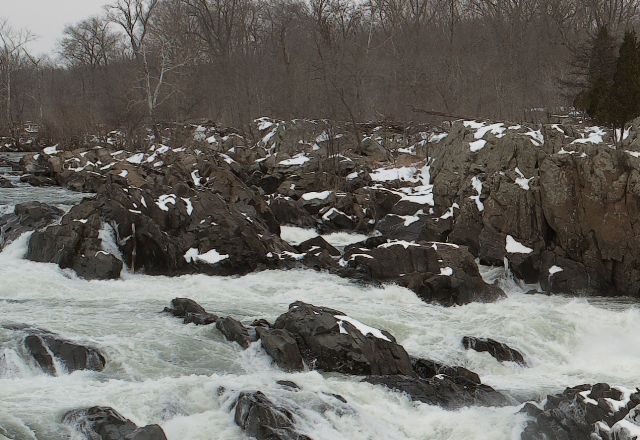
I have noticed several people wondering how the 16mp Fuji X-Trans sensor handles infinity landscape scenes. I think most agree that X-Trans looks fine when the camera "out-resolves" the scene (e.g. portraits) but has more issues when the scene "out-resolves" the camera (e.g. infinity landscape). I thought it would be useful to post a RAW file from a landscape scene and show how different popular RAW converters handle it. Handheld X-Pro1 at ISO200, f5.6, 1/800th with the Fuji 23/1.4 lens.
I tried to roughly match exposure (different RAW processors apply differing default brightness). Sharpening and color noise reduction was set to zero/off for all RAW converters. Each file was then hand-sharpened in Photoshop with "Smart Sharpen" first (0.3 radius, 200-500% amount; sometimes a second round of Smart Sharpen) and a touch of "Reduce Noise" (Preserve Detail 100%, Reduce Color Noise as needed, Sharpen Details 5%).
What did I learn? When you sharpen everything in Photoshop, the different programs look surprisingly similar. ACR8.4 didn't need any color noise reduction. AccuRaw and PhotoNinja needed the least additional sharpening. I'm surprised that Aperture looks the worst.
p.1 #2 · Fujifilm X-Trans Infinity Scene RAW Processing Comparison
Nice test.
Okay I'm surprised how good the ACR looks. ACR/PN seems to have the best balance between the tree detail, branch background detail, and snow/rock foreground. Accuraw seems the worst.
PN has better white balance but ACR seems to bring a lot more hidden detail out in the branches in the background.
p.1 #3 · Fujifilm X-Trans Infinity Scene RAW Processing Comparison
I've been impressed with how PhotoNinja handles these sorts of images. In really complex scenes it can generate a bit of moire, but it's pretty minor...
While you can go overboard with PN's 'detail' slider, bumping that up a few notches on infinity landscapes seems to do wonders.
p.1 #4 · Fujifilm X-Trans Infinity Scene RAW Processing Comparison
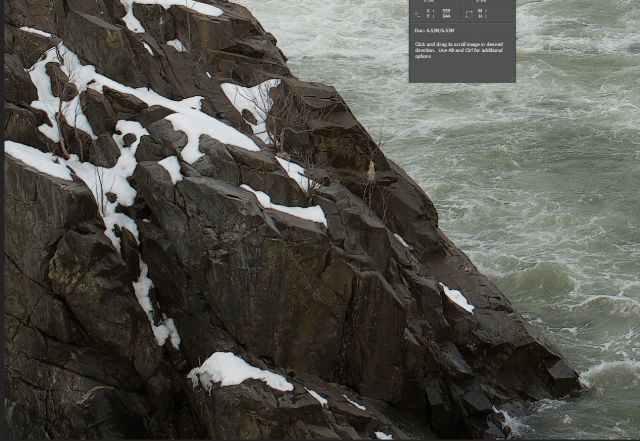
Well, it's also worth a look at some other areas of that scene with ACR. Check out the these rocks for instance (taken from the downloaded, processed jpeg). ACR does it typical thing here by turning them into blobs of smoothed shapes with no detail. This doesn't even look like a real photograph to me.
p.1 #5 · Fujifilm X-Trans Infinity Scene RAW Processing Comparison
Tariq Gibran wrote:
Well, it's also worth a look at some other areas of that scene with ACR. Check out the these rocks for instance (taken from the downloaded, processed jpeg). ACR does it typical thing here by turning them into blobs of smoothed shapes with no detail. This doesn't even look like a real photograph to me.
Absolutely. ACR has an odd "smoothness" that is very prevalent with the default settings. Hitting the ACR file with even more low radius sharpening masks the issue somewhat. You can really use a LOT of low radius sharpening with the ACR files.
p.1 #6 · Fujifilm X-Trans Infinity Scene RAW Processing Comparison
I thought you mentioned you had already sharpened the ACR file after conversion? It was your processed, full size jpeg which that crop was taken from. You mentioned "hand sharpened". Was that just a global application or did you do selective sharpening on specific areas?
p.1 #7 · Fujifilm X-Trans Infinity Scene RAW Processing Comparison
Tariq Gibran wrote:
I thought you mentioned you had already sharpened the ACR file after conversion? It was your processed, full size jpeg which that crop was taken from. You mentioned "hand sharpened". Was that just a global application or did you do selective sharpening on specific areas?
Globally applied. I was trying to roughly match the sharpening between the different converters.
I hit the ACR JPG file with another round of 0.3 radius 500% Smart Sharpen. The file still looks OK, if you like a grittier look. I then cropped to roughly match your crop.
p.1 #9 · Fujifilm X-Trans Infinity Scene RAW Processing Comparison
Dave McGaughey wrote:
Globally applied. I was trying to roughly match the sharpening between the different converters.
I hit the ACR JPG file with another round of 0.3 radius 500% Smart Sharpen. The file still looks OK, if you like a grittier look. I then cropped to roughly match your crop.
p.1 #10 · Fujifilm X-Trans Infinity Scene RAW Processing Comparison
I'm not going near Adobe anything to process my X-T1 RAW images till they get their act together (if they ever do). I'm stickin with PhotoNinja 1.2.3 for now as it is giving me astounding results all around. I doubt even if and or when Lightroom comes up to speed they will equal the overall quality I end up with in PN.
p.1 #12 · Fujifilm X-Trans Infinity Scene RAW Processing Comparison
traveler wrote:
I'm not going near Adobe anything to process my X-T1 RAW images till they get their act together (if they ever do). I'm stickin with PhotoNinja 1.2.3 for now as it is giving me astounding results all around. I doubt even if and or when Lightroom comes up to speed they will equal the overall quality I end up with in PN.
If you compare Photo Ninja defaults vs ACR defaults, Photo Ninja looks a lot better. However, I think my little test shows that much of the terrible ACR X-Trans "look" comes from the default sharpening.
p.1 #15 · Fujifilm X-Trans Infinity Scene RAW Processing Comparison
One can bring ACR relatively close to PN, but PN has the best image balance of all converters even with the defaults. In ACR it helps to take sharpness radius down to 0,6 and details to 35 or 40, sharpening at about 40-70, according to the image. But even then it has more artefacts and less clear detail than PN. I compared the converters extensively.


 that's ok Dave. I'm not fixing what ain't broken. I'm a PN guy for now