loosetrucks wrote:
Just curious, how much clarity and sharpening are you adding in LR? Also what's your technique for ensuring sharpness? E.g. taking a shot, and then refocusing and taking another redundant shot? Chimping and zooming 1:1?
I've AF fine-tuned my 58mm 3 times to each body, and I'm still not comfortable judging sharpness at f/1.4 when I actually out on the shoot. So I tend to stop down at f/2.0 for engagement sessions. If not shoot one at f/1.4 and another at f/2.0 for insurance. It's either that or I just have a bad copy of the 58. Ugh, your photos just prove that it's possible to get the result I'm after wide open!!
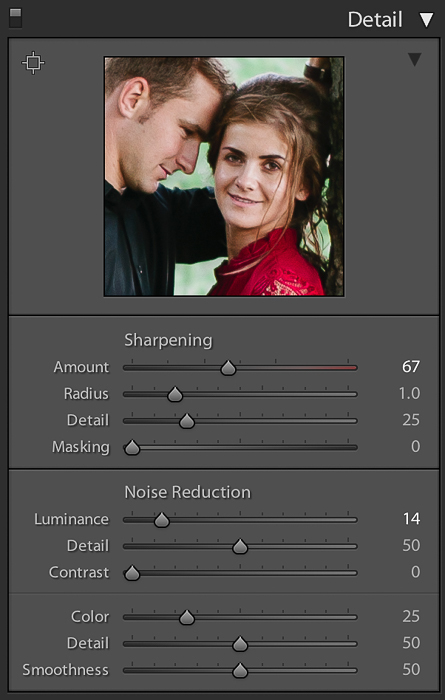
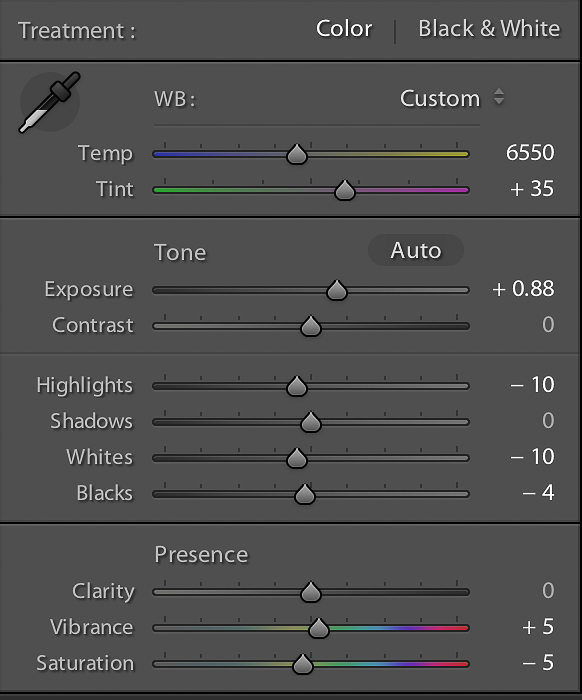
Ok guys, the secret is out! My editing is really nothing special, these are my settings.
And yes, I have fine tuned my 58G on both of my D3s bodies so the lens is fairly accurate.
Elijah wrote:
Ok guys, the secret is out! My editing is really nothing special, these are my settings.
And yes, I have fine tuned my 58G on both of my D3s bodies so the lens is fairly accurate.
Elijah wrote:
Ok guys, the secret is out! My editing is really nothing special, these are my settings.
And yes, I have fine tuned my 58G on both of my D3s bodies so the lens is fairly accurate.
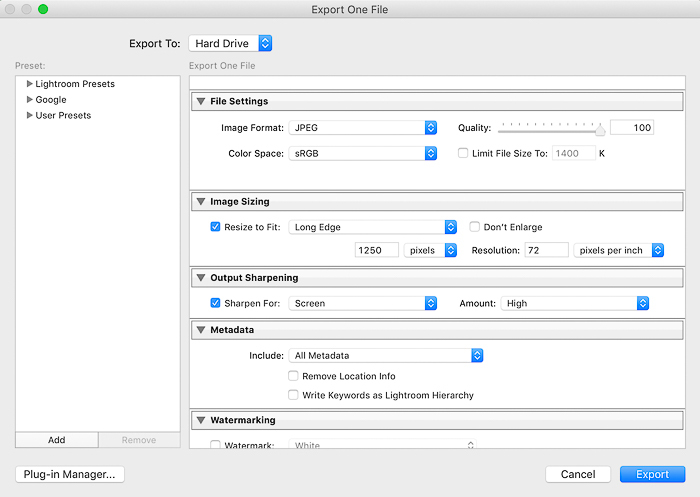
Thanks for sharing man! For the most part, our sharpening settings are the same. I may just try exporting at screen sharpening high. I currently have mine at standard. Also surprised that you have no masking, but equally surprised that your stuff is that detailed without any help from a clarity boost. Regardless your edits are nice and sharp, and a great inspiration of what this lens can put out!
popinvasion wrote:
Surprised your not masking a little.
---------------------------------------------
Hardcore wrote:
+1 My masking for portraits is upwards of 70.
---------------------------------------------
loosetrucks wrote:
Thanks for sharing man! For the most part, our sharpening settings are the same. I may just try exporting at screen sharpening high. I currently have mine at standard. Also surprised that you have no masking, but equally surprised that your stuff is that detailed without any help from a clarity boost. Regardless your edits are nice and sharp, and a great inspiration of what this lens can put out!
Guys, I'm not that great at editing
I don't even know what masking is! lol I'll give it a try at home tonight and see what it does
I just play around with the sliders, develop my own preset and it becomes my own style!
One thing for sure though, I *must* have my image in focus. It could be soft, but it must be in focus.
If it's not, I will do anything and everything to make sure I have a shot that is in focus.
During photo sessions, I chimp a lot!
Once I focus + recompose and the shot is in focus, I don't touch that AF button again, unless me or the subject moves.
@elijah Masking takes the sharpening off non contrasty non hard edges like skin but keeps it on stuff like eye lashes. Sharpened skin especially on women is not super flattering imo. I like your edits just fine. I'm not an editing genius either but I like to play. Also surprised you don't push the contrast, clarity or curves. I have fun with those buttons.
Interesting on your sharpening for screen-do you do this for client edits as well or just when posting online? Curious because I've never sharpened for screen and now wonder what I'm missing.
popinvasion wrote:
@elijah@ Masking takes the sharpening off non contrasty non hard edges like skin but keeps it on stuff like eye lashes. I like your edits just fine. I'm not en editing genius either but I like to play. Also surprised you don't push the contrast, clarity or curves. I have fun with those buttons.
Interesting on your sharpening for screen-do you do this for client edits as well or just when posting online? Curious because I've never sharpened for screen and now wonder what I'm missing.
Export a photo for web with the screen sharpening off, and with it on. Then compare. The difference is pretty significant that you'd be kicking yourself for not doing it sooner.
loosetrucks wrote:
Export a photo for web with the screen sharpening off, and with it on. Then compare. The difference is pretty significant that you'd be kicking yourself for not doing it sooner.
Which is a bummer I've released 25,000 images without at this point!!!!! Will try.
If you downsize images for web display without additional sharpening, they tend to look look 'soft'. There are various things you can do to counteract this - applying 'sharpen for screen' in Lightroom is one way. Another, if you know your way around Photoshop a bit is to use Steve Perry's web-sharpen actions. Resizing is done in two steps, followed by a couple of tweaks in levels and saturation. Each is done in a different layer, so the effect can be altered to taste by adjusting the opacity of the layers. The results are very good.
Increasing the masking in Lightroom sharpening also avoids emphasising grain in shots taken at higher ISOs as. Hold down Alt and increase the masking until you lose the white in the background.


 My editing is really nothing special, these are my settings.