Rodluvan wrote:
Did you use some kind of skin softener here? It looks kind of plastic. In my experience, one needs to apply those very carefully (and would be surprised if a young girl like that needed it at all).
wiseguy010 wrote:
Yes, you are probably right. However these kind of more or less close-up portraits require softening when using this lens on a high MP camera. Otherwise it looks like a moon-landscape even with a person with a very good skin.
Do you know some good (and not too expensive) software for this that you can advise? I hardly make portraits so I never really looked into it.
Not sure what PP software you use. I'm primarily with Lightroom and for portraits I'll brush in some minus clarity and sometimes also reduce saturation a bit. This is primarily because overall aspects of the image may look better with greater structure/clarity, but it tends to exaggerate skin blemishes, therefore selective application of minus clarity counteracts the global use of clarity. My opinion is you want to leave some subtle imperfections so that skin looks believable.
rscheffler wrote:
Not sure what PP software you use. I'm primarily with Lightroom and for portraits I'll brush in some minus clarity and sometimes also reduce saturation a bit. This is primarily because overall aspects of the image may look better with greater structure/clarity, but it tends to exaggerate skin blemishes, therefore selective application of minus clarity counteracts the global use of clarity. My opinion is you want to leave some subtle imperfections so that skin looks believable.
+1
also, use a lens with more spherical aberration.
i don't think any special software is necessary unless you are going for the magazine cover look. anden's child portraits look pretty natural and i'm pretty sure he didn't do any face smoothing. don't worry about what the face looks like at 100% just worry about what it looks like at print size. i would just use a little local contrast or clarity reduction, maybe some extra fill light to light shadows.
wiseguy010 wrote:
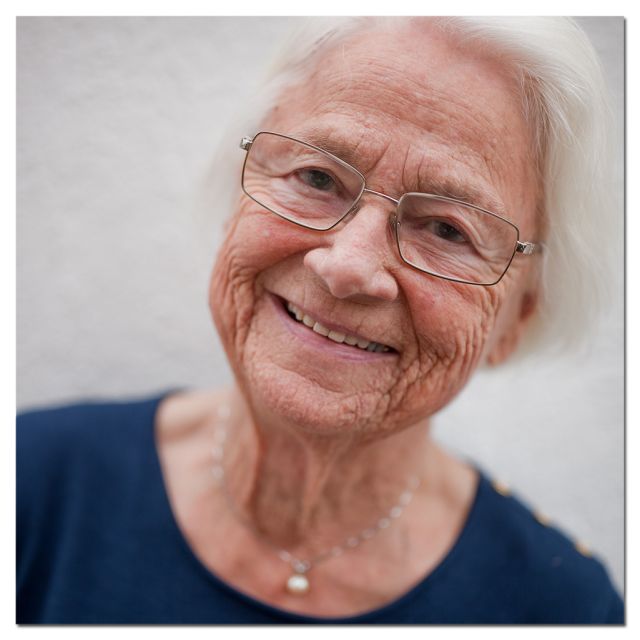
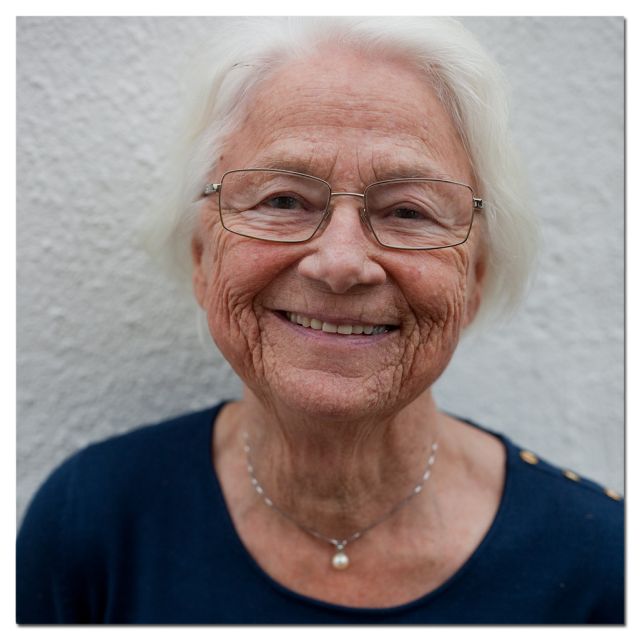
Another portrait @2.8
Yes, you are probably right. However these kind of more or less close-up portraits require softening when using this lens on a high MP camera. Otherwise it looks like a moon-landscape even with a person with a very good skin.
Hm, sorry, but I don't understand how that be any more of a problem than with any moderately sharp lens stopped down unless you actually display or print at or close to maximum resolution (I'm assuming we're talking a 36Mpx non antialising filter camera). I'm guessing any present skin anomalies in a downscaled photo are more apparent due to software sharpening, that can cause unpleasant artefacts, than lens resolution.
Do you know some good (and not too expensive) software for this that you can advise? I hardly make portraits so I never really looked into it.
Not really, or rather, I don't remember the name of the software I occasionally use (you can also make one yourself using different tools in combination), but a tip is layering the skin-softened version two-fold; one acting on colour channel and one luminance then partially add them according to need. My rule of thumb is, when in doubt - add less! Imo, there's nothing worse or more embarrassing than releasing a photo in which such editing is apparent. Both for me and model.
Would it be possible to see the original photo (or the same, but without the skin-softener)?
I used Topaz Clean a few times but that also softens the parts that don't belong to the skin. For this picture I used Nik Color Efex Pro with the option "dynamic skin softener". I can't remember the exact settings.
wiseguy010 wrote:
This is the original one without the softening.
Thanks!
but ... her skin is close to flawless as is (actually, even that looks enhanced!). anyway, on a skin like that I would never apply a general softening, but use spot tool to take out specific blemishes, and if need be, reduce dark areas, perhaps under eyes and nose, using specific tools and layers. no way in a million years does the 'edited' version look better to my eye.
I'm a bit fearful that from 2005 and forward future generations will not have an 'honest' portrait to look back on, and the signal that sends to young girls and boys can be devastating.
sorry for the 'preaching', and thanks for the original.
but ... her skin is close to flawless as is (actually, even that looks enhanced!). anyway, on a skin like that I would never apply a general softening, but use spot tool to take out specific blemishes, and if need be, reduce dark areas, perhaps under eyes and nose, using specific tools and layers. no way in a million years does the 'edited' version look better to my eye.
I'm a bit fearful that from 2005 and forward future generations will not have an 'honest' portrait to look back on, and the signal that sends to young girls and boys can be devastating.
sorry for the 'preaching', and thanks for the original.
"but ... her skin is close to flawless as is (actually, even that looks enhanced!). anyway, on a skin like that I would never apply a general softening, but use spot tool to take out specific blemishes, and if need be, reduce dark areas, perhaps under eyes and nose, using specific tools and layers. no way in a million years does the 'edited' version look better to my eye.
I'm a bit fearful that from 2005 and forward future generations will not have an 'honest' portrait to look back on, and the signal that sends to young girls and boys can be devastating."
* * *
Man, I finally pulled that link up and I couldn't agree more with what Rodluvan says. Softening took away from a beautiful image. I see worse in various forum threads: a lot of full time pros (it hurts to call them that) shoot seniors and twenty-something portraits that are over compensated with reflectors that give the subjects a different (apparent) WB than the surrounding environment, coupled with softening twice or more as much as was done in this case. The results look like translucent mannequins. Sick-looking translucent mannequins pasted into a natural scene. Rodluvan's added point about "honest" portraits may play into the very reason unnecessary softening was used here; nowadays many people have trained themselves on plastic looking portraits.
Edit: This pushed my buttons. I may have to take another pill.... I should have added to over-softening and whacky reflector light the "pro" obvious encouragement for young women to bury their faces beneath make up, especially on the eyes. The end result of this combination of bad ideas are outdoor portraits that look like flesh colored light bulbs with lips and Mr. Potato Head (I'm that old) eyes glued on them. And they charge money for this.
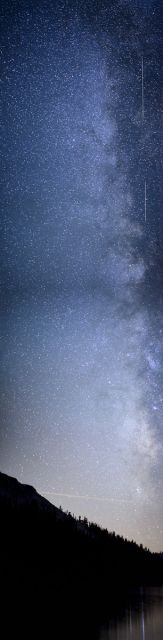
Tried my first milky way panorama test shots stopping off at a lake in Yosemite on my way back home from eastern sierras. The shots stitched together were all shot wide open at iso 3200. But i should have used a faster shutter speed as there are slight star trails, and then used iso 6400.
I only took shots in one single column because i was short on time and this was just a test.
I will shoot a better one soon. This lens is sharp wide open across the frame.
Well astrophotography is probably one of the toughest tests for a fast lens. This lens is in a class by itself for its sharpness across the frame wide open and lack of coma and clarity.
Point taken, Wayne. I know nothing about astrophotography except that I like how it looks.
For the price of the lens, I fully expected to see Noctilux uniqueness in its rendering. I just don't, mostly any way. By contrast, some of the shots from the Otus 85 that I have seen seem to have that otherworldly look. There are just so many really nice 50s, many made by Zeiss, that a real breakthrough in look is perhaps hard to achieve.
Just my opinion. Also, to clarify, I was not trying to say that I thought Anden's were the only nice photos posted here. Not at all. Instead, I felt that several of his were ones that I was sure would be difficult to get with any other 50 I had used. That was all that I was trying to say.
The Noctilux is a character lens, this is not that kind of lens, but one as optically perfect and with as few aberrations as possible, to let the motive stand on its own, and with very neutral boke.