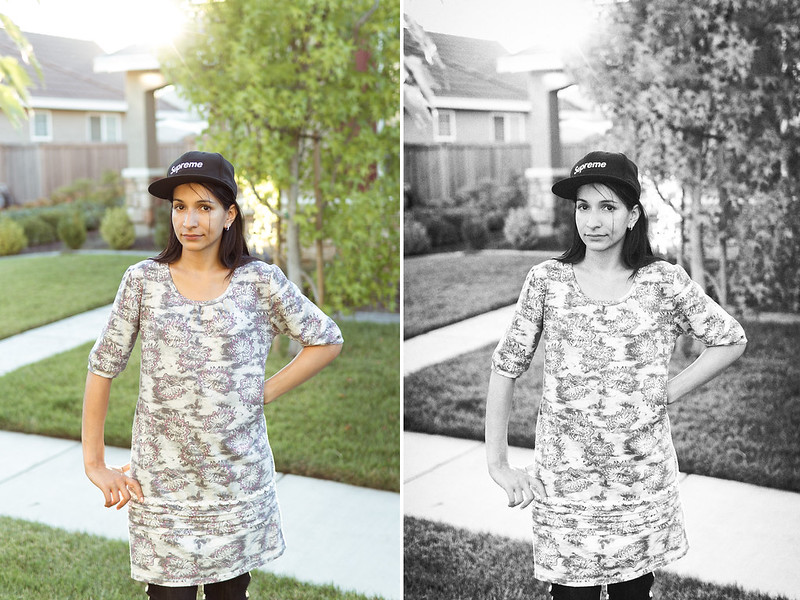
I've always enjoyed B&W, but never really made an effort in having a workflow for it. Just wanted some critique of the B&W conversion itself. I was going for the B&W film look and really my first real attempt of a B&W portrait. The photo itself is more of a snapshot of my wife so don't have to tear me up on that part in terms of composition, etc. Next time I'll choose a better photo to convert
I'm entertaining the idea of possibly getting my feet wet in doing portraits, engagement/couples within the next year so just trying to work on my editing in case I want to turn some into B&W.
So like I mentioned just looking for critique in terms of the B&W conversion. Too much grain? Skin tones off? I only have a uncalibrated laptop currently so it sucks to do PP work on this.
All in all, it's a pretty solid conversion. I think grain definitely adds to the film feel, but I would go a touch lighter here. The grain is a bit heavy. The vignetting works as well, though it's a little heavier on the bottom right half of the frame than the bottom left.
I don't know enough to comment on the skin tones, but it looks solid to me. A little dodging might help bring her face out, though, relative to the bright white dress.
It would be helpful to know how the conversion was done and other plug-ins used. It also might be instructive if you would post a color version so others can illustrate their conversion technique, if for no other reason than viewing alternatives.
Good detail, from what I can see, in dark areas of her hair and hat.
A nit list, and I am being a real butt and uber-picky with this:
blocked up area above her left shoulder - distraction
blocked-up area at junction of porch roof and post - distraction
lack of tonal values and any hint of detail in sidewalk
bright edges of her forearms is unnatural
outer edges of sleeves (bright) is unnatural - if for no other reason than they violate the laws of physics
her jumper lacks tonal gradation - I suspect some exists from how fabrics hangs/drapes across body - and thus appears flat, lacking definition
the blur lacks perspective/gradation looking instead like a painted backdrop
and finally, not related to conversion -too much headroom and I'm not sure about cutting her off at the knees (I cannot remember whether it best to do so or if mid-limb is preferable).
Some of the above is probably collateral damage of sharpening - it is important when and how sharpening is done - some conversion process amplify the negative effects.
I cannot comment on the contrast range since I tend toward softer contrast than other forum readers - that which makes the subject(s) happy is the one to use.
weissj - Yeah the grain may be too much, but difficult to say for me since I have no vision of the ideal amount of grain I'm looking for. I guess in time and trial/error I will hopefully find something suitable for my liking. Slightly less vignetting is probably a good idea.
Bob - Thanks for mentioning all of that. I will note that on any future shots I post. RAW file in LR3 with little basic tweaking on WB, exposure, sharpening and then color TIFF edit in SEP2. Sent back to LR3 to save as jpeg with no further adjustments. I will post the color version prior to being sent to SEP2 as a comparison.
As for the shot itself, this was essentially just a backlight snapshot so I definitely agree this is a poor composed shot with a poor choice of background. I wanted to see how my Sigma 30 AF reacted with the flare. The backlight shot is the cause of the bright edges. A little off topic from the processing critique but any tips on what I should avoid in the future when taking backlight portraits?
I didn't really think about the tonal range of the sidewalk. I'll keep that in mind and use the control points as needed as I think it's a little too bright and lack detail.
Also you mentioned sharpening. That's another area I'm working on improving. For this I used LR3 and did something around 80 amount, 1.6, 5 detail, 75 masking. Maybe to uch? Maybe some of it also had to do with too much structure used in SEP2?
Anyway I appreciate your replies. I love to learn and improve so thanks!
Also note in the future if I do decide to do portraits/couples, etc I may consider purchasing VSCO presets for more quickness. Hopefully at that point I'll have a calibrated IPS monitor and a new faster computer.
Compared to actual B&W film and silver prints the challenge with digital is capturing a full range of tone in the color original.
B&W film with "normal" development can record a 10-stop scene with detail everywhere. By using the Zone System, which adjusts development per scene range it's possible to render a full range of tone and detail in nearly any outdoor lighting conditions. By comparison digital, with the exception of overcast or foggy days, can't record the full range. If exposure is based on recording highlights accurately everything else winds up recorded darker than perceived by eye.
I use Levels in CS5 to evaluate tonal range in images. The histogram on yours shows a gap on the left which indicates no dark tonal values. That's usually not the case at capture, so I suspect you may have pushed the shadows lighter in PP.
Holding down the alt key I pushed the shadow slider right to 15 until I saw the darker tones clipping giving it a Max Black a well executed B&W should have in areas where there is no detail.
The middle slider in Levels alters linearity in the middle of the tonal range by making middle tones lighter or darker. When evaluating I move it right and left from center and see if it improves the rendering. Here I found making the midtones a bit darker improved it for me.
When I darkened the shadows some of the darker ones got blocked. A technique I use to selectively lighten and darken areas is applying adjustment layers. Here I used screen to pull more detail out the hair and other blocked shadows and multiply to darken the overexposed highlights. The mask thumbnails show where each was applied over the image.
Given the fact the sensor can't record the full range and will render midtones too dark if highlights are exposed optimally it's become pretty much par for the course with digital outdoors to selectively allow some highlight to blow out at capture. A strategy to keep those blown highlights from becoming a distraction is to crop them out if possible so that's what I did below in the final edit that contains all the adjustments shown above.
The tonal range seen around a photo will influence the perception of the photo. I frequently add black mats to digital shots because they usually lack shadow detail. Since the brain equates lighter with detail in a photo the perceptional "anchor" of the black mat creates an illusion that any lighter areas in the photo have detail, even if they don't. But that only works if the shadow areas are small and insignificant.
There are workarounds to the short tonal range of the digital sensor. One is to use flash to change the range in the foreground to match the range of the sensor. For example this is an ambient only exposure in sunny backlight pegged for detail in the sunlit highlights..
The scene range exceeds the sensor so everything that is shaded gets rendered darker than normal. Here's a shot assisted with dual flash, key 45° to the right, fill on a bracket over the camera:
The flash is able to render the full range in the foreground but the background shadows remain similar to the ambient only shot. The remedy? The same as in your shot, crop out the parts of the scene that don't look normal:
Is that flash or direct sunlight? Difficult to tell when the flash is used angles similar to the angle of the sun.
Here's a similar backlit flash assisted color shot of mine I converted starting with a full range of detail in the color shot, which was taken in backlight from the sun, exposed under clipping on the jacket and a single flash on bracket in front to create the highlight modeling on the face facing the skylight:
The conversion was done with the B&W action that came with CS5 with adjustment of the middle slider in Levels.
The take away here is to try to record the full range in your color original. Can you post a copy of your shot SOOC in color so we can see what you started with?
oxman - I'll take a peak of the kelbytraining vids and may consider watching a few.
cgardner - thanks for the extensive reply. Yes I pushed up the shadow point slightly using curves in SEP2. It's just something I've been playing with lately...I'm still on the fence if I like the look of this or not and if it's just something more trendy...I'll keep in mind about keeping max black side of the tonal range. I'm usually always staring at the histogram, but didn't pay attention much while editing in SEP2. I'll keep in mind the tonal range and using levels as needed for any changes.
Again thanks everyone for your replies. I'm sure I'll have more improvements next time and my awareness continues to grow.
So an example of many-ways-to-skin-a-cat, Chuck took one approach, I took one entirely different - used the History Brush combined with Blend Modes {Multiply, Screen, Color Burn} and low opacity (5 < Opacity < 45), and soft brush in CS6 to selectively lighten and darken areas to arrive at basically a similar result determined by subjective judgement (my 'eye'). Not fine-tuned brush work but you get the idea.
George DeWolfe, B&W Printing - Creating The Digital Master Print, ~$25 Amazon, teaches the entire process - conversion through print - using LR3 plus CS4 for very fine work (cloning, healing, hi-lighting edges, etc.). I've found LR BW conversions better suited for my use than SEPro2 - I get over stimulated with sliders, CPs, structure, etc resulting in something looking as if it'd been done while on steroids. SEPro2 does, in some instances serve me better but most often it is LR4 & CS6. As already pointed out, there are many fine BW conversion tutorials - find the technique and workflow that works best for you.
And I see what you mean about the flare and backlight.
If you object to my doing the re-work, I will remove it.
To be honest, I find the "grain" effect a poor and unappealing imitation of film grain. There are many tutorials on the web about adding film grain. To my eyes, most of them produce a poor result that looks like digital noise rather than film grain. When I'm serious about adding a film grain look, I use an image of actual film grain and combine it as an overlay. There are a number of sites that discuss this approach. An arbitrary google grab to explain the method:
Bob - Yes I agree many ways to skin a cat, just got to find my way!
Aunti - Good idea I'll check out that link, thanks!
Here is the before and after. Just some exposure adjustments, curves, desat, sharpening prior to sending it to SEP2. The more I look at my conversion the more things I can nitpick at, but I could do that with almost every photo I ever took/processed...


 Next time I'll choose a better photo to convert