Merry Christmas, everyone! I've done a lot more lurking than taking photos lately, but here is one of my grandson from today. He's eating cookies as fast as he can decorate them.
I know I heard some talk earlier about "Luminar" software here
Does anyone use it ? Let me know It's only $59 with coupon code and now has libraries in it for storing photos in albums
I won't pay Adobe a monthly fee
Reagan wrote:
I know I heard some talk earlier about "Luminar" software here
Does anyone use it ? Let me know It's only $59 with coupon code and now has libraries in it for storing photos in albums
I won't pay Adobe a monthly fee
Reagan
Reagan,
I have it and I'm undecided on it. It's pretty good overall, but the limited output options are frustrating to me. You can't save settings like you can with Lightroom. Every time you save a photo, you have to go through and enter all of the output settings such as size, quality, etc.
I'm actually using On1 Photo Raw 2019 for most editing. It does a great job and has better output options. It's still not as refined as LR, but it's much better than Luminar 3.
I sometimes like to have several different versions of a photo with different edits. On1 allows virtual copies just like LR. Luminar doesn't yet have this function.
I just dowloaded ON1 2019.1 and I’m going to give LR migraties tool a try. I have over 170K images in my LR catalog and it would be great if I could migratie that to ON1. So far I like it. It looks like LR + a lot of extra’s like Layers and all kind of filters. The DAM functionaliteit is still poor, but workable for me. And like Reagan; no Adobe subscription!
spoupard wrote:
Reagan,
I have it and I'm undecided on it. It's pretty good overall, but the limited output options are frustrating to me. You can't save settings like you can with Lightroom. Every time you save a photo, you have to go through and enter all of the output settings such as size, quality, etc.
I'm actually using On1 Photo Raw 2019 for most editing. It does a great job and has better output options. It's still not as refined as LR, but it's much better than Luminar 3.
I sometimes like to have several different versions of a photo with different edits. On1 allows virtual copies just like LR. Luminar doesn't yet have this function....Show more →
After using Lightroom with the Z6 the last week and how off the RAW conversion is, I am looking at a move. Stumbling through NX-D for RAW right now since it has all the camera picture control options built in, but I just can't deal with that interface.
I have ON1 2018 and will give 2019 a trial run. I just wish there was an equal plugin like LensTagger for LR. I really use that tool for my "keepers" for future reference plus the ability to add information when shooting/scanning film.
Still looking. Please let us know how the migration goes.
George
Chris Dees wrote:
I just dowloaded ON1 2019.1 and I’m going to give LR migraties tool a try. I have over 170K images in my LR catalog and it would be great if I could migratie that to ON1. So far I like it. It looks like LR + a lot of extra’s like Layers and all kind of filters. The DAM functionaliteit is still poor, but workable for me. And like Reagan; no Adobe subscription!
Does ON1 have library module or something similar for storing photos
I have started playing around with "Photos" the default photo editing software that came with my iMac
It accepts NEF's and editing
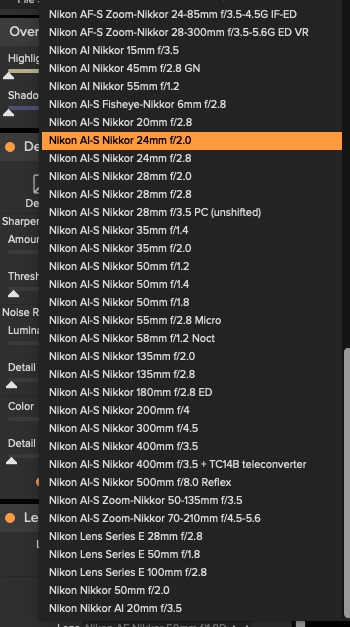
Throwing this out here since some of us are perhaps looking at ON1. Here is a list of built in Nikkor manual focus lens profiles that are in the software. At least is in 2018.5 version. I haven't downloaded the 2019.1 trial yet.
gbohannon wrote:
Throwing this out here since some of us are perhaps looking at ON1. Here is a list of built in Nikkor manual focus lens profiles that are in the software. At least is in 2018.5 version. I haven't downloaded the 2019.1 trial yet.
Reagan wrote:
Does ON1 have library module or something similar for storing photos
I have started playing around with "Photos" the default photo editing software that came with my iMac
It accepts NEF's and editing
Reagan
On1 2019 has some DAM functions. It has a catalog and you can add keywords to your images.
It works a lot like LR with picks and rejects (called different), stars, colours, albums.
It does not have a print, book or web module but it does focus stacking and layers.
I'll use the whole 30 days for the trial.
There're a lot of instruction videos on their website.
Chris Dees wrote:
On1 2019 has some DAM functions. It has a catalog and you can add keywords to your images.
It works a lot like LR with picks and rejects (called different), stars, colours, albums.
It does not have a print, book or web module but it does focus stacking and layers.
I'll use the whole 30 days for the trial.
There're a lot of instruction videos on their website.
I’m having a photography crisis. I’m actually thinking of selling off my kit and getting a basic something with a zoom. Something I can setup to spit out jpegs that I don’t have to edit.
I like the process for the most part, but I have damn near zero time to edit. I’m also tired of being the photographer for all family events. Then I have to deal with people that think they know how to do the shot better and get impatient.
Chris Dees wrote:
On1 2019 has some DAM functions. It has a catalog and you can add keywords to your images.
It works a lot like LR with picks and rejects (called different), stars, colours, albums.
It does not have a print, book or web module but it does focus stacking and layers.
I'll use the whole 30 days for the trial.
There're a lot of instruction videos on their website.
Can't On1 also import your LR catalog with all adjustments and ratings intact?