fredmiranda.com
Login

Moderated by: Fred Miranda
  New fredmiranda.com Mobile Site
  New Feature: SMS Notification alert
  New Feature: Buy & Sell Watchlist
  

FM Forums | Leica & Alternative Gear | Join Upload & Sell

1       2       3              2751              end
  

Leica M/X/T/S/Q/CL/SL Picture Thread


1bwana1
Offline
• • • • • •
Upload & Sell: On
p.2752 #1 · Leica M/X/T/S/Q/CL/SL Picture Thread


Nifty Fifty wrote:
Oh, I see — yes, then we’re on the same page. In my opinion, the scan shows an underexposed negative. It’s hard to determine the exact degree from a scan, but basically, your digital camera (you used that to scan, right?) always exposes in a way that makes the subject average out to a middle gray; that’s why the overall brightness of the subject looks reasonably correct. But that’s misleading, because it’s being rendered too bright—which you can tell by the fact that black appears as dark gray rather than true black. To see if your negative is exposed
...Show more

Thanks, I will explore this issue. I want the best negative exposure when taking the shot, and the best scan possible. So much to learn about accomplishing that.


Jun 18, 2026 at 01:16 PM
1bwana1
Offline
• • • • • •
Upload & Sell: On
p.2752 #2 · Leica M/X/T/S/Q/CL/SL Picture Thread


madNbad wrote:
High contrast scenes can fool the meter on the M6. It reads the brightest area and underexposes the shadows. Take a reading from both the darkest and the brightest areas and split the difference, It is true you can fix a lot of things in post processing but the goal is a correctly exposed negative that needs little or no adjustment.

Love the subject matter!


Thanks for taking the time to offer constructive explanations. I will try to learn more about these issues with film. So different from digital where I usually like to underexpose a 1/3 to 1/2 stop.

Hard to take two reading when I am shooting spontaneous street images. Especially in very high contrast situations which I often seek out for B&W images.


Jun 18, 2026 at 01:20 PM
Nifty Fifty
Offline
• • •
Upload & Sell: Off
p.2752 #3 · Leica M/X/T/S/Q/CL/SL Picture Thread


1bwana1 wrote:
I want the best negative exposure when taking the shot, and the best scan possible.

Ideally, you should start by limiting yourself to just one type of film, one developer, one camera, and one light meter, and then fine-tune this combination. First, you need to determine the film's actual speed based on the specific development method and developer you are using; this is assessed by looking at shadow detail. You then adjust the development time—and consequently the contrast—accordingly. It is best to get hold of literature from the heyday of analog photography and try to understand the Zone System, as it is immensely helpful for grasping the underlying principles. As for more recent literature, I would recommend "Way Beyond Monochrome" by Ralph W. Lambrecht and Chris Woodhouse.


Jun 18, 2026 at 01:32 PM
Nifty Fifty
Offline
• • •
Upload & Sell: Off
p.2752 #4 · Leica M/X/T/S/Q/CL/SL Picture Thread


1bwana1 wrote:
So different from digital where I usually like to underexpose a 1/3 to 1/2 stop.

Of course, precise exposure is the ultimate goal, but when in doubt, it is better to overexpose black-and-white negative film, develop it for a slightly shorter time as a precaution, and boost the contrast digitally later on. Underexposure is the worst option. Naturally, there are always exceptions, but that is not what we are dealing with here.


Jun 18, 2026 at 01:38 PM
Desmolicious
Offline
• • • • • • •
Upload & Sell: Off
p.2752 #5 · Leica M/X/T/S/Q/CL/SL Picture Thread


1bwana1 wrote:
Thanks for taking the time to offer constructive explanations. I will try to learn more about these issues with film. So different from digital where I usually like to underexpose a 1/3 to 1/2 stop.

Hard to take two reading when I am shooting spontaneous street images. Especially in very high contrast situations which I often seek out for B&W images.


Meter the opposite the way you shoot digital. With negative film always err to the side of overexposure if you are unsure.
Re. the scanning, I have found that I get much better 'scanned' results if I get as much of the film image on the sensor as possible. i.e. no film rebate, no borders. Use that 1:1 reproduction ratio to just capture the film image.

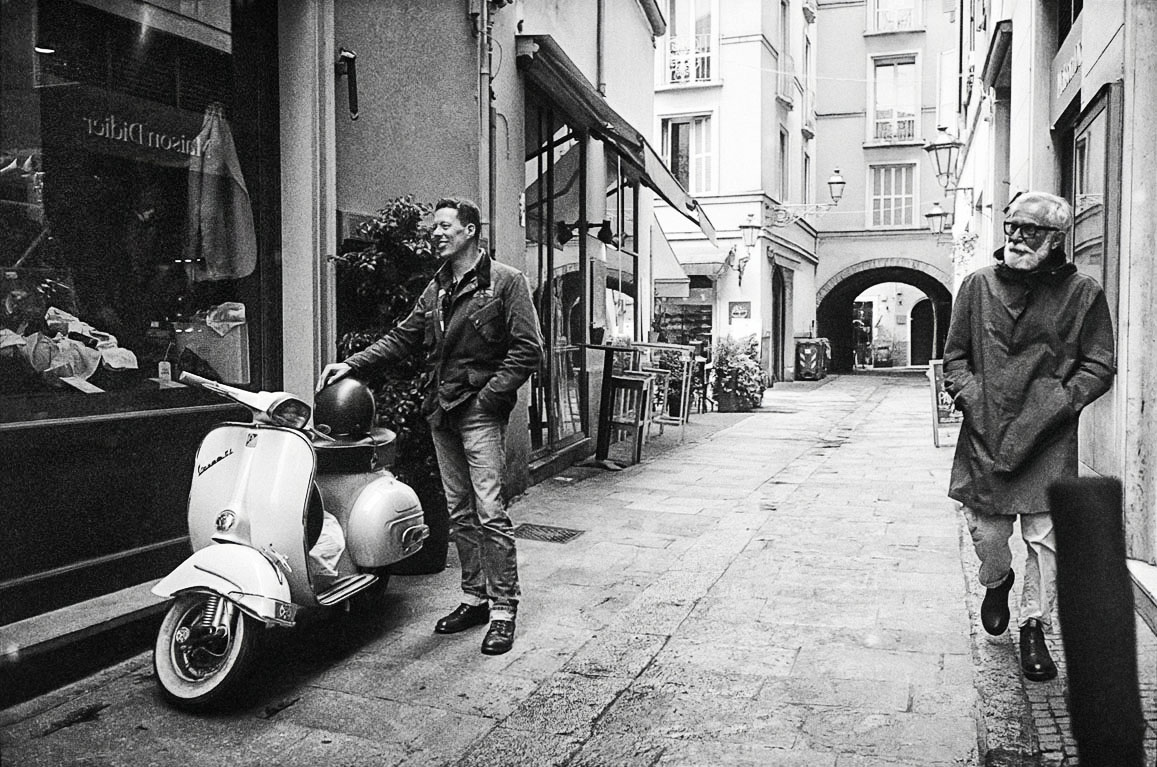
Also think about the Sunny F16 rule. Using HP5 (iso 400 film) you would be at 1/500 sec and f5.6 in the conditions you show that indicate a faint shadow under the Vespa. So you can have you camera's exposure prepped and only need to make fine exposure adjustments (if at all) when you bring the camera up to the eye and meter the scene.


Jun 18, 2026 at 02:46 PM


Search in Used Dept. 

pmeheut
Offline
• • •
Upload & Sell: On
p.2752 #6 · Leica M/X/T/S/Q/CL/SL Picture Thread


1bwana1 wrote:
Thanks. Probably not the scans, but exposure and processing is not there yet I agree. Just learning film.

If you are just learning, I understand: this is a steep curve.

Here is one possible post-processing. I am not crazy about it either but the low resolution makes it harder.


Jun 18, 2026 at 03:42 PM
Desmolicious
Offline
• • • • • • •
Upload & Sell: Off
p.2752 #7 · Leica M/X/T/S/Q/CL/SL Picture Thread


Also… i think you are just using manual inversions to convert from negative to positive?

While that can work ok, I have found that I get much better results using negativelabpro (which has to be used with Lightroom).


Jun 18, 2026 at 04:55 PM
pmeheut
Offline
• • •
Upload & Sell: On
p.2752 #8 · Leica M/X/T/S/Q/CL/SL Picture Thread


Desmolicious wrote:
While that can work ok, I have found that I get much better results using negativelabpro (which has to be used with Lightroom).

Yes, they are many ways to work. My workflow is not automatic, I have a set of tools I can use and I adapt depending on the negative.

0. Scan: whatever I want (favorite in Minolta 5400 II followed by LS 5000 followed by repro using the M11 and a excellent lens)
Scan output: something grey with all the information in 16 bits color mode. No inversion.

1. Noise Reduction First

I always deal with noise first because it has a major impact on both contrast and perceived detail.

To do this, I convert the image to a Smart Object, edit its contents, duplicate the layer, and apply Topaz DeNoise AI or Photo AI to reduce the noise a lot to the point where the image is too clean.

I then reduce the opacity of the denoised layer to somewhere between 50% and 75% in order to retain some film grain. After saving, I return to the main image.

The exact opacity depends on the image and the intended output:

* Around 67% works well for screen viewing.
* For printing, especially when the scan shows coarse “salt-and-pepper” grain, 75% often gives better results.

The advantage of this approach is that the Smart Object’s underlying .psb file contains a simple two-layer grain-management setup, while all subsequent adjustments remain as Smart Filters in the main .psd. It allows the use of a powerful noise-reduction algorithm without introducing artifacts or creating a complex stack of layers, while still preserving the texture and character of the film.

2. Handling Difficult Areas

In some images, Topaz DeNoise/Photo AI can produce artifacts in smooth, low-detail areas.

When this happens, I either:

* Use a less aggressive denoising mode or
* Process different parts of the image separately.

For localized treatment, I make separate selections, place each area on its own layer, apply the most appropriate noise reduction settings to each region, and then merge the denoised layers.

It is also possible to selectively restore grain. To do this:

1. Select the denoised layer.
2. Create a layer mask using the Add Layer Mask button.
3. Alt-click the mask to view it.
4. Invert the mask.
5. Use the Magic Wand to select the black area.
6. Fill it with a gray value (for example 90% gray).

This partially reveals the denoised layer and allows a controlled amount of grain to be reintroduced into specific regions.

3. Global Tonal Adjustments

Next:

1. Invert the image if necessary.
2. Set the black and white points using Levels.
3. Add a Hue/Saturation adjustment layer and reduce saturation to zero.
4. Flatten the layers.

I then perform local tonal corrections using curves, adjusting different areas of the image according to the desired final rendering.

Whenever possible, I use Photoshop’s AI-powered selection tools rather than the Magic Wand, as they generally produce much cleaner and more accurate selections.

4. Sharpening

A moderate sharpening pass such as:

* Amount 20–30%, Radius 2 px

can add some punch.

For stronger detail enhancement, settings around:

* Amount 100%, Radius 2 px, Threshold 5

can work well, although they also make grain more prominent.

For sharpening, I generally prefer Topaz Sharpen AI using the Too Soft, Very Noisy model. It often produces better results than Photoshop’s sharpening tools, although it can occasionally introduce artifacts. In those cases, a more conventional sharpening pass such as 80/2/5 may be preferable.

5. Silver Efex

I also use Silver Efex when appropriate. The image needs to be in color mode.

It can be applied either:

* Early in the workflow, with a light touch, or
* Near the end for fine-tuning, particularly for local contrast and structure adjustments.

Used carefully, it can add subtle refinements without compromising the natural look of the scan.


Jun 18, 2026 at 08:45 PM
1bwana1
Offline
• • • • • •
Upload & Sell: On
p.2752 #9 · Leica M/X/T/S/Q/CL/SL Picture Thread


Desmolicious wrote:
Also… i think you are just using manual inversions to convert from negative to positive?

While that can work ok, I have found that I get much better results using negativelabpro (which has to be used with Lightroom).


Does negative lab pro preserve the file as a dng RAW or must it be converted to tiff or some other format?


Jun 18, 2026 at 10:57 PM
1       2       3              2751              end


FM Forums | Leica & Alternative Gear | Join Upload & Sell

1       2       3              2751              end


Welcome back
Log in to your account