This topic is in the 2009 archive. You can read it and like its posts here. It is read only.
Archive 20097D Hot Pixels ... and something wierd
p.1 #17D Hot Pixels ... and something wierd
So I shot some long exposure, high-ISO frames to see if any hot pixels on my brand spanking new 7D. I found three ... but figure with 18 million of 'em, that's not too shabby. They start being visible at ISO 200/400 with a 30 second exposure. One thing confusing to me is two of the three are the (typical?) red dot/smear ... but one is a more distinct white cross - must be some sort of other sensor (channel readout?) defect - would be curious if anybody has any ideas?
Here's a full set of Canon 7D Hot Pixel images and below is a resize of the full image and then a 10x magnification with the three hot pixels overlaid in 1-2-3 sequence.


Here's a full set of Canon 7D Hot Pixel images and below is a resize of the full image and then a 10x magnification with the three hot pixels overlaid in 1-2-3 sequence.
Oct 13, 2009 at 06:58 PM
p.1 #27D Hot Pixels ... and something wierd
Do you have any in-camera NR turned on? I get hot pixels with the Mark III at high ISOs as well as low ISO long exposures. A while ago I did some quick tests and the long exposure hot pixels pretty much cleared up if long exposure NR was turned on. But generally I leave it and high ISO NR off due to the hit on the buffer.
Oct 13, 2009 at 07:06 PM
p.1 #37D Hot Pixels ... and something wierd
I run mostly default settings on the 7D - in this specific case, high ISO NR is turned ON, but long exposure noise reduction is turned OFF. The locations of the hot pixel was exactly the same - see the sequence of images on my website.
Again, it's not that big of deal (again, with 18 million pixels, hard not to have a few of these), but I am curious why that white dot looks different than the other two.
Again, it's not that big of deal (again, with 18 million pixels, hard not to have a few of these), but I am curious why that white dot looks different than the other two.
Oct 13, 2009 at 08:46 PM
p.1 #47D Hot Pixels ... and something wierd
That X white pixel is something I've never seen on older canon cameras, but on newer ones like 5D Mark II and 50D and 7D (all Digic4 coincidentally) I have seen them
The red ones are defective pixels which can be recalibrated by Canon
The red ones are defective pixels which can be recalibrated by Canon
Oct 14, 2009 at 01:00 AM
p.1 #67D Hot Pixels ... and something wierd
stuck pixels = stuck at 255 value regardless of exposure/ISO (white pixels - looks like a white cross when unzoomed)
dead pixels = stuck at 0 value regardless of exposure/ISO (black pixels)
hot pixels = depending on the exposure, but usually at higher ISO's (red, blue and/or green pixels)
Adobe software takes care of them automatically for RAW.
Canon can map them out for you.
Sometimes they dissappear if you run the sensor cleaning cycle for about one minute (IIRC).
Oct 14, 2009 at 01:16 AM

p.1 #77D Hot Pixels ... and something wierd
Daan B wrote:
Sometimes they dissappear if you run the sensor cleaning cycle for about one minute (IIRC).
That is exactly what fixed the stuck pixel on my 7D.
Sometimes they dissappear if you run the sensor cleaning cycle for about one minute (IIRC).
That is exactly what fixed the stuck pixel on my 7D.
Oct 14, 2009 at 09:36 AM
p.1 #87D Hot Pixels ... and something wierd
FYI: I had tried the "sensor cleaning approach" before (and did again), but didn't work. Also, if you turn on long exposure noise reduction, I did confirm it takes care of these.
Here's a composite image showing what the hot pixels look like at various ISO's - that white one sounds like a "stuck" one per Daan's comments, but note that it changes with exposure, so something else is going on.
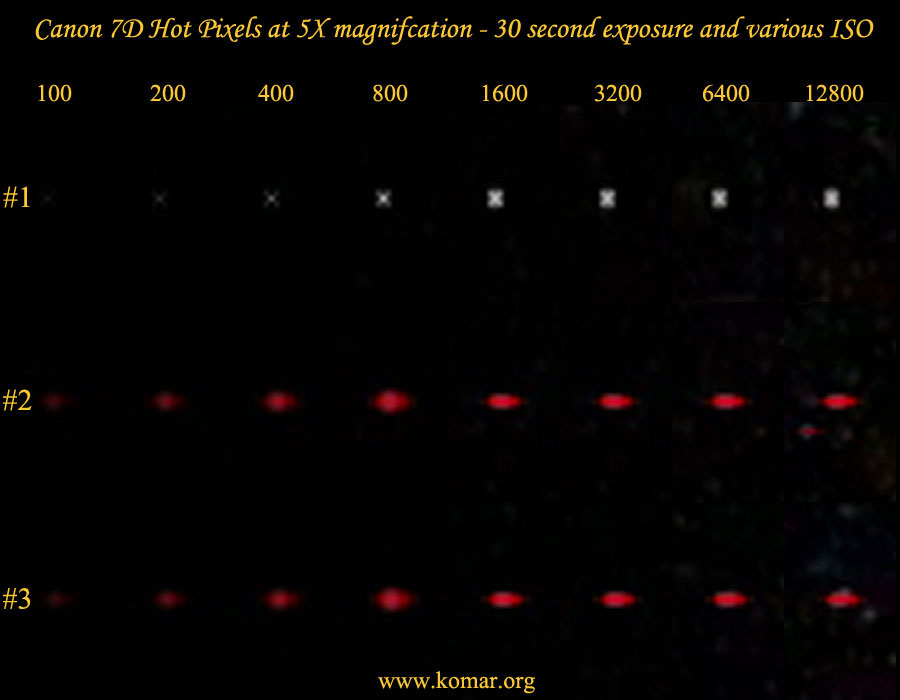
Here's a composite image showing what the hot pixels look like at various ISO's - that white one sounds like a "stuck" one per Daan's comments, but note that it changes with exposure, so something else is going on.
Oct 14, 2009 at 11:02 AM
p.1 #97D Hot Pixels ... and something wierd
Alek Komarnits wrote:
Here's a composite image showing what the hot pixels look like at various ISO's - that white one sounds like a "stuck" one per Daan's comments, but note that it changes with exposure, so something else is going on.
The brightness of the stuck pixel varies with the sensitivity. That's normal.
Here's a composite image showing what the hot pixels look like at various ISO's - that white one sounds like a "stuck" one per Daan's comments, but note that it changes with exposure, so something else is going on.
The brightness of the stuck pixel varies with the sensitivity. That's normal.
Oct 14, 2009 at 11:39 AM
p.1 #117D Hot Pixels ... and something wierd
I shot the test images in a dark, dark room ... with the lens cap on! ;-)
Oct 14, 2009 at 12:27 PM
p.1 #127D Hot Pixels ... and something wierd
I'm gonna try with my 50D. 
Tks !
Tks !
Oct 14, 2009 at 12:34 PM
p.1 #137D Hot Pixels ... and something wierd
Once nice feature of Adobe Camera RAW is that it will map out the hot pixels.
I have not seen any hot pixels on my 7D.
I have not seen any hot pixels on my 7D.
Oct 14, 2009 at 12:38 PM
p.1 #147D Hot Pixels ... and something wierd
I just want to make sure if you used this techinque:
1.keep the cap on
2.set your camera to manual sensor cleaning
3.keep it on for 10 to 20 sec. (I left it for about 1 minute)
4.turn it off
this is what took care of that stuck pixel (white x). Which was also visible on recorded video clip as a white square...
1.keep the cap on
2.set your camera to manual sensor cleaning
3.keep it on for 10 to 20 sec. (I left it for about 1 minute)
4.turn it off
this is what took care of that stuck pixel (white x). Which was also visible on recorded video clip as a white square...
Oct 15, 2009 at 09:53 AM
p.1 #157D Hot Pixels ... and something wierd
I get the same thing on my 5D and 5D Mark II on long exposures. For exposures under 4 seconds, everything is clean - no hot/dead/stuck pixels.
Oct 15, 2009 at 10:05 AM
p.1 #167D Hot Pixels ... and something wierd
kosin wrote:
I just want to make sure if you used this techinque:
1.keep the cap on
2.set your camera to manual sensor cleaning
3.keep it on for 10 to 20 sec. (I left it for about 1 minute)
4.turn it off
this is what took care of that stuck pixel (white x). Which was also visible on recorded video clip as a white square...
Yep - I tried multiple times - would have been nice if it had worked for me ... but did not - darn!
Oct 15, 2009 at 09:44 PM