Post your recent film shots!


p.1746 #3Post your recent film shots!
Bouldering at The Farm, North Walls, Squamish.
Nikon FM2n, AI Nikkor 50mm f/1.8S, Ultrafine eXtreme 400, developed in LegacyPro L110 at 1:31 for 5.5 minutes.

2025.06.11 Roll #376-09259-positive.jpg by dourbalistar, on Flickr
Nikon FM2n, AI Nikkor 50mm f/1.8S, Ultrafine eXtreme 400, developed in LegacyPro L110 at 1:31 for 5.5 minutes.
2025.06.11 Roll #376-09259-positive.jpg by dourbalistar, on Flickr
Aug 13, 2026 at 07:00 PM

p.1746 #4Post your recent film shots!
Still like the LS-5000. Just center one - hit scan, and it files 36-40 raw files across the network while I do something else.

Hosta - Canon-A2_UXF-400-at-800-Xtol-1+1_16min-68-degrees-RAW0009-Edit

random yellow leaf
Hosta - Canon-A2_UXF-400-at-800-Xtol-1+1_16min-68-degrees-RAW0009-Edit
random yellow leaf
Aug 13, 2026 at 07:33 PM
p.1746 #5Post your recent film shots!
Made some spacing errors on the Pen F. The neck strap is interfering with the double stroke. However, one bright spot is I can focus much easier, and the 38mm f1.8 is a really sharp lens.

Olympus_Pen-F-w_38mm-f1.8_UXF400-at-800_Xtol-1+1-16min-68-degrees-000027-Edit

Olympus_Pen-F-w_38mm-f1.8_UXF400-at-800_Xtol-1+1-16min-68-degrees-000027-Edit
Aug 13, 2026 at 07:46 PM


p.1746 #8Post your recent film shots!
Konica Hexar RF + Voigtlander Color-Skopar 35 (mostly) + 250D @ 400:
 |
||
 |
||
|
|
||
 |
||
|
|
||
 |
||
|
|
||
 |
||
|
|
||
 |
||
|
|
||
 |
||
|
Aug 14, 2026 at 12:46 PM
p.1746 #9Post your recent film shots!
Leica M2-R, Foma Ortho 400, 1/8 of a second handheld exposure as it was dark in there.
 Jonas 4 hearts argentique by Brad Hurley, on Flickr
Aug 14, 2026 at 01:48 PM
p.1746 #10Post your recent film shots!
James Markus wrote:
Still like the LS-5000. Just center one - hit scan, and it files 36-40 raw files across the network while I do something else.
Could you walk me through your process with the 5000? I have it as well, on Windows 10, and I have to do full previews of each frame and then full scans. It's still mostly automated but it ends up taking about 60-90 seconds per frame for the preview and another 60-90 seconds for the scan. All in for 36 frames it's about an hour and a half. Would be great if I could have it go right to scan after centering the first frame.
Still like the LS-5000. Just center one - hit scan, and it files 36-40 raw files across the network while I do something else.
Could you walk me through your process with the 5000? I have it as well, on Windows 10, and I have to do full previews of each frame and then full scans. It's still mostly automated but it ends up taking about 60-90 seconds per frame for the preview and another 60-90 seconds for the scan. All in for 36 frames it's about an hour and a half. Would be great if I could have it go right to scan after centering the first frame.
Aug 14, 2026 at 02:39 PM
|
p.1746 #11Post your recent film shots!
icarus_ wrote:
Could you walk me through your process with the 5000? I have it as well, on Windows 10, and I have to do full previews of each frame and then full scans. It's still mostly automated but it ends up taking about 60-90 seconds per frame for the preview and another 60-90 seconds for the scan. All in for 36 frames it's about an hour and a half. Would be great if I could have it go right to scan after centering the first frame.
Mihir, (Sorry for the length) Basically my scans have to step through the same preview scan and full resolution scan, and the time isn't much different than yours. A full roll takes about 45 minutes.
The Nikon Ls-5000 is suppose to do a full 4000 dpi scan in 20 seconds. The more operations you add is what slows
it down. I use Vuescan (professional mode), and think it is superior to Nikon scan v4.03. The settings in Vuescan that I use are preview scans at 500dpi (lowest setting) and full rez scans at 4000 dpi (highest setting). I scan to DNG (RAW) which makes no adjustment to the scan. I scan maximum area (no crop), and I turn off all the filters. No IR dust and scratch, No Noise reduction, and I turn off batch scan so I can get the first frame centered. After that is done I enable "Batch Scan" so I can do the whole roll - with a single click on the "Scan" button. I also run the scanner on a Win10 machine.
Prior to the above I point it across my home network to a homemade NAS and let it name each file with the long prefix I assign. Like "Canon-A2_UXF-400-at-800-Xtol-1-1_16min-68-degrees-LS-5000-4X" In this case. The preview scan is about 5 seconds, and if you do a single pass full rez scan that should be about an additional 20 seconds or less than 30 seconds total. I got into doing multiple sampling after comparing a 1X to an 8X scan on a half frame color negative. The 8X sampling was so much better that I tested 2X-4X-8X and even 16X against each other. This adds time to the scans, and it sounds like it is a bit hard on the scanner motor. I settled for 4X as it didn't seem to add as much laboring sound to the scanner motor, and was reasonable fast. Also, 4X versus 8X wasn't dramatically better. All told preview - 4X full rez scan - filed across the network is 1min 15sec - 1min 30sec total. I like to watch Jeopardy while it does it's thing.
EDIT I also set the default highlight shadow from 0.25 and 0.75 to 0.18 and 0.82
Hope that helps
Jim
James Markus wrote
Still like the LS-5000. Just center one - hit scan, and it files 36-40 raw files across the network while I do something else.Mihir, (Sorry for the length) Basically my scans have to step through the same preview scan and full resolution scan, and the time isn't much different than yours. A full roll takes about 45 minutes.
The Nikon Ls-5000 is suppose to do a full 4000 dpi scan in 20 seconds. The more operations you add is what slows
it down. I use Vuescan (professional mode), and think it is superior to Nikon scan v4.03. The settings in Vuescan that I use are preview scans at 500dpi (lowest setting) and full rez scans at 4000 dpi (highest setting). I scan to DNG (RAW) which makes no adjustment to the scan. I scan maximum area (no crop), and I turn off all the filters. No IR dust and scratch, No Noise reduction, and I turn off batch scan so I can get the first frame centered. After that is done I enable "Batch Scan" so I can do the whole roll - with a single click on the "Scan" button. I also run the scanner on a Win10 machine.
Prior to the above I point it across my home network to a homemade NAS and let it name each file with the long prefix I assign. Like "Canon-A2_UXF-400-at-800-Xtol-1-1_16min-68-degrees-LS-5000-4X" In this case. The preview scan is about 5 seconds, and if you do a single pass full rez scan that should be about an additional 20 seconds or less than 30 seconds total. I got into doing multiple sampling after comparing a 1X to an 8X scan on a half frame color negative. The 8X sampling was so much better that I tested 2X-4X-8X and even 16X against each other. This adds time to the scans, and it sounds like it is a bit hard on the scanner motor. I settled for 4X as it didn't seem to add as much laboring sound to the scanner motor, and was reasonable fast. Also, 4X versus 8X wasn't dramatically better. All told preview - 4X full rez scan - filed across the network is 1min 15sec - 1min 30sec total. I like to watch Jeopardy while it does it's thing.
EDIT I also set the default highlight shadow from 0.25 and 0.75 to 0.18 and 0.82
Hope that helps
Jim
Aug 14, 2026 at 03:56 PM
p.1746 #12Post your recent film shots!
This use to be my vegetable garden. The cedars on the right were only about 8 feet high when I made it. Soon they went to 25 feet high and about 8 feet in diameter. So I made it into a rock garden with a 10'x10' patio, burbling fountain, table for two, peach tree, small pond with fish, lily pads, and flowering water plants - and furthest from the camera two sour (bing) cherry trees. It was really a peaceful spot for morning coffee. Then my health troubles made maintaining it impossible. You couldn't see any of this in spring. I put a 10 inch carbide saw blade on my weed wacker and twice leveled the 6-7 foot high collection of weeds and woody plants. I still need to power wash the moss off the patio, prune the fruit trees, and spray 47% industrial vinegar on the re-emerging weeds. It feels good to see it again.
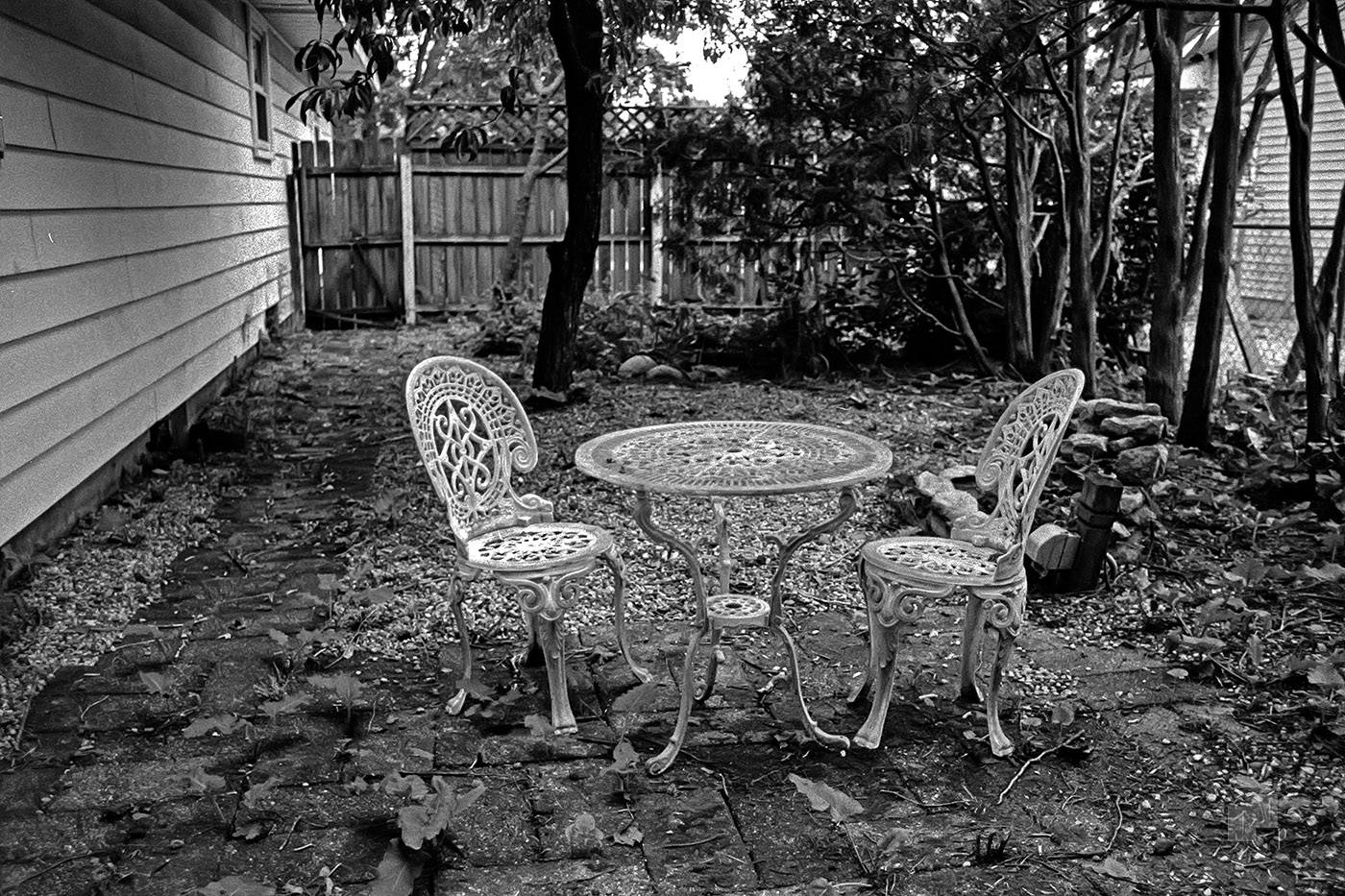
Canon-A2_UXF-400-at-800-Xtol-1-1_16min-68-degrees-RAW0029-Edit_ef_28mm-f1.8
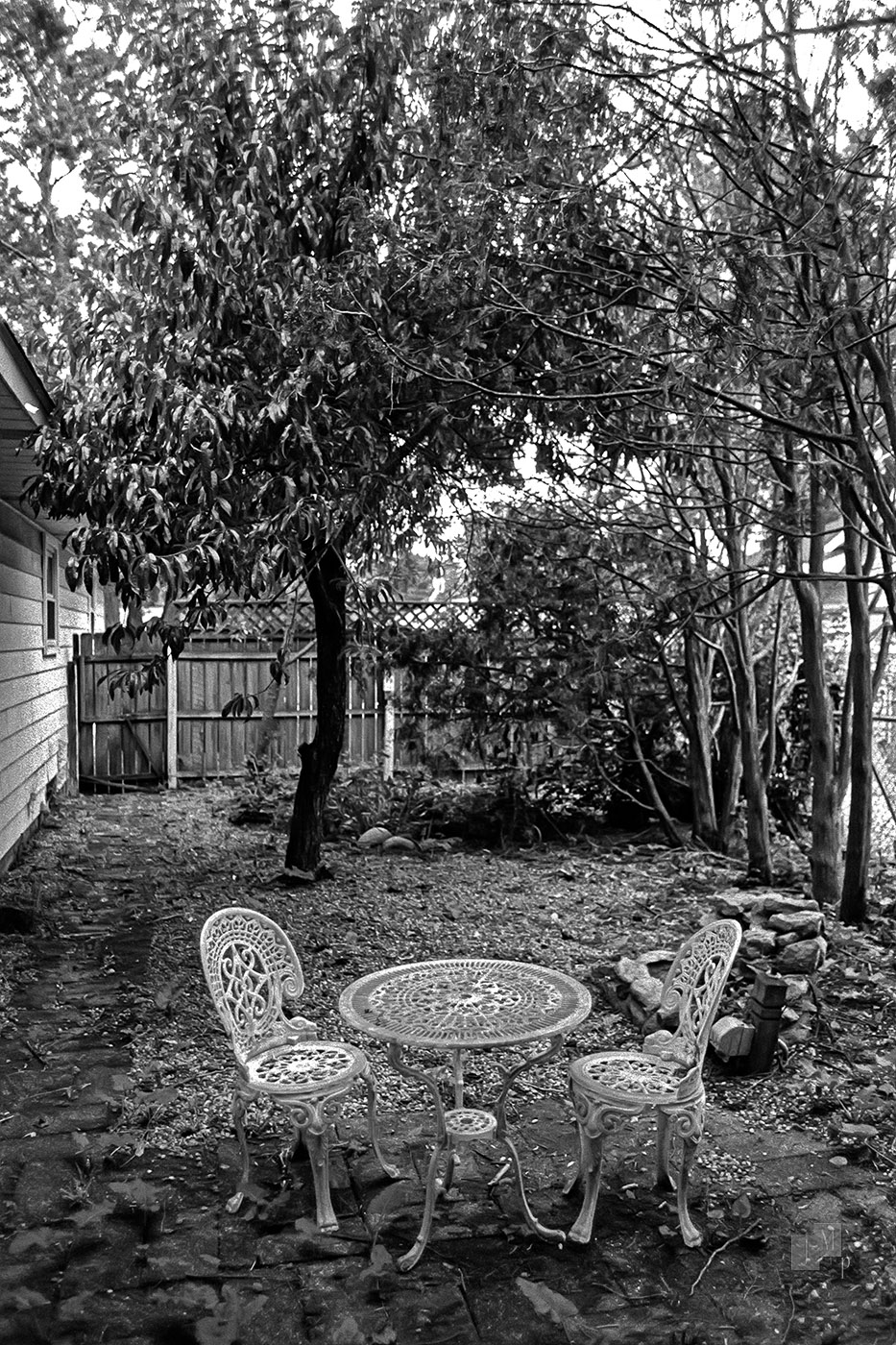
Canon-A2_UXF-400-at-800-Xtol-1-1_16min-68-degrees-RAW0029-Edit_ef_28mm-f1.8
Aug 14, 2026 at 07:28 PM
p.1746 #13Post your recent film shots!
James Markus wrote:
Could you walk me through your process with the 5000? I have it as well, on Windows 10, and I have to do full previews of each frame and then full scans. It's still mostly automated but it ends up taking about 60-90 seconds per frame for the preview and another 60-90 seconds for the scan. All in for 36 frames it's about an hour and a half. Would be great if I could have it go right to scan after centering the first frame.Mihir, (Sorry for the length) Basically my scans have to step through the same preview scan and full resolution scan, and the time isn't much different than yours. A full roll takes about 45 minutes.
The Nikon Ls-5000 is suppose to do a full 4000 dpi scan in 20 seconds. The more operations you add is what slows
it down. I use Vuescan (professional mode), and think it is superior to Nikon scan v4.03. The settings in Vuescan that I use are preview scans at 500dpi (lowest setting) and full rez scans at 4000 dpi (highest setting). I scan to...Show more →
Thanks for the detailed response, Jim. The major variable is leaving Nikonscan behind for Vuescan. I'm a big fan of Nikon's digital ICE dust removal for color, but for B&W it doesn't even work so I could totally get onboard with Vuescan and the much faster process.
icarus_ wrote
James Markus wrote
Still like the LS-5000. Just center one - hit scan, and it files 36-40 raw files across the network while I do something else.The Nikon Ls-5000 is suppose to do a full 4000 dpi scan in 20 seconds. The more operations you add is what slows
it down. I use Vuescan (professional mode), and think it is superior to Nikon scan v4.03. The settings in Vuescan that I use are preview scans at 500dpi (lowest setting) and full rez scans at 4000 dpi (highest setting). I scan to...Show more →
Thanks for the detailed response, Jim. The major variable is leaving Nikonscan behind for Vuescan. I'm a big fan of Nikon's digital ICE dust removal for color, but for B&W it doesn't even work so I could totally get onboard with Vuescan and the much faster process.
Aug 14, 2026 at 08:16 PM

p.1746 #15Post your recent film shots!
Bourse de Commerce, Paris. Rolleiflex 3.5F, Ilford Delta 400 +1.


Aug 14, 2026 at 09:31 PM
p.1746 #16Post your recent film shots!
Low Tide Walker
Leica M3 | Ilford Delta 100 | Xtol 1:1, 10:30 min | Leica Summilux-M 50mm f/1.4 ASPH
Leica M3 | Ilford Delta 100 | Xtol 1:1, 10:30 min | Leica Summilux-M 50mm f/1.4 ASPH
|
||
 |
||
|
Aug 14, 2026 at 09:39 PM
p.1746 #17Post your recent film shots!
icarus_ wrote:
Thanks for the detailed response, Jim. The major variable is leaving Nikonscan behind for Vuescan. I'm a big fan of Nikon's digital ICE dust removal for color, but for B&W it doesn't even work so I could totally get onboard with Vuescan and the much faster process.
You may want to look into this Photoshop plugin. I have it set rather low to find the "no see em" - The ones I can see I deal with myself in Photoshop.
Edited on Aug 15, 2026 at 07:33 AM · View previous versions
Thanks for the detailed response, Jim. The major variable is leaving Nikonscan behind for Vuescan. I'm a big fan of Nikon's digital ICE dust removal for color, but for B&W it doesn't even work so I could totally get onboard with Vuescan and the much faster process.
You may want to look into this Photoshop plugin. I have it set rather low to find the "no see em" - The ones I can see I deal with myself in Photoshop.
Edited on Aug 15, 2026 at 07:33 AM · View previous versions
Aug 14, 2026 at 11:02 PM
p.1746 #18Post your recent film shots!
deadwolfbones wrote:
Konica Hexar RF + Voigtlander Color-Skopar 35 (mostly) + 250D @ 400:
https://photos.smugmug.com/Film/Konica-Hexar-RF-250D-Scanned-Edited-71526/i-3JrgQWq/0/KjQDG3vwNc56pMQRvSdnbjZ3PBzvZJc49CM4KKwwz/X5/DSC_0644_merged-positive-X5.jpg
https://photos.smugmug.com/Film/Konica-Hexar-RF-250D-Scanned-Edited-71526/i-Cz4ztsj/0/KQzRVJ3tHhRxqMpDkGPs3f2xn2M24VCm2hTKnbsz9/X5/DSC_0692_merged-positive-X5.jpg
https://photos.smugmug.com/Film/Konica-Hexar-RF-250D-Scanned-Edited-71526/i-w8JRwS9/0/M2Kqgh2btsDdt9D2ML6jvjk4SVcPHv2xV6PgT8vKd/X5/DSC_0740_merged-positive-X5.jpg
https://photos.smugmug.com/Film/Konica-Hexar-RF-250D-Scanned-Edited-71526/i-P24wnQ8/0/NVmZmXBsbGrwQp67LCdDzVTCM8FSpg873875GBnDS/X5/DSC_0772_merged-positive-X5.jpg
https://photos.smugmug.com/Film/Konica-Hexar-RF-250D-Scanned-Edited-71526/i-38rTRRs/0/MbwvxfzSwWs9xTQ9ptjPfwmN5xnLbFSkbs3JP64C7/X5/DSC_0836_merged-positive-X5.jpg
https://photos.smugmug.com/Film/Konica-Hexar-RF-250D-Scanned-Edited-71526/i-4pc2T7c/0/KpZT6WKh4zgRHCTxb8ntSQcCSRfsDmtnjLSHgf3zW/4K/DSC_0844_merged-positive-4K.jpg
Ben, Did you soup the 250D @ 400 yourself, or did the processor push it for you? Either way, the colors look really good.
Aug 15, 2026 at 07:30 AM
p.1746 #19Post your recent film shots!
Leica M3ds / Summicron 50 collapsible / Tri-X / Rodinal
 Snow Vortex by Henry Beckmeyer, on Flickr
Aug 15, 2026 at 08:07 AM
p.1746 #20Post your recent film shots!
Ben, Did you soup the 250D @ 400 yourself, or did the processor push it for you? Either way, the colors look really good.
I just shot it at 400 in camera and didn't ask the lab to do anything special.
I just shot it at 400 in camera and didn't ask the lab to do anything special.
Aug 15, 2026 at 09:30 AM