fredmiranda.com
Login

Moderated by: Fred Miranda
  New fredmiranda.com Mobile Site
  New Feature: SMS Notification alert
  New Feature: Buy & Sell Watchlist
  

FM Forums | Canon Forum | Join Upload & Sell

1       2       3              35              37              42       43       end
  

Archive 2007 · •Hands-On• Eos 1D Mk III body


Tim Gray
Offline
• • •
Upload & Sell: Off
p.36 #1 · •Hands-On• Eos 1D Mk III body


greenfields wrote:
From David P and Soundhound:

"SoundHound wrote:
The MkIII RAW files are a bit bigger than the 5D's even though the MPs are lower. Not sure why there is more "file overhead" but it does fill up a flash card quicker.

14-bits vs 12-bits"

Not sure about that: Exploring .cr2 files with dcraw suggests that they are variations of .tif files with 16 bits [2 bytes] per channel so they could already hold 16-bit data so it should not make any difference to the file size whether they hold 12- or 14- bit data.


but cr2 raw files are losslessly compressed, so even if the space is 16 bit if there's 0 info in those 2 extra bits (14 vs 16), they'll take up less space


Jun 28, 2007 at 02:30 PM
Jim Turner
Offline
• •
Upload & Sell: Off
p.36 #2 · •Hands-On• Eos 1D Mk III body


I have seen some people talking about slowing down the high speed continuous rate from 10 to 7 or 8. I have searched my owners manual and looked at all the camera menu items and can't figure out how to do this. Any help would be appreciated. Thanks, Jim


Jun 29, 2007 at 05:11 PM
jtmorgan63
Offline

Upload & Sell: Off
p.36 #3 · •Hands-On• Eos 1D Mk III body


I believe it's controlled through C.FnIII-16. Select Register and then adjust the frame rate that suits you (High and Low). When finished registering the new rates, select Enable.


Jun 29, 2007 at 05:21 PM
prutske
Offline

Upload & Sell: Off
p.36 #4 · •Hands-On• Eos 1D Mk III body


If you are lost in custom functions, check the PDF document you find on this site :

http://www.robertsimaging.com/

go to the middle of the page..
it is a canon document...most interesting !

erwin


Jun 29, 2007 at 11:56 PM
Pepito
Offline
• •
Upload & Sell: Off
p.36 #5 · •Hands-On• Eos 1D Mk III body


Here's the direct link:


http://www.author-works.com/media/media-23360.pdf


Jun 30, 2007 at 12:21 AM
JimGoshorn
Offline

Upload & Sell: Off
p.36 #6 · •Hands-On• Eos 1D Mk III body


giansakidis st wrote:
please tell me is there any way to see the actuations of my mk 3. i already have an exif viewer that works at my mk i and mk ii but at mkiii the program cant see anything .please if anyone know how to see the actuations tell me .i want a program for mac or pc .thanks


Have you tried EXIF Tool by Phil Harvey?

http://www.sno.phy.queensu.ca/~phil/exiftool/

Jim


Jun 30, 2007 at 10:36 AM
Chuck Coyne
Offline
• • • •
Upload & Sell: Off
p.36 #7 · •Hands-On• Eos 1D Mk III body


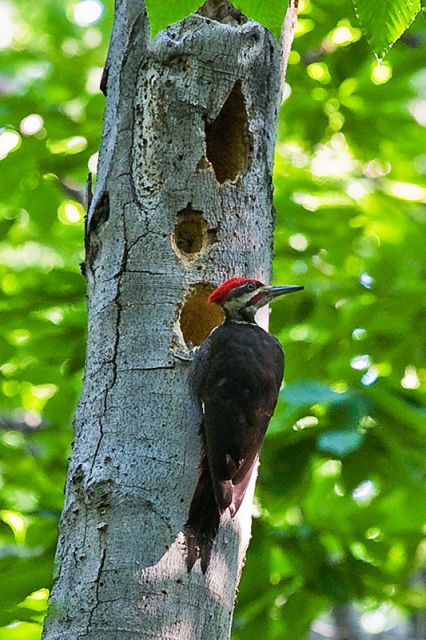
ID3 at ISO 3200 with no noise reduction applied.

Last week I took a walk with my wife and dog at our local resevoir with my 1D3 and a 100-400 lens. I don't take a tripod on these walks as it is mainly for exercise and not photography. I heard a pileated woodpecker going to work on a tree not too far off the main trail. It was about 6:30 AM and the light in this deeply wooded area was not great. I had my 1D3 set for 3200 ISO and my 100-400 at 400mm and f/8.0. I took this shot hand held at a shutter speed of 1/30! It is also a serious crop on the order of 50% of the original file size. Raw file processed in ACR 4.1.

I can't get over the how good this looks art ISO 3200 with no noise reduction either in the camera or with software after after processing.

I hope to try it again but at ISO 6400 to see how that does.

Chuck


Jun 30, 2007 at 06:05 PM
P A Valentine
Offline
• •
Upload & Sell: Off
p.36 #8 · •Hands-On• Eos 1D Mk III body


Chuck Coyne wrote:
ID3 at ISO 3200 with no noise reduction applied


That is Awesome!

Maybe before too much longer my dealer will receive a decent size shipment (...at least 8 cameras...) so I can try that for myself!


Jun 30, 2007 at 08:58 PM
mdurisseau
Offline
• •
Upload & Sell: Off
p.36 #9 · •Hands-On• Eos 1D Mk III body


I now have a software problem...the EOS Utility stopped working...now all I get is a "exception not handled" dialog box, with the option to debug...tried uninstalling and reinstalling at least three times...but I do have an e-mail to Canon...


Jun 30, 2007 at 09:08 PM
72chevelle454
Offline
• • • • • •
Upload & Sell: Off
p.36 #10 · •Hands-On• Eos 1D Mk III body


These will start out with some of the slowest moving objects in the air to some of the fasted moving objects in the air.


Air show / Hot air balloon samples:

All shot with 1DM3's using AI servo on most all shots.

fn III Settings:

(chad) 2 - I notch to the slower setting (left)
(ron) 2 - normal setting
8 - 2 enable (sourounding Assist p)
10 - 1 I have this set up as a personal favorite
16 All shot at 5 fps in low speed mode.

(gut feeling is that 10fps is causing a vibration in the sensor and causing blurry shots)

fn IV Settings:

1 - 2
5 - 1
7 - 1
8 - 1
10 - 1
16 - 1

Ron & Chad

http://i.pbase.com/o6/35/679535/1/81439979.Kbj0DlEI.CAC_0745.jpg
http://i.pbase.com/o6/35/679535/1/81439984.ZCRnrkrA.CAC_0763.jpg
http://i.pbase.com/o6/35/679535/1/81439981.UMCoToJE.CAC_0753.jpg
http://i.pbase.com/o6/35/679535/1/81440247.Ehh8oBA1.CAC_0786.jpg
http://i.pbase.com/o6/35/679535/1/81440262.djrGYZtR.CAC_0813.jpg
http://i.pbase.com/o6/35/679535/1/81440267.6lY8u64I.CAC_0819.jpg
http://i.pbase.com/o6/35/679535/1/81440269.f3AcI3lq.CAC_0822.jpg
http://i.pbase.com/o6/35/679535/1/81442082.gHrO2DWM.CAC_0855.jpg
http://i.pbase.com/o6/35/679535/1/81442084.eb0MI2AC.CAC_0879.jpg
http://i.pbase.com/o6/35/679535/1/81440088.qSLCEcLB.NewFolder2RCC_2580.jpg
http://i.pbase.com/o6/35/679535/1/81440090.iYYTMSW2.NewFolder2RCC_2592.jpg
http://i.pbase.com/o6/35/679535/1/81440092.IN97DLq5.NewFolder2RCC_2623.jpg
http://i.pbase.com/o6/35/679535/1/81440095.jMuREwCJ.NewFolder2RCC_2652.jpg
http://i.pbase.com/o6/35/679535/1/81440098.yfJ8QEMz.NewFolder2RCC_2688.jpg
http://i.pbase.com/o6/35/679535/1/81440101.Vbwc34Zl.NewFolder2RCC_2710.jpg
http://i.pbase.com/o6/35/679535/1/81440108.aYDf0amA.NewFolder2RCC_2741.jpg
http://i.pbase.com/o6/35/679535/1/81442086.7vmVSrkr.CAC_1333.jpg
http://i.pbase.com/o6/35/679535/1/81442087.pflNYYmX.CAC_1336.jpg
http://i.pbase.com/o6/35/679535/1/81440110.iAxb296J.NewFolder2RCC_2748.jpg
http://i.pbase.com/o6/35/679535/1/81440120.LiJbIJUI.NewFolder2RCC_2769.jpg
http://i.pbase.com/o6/35/679535/1/81440123.8yV9vmnq.NewFolder2RCC_2776.jpg
http://i.pbase.com/o6/35/679535/1/81440127.7k7JrXbb.NewFolder2RCC_2782.jpg
http://i.pbase.com/o6/35/679535/1/81442089.ruqr308Z.CAC_1378.jpg
http://i.pbase.com/o6/35/679535/1/81442094.XkniUbmR.CAC_1431.jpg
http://i.pbase.com/o6/35/679535/1/81440141.QTQ13Z13.NewFolder2RCC_2826.jpg
http://i.pbase.com/o6/35/679535/1/81440146.8IKIZ7AE.NewFolder2RCC_2834.jpg
http://i.pbase.com/o6/35/679535/1/81442096.VKthBnrT.CAC_1496.jpg
http://i.pbase.com/o6/35/679535/1/81442099.0gj3koT7.CAC_1498.jpg
http://i.pbase.com/o6/35/679535/1/81442100.3QBvElc7.CAC_1499.jpg


Edited by 72chevelle454 on Jun 30, 2007 at 09:51 PM GMT

Edited by 72chevelle454 on Jun 30, 2007 at 09:52 PM GMT

Edited by 72chevelle454 on Jun 30, 2007 at 10:06 PM GMT


Jun 30, 2007 at 09:32 PM
DavidP
Offline
• • • • •
Upload & Sell: Off
p.36 #11 · •Hands-On• Eos 1D Mk III body


You need to slow the shutter speed down on those prop aircraft. Try 1/160 next time.


Jun 30, 2007 at 09:41 PM
mdurisseau
Offline
• •
Upload & Sell: Off
p.36 #12 · •Hands-On• Eos 1D Mk III body


So, what CF settings did you use for CF III and CF IV?


Jun 30, 2007 at 09:42 PM
72chevelle454
Offline
• • • • • •
Upload & Sell: Off
p.36 #13 · •Hands-On• Eos 1D Mk III body


I will add to post.


mdurisseau wrote:
So, what CF settings did you use for CF III and CF IV?


Jun 30, 2007 at 09:50 PM
mdurisseau
Offline
• •
Upload & Sell: Off
p.36 #14 · •Hands-On• Eos 1D Mk III body


Thanks, sir! Great shots, incidentally...

72chevelle454 wrote:
I will add to post.


Jun 30, 2007 at 09:56 PM
jvvjvv
Offline
• • •
Upload & Sell: Off
p.36 #15 · •Hands-On• Eos 1D Mk III body


On the Doggie walk yesterday in the dark of thr redwood trees. Shot with 70-200 @ 70mm .80 sec., F2.8 at 3200 ISO. Plus I had to lighten it a little in post.


Jun 30, 2007 at 10:13 PM
Edward Kelsey
Offline

Upload & Sell: Off
p.36 #16 · •Hands-On• Eos 1D Mk III body


Really that dog shot is the pits !


Jul 01, 2007 at 10:35 PM
rd4tile
Offline
• • • •
Upload & Sell: On
p.36 #17 · •Hands-On• Eos 1D Mk III body


Wow look at the fabric in that 2nd balloon shot! Good job!


Jul 01, 2007 at 10:47 PM
jvvjvv
Offline
• • •
Upload & Sell: Off
p.36 #18 · •Hands-On• Eos 1D Mk III body


This is the pit.......


.........the other is an Aussie.

Yeah.........they are just snap shots at best, but......... black dogs at 2.8, 3200 ISO. They would be just black high noise shadows with my MK II.

I am..........(perhaps too easily)............ impressed.


Jul 02, 2007 at 12:44 AM
Benny L
Offline

Upload & Sell: Off
p.36 #19 · •Hands-On• Eos 1D Mk III body


judging by the demo copy i had for a weekend it is completely unreliable... err99 consistantly, the camera took about 30 shots over the course of the whole weekend of shooting. canon know where they can stick this one, i am going out and buying another 1ds ii instead.. at least i know i can trust that


Jul 05, 2007 at 03:40 AM
stanj
Offline
• • • • • •
Upload & Sell: On
p.36 #20 · •Hands-On• Eos 1D Mk III body


giansakidis st wrote:
please tell me is there any way to see the actuations of my mk 3. i already have an exif viewer that works at my mk i and mk ii but at mkiii the program cant see anything .please if anyone know how to see the actuations tell me .i want a program for mac or pc .thanks


Apparently not in the image data anymore:

https://www.fredmiranda.com/forum/topic/550542


Jul 06, 2007 at 02:48 AM
1       2       3              35              37              42       43       end


FM Forums | Canon Forum | Join Upload & Sell

1       2       3              35              37              42       43       end


Welcome back
Log in to your account