"SoundHound wrote:
The MkIII RAW files are a bit bigger than the 5D's even though the MPs are lower. Not sure why there is more "file overhead" but it does fill up a flash card quicker.
14-bits vs 12-bits"
Not sure about that: Exploring .cr2 files with dcraw suggests that they are variations of .tif files with 16 bits [2 bytes] per channel so they could already hold 16-bit data so it should not make any difference to the file size whether they hold 12- or 14- bit data.
but cr2 raw files are losslessly compressed, so even if the space is 16 bit if there's 0 info in those 2 extra bits (14 vs 16), they'll take up less space
I have seen some people talking about slowing down the high speed continuous rate from 10 to 7 or 8. I have searched my owners manual and looked at all the camera menu items and can't figure out how to do this. Any help would be appreciated. Thanks, Jim
I believe it's controlled through C.FnIII-16. Select Register and then adjust the frame rate that suits you (High and Low). When finished registering the new rates, select Enable.
giansakidis st wrote:
please tell me is there any way to see the actuations of my mk 3. i already have an exif viewer that works at my mk i and mk ii but at mkiii the program cant see anything .please if anyone know how to see the actuations tell me .i want a program for mac or pc .thanks
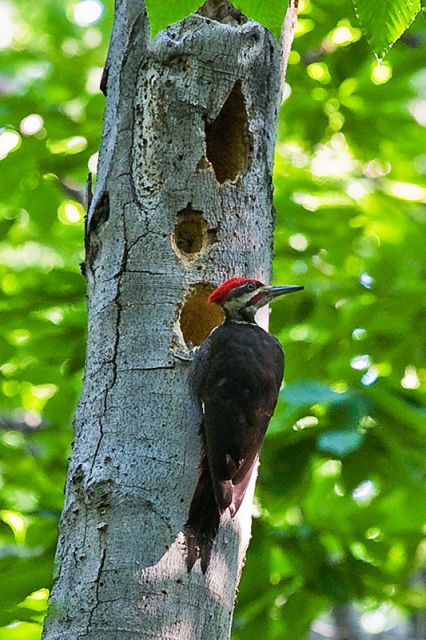
Last week I took a walk with my wife and dog at our local resevoir with my 1D3 and a 100-400 lens. I don't take a tripod on these walks as it is mainly for exercise and not photography. I heard a pileated woodpecker going to work on a tree not too far off the main trail. It was about 6:30 AM and the light in this deeply wooded area was not great. I had my 1D3 set for 3200 ISO and my 100-400 at 400mm and f/8.0. I took this shot hand held at a shutter speed of 1/30! It is also a serious crop on the order of 50% of the original file size. Raw file processed in ACR 4.1.
I can't get over the how good this looks art ISO 3200 with no noise reduction either in the camera or with software after after processing.
I hope to try it again but at ISO 6400 to see how that does.
I now have a software problem...the EOS Utility stopped working...now all I get is a "exception not handled" dialog box, with the option to debug...tried uninstalling and reinstalling at least three times...but I do have an e-mail to Canon...
These will start out with some of the slowest moving objects in the air to some of the fasted moving objects in the air.
Air show / Hot air balloon samples:
All shot with 1DM3's using AI servo on most all shots.
fn III Settings:
(chad) 2 - I notch to the slower setting (left)
(ron) 2 - normal setting
8 - 2 enable (sourounding Assist p)
10 - 1 I have this set up as a personal favorite
16 All shot at 5 fps in low speed mode.
(gut feeling is that 10fps is causing a vibration in the sensor and causing blurry shots)
On the Doggie walk yesterday in the dark of thr redwood trees. Shot with 70-200 @ 70mm .80 sec., F2.8 at 3200 ISO. Plus I had to lighten it a little in post.
judging by the demo copy i had for a weekend it is completely unreliable... err99 consistantly, the camera took about 30 shots over the course of the whole weekend of shooting. canon know where they can stick this one, i am going out and buying another 1ds ii instead.. at least i know i can trust that
giansakidis st wrote:
please tell me is there any way to see the actuations of my mk 3. i already have an exif viewer that works at my mk i and mk ii but at mkiii the program cant see anything .please if anyone know how to see the actuations tell me .i want a program for mac or pc .thanks