FM Studio: review, tag and transfer photos on Mac
p.1 #1FM Studio: review, tag and transfer photos on Mac
 |
FM Studio 1.3.4 is out. It's a Mac app that lets you look at every photo on your camera or card before a single file is copied, rate them, and download only the keepers. It's the tool I now use exclusively to get photos off my own cameras.
New in 1.3.4
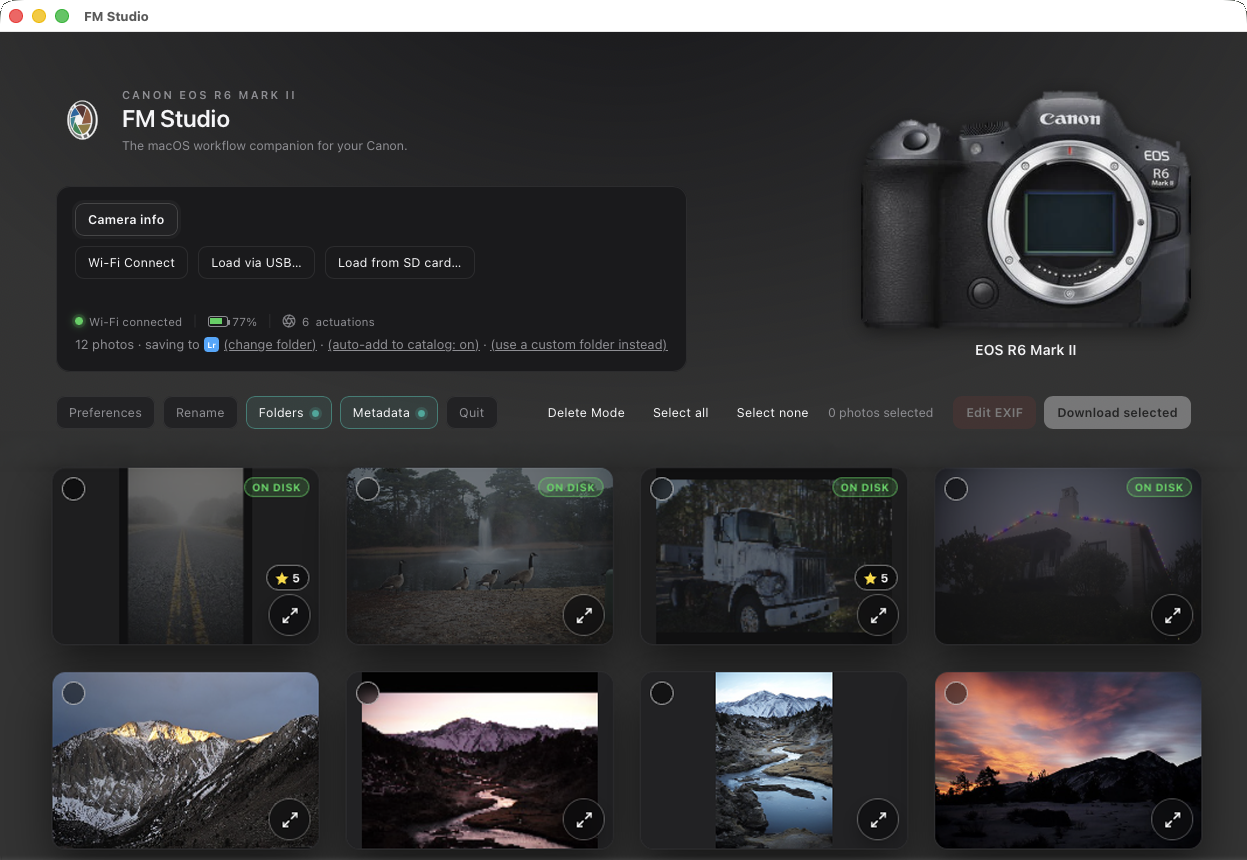
⦿ Canon Wi-Fi: connect to Canon EOS cameras over Wi-Fi, no cable or card reader needed. I tested it on the EOS R6 Mark II, and other Canon EOS cameras with Wi-Fi should work the same way. Pair once, then just pick FM Studio in the camera's list
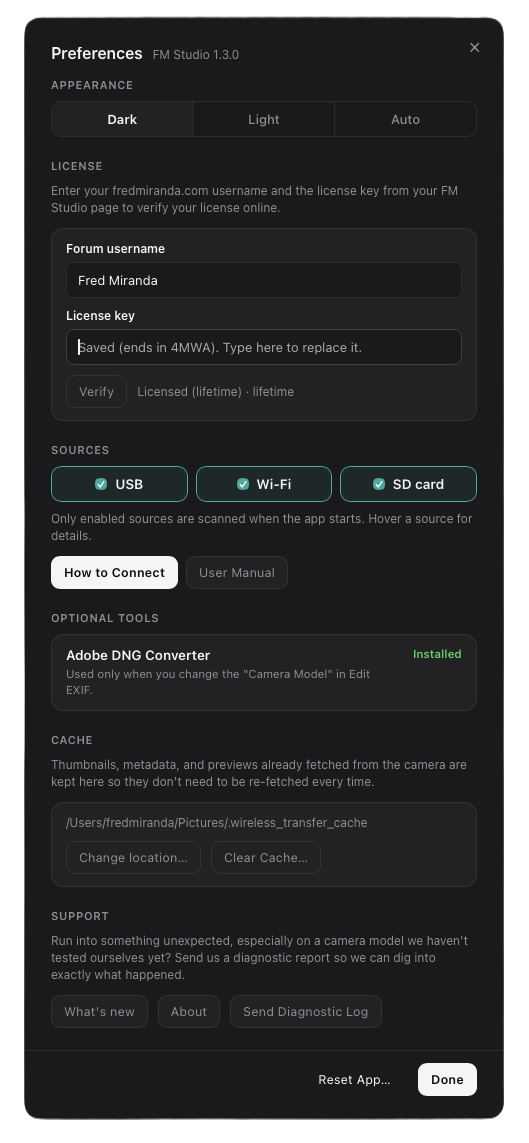
⦿ Creator contact details in Metadata: email, phone, website, address, city, state/province, postal code and country now go into every photo as it downloads. Lightroom and Bridge show them under Creator Contact Info. Metadata now covers 25 fields in all
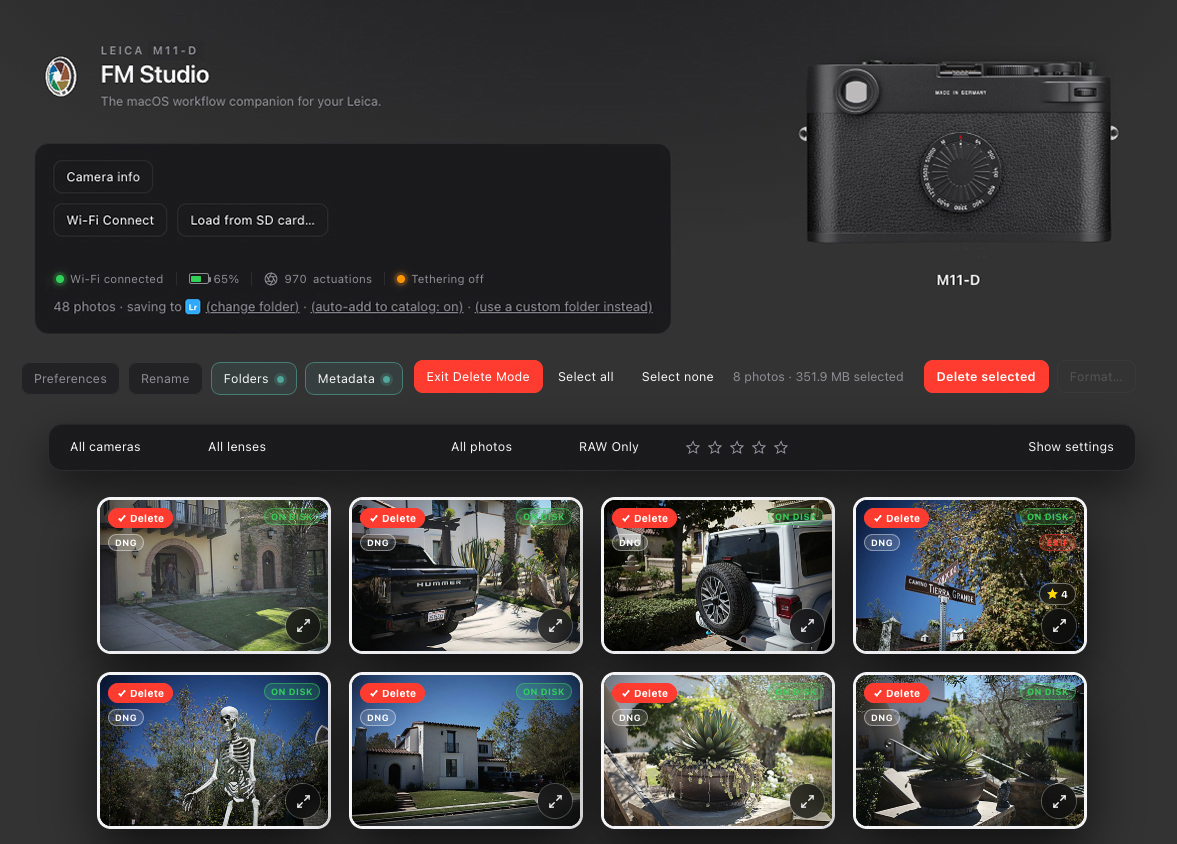
⦿ Hide Delete Mode and Format: a new Preferences option removes the Delete and Format buttons from the main screen, so nothing can be erased from a camera or card by mistake
⦿ Better Camera info: cameras now show their friendly model names
⦿ Clearer connection choices: when more than one camera or card is connected, FM Studio lists everything it found, with plain labels (USB, Mass Storage, Wi-Fi), before you pick. Two USB cameras now both show up, and a USB camera no longer jumps ahead of one waiting on Wi-Fi
Why I built it
It started as a handful of command line scripts for my Leica cameras. I was tired of importing a whole card just to find out which frames were worth keeping. I wanted to look first, rate the keepers, and copy only those. I also wanted the real shutter count of my Leicas, and I was able to build that in too. The scripts grew into a full app that I've tested with many cameras, and I keep updating it as I use it.
What makes it different
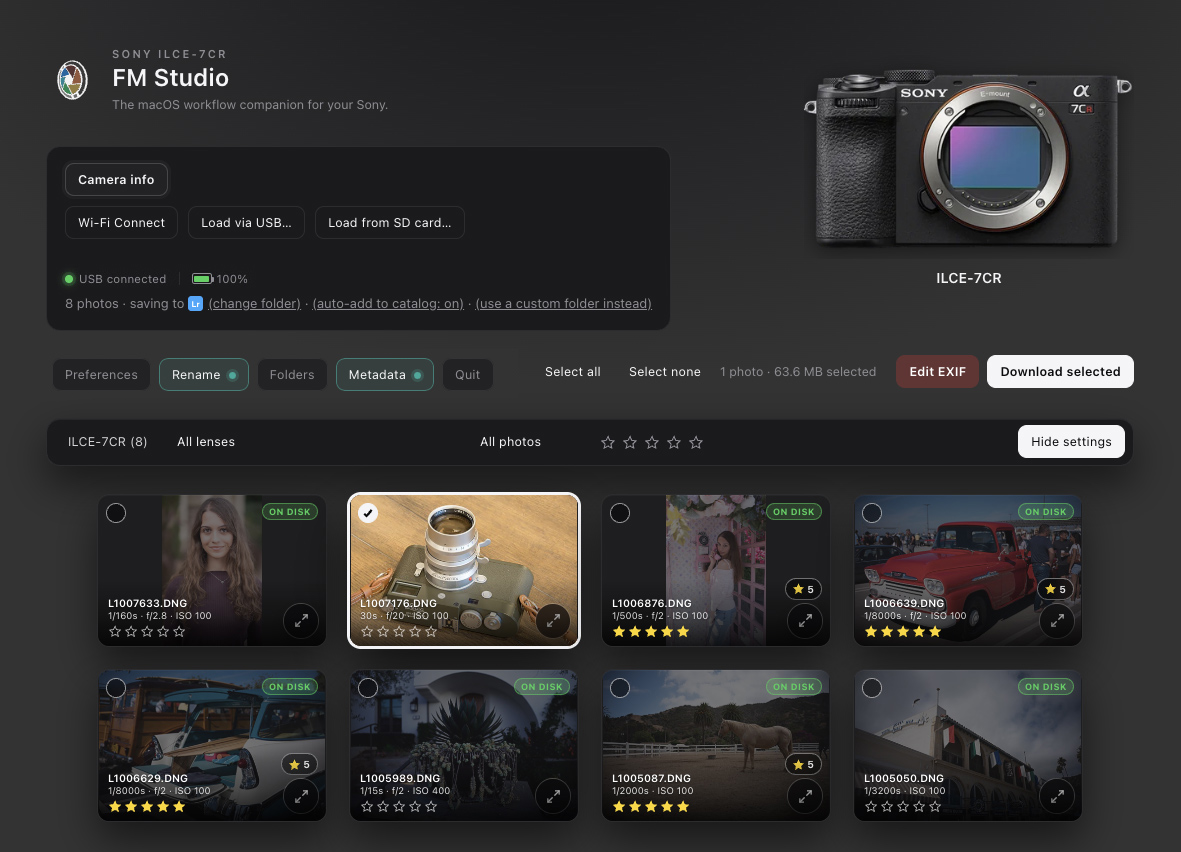
⦿ Look before you import: sharp thumbnails, large previews, full shooting info and GPS (with a map link) for everything on the camera or card, before anything is copied
⦿ Real Leica shutter count: M8, M8.2, M9, M10 and M11 series, shown right in the header
⦿ Your files are protected: ON DISK badges show what you've already downloaded, and nothing is deleted from a camera or card until a verified copy is on your Mac
⦿ It names and files your photos as they land: rename, sort into folders and add your copyright in one pass, so there's nothing left to do afterward
Cull and rate
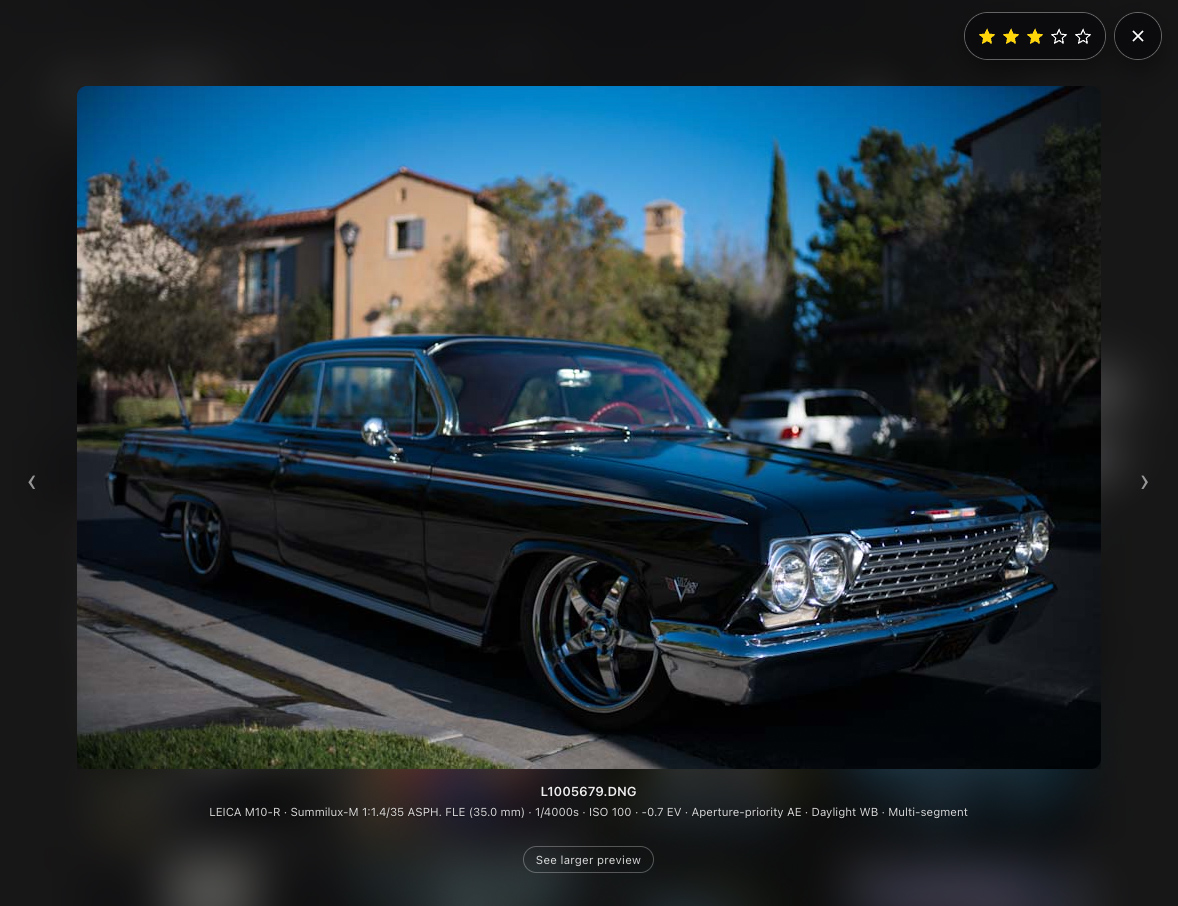
⦿ Rate 1 to 5 stars like in Lightroom, and the ratings carry over to Lightroom automatically
⦿ Filter by camera, lens, file type, download status or star rating, and select with click, drag or shift-click
Send files where they belong
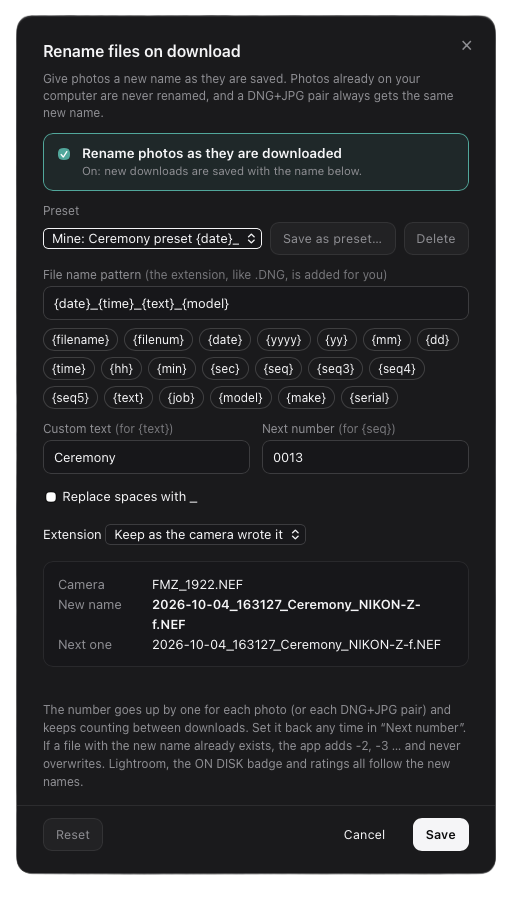
⦿ Rename on import: build the name from the date, camera, your own text and a counter, with presets and a live preview, for example 2026-10-18_Wedding_0001.DNG
⦿ Folders: sort into folders by date, camera model, job name and more, using the same building blocks as renaming, for example Year / Date / Camera model
⦿ IPTC metadata: write your name, copyright, credit line, caption, keywords, location and your full Creator contact details into every photo as it downloads, 25 IPTC fields in all. The same fields Lightroom and Photo Mechanic use
⦿ Load photos into Lightroom automatically with the included plug-in
⦿ A DNG and its JPEG always travel together and keep matching names, and nothing is overwritten
Fix what the camera got wrong
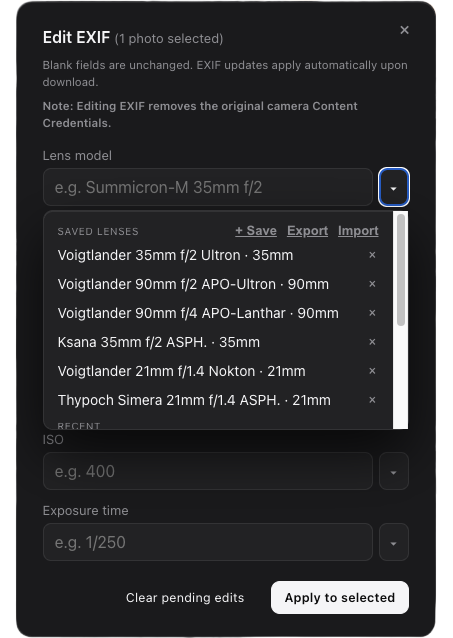
⦿ Edit lens, focal length, aperture, ISO, exposure time and camera model before or after download, with saved presets. A big help with adapted and uncoded lenses
Delete and format safely
⦿ Delete from the camera only after FM Studio confirms a verified copy is on your Mac
⦿ Format a card or the camera's internal memory only when every photo on it is safely downloaded
⦿ Prefer not to see those buttons at all? Hide them in Preferences
What it works with
⦿ Most cameras in USB mass storage mode, and any SD or CFexpress card in a reader, including Leica SL and Q, Sony, Nikon, Canon, Fujifilm, Panasonic, OM System and Hasselblad. Leica M10 and M11 bodies also work over Wi-Fi, and the M11 series over USB. Canon EOS cameras with Wi-Fi connect wirelessly too. iPhones and iPads connect over USB, including ProRAW and HEIC
⦿ Tethered shooting on selected cameras in PTP mode
⦿ If two cameras number files the same way (a Leica M-D and a Q3, for example), FM Studio tells them apart instead of mixing them up
Mac today, Windows next
⦿ A Windows version is in development, and one license covers both Mac and Windows at no extra cost, including for people who buy now
Get it
https://www.fredmiranda.com/forum/fm-studio.php
There's a Lifetime license (launch price until the end of December), 1 year, or 1 month if you'd like to try it first. It's signed and notarized by Apple, so it installs like any other Mac app. The "What's new" section on that page lists every update so far, and there are new screenshots there for Metadata and Canon.
User manual (PDF)
_______________
I'd love to hear how it works with your cameras and what you'd like to see added. Questions, bugs and suggestions are welcome in this thread, and a lot of what's in 1.3 and 1.3.4 came from your requests here.
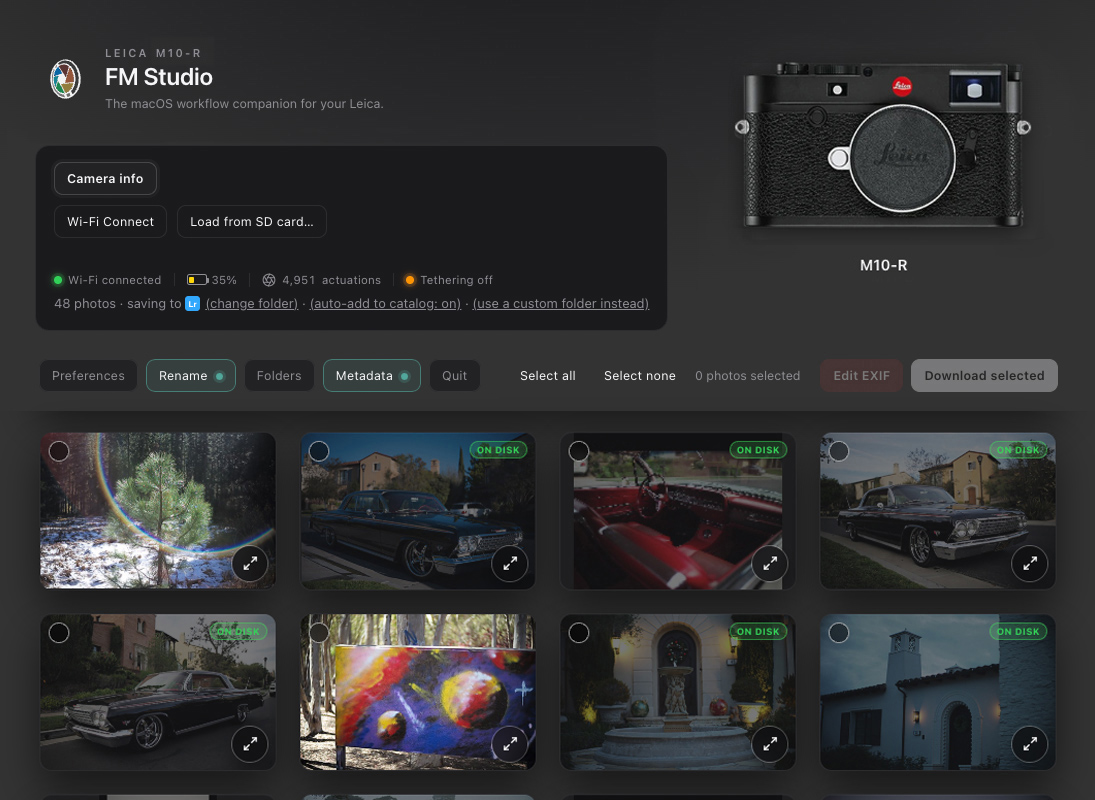
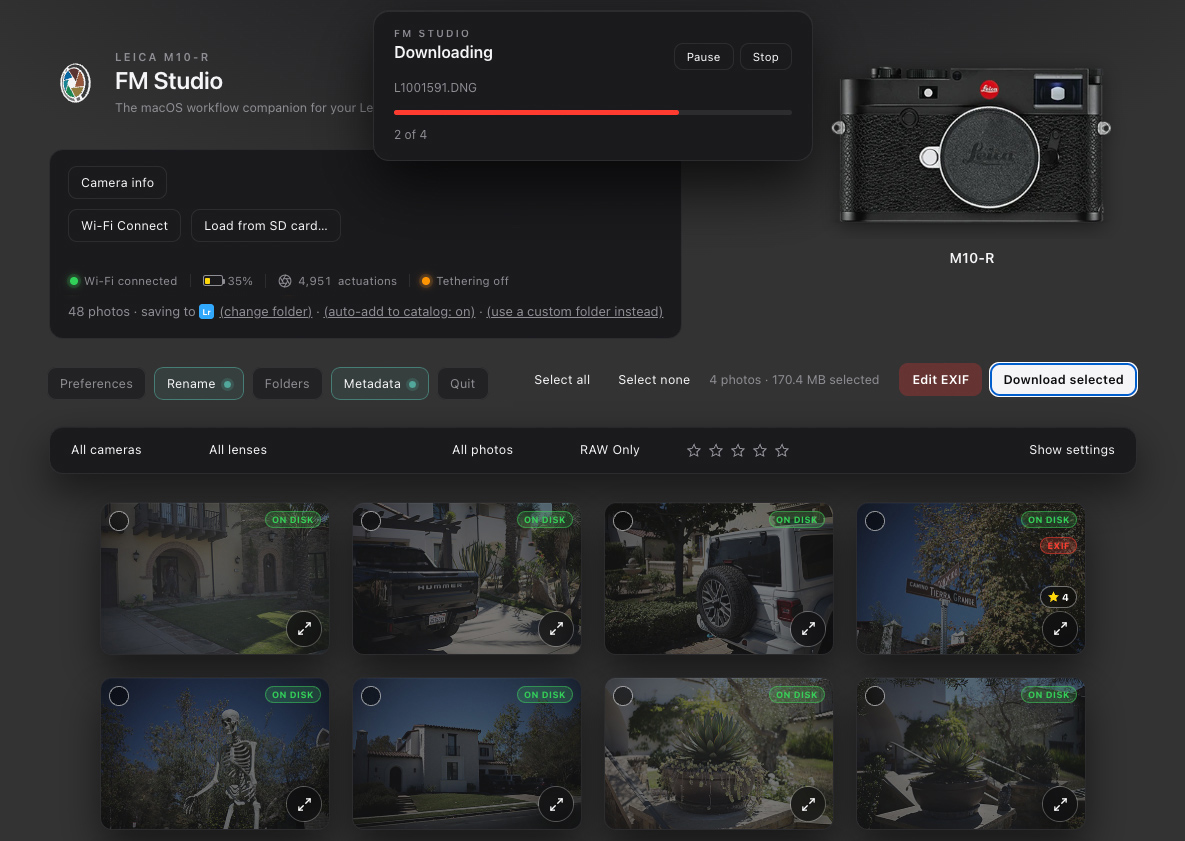
Here are some FM Studio screenshots:
 |
||
 |
||
|
|
||
 |
||
|
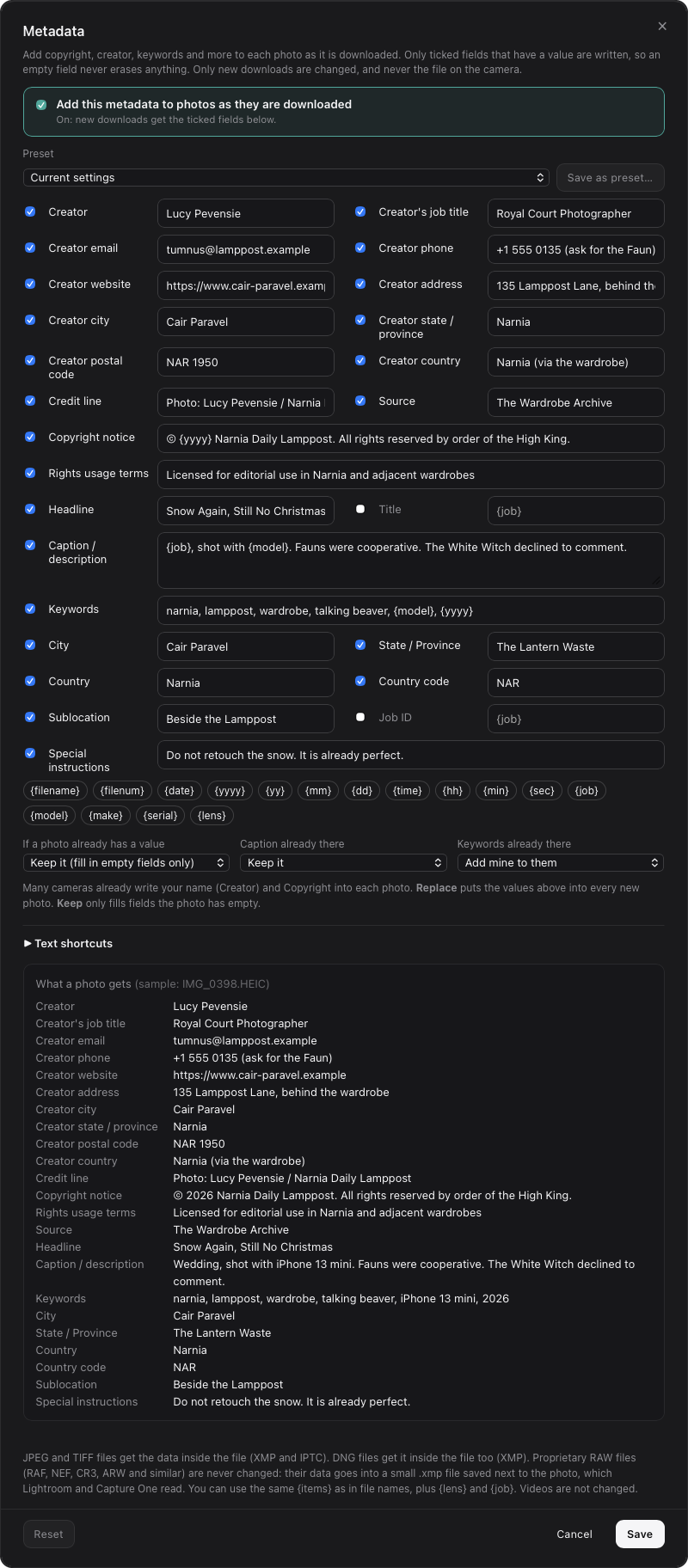
Edit Metadata field
|
||
 |
||
|
|
||
 |
||
|
|
||
 |
||
|
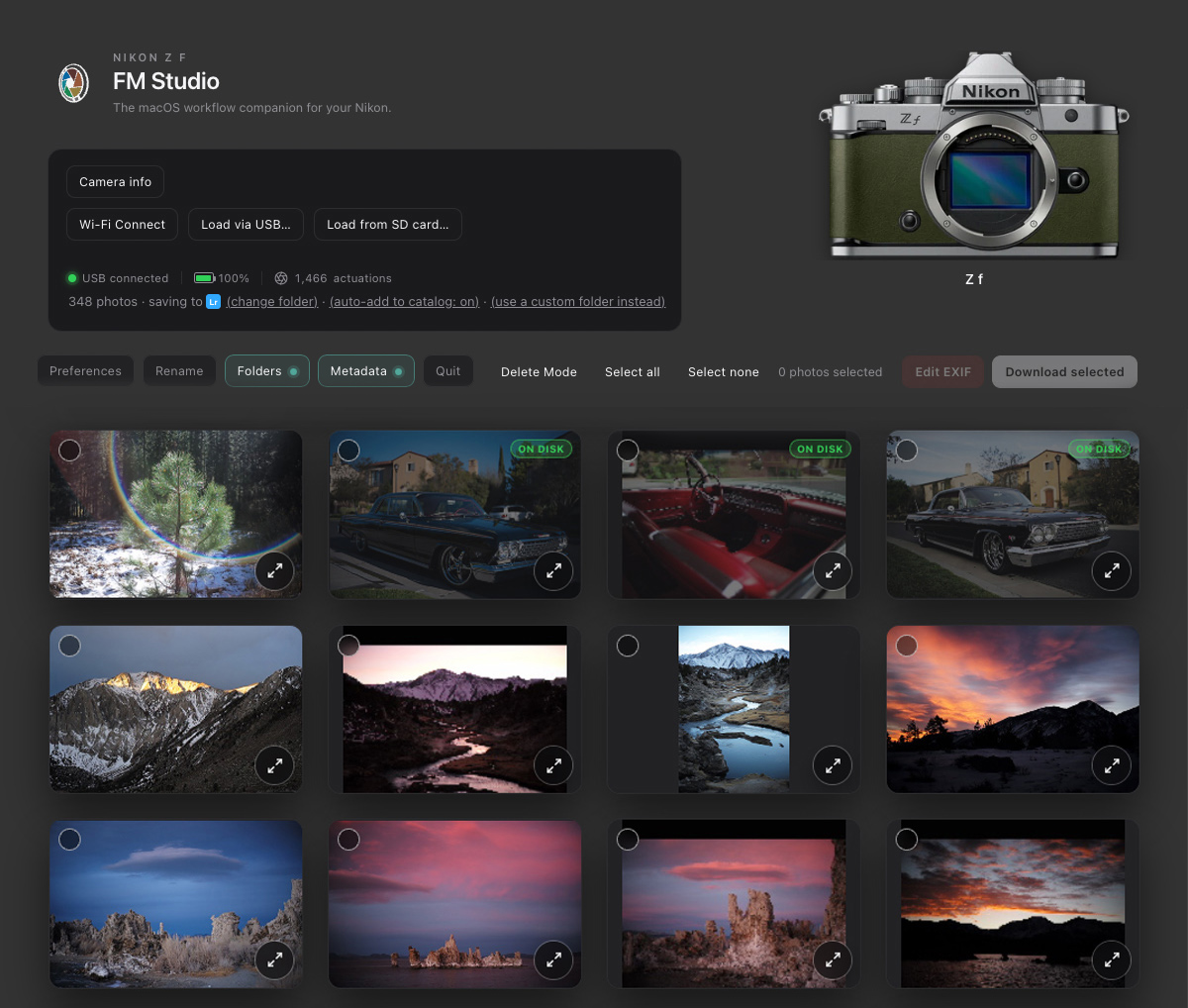
FM Studio with Nikon Zf loaded via USB connection
Oct 25, 2026 at 11:08 AM
p.1 #2FM Studio: review, tag and transfer photos on Mac
Hi
Can this import only locked files from the camera side, so if I rated/locked on a sony/canon camera etc?
Can this import only locked files from the camera side, so if I rated/locked on a sony/canon camera etc?
Oct 25, 2026 at 11:21 AM
p.1 #3FM Studio: review, tag and transfer photos on Mac
Is there any chance you will port this to Windows or Linux, doesn't AI make that easy nowadays?
EBH
EBH
Oct 25, 2026 at 12:11 PM
p.1 #4FM Studio: review, tag and transfer photos on Mac
adamgray1 wrote:
Hi
Can this import only locked files from the camera side, so if I rated/locked on a sony/canon camera etc?
Good question. Right now it doesn't read the lock/protect flag or any ratings set in the camera. FM Studio only knows the star ratings you give inside the app.
What works today: while browsing the card or camera, rate the photos you want (click a star, or press Space for 5 stars), then set the star filter to 5 and download only those. The ratings also carry over to Lightroom.
Importing only locked files is a good idea, and I'm going to look into whether it's doable. It depends on how each camera reports protected files.
Hi
Can this import only locked files from the camera side, so if I rated/locked on a sony/canon camera etc?
Good question. Right now it doesn't read the lock/protect flag or any ratings set in the camera. FM Studio only knows the star ratings you give inside the app.
What works today: while browsing the card or camera, rate the photos you want (click a star, or press Space for 5 stars), then set the star filter to 5 and download only those. The ratings also carry over to Lightroom.
Importing only locked files is a good idea, and I'm going to look into whether it's doable. It depends on how each camera reports protected files.
Oct 25, 2026 at 01:02 PM
p.1 #5FM Studio: review, tag and transfer photos on Mac
EB-1 wrote:
Is there any chance you will port this to Windows or Linux, doesn't AI make that easy nowadays?
EBH
Thanks for asking. Windows is something I'm seriously considering, and part of the app should carry over. The camera pairing (Wi-fi) and the app packaging are Mac-specific though, so it's more than a quick port and won't be in the next update. I will post here when I go ahead with it.
Is there any chance you will port this to Windows or Linux, doesn't AI make that easy nowadays?
EBH
Thanks for asking. Windows is something I'm seriously considering, and part of the app should carry over. The camera pairing (Wi-fi) and the app packaging are Mac-specific though, so it's more than a quick port and won't be in the next update. I will post here when I go ahead with it.
Oct 25, 2026 at 01:04 PM
p.1 #6FM Studio: review, tag and transfer photos on Mac
Awesome, clean UI design. Lots of future potential.
Oct 25, 2026 at 03:49 PM
p.1 #7FM Studio: review, tag and transfer photos on Mac
FM Studio 1.0.1 is out!
Thanks to everyone who has tried FM Studio so far, and for the feedback. Version 1.0.1 is now available with a few small fixes and improvements:
⦿ Dock icon brings the window back. If you close the browser window, click the FM Studio icon in the Dock and the window reopens. FM Studio keeps running until you quit it.
⦿ Lifetime licenses work offline for much longer. An internet connection is only needed to verify your license, so travel and shoots without Wi-Fi aren’t a problem.
⦿ Clearer Location Services warning (Leica M11 Wi-Fi connection only). If Location Services is off for FM Studio, the Bluetooth setup window now tells you right away, with a button that opens the right System Settings page. It doesn’t affect USB or card reader use.
⦿ User Manual button. There’s a new button next to Preferences that opens the manual, and the manual itself has been updated.
To update, download the new version from the FM Studio page and replace the old FM Studio in your Applications folder. Your license, key and settings carry over.
https://www.fredmiranda.com/forum/fm-studio.php
Thanks,
Fred
Thanks to everyone who has tried FM Studio so far, and for the feedback. Version 1.0.1 is now available with a few small fixes and improvements:
⦿ Dock icon brings the window back. If you close the browser window, click the FM Studio icon in the Dock and the window reopens. FM Studio keeps running until you quit it.
⦿ Lifetime licenses work offline for much longer. An internet connection is only needed to verify your license, so travel and shoots without Wi-Fi aren’t a problem.
⦿ Clearer Location Services warning (Leica M11 Wi-Fi connection only). If Location Services is off for FM Studio, the Bluetooth setup window now tells you right away, with a button that opens the right System Settings page. It doesn’t affect USB or card reader use.
⦿ User Manual button. There’s a new button next to Preferences that opens the manual, and the manual itself has been updated.
To update, download the new version from the FM Studio page and replace the old FM Studio in your Applications folder. Your license, key and settings carry over.
https://www.fredmiranda.com/forum/fm-studio.php
Thanks,
Fred
Oct 25, 2026 at 04:17 PM
p.1 #8FM Studio: review, tag and transfer photos on Mac
Looks like a very useful application! Looking forward to trying it.
Oct 25, 2026 at 07:44 PM
p.1 #9FM Studio: review, tag and transfer photos on Mac
Since this is my baby, I'll keep updating and supporting it...especially since I use it every day with all my cameras and smartphones.
FM Studio 1.1 is out!
⦿ New: Rename on import: Give your photos names like 2026-10-18_Wedding_0001.DNG as they download. Build the name from the date, camera, your own text and a counter, with ready-made presets and a live preview. A DNG and JPEG shot together always keep matching names, nothing is overwritten, and nothing is renamed unless you turn it on.
Also in 1.1:
⦿ Photos from two cameras with the same file numbers (such as a Leica M-D and a Q3) are no longer confused for each other.
⦿ ON DISK badges are more reliable, and the lens list no longer splits one lens into several entries.
⦿ Format Card now refuses until every photo has a verified copy on your Mac.
⦿ Selected photos are easier to see in the light appearance.
⦿ The first-time download folder is now in your Pictures folder.
Download it from your FM Studio page. Your license and settings carry over.
Many new features planned ahead!
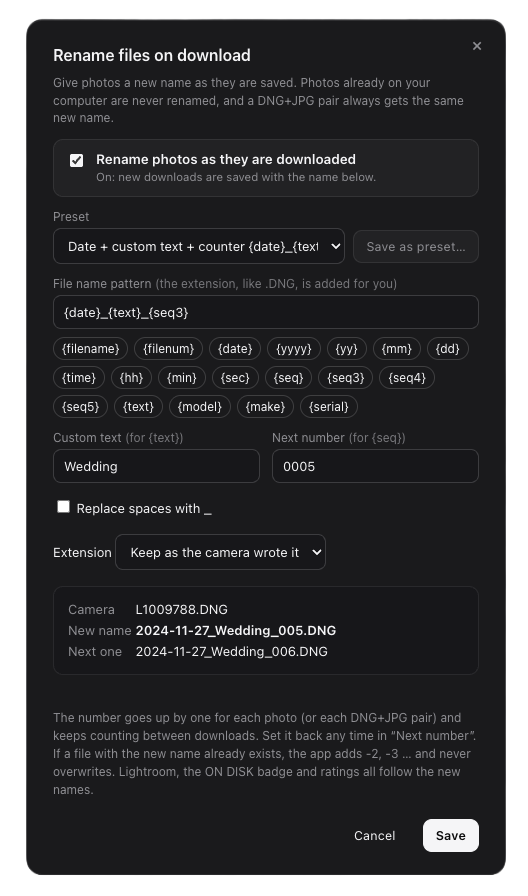
Rename on import
FM Studio 1.1 is out!
⦿ New: Rename on import: Give your photos names like 2026-10-18_Wedding_0001.DNG as they download. Build the name from the date, camera, your own text and a counter, with ready-made presets and a live preview. A DNG and JPEG shot together always keep matching names, nothing is overwritten, and nothing is renamed unless you turn it on.
Also in 1.1:
⦿ Photos from two cameras with the same file numbers (such as a Leica M-D and a Q3) are no longer confused for each other.
⦿ ON DISK badges are more reliable, and the lens list no longer splits one lens into several entries.
⦿ Format Card now refuses until every photo has a verified copy on your Mac.
⦿ Selected photos are easier to see in the light appearance.
⦿ The first-time download folder is now in your Pictures folder.
Download it from your FM Studio page. Your license and settings carry over.
Many new features planned ahead!
Rename on import
Oct 25, 2026 at 07:47 PM
p.1 #10FM Studio: review, tag and transfer photos on Mac
I just gave it go and I like it! I like culling before importing and then clearing the card directly in the camera. WiFi transfer from M11 is a little slow but then again, it is direct transfer without wires! Did A USB transfer with my X2D II and it also worked great except it did not recognize the camera (I manually entered it). One of my favorite things in this program is entering lens data into EXIF whether it's because the lens is not 6-bit coded or it is adapted to another camera. It carries over into Lightroom.
Great start Fred. Can't wait to see how this evolves.
Great start Fred. Can't wait to see how this evolves.
Oct 26, 2026 at 06:01 AM
|
p.1 #11FM Studio: review, tag and transfer photos on Mac
This looks to be VERY useful! This will be a likely purchase, when pay day arrives. Thanks, Fred!
Oct 26, 2026 at 10:08 AM
p.1 #12FM Studio: review, tag and transfer photos on Mac
Is this a competitor to Photo Mechanic and if so, what advantages does it offer? What I don't need is another subscription piece of software.
Oct 26, 2026 at 11:00 AM
RoamingScott
Offline
Activity
[X]
Details
p.1 #13FM Studio: review, tag and transfer photos on Mac
timgangloff wrote:
What I don't need is another subscription piece of software.
Especially when that subscription software is vibe coded IMO. Fred, I think you have a unique opportunity to offer perpetual licenses for this product, which is clearly more in line with the interests of the community these days.
What I don't need is another subscription piece of software.
Especially when that subscription software is vibe coded IMO. Fred, I think you have a unique opportunity to offer perpetual licenses for this product, which is clearly more in line with the interests of the community these days.
Oct 26, 2026 at 11:56 AM
p.1 #14FM Studio: review, tag and transfer photos on Mac
Fred this looks very interesting and it appears you've put quite a lot of effort to make it usable. While I've been a long time user of Photo Mechanic (PM) due to it's ability to support working professionals' needs, FM Studio seems to mostly cover PM's functionality. For me to seriously consider it I would need to see that it definitely recognizes locked photos and can only download them. The other aspect, which I use in PM because it's faster than in LR, is cropping capability. Cropping wouldn't be a deal breaker but I would have to modify my workflow to a greater extent if it wasn't available.
Matt
Matt
Oct 26, 2026 at 12:01 PM
p.1 #15FM Studio: review, tag and transfer photos on Mac
rji2goleez wrote:
I just gave it go and I like it! I like culling before importing and then clearing the card directly in the camera. WiFi transfer from M11 is a little slow but then again, it is direct transfer without wires! Did A USB transfer with my X2D II and it also worked great except it did not recognize the camera (I manually entered it). One of my favorite things in this program is entering lens data into EXIF whether it's because the lens is not 6-bit coded or it is adapted to another camera. It carries over into Lightroom.
Great start...Show more →
Thanks for giving it a try, I'm glad it's working for you! Culling first and then clearing the card in the camera is exactly how I use it too.
On the M11 Wi-Fi speed, you're right. It is the camera's own Wi-Fi link, so it will always be slower than USB or a card reader. But as far as I know, FM Studio is the only app that connects M11 series cameras to your Mac wirelessly, with no cable at all. It’s great for grabbing a few frames (I use it all the time), and for a big batch I’d use USB mass storage or a card reader. And you should see your M11's true shutter count in the top bar next to the battery indicator.
Regarding the X2D II: FM Studio reads the camera name straight from your files, so I'm curious what you meant by entering it manually. Did you use the Camera model field in Edit EXIF, and if so, what did the header show before you changed it? That would tell me if something is being read wrong for the X2D II.
I'm glad the lens metadata editing is useful. It’s one of my favorites too, especially for adapted lenses and ones without 6-bit coding, and what's great is that all the changes carry on into Lightroom automatically.
Version 1.1 just came out, with Rename on import and a number of fixes. There's more on the way. Thanks for the encouragement!
I just gave it go and I like it! I like culling before importing and then clearing the card directly in the camera. WiFi transfer from M11 is a little slow but then again, it is direct transfer without wires! Did A USB transfer with my X2D II and it also worked great except it did not recognize the camera (I manually entered it). One of my favorite things in this program is entering lens data into EXIF whether it's because the lens is not 6-bit coded or it is adapted to another camera. It carries over into Lightroom.
Great start...Show more →
Thanks for giving it a try, I'm glad it's working for you! Culling first and then clearing the card in the camera is exactly how I use it too.
On the M11 Wi-Fi speed, you're right. It is the camera's own Wi-Fi link, so it will always be slower than USB or a card reader. But as far as I know, FM Studio is the only app that connects M11 series cameras to your Mac wirelessly, with no cable at all. It’s great for grabbing a few frames (I use it all the time), and for a big batch I’d use USB mass storage or a card reader. And you should see your M11's true shutter count in the top bar next to the battery indicator.
Regarding the X2D II: FM Studio reads the camera name straight from your files, so I'm curious what you meant by entering it manually. Did you use the Camera model field in Edit EXIF, and if so, what did the header show before you changed it? That would tell me if something is being read wrong for the X2D II.
I'm glad the lens metadata editing is useful. It’s one of my favorites too, especially for adapted lenses and ones without 6-bit coding, and what's great is that all the changes carry on into Lightroom automatically.
Version 1.1 just came out, with Rename on import and a number of fixes. There's more on the way. Thanks for the encouragement!
Oct 26, 2026 at 01:56 PM
p.1 #16FM Studio: review, tag and transfer photos on Mac
Cool! Looking forward to giving this a try. I normally just use one of the camera apps, view as Icons and try to figure out which ones are keepers.
This looks to be a better workflow for sure.
This looks to be a better workflow for sure.
Oct 26, 2026 at 02:11 PM
p.1 #17FM Studio: review, tag and transfer photos on Mac
timgangloff wrote:
Is this a competitor to Photo Mechanic and if so, what advantages does it offer? What I don't need is another subscription piece of software.
Good question, and I hear you on subscriptions.
There's some overlap, since both let you cull, rate, rename and send photos to Lightroom. But FM Studio is built around the camera itself. It connects over USB or Wi-Fi (as far as I know it's the only app that connects the Leica M10 or M11 series to a Mac wirelessly) and shows the true shutter count on M10 and M11 series cameras.
You can also edit the EXIF camera and lens info, which Photo Mechanic doesn't do. It’s great for IPTC and captions, but it treats the camera and lens EXIF as read-only. That's handy for adapted or uncoded lenses.
FM Studio also has a Lightroom plug-in that automatically imports your downloaded photos, with their ratings, straight into Lightroom Classic. So, even if Lightroom is closed, as soon as you open, the files get imported automatically. And it checks that your photos are safely copied before it lets you format the card.
No subscription needed. You can buy a one-time lifetime license at $99.95 until December 31, then $149.95. All upcoming updates and new features at no extra charge.
If you'd rather not commit, there are also optional 1-month, 3-month and 1-year plans, and you can turn off auto-renew on those. Mac only for now, with a Windows version in development.
Is this a competitor to Photo Mechanic and if so, what advantages does it offer? What I don't need is another subscription piece of software.
Good question, and I hear you on subscriptions.
There's some overlap, since both let you cull, rate, rename and send photos to Lightroom. But FM Studio is built around the camera itself. It connects over USB or Wi-Fi (as far as I know it's the only app that connects the Leica M10 or M11 series to a Mac wirelessly) and shows the true shutter count on M10 and M11 series cameras.
You can also edit the EXIF camera and lens info, which Photo Mechanic doesn't do. It’s great for IPTC and captions, but it treats the camera and lens EXIF as read-only. That's handy for adapted or uncoded lenses.
FM Studio also has a Lightroom plug-in that automatically imports your downloaded photos, with their ratings, straight into Lightroom Classic. So, even if Lightroom is closed, as soon as you open, the files get imported automatically. And it checks that your photos are safely copied before it lets you format the card.
No subscription needed. You can buy a one-time lifetime license at $99.95 until December 31, then $149.95. All upcoming updates and new features at no extra charge.
If you'd rather not commit, there are also optional 1-month, 3-month and 1-year plans, and you can turn off auto-renew on those. Mac only for now, with a Windows version in development.
Oct 26, 2026 at 02:14 PM
p.1 #18FM Studio: review, tag and transfer photos on Mac
timgangloff wrote:
Is this a competitor to Photo Mechanic and if so, what advantages does it offer? What I don't need is another subscription piece of software.
Funny you ask that... I have been using Photmechanic for a long, long time... but will be moving away from it.
I can still use it with Mac OS 27... with Rosetta, but won't after that. I'm not going to the subscription model. It's 25.00/month, and for my shooting volume, it's not worth it. I was using the feature that allowed me to send images via FTP quite a bit... but found an easy work around.
Have you tried Fast Raw Viewer?? It does everything I need it to... for 17.99 TOTAL!!
Is this a competitor to Photo Mechanic and if so, what advantages does it offer? What I don't need is another subscription piece of software.
Funny you ask that... I have been using Photmechanic for a long, long time... but will be moving away from it.
I can still use it with Mac OS 27... with Rosetta, but won't after that. I'm not going to the subscription model. It's 25.00/month, and for my shooting volume, it's not worth it. I was using the feature that allowed me to send images via FTP quite a bit... but found an easy work around.
Have you tried Fast Raw Viewer?? It does everything I need it to... for 17.99 TOTAL!!
Oct 26, 2026 at 02:36 PM
p.1 #19FM Studio: review, tag and transfer photos on Mac
Thanks for all the feedback I've received via email, PM, and right here on the thread!
Once an update is released, you’ll receive a notification inside the app, on the forum, and on the FM Studio page. Please note that some updates are smaller bug fixes tailored for specific cameras.
----
FM Studio 1.1.1 is out!
A small update that makes USB connections smoother. Most cameras connect to your Mac as a drive (USB Mass Storage mode), and FM Studio now treats them as USB cameras instead of ordinary storage drives:
⦿ Plug in your camera while FM Studio is open and it loads automatically.
⦿ Load via USB now works with these cameras too, so you can use it with any camera on a USB cable.
⦿ The header shows USB and your camera’s name instead of "SD card".
⦿ If a camera isn't found, the message now tells you what to check.
Memory cards in a card reader or your Mac's SD slot work exactly as before.
Once an update is released, you’ll receive a notification inside the app, on the forum, and on the FM Studio page. Please note that some updates are smaller bug fixes tailored for specific cameras.
----
FM Studio 1.1.1 is out!
A small update that makes USB connections smoother. Most cameras connect to your Mac as a drive (USB Mass Storage mode), and FM Studio now treats them as USB cameras instead of ordinary storage drives:
⦿ Plug in your camera while FM Studio is open and it loads automatically.
⦿ Load via USB now works with these cameras too, so you can use it with any camera on a USB cable.
⦿ The header shows USB and your camera’s name instead of "SD card".
⦿ If a camera isn't found, the message now tells you what to check.
Memory cards in a card reader or your Mac's SD slot work exactly as before.
Oct 26, 2026 at 03:27 PM
p.1 #20FM Studio: review, tag and transfer photos on Mac
I've been using this app with my Hasselblad X2D II. The files load up in FM Studio really fast. After culling, downloading to my Mac is really fast. In fact these 100 megapixel files download faster than the files from the Leica Q3M which is still fast.
I have a 3D printed charging dock for my M11. When the charging dock is plugged into my Macbook, FM Studio finds the files. Here's a few images of the dock.
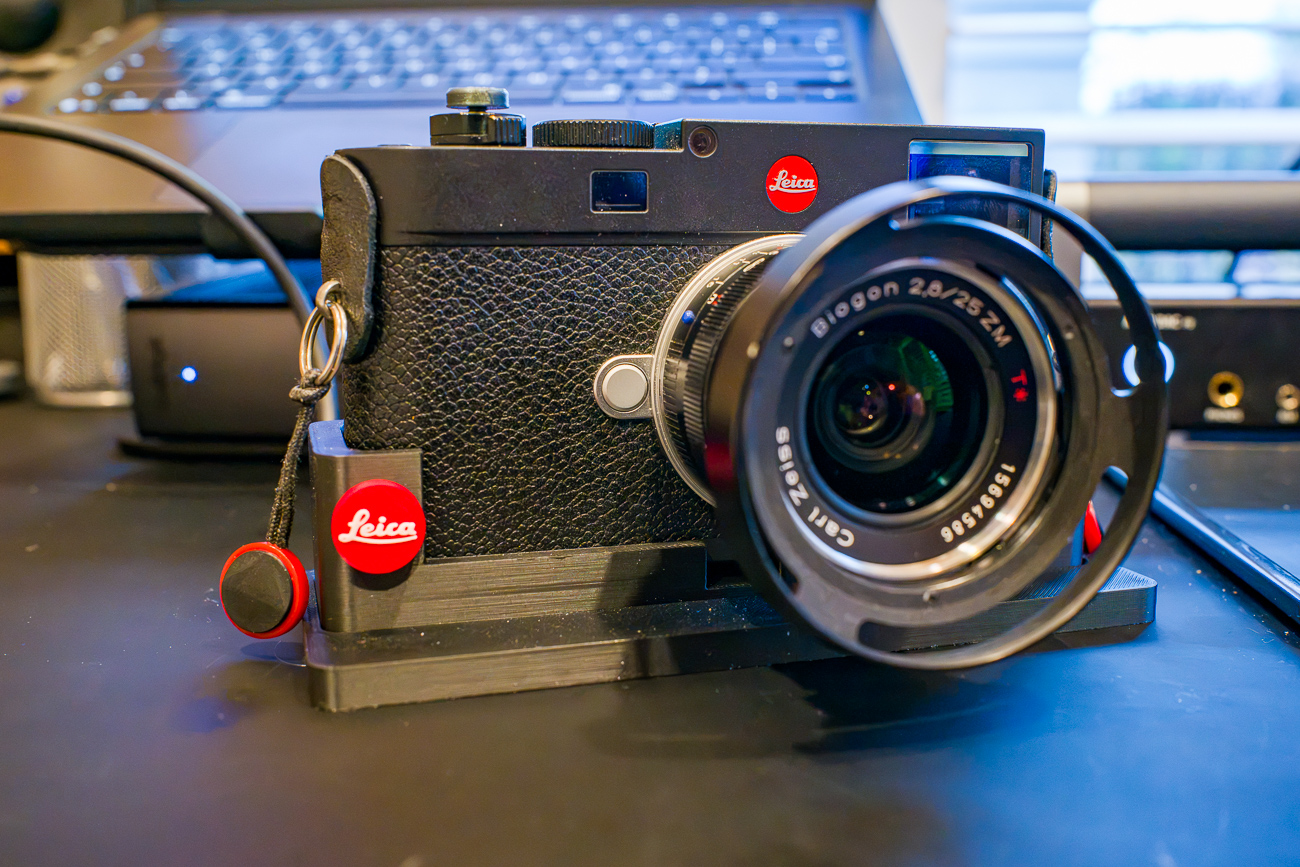
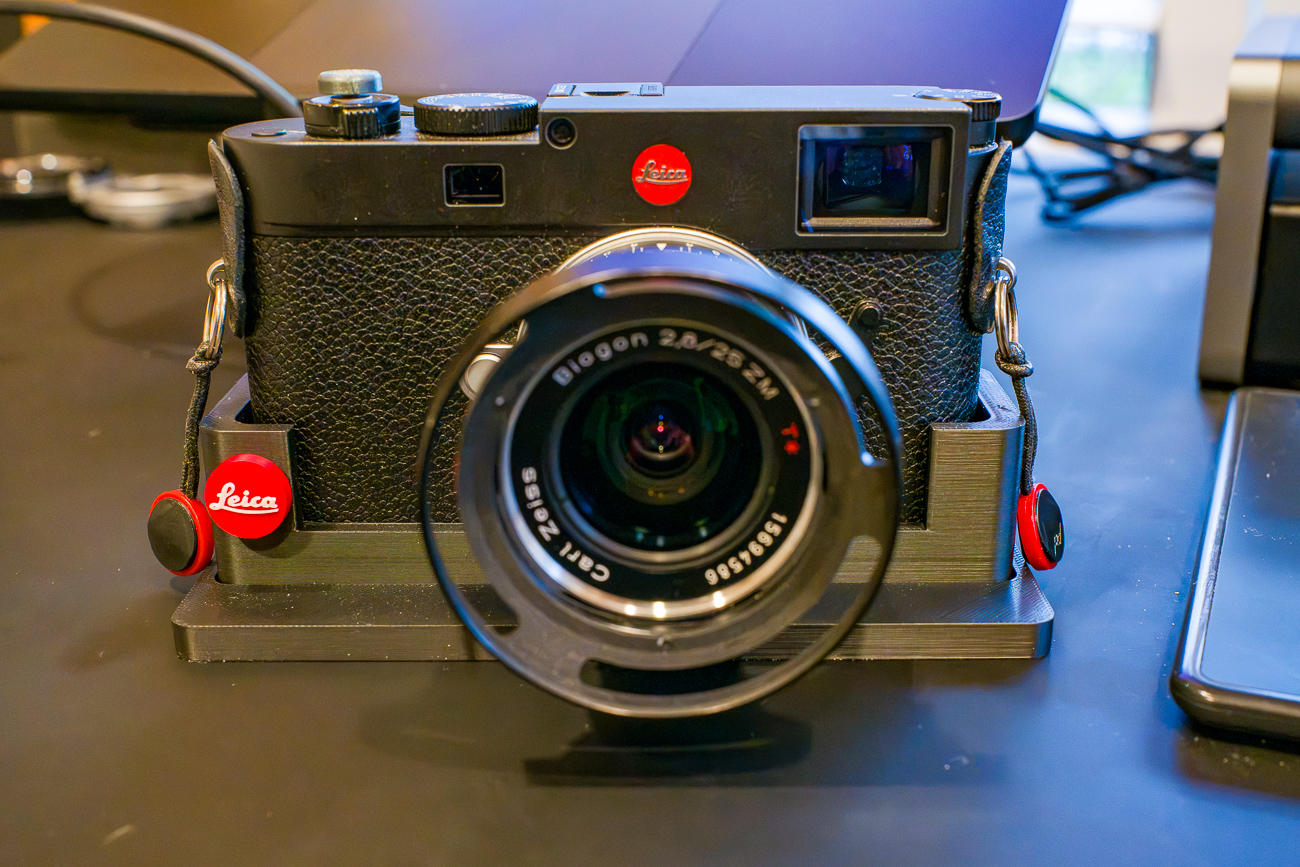
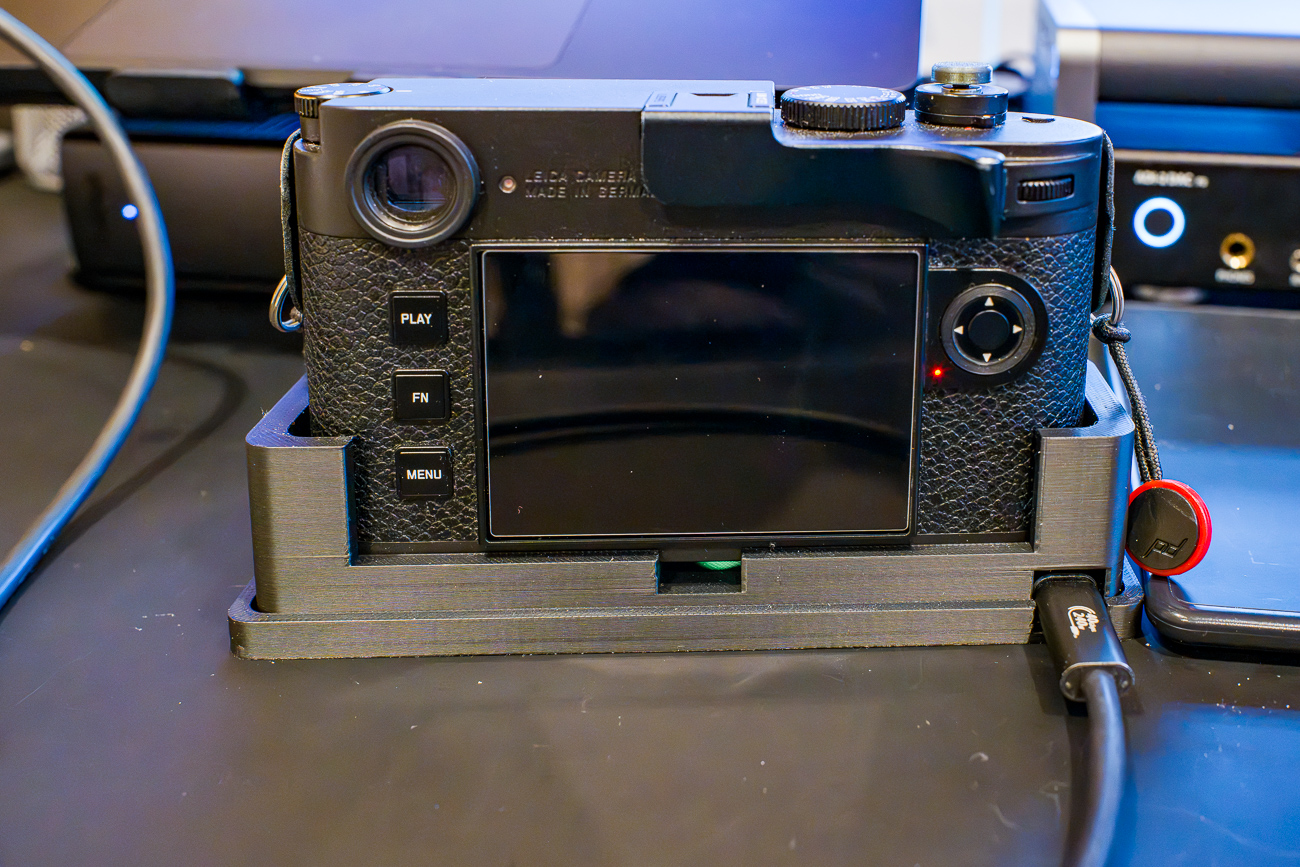
I have a 3D printed charging dock for my M11. When the charging dock is plugged into my Macbook, FM Studio finds the files. Here's a few images of the dock.
Oct 26, 2026 at 04:29 PM