p.2 #1 · FM Studio: review, tag and transfer photos on Mac
I’ve received a couple questions about reading the shutter count on pre-M10 Leica bodies like the M240 M262, and M-D series. That data isn't exposed anywhere in the image files or firmware code...it's only accessible through a hidden service menu strictly known to Leica.
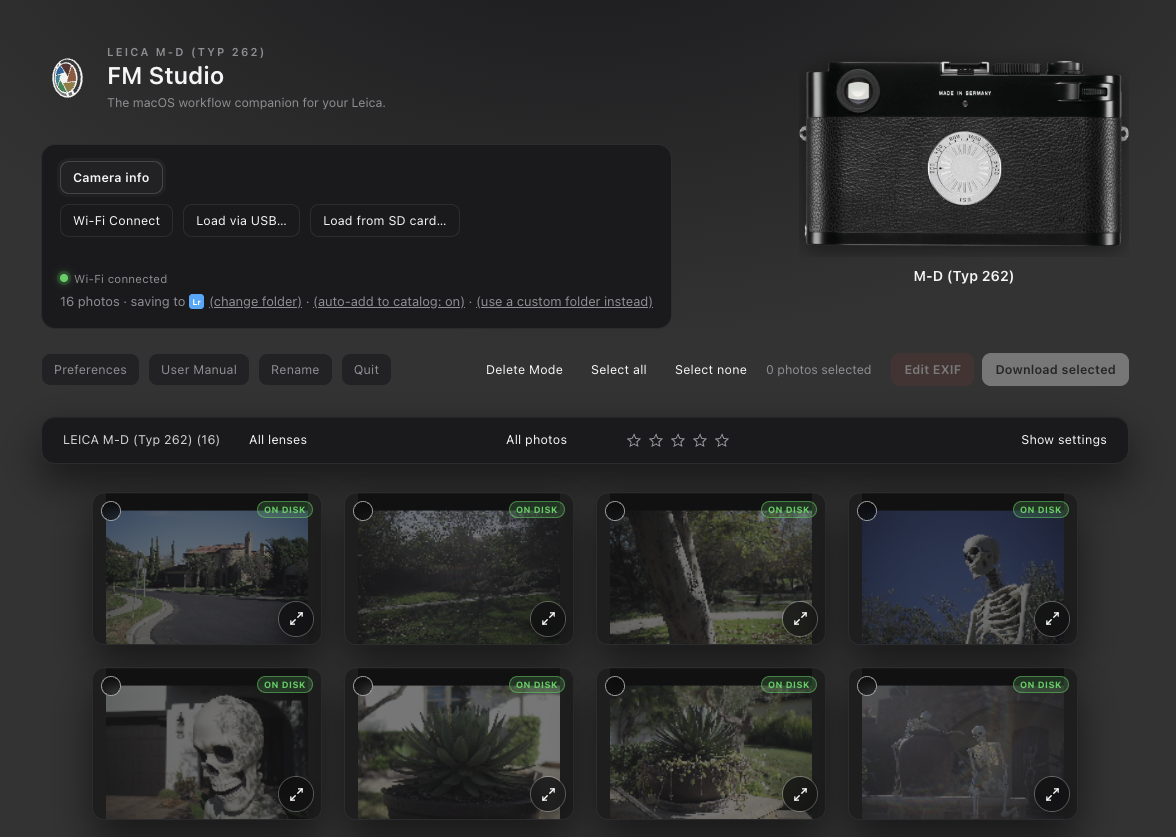
However, FM Studio still fully supports these older M bodies: either wirelessly using a Toshiba FlashAir Wi-Fi card or directly via a card reader connected to your computer. I use a 16GB FlashAir card with my M-D (Typ 262), and it works seamlessly with FM Studio. I rarely need to remove the bottom plate anymore...I just connect through the app to transfer, cull, and edit EXIF metadata directly.
p.2 #3 · FM Studio: review, tag and transfer photos on Mac
leorafa35mm wrote:
I don't know if I missed this anywhere but is there a trial available? I don't see a way to try it out before commiting to a subscription.
Good question. There isn't a free trial at the moment. The closest thing is the 1-month plan at $9.95, which you can pay once by card or PayPal without auto-renew, so it won't renew on its own. That gives you a full month to run it with your own camera and Lightroom setup.
Also, FM Studio isn't subscription-only. There's a one-time lifetime license if you'd rather buy it once and be done. It never expires, and you'd get the updates as FM Studio grows.
p.2 #5 · FM Studio: review, tag and transfer photos on Mac
mcbroomf wrote:
Hi Fred,
Will a single license work on more than one Mac (and how many)?
Also, when you finish a Windows version will a license work on both Mac and Windows machines?
Thanks
Mike
Hi Mike,
Yes. A license is personal to you, and you can use it on your own Macs. There's no set limit at the moment, so a desktop and a laptop are no problem.
A Windows version is in development, and your license will cover both. One license will work on Mac and Windows at no extra cost, including for people who have already bought. I don't have a release date yet.
p.2 #7 · FM Studio: review, tag and transfer photos on Mac
FM Studio 1.2 is out!
First, a note on the quick updates since the release. Think of them as initial growing pains, and they should slow down a bit now. FM Studio works with a lot of different cameras, and since launch and based on feedback, we have been adding meaningful features and fixes so everyone gets the most out of it. Thanks for your patience and for the feedback.
The big change in v1.2 is that FM Studio now runs in its own app window instead of a browser window:
⦿ It has its own menu bar and feels like any other Mac app.
⦿ Closing the window keeps FM Studio running, and clicking its icon in the Dock brings the window back.
⦿ You can zoom with Cmd+Plus, Cmd+Minus and Cmd+0. FM Studio remembers your zoom and the size and position of the window.
⦿ Links, such as the manual, open in your regular web browser.
⦿ Your saved presets are now kept by the app itself.
Everything else works as before. If the window can't open for any reason, FM Studio falls back to your browser the way it used to. You can download the latest version from the FM Studio page, and the updated manual is there too.
I'm going back to the drawing board now and will keep working on Windows support. I will share news when there is something to show.
p.2 #8 · FM Studio: review, tag and transfer photos on Mac
How about code replacements? Do you use that feature (I do extensively) and didn't see it mentioned in FM Studio. Maybe I missed it. But yeah, cropping, and code replacement are non-negotiables for my workflow. I rate photos in camera and not lock them, so that feature is not quite as important for me.
schlotz wrote:
Fred this looks very interesting and it appears you've put quite a lot of effort to make it usable. While I've been a long time user of Photo Mechanic (PM) due to it's ability to support working professionals' needs, FM Studio seems to mostly cover PM's functionality. For me to seriously consider it I would need to see that it definitely recognizes locked photos and can only download them. The other aspect, which I use in PM because it's faster than in LR, is cropping capability. Cropping wouldn't be a deal breaker but I would have to modify my workflow to a greater extent if it wasn't available.
p.2 #9 · FM Studio: review, tag and transfer photos on Mac
timgangloff wrote:
How about code replacements? Do you use that feature (I do extensively) and didn't see it mentioned in FM Studio. Maybe I missed it. But yeah, cropping, and code replacement are non-negotiables for my workflow. I rate photos in camera and not lock them, so that feature is not quite as important for me.
Thank you for the detailed feedback. While I don't currently have plans to add cropping, I wouldn't rule it out for the future. That feature really belongs in dedicated post-processing tools like Lightroom or Capture One, so for now, I'm going to leave it to them.
Code replacements are a different story. FM Studio already includes ExifTool and already writes metadata into your photos as they download, though today that covers a few EXIF fields such as lens, aperture and ISO. ExifTool can also write IPTC and XMP fields like caption, keywords, creator and copyright, so adding code replacements for those is realistic. I can't promise a date, but I'm adding it to my list and it's good to know it matters to your workflow.
p.2 #10 · FM Studio: review, tag and transfer photos on Mac
Fred,
sincerely appreciate your quick and detailed responses.
Fred Miranda wrote:
Thank you for the detailed feedback. While I don't currently have plans to add cropping, I wouldn't rule it out for the future. That feature really belongs in dedicated post-processing tools like Lightroom or Capture One, so for now, I'm going to leave it to them.
Code replacements are a different story. FM Studio already includes ExifTool and already writes metadata into your photos as they download, though today that covers a few EXIF fields such as lens, aperture and ISO. ExifTool can also write IPTC and XMP fields like caption, keywords, creator and copyright, so adding code replacements for those is realistic. I can't promise a date, but I'm adding it to my list and it's good to know it matters to your workflow. ...Show more →
p.2 #11 · FM Studio: review, tag and transfer photos on Mac
Excellent work, Fred. I've been using ImageIngester (authored by Marc Rochkind) for years but its useful life ends with MacOS 27. I run it with Rosetta now. FM Studio does most of what I need and I'm relieved that I now have an alternative to ImageIngester.
One feature request that I have is the ability to name folders using the same constructs as file renaming. For example, my folders are [YYYY][MM][DD]_[model].
Thanks very much, and know that I'm willing to beta test any changes.