FLX Film Lab - physics-based film simulations
p.6 #1FLX Film Lab - physics-based film simulations
Two more film stock requests: Mr Negative Same Same But Different - 35mm Film, ISO 400. I can't find a data sheet on the film (unsurprisingly) but I like the film so I thought I'd ask. The second is Kodak Elite Chrome (https://filmcolors.org/timeline-of-historical-film-colors/page/14/?sort=inventor-asc)
Nov 08, 2026 at 07:43 AM
p.6 #2FLX Film Lab - physics-based film simulations
geekcop wrote:
Two more film stock requests: Mr Negative Same Same But Different - 35mm Film, ISO 400. I can't find a data sheet on the film (unsurprisingly) but I like the film so I thought I'd ask. The second is Kodak Elite Chrome (https://filmcolors.org/timeline-of-historical-film-colors/page/14/?sort=inventor-asc)
Elite chrome is fairly straightforward. There’s also an “extra color” variant which might be interesting.
The Mr Negative is some respooled film so a) no usable data available and b) likely already in the app.
Two more film stock requests: Mr Negative Same Same But Different - 35mm Film, ISO 400. I can't find a data sheet on the film (unsurprisingly) but I like the film so I thought I'd ask. The second is Kodak Elite Chrome (https://filmcolors.org/timeline-of-historical-film-colors/page/14/?sort=inventor-asc)
Elite chrome is fairly straightforward. There’s also an “extra color” variant which might be interesting.
The Mr Negative is some respooled film so a) no usable data available and b) likely already in the app.
Nov 08, 2026 at 09:19 AM
p.6 #3FLX Film Lab - physics-based film simulations
Man I would love to try this. Looks fantastic and cheers for making something that again, is not more money.
Sadly, I guess it's only compatible with Mac OS X 26.0 and later--the Silicone M chips as I understand it. My comp isn't compatible. Cheers anyway and thanks again for releasing a great product pro bono.
Sadly, I guess it's only compatible with Mac OS X 26.0 and later--the Silicone M chips as I understand it. My comp isn't compatible. Cheers anyway and thanks again for releasing a great product pro bono.
Nov 08, 2026 at 03:06 PM
p.6 #4FLX Film Lab - physics-based film simulations
nehemiahphoto wrote:
Man I would love to try this. Looks fantastic and cheers for making something that again, is not more money.
Sadly, I guess it's only compatible with Mac OS X 26.0 and later--the Silicone M chips as I understand it. My comp isn't compatible. Cheers anyway and thanks again for releasing a great product pro bono.
Nehemiah, if you'd like to try it out maybe version 1.1.1 will work with your computer. It requires Mac OS 14 or later and doesn't specify M series chips.
Man I would love to try this. Looks fantastic and cheers for making something that again, is not more money.
Sadly, I guess it's only compatible with Mac OS X 26.0 and later--the Silicone M chips as I understand it. My comp isn't compatible. Cheers anyway and thanks again for releasing a great product pro bono.
Nehemiah, if you'd like to try it out maybe version 1.1.1 will work with your computer. It requires Mac OS 14 or later and doesn't specify M series chips.
Nov 08, 2026 at 04:05 PM
p.6 #5FLX Film Lab - physics-based film simulations
Vic Fontaine wrote:
Sadly, I guess it's only compatible with Mac OS X 26.0 and later--the Silicone M chips as I understand it. My comp isn't compatible. Cheers anyway and thanks again for releasing a great product pro bono.Nehemiah, if you'd like to try it out maybe version 1.1.1 will work with your computer. It requires Mac OS 14 or later and doesn't specify M series chips.
My comp will only update to 13.7.8 (it's a 2019)

nehemiahphoto wrote
Man I would love to try this. Looks fantastic and cheers for making something that again, is not more money.Sadly, I guess it's only compatible with Mac OS X 26.0 and later--the Silicone M chips as I understand it. My comp isn't compatible. Cheers anyway and thanks again for releasing a great product pro bono.
My comp will only update to 13.7.8 (it's a 2019)
Nov 08, 2026 at 04:14 PM
p.6 #6FLX Film Lab - physics-based film simulations
My comp will only update to 13.7.8 (it's a 2019)
Darn, so close.
Darn, so close.
Nov 08, 2026 at 06:32 PM
p.6 #7FLX Film Lab - physics-based film simulations
nehemiahphoto wrote:
Sadly, I guess it's only compatible with Mac OS X 26.0 and later--the Silicone M chips as I understand it. My comp isn't compatible. Cheers anyway and thanks again for releasing a great product pro bono.Nehemiah, if you'd like to try it out maybe version 1.1.1 will work with your computer. It requires Mac OS 14 or later and doesn't specify M series chips.My comp will only update to 13.7.8 (it's a 2019)
Damn :/
Surprised there are still so many pre 2020 Macs out there. I know it probably doesn't help much given life is so expensive right now, but upgrading to Apple silicon is really worth it - even a Macbook Neo or used M2 Macbook Air will run circles around your current machine (though some 8GB models are a bit too memory-limited for my taste).
Vic Fontaine wrote
nehemiahphoto wrote
Man I would love to try this. Looks fantastic and cheers for making something that again, is not more money.Sadly, I guess it's only compatible with Mac OS X 26.0 and later--the Silicone M chips as I understand it. My comp isn't compatible. Cheers anyway and thanks again for releasing a great product pro bono.
Damn :/
Surprised there are still so many pre 2020 Macs out there. I know it probably doesn't help much given life is so expensive right now, but upgrading to Apple silicon is really worth it - even a Macbook Neo or used M2 Macbook Air will run circles around your current machine (though some 8GB models are a bit too memory-limited for my taste).
Nov 09, 2026 at 12:13 AM
p.6 #8FLX Film Lab - physics-based film simulations
First of all, I just wanted to say how much I’m enjoying the app and the images I’m getting from it. It’s become a really inspiring part of my workflow, so thank you for all the effort you’ve put into creating it.
I have a question that may be completely off the mark, as I have no idea how any of the underlying technology works. Would it be possible to convert individual simulations, at least to some extent, into Capture One profiles or styles?
I do almost all of my editing in Capture One, and while I love what FLX can do, I haven’t yet found a good way of incorporating it into a workflow that involves larger numbers of images. I’ve seen that Spektrafilm can export LUTs, but unfortunately that doesn’t seem to be a practical solution for Capture One.
Thanks for any thoughts you might have, and all the best with future development!
I have a question that may be completely off the mark, as I have no idea how any of the underlying technology works. Would it be possible to convert individual simulations, at least to some extent, into Capture One profiles or styles?
I do almost all of my editing in Capture One, and while I love what FLX can do, I haven’t yet found a good way of incorporating it into a workflow that involves larger numbers of images. I’ve seen that Spektrafilm can export LUTs, but unfortunately that doesn’t seem to be a practical solution for Capture One.
Thanks for any thoughts you might have, and all the best with future development!
Nov 09, 2026 at 03:04 AM
p.6 #9FLX Film Lab - physics-based film simulations
jhonzatko wrote:
First of all, I just wanted to say how much I’m enjoying the app and the images I’m getting from it. It’s become a really inspiring part of my workflow, so thank you for all the effort you’ve put into creating it.
I have a question that may be completely off the mark, as I have no idea how any of the underlying technology works. Would it be possible to convert individual simulations, at least to some extent, into Capture One profiles or styles?
I do almost all of my editing in Capture One, and while I love what FLX can do,...Show more →
Thanks, glad you like the app!
I'm also a Capture One user, but mostly because I am being held hostage by my back catalogue. At this point I consider it a badly written piece of software with a toxic business model. So I will not invest my own time and money to improve C1 in any way. But feel free to ask them to pay me to do it - I promise my terms won't be more toxic than theirs
Multi image workflow is high on my list of things to look into for this app. But it does come with significant challenges as the imaging pipeline of this app is VRAM hungry and loading several images might cause instabilities on many hardware configurations and / or make the app sluggish. So it's not a guarantee that it'll work.
For now you can manage your library in C1 and open individual images in FLX Film Lab with the "open with.." function in C1. Still a relatively slow workflow if you have a lot of images though.
First of all, I just wanted to say how much I’m enjoying the app and the images I’m getting from it. It’s become a really inspiring part of my workflow, so thank you for all the effort you’ve put into creating it.
I have a question that may be completely off the mark, as I have no idea how any of the underlying technology works. Would it be possible to convert individual simulations, at least to some extent, into Capture One profiles or styles?
I do almost all of my editing in Capture One, and while I love what FLX can do,...Show more →
Thanks, glad you like the app!
I'm also a Capture One user, but mostly because I am being held hostage by my back catalogue. At this point I consider it a badly written piece of software with a toxic business model. So I will not invest my own time and money to improve C1 in any way. But feel free to ask them to pay me to do it - I promise my terms won't be more toxic than theirs
Multi image workflow is high on my list of things to look into for this app. But it does come with significant challenges as the imaging pipeline of this app is VRAM hungry and loading several images might cause instabilities on many hardware configurations and / or make the app sluggish. So it's not a guarantee that it'll work.
For now you can manage your library in C1 and open individual images in FLX Film Lab with the "open with.." function in C1. Still a relatively slow workflow if you have a lot of images though.
Nov 09, 2026 at 05:58 AM
p.6 #10FLX Film Lab - physics-based film simulations
fjablo wrote:
Sadly, I guess it's only compatible with Mac OS X 26.0 and later--the Silicone M chips as I understand it. My comp isn't compatible. Cheers anyway and thanks again for releasing a great product pro bono.Nehemiah, if you'd like to try it out maybe version 1.1.1 will work with your computer. It requires Mac OS 14 or later and doesn't specify M series chips.My comp will only update to 13.7.8 (it's a 2019)
Damn :/
Surprised there are still so many pre 2020 Macs out there. I know it probably doesn't help much given life is so expensive right now, but upgrading to Apple silicon is really worth it - even a Macbook Neo or used M2 Macbook Air will run circles around your current machine (though some 8GB models are a bit too memory-limited for my taste).
Yeah, it’s funny though with phones my comp gets little use. Realistically, I really just use my Mac to edit my video footage and photos. Aside from that, and maybe an odd job with filling out a PDF for what not here and there, I don’t use it. I just use a phone for everything as far as news consumption and email and what not. It’s a hard upgrade to justify. Your app is the first thing that has presented an issue.
On top of all that, I am shooting more film than digital nowadays, so it’s really a small use case! The photos look great though.
nehemiahphoto wrote
Vic Fontaine wrote
nehemiahphoto wrote
Man I would love to try this. Looks fantastic and cheers for making something that again, is not more money.Sadly, I guess it's only compatible with Mac OS X 26.0 and later--the Silicone M chips as I understand it. My comp isn't compatible. Cheers anyway and thanks again for releasing a great product pro bono.
Surprised there are still so many pre 2020 Macs out there. I know it probably doesn't help much given life is so expensive right now, but upgrading to Apple silicon is really worth it - even a Macbook Neo or used M2 Macbook Air will run circles around your current machine (though some 8GB models are a bit too memory-limited for my taste).
Yeah, it’s funny though with phones my comp gets little use. Realistically, I really just use my Mac to edit my video footage and photos. Aside from that, and maybe an odd job with filling out a PDF for what not here and there, I don’t use it. I just use a phone for everything as far as news consumption and email and what not. It’s a hard upgrade to justify. Your app is the first thing that has presented an issue.
On top of all that, I am shooting more film than digital nowadays, so it’s really a small use case! The photos look great though.
Nov 09, 2026 at 09:08 AM
|
p.6 #11FLX Film Lab - physics-based film simulations
fjablo wrote:
Surprised there are still so many pre 2020 Macs out there. I know it probably doesn't help much given life is so expensive right now, but upgrading to Apple silicon is really worth it - even a Macbook Neo or used M2 Macbook Air will run circles around your current machine (though some 8GB models are a bit too memory-limited for my taste).
For me it's not about the cost. I simply have no use for "better" hardware (until now, that is...). I never use any apps that need more than my 2019 Mac (with 64 GB RAM though) easily can cope with. So it would be more or less stupid to upgrade for no reason.
I also use my phone as little as possible, so it's not about that either.
However... As mentioned earlier, 1.1.1 actually loads and "works" on my computer (OS 14), but the images are just pure black. 😢
Surprised there are still so many pre 2020 Macs out there. I know it probably doesn't help much given life is so expensive right now, but upgrading to Apple silicon is really worth it - even a Macbook Neo or used M2 Macbook Air will run circles around your current machine (though some 8GB models are a bit too memory-limited for my taste).
For me it's not about the cost. I simply have no use for "better" hardware (until now, that is...). I never use any apps that need more than my 2019 Mac (with 64 GB RAM though) easily can cope with. So it would be more or less stupid to upgrade for no reason.
I also use my phone as little as possible, so it's not about that either.
However... As mentioned earlier, 1.1.1 actually loads and "works" on my computer (OS 14), but the images are just pure black. 😢
Nov 09, 2026 at 09:38 AM
p.6 #12FLX Film Lab - physics-based film simulations
My typical workflow is adobe camera raw -> photoshop for export. I really like this app and am happy to give up my film presets, but there are some things I still like to do in acr. Right now I open the raw FLX, export as a tiff and open in photoshop. I can use acr as a filter there which gives me the same ui if not the actual raw capabilities... Is there a better way that I'm missing?
Are the sidecar files created by acr binaries unusable by other software, or could they be used on import to FLX, for example?
Are the sidecar files created by acr binaries unusable by other software, or could they be used on import to FLX, for example?
Nov 09, 2026 at 10:32 AM
p.6 #13FLX Film Lab - physics-based film simulations
Love this app!
Would there be a way to add an Oval mask to the graduated filters section? I have a few lenses I use that have some pretty aggressive vignetting that I'd like to compensate for a little bit. Or am I best to use the Oval under dodge & burn?
Would also love to see some photos of people working with skin tones - for nature and landscape I've had great luck with this so far, but a lot harder time editing skin tones, I find by the time the skin is looking good, the background is way too dark.
Would there be a way to add an Oval mask to the graduated filters section? I have a few lenses I use that have some pretty aggressive vignetting that I'd like to compensate for a little bit. Or am I best to use the Oval under dodge & burn?
Would also love to see some photos of people working with skin tones - for nature and landscape I've had great luck with this so far, but a lot harder time editing skin tones, I find by the time the skin is looking good, the background is way too dark.
Nov 09, 2026 at 11:14 AM
p.6 #14FLX Film Lab - physics-based film simulations
It would be great if the masking filters went away. Once you apply one, you're stuck looking at the blue outline the whole time.
Nov 09, 2026 at 12:52 PM

p.6 #15FLX Film Lab - physics-based film simulations
Felix, I just tried the Kodachrome 25 (profile?) on a shot that I knew would tell me if it was right by the reds. They look perfect to me. Wonderful app you have put together - Congrats, and thank you!
Jim
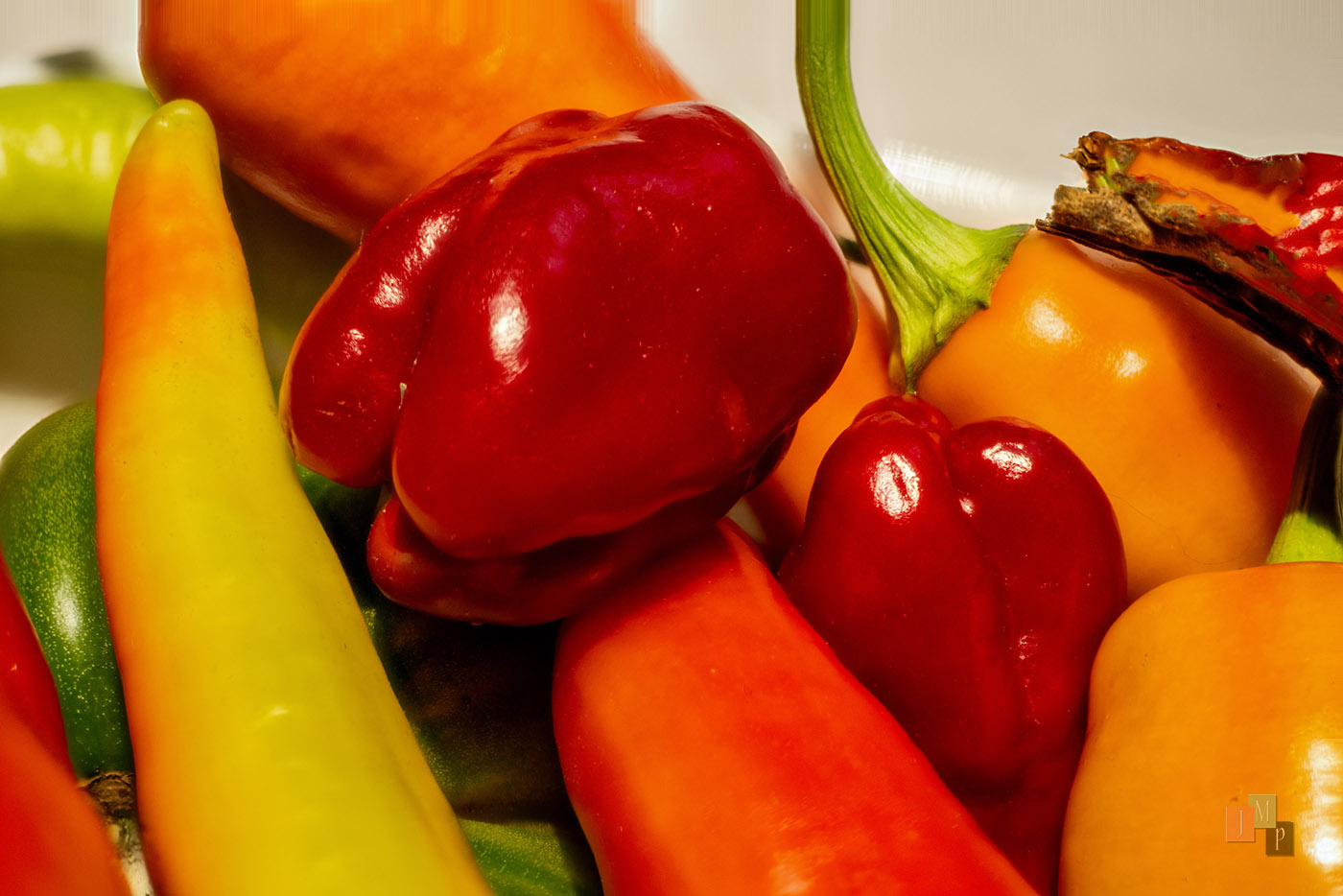
Original D800 Nikkor-P.C 55mm f3.5 ai'd-micro-Focus stack TEST
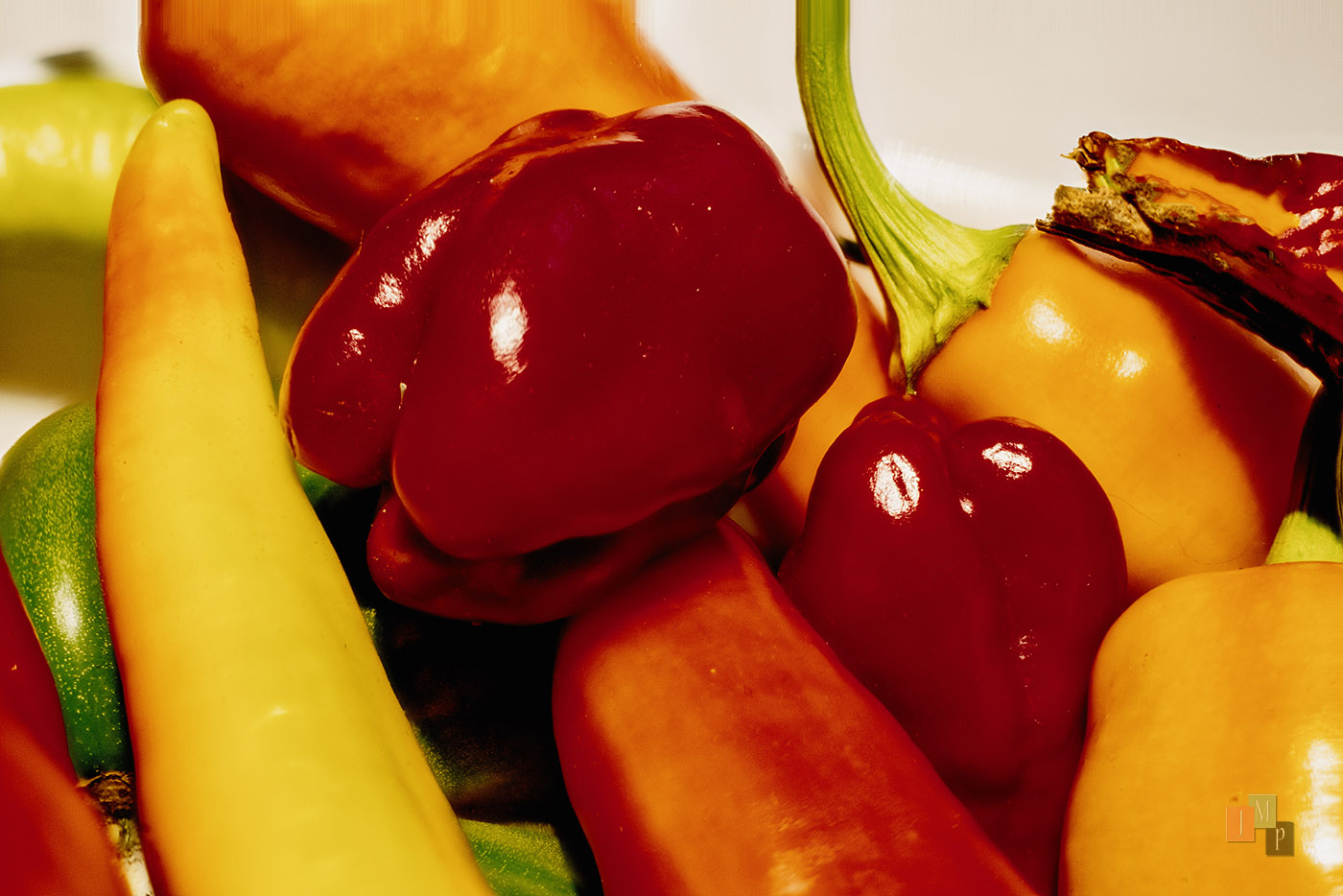
Kodachrome 25 D800 Nikkor-P.C 55mm f3.5 ai'd-micro-Focus stack TEST
Jim
Original D800 Nikkor-P.C 55mm f3.5 ai'd-micro-Focus stack TEST
Kodachrome 25 D800 Nikkor-P.C 55mm f3.5 ai'd-micro-Focus stack TEST
Nov 09, 2026 at 12:56 PM
p.6 #16FLX Film Lab - physics-based film simulations
Version 1.5.0 is out now! https://github.com/felixjablonka/flx-film-lab/releases/tag/v1.5.0
New film stocks:
- Kodak Double-X 5222 and its print film Kodak 2302
- Kodak Elite Chrome 100 "Extra Color" and Elite Chrome 200
- Polaroid pack film! Polacolor 559 and two BW variants: 553 and Pro 100
Interface and editing tools:
- Oval mask added to "Graduated Exposure" section
- Masks can be hidden with a toggle on the top right
Here are some samples from the new film stocks:
 Florence x "Elite Chrome 200" by Felix, auf Flickr
 Venice x "Elite Chrome 100EC" by Felix, auf Flickr
 Venice x "Polaroid 553" by Felix, auf Flickr
 That Tree x "Polacolor 559" by Felix, auf Flickr
New film stocks:
- Kodak Double-X 5222 and its print film Kodak 2302
- Kodak Elite Chrome 100 "Extra Color" and Elite Chrome 200
- Polaroid pack film! Polacolor 559 and two BW variants: 553 and Pro 100
Interface and editing tools:
- Oval mask added to "Graduated Exposure" section
- Masks can be hidden with a toggle on the top right
Here are some samples from the new film stocks:
Florence x "Elite Chrome 200" by Felix, auf FlickrVenice x "Elite Chrome 100EC" by Felix, auf FlickrVenice x "Polaroid 553" by Felix, auf FlickrThat Tree x "Polacolor 559" by Felix, auf FlickrNov 11, 2026 at 04:01 AM
p.6 #17FLX Film Lab - physics-based film simulations
Color me very impressed. Based on past experience with other programs, I found it very easy to use. Was able to quickly make excellent digital 'prints' within minutes of first starting the program.
A couple wishes. While the loupe is handy, and works as expected, it would be nice to have Ctrl (CMD) + or - for quickly zooming in and out. Also, any way to make the Temperature and Tint sliders under White Balance sticky. I'm curious what the underlying values are when selecting either As Shot or Film Reference. If the sliders were available, it would be easy to make minor corrections from either of those starting points, rather than starting from an arbitrary value, which seems to be a smidge less than 5000K, in Custom.
A couple wishes. While the loupe is handy, and works as expected, it would be nice to have Ctrl (CMD) + or - for quickly zooming in and out. Also, any way to make the Temperature and Tint sliders under White Balance sticky. I'm curious what the underlying values are when selecting either As Shot or Film Reference. If the sliders were available, it would be easy to make minor corrections from either of those starting points, rather than starting from an arbitrary value, which seems to be a smidge less than 5000K, in Custom.
Nov 11, 2026 at 08:35 AM
p.6 #18FLX Film Lab - physics-based film simulations
I know this isn't probably the direction you want the product to head, but if there was any kind of way Noritsu or Frontier emulations could be incorporated as an alternative to the prints, that would be incredible!
Edit: Something else I'm experiencing is shadows look quite a bit different upon export on my Windows 11 machine. If i take a screenshot of the exported image and a screenshot of FLX, the two images appear the same, but it almost seems as if FLX is overriding my color profile? Might be a me problem only!
Edit: Something else I'm experiencing is shadows look quite a bit different upon export on my Windows 11 machine. If i take a screenshot of the exported image and a screenshot of FLX, the two images appear the same, but it almost seems as if FLX is overriding my color profile? Might be a me problem only!
Nov 11, 2026 at 08:55 AM
p.6 #19FLX Film Lab - physics-based film simulations
Taperwing wrote:
Color me very impressed. Based on past experience with other programs, I found it very easy to use. Was able to quickly make excellent digital 'prints' within minutes of first starting the program.
A couple wishes. While the loupe is handy, and works as expected, it would be nice to have Ctrl (CMD) + or - for quickly zooming in and out. Also, any way to make the Temperature and Tint sliders under White Balance sticky. I'm curious what the underlying values are when selecting either As Shot or Film Reference. If the sliders were available, it would be easy to...Show more →
There are multiple ways to control "White Balance" in the app.
The first one, that sits with the film selection, is changing the temperature of the light the "negative" was exposed with - the purist view of this is that it should always be set to "film reference" as that is how real film would behave given the actual light you shot in. The other options there are really only meant as fallbacks. Films are either daylight balanced (5500K) or tungsten balanced (3200K) so that is what the "film reference" sets.
The other one - and that is the one I suggest to use for smaller tweaks - is the color balance of the "print". It sits in the color section and here you can easily make the print a bit warmer or cooler. In the background these settings simulate the use of filters in the darkroom, the controls have just been translated to terms photographer's these days would know from editing apps
Another more purist way to control color balance is applying virtual warming filters (e.g. Wratten 81C or 85 or Tiffen 812).
I'm trying to keep the app more "analogue" and true to the film experience in some ways, hence the more limited tools in the pre-negative stage of the pipeline
Color me very impressed. Based on past experience with other programs, I found it very easy to use. Was able to quickly make excellent digital 'prints' within minutes of first starting the program.
A couple wishes. While the loupe is handy, and works as expected, it would be nice to have Ctrl (CMD) + or - for quickly zooming in and out. Also, any way to make the Temperature and Tint sliders under White Balance sticky. I'm curious what the underlying values are when selecting either As Shot or Film Reference. If the sliders were available, it would be easy to...Show more →
There are multiple ways to control "White Balance" in the app.
The first one, that sits with the film selection, is changing the temperature of the light the "negative" was exposed with - the purist view of this is that it should always be set to "film reference" as that is how real film would behave given the actual light you shot in. The other options there are really only meant as fallbacks. Films are either daylight balanced (5500K) or tungsten balanced (3200K) so that is what the "film reference" sets.
The other one - and that is the one I suggest to use for smaller tweaks - is the color balance of the "print". It sits in the color section and here you can easily make the print a bit warmer or cooler. In the background these settings simulate the use of filters in the darkroom, the controls have just been translated to terms photographer's these days would know from editing apps
Another more purist way to control color balance is applying virtual warming filters (e.g. Wratten 81C or 85 or Tiffen 812).
I'm trying to keep the app more "analogue" and true to the film experience in some ways, hence the more limited tools in the pre-negative stage of the pipeline
Nov 11, 2026 at 11:28 AM
p.6 #20FLX Film Lab - physics-based film simulations
lifef8 wrote:
I know this isn't probably the direction you want the product to head, but if there was any kind of way Noritsu or Frontier emulations could be incorporated as an alternative to the prints, that would be incredible!
Would be a neat option, but I'm not sure there is solid data to build profiles for Noritsu or Frontier emulations. Not against the idea itself though
lifef8 wrote:
Edit: Something else I'm experiencing is shadows look quite a bit different upon export on my Windows 11 machine. If i take a screenshot of the exported image and a screenshot of FLX, the two images appear the same, but it almost seems as if FLX is overriding my color profile? Might be a me problem only!
Thanks for the hint! The export and the preview are the same pixels, which your screenshots confirm. FLX doesn’t change your color profile, it's a difference in how they are displayed: FLX’s preview is a standard sRGB window, while your image viewer (Windows Photos etc) seems to be color-managed. And with HDR or “automatically manage color for apps” on, Windows maps the pixels differently. I'll look into that for a future update.
I know this isn't probably the direction you want the product to head, but if there was any kind of way Noritsu or Frontier emulations could be incorporated as an alternative to the prints, that would be incredible!
Would be a neat option, but I'm not sure there is solid data to build profiles for Noritsu or Frontier emulations. Not against the idea itself though
lifef8 wrote:
Edit: Something else I'm experiencing is shadows look quite a bit different upon export on my Windows 11 machine. If i take a screenshot of the exported image and a screenshot of FLX, the two images appear the same, but it almost seems as if FLX is overriding my color profile? Might be a me problem only!
Thanks for the hint! The export and the preview are the same pixels, which your screenshots confirm. FLX doesn’t change your color profile, it's a difference in how they are displayed: FLX’s preview is a standard sRGB window, while your image viewer (Windows Photos etc) seems to be color-managed. And with HDR or “automatically manage color for apps” on, Windows maps the pixels differently. I'll look into that for a future update.
Nov 11, 2026 at 11:40 AM