Apple's new RAW decoder and denoise engine rivals DxO's PureRAW
p.1 #1Apple's new RAW decoder and denoise engine rivals DxO's PureRAW
Apple’s new RAW decoder and denoising appears to be as good as DxO’s RAW denoise - and it works great with the A7R6 files (any format) and apparently support the A75 files as well.
If you have a Mac running macOS 27 and want to try it out you can download my RAW app - its a bit clunky because I broke some of the UI elements and haven’t got around to fixing them until I figured it would be worth doing - and given how good the App RAW denoiser seems to be I will probably put a bit more effort into fixing it up. It is also a bit slow with the new raw decoder so be patient if you do try it - don't click onto images too quickly or you will clog up the graphics pipeline as currently it does not handle cleanup of the pipeline properly. I will have to optimises the graphics by tiling the images - but up until now it hasn’t been worth it. One thing that is impressive is how the Apple engine caches the intermediate ML results - when you go to export the image it takes less than a second !!
However bear in mind that the app currently has some bugs that cause things to grind to a halt after processing a few images. Restart the app to fix that More clean up required to smoothing things out - hopefully Apple release Aperture v2 so I don’t have to bother! Alternately look for the app called RAWScope on the App Store which I believe is also using Apple version 9 decoder.
https://duncangroenewald.com/files/Software/RAW.zip
RAW Editor Instructions (arrow up and down to navigate the browser presentation or mouse over left side for thumbnails)
https://duncangroenewald.com/pages/guides/raw-editor/RAW-Editor-Instructions/index.html
https://duncangroenewald.com/pages/guides/raw-editor/RAW-Editor-Instructions.pdf
The app is a little counterintuitive in that you need to select a folder with RAW files and then import the files - the app just reads the files metadata and saves then in a database along with any adjustments. It is non-destructive so does not alter the original RAW files in any way. Send me a message and I can dig out the instructions if necessary.
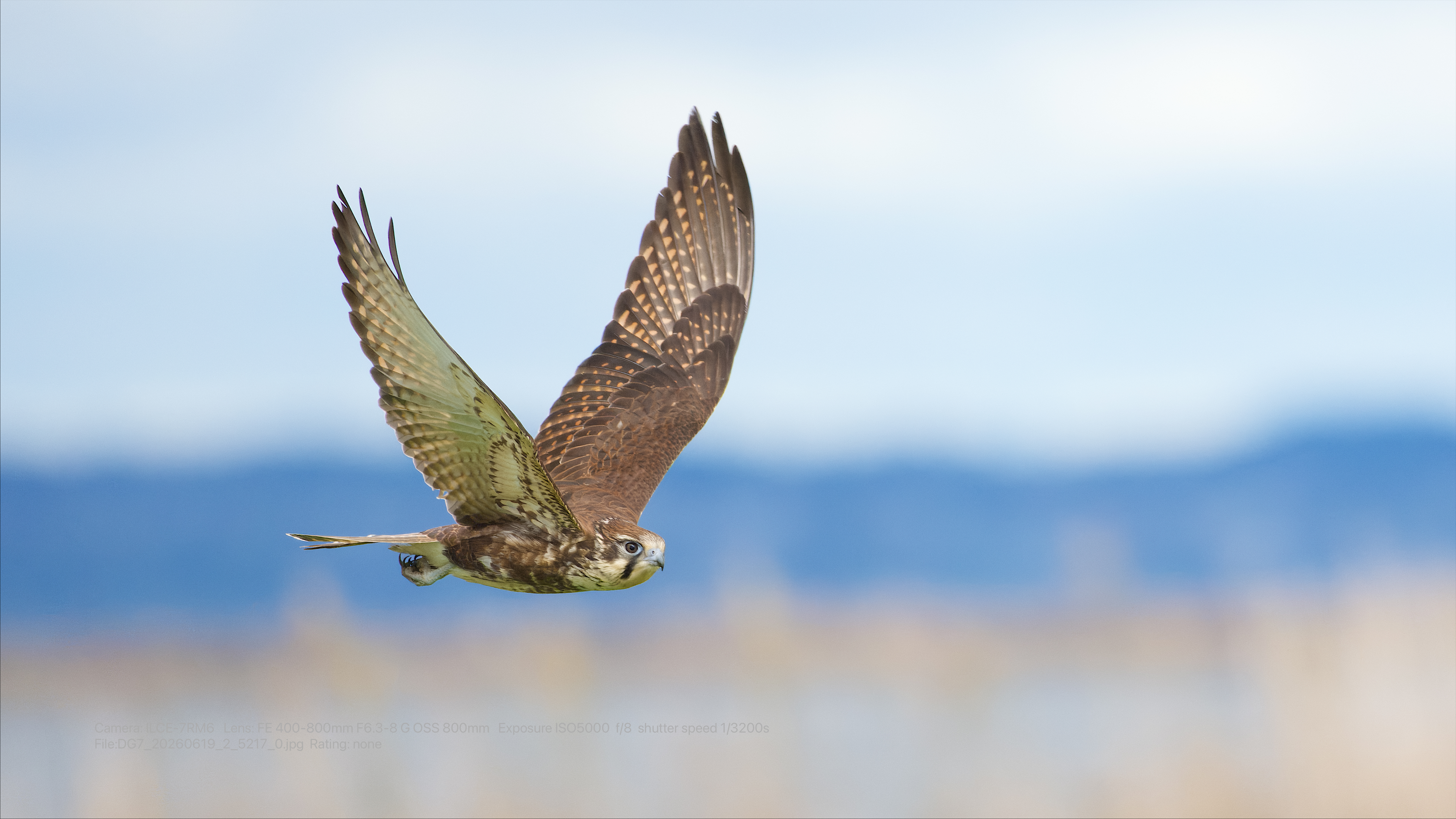
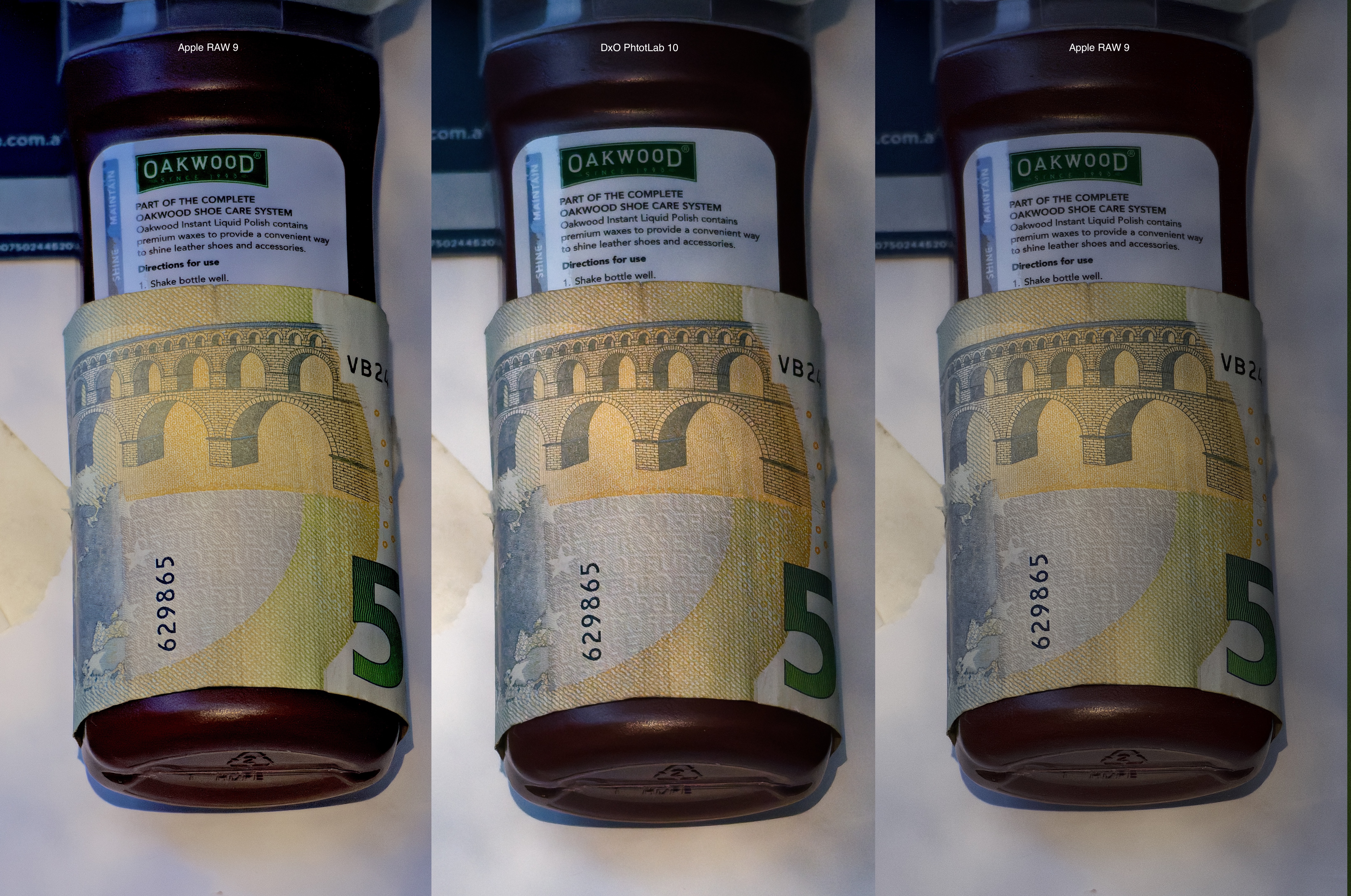
A couple of examples below - I think it is on par with DxO in terms of retaining the details and slightly better overall at removing noise - it seems to produce slightly more subtle results.
Obviously there are many functions in PhotoLab that are not available in my app but it is nice to see a really excellent RAW decoder from Apple - they must be serious about providing a full suite of Photo/Video applications in future.
Unfortunately there are currently only a limited set of Cameras that are supported by the Version 9 RAW decoder - the Canon R1, Sony A7riii, A75 and A7R6 being some of them. No A1, A1ii or A9iii as yet.
Edited on Oct 04, 2026 at 05:14 PM · View previous versions
If you have a Mac running macOS 27 and want to try it out you can download my RAW app - its a bit clunky because I broke some of the UI elements and haven’t got around to fixing them until I figured it would be worth doing - and given how good the App RAW denoiser seems to be I will probably put a bit more effort into fixing it up. It is also a bit slow with the new raw decoder so be patient if you do try it - don't click onto images too quickly or you will clog up the graphics pipeline as currently it does not handle cleanup of the pipeline properly. I will have to optimises the graphics by tiling the images - but up until now it hasn’t been worth it. One thing that is impressive is how the Apple engine caches the intermediate ML results - when you go to export the image it takes less than a second !!
However bear in mind that the app currently has some bugs that cause things to grind to a halt after processing a few images. Restart the app to fix that More clean up required to smoothing things out - hopefully Apple release Aperture v2 so I don’t have to bother! Alternately look for the app called RAWScope on the App Store which I believe is also using Apple version 9 decoder.
https://duncangroenewald.com/files/Software/RAW.zip
RAW Editor Instructions (arrow up and down to navigate the browser presentation or mouse over left side for thumbnails)
https://duncangroenewald.com/pages/guides/raw-editor/RAW-Editor-Instructions/index.html
https://duncangroenewald.com/pages/guides/raw-editor/RAW-Editor-Instructions.pdf
The app is a little counterintuitive in that you need to select a folder with RAW files and then import the files - the app just reads the files metadata and saves then in a database along with any adjustments. It is non-destructive so does not alter the original RAW files in any way. Send me a message and I can dig out the instructions if necessary.
A couple of examples below - I think it is on par with DxO in terms of retaining the details and slightly better overall at removing noise - it seems to produce slightly more subtle results.
Obviously there are many functions in PhotoLab that are not available in my app but it is nice to see a really excellent RAW decoder from Apple - they must be serious about providing a full suite of Photo/Video applications in future.
Unfortunately there are currently only a limited set of Cameras that are supported by the Version 9 RAW decoder - the Canon R1, Sony A7riii, A75 and A7R6 being some of them. No A1, A1ii or A9iii as yet.
Edited on Oct 04, 2026 at 05:14 PM · View previous versions
Oct 04, 2026 at 05:31 AM
p.1 #2Apple's new RAW decoder and denoise engine rivals DxO's PureRAW
I'm curious to try this, but can't seem to get any images to load into the app. I created a folder with three raw files from the a7Rvi and tried to add it, but nothing happens. What am I doing wrong?
Oct 04, 2026 at 06:31 AM
p.1 #3Apple's new RAW decoder and denoise engine rivals DxO's PureRAW
Sony content??
Oct 04, 2026 at 08:16 AM
p.1 #4Apple's new RAW decoder and denoise engine rivals DxO's PureRAW
Jeffrey wrote:
Sony content??
Seems like it should be in “Post Processing & Printing” rather than here.
Sony content??
Seems like it should be in “Post Processing & Printing” rather than here.
Oct 04, 2026 at 08:55 AM
p.1 #5Apple's new RAW decoder and denoise engine rivals DxO's PureRAW
Is this a stand alone app or some kind of plugin to be used with some specific image processing flow?
Could you please explain for those of us not as familiar with a tool like this. Thank you.
Could you please explain for those of us not as familiar with a tool like this. Thank you.
Oct 04, 2026 at 09:02 AM
p.1 #6Apple's new RAW decoder and denoise engine rivals DxO's PureRAW
I have tried it and I added some raw from A7R6 and after fiddling with the sliders ...how do I export?
Oct 04, 2026 at 10:29 AM
p.1 #7Apple's new RAW decoder and denoise engine rivals DxO's PureRAW
I don't want to use it in an app. I want the feature available in Camera RAW or Photoshop. It that where I can access it?
Oct 04, 2026 at 01:03 PM
p.1 #8Apple's new RAW decoder and denoise engine rivals DxO's PureRAW
How does it compare to Lightroom denoise?
Oct 04, 2026 at 02:19 PM
p.1 #9Apple's new RAW decoder and denoise engine rivals DxO's PureRAW
Does it have lens profiles in the RAW conversion or how does that work for high distortion and CA in many modern lenses?
EBH
EBH
Oct 04, 2026 at 02:28 PM
|
p.1 #11Apple's new RAW decoder and denoise engine rivals DxO's PureRAW
EB-1 wrote:
Does it have lens profiles in the RAW conversion or how does that work for high distortion and CA in many modern lenses?
EBH
There is a lens correction option (on or off) - but whether it is available depends on the lens used and I'm my limited testing the only seems to be available on images I have taken with wide angle lenses, which are typically landscape images.
Check the second last page in the Instructions for example showing the lens correction option.
Does it have lens profiles in the RAW conversion or how does that work for high distortion and CA in many modern lenses?
EBH
There is a lens correction option (on or off) - but whether it is available depends on the lens used and I'm my limited testing the only seems to be available on images I have taken with wide angle lenses, which are typically landscape images.
Check the second last page in the Instructions for example showing the lens correction option.
Oct 04, 2026 at 05:13 PM
p.1 #12Apple's new RAW decoder and denoise engine rivals DxO's PureRAW
gdanmitchell wrote:
Seems like it should be in “Post Processing & Printing” rather than here.
Probably but relevant for A75 and A7R6 users since their file formats appear to be fully supported.
Jeffrey wrote
Sony content??Probably but relevant for A75 and A7R6 users since their file formats appear to be fully supported.
Oct 04, 2026 at 05:14 PM
p.1 #13Apple's new RAW decoder and denoise engine rivals DxO's PureRAW
biggles2002 wrote:
I have tried it and I added some raw from A7R6 and after fiddling with the sliders ...how do I export?
I have added a link to some basic instructions to the original post
I have tried it and I added some raw from A7R6 and after fiddling with the sliders ...how do I export?
I have added a link to some basic instructions to the original post
Oct 04, 2026 at 05:16 PM
p.1 #14Apple's new RAW decoder and denoise engine rivals DxO's PureRAW
pr4photos wrote:
How does it compare to Lightroom denoise?
No idea, I don't use Lightroom - perhaps someone else can test and let us know.
How does it compare to Lightroom denoise?
No idea, I don't use Lightroom - perhaps someone else can test and let us know.
Oct 04, 2026 at 05:17 PM
p.1 #15Apple's new RAW decoder and denoise engine rivals DxO's PureRAW
swldstn wrote:
Is this a stand alone app or some kind of plugin to be used with some specific image processing flow?
Could you please explain for those of us not as familiar with a tool like this. Thank you.
Standalone macOS app - see the link to the instructions I have added to the original post.
This is NOT a commercial app - and intended for those who are interested in seeing what Apple is making available on their platforms.
If you are not technically proficient you might get frustrated as the app has a few bugs !
You have been warned !
Is this a stand alone app or some kind of plugin to be used with some specific image processing flow?
Could you please explain for those of us not as familiar with a tool like this. Thank you.
Standalone macOS app - see the link to the instructions I have added to the original post.
This is NOT a commercial app - and intended for those who are interested in seeing what Apple is making available on their platforms.
If you are not technically proficient you might get frustrated as the app has a few bugs !
You have been warned !
Oct 04, 2026 at 05:20 PM
p.1 #16Apple's new RAW decoder and denoise engine rivals DxO's PureRAW
FYI - I have just done a number of updates to the App to fix some of the UI issues and bugs.
Use the link above to periodically download the zip file to get the most recent update. I suggest you keep the old copy around just in case something is broken in the new version.
For reference exports for full sized A7R6 files take about 4.5 seconds, which I think might be bit faster than what I get with DxO. I am using a MacBook Pro M3 Max with 48GB RAM. Currently the app is not processing multiple images concurrently as there were issues when I tried doing that previously.
Use the link above to periodically download the zip file to get the most recent update. I suggest you keep the old copy around just in case something is broken in the new version.
For reference exports for full sized A7R6 files take about 4.5 seconds, which I think might be bit faster than what I get with DxO. I am using a MacBook Pro M3 Max with 48GB RAM. Currently the app is not processing multiple images concurrently as there were issues when I tried doing that previously.
Oct 04, 2026 at 10:56 PM
p.1 #17Apple's new RAW decoder and denoise engine rivals DxO's PureRAW
I have imported 16 raw files and in split screen below the main window I can't see any images Just Assets 0/16.
In the left window where the projects etc are above the 5 stars there it says Assets: 16>16>0
So when I don't see the images in splitscreen I can't choose the image that I have edit and don't get the export tab
In the left window where the projects etc are above the 5 stars there it says Assets: 16>16>0
So when I don't see the images in splitscreen I can't choose the image that I have edit and don't get the export tab
Oct 05, 2026 at 08:03 AM
p.1 #18Apple's new RAW decoder and denoise engine rivals DxO's PureRAW
biggles2002 wrote:
I have imported 16 raw files and in split screen below the main window I can't see any images Just Assets 0/16.
In the left window where the projects etc are above the 5 stars there it says Assets: 16>16>0
So when I don't see the images in splitscreen I can't choose the image that I have edit and don't get the export tab
Have you selected all the filters in the left sidebar - if you select the top level in each section it should show all the files in the browser. If there is nothing showing under each of the top level filters that usually means the file import wasn't successful.
DM me directly and I can help you get it working.
I have imported 16 raw files and in split screen below the main window I can't see any images Just Assets 0/16.
In the left window where the projects etc are above the 5 stars there it says Assets: 16>16>0
So when I don't see the images in splitscreen I can't choose the image that I have edit and don't get the export tab
Have you selected all the filters in the left sidebar - if you select the top level in each section it should show all the files in the browser. If there is nothing showing under each of the top level filters that usually means the file import wasn't successful.
DM me directly and I can help you get it working.
Oct 05, 2026 at 02:16 PM
p.1 #19Apple's new RAW decoder and denoise engine rivals DxO's PureRAW
duncangr wrote:
EBHThere is a lens correction option (on or off) - but whether it is available depends on the lens used and I'm my limited testing the only seems to be available on images I have taken with wide angle lenses, which are typically landscape images.
Check the second last page in the Instructions for example showing the lens correction option.
Maybe I'm not understading. You are building a front end for the native Apple ARW converter?
My main question is really because of trhe a7rVI and if NR with the problematic 12-bit files looks different from the 14-bit files.
EBH
EB-1 wrote
Does it have lens profiles in the RAW conversion or how does that work for high distortion and CA in many modern lenses?EBH
Check the second last page in the Instructions for example showing the lens correction option.
Maybe I'm not understading. You are building a front end for the native Apple ARW converter?
My main question is really because of trhe a7rVI and if NR with the problematic 12-bit files looks different from the 14-bit files.
EBH
Oct 05, 2026 at 04:45 PM
p.1 #20Apple's new RAW decoder and denoise engine rivals DxO's PureRAW
Thanks for this! I am excited to dive in.
I have already switched a lot of my workflow over to Apple (Pixelmator most of the time, Photomator if I'm on an iPad).
DXO (for denoise and optical corrections) -> DNG -> an Apple Shortcut which loops over the DNGs, applies some lighting, hue, and saturation adjustments via Pixelmator -> HEIC for storage
For my use case, it looks like we're getting close to skipping those first steps.
I have already switched a lot of my workflow over to Apple (Pixelmator most of the time, Photomator if I'm on an iPad).
DXO (for denoise and optical corrections) -> DNG -> an Apple Shortcut which loops over the DNGs, applies some lighting, hue, and saturation adjustments via Pixelmator -> HEIC for storage
For my use case, it looks like we're getting close to skipping those first steps.
Oct 06, 2026 at 07:33 AM