C2PA / Content Credentials – Have you come across this yet?
p.1 #1C2PA / Content Credentials – Have you come across this yet?
I find this topic pretty fascinating, and I suspect many photographers still have no idea what is currently developing in the background.
C2PA and Content Credentials are essentially a kind of digital provenance record for images. They can document how an image was created, which applications or devices were involved, whether generative AI was used, and which relevant editing steps were recorded in its provenance history. Depending on the workflow, even source images – so-called “ingredients” – and earlier states of an image can be visible.
Adobe has used Content Credentials with Firefly for quite some time, but the much broader automatic rollout across Adobe applications is new. **Adobe began rolling this out across its applications in August 2026, with the rollout continuing throughout the month.**
Since then, when qualifying generative AI functions are used in supported Adobe applications, C2PA information is automatically attached to the resulting content. According to Adobe, this automatic AI labeling cannot be disabled for qualifying content.
So this is actually a very recent change – only a few weeks old in many Adobe workflows – which is probably one reason why many photographers have not even noticed it yet.
What makes this particularly interesting is how persistent this information is becoming.
Ordinary metadata is relatively easy to remove. That is exactly why these systems now go considerably further. With so-called **Durable Content Credentials**, invisible watermarks and digital fingerprints are also used. The associated provenance information is additionally stored in a Content Credentials cloud.
So the information does not simply disappear just because someone removes the metadata from the file. Using the watermark and fingerprint, the image can be matched back to its stored Content Credentials. These methods are specifically designed to survive editing, resizing, compression, cropping and even screenshots.
Adobe explicitly states, for example, that Content Credentials stored in the cloud can even be rediscovered from a screenshot.
So simply removing the metadata and assuming everything is gone no longer works in the same way. That is what I find so interesting about it: the provenance and AI information is no longer tied only to some EXIF field that can be removed with a couple of mouse clicks.
And this is **not an Adobe-only system**.
C2PA is an open standard. Adobe, Google, Microsoft, Meta, Sony, OpenAI, Amazon and other major companies support C2PA, are involved in its development, or are gradually integrating this kind of provenance information into their products and platforms.
Adobe Inspect is therefore not limited to information created by Photoshop or Lightroom. If another application or device has created valid C2PA Content Credentials, Adobe's tool can read those as well.
That is what makes the whole thing particularly interesting in the long run: it is becoming a cross-platform and cross-manufacturer standard rather than just another proprietary Adobe solution.
If you want to try it yourself, you can upload an image and inspect it here:
**Adobe Content Authenticity – Inspect:**
https://contentauthenticity.adobe.com/inspect
It shows whether Content Credentials are present and what has been recorded – for example the applications or devices involved, generative AI use, editing steps and other parts of the provenance chain.
Adobe also has a Chrome browser extension that can detect Content Credentials directly on images displayed on websites. So you do not necessarily have to download an image first and inspect it manually.
I think this is where things are ultimately heading: at some point, while simply looking at an image online, you may see a small symbol and be able to click it to find out how the image was created and whether generative AI was involved.
Out of curiosity, I have already checked quite a few images on Flickr. Particularly images where my first thought was:
*There is simply no way this could have been photographed like that, no matter how skilled the photographer is.*
And that is where things became interesting.
In the images I checked, I found entries such as **Adobe Firefly, Generative Fill, Created with AI, Edited with AI**, as well as AI-modified ingredients in the provenance information.
And I am explicitly **not** talking about somebody removing a dust spot or a tiny distracting object.
In some cases, entire areas of the image had been generatively altered, replaced or newly created. At that point, for me personally, it is no longer conventional photographic editing.
I have absolutely nothing against AI-generated images. They can look fantastic. I also have nothing against retouching. I simply think it should remain transparent **what is still photography and at what point a photograph increasingly becomes a generated or digitally constructed image.**
There is one aspect of this that affects me personally as well.
I like using generative removal for small spots because it can sometimes work more reliably than the traditional Clone Stamp. But using a generative function for something that minor is also documented accordingly.
Someone who only sees “edited with AI” without looking any further might initially assume that far more was changed than was actually the case. If you inspect the Content Credentials in detail, however, you get a much better idea of what was actually done.
For small corrections like that, I will probably go back to using the good old Clone Stamp more often. :-)
The subject has also gained additional momentum through the EU AI Act. Since **August 2, 2026**, the relevant transparency requirements for artificially generated or manipulated content have been in effect. That is another reason why machine-readable labeling and provenance information are becoming increasingly important.
Of course, this does not mean that we can suddenly take any ten-year-old photograph and reconstruct what was done to it. If this provenance information never existed in the first place, it cannot simply be recreated afterwards.
But for current and future images, things are changing quite fundamentally.
And I suspect many photographers still have no idea what information their newly exported, generatively edited images may now carry with them.
Eventually, we may no longer have to argue about whether an image merely *“looks a bit like AI.”*
We will simply be able to look at what is actually documented in its provenance chain.
If you use Adobe software, you can easily try this yourself: take one of your own photographs, use a generative function in Photoshop or Lightroom, export the finished image and then upload it to Adobe Inspect.
You can then see for yourself what has actually been recorded.
And my personal wish for Flickr and similar platforms would eventually be one very simple option:
**“Hide generatively altered images.”**
Then I would not even have to look at them. ;-)
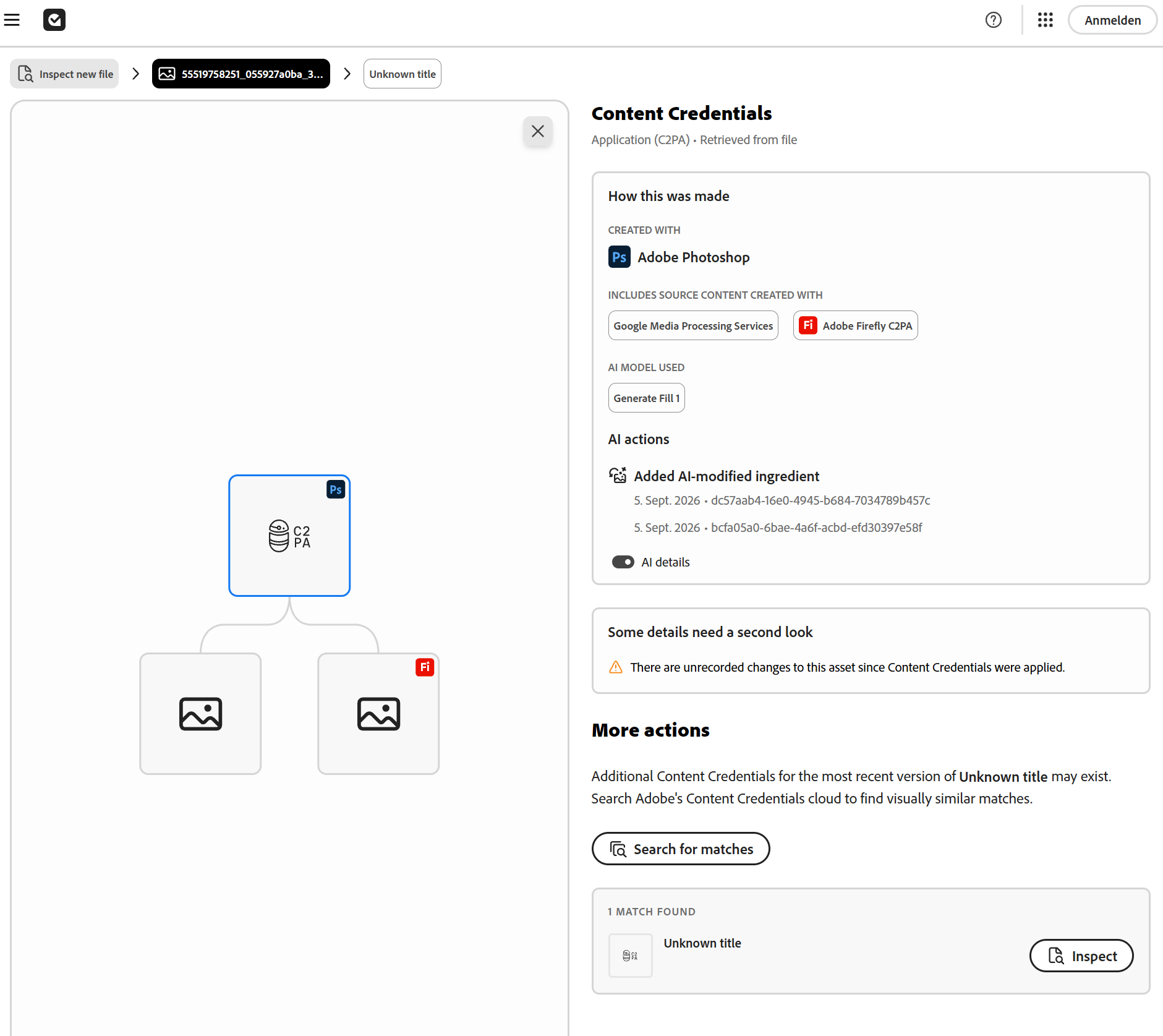
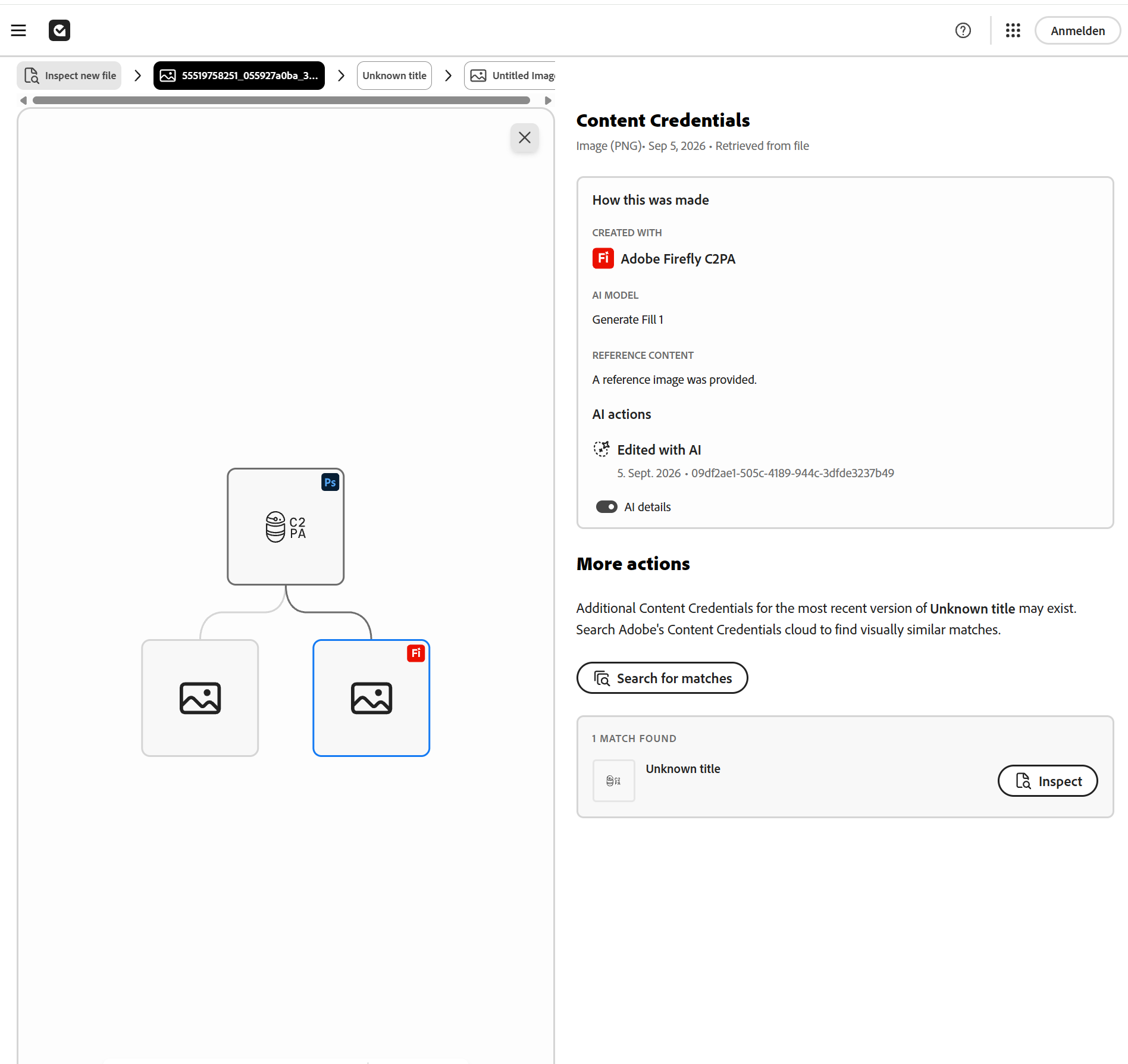
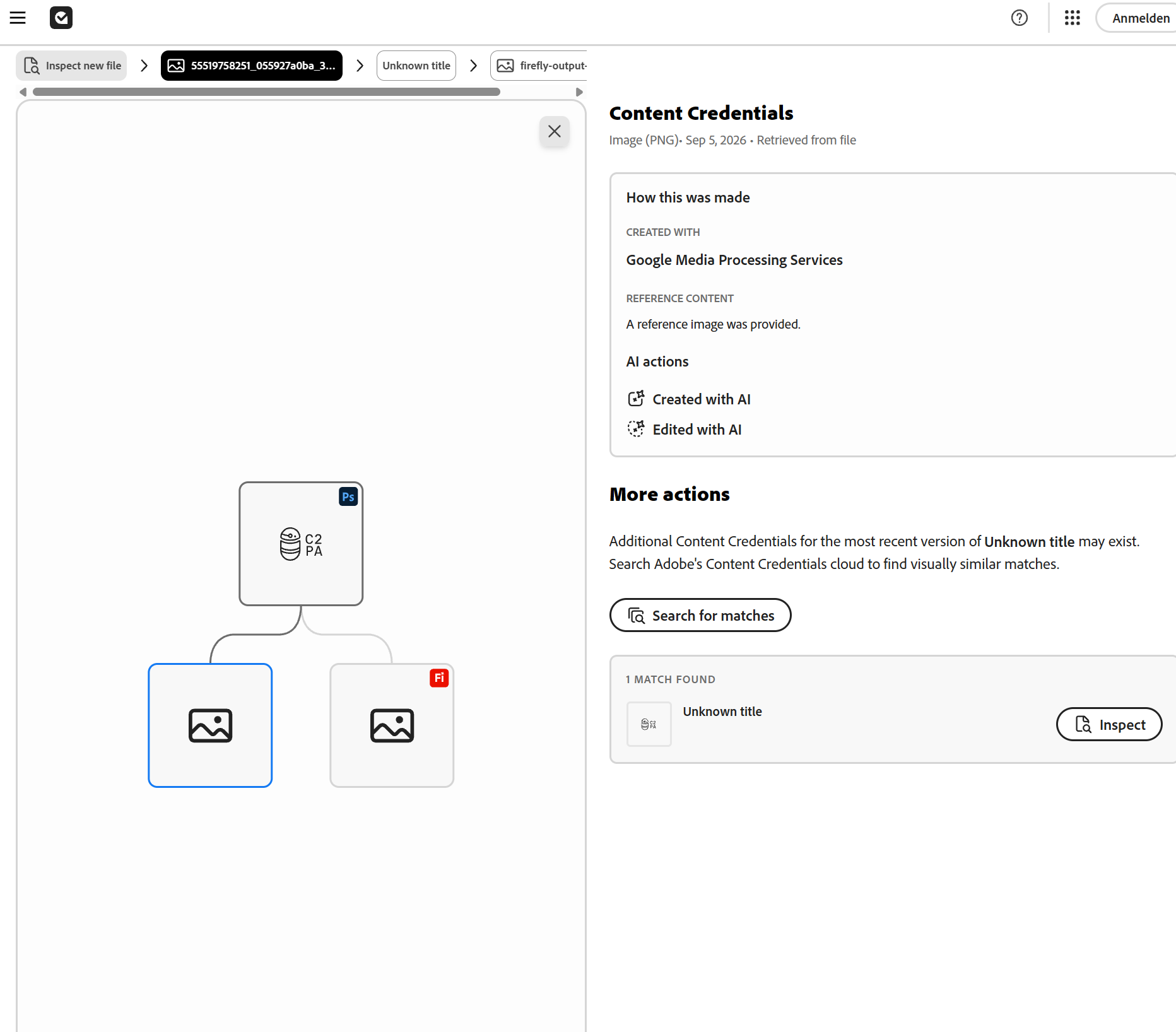
C2PA and Content Credentials are essentially a kind of digital provenance record for images. They can document how an image was created, which applications or devices were involved, whether generative AI was used, and which relevant editing steps were recorded in its provenance history. Depending on the workflow, even source images – so-called “ingredients” – and earlier states of an image can be visible.
Adobe has used Content Credentials with Firefly for quite some time, but the much broader automatic rollout across Adobe applications is new. **Adobe began rolling this out across its applications in August 2026, with the rollout continuing throughout the month.**
Since then, when qualifying generative AI functions are used in supported Adobe applications, C2PA information is automatically attached to the resulting content. According to Adobe, this automatic AI labeling cannot be disabled for qualifying content.
So this is actually a very recent change – only a few weeks old in many Adobe workflows – which is probably one reason why many photographers have not even noticed it yet.
What makes this particularly interesting is how persistent this information is becoming.
Ordinary metadata is relatively easy to remove. That is exactly why these systems now go considerably further. With so-called **Durable Content Credentials**, invisible watermarks and digital fingerprints are also used. The associated provenance information is additionally stored in a Content Credentials cloud.
So the information does not simply disappear just because someone removes the metadata from the file. Using the watermark and fingerprint, the image can be matched back to its stored Content Credentials. These methods are specifically designed to survive editing, resizing, compression, cropping and even screenshots.
Adobe explicitly states, for example, that Content Credentials stored in the cloud can even be rediscovered from a screenshot.
So simply removing the metadata and assuming everything is gone no longer works in the same way. That is what I find so interesting about it: the provenance and AI information is no longer tied only to some EXIF field that can be removed with a couple of mouse clicks.
And this is **not an Adobe-only system**.
C2PA is an open standard. Adobe, Google, Microsoft, Meta, Sony, OpenAI, Amazon and other major companies support C2PA, are involved in its development, or are gradually integrating this kind of provenance information into their products and platforms.
Adobe Inspect is therefore not limited to information created by Photoshop or Lightroom. If another application or device has created valid C2PA Content Credentials, Adobe's tool can read those as well.
That is what makes the whole thing particularly interesting in the long run: it is becoming a cross-platform and cross-manufacturer standard rather than just another proprietary Adobe solution.
If you want to try it yourself, you can upload an image and inspect it here:
**Adobe Content Authenticity – Inspect:**
https://contentauthenticity.adobe.com/inspect
It shows whether Content Credentials are present and what has been recorded – for example the applications or devices involved, generative AI use, editing steps and other parts of the provenance chain.
Adobe also has a Chrome browser extension that can detect Content Credentials directly on images displayed on websites. So you do not necessarily have to download an image first and inspect it manually.
I think this is where things are ultimately heading: at some point, while simply looking at an image online, you may see a small symbol and be able to click it to find out how the image was created and whether generative AI was involved.
Out of curiosity, I have already checked quite a few images on Flickr. Particularly images where my first thought was:
*There is simply no way this could have been photographed like that, no matter how skilled the photographer is.*
And that is where things became interesting.
In the images I checked, I found entries such as **Adobe Firefly, Generative Fill, Created with AI, Edited with AI**, as well as AI-modified ingredients in the provenance information.
And I am explicitly **not** talking about somebody removing a dust spot or a tiny distracting object.
In some cases, entire areas of the image had been generatively altered, replaced or newly created. At that point, for me personally, it is no longer conventional photographic editing.
I have absolutely nothing against AI-generated images. They can look fantastic. I also have nothing against retouching. I simply think it should remain transparent **what is still photography and at what point a photograph increasingly becomes a generated or digitally constructed image.**
There is one aspect of this that affects me personally as well.
I like using generative removal for small spots because it can sometimes work more reliably than the traditional Clone Stamp. But using a generative function for something that minor is also documented accordingly.
Someone who only sees “edited with AI” without looking any further might initially assume that far more was changed than was actually the case. If you inspect the Content Credentials in detail, however, you get a much better idea of what was actually done.
For small corrections like that, I will probably go back to using the good old Clone Stamp more often. :-)
The subject has also gained additional momentum through the EU AI Act. Since **August 2, 2026**, the relevant transparency requirements for artificially generated or manipulated content have been in effect. That is another reason why machine-readable labeling and provenance information are becoming increasingly important.
Of course, this does not mean that we can suddenly take any ten-year-old photograph and reconstruct what was done to it. If this provenance information never existed in the first place, it cannot simply be recreated afterwards.
But for current and future images, things are changing quite fundamentally.
And I suspect many photographers still have no idea what information their newly exported, generatively edited images may now carry with them.
Eventually, we may no longer have to argue about whether an image merely *“looks a bit like AI.”*
We will simply be able to look at what is actually documented in its provenance chain.
If you use Adobe software, you can easily try this yourself: take one of your own photographs, use a generative function in Photoshop or Lightroom, export the finished image and then upload it to Adobe Inspect.
You can then see for yourself what has actually been recorded.
And my personal wish for Flickr and similar platforms would eventually be one very simple option:
**“Hide generatively altered images.”**
Then I would not even have to look at them. ;-)
Sep 18, 2026 at 07:02 AM
p.1 #2C2PA / Content Credentials – Have you come across this yet?
It is important to mention that in Adobe Photoshop (the only program I investigated), this feature is opt in, meaning it it turned off by default. The only way data regarding the history of your images will be saved to the cloud and available to the world is if you deliberately turn it on. Since few know that this feature exists, I doubt that many people have turned it on.
It seems at least unethical to save your image information to a public space without you, the author, knowing about it. I'm sure is the reason it's an opt-in feature. I can't imagine any software company having a feature like this turned on by default, and I could imagine legal challenges if it is.
It seems at least unethical to save your image information to a public space without you, the author, knowing about it. I'm sure is the reason it's an opt-in feature. I can't imagine any software company having a feature like this turned on by default, and I could imagine legal challenges if it is.
Sep 20, 2026 at 01:52 AM
p.1 #3C2PA / Content Credentials – Have you come across this yet?
I can't disable this in any of the Adobe applications, either in Lightroom or Photoshop. As soon as certain generative AI features are used, C2PA metadata is automatically added when the image is exported. According to Adobe, this labeling cannot be disabled for content that has been generated or modified using the relevant AI features.
Have you installed the latest Adobe updates? This was only introduced or fully activated quite recently.
There may also be differences between Europe and other regions. In the EU, new transparency requirements under the EU AI Act have applied since August 2, 2026, including requirements for certain AI-generated or AI-manipulated content. Adobe also refers to these new legal requirements in connection with its automatic labeling.
However, I can't say whether Adobe is implementing this in exactly the same way worldwide or whether there are regional differences. That would actually be interesting to know.
Have you installed the latest Adobe updates? This was only introduced or fully activated quite recently.
There may also be differences between Europe and other regions. In the EU, new transparency requirements under the EU AI Act have applied since August 2, 2026, including requirements for certain AI-generated or AI-manipulated content. Adobe also refers to these new legal requirements in connection with its automatic labeling.
However, I can't say whether Adobe is implementing this in exactly the same way worldwide or whether there are regional differences. That would actually be interesting to know.
Sep 20, 2026 at 01:57 AM
p.1 #4C2PA / Content Credentials – Have you come across this yet?
Adobe FAQ
Can I turn automatic C2PA metadata off?
No. Under the new laws, this metadata cannot be disabled for qualifying content.
I think that's the case worldwide.:
https://helpx.adobe.com/au/creative-cloud/apps/generative-ai/ai-content-labeling-faq.html
Can I turn automatic C2PA metadata off?
No. Under the new laws, this metadata cannot be disabled for qualifying content.
I think that's the case worldwide.:
https://helpx.adobe.com/au/creative-cloud/apps/generative-ai/ai-content-labeling-faq.html
Sep 20, 2026 at 02:02 AM
p.1 #5C2PA / Content Credentials – Have you come across this yet?
It's more complex than either of us think:
Default Behavior by Workflow
Standard Editing & Photography: For regular image creation, editing history, and saving/exporting standard documents, Content Credentials are typically optional and disabled by default until you manually turn them on in your preferences.
Generative AI: If your workflow touches Adobe's generative AI tools or Firefly-powered features, C2PA Content Credentials are automatically embedded by default with no option to disable or opt-out. This permanent, cryptographically signed tag records that AI was used during creation.
Photoshop Remove Tool triggers mandatory Content Credentials only when it uses generative AI processing (such as Adobe Firefly) rather than traditional pixel-based algorithms.
Generative AI Mode: If you use the Remove tool with its generative AI capabilities active (processing via Adobe's cloud-based Firefly engine), Adobe automatically attaches a permanent, tamper-proof Content Credentials tag to the file. Tagging generative AI usage is mandatory and cannot be opted out of or stripped from the metadata if cloud processing occurred.
Traditional/Standard Mode: If you use the Remove tool with generative AI turned off (relying on standard content-aware filling methods), it behaves like a traditional pixel adjustment and does not trigger mandatory Content Credentials.
Default Behavior by Workflow
Standard Editing & Photography: For regular image creation, editing history, and saving/exporting standard documents, Content Credentials are typically optional and disabled by default until you manually turn them on in your preferences.
Generative AI: If your workflow touches Adobe's generative AI tools or Firefly-powered features, C2PA Content Credentials are automatically embedded by default with no option to disable or opt-out. This permanent, cryptographically signed tag records that AI was used during creation.
Photoshop Remove Tool triggers mandatory Content Credentials only when it uses generative AI processing (such as Adobe Firefly) rather than traditional pixel-based algorithms.
Generative AI Mode: If you use the Remove tool with its generative AI capabilities active (processing via Adobe's cloud-based Firefly engine), Adobe automatically attaches a permanent, tamper-proof Content Credentials tag to the file. Tagging generative AI usage is mandatory and cannot be opted out of or stripped from the metadata if cloud processing occurred.
Traditional/Standard Mode: If you use the Remove tool with generative AI turned off (relying on standard content-aware filling methods), it behaves like a traditional pixel adjustment and does not trigger mandatory Content Credentials.
Sep 20, 2026 at 03:35 AM
|
p.1 #6C2PA / Content Credentials – Have you come across this yet?
Yes, that's exactly what I had already written from the beginning.
Regular Content Credentials are optional, but once certain generative AI features are used, the labeling is applied automatically and cannot be disabled.
The metadata itself can still be removed or lost during certain processing steps. That's exactly why Durable Content Credentials go much further: in addition to signed C2PA metadata, an invisible watermark with an identifier is embedded into the image, while a content-based digital fingerprint is also used. The associated provenance data is stored in the cloud.
When the image is checked later, the watermark helps retrieve the stored credentials, while the image content is also recognized through the fingerprint and matched against the stored record. These methods are designed to keep working after resizing, cropping and compression, and even to restore the connection after a screenshot.
So simply stripping EXIF or C2PA metadata from the file is not enough. That resistance to metadata removal was actually one of the points I had already described in my original post.
Regular Content Credentials are optional, but once certain generative AI features are used, the labeling is applied automatically and cannot be disabled.
The metadata itself can still be removed or lost during certain processing steps. That's exactly why Durable Content Credentials go much further: in addition to signed C2PA metadata, an invisible watermark with an identifier is embedded into the image, while a content-based digital fingerprint is also used. The associated provenance data is stored in the cloud.
When the image is checked later, the watermark helps retrieve the stored credentials, while the image content is also recognized through the fingerprint and matched against the stored record. These methods are designed to keep working after resizing, cropping and compression, and even to restore the connection after a screenshot.
So simply stripping EXIF or C2PA metadata from the file is not enough. That resistance to metadata removal was actually one of the points I had already described in my original post.
Sep 20, 2026 at 03:52 AM
p.1 #7C2PA / Content Credentials – Have you come across this yet?
Stefan Official wrote:
I find this topic pretty fascinating, and I suspect many photographers still have no idea what is currently developing in the background.
C2PA and Content Credentials are essentially a kind of digital provenance record for images. They can document how an image was created, which applications or devices were involved, whether generative AI was used, and which relevant editing steps were recorded in its provenance history. Depending on the workflow, even source images – so-called “ingredients” – and earlier states of an image can be visible.
Adobe has used Content Credentials with Firefly for quite some time, but the much broader...Show more →
An interesting and informative post. Thanks.
I find this topic pretty fascinating, and I suspect many photographers still have no idea what is currently developing in the background.
C2PA and Content Credentials are essentially a kind of digital provenance record for images. They can document how an image was created, which applications or devices were involved, whether generative AI was used, and which relevant editing steps were recorded in its provenance history. Depending on the workflow, even source images – so-called “ingredients” – and earlier states of an image can be visible.
Adobe has used Content Credentials with Firefly for quite some time, but the much broader...Show more →
An interesting and informative post. Thanks.
Sep 20, 2026 at 10:54 AM
p.1 #8C2PA / Content Credentials – Have you come across this yet?
Just an fyi, a quick test on a Sony file where Lr's Ai Denoise was used shows it does not recognize anything.
Sep 28, 2026 at 05:13 AM
p.1 #9C2PA / Content Credentials – Have you come across this yet?
Great discussion that I wasn't aware of. This is the kind of new stuff that I would love to read more often at FM. 
Oct 01, 2026 at 12:12 AM
p.1 #10C2PA / Content Credentials – Have you come across this yet?
Maybe I really will write more about topics like this, and other new technologies, in the future. :-)
The problem is that surprisingly few people today seem interested in what is actually happening in the background.
If I think back 15 or 20 years — and with Usenet we would really have to go back even further — the internet was much more open. Discussions were not concentrated on a handful of large platforms. A lot of information was publicly accessible, searchable, linkable and discoverable.
Today, a huge amount of discussion takes place inside Facebook groups, Reddit, Discord and other increasingly closed systems. In some cases you cannot even read the content without an account, search engines cannot properly index much of it, and knowledge can eventually disappear together with a platform or a closed community.
I don't think that is a particularly good development in the long run. Most people hardly notice it, because we have become accustomed to an algorithm deciding what we are shown.
But back to C2PA. :-)
The test with AI noise reduction is actually interesting, and the result makes sense.
“AI” does not automatically mean “generative AI.”
Lightroom's Denoise does use artificial intelligence, but its purpose is to reconstruct existing image information and reduce noise. It does not invent new objects, people or areas of an image in the same sense as Generative Fill or Generative Remove.
Adobe itself now distinguishes between ordinary AI-assisted functions and generative AI. So it is quite logical that Denoise does not trigger the same automatic labeling as a generative modification.
And I think this distinction is important.
Otherwise we will eventually end up with the absurd statement:
“AI was involved, therefore the photograph was manipulated.”
AI is already involved in noise reduction, masking, subject detection, sharpening and many other functions. For me, the important question is not **whether AI was used**, but **whether it changed what the photograph actually depicts.**
Another interesting question is how reliable these provenance systems can remain in the long term.
Naturally, there is already a counter-movement. Whenever a technical protection mechanism appears, somebody begins examining it and trying to defeat it. That has been true of almost every technical system ever created.
With Durable Content Credentials, as discussed above, simply deleting the metadata is no longer necessarily enough. So some experiments instead try to alter the image itself until the watermark or fingerprint can no longer be reliably recognized.
This can involve heavy cropping, geometric transformations or very small changes to a large number of pixels.
The latter is particularly interesting from a technical point of view: the idea is to produce changes that are significant to an algorithm while remaining as inconspicuous as possible to the human eye.
But this does not work equally well in every case.
The more robust the recognition system becomes, the more the image may eventually have to be altered in order to defeat it. And at some point this becomes rather absurd from a photographer's perspective.
If I have to visibly degrade my own photograph or crop away a substantial part of it merely to prevent its provenance from being recognized, I may have defeated the recognition system — but I have also damaged my own image.
Nevertheless, this illustrates an important limitation of C2PA:
**It cannot guarantee that every manipulated image will always be identifiable.**
And, just as importantly, an image without Content Credentials is obviously not automatically manipulated.
I deliberately did not go very deeply into this side of the subject in my first post, because otherwise the immediate reaction is often:
“If it can be bypassed, then the whole system is pointless.”
I think that misses the point.
C2PA becomes really interesting once **having an intact provenance chain has value in itself.**
A news agency, photography competition or perhaps eventually a platform such as Flickr could, for example, decide that certain categories only accept images with valid and intact Content Credentials.
At that point nobody would need to prove that an image had been manipulated.
A missing or deliberately destroyed provenance chain would simply mean that the image no longer meets the requirements for that particular category.
That is a completely different approach.
A security seal does not have to be indestructible either. Its purpose is that you can tell when it is no longer intact.
That is why I suspect this subject will remain interesting for a long time.
It will probably become a classic cat-and-mouse game. Fingerprints and watermarks will become more robust, better methods of interfering with them will appear, recognition systems will improve again, and the cycle will continue.
It will probably never be perfect.
But there is a very large difference between **“not perfect”** and **“useless.”**
And because I am increasingly seeing photographs in which actual image content has been generatively changed while the result is still presented as if it were a documented photographic moment, I find this development particularly interesting.
Not because C2PA can tell us whether an image is “true.”
It cannot.
But it can potentially give us much more information about **where an image came from and what happened to it along the way.**
And then everyone can decide for themselves what they make of that information.
Let's see where all of this stands in a year — and even more interestingly, in five years.
I suspect both sides of this technological race will have developed quite a bit by then.
The problem is that surprisingly few people today seem interested in what is actually happening in the background.
If I think back 15 or 20 years — and with Usenet we would really have to go back even further — the internet was much more open. Discussions were not concentrated on a handful of large platforms. A lot of information was publicly accessible, searchable, linkable and discoverable.
Today, a huge amount of discussion takes place inside Facebook groups, Reddit, Discord and other increasingly closed systems. In some cases you cannot even read the content without an account, search engines cannot properly index much of it, and knowledge can eventually disappear together with a platform or a closed community.
I don't think that is a particularly good development in the long run. Most people hardly notice it, because we have become accustomed to an algorithm deciding what we are shown.
But back to C2PA. :-)
The test with AI noise reduction is actually interesting, and the result makes sense.
“AI” does not automatically mean “generative AI.”
Lightroom's Denoise does use artificial intelligence, but its purpose is to reconstruct existing image information and reduce noise. It does not invent new objects, people or areas of an image in the same sense as Generative Fill or Generative Remove.
Adobe itself now distinguishes between ordinary AI-assisted functions and generative AI. So it is quite logical that Denoise does not trigger the same automatic labeling as a generative modification.
And I think this distinction is important.
Otherwise we will eventually end up with the absurd statement:
“AI was involved, therefore the photograph was manipulated.”
AI is already involved in noise reduction, masking, subject detection, sharpening and many other functions. For me, the important question is not **whether AI was used**, but **whether it changed what the photograph actually depicts.**
Another interesting question is how reliable these provenance systems can remain in the long term.
Naturally, there is already a counter-movement. Whenever a technical protection mechanism appears, somebody begins examining it and trying to defeat it. That has been true of almost every technical system ever created.
With Durable Content Credentials, as discussed above, simply deleting the metadata is no longer necessarily enough. So some experiments instead try to alter the image itself until the watermark or fingerprint can no longer be reliably recognized.
This can involve heavy cropping, geometric transformations or very small changes to a large number of pixels.
The latter is particularly interesting from a technical point of view: the idea is to produce changes that are significant to an algorithm while remaining as inconspicuous as possible to the human eye.
But this does not work equally well in every case.
The more robust the recognition system becomes, the more the image may eventually have to be altered in order to defeat it. And at some point this becomes rather absurd from a photographer's perspective.
If I have to visibly degrade my own photograph or crop away a substantial part of it merely to prevent its provenance from being recognized, I may have defeated the recognition system — but I have also damaged my own image.
Nevertheless, this illustrates an important limitation of C2PA:
**It cannot guarantee that every manipulated image will always be identifiable.**
And, just as importantly, an image without Content Credentials is obviously not automatically manipulated.
I deliberately did not go very deeply into this side of the subject in my first post, because otherwise the immediate reaction is often:
“If it can be bypassed, then the whole system is pointless.”
I think that misses the point.
C2PA becomes really interesting once **having an intact provenance chain has value in itself.**
A news agency, photography competition or perhaps eventually a platform such as Flickr could, for example, decide that certain categories only accept images with valid and intact Content Credentials.
At that point nobody would need to prove that an image had been manipulated.
A missing or deliberately destroyed provenance chain would simply mean that the image no longer meets the requirements for that particular category.
That is a completely different approach.
A security seal does not have to be indestructible either. Its purpose is that you can tell when it is no longer intact.
That is why I suspect this subject will remain interesting for a long time.
It will probably become a classic cat-and-mouse game. Fingerprints and watermarks will become more robust, better methods of interfering with them will appear, recognition systems will improve again, and the cycle will continue.
It will probably never be perfect.
But there is a very large difference between **“not perfect”** and **“useless.”**
And because I am increasingly seeing photographs in which actual image content has been generatively changed while the result is still presented as if it were a documented photographic moment, I find this development particularly interesting.
Not because C2PA can tell us whether an image is “true.”
It cannot.
But it can potentially give us much more information about **where an image came from and what happened to it along the way.**
And then everyone can decide for themselves what they make of that information.
Let's see where all of this stands in a year — and even more interestingly, in five years.
I suspect both sides of this technological race will have developed quite a bit by then.
Oct 02, 2026 at 04:19 AM