p.1 #1 · LightRoom Applies It's Own Adjustments to Masks
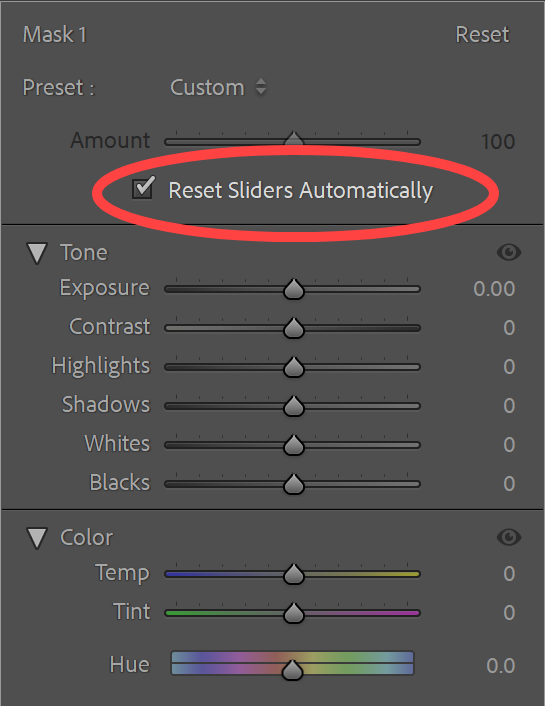
Has anyone else noticed this? I'm running LR Classic Desktop on a Mac and I've noticed recently that when I create a mask using LR to select Landscape, Sky, Mountain, Water etc. it is loading some preset to each mask created. It is adding a 38 point bump to the Shadow slider, a 5 point magenta Tint adjustment, a -5.5 point Hue adjustment and then it is also adding a slight contrast bump in the Tone Curve. Is it perhaps a preset? It there a way to turn these off?
On Windows LrC 15.5.1 I'm actually seeing the opposite behavior. The sliders are resetting to zero regardless of whether the checkbox is enabled or not.
p.1 #3 · LightRoom Applies It's Own Adjustments to Masks
MRomine wrote:
Has anyone else noticed this? I'm running LR Classic Desktop on a Mac and I've noticed recently that when I create a mask using LR to select Landscape, Sky, Mountain, Water etc. it is loading some preset to each mask created. It is adding a 38 point bump to the Shadow slider, a 5 point magenta Tint adjustment, a -5.5 point Hue adjustment and then it is also adding a slight contrast bump in the Tone Curve. Is it perhaps a preset? It there a way to turn these off?
It sounds like you have your mask sliders set to a preset. Can you zero them out?
p.1 #4 · LightRoom Applies It's Own Adjustments to Masks
Jack Flesher wrote:
It sounds like you have your mask sliders set to a preset. Can you zero them out?
I don't know, I don't use presets. I know that LR comes with a bunch of them. Is there a way to globally turn them off or would I have to go through each one individually to do that?
p.1 #5 · LightRoom Applies It's Own Adjustments to Masks
MRomine wrote:
I don't know, I don't use presets. I know that LR comes with a bunch of them. Is there a way to globally turn them off or would I have to go through each one individually to do that?
I don't use LRc anymore, but I assume it's at least similar to what it used to be. In the mask palette there are options to select a brush or whatever. Then under the brush option are a set of slider adjustments for light, color, etc. ALL of those should be zeroed out unless you KNOW why or what you want them adjusted to. I virtually always just use brush to select what I want to adjust, then using the sliders, adjust it to taste. IOW, If I want to darken the masked selection, I would go into "Light" and lower the exposure or bring down highlights; if I wanted to warm it up, I would go into "Color" and tweak color temp or add selected warmer tone.
It may be at some point you "saved" one of the initial choices as a "preset" and simply need to toggle over to choose the base option?
p.1 #6 · LightRoom Applies It's Own Adjustments to Masks
Jack Flesher wrote:
It may be at some point you "saved" one of the initial choices as a "preset" and simply need to toggle over to choose the base option?
That certainly sounds plausible, where would I look for the potential saved preset? In the Preset Menu I would assume? It would probably have a system generated name so hopefully easy to find.
p.1 #7 · LightRoom Applies It's Own Adjustments to Masks
MRomine wrote:
That certainly sounds plausible, where would I look for the potential saved preset? In the Preset Menu I would assume? It would probably have a system generated name so hopefully easy to find.
There’s usually a menu icon in the upper rh side of each tool box, probably there.