Into The Light
p.1 #1Into The Light
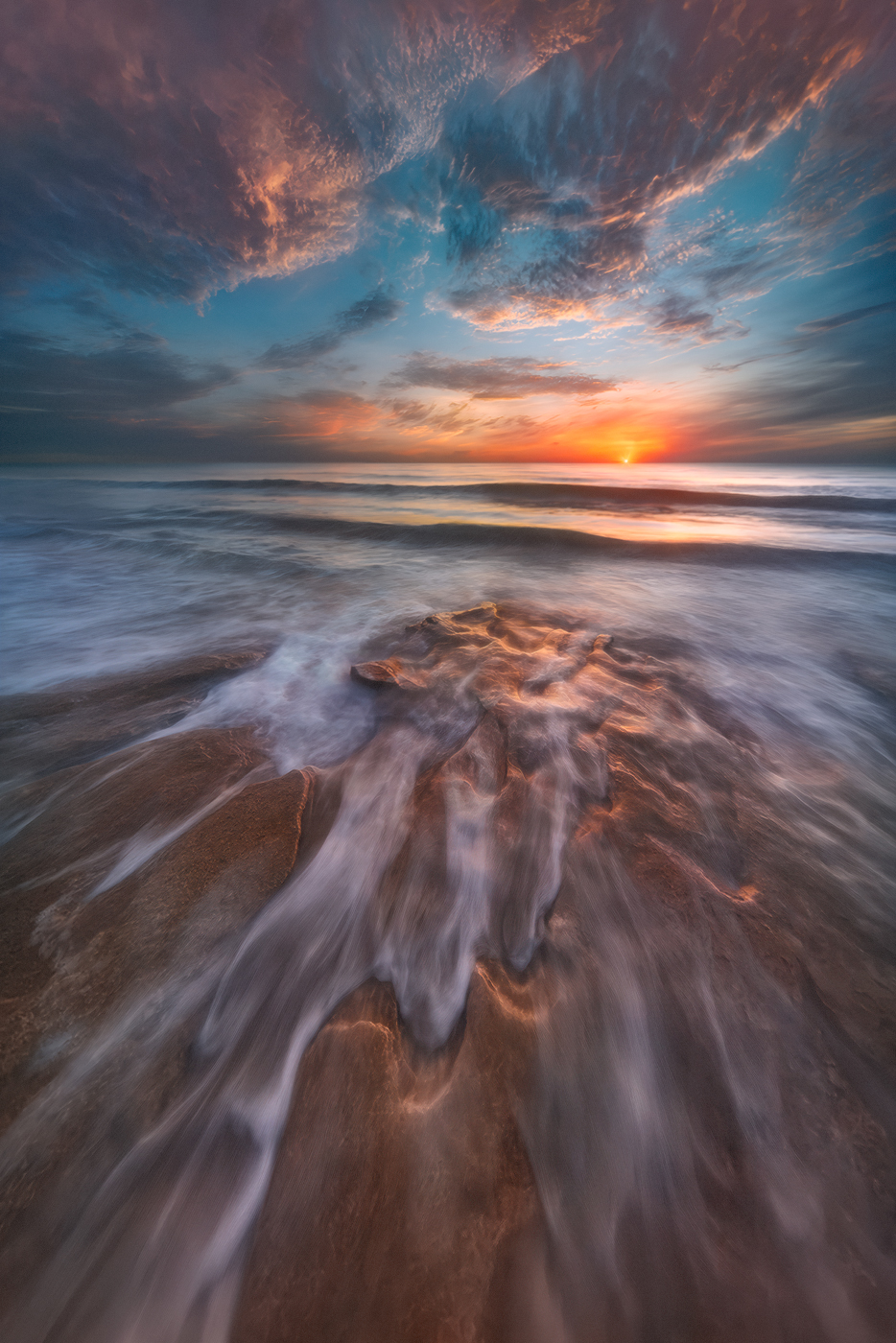
One of my favorite sunrise shots/moments from this summers thunderstorm season ("lightning alley") on Floridas east Atlantic coast.
[Techie Details in the first comment below the image...
[Techie Details in the first comment below the image...
Sep 03, 2026 at 10:53 AM
p.1 #2Into The Light
Technical details:
After living at this very special location for about 4-1/2 years (and shooting here for almost 10) and doing 7 workshops (4 private) just this year so far, putting in a ton of time and work to get extremely familiar with the weather patterns, tides, compositions, shutter speeds, technical approaches… here my private client (YOU are awesome!) wanted me to set up side by side him, and shoot together (him shooting his preferred - better composition, I helped him find in the hour of scouting earlier in the AM) and teach him, by telling him what was working best, and then most importantly making sure it was working for him. It worked for him in spades! One really cool thing I learned, literally during this moment, was that the timing of the far mid to background waves rolling in (but not quite yet cresting) right where we wanted them, was happening almost always at the same time that the water in our foregrounds (near our feet) was retreating back out! This allowed us to get all the compositional elements, right where we wanted them the most, much more often in a single shot. Usually I primarily shoot when I see the water retreating (foreground being very primary to me) then secondarily when mid-background waves are rolling in, and then also when the various best lighting conditions climax… usually I just over shoot like nuts!
Here we started to figure out how to get all or most of what we wanted in a single shot (sometimes minus exposure bracketing when the dynamic range gets extreme).
Instead of exposure bracketing each series of shots in a less thoughtful way, we worked very hard to get the exact land/ocean elements we wanted (over and over) and then each time we knew were getting that, and the light was doing something special (and the dynamic range got extreme) we would just manually meter down, auto bracket 5 frames (3 stops apart) to have the full insurance that we had the sun and specular highlights exposed down to not clipping. Then we would go immediately meter back to working the land/and ocean (the foreground water texture we wanted and also the mid to background rolling waves - trying to get that in one shot).
I shot with the Laowa 9mm on my Leica SL2, he shot with a 10mm on his Nikon.
We shot in Shutter Priority mode, auto bracketing (5 shots), Auto ISO (so the camera changes ISO to shoot darker or brighter) with our f/stop (f/11) and focus locked in manually. We both used a 6-stop ND filter (I used a Kolari clip in ND filter that drops in between the lens and the sensor). I drop this in AFTER the blue hour is over and the sun is starting to break the horizon line).
Occasionally the sun got so bright that after shooting our foreground and ocean portion, we very quickly metered down (by quickly choosing a faster shutting speed - like 3, 6 or 9 clicks on the cameras rotating dial) shot that almost instantly (sometimes checking the LCD to ensure a dark sun was caught) then clicked back to 0.50 (1/2 second) shutter speed, and got back to biz. When clouds block the sun moderately the going back and forth was not necessary.
Processing:
Images for dynamic range were processed in Camera Raw (either though Adobe Lightroom Classic - where the “Develop Tab” IS Camera Raw or through Adobe Bridge which accesses the Camera Raw plug in). Of course Photoshop can access Camera raw as well. I most often use the Bridge/Camera Raw option. I am convinced it is still the best in the biz, for quality processing by a long shot.
I am a huge convert to using the “Adaptive Color” profile (no more linear profiles as I used to teach - and certainly not the default "adobe color").
I always choose “Raw Details” which is far better demosaicing than not checking it.
I ALWAYS turn off the very damaging sharpening default settings and never ever use it on a master file! This is the worst thing ever for damaging our master files, severely limiting the potential quality of a print/enlargement.
I turn down the color noise slider to a minimum amount (5 is my default preset) to prevent color bleeding (which kills micro color variations) and a few other tricks I’ll be disclosing in a soon coming video.
I get the Raw file as best as I can, then import it into Photoshop as a Raw Smart Object (literally a lossless Raw Layer) then by duplicating the raw layer (right click/new smart object via a copy) we can push lossless Raw Layers a lot further than just Lightroom or Camera Raw alone.
I hope it helps someone.
Get out there and enjoy!!!
After living at this very special location for about 4-1/2 years (and shooting here for almost 10) and doing 7 workshops (4 private) just this year so far, putting in a ton of time and work to get extremely familiar with the weather patterns, tides, compositions, shutter speeds, technical approaches… here my private client (YOU are awesome!) wanted me to set up side by side him, and shoot together (him shooting his preferred - better composition, I helped him find in the hour of scouting earlier in the AM) and teach him, by telling him what was working best, and then most importantly making sure it was working for him. It worked for him in spades! One really cool thing I learned, literally during this moment, was that the timing of the far mid to background waves rolling in (but not quite yet cresting) right where we wanted them, was happening almost always at the same time that the water in our foregrounds (near our feet) was retreating back out! This allowed us to get all the compositional elements, right where we wanted them the most, much more often in a single shot. Usually I primarily shoot when I see the water retreating (foreground being very primary to me) then secondarily when mid-background waves are rolling in, and then also when the various best lighting conditions climax… usually I just over shoot like nuts!
Here we started to figure out how to get all or most of what we wanted in a single shot (sometimes minus exposure bracketing when the dynamic range gets extreme).
Instead of exposure bracketing each series of shots in a less thoughtful way, we worked very hard to get the exact land/ocean elements we wanted (over and over) and then each time we knew were getting that, and the light was doing something special (and the dynamic range got extreme) we would just manually meter down, auto bracket 5 frames (3 stops apart) to have the full insurance that we had the sun and specular highlights exposed down to not clipping. Then we would go immediately meter back to working the land/and ocean (the foreground water texture we wanted and also the mid to background rolling waves - trying to get that in one shot).
I shot with the Laowa 9mm on my Leica SL2, he shot with a 10mm on his Nikon.
We shot in Shutter Priority mode, auto bracketing (5 shots), Auto ISO (so the camera changes ISO to shoot darker or brighter) with our f/stop (f/11) and focus locked in manually. We both used a 6-stop ND filter (I used a Kolari clip in ND filter that drops in between the lens and the sensor). I drop this in AFTER the blue hour is over and the sun is starting to break the horizon line).
Occasionally the sun got so bright that after shooting our foreground and ocean portion, we very quickly metered down (by quickly choosing a faster shutting speed - like 3, 6 or 9 clicks on the cameras rotating dial) shot that almost instantly (sometimes checking the LCD to ensure a dark sun was caught) then clicked back to 0.50 (1/2 second) shutter speed, and got back to biz. When clouds block the sun moderately the going back and forth was not necessary.
Processing:
Images for dynamic range were processed in Camera Raw (either though Adobe Lightroom Classic - where the “Develop Tab” IS Camera Raw or through Adobe Bridge which accesses the Camera Raw plug in). Of course Photoshop can access Camera raw as well. I most often use the Bridge/Camera Raw option. I am convinced it is still the best in the biz, for quality processing by a long shot.
I am a huge convert to using the “Adaptive Color” profile (no more linear profiles as I used to teach - and certainly not the default "adobe color").
I always choose “Raw Details” which is far better demosaicing than not checking it.
I ALWAYS turn off the very damaging sharpening default settings and never ever use it on a master file! This is the worst thing ever for damaging our master files, severely limiting the potential quality of a print/enlargement.
I turn down the color noise slider to a minimum amount (5 is my default preset) to prevent color bleeding (which kills micro color variations) and a few other tricks I’ll be disclosing in a soon coming video.
I get the Raw file as best as I can, then import it into Photoshop as a Raw Smart Object (literally a lossless Raw Layer) then by duplicating the raw layer (right click/new smart object via a copy) we can push lossless Raw Layers a lot further than just Lightroom or Camera Raw alone.
I hope it helps someone.
Get out there and enjoy!!!
Sep 03, 2026 at 10:53 AM
p.1 #6Into The Light
Love the textures in the clouds, and the subtle vibrancy throughout, Mark!
Douglas
Douglas
Sep 04, 2026 at 08:11 AM
p.1 #7Into The Light
Beautiful shot Mark, really draws the eye in and I love the colors and painterly feel to it!
Sep 04, 2026 at 04:56 PM
p.1 #8Into The Light
Nicely done Mark! I like the colors and the composition. Thanks for the technical info!
jacob
jacob
Sep 04, 2026 at 09:25 PM
p.1 #9Into The Light
It is nearly impossible to understate how much skill and vision is required to pull off a shot like this.
Sep 05, 2026 at 12:36 AM
p.1 #10Into The Light
First of all thank you to everyone for your gracious comments. I hope you’re enjoying the weekend.
GroovyGeek wrote:
It is nearly impossible to understate how much skill and vision is required to pull off a shot like this.
Thank you. One easier way to do it is just set up your camera and have it shoot nonstop for a half hour. And maybe have a second camera pointed at the sun metered down. And if your first camera is just shooting back to back to back to back, it dramatically ups the odds of catching a very special moment.
That’s been my approach for a long time (I often plant my camera in a composition and let it shoot back to back for over an hour at a certain shutter speed). But one thing that teaching forces a person to do is learn!!!
Also, another factor is going out morning after morning after morning after morning. Overtime, you begin to sort of calm down (a little bit) when the scene/light explodes, and you just start noticing things you did not before, by simple repetition.
I’ve been shooting seascapes as my favorite genre since about 2003 when I lived in Oregon. Then I’ve lived in this most awesome area in Florida for 4-1/2 years (and been in the general area almost 10 years) and I’ve literally been able to either live right on the beach or just across the street. Inevitably I’m out there three or four times a week even if it’s just for my morning walks. In this, I’ve filled up tens and tens and tens of terabytes. I never tire of the oceans beauty!
All I’m trying to say is that becoming very familiar with, and developing a relationship with your subject matter overtime and studying it well, can teach a person so very much.
Is that what’s so awesome about Photography?! We get to go see these things #1. Which can be life-changing in and of itself.
But then it’s a huge learning curve that never flat lines! If a person wants to not get in a rut and not get set in their ways, this incredible privilege we have, affords that in spades.
A great friend of mine who owns one of the best fine art print labs in the United States, “Artful Printers” Miami, Bascilio Alvarez, texted me the other day for just a little advice on the wave panning type of shots. I left him a couple of audios about some really important things I’ve learned to up the keepers, doing it as much as I do. A lot of little things. After he listened to those he just said “ I’m just gonna come up there and do a workshop with you!” It is truely a most wonderful privilege to be able to help people shave off years from that learning curve.
That’s why I post the techie stuff. Because there’s always a couple of people who it will help, and will learn a few things from it. Like I did when I first started doing it. I found a photo online that blew my mind on Instagram, and I literally found the photographer and called him. And then when I first started going out, I went off of that advice that he gave me.
GroovyGeek wrote:
It is nearly impossible to understate how much skill and vision is required to pull off a shot like this.
Thank you. One easier way to do it is just set up your camera and have it shoot nonstop for a half hour. And maybe have a second camera pointed at the sun metered down. And if your first camera is just shooting back to back to back to back, it dramatically ups the odds of catching a very special moment.
That’s been my approach for a long time (I often plant my camera in a composition and let it shoot back to back for over an hour at a certain shutter speed). But one thing that teaching forces a person to do is learn!!!
Also, another factor is going out morning after morning after morning after morning. Overtime, you begin to sort of calm down (a little bit) when the scene/light explodes, and you just start noticing things you did not before, by simple repetition.
I’ve been shooting seascapes as my favorite genre since about 2003 when I lived in Oregon. Then I’ve lived in this most awesome area in Florida for 4-1/2 years (and been in the general area almost 10 years) and I’ve literally been able to either live right on the beach or just across the street. Inevitably I’m out there three or four times a week even if it’s just for my morning walks. In this, I’ve filled up tens and tens and tens of terabytes. I never tire of the oceans beauty!
All I’m trying to say is that becoming very familiar with, and developing a relationship with your subject matter overtime and studying it well, can teach a person so very much.
Is that what’s so awesome about Photography?! We get to go see these things #1. Which can be life-changing in and of itself.
But then it’s a huge learning curve that never flat lines! If a person wants to not get in a rut and not get set in their ways, this incredible privilege we have, affords that in spades.
A great friend of mine who owns one of the best fine art print labs in the United States, “Artful Printers” Miami, Bascilio Alvarez, texted me the other day for just a little advice on the wave panning type of shots. I left him a couple of audios about some really important things I’ve learned to up the keepers, doing it as much as I do. A lot of little things. After he listened to those he just said “ I’m just gonna come up there and do a workshop with you!” It is truely a most wonderful privilege to be able to help people shave off years from that learning curve.
That’s why I post the techie stuff. Because there’s always a couple of people who it will help, and will learn a few things from it. Like I did when I first started doing it. I found a photo online that blew my mind on Instagram, and I literally found the photographer and called him. And then when I first started going out, I went off of that advice that he gave me.
Sep 05, 2026 at 01:19 PM
|
p.1 #11Into The Light
Thank you for taking the time to provide such a robust write-up with the image you shared- what an enjoyable read!
Sep 06, 2026 at 05:59 PM
p.1 #12Into The Light
Mark, the colors, textures, and flow of this image is outstanding. I genuinely love the photo details and write-up. Thanks for taking the time to share the "behind the scenes"
Sep 06, 2026 at 09:22 PM
p.1 #13Into The Light
Mark Metternich wrote:
Is that what’s so awesome about Photography?! We get to go see these things
Mark, wonderful image. Reminds me very much of paintings by Turner.
I wanted to pick up on your words above, in a longer post full of very good info. They really resonated with me. We are lucky to see these things.
(And thanks also for posting the technical stuff. One day I'll have the time to really go in depth on it).
Is that what’s so awesome about Photography?! We get to go see these things
Mark, wonderful image. Reminds me very much of paintings by Turner.
I wanted to pick up on your words above, in a longer post full of very good info. They really resonated with me. We are lucky to see these things.
(And thanks also for posting the technical stuff. One day I'll have the time to really go in depth on it).
Sep 08, 2026 at 04:29 PM

p.1 #15Into The Light
Hi Mark,
great image! I'm really impressed with the timing of this shot as the rectracting water fits perfectly into the runnels in the rock of the shore. To me that's the most amazing aspect of your photo.
Thanks also for the comprehensive description of you handling in LR. I've learnt aboute the adaptive image profile and the RAW Details option which I will try in the near future. I'm sure both of them will be helpful in a couple of cases.
I'm a bit envious of you living by the shore, being able to just go out and shoot the most amazing weather and light situations. To me this proves that it's best to shoot close to home, where you know all the best spots and can time the best opportunities unlike if you are on vacation somewhere for a short period of time, then it's just pure luck (and the skill to take the shot) if you come home with some great photos.
Regards, Rolf
great image! I'm really impressed with the timing of this shot as the rectracting water fits perfectly into the runnels in the rock of the shore. To me that's the most amazing aspect of your photo.
Thanks also for the comprehensive description of you handling in LR. I've learnt aboute the adaptive image profile and the RAW Details option which I will try in the near future. I'm sure both of them will be helpful in a couple of cases.
I'm a bit envious of you living by the shore, being able to just go out and shoot the most amazing weather and light situations. To me this proves that it's best to shoot close to home, where you know all the best spots and can time the best opportunities unlike if you are on vacation somewhere for a short period of time, then it's just pure luck (and the skill to take the shot) if you come home with some great photos.
Regards, Rolf
Sep 10, 2026 at 12:27 PM
p.1 #17Into The Light
Tremendously magnificent Mark! I would call it "Creation" as looking at it I imagine how God felt like just after creation of the Earth and the sea.
Sep 12, 2026 at 02:37 AM
p.1 #18Into The Light
Peire wrote:
Tremendously magnificent Mark! I would call it "Creation" as looking at it I imagine how God felt like just after creation of the Earth and the sea.
A HUGE thank you. I have been trying to think of a name for the image! Blessings!
Tremendously magnificent Mark! I would call it "Creation" as looking at it I imagine how God felt like just after creation of the Earth and the sea.
A HUGE thank you. I have been trying to think of a name for the image! Blessings!
Sep 15, 2026 at 09:45 AM
