DxO just put version 10 on their website. New features listed there:
Depth masks
Advanced color grading
Extended AI capabilities - people selection, facial feature selection, AI dust spot removal, AI masks combining with U point selection.
I'll probably grab it when I get back from my next trip. The dust spot removal will be a big time saver, and I could see using the depth masks. The person-oriented changes leave me flat, but then I don't really take pictures of people.
Thanks for sharing. I was expecting depth masks & advanced color grading to make it to PL 10 (from Nik Collection 9). The moment I saw them in Nik 9, my first thoughts were these need to be in the raw editor. I don't like the delayed tactics that DXO plays like this, forcing users to buy other pieces of software in the pie. But what the hell? Why not? I'd have them in my raw editor than any others. Time for an upgrade then!
The PL10 trial is actually ready for download for everyone. https://www.dxo.com/en/dxo-photolab/download/
Feels a kind of faster than PL9 on a notebook with Nvidia GeForce RTX 4050 with 6GB and 32GB RAM
I did the upgrade from PL9-PL10 last evening.
Played with it for about an hour.
The depth masks- at least in my hands for my images- did not do much for me. It did do a nicer job blurring the background, but I do not use that in my prints.
The auto masks seemed a little quicker. I can not say they were really better.
The ability to draw an oval control point is a winner- almost gives me a radial gradient mask I was missing in dxo.
I did not see they broke anything or made anything I used worse. That is not always the case.
Game changing?? No. At least not with an hour of playing around.
But, I upgrade every year so this was my expected journey.
gary
Looks like A7R VI compressed RAW support was added to PL9.12 and PL10, but isn’t working fully yet (bug reports apparently have been filed as of yesterday)
I purchased PL10, however, I think of this as a donation of a sort to DxO.
It doesn't look like PL10 has been a significant update to me
I use Capture One for most of my processing, and the main reason for this is that the tonal corrections work better in C1 vs. PL10, in my opinion and in my experience.
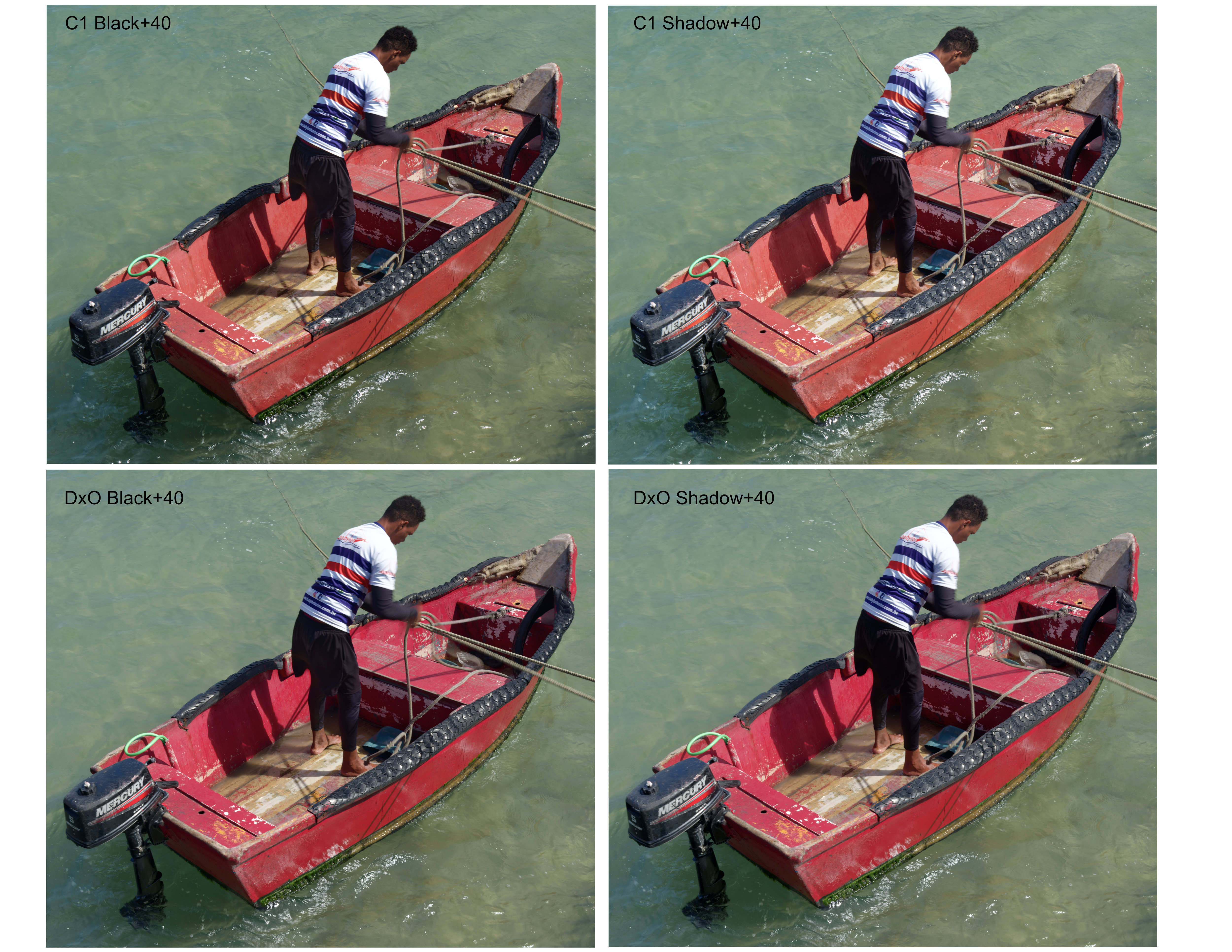
Here is one example of a raw file that has deep dark areas (see upload 1). This upload 1 has been exported from DxO PL10 with optical corrections only and in Neutral color rendering.
The second upload is a compilation of the same image with only Black, or Shadow, pushed by +40. Only one slider (either Black or Shadow) was adjusted, while no other adjustments have been made. It is worth noting that both Capture One and DxO PL10 have the adjustment range extending from 0 to 100 at maximum; that is they have the same scale, although that may or may not be linear.
Let's examine the comparison in the second upload to see some subtle tonal differences (please, ignore the color differences between the Neutral profile in PL10 and the Generic camera profile in C1).
To my eye, C1 lifts Black more successfully than PL10. It seems to me that lifting Black in PL10 results in a minor loss of contrast. Furthermore, when I compare the two images from PL10 (with either Black or Shadow lifted by +40), I cannot see a significant difference except slightly lighter shadows in the latter (look closely at the face to see the difference). Basically, PL10 struggles, in my experience, with lifting the darkest tones.
The effects in the two images from Capture One are more distinct. The Blacks are lifted without a loss of contrast and without touching the Shadows much. One the other hand, lifting the Shadows selectively works to retain much of the darker tones in the Blacks.
In my experience, ALL tonal corrections (including White, Highlights, and Midtones) are more precise and selective in Capture One.
I find that tonal corrections in Capture One are much easier, more straightforward and faster, and can often be done to achieve a balanced result without masking.
For DxO PL10, I wish they had re-worked the "Selective Tone" adjustments. This would have been considerably more useful to me than the new masking in PL10. I cannot help feeling slightly disappointed by PL10.
Well, I am still hopeful that maybe something should change in PL11; thus, I donated the cost of the upgrade from PL9 to PL10 this time.
GFX100S IIGF20-35mmF4 R WR lens35mmf/10.01/28s80 ISO0.0 EV
Another interesting point to mention is that while I added sharpening ("Lens Sharpness Optimization" at 86) when processing the above image in DxO PL10, NO SHARPENING was used when the image was processed in Capture One. I don't know why, but I see that demosaiced raw files in Capture One look naturally sufficiently sharp to me, and I don't use sharpening in Capture One at all.
DXO PL 10.0.1 is available for download. Just updated my version.
Good news for PhotoLab users: DxO PhotoLab 10.0.1 and 9.12.1 for Windows are now available and resolve the compatibility issue with NVIDIA driver 616.56 that could prevent exports using AI-powered corrections.............................
Detailed description at the bottom of the website.
ruthenium wrote:
Another interesting point to mention is that while I added sharpening ("Lens Sharpness Optimization" at 86) when processing the above image in DxO PL10, NO SHARPENING was used when the image was processed in Capture One. I don't know why, but I see that demosaiced raw files in Capture One look naturally sufficiently sharp to me, and I don't use sharpening in Capture One at all.
I had the same observation. The images look a bit softer than with capture one. They used to be comparable. I had to use some sharpen and fine contrast to make them look equal.
I tried some light luma and it was way too strong. Hard to correct the curve, it is not sensitive or precise enough. A millimeter makes the shadows way too dark.
I use smart lighting in spot weighted for tonality corrections and move the spot around between white and dark in the image until it looks correct for me. Tonal corrections are much easier in capture one. I do miss levels too.
I wish DXO would integrate Nik color efex pro into DXO PL. It has such an abundance of precise tools for contrast, and color. They did rewrite the code for Nik color efex pro anyway. Should not be too hard to integrate it into Photolab for Nik license owners. Instead they boost their competitor Adobe.
Propose to integrate it in Photolab, and countless people mention no,no, its a plugin. Well its code, and the code can be integrated in every program.
I will quite likely go perpetual with capture one as my main editor, because they concentrate too much on fashion and studio, and use DXO as secondary editor.
pete478888 wrote:
Would be quite likely best, to trial PL10 on your own specific hardware/software configuration. It's a 30 day trial.
Unfortunately I don't have PL9 to compare it with, due to my own stupidity.
But I should stick with one version so maybe PL10 for a few years and get some finished work done with it. It's impractical to use different edits with different version since they are always changing everything.
I have to test speed later. I'm curious what people are getting for cycle times with DP3 vs. XD3 on various nVidia graphics cards.


 #$%@!
#$%@!