Browser-based RAW editing — how important is the editing experience vs...
p.1 #1Browser-based RAW editing — how important is the editing experience vs. the RAW engine?
I've been experimenting with a browser-based RAW workflow and I'd love to get some opinions from photographers here.
One thing I've been thinking about is how much of the editing experience people actually care about versus the RAW processing/rendering itself.
For example:
color rendering
highlight recovery
shadow detail
white balance
responsiveness
local adjustments
export quality
I've been building a small browser-based RAW editor while exploring these questions.
If anyone is interested in testing the current version and giving me some brutally honest feedback, I'd appreciate it.
https://rawnd.app
Especially interested in hearing from people who have used Lightroom, Capture One, DxO, etc. and can tell me where a browser workflow still falls short.
Thanks!
One thing I've been thinking about is how much of the editing experience people actually care about versus the RAW processing/rendering itself.
For example:
color rendering
highlight recovery
shadow detail
white balance
responsiveness
local adjustments
export quality
I've been building a small browser-based RAW editor while exploring these questions.
If anyone is interested in testing the current version and giving me some brutally honest feedback, I'd appreciate it.
https://rawnd.app
Especially interested in hearing from people who have used Lightroom, Capture One, DxO, etc. and can tell me where a browser workflow still falls short.
Thanks!
Aug 23, 2026 at 05:26 PM
p.1 #2Browser-based RAW editing — how important is the editing experience vs. the RAW engine?
Attached are two jpegs: first from Capture One and the second from your Rawnd.
One difference that I experienced was that light adjustments (White, Black, etc.) in Rawnd were less selective than those in Capture One. For example, Black in Capture One applies very narrowly to the blackest blacks and doesn't touch the Shadows. The same can be said about White, that doesn't affect the Highlights (and the Highlights don't change the Midtones).
Such highly selective nature of the adjustments in Capture One allows adjusting exposure often without masking.
In Rawnd, lifting the Black tones affected the overall contrast. I could not lift the black tones in Rawnd (you can see this if you compare the two jpegs). In general, the adjustments felt more "crude", less selective.
A minor point: can you make double-clicking on a slider reset this slider?
Is the Curve tool RGB or Luma?
It seems that all EXIF information is lost on export from Rawnd. Also it seems that there is no choice of a color space. I believe the exported jpeg is sRGB.
What makes you think that processing in a browser should be more convenient than in an app? I mean, why wouldn't you develop an app?
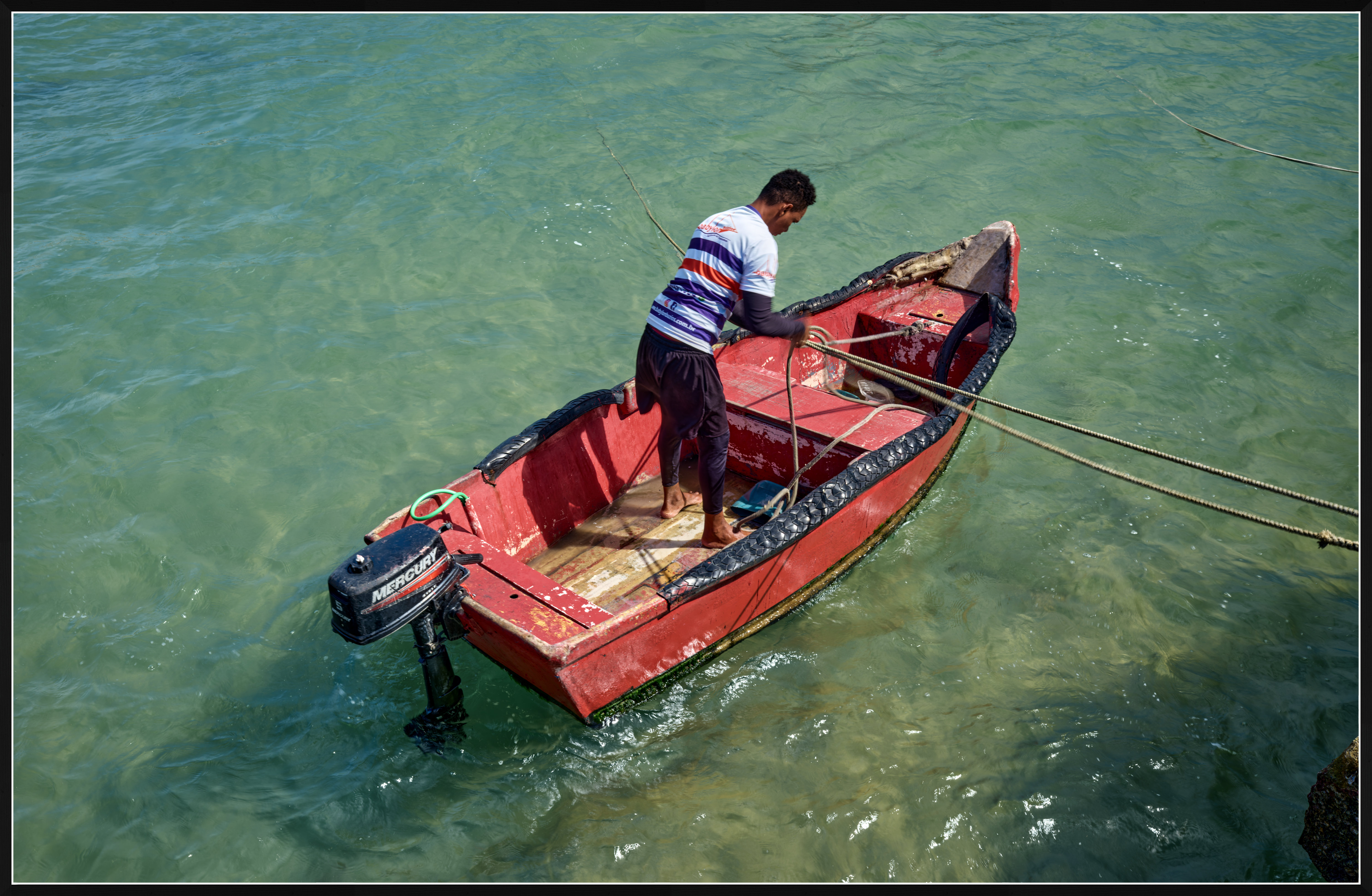
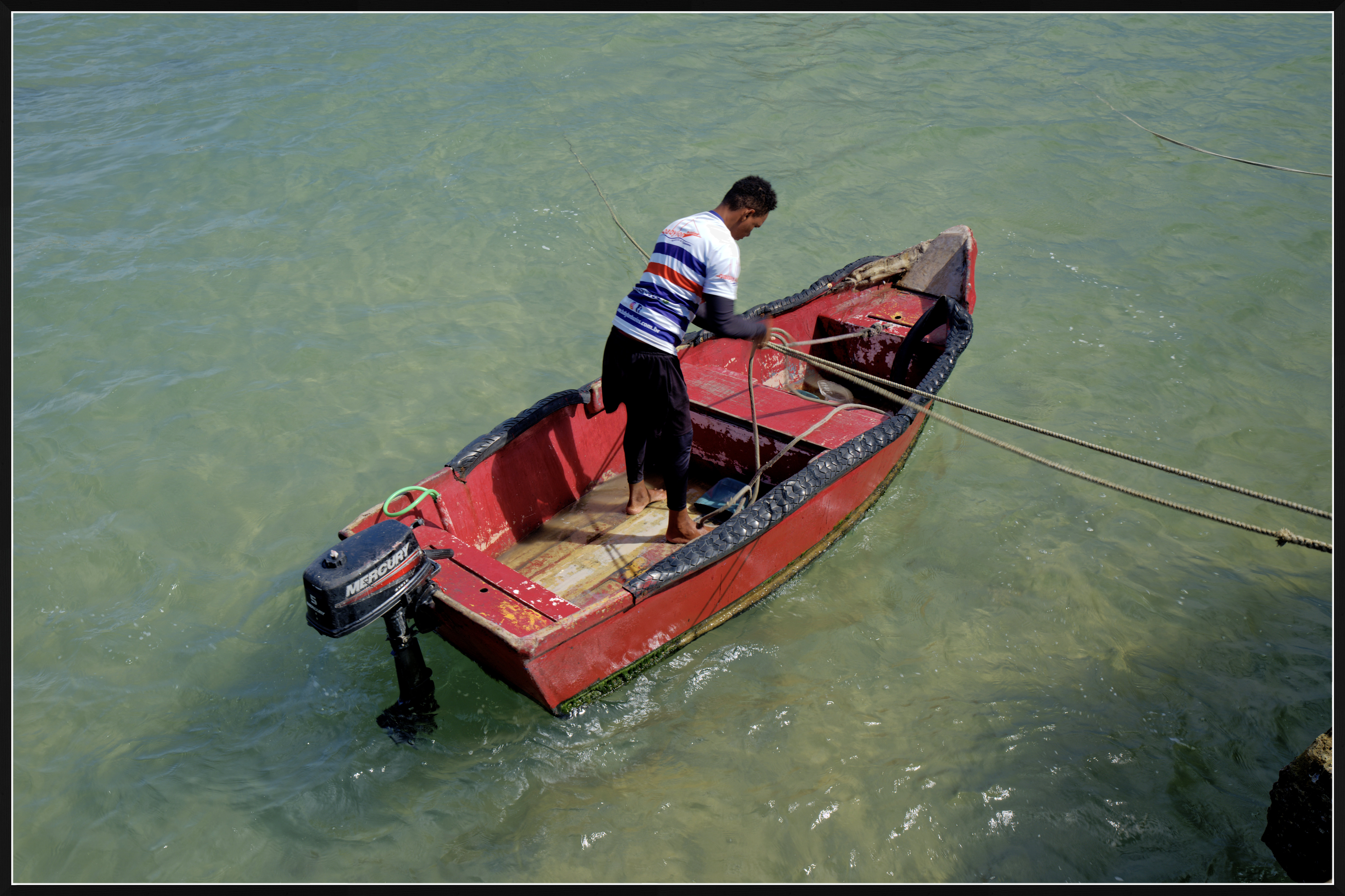
One difference that I experienced was that light adjustments (White, Black, etc.) in Rawnd were less selective than those in Capture One. For example, Black in Capture One applies very narrowly to the blackest blacks and doesn't touch the Shadows. The same can be said about White, that doesn't affect the Highlights (and the Highlights don't change the Midtones).
Such highly selective nature of the adjustments in Capture One allows adjusting exposure often without masking.
In Rawnd, lifting the Black tones affected the overall contrast. I could not lift the black tones in Rawnd (you can see this if you compare the two jpegs). In general, the adjustments felt more "crude", less selective.
A minor point: can you make double-clicking on a slider reset this slider?
Is the Curve tool RGB or Luma?
It seems that all EXIF information is lost on export from Rawnd. Also it seems that there is no choice of a color space. I believe the exported jpeg is sRGB.
What makes you think that processing in a browser should be more convenient than in an app? I mean, why wouldn't you develop an app?
GFX100S II GF20-35mmF4 R WR lens 35mm f/10.0 1/28s 80 ISO 0.0 EV
Aug 23, 2026 at 06:18 PM
p.1 #3Browser-based RAW editing — how important is the editing experience vs. the RAW engine?
Hi ruthenium,
Thank you — this is the most useful feedback i've had. You've found something real, and you've diagnosed it correctly, so let me answer precisely rather than reassuringly.
Tone selectivity — you're right, and here is exactly why
Blacks and Whites in Rawnd are not selective at all today. They're a levels-style remap: Blacks subtracts a black point in linear light, Whites divides by a white point, and the whole scale is renormalised between the two. No tonal mask is involved, so by construction the adjustment rescales the entire tonal range. That is precisely the global contrast shift you saw. In Capture One, Black is a narrow, feathered adjustment that tapers to nothing before it reaches the Shadows. Ours has no taper at all.
Highlights and Shadows do have masks, but they're far too wide: each ramps from middle grey out to its own end of the scale. Shadows covers everything below middle grey, Highlights everything above — half the picture each, meeting in the middle. Hence "crude". C1's are much tighter.
The specific thing you noticed — not being able to lift the blacks — has a second cause stacked on top. Rawnd applies a base curve measured from the camera's own rendering, and that curve has a toe that darkens the bottom fifth of the range. So you lift the black point in linear light, and then the toe puts most of it back. The control is fighting the curve underneath it.
What we're changing: give Blacks and Whites their own narrow, tapered masks confined to the ends of the scale, so Blacks stops before the Shadows and Whites before the Highlights; and narrow the Highlights/Shadows ramps so they fall to zero before reaching the midtones. Being able to grade exposure without reaching for a mask is the entire point of those controls, and today ours don't earn it. This is at the top of the list.
Double-clicking a slider to reset
Fair. Double-click already resets — but only on the slider's label, which isn't discoverable. (The label is also a scrub handle, by the way: drag it left/right for much finer control than the track gives you, Shift for 5× finer.) Extending double-click to the track and the handle is a small change and we'll do it.
Is the Curve RGB or Luma?
RGB. One composite curve, applied to R, G and B through the same lookup table, in display-referred space after the base curve and contrast. So it behaves like Photoshop's composite RGB curve: an S-curve raises saturation along with contrast. There's no Luma mode and no per-channel R/G/B curves yet. Both are planned — Luma especially, since it's the one you want when shaping contrast without touching colour.
EXIF and colour space
Both correct, and both worth being blunt about.
EXIF: Rawnd reads it — camera, lens, shutter, aperture, ISO, focal length, exposure compensation, capture date, orientation; it's in the info bar. But the export path encodes through the browser's canvas encoder, which writes pixels and nothing else. The metadata is in hand, we simply don't write it back into the file. That's a bug, not a decision, and a fixable one.
Colour space: exported JPEGs are sRGB — the pipeline converts camera-native to linear sRGB through the camera matrix and encodes sRGB at the end. Slightly worse than you assumed, though: the file is untagged sRGB, with no ICC profile embedded, so a colour-managed application has to guess. Embedding the sRGB profile is the immediate fix. Offering Display P3 and Adobe RGB is the real one, and it requires carrying a working space through to the encoder instead of hardcoding sRGB.
Why a browser rather than an app?
The honest answer is that we built the app first. Rawnd started as a Rust desktop application (Tauri). When we looked at what the native shell was actually contributing, the answer was: a window. The RAW decoder, the render engine, the shaders, the whole UI already ran inside a webview. Fifty-nine of sixty-two source files moved to the browser build unchanged. We weren't trading native performance for convenience — the "native" app was a web app in a costume.
What that buys:
Nothing is uploaded, ever. The decoder is a WebAssembly module running inside your page; your edits live in local browser storage. There is no server that sees your files. People assume the opposite, so it's worth saying plainly.
No installer, no update cycle, no per-platform builds. You open a URL and you're editing.
It still installs as an app if you want one. Rawnd is a PWA: install it and it runs fully offline, registers itself for fifteen RAW extensions, and double-clicking a .NEF opens it. Same icon in your dock, no app store.
What we give up, and I'd rather tell you than let you find it: we reach the GPU through WebGL2 rather than Metal or CUDA; a browser tab has a memory ceiling a native process doesn't; and we have no access to your display profile — which is the same limitation sitting behind the sRGB-only export. For very large batches, a native app still wins.
For the work Rawnd is actually for — getting through a shoot, culling, grading — the browser costs nothing that matters and removes a lot of friction. And if we ever hit a wall where it does matter, the engine is portable. It ran in a native shell once already.
Thank you again, genuinely. Comparing two JPEGs and locating the difference in where the adjustments act is a far more useful report than "it looks worse". If you're willing, I'd like to send you a build once the tone controls are reworked, and hear whether it holds up against C1 on your own files.
Best,
Matthieu
Thank you — this is the most useful feedback i've had. You've found something real, and you've diagnosed it correctly, so let me answer precisely rather than reassuringly.
Tone selectivity — you're right, and here is exactly why
Blacks and Whites in Rawnd are not selective at all today. They're a levels-style remap: Blacks subtracts a black point in linear light, Whites divides by a white point, and the whole scale is renormalised between the two. No tonal mask is involved, so by construction the adjustment rescales the entire tonal range. That is precisely the global contrast shift you saw. In Capture One, Black is a narrow, feathered adjustment that tapers to nothing before it reaches the Shadows. Ours has no taper at all.
Highlights and Shadows do have masks, but they're far too wide: each ramps from middle grey out to its own end of the scale. Shadows covers everything below middle grey, Highlights everything above — half the picture each, meeting in the middle. Hence "crude". C1's are much tighter.
The specific thing you noticed — not being able to lift the blacks — has a second cause stacked on top. Rawnd applies a base curve measured from the camera's own rendering, and that curve has a toe that darkens the bottom fifth of the range. So you lift the black point in linear light, and then the toe puts most of it back. The control is fighting the curve underneath it.
What we're changing: give Blacks and Whites their own narrow, tapered masks confined to the ends of the scale, so Blacks stops before the Shadows and Whites before the Highlights; and narrow the Highlights/Shadows ramps so they fall to zero before reaching the midtones. Being able to grade exposure without reaching for a mask is the entire point of those controls, and today ours don't earn it. This is at the top of the list.
Double-clicking a slider to reset
Fair. Double-click already resets — but only on the slider's label, which isn't discoverable. (The label is also a scrub handle, by the way: drag it left/right for much finer control than the track gives you, Shift for 5× finer.) Extending double-click to the track and the handle is a small change and we'll do it.
Is the Curve RGB or Luma?
RGB. One composite curve, applied to R, G and B through the same lookup table, in display-referred space after the base curve and contrast. So it behaves like Photoshop's composite RGB curve: an S-curve raises saturation along with contrast. There's no Luma mode and no per-channel R/G/B curves yet. Both are planned — Luma especially, since it's the one you want when shaping contrast without touching colour.
EXIF and colour space
Both correct, and both worth being blunt about.
EXIF: Rawnd reads it — camera, lens, shutter, aperture, ISO, focal length, exposure compensation, capture date, orientation; it's in the info bar. But the export path encodes through the browser's canvas encoder, which writes pixels and nothing else. The metadata is in hand, we simply don't write it back into the file. That's a bug, not a decision, and a fixable one.
Colour space: exported JPEGs are sRGB — the pipeline converts camera-native to linear sRGB through the camera matrix and encodes sRGB at the end. Slightly worse than you assumed, though: the file is untagged sRGB, with no ICC profile embedded, so a colour-managed application has to guess. Embedding the sRGB profile is the immediate fix. Offering Display P3 and Adobe RGB is the real one, and it requires carrying a working space through to the encoder instead of hardcoding sRGB.
Why a browser rather than an app?
The honest answer is that we built the app first. Rawnd started as a Rust desktop application (Tauri). When we looked at what the native shell was actually contributing, the answer was: a window. The RAW decoder, the render engine, the shaders, the whole UI already ran inside a webview. Fifty-nine of sixty-two source files moved to the browser build unchanged. We weren't trading native performance for convenience — the "native" app was a web app in a costume.
What that buys:
Nothing is uploaded, ever. The decoder is a WebAssembly module running inside your page; your edits live in local browser storage. There is no server that sees your files. People assume the opposite, so it's worth saying plainly.
No installer, no update cycle, no per-platform builds. You open a URL and you're editing.
It still installs as an app if you want one. Rawnd is a PWA: install it and it runs fully offline, registers itself for fifteen RAW extensions, and double-clicking a .NEF opens it. Same icon in your dock, no app store.
What we give up, and I'd rather tell you than let you find it: we reach the GPU through WebGL2 rather than Metal or CUDA; a browser tab has a memory ceiling a native process doesn't; and we have no access to your display profile — which is the same limitation sitting behind the sRGB-only export. For very large batches, a native app still wins.
For the work Rawnd is actually for — getting through a shoot, culling, grading — the browser costs nothing that matters and removes a lot of friction. And if we ever hit a wall where it does matter, the engine is portable. It ran in a native shell once already.
Thank you again, genuinely. Comparing two JPEGs and locating the difference in where the adjustments act is a far more useful report than "it looks worse". If you're willing, I'd like to send you a build once the tone controls are reworked, and hear whether it holds up against C1 on your own files.
Best,
Matthieu
Aug 24, 2026 at 04:54 AM
p.1 #4Browser-based RAW editing — how important is the editing experience vs. the RAW engine?
Matthieu, thank you for the detailed response. I should add to my previous comments that I looked at Rawnd only briefly and superficially by moving the sliders to get a sense of what corrections are available and what they do. I haven't tried denoising, masking, and it seems there's a full auto correction option that I haven't tested - all my adjustments were manual.
The way how the tonal adjustments (Black, White, etc) work in Rawnd closely reminded me the corresponding adjustments in DxO Photolab - a very nice app in many ways, yet with this one major flaw that made me adopt Capture One for most of my processing from raw. The tonal adjustments in Capture One are superb by being surgically precise.
One positive thing about my experience with Rawnd that I should have mentioned: the responsiveness was very good on the large 102MP raw file - everything I tried worked without delay - at least it felt that way.
I did have a slight uncomfortable feeling about allowing access to the raw file on my computer. There are increasingly sophisticated ways of criminal ciberactivity. I am afraid that today the cyber criminals are ahead of most people and the only way to avoid trouble is by not allowing any external access to files and folders. Using Rawnd made me feel somewhat vulnerable (perhaps for no good reason, but this feeling is subconscious). Your professional response was reassuring - you need to gain trust to be successful.
One last suggestion: Capture One has a very useful tool - Levels. It is particularly useful in the Auto mode when Capture One auto adjusts the Black and White levels (and sets the Midtones). This is an easy way to correct flat images where the tonal range is not wide enough. I regularly use Auto Levels in Capture One and think of this as an essential basic adjustment.
And the last thought- you are effectively competing with established successful software products from Adobe, Capture One, DxO, and several others. You may find this challenging reaching the sophistication level of the apps they offer (at least in short-term). Thus, you may want to differentiate your product somehow. There must be something about Rawnd to make it a compelling option, otherwise few photographers would use it.
Dmitri
The way how the tonal adjustments (Black, White, etc) work in Rawnd closely reminded me the corresponding adjustments in DxO Photolab - a very nice app in many ways, yet with this one major flaw that made me adopt Capture One for most of my processing from raw. The tonal adjustments in Capture One are superb by being surgically precise.
One positive thing about my experience with Rawnd that I should have mentioned: the responsiveness was very good on the large 102MP raw file - everything I tried worked without delay - at least it felt that way.
I did have a slight uncomfortable feeling about allowing access to the raw file on my computer. There are increasingly sophisticated ways of criminal ciberactivity. I am afraid that today the cyber criminals are ahead of most people and the only way to avoid trouble is by not allowing any external access to files and folders. Using Rawnd made me feel somewhat vulnerable (perhaps for no good reason, but this feeling is subconscious). Your professional response was reassuring - you need to gain trust to be successful.
One last suggestion: Capture One has a very useful tool - Levels. It is particularly useful in the Auto mode when Capture One auto adjusts the Black and White levels (and sets the Midtones). This is an easy way to correct flat images where the tonal range is not wide enough. I regularly use Auto Levels in Capture One and think of this as an essential basic adjustment.
And the last thought- you are effectively competing with established successful software products from Adobe, Capture One, DxO, and several others. You may find this challenging reaching the sophistication level of the apps they offer (at least in short-term). Thus, you may want to differentiate your product somehow. There must be something about Rawnd to make it a compelling option, otherwise few photographers would use it.
Dmitri
Aug 24, 2026 at 06:20 AM
p.1 #5Browser-based RAW editing — how important is the editing experience vs. the RAW engine?
Hi Dmitri,
Thank you — and the caveat changes nothing. Moving the sliders is what everyone does first.
The tonal adjustments. You were right, and the measurement was worse than the impression. Blacks and Whites weren't a weak version of Capture One's — they were a levels remap, an affine transform of the whole scale, so they couldn't be selective even in principle. Whites at −50 moved the midtone by 14.4 display points and white itself by 13.4. An exposure slider under another name.
All four are now confined to their own zones, and your three sentences are three tests in our suite. Happy to send you a build.
Levels. You've put your finger on the missing half. Capture One separates the global job (Levels) from the selective one (the HDR panel), and that separation is why its adjustments can be surgical. We had the two conflated in the worst way; fixing it gave us the selective half and left nothing doing the global one. Levels with Auto is next — and the auto-correct button you haven't tried belongs on it.
Speed. Thank you, 102 MP is the test that counts. Decoding is WebAssembly in the page, rendering is on your GPU. Nothing crosses a network.
File access. That instinct is right and you shouldn't take my word for it. Rawnd installs and runs fully offline: disconnect from the internet and keep working — open a RAW, develop it, export a JPEG. If anything were leaving your machine, that couldn't work. And the browser only grants what you picked, for that session. There's no filesystem to roam.
Differentiation. We won't out-render Capture One and shouldn't try. The bet is complementary: cull and pre-develop in the browser on any machine, export XMP, finish in C1. Trying costs a link and leaving costs nothing — the opposite of everything else on that list.
Thanks again. Second time your feedback has moved something real.
Matthieu
Thank you — and the caveat changes nothing. Moving the sliders is what everyone does first.
The tonal adjustments. You were right, and the measurement was worse than the impression. Blacks and Whites weren't a weak version of Capture One's — they were a levels remap, an affine transform of the whole scale, so they couldn't be selective even in principle. Whites at −50 moved the midtone by 14.4 display points and white itself by 13.4. An exposure slider under another name.
All four are now confined to their own zones, and your three sentences are three tests in our suite. Happy to send you a build.
Levels. You've put your finger on the missing half. Capture One separates the global job (Levels) from the selective one (the HDR panel), and that separation is why its adjustments can be surgical. We had the two conflated in the worst way; fixing it gave us the selective half and left nothing doing the global one. Levels with Auto is next — and the auto-correct button you haven't tried belongs on it.
Speed. Thank you, 102 MP is the test that counts. Decoding is WebAssembly in the page, rendering is on your GPU. Nothing crosses a network.
File access. That instinct is right and you shouldn't take my word for it. Rawnd installs and runs fully offline: disconnect from the internet and keep working — open a RAW, develop it, export a JPEG. If anything were leaving your machine, that couldn't work. And the browser only grants what you picked, for that session. There's no filesystem to roam.
Differentiation. We won't out-render Capture One and shouldn't try. The bet is complementary: cull and pre-develop in the browser on any machine, export XMP, finish in C1. Trying costs a link and leaving costs nothing — the opposite of everything else on that list.
Thanks again. Second time your feedback has moved something real.
Matthieu
Aug 24, 2026 at 06:51 AM
RoamingScott
Offline
Activity
[X]
Details
p.1 #6Browser-based RAW editing — how important is the editing experience vs. the RAW engine?
Holy AI.
Aug 24, 2026 at 08:08 AM
p.1 #7Browser-based RAW editing — how important is the editing experience vs. the RAW engine?
I'm a developer and I've been passionate about photography for years. I got tired of Lightroom, so I decided to build my own app.
And yes, of course I used AI to help me build it. 😄
AI is incredibly powerful when you actually know what you're doing. I'm a professional developer in my day job, so I know how to build software and what I'm asking the AI to do.
Without AI, honestly, I probably wouldn't have had the time or the budget to build this on my own — especially with all the development, RAW support, and photography metadata involved.
So yes, I use AI to work faster. But that's exactly what I do for a living. 😉
And yes, of course I used AI to help me build it. 😄
AI is incredibly powerful when you actually know what you're doing. I'm a professional developer in my day job, so I know how to build software and what I'm asking the AI to do.
Without AI, honestly, I probably wouldn't have had the time or the budget to build this on my own — especially with all the development, RAW support, and photography metadata involved.
So yes, I use AI to work faster. But that's exactly what I do for a living. 😉
Aug 24, 2026 at 08:15 AM
p.1 #8Browser-based RAW editing — how important is the editing experience vs. the RAW engine?
My basic concern would be how it can work in all different browsers and how it would be affected by all their updates.
EBH
EBH
Aug 25, 2026 at 04:09 PM
p.1 #9Browser-based RAW editing — how important is the editing experience vs. the RAW engine?
Everything Rawnd uses is a shipped web standard — WebAssembly, WebGL2, Canvas —
not an experimental API behind a flag, and browsers don't remove those once
they're deployed. It also installs and runs offline, so an installed copy keeps
working regardless.
The real answer though: nothing is locked in. Your RAW files never leave your
machine, and the culling comes out as standard XMP sidecars that Lightroom and
Bridge read natively. If a browser update broke Rawnd tomorrow, your files and
your ratings are untouched and still readable by everything else.
not an experimental API behind a flag, and browsers don't remove those once
they're deployed. It also installs and runs offline, so an installed copy keeps
working regardless.
The real answer though: nothing is locked in. Your RAW files never leave your
machine, and the culling comes out as standard XMP sidecars that Lightroom and
Bridge read natively. If a browser update broke Rawnd tomorrow, your files and
your ratings are untouched and still readable by everything else.
Aug 26, 2026 at 07:25 AM
p.1 #10Browser-based RAW editing — how important is the editing experience vs. the RAW engine?
It does not seem to work for FF in Windows. Maybe it is Apple stuff?
Does it work in Mint like Cinnamon?
EBH
Does it work in Mint like Cinnamon?
EBH
Aug 26, 2026 at 06:52 PM
|
p.1 #11Browser-based RAW editing — how important is the editing experience vs. the RAW engine?
Could not open Fuji X100s RAF file.
Aug 26, 2026 at 07:08 PM
p.1 #12Browser-based RAW editing — how important is the editing experience vs. the RAW engine?
Hello Daves3222, The X100s uses an X-Trans sensor, and Rawnd doesn't demosaic
X-Trans yet. It reads the file and recognises the layout, but there's nothing
to show you until that's written — X-Trans is a 6×6 pattern, so every
algorithm written for Bayer is inapplicable rather than just suboptimal. Fuji
bodies with Bayer sensors (GFX, X-A series) open fine. Sorry about it !
X-Trans yet. It reads the file and recognises the layout, but there's nothing
to show you until that's written — X-Trans is a 6×6 pattern, so every
algorithm written for Bayer is inapplicable rather than just suboptimal. Fuji
bodies with Bayer sensors (GFX, X-A series) open fine. Sorry about it !
Aug 27, 2026 at 04:48 AM
p.1 #13Browser-based RAW editing — how important is the editing experience vs. the RAW engine?
EDIT: Fixed — you can now drag a folder onto the page instead of using the button, and on Firefox that turned out to be about ten times faster: a 500-photo folder went from ~9 seconds to under 1. The slow part was never Firefox itself, it was the folder-input fallback it has to use; its drag-and-drop path does the same work in a fraction of the time.
Firefox and Safari now lead with a drop zone, with the button still there underneath for anyone who'd rather pick. Chrome is unchanged, and can take a dropped folder too.
Thanks for reporting it — it wouldn't have been measured otherwise.
------------------------------------------------------------------------------------------
Hi EB-1, thanks for trying it —
It does work in Firefox. The catch is the wait: Firefox builds the whole file
list itself before Rawnd sees a single photo, so on a big folder nothing seems
to happen for a while. That's the browser, before any of my code runs. Landing
on the editor page with the "open folder" button is intended, not a dead end.
Two things make it much worse and neither is obvious: antivirus scanning each
file, and folders in OneDrive/Dropbox with files still in the cloud — those get
downloaded before anything opens.
Try a folder of 20 or 30 photos first, kept locally. If that comes up quickly,
it's the wait rather than a failure. Mint is the same story — it's the browser
that matters here, not the OS.
Let me know how it goes.
Firefox and Safari now lead with a drop zone, with the button still there underneath for anyone who'd rather pick. Chrome is unchanged, and can take a dropped folder too.
Thanks for reporting it — it wouldn't have been measured otherwise.
------------------------------------------------------------------------------------------
Hi EB-1, thanks for trying it —
It does work in Firefox. The catch is the wait: Firefox builds the whole file
list itself before Rawnd sees a single photo, so on a big folder nothing seems
to happen for a while. That's the browser, before any of my code runs. Landing
on the editor page with the "open folder" button is intended, not a dead end.
Two things make it much worse and neither is obvious: antivirus scanning each
file, and folders in OneDrive/Dropbox with files still in the cloud — those get
downloaded before anything opens.
Try a folder of 20 or 30 photos first, kept locally. If that comes up quickly,
it's the wait rather than a failure. Mint is the same story — it's the browser
that matters here, not the OS.
Let me know how it goes.
Aug 27, 2026 at 04:52 AM
p.1 #14Browser-based RAW editing — how important is the editing experience vs. the RAW engine?
Hello again,
Quick follow-up for the Fujifilm shooters here: Rawnd now opens X-Trans files.
The container was never the hard part — RAF has been readable for years. The
sensor is. X-Trans uses a 6×6 colour filter pattern instead of Bayer's 2×2, so
demosaicing code written for Bayer is inapplicable, not merely suboptimal. Only
8 of every 36 photosites read red and 8 read blue, so those channels are rebuilt
from sparse evidence — and anything finer than the mosaic (a twig, a wire, a
branch against bright sky) invites false colour. That's exactly what we hit:
green and magenta fringing on thin dark subjects.
Two things fixed it.
White balance now happens *before* demosaicing. Red and blue are reconstructed
from the difference R−G, which only holds if that difference varies slowly. In
raw sensor space it doesn't — it's proportional to brightness, roughly −0.49 in
a bright sky against −0.02 on a dark branch. Interpolating across that edge
carried the sky's value onto the branch and drove red to zero: a twig rendered
pure green. Balancing first flattens it.
And green is now anchored on each photosite's own reading. Green used to be
averaged blindly, so a one-pixel wire against blown sky took its green from the
sky and came out bright. Once the mosaic is balanced, a red photosite's own
value estimates the green belonging there — dark on the wire, bright in the sky.
Honestly, the thing that actually unblocked this was the reference. The camera
writes its own JPEG from the same photosites, so it's the one truthful answer
for what a scene should look like. Several earlier attempts improved numbers
measured in sensor space and changed nothing on screen.
Speed holds: a 24 MP X100F develops in about 1.3 s in the browser, Bayer files
in about 0.45 s. Nothing is uploaded — the file is read on your own machine.
One caveat worth stating: a residual colour edge I chased for a while turned out
to be lateral CA from the lens, not the decoder. Fujifilm corrects it in its own
JPEG; in Rawnd it's one toggle under Optics.
Curious how it does on your files — especially X-T and X-Pro bodies. They decode
correctly, but I've inspected the X100F far more closely than the rest.
Quick follow-up for the Fujifilm shooters here: Rawnd now opens X-Trans files.
The container was never the hard part — RAF has been readable for years. The
sensor is. X-Trans uses a 6×6 colour filter pattern instead of Bayer's 2×2, so
demosaicing code written for Bayer is inapplicable, not merely suboptimal. Only
8 of every 36 photosites read red and 8 read blue, so those channels are rebuilt
from sparse evidence — and anything finer than the mosaic (a twig, a wire, a
branch against bright sky) invites false colour. That's exactly what we hit:
green and magenta fringing on thin dark subjects.
Two things fixed it.
White balance now happens *before* demosaicing. Red and blue are reconstructed
from the difference R−G, which only holds if that difference varies slowly. In
raw sensor space it doesn't — it's proportional to brightness, roughly −0.49 in
a bright sky against −0.02 on a dark branch. Interpolating across that edge
carried the sky's value onto the branch and drove red to zero: a twig rendered
pure green. Balancing first flattens it.
And green is now anchored on each photosite's own reading. Green used to be
averaged blindly, so a one-pixel wire against blown sky took its green from the
sky and came out bright. Once the mosaic is balanced, a red photosite's own
value estimates the green belonging there — dark on the wire, bright in the sky.
Honestly, the thing that actually unblocked this was the reference. The camera
writes its own JPEG from the same photosites, so it's the one truthful answer
for what a scene should look like. Several earlier attempts improved numbers
measured in sensor space and changed nothing on screen.
Speed holds: a 24 MP X100F develops in about 1.3 s in the browser, Bayer files
in about 0.45 s. Nothing is uploaded — the file is read on your own machine.
One caveat worth stating: a residual colour edge I chased for a while turned out
to be lateral CA from the lens, not the decoder. Fujifilm corrects it in its own
JPEG; in Rawnd it's one toggle under Optics.
Curious how it does on your files — especially X-T and X-Pro bodies. They decode
correctly, but I've inspected the X100F far more closely than the rest.
Aug 28, 2026 at 07:07 AM
p.1 #15Browser-based RAW editing — how important is the editing experience vs. the RAW engine?
Some very superfical comments: maybe it's a browser limitation but I feel the overall responsiveness is more sluggish than hardware accelerated lightroom, when I drag on slider during editing I'd hear my cpu/gpu fan ramp up during editing and output geneally come with some delay. Not a very smooth experience at least for my case.
Some other minor thing I noticed: additional shortcut tailored for individual panel would be nice, such as using scroll wheel to scroll through photos at the bottom overview panel instead of dragging the scroll bar, and able to delete a selected mask by pressing delete instead of clicking on trash can icon.
Some other minor thing I noticed: additional shortcut tailored for individual panel would be nice, such as using scroll wheel to scroll through photos at the bottom overview panel instead of dragging the scroll bar, and able to delete a selected mask by pressing delete instead of clicking on trash can icon.
Aug 28, 2026 at 04:41 PM
p.1 #16Browser-based RAW editing — how important is the editing experience vs. the RAW engine?
RoamingScott wrote:
Holy AI.
Normally we don't always agree, but I'm on board with you here.
This app is entirely AI and almost every bit of these post responses are fully AI. I don't know what this site's stance on AI is but I'd rather not see this slop here.
Holy AI.
Normally we don't always agree, but I'm on board with you here.
This app is entirely AI and almost every bit of these post responses are fully AI. I don't know what this site's stance on AI is but I'd rather not see this slop here.
Aug 28, 2026 at 06:50 PM
p.1 #17Browser-based RAW editing — how important is the editing experience vs. the RAW engine?
The posts are AI? How does that work and why is it?
EBH
EBH
Aug 29, 2026 at 12:23 AM
p.1 #18Browser-based RAW editing — how important is the editing experience vs. the RAW engine?
Thank you Bruce for your answer ! Did you tried it before saying it's a slop? You have to wake up I'm developer and everyone using AI now, it's like you have no choice ! People who don't want to use it will stay behind ! And for the AI post I wrote in French and translate in English because English is not my mother tongue, so I was thinking it was better to everyone to fully understand what I mean ! But all good I can speak with my word ! FYI , Lightroom, Darktable, DXO and all others use AI to code ! It's a no brainer now ! And as I said it's my job ! I review each line of code because I know how to code
Aug 29, 2026 at 06:23 AM
p.1 #19Browser-based RAW editing — how important is the editing experience vs. the RAW engine?
Thanks aerowing for your constructive comment ! What's your laptop spec ? How many RAM and what's your GPU ? For the other part I take note and will improve it thank you
Aug 29, 2026 at 06:28 AM
p.1 #20Browser-based RAW editing — how important is the editing experience vs. the RAW engine?
I just added some new mask features: Object Detection and Brush! They're free, so feel free to try them out
Sep 09, 2026 at 12:42 PM