GFX100sii...Downloads 2 images..

p.1 #1GFX100sii...Downloads 2 images..
I have a problem which I am sure is "operator error" but I cannot find out what Menu option is causing this..
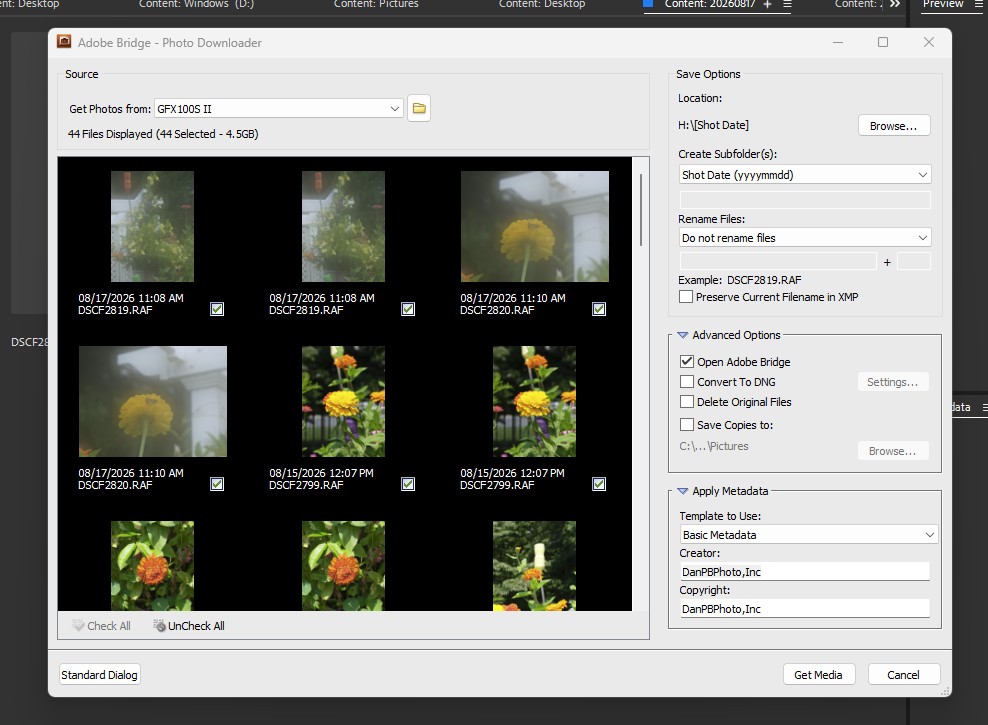
When downloading from camera to computer, the camera downloads 2 .RAF files at a time..2 files with the exact same file number appear in Adobe Photodownloader.
My Canon's do not do this.
Be aware that the Fuji Menu system has me very confused so be "kind".
HELP?
Thanks!
Dan
When downloading from camera to computer, the camera downloads 2 .RAF files at a time..2 files with the exact same file number appear in Adobe Photodownloader.
My Canon's do not do this.
Be aware that the Fuji Menu system has me very confused so be "kind".
HELP?
Thanks!
Dan
Aug 14, 2026 at 11:20 AM
p.1 #2GFX100sii...Downloads 2 images..
No Fuji menu expert but do you have it set to backup your RAF files, one file on each card? What happens if you pull one of the cards and download via a card reader, do you just get one file? Adobe might we seeing two cards with the same file and downloading both.
Aug 14, 2026 at 11:44 AM
p.1 #3GFX100sii...Downloads 2 images..
It can't be the exact same file number, if you mean the file name. If you have 2 files, and both called "DSCF0014" as example, then you probably don't have the extensions showing, and one is a RAF and the other is a JPG...
Which would mean on that card, you are saving RAW+JPG (option is easier to see in default Q menu)
Which would mean on that card, you are saving RAW+JPG (option is easier to see in default Q menu)
Aug 14, 2026 at 06:19 PM
p.1 #4GFX100sii...Downloads 2 images..
SGinNorcal wrote:
No Fuji menu expert but do you have it set to backup your RAF files, one file on each card? What happens if you pull one of the cards and download via a card reader, do you just get one file? Adobe might we seeing two cards with the same file and downloading both.
Truthfully, I dont know. I'll check..That "setting" is probably one I would never use BUT......The files "eat" up disk space enough as it is..but 2 each Naw...
I will check.
Thanks!
Dan
No Fuji menu expert but do you have it set to backup your RAF files, one file on each card? What happens if you pull one of the cards and download via a card reader, do you just get one file? Adobe might we seeing two cards with the same file and downloading both.
Truthfully, I dont know. I'll check..That "setting" is probably one I would never use BUT......The files "eat" up disk space enough as it is..but 2 each
Naw...I will check.
Thanks!
Dan
Aug 15, 2026 at 11:12 AM
p.1 #5GFX100sii...Downloads 2 images..
RWNPhoto wrote:
It can't be the exact same file number, if you mean the file name. If you have 2 files, and both called "DSCF0014" as example, then you probably don't have the extensions showing, and one is a RAF and the other is a JPG...
Which would mean on that card, you are saving RAW+JPG (option is easier to see in default Q menu)
The file(s) downloaded are DSCxxx1.RAF and DSCxxx1.RAF
Of course I am on my "other computer" and the screenshot I need is there...
Thanks Mich..I will post exactly what Adobe Photodownloader "sees"...It is 2 exacatly the same files and the same in all forms....
Dan
I save no jpg file..1 raw file only saved
It can't be the exact same file number, if you mean the file name. If you have 2 files, and both called "DSCF0014" as example, then you probably don't have the extensions showing, and one is a RAF and the other is a JPG...
Which would mean on that card, you are saving RAW+JPG (option is easier to see in default Q menu)
The file(s) downloaded are DSCxxx1.RAF and DSCxxx1.RAF
Of course I am on my "other computer" and the screenshot I need is there...
Thanks Mich..I will post exactly what Adobe Photodownloader "sees"...It is 2 exacatly the same files and the same in all forms....
Dan
I save no jpg file..1 raw file only saved
Aug 15, 2026 at 11:17 AM
p.1 #6GFX100sii...Downloads 2 images..
If you have 2 files with exactly the same name, then you have 2 files in 2 different locations/folders, and whatever you are using to "view" the names sees both locations (or more than 2). No operating system will allow 2 files with same names in the same folder.
Never sure Adobe photo downloader, and I'm not going to google it and try it out now
Never sure Adobe photo downloader, and I'm not going to google it and try it out now
Aug 15, 2026 at 01:56 PM
p.1 #7GFX100sii...Downloads 2 images..
RWNPhoto wrote:
If you have 2 files with exactly the same name, then you have 2 files in 2 different locations/folders, and whatever you are using to "view" the names sees both locations (or more than 2). No operating system will allow 2 files with same names in the same folder.
Never sure Adobe photo downloader, and I'm not going to google it and try it out now
Thanks for your input "Mich".
I am going to work on this today....I believe I checked what was stored on the memory card, prior to downloading to computer in the GFX and there was only 1 file stored on the card. Not 100% sure but will re-check!
Thanks again!
Dan
If you have 2 files with exactly the same name, then you have 2 files in 2 different locations/folders, and whatever you are using to "view" the names sees both locations (or more than 2). No operating system will allow 2 files with same names in the same folder.
Never sure Adobe photo downloader, and I'm not going to google it and try it out now
Thanks for your input "Mich".
I am going to work on this today....I believe I checked what was stored on the memory card, prior to downloading to computer in the GFX and there was only 1 file stored on the card. Not 100% sure but will re-check!
Thanks again!
Dan
Aug 16, 2026 at 09:51 AM
|
p.1 #8GFX100sii...Downloads 2 images..
SGinNorcal wrote:
No Fuji menu expert but do you have it set to backup your RAF files, one file on each card? What happens if you pull one of the cards and download via a card reader, do you just get one file? Adobe might we seeing two cards with the same file and downloading both.
---------------------------------------------
RWNPhoto wrote:
It can't be the exact same file number, if you mean the file name. If you have 2 files, and both called "DSCF0014" as example, then you probably don't have the extensions showing, and one is a RAF and the other is a JPG...
Which would mean on that card, you are saving RAW+JPG (option is easier to see in default Q menu)
---------------------------------------------
RWNPhoto wrote:
If you have 2 files with exactly the same name, then you have 2 files in 2 different locations/folders, and whatever you are using to "view" the names sees both locations (or more than 2). No operating system will allow 2 files with same names in the same folder.
Never sure Adobe photo downloader, and I'm not going to google it and try it out now
OK..I just downloaded from Fuji..It is copying 2 images to Adobe...
The 2 files have identical file numbers...
Now that I proved it is the camera and probably a Menu setting..I will research..
Thanks!
Dan
No Fuji menu expert but do you have it set to backup your RAF files, one file on each card? What happens if you pull one of the cards and download via a card reader, do you just get one file? Adobe might we seeing two cards with the same file and downloading both.
---------------------------------------------
RWNPhoto wrote:
It can't be the exact same file number, if you mean the file name. If you have 2 files, and both called "DSCF0014" as example, then you probably don't have the extensions showing, and one is a RAF and the other is a JPG...
Which would mean on that card, you are saving RAW+JPG (option is easier to see in default Q menu)
---------------------------------------------
RWNPhoto wrote:
If you have 2 files with exactly the same name, then you have 2 files in 2 different locations/folders, and whatever you are using to "view" the names sees both locations (or more than 2). No operating system will allow 2 files with same names in the same folder.
Never sure Adobe photo downloader, and I'm not going to google it and try it out now
OK..I just downloaded from Fuji..It is copying 2 images to Adobe...
The 2 files have identical file numbers...
Now that I proved it is the camera and probably a Menu setting..I will research..
Thanks!
Dan
Aug 17, 2026 at 10:02 AM
p.1 #9GFX100sii...Downloads 2 images..
Danpbphoto wrote:
---------------------------------------------
Which would mean on that card, you are saving RAW+JPG (option is easier to see in default Q menu)---------------------------------------------
Never sure Adobe photo downloader, and I'm not going to google it and try it out nowOK..I just downloaded from Fuji..It is copying 2 images to Adobe...
The 2 files have identical file numbers...
Now that I proved it is the camera and probably a Menu setting..I will research..
Thanks!
Dan
I went through all the Menu settings....The only settg that would keep 2 files would be "Image Quality"..mine is set for "RAW" only...
Any advice before I call Fuji?
A setting I am "ignoring" for whatever reason?
I DO have 2 sdx cards in the slots...no info on #2..I have pulled it for a test.
Thanks!
Dan
SGinNorcal wrote
No Fuji menu expert but do you have it set to backup your RAF files, one file on each card? What happens if you pull one of the cards and download via a card reader, do you just get one file? Adobe might we seeing two cards with the same file and downloading both.RWNPhoto wrote
It can't be the exact same file number, if you mean the file name. If you have 2 files, and both called "DSCF0014" as example, then you probably don't have the extensions showing, and one is a RAF and the other is a JPG...Which would mean on that card, you are saving RAW+JPG (option is easier to see in default Q menu)
RWNPhoto wrote
If you have 2 files with exactly the same name, then you have 2 files in 2 different locations/folders, and whatever you are using to "view" the names sees both locations (or more than 2). No operating system will allow 2 files with same names in the same folder.Never sure Adobe photo downloader, and I'm not going to google it and try it out now
The 2 files have identical file numbers...
Now that I proved it is the camera and probably a Menu setting..I will research..
Thanks!
Dan
I went through all the Menu settings....The only settg that would keep 2 files would be "Image Quality"..mine is set for "RAW" only...
Any advice before I call Fuji?
A setting I am "ignoring" for whatever reason?
I DO have 2 sdx cards in the slots...no info on #2..I have pulled it for a test.
Thanks!
Dan
Aug 17, 2026 at 10:27 AM
RoamingScott
Offline
Activity
[X]
Details
p.1 #10GFX100sii...Downloads 2 images..
A good example of an unnecessary software layer causing more headaches than it solves.
Copy > paste from SD to Computer wouldn't let you down like this
Copy > paste from SD to Computer wouldn't let you down like this
Aug 17, 2026 at 10:34 AM
p.1 #11GFX100sii...Downloads 2 images..
RoamingScott wrote:
A good example of an unnecessary software layer causing more headaches than it solves.
Copy > paste from SD to Computer wouldn't let you down like this
Thanks Scott well I just proved myself WRONG again..I have the Fuji RAW Converter also and the camera downloads fine to it SO it must be Adobe PD "seeing" 2 files somewhere....
Yea I have many "workarounds". I as just tryin' to see how bad my memory really IS!
Dan
A good example of an unnecessary software layer causing more headaches than it solves.
Copy > paste from SD to Computer wouldn't let you down like this
Thanks Scott well I just proved myself WRONG again..I have the Fuji RAW Converter also and the camera downloads fine to it SO it must be Adobe PD "seeing" 2 files somewhere....
Yea I have many "workarounds". I as just tryin' to see how bad my memory really IS!
Dan
Aug 17, 2026 at 10:53 AM
p.1 #12GFX100sii...Downloads 2 images..
SGinNorcal wrote:
No Fuji menu expert but do you have it set to backup your RAF files, one file on each card? What happens if you pull one of the cards and download via a card reader, do you just get one file? Adobe might we seeing two cards with the same file and downloading both.
I do NOT .....but I DID pull Card#2 just for fun...
Dan
No Fuji menu expert but do you have it set to backup your RAF files, one file on each card? What happens if you pull one of the cards and download via a card reader, do you just get one file? Adobe might we seeing two cards with the same file and downloading both.
I do NOT .....but I DID pull Card#2 just for fun...
Dan
Aug 17, 2026 at 10:58 AM
p.1 #13GFX100sii...Downloads 2 images..
Hey Dan, if you go into Menu, then the wrench icon, then Save Data Setting, then Card Slot Setting, and look at how it is set. If you are on Backup, its putting a copy of each RAF file on each card. Sounds like this is how its set and Adobe is reading both cards since you are connected to the camera. You can change it to Sequential, and it will only save to one card but of course with no backup. Or just change to using a single card reader vs. plugging in the camera to upload.
Aug 17, 2026 at 11:38 AM
p.1 #14GFX100sii...Downloads 2 images..
SGinNorcal wrote:
Hey Dan, if you go into Menu, then the wrench icon, then Save Data Setting, then Card Slot Setting, and look at how it is set. If you are on Backup, its putting a copy of each RAF file on each card. Sounds like this is how its set and Adobe is reading both cards since you are connected to the camera. You can change it to Sequential, and it will only save to one card but of course with no backup. Or just change to using a single card reader vs. plugging in the camera to upload.
It is on "Sequential"....BUT I did remove Card#2 just for grins....
It is the Adobe program upon some further reserach using Fuji RAW Converter and Adobe DPP>
Thanks!
Dan
Hey Dan, if you go into Menu, then the wrench icon, then Save Data Setting, then Card Slot Setting, and look at how it is set. If you are on Backup, its putting a copy of each RAF file on each card. Sounds like this is how its set and Adobe is reading both cards since you are connected to the camera. You can change it to Sequential, and it will only save to one card but of course with no backup. Or just change to using a single card reader vs. plugging in the camera to upload.
It is on "Sequential"....BUT I did remove Card#2 just for grins....
It is the Adobe program upon some further reserach using Fuji RAW Converter and Adobe DPP>
Thanks!
Dan
Aug 17, 2026 at 11:55 AM