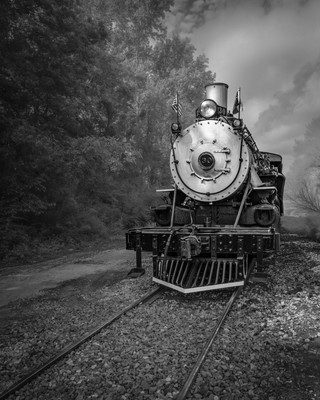
Posting first image on FM - how about a train shot?
p.1 #1Posting first image on FM - how about a train shot?
I am loving these Fuji images - especially with the little voigtlanders.... Just figuring out how to post images on FM 
Texas State Railroad - black and white
Texas State Railroad - black and white
Jul 25, 2026 at 07:42 PM

p.1 #2Posting first image on FM - how about a train shot?
Well, you posted a link, so if that was your desire, you succeeded...
But I'd bet if you want to share and get more comments, you should put in the B&W board here as a wider audience will see it, and appreciate the image you have.
But I'd bet if you want to share and get more comments, you should put in the B&W board here as a wider audience will see it, and appreciate the image you have.
Jul 26, 2026 at 08:43 AM
p.1 #3Posting first image on FM - how about a train shot?
pechance wrote:
I am loving these Fuji images - especially with the little voigtlanders.... Just figuring out how to post images on FM
Texas State Railroad - black and white
Also, if you haven’t figure it out yet, to share a photo on FM (and, as the previous poster suggested, this one doesn’t really go in this forum), just paste in the full URL of the photograph of the image posted on your website, making sure that it ends with “.jpg”… Unfortunately, the site where that photo is posted uses a different from of the UTL that lacks the “.jpg” at the end, so unless there is a way around that you are going to need a different solution.
You can also get an upload account here, and there’s a pretty easy way to post from Flickr if you have an account there.)
Few people are going to click through on a link to see a photo posted elsewhere.
I am loving these Fuji images - especially with the little voigtlanders.... Just figuring out how to post images on FM
Texas State Railroad - black and white
Also, if you haven’t figure it out yet, to share a photo on FM (and, as the previous poster suggested, this one doesn’t really go in this forum), just paste in the full URL of the photograph of the image posted on your website, making sure that it ends with “.jpg”… Unfortunately, the site where that photo is posted uses a different from of the UTL that lacks the “.jpg” at the end, so unless there is a way around that you are going to need a different solution.
You can also get an upload account here, and there’s a pretty easy way to post from Flickr if you have an account there.)
Few people are going to click through on a link to see a photo posted elsewhere.
Jul 26, 2026 at 09:46 AM
p.1 #4Posting first image on FM - how about a train shot?
gdanmitchell wrote:
Texas State Railroad - black and whiteAlso, if you haven’t figure it out yet, to share a photo on FM (and, as the previous poster suggested, this one doesn’t really go in this forum), just paste in the full URL of the photograph of the image posted on your website, making sure that it ends with “.jpg”… Unfortunately, the site where that photo is posted uses a different from of the UTL that lacks the “.jpg” at the end, so unless there is a way around that you are going to need a different solution.
You can also get an upload account here, and there’s a...Show more →
Thanks - couldn't get it to work via my website, but was able to upload to Flickr and use the BBCode. Thanks!
pechance wrote
I am loving these Fuji images - especially with the little voigtlanders.... Just figuring out how to post images on FMTexas State Railroad - black and white
You can also get an upload account here, and there’s a...Show more →
Thanks - couldn't get it to work via my website, but was able to upload to Flickr and use the BBCode. Thanks!
Jul 26, 2026 at 10:51 AM
p.1 #5Posting first image on FM - how about a train shot?
pechance wrote:
Texas State Railroad - black and whiteAlso, if you haven’t figure it out yet, to share a photo on FM (and, as the previous poster suggested, this one doesn’t really go in this forum), just paste in the full URL of the photograph of the image posted on your website, making sure that it ends with “.jpg”… Unfortunately, the site where that photo is posted uses a different from of the UTL that lacks the “.jpg” at the end, so unless there is a way around that you are going to need a different solution.
You can also get an upload account here, and there’s a pretty easy way to post from Flickr if you have an account there.)
Few people are going to click through on a link to see a photo posted elsewhere.Thanks - couldn't get it to work via my website, but was able to upload to Flickr and use the BBCode. Thanks!
That Flickr upload option is really very useful. I used to share images posted on my own two websites, but it turns out that it is simpler for me to use the Flickr option nowadays.
Glad to hear it worked for you!
gdanmitchell wrote
pechance wrote
I am loving these Fuji images - especially with the little voigtlanders.... Just figuring out how to post images on FMTexas State Railroad - black and white
You can also get an upload account here, and there’s a pretty easy way to post from Flickr if you have an account there.)
Few people are going to click through on a link to see a photo posted elsewhere.
That Flickr upload option is really very useful. I used to share images posted on my own two websites, but it turns out that it is simpler for me to use the Flickr option nowadays.
Glad to hear it worked for you!
Jul 26, 2026 at 08:49 PM
p.1 #6Posting first image on FM - how about a train shot?
You may find useful this old, now archived, thread "Suggestions For FM Uploads?"
https://share.google/NLn6atrnKLND9jhKi
There was a discussion in this thread on posting from Flickr using BBCode. Read the posts from @danny_j1971 who offered some useful tips.
https://share.google/NLn6atrnKLND9jhKi
There was a discussion in this thread on posting from Flickr using BBCode. Read the posts from @danny_j1971 who offered some useful tips.
Jul 27, 2026 at 05:24 AM
p.1 #7Posting first image on FM - how about a train shot?
For those who haven’t done it, posting from Flickr is super-easy.
1. Go to your photo on Flickr. (Click on it in your photo stream if that’s where you are looking at it.)
2. Below and to the right of your photo there are three small icons. Click “up arrow curving to the right” icon.
3. Choose the “BBCode” option from the four options at the top of the window that appears.
4. Select the pixel dimensions you want from the pop-up menu. Then select the “BBCode” text that appears and copy it.
5. Paste it into your FM post.
If you try it once or twice, I think you’ll quickly see how easy it is.
1. Go to your photo on Flickr. (Click on it in your photo stream if that’s where you are looking at it.)
2. Below and to the right of your photo there are three small icons. Click “up arrow curving to the right” icon.
3. Choose the “BBCode” option from the four options at the top of the window that appears.
4. Select the pixel dimensions you want from the pop-up menu. Then select the “BBCode” text that appears and copy it.
5. Paste it into your FM post.
If you try it once or twice, I think you’ll quickly see how easy it is.
Jul 27, 2026 at 08:52 AM
p.1 #8Posting first image on FM - how about a train shot?
gdanmitchell wrote:
For those who haven’t done it, posting from Flickr is super-easy.
1. Go to your photo on Flickr. (Click on it in your photo stream if that’s where you are looking at it.)
2. Below and to the right of your photo there are three small icons. Click “up arrow curving to the right” icon.
3. Choose the “BBCode” option from the four options at the top of the window that appears.
4. Select the pixel dimensions you want from the pop-up menu. Then select the “BBCode” text that appears and copy it.
5. Paste it into your FM post.
If you try it once or...Show more →
One thing worth noting, to avoid the odd formatting that occurs with the default BBCode, make sure you hit the enter key between the first close URL tag and the rest of the text.
[/url] {hit enter key after the first occurance close tag after you paste the BBCode into the new post.}
For those who haven’t done it, posting from Flickr is super-easy.
1. Go to your photo on Flickr. (Click on it in your photo stream if that’s where you are looking at it.)
2. Below and to the right of your photo there are three small icons. Click “up arrow curving to the right” icon.
3. Choose the “BBCode” option from the four options at the top of the window that appears.
4. Select the pixel dimensions you want from the pop-up menu. Then select the “BBCode” text that appears and copy it.
5. Paste it into your FM post.
If you try it once or...Show more →
One thing worth noting, to avoid the odd formatting that occurs with the default BBCode, make sure you hit the enter key between the first close URL tag and the rest of the text.
[/url] {hit enter key after the first occurance close tag after you paste the BBCode into the new post.}
Jul 27, 2026 at 11:15 AM
|
p.1 #9Posting first image on FM - how about a train shot?
That is a great point, and I do that, too. :-)
(I also delete the part that makes my name appear since that is already seen on FM. But newbies can ignore that!)
tsdevine wrote:
1. Go to your photo on Flickr. (Click on it in your photo stream if that’s where you are looking at it.)
2. Below and to the right of your photo there are three small icons. Click “up arrow curving to the right” icon.
3. Choose the “BBCode” option from the four options at the top of the window that appears.
4. Select the pixel dimensions you want from the pop-up menu. Then select the “BBCode” text that appears and copy it.
5. Paste it into your FM post.
If you try it once or twice, I think you’ll quickly see how easy it is.One thing worth noting, to avoid the odd formatting that occurs with the default BBCode, make sure you hit the enter key between the first close URL tag and the rest of the text.
[/url] {hit enter key after the first occurance close tag after you paste the BBCode into the new post.}
Edited on Jul 27, 2026 at 10:50 PM · View previous versions
(I also delete the part that makes my name appear since that is already seen on FM. But newbies can ignore that!)
tsdevine wrote:
gdanmitchell wrote
For those who haven’t done it, posting from Flickr is super-easy.1. Go to your photo on Flickr. (Click on it in your photo stream if that’s where you are looking at it.)
2. Below and to the right of your photo there are three small icons. Click “up arrow curving to the right” icon.
3. Choose the “BBCode” option from the four options at the top of the window that appears.
4. Select the pixel dimensions you want from the pop-up menu. Then select the “BBCode” text that appears and copy it.
5. Paste it into your FM post.
If you try it once or twice, I think you’ll quickly see how easy it is.
[/url] {hit enter key after the first occurance close tag after you paste the BBCode into the new post.}
Edited on Jul 27, 2026 at 10:50 PM · View previous versions
Jul 27, 2026 at 11:57 AM
p.1 #10Posting first image on FM - how about a train shot?
pechance, your train photos are great! Thanks for sharing the link.
Jul 27, 2026 at 03:01 PM
p.1 #11Posting first image on FM - how about a train shot?
gaopa wrote:
pechance, your train photos are great! Thanks for sharing the link.
thanks for the kind words.
pechance, your train photos are great! Thanks for sharing the link.
thanks for the kind words.
Jul 27, 2026 at 04:41 PM
p.1 #12Posting first image on FM - how about a train shot?
gaopa wrote:
pechance, your train photos are great! Thanks for sharing the link.
Agreed! Really nice images.
pechance, your train photos are great! Thanks for sharing the link.
Agreed! Really nice images.
Jul 27, 2026 at 11:33 PM
p.1 #13Posting first image on FM - how about a train shot?
Looked at your website. Really like your pictures!
Great work and welcome to FM.
Great work and welcome to FM.
Jul 28, 2026 at 06:11 AM
p.1 #14Posting first image on FM - how about a train shot?
gjoliver wrote:
Looked at your website. Really like your pictures!
Great work and welcome to FM.
Thanks!
Looked at your website. Really like your pictures!
Great work and welcome to FM.
Thanks!
Jul 28, 2026 at 07:21 AM
p.1 #15Posting first image on FM - how about a train shot?
Great photos, pechance and well come to Fuji Forum!
Aug 05, 2026 at 11:06 AM
p.1 #16Posting first image on FM - how about a train shot?
From the photo page, click Share, click Get the embed code, select just the image URL.
Paste here between the BBCode IMG /IMG markup.
Aug 05, 2026 at 04:15 PM