July 8th Adobe Camera Raw Update
p.1 #1July 8th Adobe Camera Raw Update
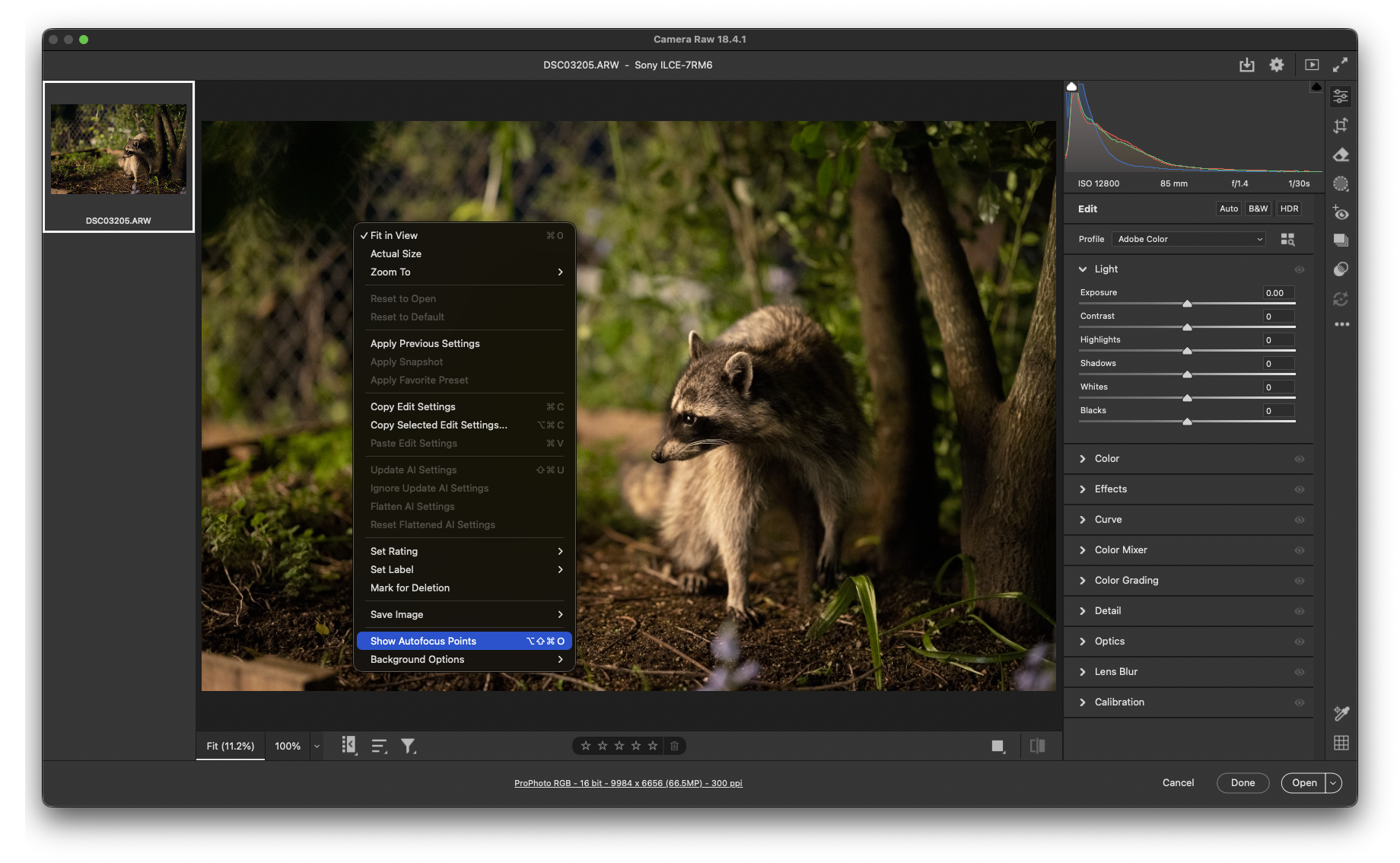
PSA, other than camera and lens updates they have added a "show autofocus points" option when right clicking the raw file. 🫠
Jul 08, 2026 at 08:41 AM
p.1 #2July 8th Adobe Camera Raw Update
Great! Been wanting that for a long time, no more putzing with flaky plugins.
However, on quick testing the option was grayed out on some older raw files. I can't see a reason yet, but will keep testing. If anybody figures out why, please tell.
However, on quick testing the option was grayed out on some older raw files. I can't see a reason yet, but will keep testing. If anybody figures out why, please tell.
Jul 08, 2026 at 09:56 AM
p.1 #3July 8th Adobe Camera Raw Update
Ps>Help>What's New
shows 'Work locally with remove tool' and 'Reflection Removal.'
Nothing [that I spotted] about focus points in the release notes .https://helpx.adobe.com/photoshop/desktop/whats-new/photoshop-on-desktop-release-notes.html
Thanks for posting, James. I like the latest version of the LrC plugin.
shows 'Work locally with remove tool' and 'Reflection Removal.'
Nothing [that I spotted] about focus points in the release notes .https://helpx.adobe.com/photoshop/desktop/whats-new/photoshop-on-desktop-release-notes.html
Thanks for posting, James. I like the latest version of the LrC plugin.
Jul 08, 2026 at 10:33 AM
p.1 #4July 8th Adobe Camera Raw Update
GoodEgg wrote:
Ps>Help>What's New
shows 'Work locally with remove tool' and 'Reflection Removal.'
Nothing [that I spotted] about focus points in the release notes .https://helpx.adobe.com/photoshop/desktop/whats-new/photoshop-on-desktop-release-notes.html
Thanks for posting, James. I like the latest version of the LrC plugin.
Not Photoshop, Adobe Camera Raw..... 😎
I like the LR plug-in as well. Adds way more info other than just the focus point.....
Ps>Help>What's New
shows 'Work locally with remove tool' and 'Reflection Removal.'
Nothing [that I spotted] about focus points in the release notes .https://helpx.adobe.com/photoshop/desktop/whats-new/photoshop-on-desktop-release-notes.html
Thanks for posting, James. I like the latest version of the LrC plugin.
Not Photoshop, Adobe Camera Raw..... 😎
I like the LR plug-in as well. Adds way more info other than just the focus point.....
Jul 08, 2026 at 10:51 AM
p.1 #5July 8th Adobe Camera Raw Update
redcrown wrote:
Great! Been wanting that for a long time, no more putzing with flaky plugins.
However, on quick testing the option was grayed out on some older raw files. I can't see a reason yet, but will keep testing. If anybody figures out why, please tell.
Tried it on a Sony A1-II raw file, show auto focus point was greyed out...?
Great! Been wanting that for a long time, no more putzing with flaky plugins.
However, on quick testing the option was grayed out on some older raw files. I can't see a reason yet, but will keep testing. If anybody figures out why, please tell.
Tried it on a Sony A1-II raw file, show auto focus point was greyed out...?
Jul 08, 2026 at 04:12 PM
p.1 #6July 8th Adobe Camera Raw Update
"Not Photoshop, Adobe Camera Raw..... 😎"
I know. I tried several NEFs in Camera Raw 18.4, Show Autofocus Points was grayed out, haven't figured out why.
I know. I tried several NEFs in Camera Raw 18.4, Show Autofocus Points was grayed out, haven't figured out why.
Jul 08, 2026 at 09:24 PM
p.1 #7July 8th Adobe Camera Raw Update
My bad hadn't upgraded to 18.4.1. ACR now shows the focal point for the Sony A1-II files.
Jul 09, 2026 at 05:43 AM
|
p.1 #9July 8th Adobe Camera Raw Update
James Burden wrote:
PSA, other than camera and lens updates they have added a "show autofocus points" option when right clicking the raw file. 🫠
That’s a nifty little addition. I’m not sure it will have a whole lot of value in general, but if you are trying to analyze focus issues it could be pretty helpful.
Am I correct that it may only work with Canon, Sony, and Nikon files?
PSA, other than camera and lens updates they have added a "show autofocus points" option when right clicking the raw file. 🫠
That’s a nifty little addition. I’m not sure it will have a whole lot of value in general, but if you are trying to analyze focus issues it could be pretty helpful.
Am I correct that it may only work with Canon, Sony, and Nikon files?
Jul 09, 2026 at 09:12 AM
p.1 #10July 8th Adobe Camera Raw Update
gdanmitchell wrote:
That’s a nifty little addition. I’m not sure it will have a whole lot of value in general, but if you are trying to analyze focus issues it could be pretty helpful.
Am I correct that it may only work with Canon, Sony, and Nikon files?
That appears to be correct...

James Burden wrote
PSA, other than camera and lens updates they have added a "show autofocus points" option when right clicking the raw file. 🫠Am I correct that it may only work with Canon, Sony, and Nikon files?
That appears to be correct...
Jul 09, 2026 at 10:37 AM
p.1 #11July 8th Adobe Camera Raw Update
James Burden wrote:
That’s a nifty little addition. I’m not sure it will have a whole lot of value in general, but if you are trying to analyze focus issues it could be pretty helpful.
Am I correct that it may only work with Canon, Sony, and Nikon files?That appears to be correct...
When I saw the feature, my first thought was that it might help me sort out an issue I'm having with some of my Fujifilm lenses... but it did not work on those .RAF files..
gdanmitchell wrote
James Burden wrote
PSA, other than camera and lens updates they have added a "show autofocus points" option when right clicking the raw file. 🫠Am I correct that it may only work with Canon, Sony, and Nikon files?
When I saw the feature, my first thought was that it might help me sort out an issue I'm having with some of my Fujifilm lenses... but it did not work on those .RAF files..
Jul 09, 2026 at 01:19 PM
p.1 #12July 8th Adobe Camera Raw Update
Not much new in this release.
https://helpx.adobe.com/camera-raw/using/whats-new/release-notes.html
matches what James Burden said. May as well post the entirety.
July 2026 release (version 18.4.1)
Feature updates
• Use Generative Expand to extend your photo and fill empty or transparent areas with content that matches the original photo.
• Review and present your photos using the Full screen presentation option and easily navigate through photos with the arrow keys. You can also right-click the photo in presentation mode and access options to customize the background color and presentation layout, and view the photo information.
• View the autofocus points of your camera as an overlay on the photo preview for supported Canon, Nikon, and Sony raw files, helping you understand focus at capture time without affecting your edits or the file's metadata. Access the Show Autofocus Points option from the context menu as you right-click the photo in the preview or press Ctrl + Alt + Shift + O (Windows) or Command + Option + Shift + O (macOS).
• Enhance images from the latest lenses in Camera Raw.
FM.com prepends HTML code to whatever is pasted in. Strip out "https://www[.]fredmiranda[.]com/forum/link.php?url="
https://helpx.adobe.com/camera-raw/using/whats-new/release-notes.html
matches what James Burden said. May as well post the entirety.
July 2026 release (version 18.4.1)
Feature updates
• Use Generative Expand to extend your photo and fill empty or transparent areas with content that matches the original photo.
• Review and present your photos using the Full screen presentation option and easily navigate through photos with the arrow keys. You can also right-click the photo in presentation mode and access options to customize the background color and presentation layout, and view the photo information.
• View the autofocus points of your camera as an overlay on the photo preview for supported Canon, Nikon, and Sony raw files, helping you understand focus at capture time without affecting your edits or the file's metadata. Access the Show Autofocus Points option from the context menu as you right-click the photo in the preview or press Ctrl + Alt + Shift + O (Windows) or Command + Option + Shift + O (macOS).
• Enhance images from the latest lenses in Camera Raw.
FM.com prepends HTML code to whatever is pasted in. Strip out "https://www[.]fredmiranda[.]com/forum/link.php?url="
Jul 11, 2026 at 12:23 AM
p.1 #13July 8th Adobe Camera Raw Update
The Show Autofocus Points feature convinced me - disappointingly - that my A7R2 only performs eye autofocus while a custom button is held down at the same time that the shutter is triggered with another finger. Not too easy to do in practice. Uh oh: I guess I have the latest in 2015 technology.
Jul 13, 2026 at 01:33 PM
p.1 #14July 8th Adobe Camera Raw Update
This tool works wonderfully and you can support an FM member by using it (even though it's free): https://github.com/FocusPointsLrC/Focus-Points/releases/tag/v3.3.1
Jul 14, 2026 at 10:13 AM
p.1 #15July 8th Adobe Camera Raw Update
corposant wrote:
This tool works wonderfully and you can support an FM member by using it (even though it's free): https://github.com/FocusPointsLrC/Focus-Points/releases/tag/v3.3.1
It does work wonderfully in "Lightroom" and I use it all the time. This thread is about Camera Raw.....does it also work there?
This tool works wonderfully and you can support an FM member by using it (even though it's free): https://github.com/FocusPointsLrC/Focus-Points/releases/tag/v3.3.1
It does work wonderfully in "Lightroom" and I use it all the time. This thread is about Camera Raw.....does it also work there?
Jul 14, 2026 at 12:33 PM
p.1 #16July 8th Adobe Camera Raw Update
corposant wrote:
This tool works wonderfully and you can support an FM member by using it (even though it's free): https://github.com/FocusPointsLrC/Focus-Points/releases/tag/v3.3.1
James Burden wrote:
It does work wonderfully in "Lightroom" and I use it all the time. This thread is about Camera Raw.....does it also work there?
Thanks a lot for your comments! Really appreciate that 😊
It doesn't work outside LrC because it's built on LR SDK which is only available in LrC.
redcrown wrote:
Great! Been wanting that for a long time, no more putzing with flaky plugins.
However, on quick testing the option was grayed out on some older raw files. I can't see a reason yet, but will keep testing. If anybody figures out why, please tell.
Flaky? You contradict yourself in the very next sentence 😄
I think the fact that ACR now has an AF point display is excellent news for Lightroom users! I'm sure it will be available by October at the latest.
However, I don't believe that the plugin will become obsolete. Personally, I don't use it to inspect the focus point on every image. As long as the image is sharp where I want it to be, I don't care about the focus point.
For me, the benefit of the plugin is that it helps answer the question, 'Why is this image not sharp?'
The position of the focus point is just one factor. There are many other factors that can affect whether a photo is in focus. Excerpt from the README:
Modern cameras record far more than the final photograph. Along with the image they record autofocus information, subject detection, focus distance, lens settings, camera orientation and many other details that help explain how the photograph was captured.
Lightroom Classic imports only part of this information and displays even less.
Focus Points brings this information together in a single view, allowing you to review each photograph with the information your camera actually recorded.
At the moment, this plugin has no competition when it comes to this task. I'm curious how far Adobe is able or willing to take that feature....
BTW, I did a double release this week - V3.4 and V4 pre-release which adds second screen support:
https://focuspointslrc.github.io/Focus-Points/
This tool works wonderfully and you can support an FM member by using it (even though it's free): https://github.com/FocusPointsLrC/Focus-Points/releases/tag/v3.3.1
James Burden wrote:
It does work wonderfully in "Lightroom" and I use it all the time. This thread is about Camera Raw.....does it also work there?
Thanks a lot for your comments! Really appreciate that 😊
It doesn't work outside LrC because it's built on LR SDK which is only available in LrC.
redcrown wrote:
Great! Been wanting that for a long time, no more putzing with flaky plugins.
However, on quick testing the option was grayed out on some older raw files. I can't see a reason yet, but will keep testing. If anybody figures out why, please tell.
Flaky? You contradict yourself in the very next sentence 😄
I think the fact that ACR now has an AF point display is excellent news for Lightroom users! I'm sure it will be available by October at the latest.
However, I don't believe that the plugin will become obsolete. Personally, I don't use it to inspect the focus point on every image. As long as the image is sharp where I want it to be, I don't care about the focus point.
For me, the benefit of the plugin is that it helps answer the question, 'Why is this image not sharp?'
The position of the focus point is just one factor. There are many other factors that can affect whether a photo is in focus. Excerpt from the README:
Modern cameras record far more than the final photograph. Along with the image they record autofocus information, subject detection, focus distance, lens settings, camera orientation and many other details that help explain how the photograph was captured.
Lightroom Classic imports only part of this information and displays even less.
Focus Points brings this information together in a single view, allowing you to review each photograph with the information your camera actually recorded.
At the moment, this plugin has no competition when it comes to this task. I'm curious how far Adobe is able or willing to take that feature....
BTW, I did a double release this week - V3.4 and V4 pre-release which adds second screen support:
https://focuspointslrc.github.io/Focus-Points/
Jul 18, 2026 at 02:00 PM