gdanmitchell wrote:
Taking a look at photographs made at varying apertures, preferably in the form of real world outputs such as prints, will give you a much better idea. :-)
Agreed. Since the impact of diffraction varies by lens, I just thought it would be a useful tip to point out, especially if someone is curious about a lens they don't own.
If anyone wants to see a more visual example. Photographylife doesn't have MTF test for many Sony lenses, but they did recently publish samples of what different MTF values look like, which definitely helps put their test into perspective: https://photographylife.com/how-our-sharpness-measurements-look-in-photos
You can basically determine what level of sharpness is acceptable to you and then compare it to the results of various lenses.
Ross Martin wrote:
On the topic of color differences, here is a comparison of converted RAW files from A7R6 and Nikon Z8 on a 100% crop of my usual test scene - I equalized WB using the eyedropper in LR, no other color work was done. For my use, these colors are so close to identical that color differences are a non-issue for me and not a reason I choose one camera over the other. YMMV.
The impact of diffraction really does not vary appreciably by lens. (Secondary design issues like number and shape of aperture blades could conceivably make diffraction blur look different, I suppose, but that’s pretty small potatoes.)
The presence of diffraction blur is not the result of lens design. It is an optical phenomenon that affects all lenses equally based on the aperture used.
DWOfPaul wrote:
Agreed. Since the impact of diffraction varies by lens, I just thought it would be a useful tip to point out, especially if someone is curious about a lens they don't own.
Some folks said it wouldn't be possible to get sharp images with the A7R5 and the 200-600 f/6.3 because diffraction will start affecting images at anything less than f/5.6 and/or because the 200-600 wasn't sharp enough to resolve images for this high resolution sensor (whatever that means).
This image taken with the 200-600 + 1.4TC @840mm f/9.
There seems to be a gap between theory and what can be achieved in practice. Whatever theory they are using it doesn't seem to account for the fact that @840mm the subject is much larger in the frame and any softening because of diffraction is probably negligible compared to the increased subject size and can be effectively eliminated in post processing without losing any of the additional detail from the higher resolution sensor.
^^^
The gap is that some people confuse the fact that one aperture is sharpest (in the context of diffraction-limited apertures) with the reality that other apertures can also produce photographs of excellent sharpness.
It is kind of a classic case of the misapplication f a fact.
Just because one aperture is "the sharpest" by some criteria doesn't mean that other apertures cannot also produce very sharp photographs.
The image is obviously processed with AI based sharpening and denoising. Since AI fills in details missing in the original, it equalizes the advantages of better lenses/aperture.
I am not against these tools just saying that it is not the right image to demonstrate lens performance.
duncangr wrote:
Some folks said it wouldn't be possible to get sharp images with the A7R5 and the 200-600 f/6.3 because diffraction will start affecting images at anything less than f/5.6 and/or because the 200-600 wasn't sharp enough to resolve images for this high resolution sensor (whatever that means).
This image taken with the 200-600 + 1.4TC @840mm f/9.
There seems to be a gap between theory and what can be achieved in practice. Whatever theory they are using it doesn't seem to account for the fact that @840mm the subject is much larger in the frame and any softening because of diffraction is probably negligible compared to the increased subject size and can be effectively eliminated in post processing without losing any of the additional detail from the higher resolution sensor.
The one you listed for the A1 II does not have this, which is why I am asking.
No. You can't. You have to click through the display button which is very annoying. That setting on the RVI is great and I hope they can bring this to the A1 II via firmware.
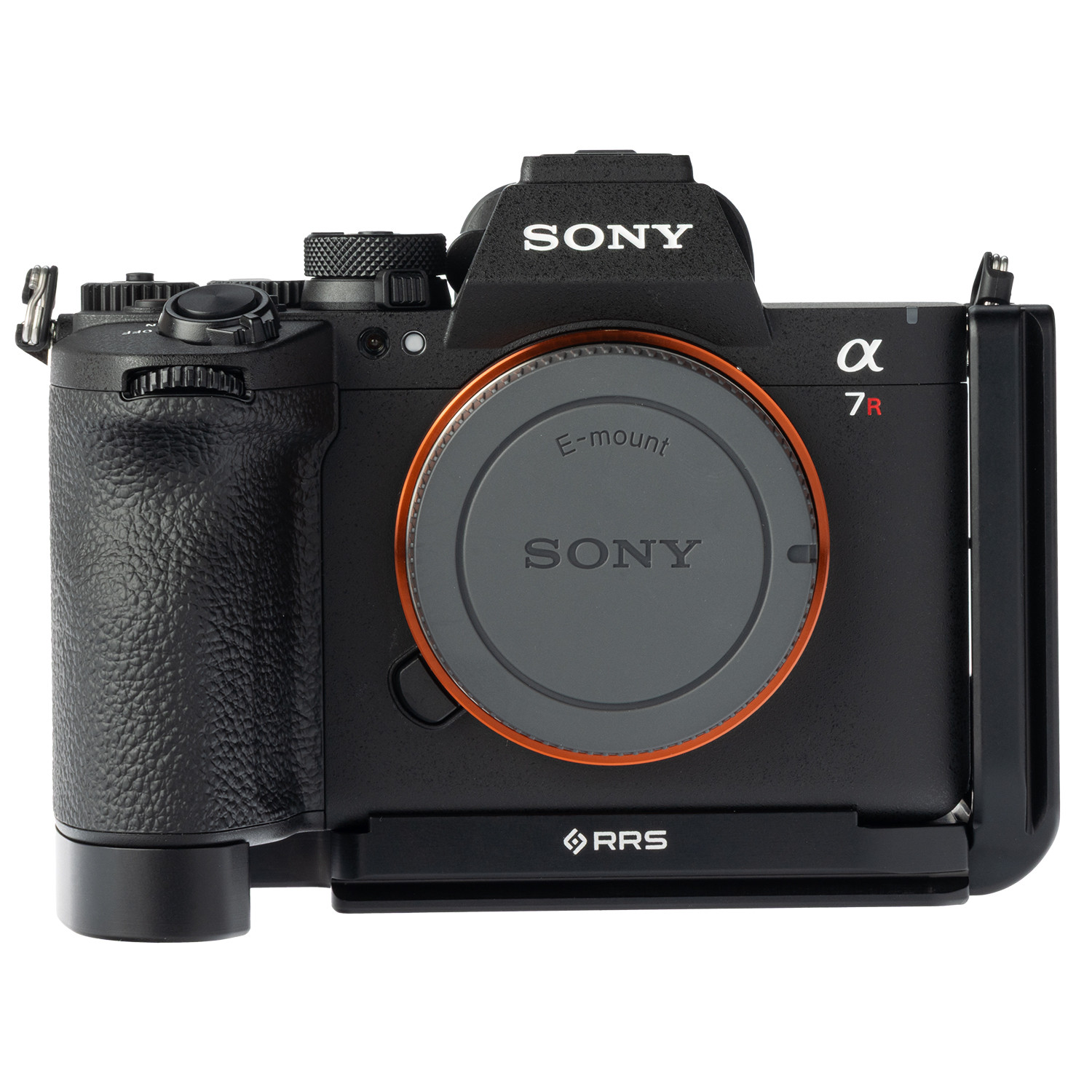
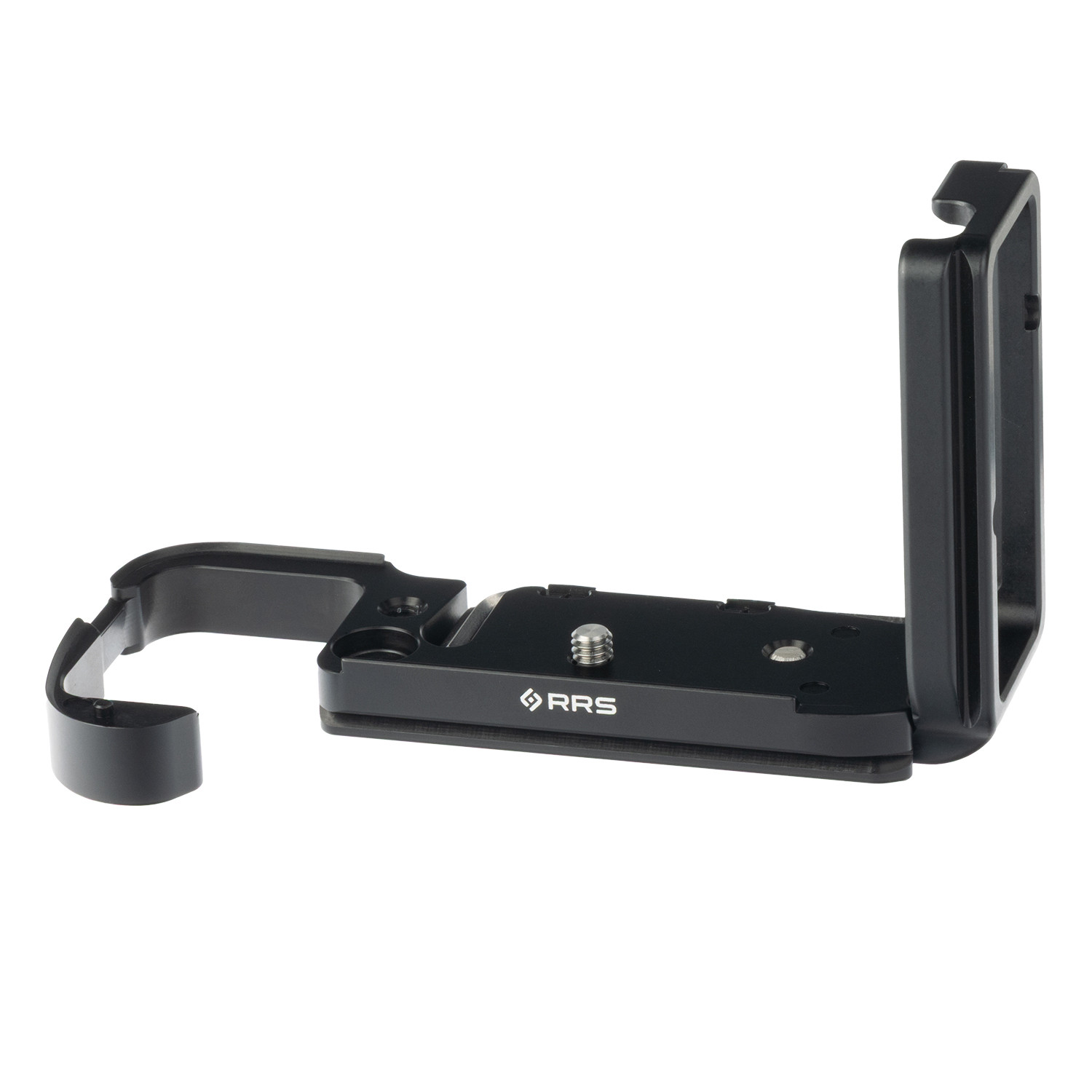
RRS has their L-bracket for the A7R6 up for preorder for $215. They have made an interesting design choice: the place where your pinky tip would naturally rest has no metal, it’s open. This is their way of enabling battery access, as opposed to the other L-bracket makers like Smallrig and Leophoto who build in a lever to open/close for battery access and those designs maintain a full plate wraparound at bottom of grip for your finger.
Ross Martin wrote:
RRS has their L-bracket for the A7R6 up for preorder for $215. They have made an interesting design choice: the place where your pinky tip would naturally rest has no metal, it’s open. This is their way of enabling battery access, as opposed to the other L-bracket makers like Smallrig and Leophoto who build in a lever to open/close for battery access and those designs maintain a full plate wraparound at bottom of grip for your finger.
Well, now that the RRS L-bracket is available, I’m going to have to get serious about figuring out my lens situation and moving ahead with a purchase. (Ross, I will likely PM you with some basic lens questions, since I suspect that some of your photography has similar requirements to mine. If you’d prefer, I can make the message that I’ll send into a FM board post for wider sharing.)
That’s an interesting approach to the question of how to deal with batter access.
My old 5DsR RRS L-bracket uses the “solid” (for lack of a better simple description) design for the plate — the bracket extends almost all the way across the camera bottom, but stops short of the battery compartment door. Because the overall L-bracket is fairly large on this camera, I don’t really think about it stopping before the shutter-button-end of the camera. (It is a solid design that is practical and has worked for over a decade without a hiccup.) Also important: there’s plenty of space between the “L” and the side of the camera to plug in the Canon remote release cable with its 90 degree angle plug.
I ended up with a Kirk L-bracket for my Fujifim XT5. I went with Kirk for this because I had an unfortunate experience with an early RRS bracket for another Fujifilm camera, the XPro-2. I “discovered” in the field (with the field unfortunately being day 2 of a multi day backpacking trip) that RRS had not left enough space between the “L” section and the camera body for Fujifilm’s own remote release connection. (I was not, literally, a “happy camper” on that trip.) I wasn’t confident in the updated RRS design for the XT5, so I went with the Kirk. It basically is solid, but…
… It also is “short” in order to leave the battery door accessible. The problem is that the body is smaller than the 5DsR, so the bottom plate is shorter and covers a smaller percentage of the camera’s bottom plate. I’m also less than excited about how they resolved the issue with space between the “L” section and the side of the camera where cables connect. It works, but it is a bit cumbersome. The solution is to put a lick nut on the “L” section when it connects to the base plate, stash a hex key to the bottom of the bracket (it is a sort of slick design for that), and have you slide the “L” section in and out as needed, and lock/unlock the plate.
Is that the case with the RRS L-bracket for the A7r6? Do you know if you slide it in and out to plug in a remote release, etc.? It looks like the “L” section fits pretty close to the side of the body in the photos
I’ll also be interested to hear from users about whether (and how) that extension around the battery door affects mounting the camera to the tripod. I’m assung that it doesn’t get in the way at all, but it will be good to know. (It might be an issue if you slide the camera into the bracket from that side — though that might not really be a problem.)
gdanmitchell wrote:
Well, now that the RRS L-bracket is available, I’m going to have to get serious about figuring out my lens situation and moving ahead with a purchase. (Ross, I will likely PM you with some basic lens questions, since I suspect that some of your photography has similar requirements to mine. If you’d prefer, I can make the message that I’ll send into a FM board post for wider sharing.)
That’s an interesting approach to the question of how to deal with batter access.
My old 5DsR RRS L-bracket uses the “solid” (for lack of a better simple description) design for the plate — the bracket extends almost all the way across the camera bottom, but stops short of the battery compartment door. Because the overall L-bracket is fairly large on this camera, I don’t really think about it stopping before the shutter-button-end of the camera. (It is a solid design that is practical and has worked for over a decade without a hiccup.) Also important: there’s plenty of space between the “L” and the side of the camera to plug in the Canon remote release cable with its 90 degree angle plug.
I ended up with a Kirk L-bracket for my Fujifim XT5. I went with Kirk for this because I had an unfortunate experience with an early RRS bracket for another Fujifilm camera, the XPro-2. I “discovered” in the field (with the field unfortunately being day 2 of a multi day backpacking trip) that RRS had not left enough space between the “L” section and the camera body for Fujifilm’s own remote release connection. (I was not, literally, a “happy camper” on that trip.) I wasn’t confident in the updated RRS design for the XT5, so I went with the Kirk. It basically is solid, but…
… It also is “short” in order to leave the battery door accessible. The problem is that the body is smaller than the 5DsR, so the bottom plate is shorter and covers a smaller percentage of the camera’s bottom plate. I’m also less than excited about how they resolved the issue with space between the “L” section and the side of the camera where cables connect. It works, but it is a bit cumbersome. The solution is to put a lick nut on the “L” section when it connects to the base plate, stash a hex key to the bottom of the bracket (it is a sort of slick design for that), and have you slide the “L” section in and out as needed, and lock/unlock the plate.
Is that the case with the RRS L-bracket for the A7r6? Do you know if you slide it in and out to plug in a remote release, etc.? It looks like the “L” section fits pretty close to the side of the body in the photos
I’ll also be interested to hear from users about whether (and how) that extension around the battery door affects mounting the camera to the tripod. I’m assung that it doesn’t get in the way at all, but it will be good to know. (It might be an issue if you slide the camera into the bracket from that side — though that might not really be a problem.)...Show more →
Lenses are easy Dan — the newest 16-35 and 24-70 f2.8 zooms, the 70-200/2.8 or the 50-150/2 depending on your needs, then the new 100-400 and 400-800 and of course the 1.4x. Add the macro if it’s something you do. Simple.