fredmiranda.com
Login

Moderated by: Fred Miranda
  New fredmiranda.com Mobile Site
  New Feature: SMS Notification alert
  New Feature: Buy & Sell Watchlist
  

FM Forums | Post-processing & Printing | Join Upload & Sell

       2       3       4       end
  

Color discrepancies from Lightroom to Flickr, Imgur, Windows Photos, fir...


BigBabyMoses06
Offline
• •
Upload & Sell: On
p.1 #1 · Color discrepancies from Lightroom to Flickr, Imgur, Windows Photos, firefox, and chrome/brave browsers.


Hi friends. Having some color constancy problems. I did upgrade to Win 11 recently, not sure if that's relevant? I've only noticed this after doing so...


1) Main Issue: Light Room Images once exported and opened in windows photos and imgur/flickr all have varying levels of saturation and contrast, compared to LR dev panel. This makes it difficult to post for social media and knowing what are accurate colors. I have ASUS Pro-Art monitors and a Calibrite 123 monitor calibation tool, that's all good to go. The problem is less severe as the crazy color differences between firefox and chome that I found and fixed (shown in second link below), but it's noticeable to me. Am I being too critical?

Here is a clip showing the discrepancy between LR and photos app:


- Windows Photos - Less saturation/contrast than LR.
- Flickr/Imgur using brave/chrome - Less saturation/contrast than LR, but more than windows photos.
- Imgur when using Firefox - Way more sat/cont than LR, by a crazy margin.
- When downloading the imgur and lr photo back to my computer, then viewing them on windows photos, they look 100% identical to each other, and identical to to source image used to upload to those places, but still less sat/cont than photos.

This is important: I compared a set of photos that I took and edited PRIOR to upgrading to windows 11, and I can see no difference between Lightroom, windows photos, flickr, and instagram on brave/chrome browser.


2) Another issue I found and have since fixed: During my research into this problem, I discovered that Firefox has crazy color inconsistencies, and is often very over saturated. The difference between imgur on firefox compared to brave/chrome is insane.

Check out this quick clip see what I'm talking about:


The Fix: You have to change the color management mode and change the number to 1. To do so follow these instructions:
"To change color management in Firefox, type about:config in the address bar, search for gfx.color_management.mode, and change the value to 1"


Appreciate any input anyone has.

-Confused


Mar 18, 2026 at 05:50 PM
GoodEgg
Online
• • • •
Upload & Sell: Off
p.1 #2 · Color discrepancies from Lightroom to Flickr, Imgur, Windows Photos, firefox, and chrome/brave browsers.


Dear Confused -- How are you exporting from Lightroom? Image Format and especially, Color Space?


Mar 18, 2026 at 06:29 PM
BigBabyMoses06
Offline
• •
Upload & Sell: On
p.1 #3 · Color discrepancies from Lightroom to Flickr, Imgur, Windows Photos, firefox, and chrome/brave browsers.


GoodEgg wrote:
Dear Confused -- How are you exporting from Lightroom? Image Format and especially, Color Space?


Excellent question, I should have included that info. Export as 100% quality jpeg in sRGB, as I have always done.


Mar 18, 2026 at 06:33 PM
ruthenium
Online
• • • •
Upload & Sell: On
p.1 #4 · Color discrepancies from Lightroom to Flickr, Imgur, Windows Photos, firefox, and chrome/brave browsers.


BigBabyMoses06 wrote:
Excellent question, I should have included that info. Export as 100% quality jpeg in sRGB, as I have always done.


Try exporing with embedded AdobeRGB or Display P3 instead of sRGB.


Mar 18, 2026 at 07:55 PM
GoodEgg
Online
• • • •
Upload & Sell: Off
p.1 #5 · Color discrepancies from Lightroom to Flickr, Imgur, Windows Photos, firefox, and chrome/brave browsers.


ruthenium is onto something. I searched for "color space and websites." Oodles and oodles out there on the web.

and found this overview: https://www.esveo.com/en/blog/color-spaces-in-the-web/


Mar 18, 2026 at 09:34 PM
jeffbuzz
Offline
• • • •
Upload & Sell: On
p.1 #6 · Color discrepancies from Lightroom to Flickr, Imgur, Windows Photos, firefox, and chrome/brave browsers.


Are the uploaded images being further compressed by the hosting services? If you upload a new image and then download it back from the host, is the file size smaller? Hash changed. Extreme compression at the host can degrade colors.

Very few viewing devices are going to support any colorspace larger than sRGB. It doesn't make sense to use anything else for web viewing.


Mar 18, 2026 at 10:38 PM
gdanmitchell
Online
• • • • • • •
Upload & Sell: Off
p.1 #7 · Color discrepancies from Lightroom to Flickr, Imgur, Windows Photos, firefox, and chrome/brave browsers.


Use sRGB color space.


Mar 18, 2026 at 10:59 PM
John Wheeler
Offline
• • •
Upload & Sell: Off
p.1 #8 · Color discrepancies from Lightroom to Flickr, Imgur, Windows Photos, firefox, and chrome/brave browsers.


BigBabyMoses06 wrote:
Hi friends. Having some color constancy problems. I did upgrade to Win 11 recently, not sure if that's relevant? I've only noticed this after doing so...

1) Main Issue: Light Room Images once exported and opened in windows photos and imgur/flickr all have varying levels of saturation and contrast, compared to LR dev panel. This makes it difficult to post for social media and knowing what are accurate colors. I have ASUS Pro-Art monitors and a Calibrite 123 monitor calibation tool, that's all good to go. The problem is less severe as the crazy color differences between firefox and chome
...Show more

Let me frame this using a couple of basic color-management ideas that help explain all the behaviors you’re seeing.

Think of a color space like a temperature scale.
Different scales (sRGB, Adobe RGB, ProPhoto) describe the same colors, but they use different numbers to represent them.

Also, some “scales” are wider than others:

Lightroom uses a very wide gamut working space (similar to ProPhoto)

sRGB is a much smaller gamut

Because wide gamut spaces have to cover more colors using the same 0–255 numbers, they effectively assign smaller numeric values to represent the same visual color compared to sRGB.

What’s happening in your case

Inside Lightroom

You’re viewing in a wide gamut space

On a wide gamut monitor, this allows you to see maximum saturation and color range

This is essentially your “full fidelity” view

Exporting to sRGB

When you convert to sRGB, you are compressing that wider gamut into a smaller one

The most saturated colors simply cannot fit and are reduced

So the image will naturally look less saturated than Lightroom

If the viewing app is color managed (best case)

The app correctly interprets sRGB

It converts from sRGB → your monitor profile

Result: accurate color, but less saturated than Lightroom (because of the sRGB limitation)

If the viewing app is NOT color managed (common issue)

The app just sends the RGB numbers directly to the display

Your wide gamut monitor expects different (smaller) numbers for those colors

So the same sRGB numbers get interpreted as more saturated than intended

This is why sites/apps like Imgur often look overcooked on wide gamut displays

Why older images seem more consistent

If your earlier images were already created/exported in sRGB, then:

The “extra” wide-gamut colors were already gone

Color-managed apps will all show them consistently (just at sRGB saturation levels)

Non-managed apps may still oversaturate slightly, but the effect is often less noticeable

Bottom line

What you’re seeing is the combination of:

Lightroom using a wide gamut space

Exporting to sRGB (smaller gamut)

Whether the viewing app uses color management or not

Those three factors together explain nearly all the differences you’re observing.

Hope this information is helpful
John Wheeler


Mar 19, 2026 at 02:16 PM
BigBabyMoses06
Offline
• •
Upload & Sell: On
p.1 #9 · Color discrepancies from Lightroom to Flickr, Imgur, Windows Photos, firefox, and chrome/brave browsers.


Thank you John, and everyone. Extremely helpful.

I did try today exporting in other modes and saw some differences, but decided to stick with sRGB, and will just monitor the exports and work the differences into my work flow. They are pretty minor after all, and considering there is no one authority on color and screens, I will drive myself (even more) crazy trying to get everything "perfect" and matching lol. It's just not possible.

Thanks folks!

John Wheeler wrote:
Let me frame this using a couple of basic color-management ideas that help explain all the behaviors you’re seeing.

Think of a color space like a temperature scale.
Different scales (sRGB, Adobe RGB, ProPhoto) describe the same colors, but they use different numbers to represent them.

Also, some “scales” are wider than others:

Lightroom uses a very wide gamut working space (similar to ProPhoto)

sRGB is a much smaller gamut

Because wide gamut spaces have to cover more colors using the same 0–255 numbers, they effectively assign smaller numeric values to represent the same visual color compared to sRGB.

What’s happening in your case

Inside Lightroom

You’re viewing
...Show more


Mar 19, 2026 at 03:45 PM
Alan Olander
Offline
• •
Upload & Sell: Off
p.1 #10 · Color discrepancies from Lightroom to Flickr, Imgur, Windows Photos, firefox, and chrome/brave browsers.


Perfect is the enemy of good.


Mar 19, 2026 at 04:28 PM


Search in Used Dept. 

John Wheeler
Offline
• • •
Upload & Sell: Off
p.1 #11 · Color discrepancies from Lightroom to Flickr, Imgur, Windows Photos, firefox, and chrome/brave browsers.


You're welcome @BigBabyMoses06
To make LR match what you see when you convert to sRGB, just use the Soft Proof function in LR to preview the image in sRGB
John Wheeler

BigBabyMoses06 wrote:
Thank you John, and everyone. Extremely helpful.

I did try today exporting in other modes and saw some differences, but decided to stick with sRGB, and will just monitor the exports and work the differences into my work flow. They are pretty minor after all, and considering there is no one authority on color and screens, I will drive myself (even more) crazy trying to get everything "perfect" and matching lol. It's just not possible.

Thanks folks!


Mar 19, 2026 at 06:10 PM
Camperjim
Offline
• • • • •
Upload & Sell: On
p.1 #12 · Color discrepancies from Lightroom to Flickr, Imgur, Windows Photos, firefox, and chrome/brave browsers.


Yes, always upload to the internet using jpeg format. That still does not mean that someone viewing your work will see what is on your monitor.

First, except for photography enthusiasts, hardly anyone will have a properly calibrated monitor. What they see will often be way too bright and with a blue tint.

Unfortunately that is only part of the problem. Many different browsers will give different results, often pretty good, but noticeably different. The differences are not just in the colors, but also sharpness and constrast.

I have even seen differences on my own computer just using the Microsoft Photo viewer. The standard viewer looks good, but when I switch to the slideshow format, I see substantial changes. There is often some minor, but annoying cropping and the images are clearly more vivid with more saturated colors, more contrast, and possibily even some additional sharpening.

I gave up long ago being concerned about exacting post processing for the internet. I save that for my prints.


Mar 19, 2026 at 06:20 PM
gdanmitchell
Online
• • • • • • •
Upload & Sell: Off
p.1 #13 · Color discrepancies from Lightroom to Flickr, Imgur, Windows Photos, firefox, and chrome/brave browsers.


Camperjim wrote:
Yes, always upload to the internet using jpeg format. That still does not mean that someone viewing your work will see what is on your monitor. .


If you profile your monitor, when you convert to sRGB (likely as a jpg) the jpg image should look pretty much as it will in web browsers on other monitors that are calibrated. Of course, you cannot guarantee that your viewers are using calibrated monitors, so things may well be different from what you.

There’s no perfect solution to this, but the most compatible, predictable thing to do is export using the sRGB color space and check it in your brower(s).


Mar 19, 2026 at 09:17 PM
ruthenium
Online
• • • •
Upload & Sell: On
p.1 #14 · Color discrepancies from Lightroom to Flickr, Imgur, Windows Photos, firefox, and chrome/brave browsers.


If you have a reasonably wide-gamut display that covers all or most of Display P3 color space, then it would make sense to use this color space rather than sRGB that is smaller than Display P3. The latter is wider in the deep warm colors, such as in your examples, e.g. deep red. Out of the smaller sRGB gamut colors will lack texture and detail - the corresponding areas of your images are going to look flat.
Most modern displays support Display P3, or at least cover most of this color space.
To the best of my experience, all major moder browsers shall correctly display jpegs with the embedded Display P3 profile.


Mar 19, 2026 at 09:53 PM
Camperjim
Offline
• • • • •
Upload & Sell: On
p.1 #15 · Color discrepancies from Lightroom to Flickr, Imgur, Windows Photos, firefox, and chrome/brave browsers.


gdanmitchell wrote:
If you profile your monitor, when you convert to sRGB (likely as a jpg) the jpg image should look pretty much as it will in web browsers on other monitors that are calibrated. .


That is not my experience. As I stated above I see noticeable differences even on my computer using different browsers and image viewers. Some seem to pump up the image saturation and constrast and perhaps sharpening as well. Of course to some extend they are "pretty much" the same.


Mar 19, 2026 at 09:59 PM
Camperjim
Offline
• • • • •
Upload & Sell: On
p.1 #16 · Color discrepancies from Lightroom to Flickr, Imgur, Windows Photos, firefox, and chrome/brave browsers.


ruthenium wrote:
If you have a reasonably wide-gamut display that covers all or most of Display P3 color space, then it would make sense to use this color space rather than sRGB that is smaller than Display P3. The latter is wider in the deep warm colors, such as in your examples, e.g. deep red. Out of the smaller sRGB gamut colors will lack texture and detail - the corresponding areas of your images are going to look flat.
Most modern displays support Display P3, or at least cover most of this color space.
To the best of my experience, all major moder
...Show more

Yes that is my experience. If you upload images with a larger gamut and colors in that image are outside of sRGB, then the image will look flat, a bit washed out. The major issue is not the monitor gamut for the viewer's monitor, but the standard use of sRGB for the internet browsers. I have even seen that when I accidentally uploaded an Adobe RGB image and then viewed it on my own computer.


Mar 19, 2026 at 10:06 PM
BigBabyMoses06
Offline
• •
Upload & Sell: On
p.1 #17 · Color discrepancies from Lightroom to Flickr, Imgur, Windows Photos, firefox, and chrome/brave browsers.


ruthenium wrote:
If you have a reasonably wide-gamut display that covers all or most of Display P3 color space, then it would make sense to use this color space rather than sRGB that is smaller than Display P3. The latter is wider in the deep warm colors, such as in your examples, e.g. deep red. Out of the smaller sRGB gamut colors will lack texture and detail - the corresponding areas of your images are going to look flat.
Most modern displays support Display P3, or at least cover most of this color space.
To the best of my experience, all major moder
...Show more

I just tried Display P3 and it makes a significant difference when viewing on my computer. The difference is less severe after throwing them on imgur but still very noticeable.

I think we solved my problem. The Display P3 exports look almost, if not exactly, identical the the lightroom develop panel.

Now I just need to test on socials and other platform but per my research, Instagram has supported Display P3 since 2017.


Some examples. May have to copy and paste the link if you want to open them full size to really see the difference. The yellow S2000 is quite noticeable. The difference gets less severe the mo

https://imgur.com/a/fBd9zOH

Display P3


sRGB


Mar 19, 2026 at 10:45 PM
ruthenium
Online
• • • •
Upload & Sell: On
p.1 #18 · Color discrepancies from Lightroom to Flickr, Imgur, Windows Photos, firefox, and chrome/brave browsers.


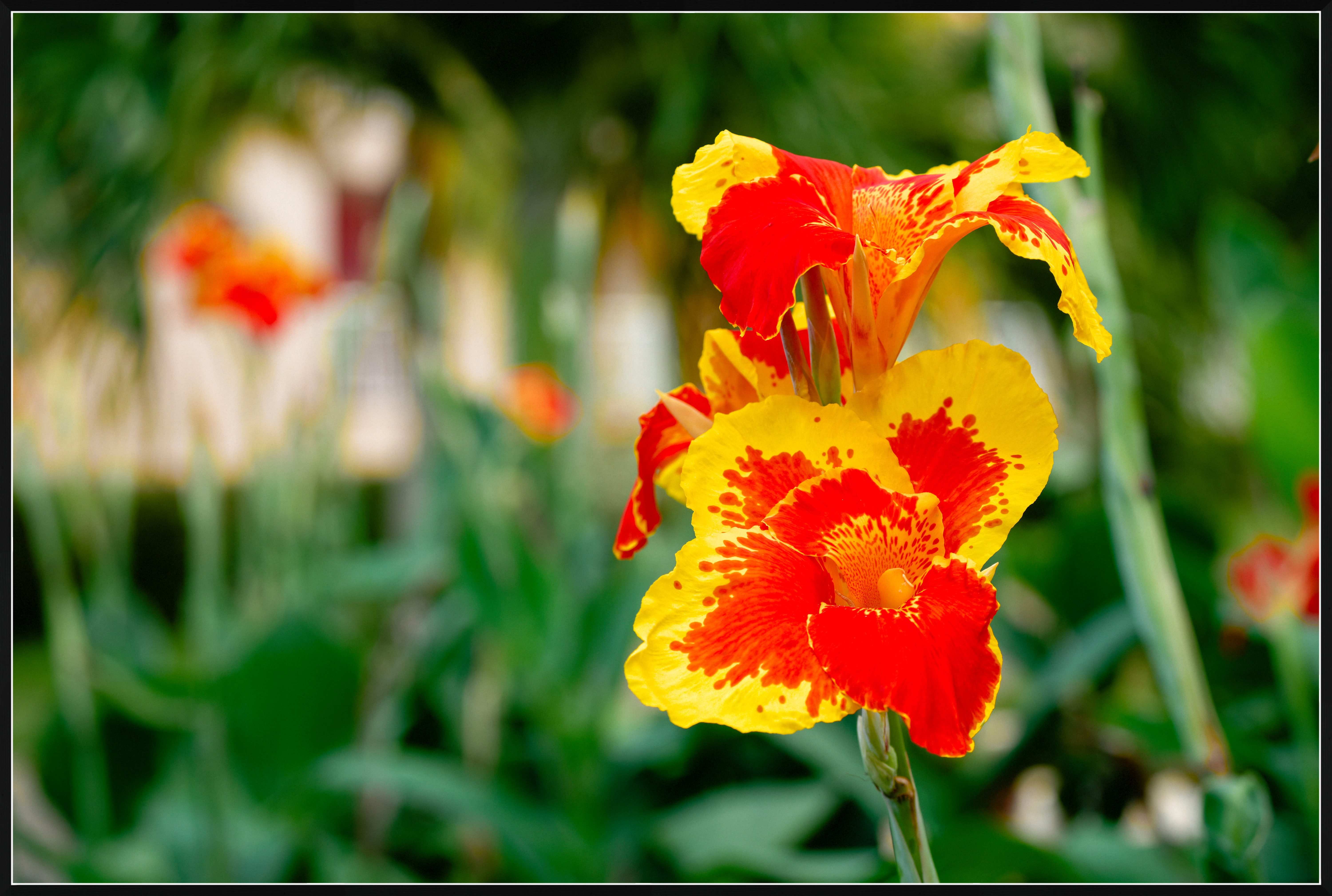
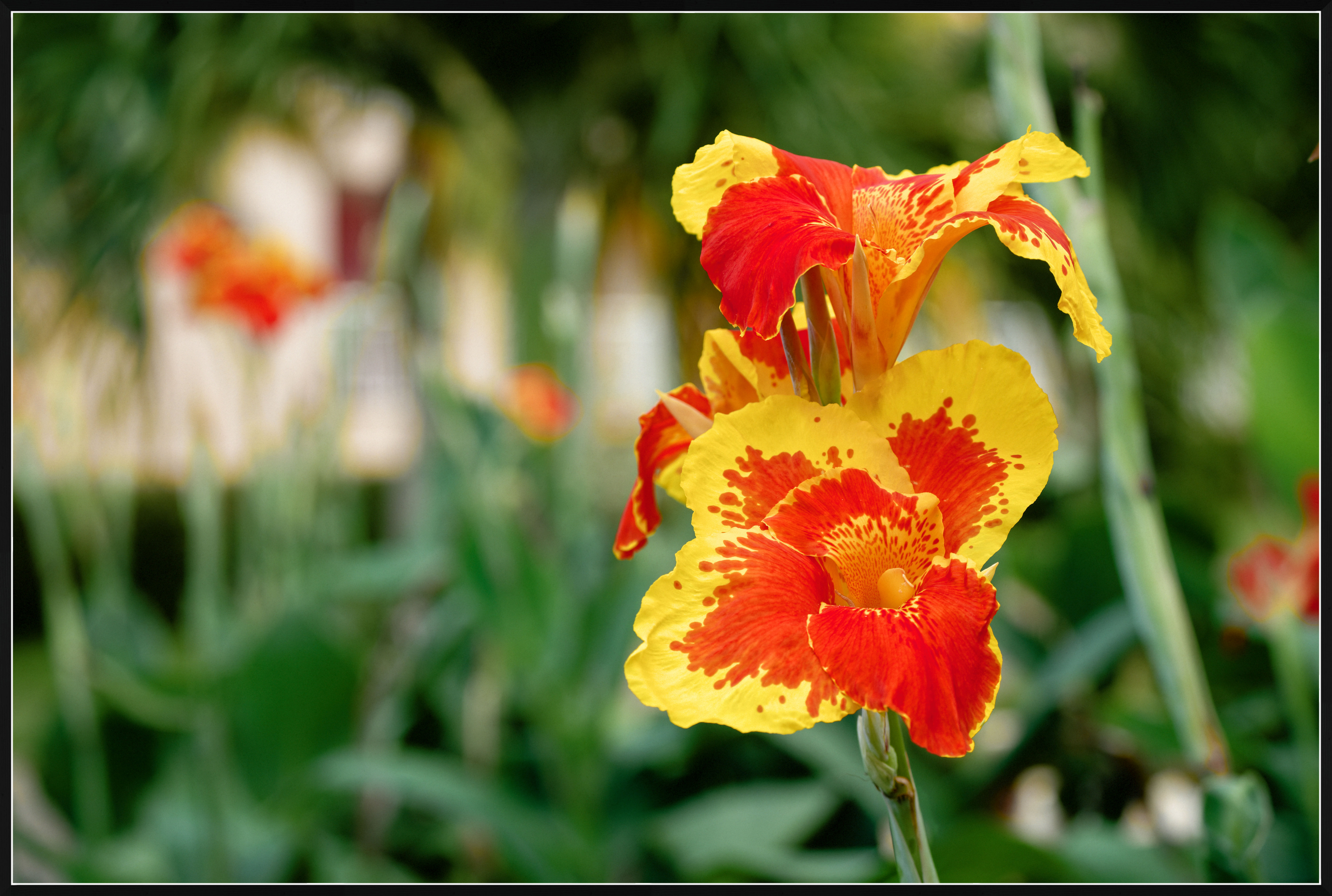
Here is an example of differences between the two color profiles:
The top image was exported as sRGB and the next was exported with Display P3 color profile.

I suggest downloading these jpegs for viewing on your computer, in addition to viewing in a browser.

If you don't see an obvious difference (by looking at the flower) between the two, then either your display isn't set to display its full native gamut (or has a small native gamut), or the viewer app doesn't render the jpegs correctly. Somewhat counterintuitively, in some apps, the latter problem can possibly be helped by disabling (unchecking) "Enable Color Managment..." in the settings in apps like FastStone image viewer or InfranView.


  ILCE-1    E 50-400mm F4.5-6.3 A067 lens    85mm    f/5.6    1/250s    500 ISO    0.0 EV  


  ILCE-1    E 50-400mm F4.5-6.3 A067 lens    85mm    f/5.6    1/250s    500 ISO    0.0 EV  


Mar 20, 2026 at 09:07 AM
gdanmitchell
Online
• • • • • • •
Upload & Sell: Off
p.1 #19 · Color discrepancies from Lightroom to Flickr, Imgur, Windows Photos, firefox, and chrome/brave browsers.


If you download images using different color spaces to your computer and view them in a photography app that recognizes the different color spaces you may well see differences.

However, if your goal is (relatively) consistent appearance for those viewing in web browsers, what happens is less predictable. sRGB is the standard used/recognized by all web browsers, so images uploaded in that format will be the most consistent across platforms and various browser apps.

Browsers vary in their ability to recognize and accurately display images using other color spaces. It has been a while since I’ve done the experiments, but when I did I found that some browsers would do fine with multiple color spaces while others offered up very different renderings, presumably because they were not designed to recognize the different color spaces.

In the end, if you goal is consistent appearance for your images displayed in web browsers, then sRRB is currently your default choice.

(If you are working on images on your computer during the post-processing phase, other color spaces make more sense. But when it comes time to take the finished image and produce a web-ready version, you’ll want to use sRGB.)


Mar 20, 2026 at 09:24 AM
Camperjim
Offline
• • • • •
Upload & Sell: On
p.1 #20 · Color discrepancies from Lightroom to Flickr, Imgur, Windows Photos, firefox, and chrome/brave browsers.


It has also been a year or two since I did any such studies so browsers may be improved in this regard. The other issue is the amount of colors outside of sRGB.

For both pairs of images above, the race cars and the flower, I see no differences between the pairs.


Mar 20, 2026 at 10:36 AM
       2       3       4       end


FM Forums | Post-processing & Printing | Join Upload & Sell

       2       3       4       end


Welcome back
Log in to your account