fredmiranda.com
Login

Moderated by: Fred Miranda
  New fredmiranda.com Mobile Site
  New Feature: SMS Notification alert
  New Feature: Buy & Sell Watchlist
  

FM Forums | Post-processing & Printing | Join Upload & Sell

1       2              4       end
  

Color discrepancies from Lightroom to Flickr, Imgur, Windows Photos, fir...


John Wheeler
Offline
• • •
Upload & Sell: Off
p.3 #1 · Color discrepancies from Lightroom to Flickr, Imgur, Windows Photos, firefox, and chrome/brave browsers.


ruthenium wrote:
This can be irrelevant, yet I wonder if "Download" can be different from "Save as"?
I used "Save as" in Safari to save the file from FM on my MBP.
I have both a Mac and a Windows laptop. I shall look into any differences between the two in how they handle downloads from FM. I can also look at the metadata with exiftool.
I believe the right way to get the information is either with
exiftool -ColorSpace -ICC_Profile:ProfileDescription image.jpg
or
exiftool -icc_profile:all file.jpg

Correct me if I am wrong.


I think that will do it. One needs to check for the ICC profile yet also there is a separate tag with just the color space name (amny apps ignore that one)

exiftool -s
-ColorSpace
-ProfileDescription
yourimage.jpg

Sometimes I just dump all the metadata and search through it.

John Wheeler


Mar 23, 2026 at 02:32 PM
ruthenium
Online
• • • •
Upload & Sell: On
p.3 #2 · Color discrepancies from Lightroom to Flickr, Imgur, Windows Photos, firefox, and chrome/brave browsers.


dclark wrote:
These image files were Exported from LrC and had embedded color profiles.
When I examine these files as presented to the browser on this web site, they all have embedded profiles, including the sRGB file.


Dave, I value the input from you, and I understand your concerns.
The question on whether sRGB jpegs from C1 and/or PL9 have the color profile/space embedded is best addressed by examining the files exported directly from these converters (rather than by downloading from FM in a browser).
I uploaded the four files in a shared Dropbox folder:

https://www.dropbox.com/scl/fo/9erpap9gitc7vble3tg2c/ANcogE7miWYiPaQzVVPUyo4?rlkey=sgd2xdv9xw5m6zmwqgubolmpn&st=ntcaccex&dl=0

I have no access to Photoshop (I cancelled my subscription last December). You (and John) are welcome to download the jpegs from Dropbox and examine these in PS.

What I could do was to read the EXIF of the sRGB jpegs with exiftool.
The following is what I see in the EXIF when looking for all tags that contain either "Profile" or "Color".
It is apparent that Capture One and DxO Photolab 9 write different information in EXIF.
However, I see "Color Space : sRGB" in both jpegs. Does this indicate that the profile is embedded?

% exiftool "-*Profile*" "-*Color*" _DSF3919_C1_sRGB.jpg
Profile CMM Type : Linotronic
Profile Version : 2.1.0
Profile Class : Display Device Profile
Profile Connection Space : XYZ
Profile Date Time : 1998:02:09 06:49:00
Profile File Signature : acsp
Profile Creator : Hewlett-Packard
Profile ID : 0
Profile Copyright : Copyright (c) 1998 Hewlett-Packard Company
Profile Description : sRGB IEC61966-2.1
Color Space Data : RGB
Color Components : 3

% exiftool "-*Profile*" "-*Color*" _DSF3919_DxO_sRGB.jpg
Color Chrome Effect : Off
Color Chrome FX Blue : Off
Color Space : sRGB
Color Components : 3


Mar 23, 2026 at 04:47 PM
ruthenium
Online
• • • •
Upload & Sell: On
p.3 #3 · Color discrepancies from Lightroom to Flickr, Imgur, Windows Photos, firefox, and chrome/brave browsers.


John Wheeler wrote:
I think that will do it. One needs to check for the ICC profile yet also there is a separate tag with just the color space name (amny apps ignore that one)

exiftool -s
-ColorSpace
-ProfileDescription
yourimage.jpg

Sometimes I just dump all the metadata and search through it.

John Wheeler


John, I examined my sRGB jpegs posted earlier in this thread (the roses), when downloaded from FM.

When downloaded from FM on my Mac in Safari, the jpegs have the EXIF intact - I can post a copy from exiftool, but it is very long, and this is probably unnecessary. Thus, jpegs on FM retain EXIF.

On the other hand, the very same jpegs downloaded from Windows browsers: Edge, Opera, and Chrome - all come with the same very short EXIF, e.g.
exiftool 3034816_Opera.jpg
ExifTool Version Number : 13.50
File Name : 3034816_Opera.jpg
Directory : .
File Size : 3.5 MB
File Modification Date/Time : 2026:03:23 13:16:34-04:00
File Access Date/Time : 2026:03:23 13:16:36-04:00
File Inode Change Date/Time : 2026:03:23 13:16:34-04:00
File Permissions : -rwx------
File Type : JPEG
File Type Extension : jpg
MIME Type : image/jpeg
Exif Byte Order : Little-endian (Intel, II)
Copyright :
Image Width : 6677
Image Height : 3877
Encoding Process : Progressive DCT, Huffman coding
Bits Per Sample : 8
Color Components : 3
Y Cb Cr Sub Sampling : YCbCr4:4:4 (1 1)
Image Size : 6677x3877
Megapixels : 25.9

Thus, almost entire EXIF is removed by Edge, Opera, and Chrome in Windows.
I checked whether Opera does the same on my Mac, and I confirm that it acts in Mac as in Windows:

% exiftool 3034816_Mac_Opera.jpg
ExifTool Version Number : 13.50
File Name : 3034816_Mac_Opera.jpg
Directory : .
File Size : 3.5 MB
File Modification Date/Time : 2026:03:23 18:38:02-04:00
File Access Date/Time : 2026:03:23 18:38:02-04:00
File Inode Change Date/Time : 2026:03:23 18:38:02-04:00
File Permissions : -rwx------
File Type : JPEG
File Type Extension : jpg
MIME Type : image/jpeg
Exif Byte Order : Little-endian (Intel, II)
Copyright :
Image Width : 6677
Image Height : 3877
Encoding Process : Progressive DCT, Huffman coding
Bits Per Sample : 8
Color Components : 3
Y Cb Cr Sub Sampling : YCbCr4:4:4 (1 1)
Image Size : 6677x3877
Megapixels : 25.9


Mar 23, 2026 at 05:42 PM
dclark
Offline
• • • • •
Upload & Sell: On
p.3 #4 · Color discrepancies from Lightroom to Flickr, Imgur, Windows Photos, firefox, and chrome/brave browsers.


ruthenium wrote:
...The question on whether sRGB jpegs from C1 and/or PL9 have the color profile/space embedded is best addressed by examining the files exported directly from these converters (rather than by downloading from FM in a browser).....


Try:
exiftool filename.jpg -i profile
or
exiftool -icc_profile:* filename.jpg


Mar 23, 2026 at 06:12 PM
BigBabyMoses06
Online
• •
Upload & Sell: On
p.3 #5 · Color discrepancies from Lightroom to Flickr, Imgur, Windows Photos, firefox, and chrome/brave browsers.


Here's another Imgur upload that is basically backwards or something. Not sure what happened today but Display P3 images are not being displayed properly anymore. https://imgur.com/a/sPd4Mdu


sRGB


Display P3


Here is a drive folder with some of the photos in question. Interestingly, Google Drive displays the colors PERFECTLY for me in all browsers, basically confirming something is quite messed up with imgur for me Weird. I guess that's mostly good news?
https://drive.google.com/drive/folders/18IWSJ9V5S2yg7FUOMrGvAohNyxwd_0yr?usp=sharing


Btw, my Pixel 10 Pro XL displays the exported images the same as my desktop, when I send them to my phone. Display P3 images look incredible. Good to know, that when I send myself images on Signal, to view on my phone, Signal must color manage the photos because they look identical.


Mar 23, 2026 at 07:04 PM
ruthenium
Online
• • • •
Upload & Sell: On
p.3 #6 · Color discrepancies from Lightroom to Flickr, Imgur, Windows Photos, firefox, and chrome/brave browsers.


dclark wrote:
Try:
exiftool filename.jpg -i profile
or
exiftool -icc_profile:* filename.jpg


Dave, I believe you would like to see all tags in EXIF that have either "profile" or "icc" in the name.
The following is everything I could find in the jpegs exported with sRGB or Display P3 profiles from C1 and DxO PL9.
Note that the EXIF tag Color Space can take two values: sRGB or Uncalibrated. To the best of my knowledge, this tag cannot (or not intended to) specify Display P3, Adobe RGB, etc. "Uncalibrated" means "look for Profile Description".
For example, for Display P3, the output from exiftool is expected to show Color Space: Uncalibrated and Profile Description: Display P3. To add to the confusion, I see that C1 does not write "Color Space" (only Color Space Data) in EXIF at all, whereas DxO PL9 does write "Color Space" in EXIF. Maybe Capture One considers this tag redundant?
See below for the output for all tags that contain "profile" or "icc" or "color" or "space" in the jpegs which names should be descriptive.

% exiftool "-*rofile*" "-*cc*" "-*olor*" "-*pace*" _DSF3919_C1_sRGB.jpg
Profile CMM Type : Linotronic
Profile Version : 2.1.0
Profile Class : Display Device Profile
Profile Connection Space : XYZ
Profile Date Time : 1998:02:09 06:49:00
Profile File Signature : acsp
Profile Creator : Hewlett-Packard
Profile ID : 0
Profile Copyright : Copyright (c) 1998 Hewlett-Packard Company
Profile Description : sRGB IEC61966-2.1
File Access Date/Time : 2026:03:24 10:29:14-04:00
Create Date : 2026:03:22 12:36:10.26
Color Space Data : RGB
Color Components : 3
Color Space Data : RGB
Profile Connection Space : XYZ
Connection Space Illuminant : 0.9642 1 0.82491

% exiftool "-*rofile*" "-*cc*" "-*olor*" "-*pace*" _DSF3919_C1_P3.jpg
Profile CMM Type : Apple Computer Inc.
Profile Version : 4.0.0
Profile Class : Display Device Profile
Profile Connection Space : XYZ
Profile Date Time : 2022:01:01 00:00:00
Profile File Signature : acsp
Profile Creator : Apple Computer Inc.
Profile ID : 0
Profile Description : Display P3
Profile Copyright : Copyright Apple Inc., 2022
File Access Date/Time : 2026:03:24 10:29:14-04:00
Create Date : 2026:03:22 12:36:10.26
Color Space Data : RGB
Color Components : 3
Color Space Data : RGB
Profile Connection Space : XYZ
Connection Space Illuminant : 0.9642 1 0.82491

% exiftool "-*rofile*" "-*cc*" "-*olor*" "-*pace*" _DSF3919_DxO_sRGB.jpg
File Access Date/Time : 2026:03:24 10:29:14-04:00
Create Date : 2026:03:22 12:36:10.26-04:00
Color Chrome Effect : Off
Color Chrome FX Blue : Off
Color Space : sRGB
Color Components : 3
Color Space : sRGB

% exiftool "-*rofile*" "-*cc*" "-*olor*" "-*pace*" _DSF3919_DxO_P3.jpg
Profile CMM Type : Apple Computer Inc.
Profile Version : 4.0.0
Profile Class : Display Device Profile
Profile Connection Space : XYZ
Profile Date Time : 2022:01:01 00:00:00
Profile File Signature : acsp
Profile Creator : Apple Computer Inc.
Profile ID : ecfda38e388547c36db4bd4f7ada182f
Profile Description : Display P3
Profile Copyright : Copyright Apple Inc., 2022
File Access Date/Time : 2026:03:24 10:29:14-04:00
Create Date : 2026:03:22 12:36:10.26-04:00
Color Chrome Effect : Off
Color Chrome FX Blue : Off
Color Space : Uncalibrated
Color Space Data : RGB
Color Components : 3
Color Space : Uncalibrated
Color Space Data : RGB
Profile Connection Space : XYZ
Connection Space Illuminant : 0.9642 1 0.82491


Mar 24, 2026 at 10:04 AM
ruthenium
Online
• • • •
Upload & Sell: On
p.3 #7 · Color discrepancies from Lightroom to Flickr, Imgur, Windows Photos, firefox, and chrome/brave browsers.


BigBabyMoses06 wrote:
Here's another Imgur upload that is basically backwards or something. Not sure what happened today but Display P3 images are not being displayed properly anymore. https://imgur.com/a/sPd4Mdu

sRGB
https://i.imgur.com/NuZD5Hqh.jpg

Display P3
https://i.imgur.com/vWZbg5Hh.jpg

Here is a drive folder with some of the photos in question. Interestingly, Google Drive displays the colors PERFECTLY for me in all browsers, basically confirming something is quite messed up with imgur for me Weird. I guess that's mostly good news?
https://drive.google.com/drive/folders/18IWSJ9V5S2yg7FUOMrGvAohNyxwd_0yr?usp=sharing

Btw, my Pixel 10 Pro XL displays the exported images the same as my desktop, when I send them to my phone. Display P3 images look incredible. Good to know, that when
...Show more

I downloaded the two jpegs from Imgur, as well as from Google Drive.
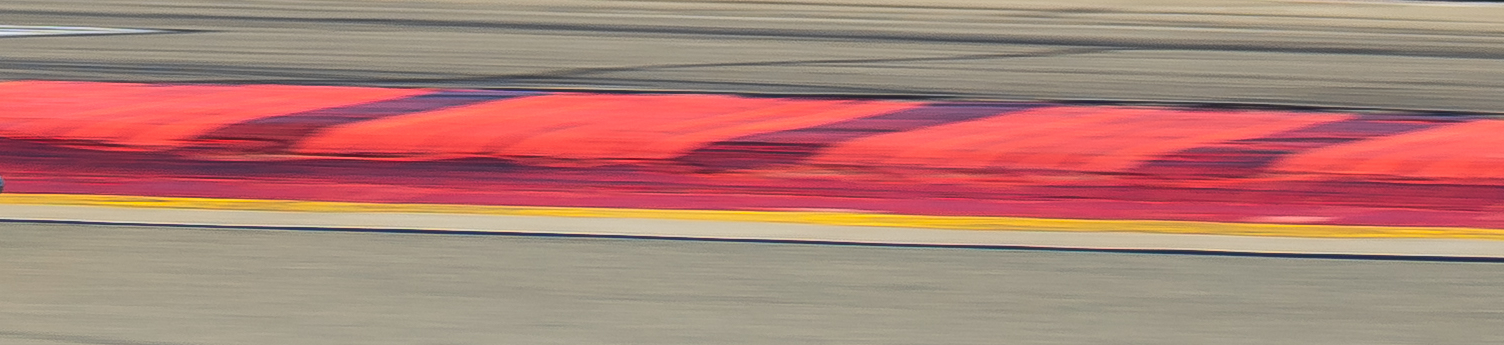
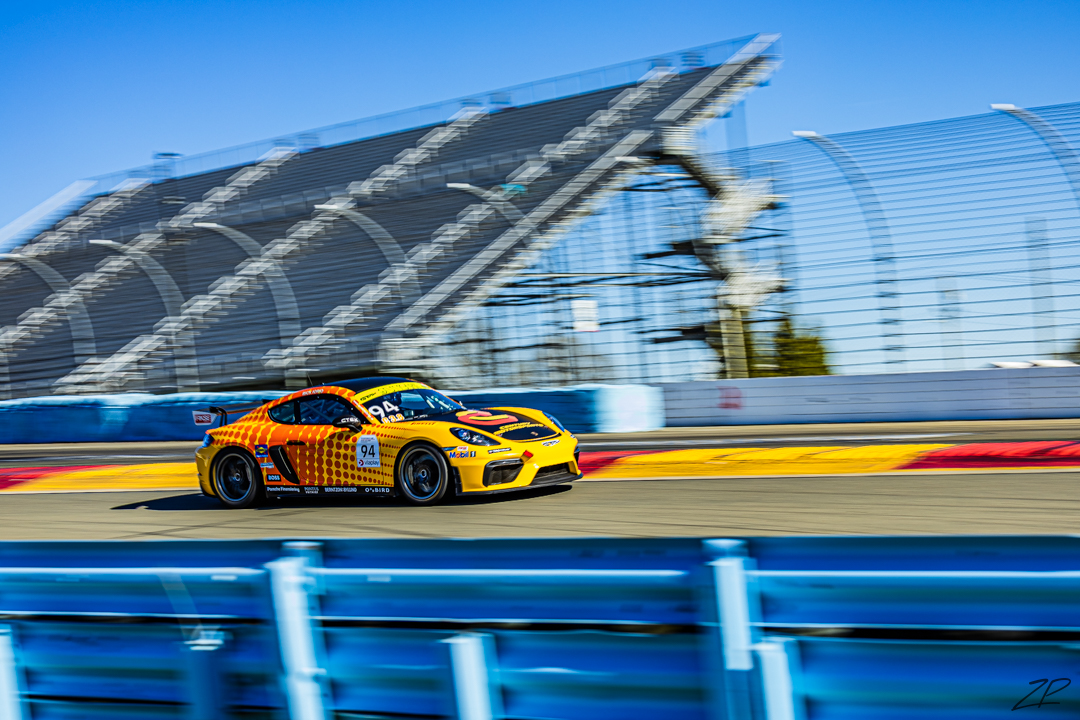
sRGB Porsche.jpg and DP3 Porsche.jpg from Google drive have their EXIF intact and these are displayed correctly on my BenQ monitor. I obtained small crops from these two jpegs and uploaded the crops with this post to illustrate the loss of detail in the red with sRGB, when compared with the crop with Display P3.

Unfortunately, the jpegs that I downloaded in Safari browser from Imgur are missing most image information in their EXIF, as you can see below. The one that originally had the Display P3 profile, now it is missing this information. This is probably the reason why it isn't displayed correctly. Both jpegs from Imgur are smaller than the originals. Have you resized the original jpegs for Imgur? If yes, how the images have been resized? Can you check whether the EXIF might have been stripped as a result of the resizing?

% exiftool vWZbg5H.jpeg
ExifTool Version Number : 13.50
File Name : vWZbg5H.jpeg
Directory : .
File Size : 862 kB
File Modification Date/Time : 2026:03:24 11:10:09-04:00
File Access Date/Time : 2026:03:24 11:10:08-04:00
File Inode Change Date/Time : 2026:03:24 11:10:09-04:00
File Permissions : -rwx------
File Type : JPEG
File Type Extension : jpg
MIME Type : image/jpeg
Image Width : 4200
Image Height : 2800
Encoding Process : Baseline DCT, Huffman coding
Bits Per Sample : 8
Color Components : 3
Y Cb Cr Sub Sampling : YCbCr4:2:0 (2 2)
Image Size : 4200x2800
Megapixels : 11.8

% exiftool NuZD5Hq.jpeg
ExifTool Version Number : 13.50
File Name : NuZD5Hq.jpeg
Directory : .
File Size : 872 kB
File Modification Date/Time : 2026:03:24 11:11:44-04:00
File Access Date/Time : 2026:03:24 11:11:44-04:00
File Inode Change Date/Time : 2026:03:24 11:11:44-04:00
File Permissions : -rwx------
File Type : JPEG
File Type Extension : jpg
MIME Type : image/jpeg
Image Width : 4200
Image Height : 2800
Encoding Process : Baseline DCT, Huffman coding
Bits Per Sample : 8
Color Components : 3
Y Cb Cr Sub Sampling : YCbCr4:2:0 (2 2)
Image Size : 4200x2800
Megapixels : 11.8


Display P3 crop from DP3_Porsche.jpg


sRGB crop from sRGB_Porsche.jpg


Mar 24, 2026 at 10:49 AM
dclark
Offline
• • • • •
Upload & Sell: On
p.3 #8 · Color discrepancies from Lightroom to Flickr, Imgur, Windows Photos, firefox, and chrome/brave browsers.


.

Edited on Mar 24, 2026 at 01:06 PM · View previous versions


Mar 24, 2026 at 11:53 AM
dclark
Offline
• • • • •
Upload & Sell: On
p.3 #9 · Color discrepancies from Lightroom to Flickr, Imgur, Windows Photos, firefox, and chrome/brave browsers.


.

Edited on Mar 24, 2026 at 01:06 PM · View previous versions


Mar 24, 2026 at 12:18 PM
BigBabyMoses06
Online
• •
Upload & Sell: On
p.3 #10 · Color discrepancies from Lightroom to Flickr, Imgur, Windows Photos, firefox, and chrome/brave browsers.


ruthenium wrote:
I downloaded the two jpegs from Imgur, as well as from Google Drive.
sRGB Porsche.jpg and DP3 Porsche.jpg from Google drive have their EXIF intact and these are displayed correctly on my BenQ monitor. I obtained small crops from these two jpegs and uploaded the crops with this post to illustrate the loss of detail in the red with sRGB, when compared with the crop with Display P3.

Unfortunately, the jpegs that I downloaded in Safari browser from Imgur are missing most image information in their EXIF, as you can see below. The one that originally had the Display P3 profile,
...Show more


Good question. I uploaded the full size images, no resizing.

Re imgur, i'm still baffled how my uploads from a few days ago are appearing properly, but all my new uploads are not, and DP3 images are being, muffled, for lack of a better term. sRGB appears accurate. Something must have changed on their end in recent days. I just downloaded my images from imgur, and they appear as I see them in browser, muffled.

I've used imgur for many many years as a quick and easy host that embeds easily into forums. May have to start looking elsewhere, or just stick with sRGB for now.


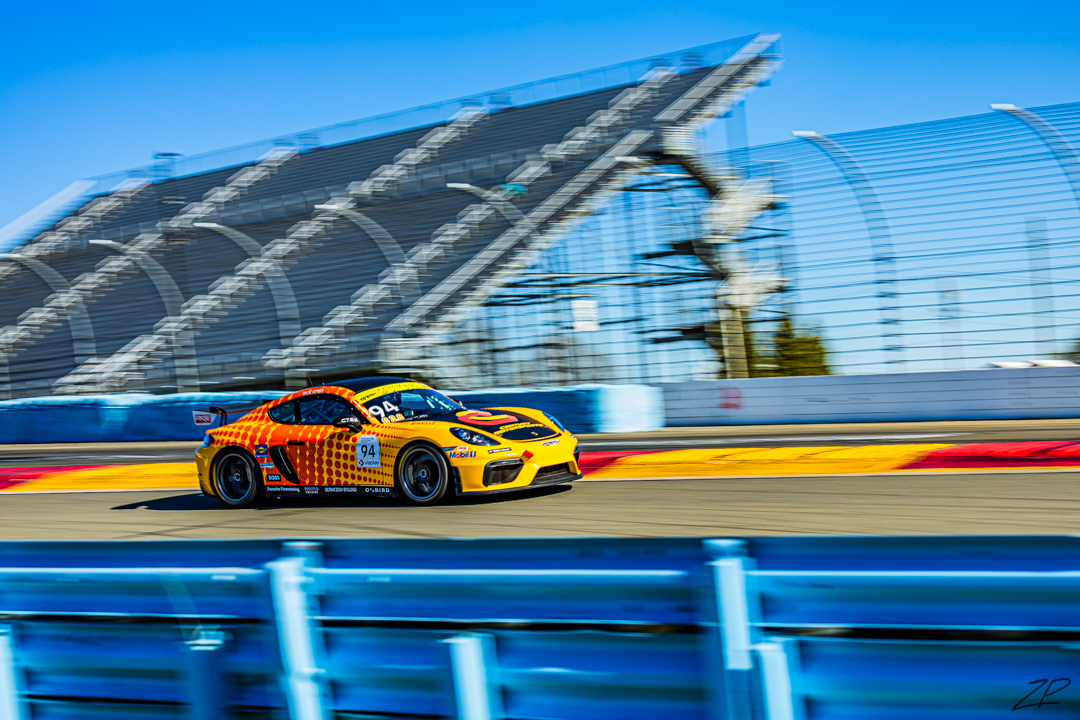
For fun, here is another couple of photos that really show off the difference of sRGB and Display P3.
https://imgur.com/a/WEzZVJa
https://drive.google.com/drive/folders/18IWSJ9V5S2yg7FUOMrGvAohNyxwd_0yr?usp=drive_link


Conversation here made me realize I could add images to my post directly, rather than host an image outside. I completely forgot I could do that lol. They display properly for me here.


DP3 Crazy Colors


sRGB Crazy Colors


Mar 24, 2026 at 12:42 PM


Search in Used Dept. 

ruthenium
Online
• • • •
Upload & Sell: On
p.3 #11 · Color discrepancies from Lightroom to Flickr, Imgur, Windows Photos, firefox, and chrome/brave browsers.


dclark wrote:
.


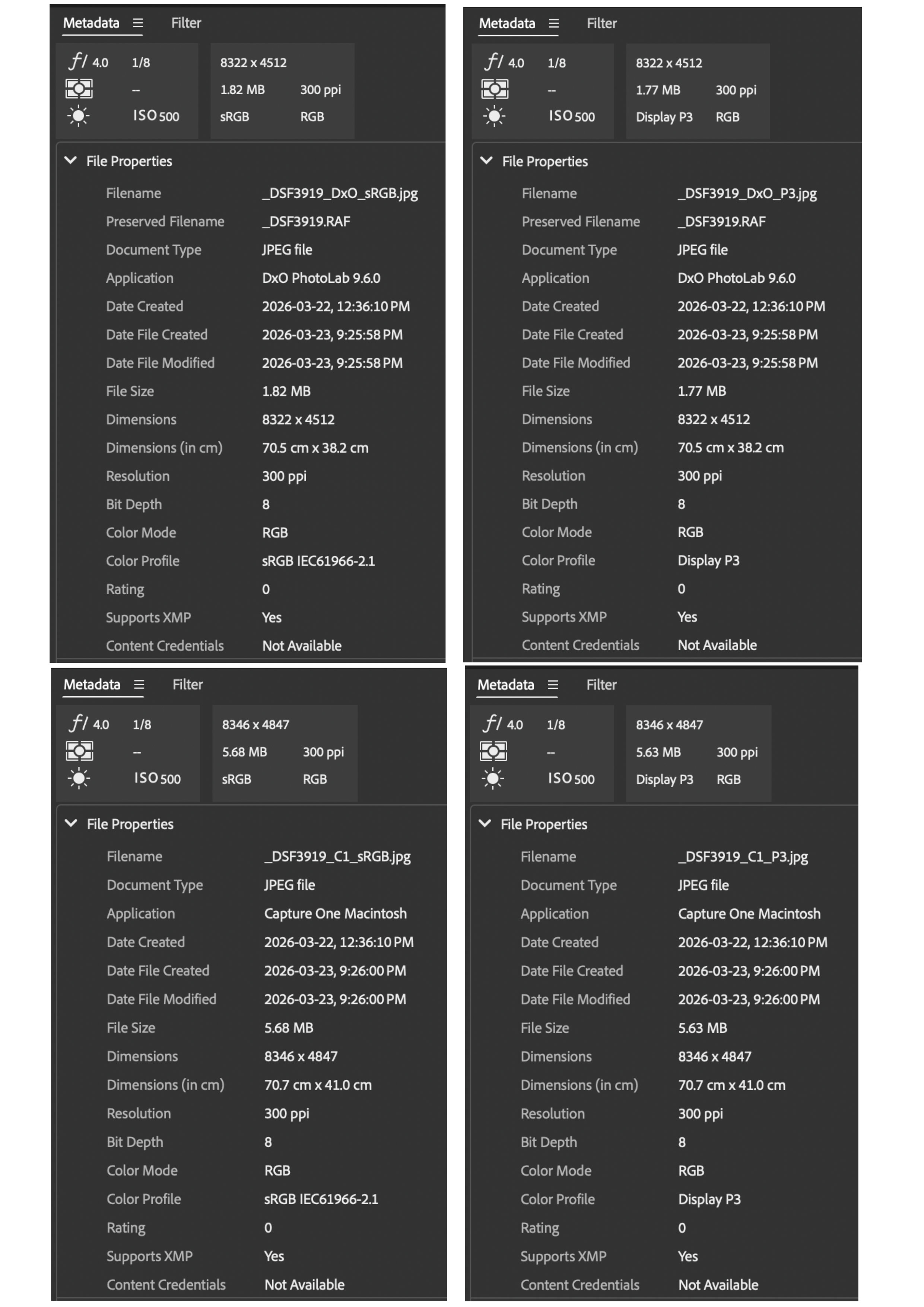
I installed Bridge, as you suggested.
The following upload shows the metadata in four jpegs (their names indicate whether they originate from C1 or PL9, as well as the embedded color profiles).
I hope this is what you asked for, and I hope this should allow you to confirm that the profiles have been embedded.


Mar 24, 2026 at 02:12 PM
ruthenium
Online
• • • •
Upload & Sell: On
p.3 #12 · Color discrepancies from Lightroom to Flickr, Imgur, Windows Photos, firefox, and chrome/brave browsers.


BigBabyMoses06 wrote:
Good question. I uploaded the full size images, no resizing.

Re imgur, i'm still baffled how my uploads from a few days ago are appearing properly, but all my new uploads are not, and DP3 images are being, muffled, for lack of a better term. sRGB appears accurate. Something must have changed on their end in recent days. I just downloaded my images from imgur, and they appear as I see them in browser, muffled.

I've used imgur for many many years as a quick and easy host that embeds easily into forums. May have to start looking elsewhere, or
...Show more

You may want to know what Imgur is doing to your jpegs, and whether there are options available to you to influence the behaviour of Imgur. For example, if Imgur doesn't allow uploading full-sized images, and there is a known upper limit for the disk size or pixel size, then you can try exporting properly resized jpegs from LR (or a different converter, if you don't use LR). Maybe this should solve the problem. If not, I personally wouldn't use Imgur, if the hosted images are silently resized and irreversibly stripped of the critical image information that is needed for their correct display in a browser.


Mar 24, 2026 at 02:25 PM
John Wheeler
Offline
• • •
Upload & Sell: Off
p.3 #13 · Color discrepancies from Lightroom to Flickr, Imgur, Windows Photos, firefox, and chrome/brave browsers.


ruthenium wrote:
John, I examined my sRGB jpegs posted earlier in this thread (the roses), when downloaded from FM.

When downloaded from FM on my Mac in Safari, the jpegs have the EXIF intact - I can post a copy from exiftool, but it is very long, and this is probably unnecessary. Thus, jpegs on FM retain EXIF.

On the other hand, the very same jpegs downloaded from Windows browsers: Edge, Opera, and Chrome - all come with the same very short EXIF, e.g.
exiftool 3034816_Opera.jpg
ExifTool Version Number : 13.50
File Name
...Show more

Interesting. That adds to my understanding. Thanks
John Wheeler


Mar 24, 2026 at 03:48 PM
gdanmitchell
Offline
• • • • • • •
Upload & Sell: Off
p.3 #14 · Color discrepancies from Lightroom to Flickr, Imgur, Windows Photos, firefox, and chrome/brave browsers.


There’s another thread that includes a post with some intensely colorful jpg files. I thought of this thread when I saw the photos, and I asked the poster what color space he used. No answer yet, but I’lll share if he replies.

Update: I downloaded the first file in that post, a very red automobile, and checked the EXIF. It uses the sRGB color space.


Mar 24, 2026 at 10:50 PM
ruthenium
Online
• • • •
Upload & Sell: On
p.3 #15 · Color discrepancies from Lightroom to Flickr, Imgur, Windows Photos, firefox, and chrome/brave browsers.


gdanmitchell wrote:
There’s another thread that includes a post with some intensely colorful jpg files. I thought of this thread when I saw the photos, and I asked the poster what color space he used. No answer yet, but I’lll share if he replies.

Update: I downloaded the first file in that post, a very red automobile, and checked the EXIF. It uses the sRGB color space.


Dan, when you print, do you send sRGB images to the printer?


Mar 25, 2026 at 06:34 AM
ruthenium
Online
• • • •
Upload & Sell: On
p.3 #16 · Color discrepancies from Lightroom to Flickr, Imgur, Windows Photos, firefox, and chrome/brave browsers.


gdanmitchell wrote:
There’s another thread that includes a post with some intensely colorful jpg files. I thought of this thread when I saw the photos, and I asked the poster what color space he used. No answer yet, but I’lll share if he replies.

Update: I downloaded the first file in that post, a very red automobile, and checked the EXIF. It uses the sRGB color space.


This means that the images do not correctly illustrate the Cobalt Kodachrome profile (1987 version) colors.
These colors must be more deep and vibrant than seen in the examples posted by Fred.

When good quality color reproduction is needed, this is when using a small/narrow color space is inappropriate.
sRGB is "good enough" for many uses and most users.
There is a difference, however, between good and good enough.


Mar 25, 2026 at 07:14 AM
gdanmitchell
Offline
• • • • • • •
Upload & Sell: Off
p.3 #17 · Color discrepancies from Lightroom to Flickr, Imgur, Windows Photos, firefox, and chrome/brave browsers.


ruthenium wrote:
Dan, when you print, do you send sRGB images to the printer?


Not sure how that is relevant to my share, but here goes:

I use ACR to initially process raw images, which I export as 16 bit smart objects to Photoshop using ProPhoto.

I do additional work in Photoshop with the file in the ProPhoto color space and save the master files as .psd.

The ProPhoto color space is larger than Adobe RGB, P3, and others so I let Photoshop warn me if colors are out of gamut for my printer.

I print flattened, resized, and custom sharped files from Photoshop to my Epson P9000, with Photoshop managing colors and using custom profiles for the various print media I use.

For web images, I flatten, resize, custom sharpen for the web, convert to 8-bit sRGB jpg files.

- - -

ruthenium wrote:
This means that the images do not correctly illustrate the Cobalt Kodachrome profile (1987 version) colors.
These colors must be more deep and vibrant than seen in the examples posted by Fred.

When good quality color reproduction is needed, this is when using a small/narrow color space is inappropriate.
sRGB is "good enough" for many uses and most users.
There is a difference, however, between good and good enough.


I shared that link after seeing the claims that using sRGB for web files would produce flatter images without sufficient saturation.

p3 (along with others) is a somewhat larger color space — no one denies that. The issue, for the time being, remains the same one we've long dealt with, namely the size of the color space (larger is good versus consistent rendering on the web (consistency is good!).

Clearly, there is a transition toward P3, and once that transition is complete it will unarguably make sense to use that color space for images destined for web and similar electronic displays. I think it is already a viable working color space in Photoshop if you are willing to work with its smaller than ProPhoto color space, which is very reasonable when your intended output is web images and not print.

One of the tricky things about color "science" (which is the right term here, unlike the wwhatay we see it in a lot of camera discussions) is that it is extremely complicated under the hood. Mapping print color to screen color is really messy. there are plenty of ways for display to go wrong. In particular, we can't assume that images will be seen on displays that are properly profiled or viewed in the right ambient light. Even with the old standby sRGB things don't always turn out as they should. (I have an image that I use for a header on social media sites which, when displayed as a header, renders the colors differently that when I post it in a message on those sites!)


Mar 25, 2026 at 11:21 AM
dclark
Offline
• • • • •
Upload & Sell: On
p.3 #18 · Color discrepancies from Lightroom to Flickr, Imgur, Windows Photos, firefox, and chrome/brave browsers.


Many images, maybe most images, have a color gamut that is limited and will fit into a sRGB gamut without compromise. Some of our images have a wider color gamut than can be represented by sRGB color encoding. Those are often the images we are most proud of. You can choose to edit the file to reduce the gamut to fit within sRGB, or you can try a wider gamut color encoding so that either no compromise is needed or at least the compromise is more limited. I always choose the latter. In those cases, sRGB is not good enough.

The argument about good enough versus consistency was once a more compelling argument than it is today. All popular browsers will properly render images with embedded profiles. Any serious photographer should be able to embed profiles in anything they upload, and there are plenty of web sites that properly color manage image files. We don't live in the aughts any more, it's 2026.


Mar 25, 2026 at 11:52 AM
grandmas
Offline
• • • •
Upload & Sell: Off
p.3 #19 · Color discrepancies from Lightroom to Flickr, Imgur, Windows Photos, firefox, and chrome/brave browsers.


I thought a few years ago that a future would have a universal color space we could use. Now it seems like there are more than in the past. Can we expect to ever have a universal color space for both printing and monitor viewing?


Mar 25, 2026 at 02:01 PM
John Wheeler
Offline
• • •
Upload & Sell: Off
p.3 #20 · Color discrepancies from Lightroom to Flickr, Imgur, Windows Photos, firefox, and chrome/brave browsers.


That would be great and eliminate a lot of headaches.

In fact the industry did that 30 hears ago.
sRGB was developed by Microsoft and HP in 1996 to provide a universal color space for the internet and digital devices. It was officially published as the IEC 61966-2-1:1999 standard by the International Electrotechnical Commission (IEC) in 1999

It may take some companies taking the lead on this to achieve a wide-ranging standard. Note that overall use of sRGB monitors is still ~70% of the market. The industry has gotten used to having the "best" gamut, and a standard takes away that selling point, which can create some industry resistance, especially for those not producing products in that standard.
P3 is really taking off, and Apple might be thrilled to have that become the new standard, yet Apple's competitors may take exception.

I am game though
John Wheeler


Mar 25, 2026 at 03:38 PM
1       2              4       end


FM Forums | Post-processing & Printing | Join Upload & Sell

1       2              4       end


Welcome back
Log in to your account