How to get shutter count from Canon cameras.
p.1 #1How to get shutter count from Canon cameras.
I have a canon 77D, Canon 6D and a Canon 5D mark three. I have tried using the online tools for getting a shutter count, but no luck. Is there a way to get the shutter account from these cameras without having to buy an app? Thank You.
Mar 13, 2026 at 07:26 PM
p.1 #2How to get shutter count from Canon cameras.
Not sure how good this is, but it appears to get the info from EXIF embedded in photos: https://imageonline.io/shutter-count/
Mar 13, 2026 at 09:20 PM
p.1 #3How to get shutter count from Canon cameras.
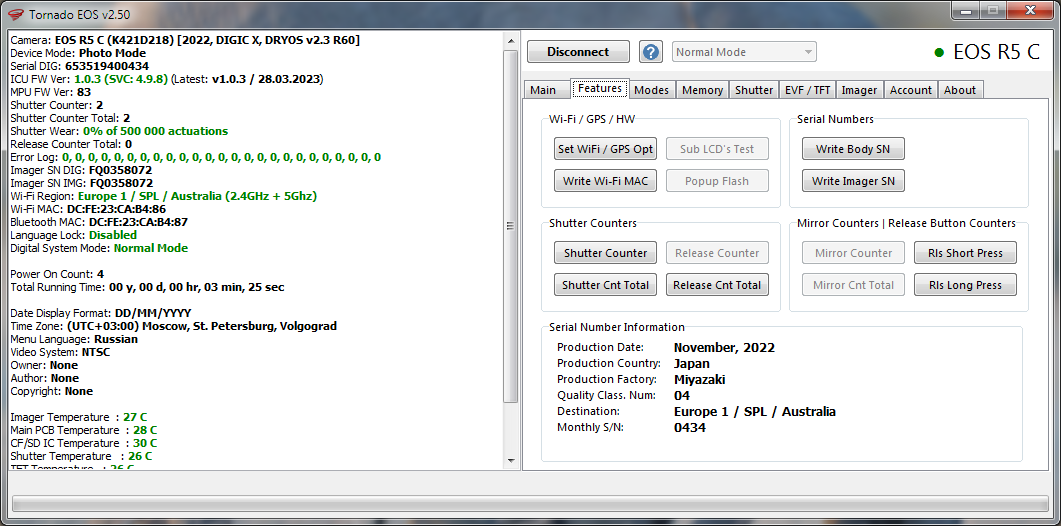
Tornado EOS is free and works for all three. https://kameratrollet.se/canon-shutter-count/
I have 6D and use Magic Lantern.
I have 6D and use Magic Lantern.
Mar 14, 2026 at 01:30 PM
p.1 #4How to get shutter count from Canon cameras.
https://imageonline.io/shutter-count/ will give you the total actuations (Electronic and mechanical) of your Canon Camera.
Shuttercount is a Mac program at https://apps.apple.com/us/app/shuttercount/id720123827?mt=12 is $9.99 (used to be free) and will show just the mechanical actuations. Shuttercount Pro is $19.99 and will show each of the mechanical and electronic actuations, seperately. I have used Shuttercount Pro for some time and like it.
It will also allow you to enter Copyright, Owner, etc. in their fields. It will set/sync the time from your computer, usefull for multiple cameras.
Shuttercount is a Mac program at https://apps.apple.com/us/app/shuttercount/id720123827?mt=12 is $9.99 (used to be free) and will show just the mechanical actuations. Shuttercount Pro is $19.99 and will show each of the mechanical and electronic actuations, seperately. I have used Shuttercount Pro for some time and like it.
It will also allow you to enter Copyright, Owner, etc. in their fields. It will set/sync the time from your computer, usefull for multiple cameras.
Mar 14, 2026 at 04:00 PM
p.1 #5How to get shutter count from Canon cameras.
If you use different programs you may get different counts.
What variation do you see ?
What variation do you see ?
Mar 18, 2026 at 10:26 AM
p.1 #6How to get shutter count from Canon cameras.
Canon Japan and Magic Lantern gave me the same for 7D and 6D. Tornado EOS gave me the same for 6D. I never tried 7D with Tornado EOS.
elfanucchi wrote:
If you use different programs you may get different counts.
What variation do you see ?
elfanucchi wrote:
If you use different programs you may get different counts.
What variation do you see ?
Mar 19, 2026 at 12:38 AM
p.1 #7How to get shutter count from Canon cameras.
ShutterCount app on iphone is the only way to find out the mechanical shutter actuation count. There is a method of a program reading it off a photo from the sd card but that only tells you the total actuations including electronic.
Jul 13, 2026 at 03:37 PM
p.1 #8How to get shutter count from Canon cameras.
Only way? https://www.spt.info/sc_images/5DMK4_Pro_Slideshow/Canon_5D_MK_IV_Software_2c_Shutter3.jpg

LegendaryKnight wrote:
ShutterCount app on iphone is the only way to find out the mechanical shutter actuation count. There is a method of a program reading it off a photo from the sd card but that only tells you the total actuations including electronic.
LegendaryKnight wrote:
ShutterCount app on iphone is the only way to find out the mechanical shutter actuation count. There is a method of a program reading it off a photo from the sd card but that only tells you the total actuations including electronic.
Jul 14, 2026 at 09:18 AM
|
p.1 #9How to get shutter count from Canon cameras.
rscheffler wrote:
Not sure how good this is, but it appears to get the info from EXIF embedded in photos: https://imageonline.io/shutter-count/
Not sure how accurate it is, but it just showed I had 1,000,537 clicks on my 5D2.
Not sure how good this is, but it appears to get the info from EXIF embedded in photos: https://imageonline.io/shutter-count/
Not sure how accurate it is, but it just showed I had 1,000,537 clicks on my 5D2.
Jul 18, 2026 at 07:40 AM
p.1 #10How to get shutter count from Canon cameras.
Using a version of Shutter Count where I connected my camera to the computer, it read 15,544. I believe that is correct or close to it.
Jim
Jim
Jul 18, 2026 at 08:19 AM
p.1 #11How to get shutter count from Canon cameras.
jgoetz4 wrote:
Not sure how accurate it is, but it just showed I had 1,000,537 clicks on my 5D2.
Yeah, that one is clearly broken. I had like 1.6M and 1.2M which is fiction.
rscheffler wrote
Not sure how good this is, but it appears to get the info from EXIF embedded in photos: https://imageonline.io/shutter-count/Yeah, that one is clearly broken. I had like 1.6M and 1.2M which is fiction.
Jul 18, 2026 at 10:04 AM
p.1 #12How to get shutter count from Canon cameras.
With apologies I’m going to piggyback this with what I believe to be a relevant question. I’ve been using Shutter Count for over a decade. I’ve always wondered, since an independent app can find it, the shutter count is there in the camera, so why can’t/doesn’t Canon have that information readily available in the menus? Does anybody know? Thanks in advance.
Jul 20, 2026 at 07:37 AM
p.1 #13How to get shutter count from Canon cameras.
There are thousands of metadata tags in the files that Canon hasn’t published. The shutter count is just one piece of the puzzle. No one knows why.
BigSky13 wrote:
With apologies I’m going to piggyback this with what I believe to be a relevant question. I’ve been using Shutter Count for over a decade. I’ve always wondered, since an independent app can find it, the shutter count is there in the camera, so why can’t/doesn’t Canon have that information readily available in the menus? Does anybody know? Thanks in advance.
BigSky13 wrote:
With apologies I’m going to piggyback this with what I believe to be a relevant question. I’ve been using Shutter Count for over a decade. I’ve always wondered, since an independent app can find it, the shutter count is there in the camera, so why can’t/doesn’t Canon have that information readily available in the menus? Does anybody know? Thanks in advance.
Jul 20, 2026 at 12:00 PM
p.1 #15How to get shutter count from Canon cameras.
I personally like camerashuttercount.com. I use it for my pc and it gives you a list of cameras you can check for free. https://www.camerashuttercount.com/
Just upload a raw file.
If you want to check more cameras there's a minimal fee for an app that works for windows or apple a mac. One license covers three devices for life (25 bucks basically). Or you can do a 14 day license for $5.99 (test all of your cameras and keep screen shots like I do).
edit: 5.99 not 4.99
Just upload a raw file.
If you want to check more cameras there's a minimal fee for an app that works for windows or apple a mac. One license covers three devices for life (25 bucks basically). Or you can do a 14 day license for $5.99 (test all of your cameras and keep screen shots like I do).
edit: 5.99 not 4.99
Jul 24, 2026 at 05:58 AM
p.1 #16How to get shutter count from Canon cameras.
2112Rush wrote:
I personally like camerashuttercount.com. I use it for my pc and it gives you a list of cameras you can check for free. https://www.camerashuttercount.com/
Just upload a raw file.
If you want to check more cameras there's a minimal fee for an app that works for windows or apple a mac. One license covers three devices for life (25 bucks basically). Or you can do a 14 day license for $5.99 (test all of your cameras and keep screen shots like I do).
edit: 5.99 not 4.99
Yeah, I bought it well over a decade ago and they still update it with new camera models—$9.99 well spent. Of course, it's something I only use when buying or selling a camera.
I personally like camerashuttercount.com. I use it for my pc and it gives you a list of cameras you can check for free. https://www.camerashuttercount.com/
Just upload a raw file.
If you want to check more cameras there's a minimal fee for an app that works for windows or apple a mac. One license covers three devices for life (25 bucks basically). Or you can do a 14 day license for $5.99 (test all of your cameras and keep screen shots like I do).
edit: 5.99 not 4.99
Yeah, I bought it well over a decade ago and they still update it with new camera models—$9.99 well spent. Of course, it's something I only use when buying or selling a camera.
Jul 24, 2026 at 10:41 AM