fredmiranda.com
Login

Moderated by: Fred Miranda
  New fredmiranda.com Mobile Site
  New Feature: SMS Notification alert
  New Feature: Buy & Sell Watchlist
  

FM Forums | Sony Forum | Join Upload & Sell

1              3       4       end
  

Skin tones updates on A7V or A7rV?


j4nu
Offline
• • • • •
Upload & Sell: Off
p.2 #1 · Skin tones updates on A7V or A7rV?


ruthenium wrote:
I was curious about how Manny's samples (https://www.manuelortizphoto.com/free-downloads) should look in Capture One.
The following is a compilation of crops from the following cameras:
Top, Sony A7RV (FF camera)
Middle: Fujifilm GFX100 II (medium/large format camera)
Bottom: Canon EOS R5 (FF camera)

I tested two ICC profiles in Capture One (with Film Standard curve)
The first (all crops on the left side) was the default profile (ProStandard)
The second (all crops on the right side) was Leaf LF5 ProPhotoRGB - Portrait

My corrections in Capture One were minimal. I set Highlights and Light to -50, then auto adjusted the Levels.

I find the differences in colors unexpectedly large
...Show more

Thanks for posting these (and for the effort put into processing them obviously).
I think I ask this in every thread about colors, but since the same profile was used, why is the output different?
Is it really only the matter of WB (if it is, then it should be possible to normalize it in post) ?
Or maybe CFA differs between brands, and there is some color there ...
Much as I'd like to believe it's all in the software part, I'm afraid there's some intrinsic "bias" even in RAW data...


Feb 09, 2026 at 07:45 PM
ruthenium
Offline
• • • •
Upload & Sell: On
p.2 #2 · Skin tones updates on A7V or A7rV?


j4nu wrote:
Thanks for posting these (and for the effort put into processing them obviously).
I think I ask this in every thread about colors, but since the same profile was used, why is the output different?
Is it really only the matter of WB (if it is, then it should be possible to normalize it in post) ?
Or maybe CFA differs between brands, and there is some color there ...
Much as I'd like to believe it's all in the software part, I'm afraid there's some intrinsic "bias" even in RAW data...


I don't think the default Capture One profile is the same for different cameras - I fully expect this to be camera-specific.
The Leaf profile is the same for all three. This is where the differences seem less pronounced.
My main concern is about WB.
I checked the EXIF for Canon EOS R5 and the info suggests WB was Auto:
WB RGGB Levels As Shot : 1883 1024 1024 1945
WB RGGB Levels Auto : 1883 1024 1024 1945
WB RGGB Levels Measured : 1883 1024 1024 1945

It would have been interesting to run this test with WB set to Daylight in every camera.
Whether WB "should be possible to normalize it in post" - one can try. It would have helped if the model had had a colorchecker chart next to her face.

Presently, the comparison is not very useful - it indicates differences but it wasn't a "scientific" test.


Feb 09, 2026 at 08:07 PM
j4nu
Offline
• • • • •
Upload & Sell: Off
p.2 #3 · Skin tones updates on A7V or A7rV?


ruthenium wrote:
It would have been interesting to run this test with WB set to Daylight in every camera.

I'm not sure that would that much, as that is just a label (not an absolute numeric value) I think...
ruthenium wrote:
Whether WB "should be possible to normalize it in post" - one can try.

But that is what the "there's no color in camera hardware" people are saying ...


Feb 09, 2026 at 08:18 PM
ruthenium
Offline
• • • •
Upload & Sell: On
p.2 #4 · Skin tones updates on A7V or A7rV?


j4nu wrote:
I'm not sure that would that much, as that is just a label (not an absolute numeric value) I think...

But that is what the "there's no color in camera hardware" people are saying ...


WB is a bit of a mystery to me. Until recently, I mistakenly thought that WB should be the same (the same numerical value for color temperature and tint) for the same raw file in different applications. This turned out not be the case. For example, in a recent thread https://www.fredmiranda.com/forum/topic/1929486/0#16966391
the temperature was as different as follows for the same raw file.
Temperature 5300 K (ACR) - 5051 (DxO) - 4935 (Iridient) - 4871(Affinity) 4732 (C1).

Furthermore, WB can be significantly affected by different lenses on the same camera body, while using the same target. For example, with two lenses on the GFX100S II:
WB with the Fujinon GF55mm F1.7 lens (at f/5.6) was
Temperature 5051 - Tint 47 in DxO Photolab 9
Temperature 4732 - Tint 12.1 in Capture One

When the lens was replaced by Fujinon GF20-35mm F4 (at 35mm f/5.6) while keeping everything else unchanged and unmoved, except the tripod that was moved closer to the target to frame it as with the 55mm lens, then WB changed to
Temperature 5259 - Tint 44 in DxO Photolab 9
Temperature 4968 - Tint 10.7 in Capture One

I don't know how to equalize WB between different camera bodies&lenses without a colorchecker chart, that is without creating a custom profile. One can try the simplest - a grey card, but I am not sure if this is going to be good enough.


Feb 09, 2026 at 08:55 PM
old-gregg
Offline
• • •
Upload & Sell: Off
p.2 #5 · Skin tones updates on A7V or A7rV?


tuxounet wrote:
I will therefore try to apply the Canon R5 or Fuji X-T5 profile to my SONY RAW files and the problem will be solved, I suppose.


This will not work, because a profile must be made for each camera model.

A sensor+CFA combination generate data, not color. Just numbers. There is no rule that says that 23234 means "red". Therefore, if you're building a RAW converter, the first step is to use a test target with known color values, to build a lookup table which maps digital values coming from your sensor to color frequencies. The result is called sensor's native color gamut.

Sensor's gamut is much wider than monitors or printers. So... the next step is to decide what to "chop off", i.e. you have to perceptually map values from sensor's native gamut to the target color space, like sRGB or AdobeRGB.

Next step is to apply gamma and a tone curve because sensor data is linear, but human eye perceive luminance logarithmically.

Last step is to boost some colors and suppress others to create a pleasing image. Usually two complimentary colors are slightly boosted, while others are slightly muted, saturation is boosted or muted, depending on the purpose of a profile, like landscape, portrait, etc.

And finally, all of this is repeated twice: for warm-vs-cool white balance. And the result is baked as lookup tables and curves into a camera profile, which is a file (DCP for Adobe).

I hope it's easy to see why the sensor/camera manufacturer is irrelevant. The differences between sensors get erased at the 2nd step in the process. The differences in output you see are the differences in profiles, which means that you can take any two cameras and build your own profiles that will produce identical color.

The color differences between cameras that people argue about online are just profile differences.

To learn more:
https://helpx.adobe.com/content/dam/help/en/camera-raw/digital-negative/jcr_content/root/content/flex/items/position/position-par/download_section_733958301/download-1/DNG_Spec_1_7_1_0.pdf


Feb 09, 2026 at 10:48 PM
old-gregg
Offline
• • •
Upload & Sell: Off
p.2 #6 · Skin tones updates on A7V or A7rV?


I will also add that our eyes are terrible at color perception. Our sensitivity to different light frequencies is highly uneven, we famously can't see blue well. We also lose ability to separate colors as light intensity declines. Basically, any camera sensor sees vastly more than we do. We use software and algorithms to "pick" from the vast sensor gamut what our eyes "like", and it's a creative choice. This is even simpler way to explain why sensors don't matter, but software does.


Feb 09, 2026 at 11:04 PM
old-gregg
Offline
• • •
Upload & Sell: Off
p.2 #7 · Skin tones updates on A7V or A7rV?


ruthenium wrote:
WB is a bit of a mystery to me. Until recently, I mistakenly thought that WB should be the same (the same numerical value for color temperature and tint) for the same raw file in different applications. This turned out not be the case. For example, in a recent thread https://www.fredmiranda.com/forum/topic/1929486/0#16966391
the temperature was as different as follows for the same raw file.
Temperature 5300 K (ACR) - 5051 (DxO) - 4935 (Iridient) - 4871(Affinity) 4732 (C1).


This is because different RAW converters use different color engines that rely on internal color spaces that aren't the same. For example, Lightroom/ACR use Adobe's own "Lightroom RGB", DxO uses "DxO Wide Gamut" and C1 has "CIE XYZ".


Feb 09, 2026 at 11:09 PM
A74me
Offline
• •
Upload & Sell: Off
p.2 #8 · Skin tones updates on A7V or A7rV?


ruthenium wrote:
Where I looked when compared the 14- to 16-bit on my GFX100S II was the extreme, really deep shadows (without and with denoising) lifted by 4 stops. I honestly couldn't see any advantage of the 16-bit raw there. Jim Kasson saw the same, "There appears to be no increase in engineering dynamic range (EDR) with 16-bit precision when compared to 14-bit precision"
https://blog.kasson.com/gfx-100-ii/fujifilm-gfx-100-ii-edr-16-bit-precision/


i dont trust anything he says after he posted 2 identical images taken with his z8 and gfx100ii and said how much better the color was using MF. so i downloaded both his images took them into Ps and corrected the WB mistakes, both images looked identical. colors and graduations were identical.


Feb 09, 2026 at 11:17 PM
aCuria
Offline
• • •
Upload & Sell: Off
p.2 #9 · Skin tones updates on A7V or A7rV?


j4nu wrote:
Thanks for posting these (and for the effort put into processing them obviously).
I think I ask this in every thread about colors, but since the same profile was used, why is the output different?
Is it really only the matter of WB (if it is, then it should be possible to normalize it in post) ?
Or maybe CFA differs between brands, and there is some color there ...
Much as I'd like to believe it's all in the software part, I'm afraid there's some intrinsic "bias" even in RAW data...


j4nu wrote:
why is the output different?


Probably many reasons:
- Differences in sensor bit depth.
- Different lenses used, some lenses (Tamron) tend to boost yellow
- Some sensors sacrifice image quality to increase readout speed (R5ii).
- Errors in making the profiles used by C1 / Lightroom
- Sample variation between cameras of the same model


Feb 10, 2026 at 05:54 AM
ruthenium
Offline
• • • •
Upload & Sell: On
p.2 #10 · Skin tones updates on A7V or A7rV?


old-gregg wrote:
This will not work, because a profile must be made for each camera model.

A sensor+CFA combination generate data, not color. Just numbers. There is no rule that says that 23234 means "red". Therefore, if you're building a RAW converter, the first step is to use a test target with known color values, to build a lookup table which maps digital values coming from your sensor to color frequencies. The result is called sensor's native color gamut.

Sensor's gamut is much wider than monitors or printers. So... the next step is to decide what to "chop off", i.e. you have to
...Show more

I agree with you on that observed differences between colors are mostly due to different interpretations of the raw files in post. There's another factor that complicates comparisons - different lenses. In real life, for example, a Sony body with a Sony lens isn't going to produce a raw file truly equivalent to one from a medium format camera system, even when we do our best to satisfy all the technical conditions of photographic equivalence. In real life, those who compare colors may not even have or use photographically equivalent lenses. And, to add to this is Auto-WB that most people use, that I don't believe can be the same in different cameras from different manufacturers.

I am willing to believe that one can, in principle, somehow obtain equivalent raw files from different cameras (e.g. by using the same lens with adapters), then develop and apply suitable custom profiles. All of this, to prove the point that the images should be equivalent, regardless of the camera make.

At the end of the above technical exercise, we shall return to the reality of 99% photographers (1) using different lenses, and (2) using the pre-defined color profiles in the applications of their choice for post-processing.

Thus, for an average photographer, in practice(!), one camera system may well produce "better colors" than another, and there will be little that this photographer would be able to do in practice.

The typical common advice is to use custom profiles. But, what is the problem with the profiles available in Lightroom, Capture One, DxO Photolab, etc.? One can make a custom profile for use with a stable illuminant, e.g. in a studio. I doubt one can make a universal prifile for different lighting conditions that would work better than the commercial profiles.

Perhaps the best practical alternative to custom profiles is to use a relatively flat profile available (when available) from Lightroom, Capture One, etc., as the starting point for post-processing.

The last practical point is about WB. This is of personal interest, and I would be interested in opinions. I have come across this suggestion from professional experienced photographers to avoid Auto-WB, and use Daylight in the settings. Obviously, this is a subject on its own. But, I think there might be something wise about this approach. We cannot really trust Auto-WB, so what's the point of using it, when too often Auto-WB needs to be corrected in post anyways?


Feb 10, 2026 at 09:43 AM


Search in Used Dept. 

ruthenium
Offline
• • • •
Upload & Sell: On
p.2 #11 · Skin tones updates on A7V or A7rV?


old-gregg wrote:
This will not work, because a profile must be made for each camera model.

A sensor+CFA combination generate data, not color. Just numbers. There is no rule that says that 23234 means "red". Therefore, if you're building a RAW converter, the first step is to use a test target with known color values, to build a lookup table which maps digital values coming from your sensor to color frequencies. The result is called sensor's native color gamut.

Sensor's gamut is much wider than monitors or printers. So... the next step is to decide what to "chop off", i.e. you have to
...Show more

Regarding applying different color profiles in Capture One, the following is a quote from a book:
"One very cool feature about the
ICC Profile system is that you can
actually choose a profile from an
entirely different camera and apply
that to your images. Just click on
the ICC Profile drop-down menu
and select Show All.
Capture One will now display all
the ICC Profiles that ship with the
application, and you can experiment
to your heart’s content. Note how
the colors in the image are updated
as you hover the mouse over a
profile, making it easier to check
several different profiles with ease.
Selecting an ICC Profile that is
optimized for another camera’s
sensor can obviously affect the
color reproduction in unpredictable
ways, so be careful if color accuracy
is important. However, some ICC
Profiles can be very useful."

This is from Photographer's guide to Capture One by N. W. Christoffersen.

The need to be careful is understood. In practice, I tend to like some of the Leaf profiles in Capture One.


Feb 10, 2026 at 09:51 AM
gdanmitchell
Offline
• • • • • • •
Upload & Sell: Off
p.2 #12 · Skin tones updates on A7V or A7rV?


old-gregg wrote:
I will also add that our eyes are terrible at color perception. Our sensitivity to different light frequencies is highly uneven, we famously can't see blue well. We also lose ability to separate colors as light intensity declines. Basically, any camera sensor sees vastly more than we do. We use software and algorithms to "pick" from the vast sensor gamut what our eyes "like", and it's a creative choice. This is even simpler way to explain why sensors don't matter, but software does.


Our color perception creates all kinds of fascinating problems when we try to compare what we see to what “the camera sees.”

Our visual system (eyes plus brain) fits a lot of what it sees into the context of what it thinks is true. A classic example: When we look at snow we see it as white even though it often is not. For example, snow in shadows, illuminated by the big blue light panel of the sky, is actually quite blue in objective terms, yet our eyes/brains tell us it is white.

Photographing low light landscapes reveals another issue — our decreased sensitivity to color in very low light. I was recently reminded of this when I photographed a desert mountain scene in the morning twilight period when color was just coming to the sky. I had to decrease exposure quite a bit to avoid blowing out the sky colors, which meant that I would have to do a lot of work to recover detail in some vary dark areas where mountains were still in shadow. Brining up the luminosity in those areas wasn’t too hard, but the intensity of the blue color was hallucinogenic. I had to reduce saturation and shift color balance in those areas radically in order ot approximate what the eye expects.

Except in some specific cases (e.g. maintaining brand colors in advertising photography, etc.) getting “accurate colors” is often far less important than getting beautiful or believable colors.


Feb 10, 2026 at 10:09 AM
bwcolor
Offline
• • • •
Upload & Sell: Off
p.2 #13 · Skin tones updates on A7V or A7rV?


Regardless of what you come away with after reading this thread, know that it is likely that the Sony A7RVI will be out sometime this year and maybe as early as two months from now.


Feb 10, 2026 at 10:10 AM
RoamingScott
Offline
• • • • • •
Upload & Sell: Off
p.2 #14 · Skin tones updates on A7V or A7rV?


The fact that the piss-yellow skin tones generated from the Canon 5D line had a generation of portrait photographers in an absolute chokehold for a decade tells me that most people wouldn't know pleasing color if it slapped them upside the head.


Feb 10, 2026 at 10:16 AM
old-gregg
Offline
• • •
Upload & Sell: Off
p.2 #15 · Skin tones updates on A7V or A7rV?


ruthenium wrote:
Regarding applying different color profiles in Capture One, the following is a quote from a book:


You are confusing an ICC profile with a camera profile, but I am not familiar with how C1 manages camera profiles. Is there an equivalent to DCP?


Feb 10, 2026 at 12:14 PM
ruthenium
Offline
• • • •
Upload & Sell: On
p.2 #16 · Skin tones updates on A7V or A7rV?


old-gregg wrote:
You are confusing an ICC profile with a camera profile, but I am not familiar with how C1 manages camera profiles. Is there an equivalent to DCP?


Profiles in Capture One are ICC profiles.


Feb 10, 2026 at 12:40 PM
ruthenium
Offline
• • • •
Upload & Sell: On
p.2 #17 · Skin tones updates on A7V or A7rV?


gdanmitchell wrote:
Our color perception creates all kinds of fascinating problems when we try to compare what we see to what “the camera sees.”

Our visual system (eyes plus brain) fits a lot of what it sees into the context of what it thinks is true. A classic example: When we look at snow we see it as white even though it often is not. For example, snow in shadows, illuminated by the big blue light panel of the sky, is actually quite blue in objective terms, yet our eyes/brains tell us it is white.

Photographing low light landscapes reveals another issue —
...Show more

I fully agree with you about believable colors trumping (is Trumping need to be capitalized in modern American English?) "accurate colors." What we may disagree about are "beautiful colors." For example, Manny Ortez seems to like the models with faces painted like oversized baby dolls, where there is no patch of exposed natural skin left on the face. I guess he sees beauty in this, while I find the looks and colors bordering with vulgar.


Feb 10, 2026 at 12:52 PM
jojib
Offline
• • •
Upload & Sell: Off
p.2 #18 · Skin tones updates on A7V or A7rV?


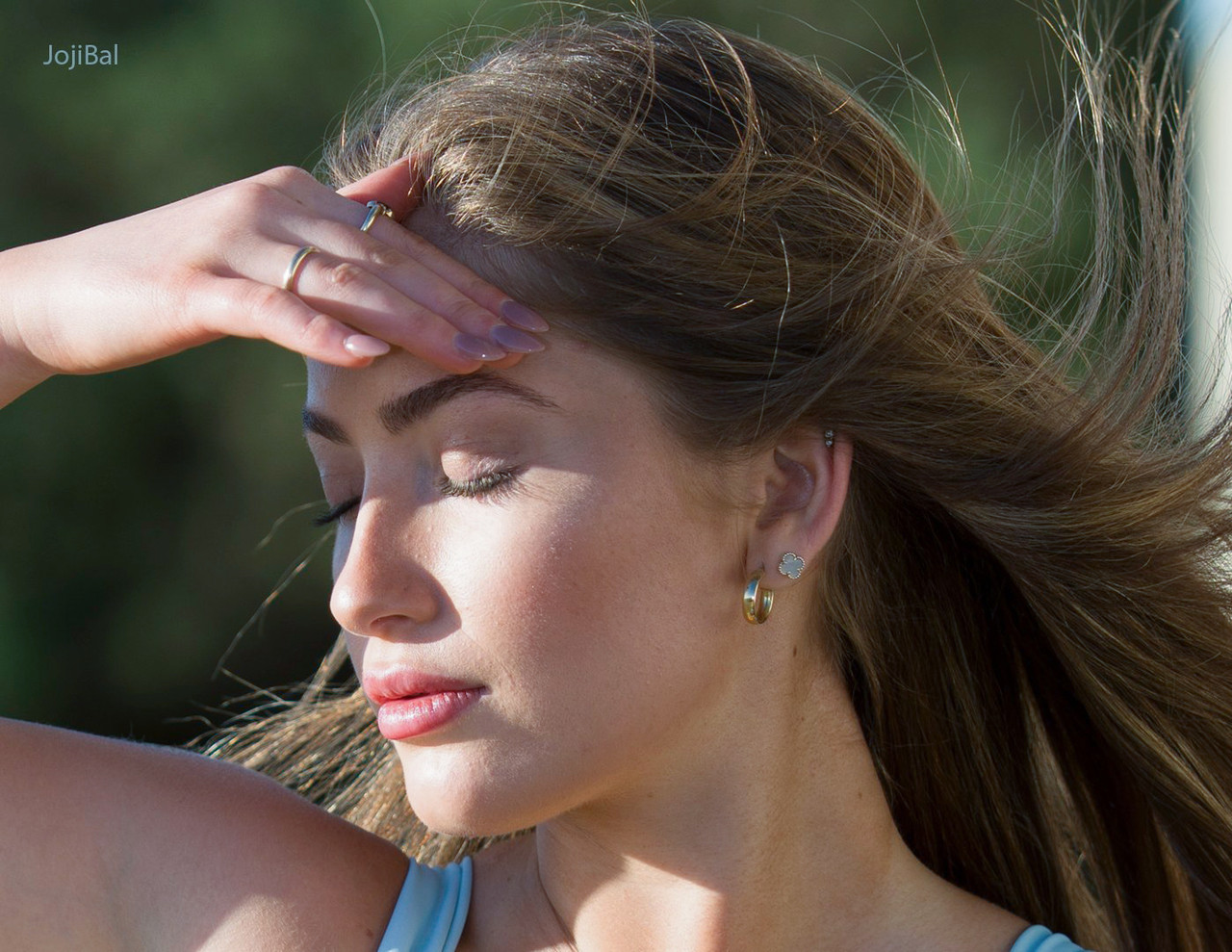
Both Adobe and DXO PL can take their sweet time working on the A7V profiles :-) I've used Sony's raw converter Image Edge Desktop to process these. I always use the Portrait creative setting.

All A7V with the Sigma 28-105/2.8 DG DN Art except the last one (Sigma 35/1.4 Art)


Feb 10, 2026 at 01:01 PM
j4nu
Offline
• • • • •
Upload & Sell: Off
p.2 #19 · Skin tones updates on A7V or A7rV?


aCuria wrote:
Probably many reasons:
- Differences in sensor bit depth.
- Different lenses used, some lenses (Tamron) tend to boost yellow
- Some sensors sacrifice image quality to increase readout speed (R5ii).
- Errors in making the profiles used by C1 / Lightroom
- Sample variation between cameras of the same model


Exactly! So, there is a bit more to it than software.


Feb 10, 2026 at 02:52 PM
A74me
Offline
• •
Upload & Sell: Off
p.2 #20 · Skin tones updates on A7V or A7rV?


jojib wrote:
Both Adobe and DXO PL can take their sweet time working on the A7V profiles :-) I've used Sony's raw converter Image Edge Desktop to process these. I always use the Portrait creative setting.

All A7V with the Sigma 28-105/2.8 DG DN Art except the last one (Sigma 35/1.4 Art)

https://www.dpreview.com/forums/media/3dsc00303portraitc-jpg.4607561/full.jpg
https://www.dpreview.com/forums/media/3dsc03533portrait-jpg.4607563/full.jpg
https://www.dpreview.com/forums/media/3dsc07207portrait-jpg.4607560/full.jpg
https://www.dpreview.com/forums/media/3dsc08940portrait-jpg.4607562/full.jpg
https://www.dpreview.com/forums/media/3dsc02319portrait-2-jpg.4607559/full.jpg


I dont know how you can make any conclusion about skin tones with these images.

the skin tones are accurate after wb correction.


Feb 10, 2026 at 02:54 PM
1              3       4       end


FM Forums | Sony Forum | Join Upload & Sell

1              3       4       end


Welcome back
Log in to your account