I’m wondering if you see any benefits to upgrading from the A7IV to the A7RV or A7V, particularly in terms of post-processing time — especially for skin tone corrections. I know some cameras render skin tones as more magenta or greenish…
Has anyone compared them directly?
I bumped another thread about comparing camera colors here.
If you shoot JPG only the in camera processing is important. If you shoot raw you can check the linked thread and consider making a good profile for your camera.
Asit is you are basically asking if an unknown software manufacturer had good luck with their default profile for the new camera.
Thanks for bumping that informative thread, Jonas.
To the OP, it depends on several factors, like if you are shooting RAW, JPEG, which software you use to process your images, so some extend lenses, etc. In my experience having been on several generations of Sony mirrorless cameras, most recently a7RV and a7CII - yes, Sony's color science is improving with each new generation of sensors and cameras. I actually find that I like Sony's color science at this point while Nikon's are great for landscape, product and wildlife, and Canon peachy starting point is flattering for portrait/people photography - if we dare/are allowed to generalize. If anything, Sony does skew to the green.
I haven't tried the latest a7V, but I went from the a7IV to the a7RV and it was a definite improvement in color. But as always, if you shoot RAW you can get any camera's file to look pretty much any way you like it.
Jonas point about color profile is a good one. It is worth investing some time to understand one's preferences and see if you can develop some profiles to get a good starting point, perhaps even no post-processing. Secondly, I use LR Classic and I found that it makes a big difference on which profiles I use as a starting point in LR. Adobe RAW profiles like Landscape, Standard, Vivid, etc makes a big difference.
Hello,
Thank you for your very informative answers. Maybe I should clarify what I mean by "saving time."
Before SONY, I was on the Fuji team, and before that at Canon. I found myself having to edit old RAW files from my Fuji, and I find that skin tone nuances are much easier to retouch: often, it seems to me that when editing SONY RAWs, the editing produces more "undesirable edge effects."
I use Capture One (always have), and sometimes, yes, I shoot JPEG for casual situations…
Hi
In my experience it's better to get everything as "right" as possible in an early stage of the post processing. The camera profile is an example of that. In the link I posted you can look at the images (post #13) and how they are a lot more like each other than what we see in the original images. With a good profile (not one made from the JPG images as I had to do it in the example) you are very much better off to a good starting point for your own creative take on the later steps of process.
Maybe I misunderstand and you are looking for something else.
Kudos to Stephen for still letting us see him demonstrate the colors.
I don't have the A7IV nor A7RV but I do have the A7V and still keeping the A6700.I am still waiting for the A7V profiles from ACR and DXO PL 9 Elite. However the skin tones via the ACR Beta profile of the A7V looks accurate and attractive.
Got some samples here with the A7V in various lighting scenarios: by the window, Bali sun, with Godox V100s, high ISO, blue hour and etc. These are straight from my camera processed via Adobe ACR and clicking on AUTO. Still waiting for the profiles from both Adobe and DXO PhotoLab.
tuxounet wrote:
Hello,
Thank you for your very informative answers. Maybe I should clarify what I mean by "saving time."
Before SONY, I was on the Fuji team, and before that at Canon. I found myself having to edit old RAW files from my Fuji, and I find that skin tone nuances are much easier to retouch: often, it seems to me that when editing SONY RAWs, the editing produces more "undesirable edge effects."
I use Capture One (always have), and sometimes, yes, I shoot JPEG for casual situations…
The subject of colors has been discussed on FM. Thus, I am not going to say anything new or original.
Cameras don't make colors. There are no colors (in the conventional sense) in the raw files.
The colors are synthesized by the proprietary demosaicing algorithms in post. The demosaiced raw files are further modified by proprietary color profiles with different curves. Even the white balance is set differently in different apps. For example, the color temperature can be different on the same raw file in ACR and in Capture One by almost 700K.
It possible that by pure luck default color profile(s) for camera A may give a preferred look in post, while default color profile(s) for camera B would not. However, the difference is going to be in the profiles if different cameras are compared under equivalent conditions. It is understood that the raw file from a larger sensor can (but not always) be of better raw quality (better dynamic range) than the same from a smaller sensor. However, this is a different subject.
The practical point is that when one isn't happy with colors, it would make sense to replace camera A by camera B only if the latter has a better dynamic range (although this wouldn't guarantee an immediate meaningful difference). Otherwise, it makes more sense to look for and explore alternative profiles.
Regarding your experience in Capture One, you haven't mentioned your "Base Characteristics" (ICC Profile and Curve). What you may want to try - although I don't mean to promise better colors or user experience - are some of the Leaf profiles.
Click on ICC Profile, then click on Leaf and go into Leaf Color IQ 100MP menu. Try some of the profiles in there. For example, I like "LeafLF5 LF5 ProPhotoRGB - Product.
As for the "nicer colors," that's pretty much a matter of taste, which is why asking other people for advice is rather pointless, at least without comparison images. There are apparently some Sony users who miss the colors of the first A7.
And there are also differing opinions regarding the differences in skin tones between, for example, the A7iv and A7v:
?si=I-a4vnmnx1urH6ya
Two important caveats: color is subjective, and skin color in particular is even more so: there are endless skin colors out there in the world. And the second is that nobody wants accurate color. It is simply too dull. All color profiles intentionally introduce what is essentially a distortion, to please a viewer.
tuxounet wrote:
I’m wondering if you see any benefits to upgrading from the A7IV to the A7RV or A7V, particularly in terms of post-processing time — especially for skin tone corrections. I know some cameras render skin tones as more magenta or greenish.
Unless you're shooting SOOC JPG, skintone or color in general has absolutely nothing to do with the camera. Digital color is 100% software construct, and is "made" in a RAW converter.
And if we're talking about the in-camera JPEG engine, plenty of people (myself included) would say that Sony's JPEGs aren't class-leading in terms of color palette, regardless of camera. Sony color philosophy is to be... too accurate (see the 2nd caveat above). I'd rank Fuji, Nikon and Canon as a bit more pleasing, at least for caucasian skin.
Oh... to answer your question: NO. I owned A7R IV, IVa, V and A1 II and I get Adobe Color with all of them in Lightroom, which I also modify heavily using my own custom color profiles. My recommendation is to develop your own tuxounet color and not be dependent on a color taste of an anonymous engineer in Japan
old-gregg wrote:
Two important caveats: color is subjective, and skin color in particular is even more so: there are endless skin colors out there in the world. And the second is that nobody wants accurate color. It is simply too dull. All color profiles intentionally introduce what is essentially a distortion, to please a viewer.
Unless you're shooting SOOC JPG, skintone or color in general has absolutely nothing to do with the camera. Digital color is 100% software construct, and is "made" in a RAW converter.
And if we're talking about the in-camera JPEG engine, plenty of people (myself included) would say that Sony's JPEGs aren't class-leading in terms of color palette, regardless of camera. Sony color philosophy is to be... too accurate (see the 2nd caveat above). I'd rank Fuji, Nikon and Canon as a bit more pleasing, at least for caucasian skin.
Oh... to answer your question: NO. I owned A7R IV, IVa, V and A1 II and I get Adobe Color with all of them in Lightroom, which I also modify heavily using my own custom color profiles. My recommendation is to develop your own tuxounet color and not be dependent on a color taste of an anonymous engineer in Japan ...Show more →
This!! Couldn't this posting please appear automatically as a disclaimer if someone wants to open the umpteenth superfluous thread about "skin tones"?
It’s absolutely correct that the raw converter determines the final (R, G, B) values that a subject appears as. When shooting JPEG, the image is processed using the camera manufacturer’s built-in “color science.” In contrast, when shooting RAW, the camera simply records sensor data, and the final color rendering depends on the raw converter (for example, Lightroom), not the camera’s built-in “color science.”
To add some nuance, when discussing “skin tones,” smooth color gradation is especially important. The quality of this gradation is closely tied to the effective bit depth of the sensor.
It’s also worth noting that it’s not possible to store 14 bits of true, noise-free image data in a 14-bit file, because real-world ADCs (analog-to-digital converters) are not ideal. Some headroom must be built into the system to accommodate noise and other non-idealities in the signal chain.
In practice, if a sensor delivers around 12 bits of usable (real) data, the manufacturer may package this into a 14-bit RAW file. Likewise, if a sensor is capable of delivering close to 14 bits of meaningful data, a 16-bit RAW file may be used.
I exported the raw's with no editing, and did downsampling to minimize the differences in native resolution between the cameras. Ignore the sharpness differences between the images, just look at the tonal gradation
I think even if the differences in color are completely removed, the differences in tonal gradation will remain
Thank you infinitely for your responses, which are very informative and very useful.
This is probably very important: "To add some nuance, when discussing “skin tones,” smooth color gradation is especially important. The quality of this gradation is closely tied to the effective bit depth of the sensor."
I will therefore try to apply the Canon R5 or Fuji X-T5 profile to my SONY RAW files and the problem will be solved, I suppose.
Thank you infinitely for your responses, which are very informative and very useful.
This is probably very important: "To add some nuance, when discussing “skin tones,” smooth color gradation is especially important. The quality of this gradation is closely tied to the effective bit depth of the sensor."
I will therefore try to apply the Canon R5 or Fuji X-T5 profile to my SONY RAW files and the problem will be solved, I suppose.
Ehh, just set the color profile to "Adobe Color" and work from there, you'll be good. Also adjust vibrancy rather than saturation.
I neverrrrr use the Sony profiles, because the skin comes out so weirdly red.
aCuria wrote:
It’s absolutely correct that the raw converter determines the final (R, G, B) values that a subject appears as. When shooting JPEG, the image is processed using the camera manufacturer’s built-in “color science.” In contrast, when shooting RAW, the camera simply records sensor data, and the final color rendering depends on the raw converter (for example, Lightroom), not the camera’s built-in “color science.”
To add some nuance, when discussing “skin tones,” smooth color gradation is especially important. The quality of this gradation is closely tied to the effective bit depth of the sensor.
It’s also worth noting that it’s not possible to store 14 bits of true, noise-free image data in a 14-bit file, because real-world ADCs (analog-to-digital converters) are not ideal. Some headroom must be built into the system to accommodate noise and other non-idealities in the signal chain.
In practice, if a sensor delivers around 12 bits of usable (real) data, the manufacturer may package this into a 14-bit RAW file. Likewise, if a sensor is capable of delivering close to 14 bits of meaningful data, a 16-bit RAW file may be used.
I exported the raw's with no editing, and did downsampling to minimize the differences in native resolution between the cameras. Ignore the sharpness differences between the images, just look at the tonal gradation
I think even if the differences in color are completely removed, the differences in tonal gradation will remain
I doubt we shall ever know the color of the skin under all the layers of paint on the face of this female.
More seriously, it is interesting that you noted "if a sensor is capable of delivering close to 14 bits of meaningful data, a 16-bit RAW file may be used." I understand that this aspect is unrelated to the OP's question. Nevertheless, on my GFX100S II, there is a choice of saving 14- or 16-bit raw. It is publicly unknown whether the ADC is actually 14- or 16-bit. My own guess is that the ADC is 14-bit, while the camera can fit this into a 16-bit container. There has been some serious discussion on whether one should work with the 14- or 16-bit raw from the GFX sensor. According to Jim Kasson, the 16-bit raw from the GFX100 is practically indistinguishable from the 14-bit raw. I looked into this myself, and indeed, couldn't see any visible difference. My impression is that while there can be an observable difference between 12- and 14-bit raw, then writing the latter as 16-bit most likely makes no practical sense or difference (except giving a somewhat larger files, e.g. about 120MB vs 80MB).
Thank you infinitely for your responses, which are very informative and very useful.
This is probably very important: "To add some nuance, when discussing “skin tones,” smooth color gradation is especially important. The quality of this gradation is closely tied to the effective bit depth of the sensor."
I will therefore try to apply the Canon R5 or Fuji X-T5 profile to my SONY RAW files and the problem will be solved, I suppose.
It needs to be added that there are corrections that affect the colors. In general, those correction that affect contrast can be expected to affect color. The prime example is the RGB curve. Apply an S- RGB curve, and the skin colors can be expected to shift to orange-red. The result may look ugly. Related corrections like Contrast, Dehaze need to be used with caution.
I expect that there are different strategies among the experts. My own preference is to use a relatively flat color profile as the starting point. The reasoning behind this approach is simple: it is easier to add some contrast, saturation, and vibrance over a flat profile than desaturate an overcooked one.
I doubt this very much that there can be a single color profile that can be applied toward a raw file with the effect of producing pleasant skin colors without any further adjustments. It makes sense (to me), to start a step or two away, that is from an under-corrected flat-ish starting point, and add corrections that are needed.
ruthenium wrote:
I doubt we shall ever know the color of the skin under all the layers of paint on the face of this female.
More seriously, it is interesting that you noted "if a sensor is capable of delivering close to 14 bits of meaningful data, a 16-bit RAW file may be used." I understand that this aspect is unrelated to the OP's question. Nevertheless, on my GFX100S II, there is a choice of saving 14- or 16-bit raw. It is publicly unknown whether the ADC is actually 14- or 16-bit. My own guess is that the ADC is 14-bit, while the camera can fit this into a 16-bit container. There has been some serious discussion on whether one should work with the 14- or 16-bit raw from the GFX sensor. According to Jim Kasson, the 16-bit raw from the GFX100 is practically indistinguishable from the 14-bit raw. I looked into this myself, and indeed, couldn't see any visible difference. My impression is that while there can be an observable difference between 12- and 14-bit raw, then writing the latter as 16-bit most likely makes no practical sense or difference (except giving a somewhat larger files, e.g. about 120MB vs 80MB)....Show more →
But having more bits has the advantage of giving more headroom in editing so that if tones which originally are close together are spread much apart in editing, you don't get visible artifacts like banding. So I bet when you treat the RAW files with some rather extreme editing, the 16bit file will show an advantage over the 14bit file.
hasenbein wrote:
But having more bits has the advantage of giving more headroom in editing so that if tones which originally are close together are spread much apart in editing, you don't get visible artifacts like banding. So I bet when you treat the RAW files with some rather extreme editing, the 16bit file will show an advantage over the 14bit file.
Where I looked when compared the 14- to 16-bit on my GFX100S II was the extreme, really deep shadows (without and with denoising) lifted by 4 stops. I honestly couldn't see any advantage of the 16-bit raw there. Jim Kasson saw the same, "There appears to be no increase in engineering dynamic range (EDR) with 16-bit precision when compared to 14-bit precision" https://blog.kasson.com/gfx-100-ii/fujifilm-gfx-100-ii-edr-16-bit-precision/
Thank you infinitely for your responses, which are very informative and very useful.
This is probably very important: "To add some nuance, when discussing “skin tones,” smooth color gradation is especially important. The quality of this gradation is closely tied to the effective bit depth of the sensor."
I will therefore try to apply the Canon R5 or Fuji X-T5 profile to my SONY RAW files and the problem will be solved, I suppose.
Hi,
I'm not sure about your solution. You may have luck of course... I wonder though, if the solution is to use profiles made for other cameras (other sensors, other Bayer layers (maybe not the right word for Fujifilm cameras) and other electronics - what was the problem from start? And what has this to do with gradation and bit depth?
Like ruthenium I start my PP with a profile giving me quite flat images. I then get images with "correct" but kinda pale and boring colors and the contrast is on the low side. This in turn gives me plenty of room for my own ideas.
I linked to another thread. I think you can see the result coming from applying (non-optimal) a kind of profile applied in PP - just to give you an idea about what I mean with profiles and their effect. Does the A74 image still have too much of green in it for your taste?
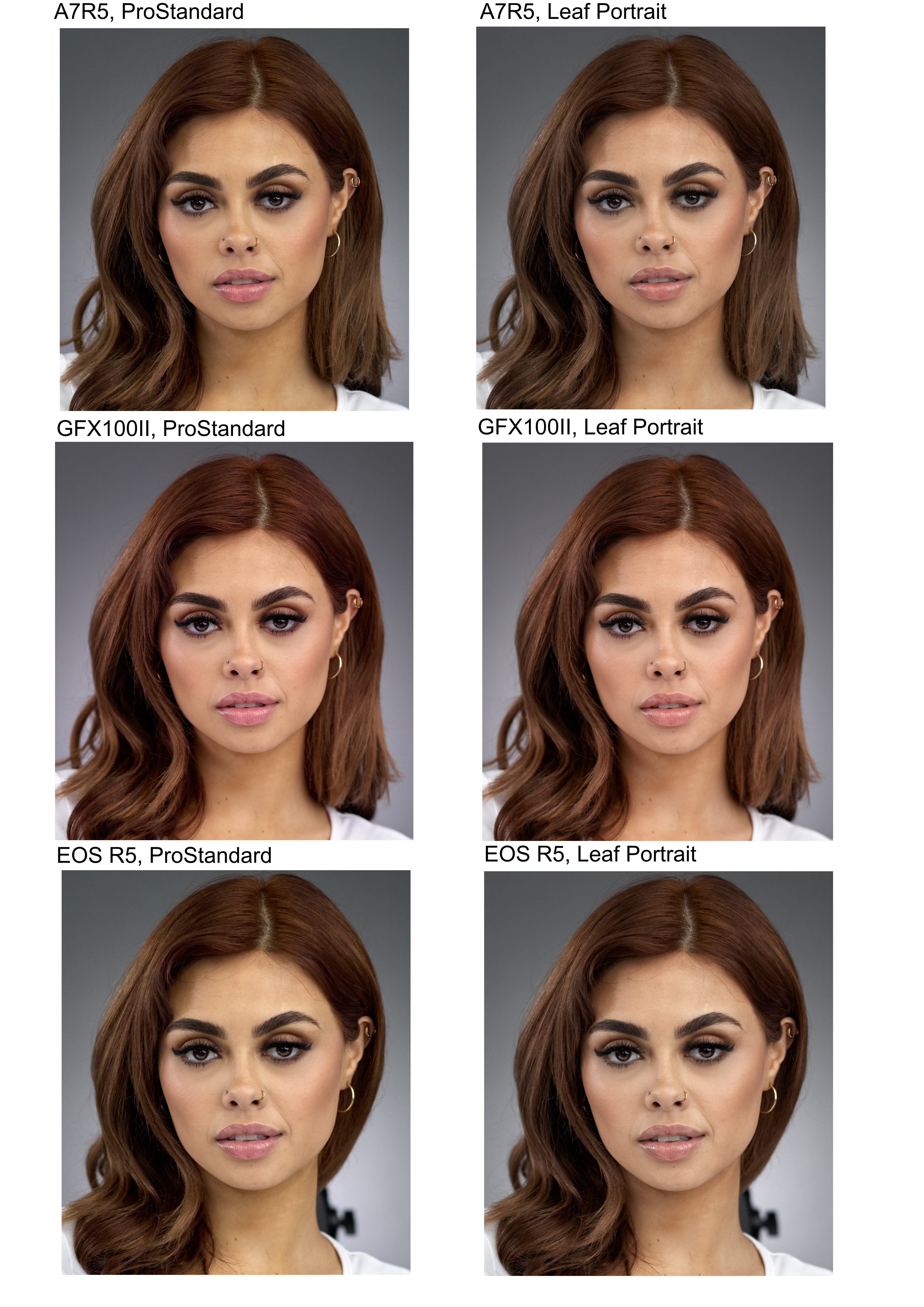
I was curious about how Manny's samples (https://www.manuelortizphoto.com/free-downloads) should look in Capture One.
The following is a compilation of crops from the following cameras:
Top, Sony A7RV (FF camera)
Middle: Fujifilm GFX100 II (medium/large format camera)
Bottom: Canon EOS R5 (FF camera)
I tested two ICC profiles in Capture One (with Film Standard curve)
The first (all crops on the left side) was the default profile (ProStandard)
The second (all crops on the right side) was Leaf LF5 ProPhotoRGB - Portrait
My corrections in Capture One were minimal. I set Highlights and White to -50, then auto adjusted the Levels.
I find the differences in colors unexpectedly large with the default profile (on the left).
In every case, I tend to like the colors of the Leaf profile (on the right) better than the default.
I suspect that the observed differences can be due to differences in WB. I am not sure, but I don't think Manny set the same WB in every camera. Correct me if I'm am wrong. For a comparative test like this, I would have set some fixed WB, e.g. Daylight in every camera.