p.1 #1 · Numbers displayed in Lightroom catalog folder structure
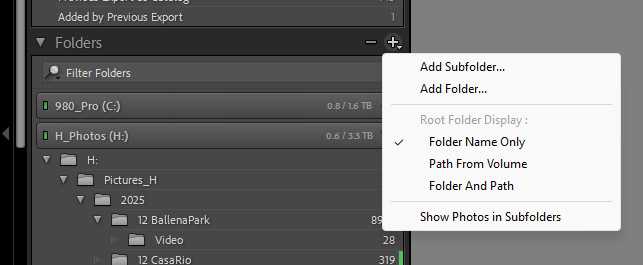
I started a new catalog after building a new computer last October. My folders once only displayed a number to the right of the RAW folder, with zeros to the right of the subject and any other folders higher in the structure. Now, as shown in the screenshot below, all the folders display numbers, with the main subject showing the combined number of all its subfolders. I have included the file handling screenshot to see if there is any input into what I do here.
p.1 #3 · Numbers displayed in Lightroom catalog folder structure
MY LR has shown the numbers as you show for as long as I can remember. Pretty sure that's working as intended as a byproduct of enabling subfolder display.
As to your import processes, that seems like a separate issue. What does the top of your import screen show (next to Import Assisted Culling)...Add?
p.1 #4 · Numbers displayed in Lightroom catalog folder structure
RoamingScott wrote:
MY LR has shown the numbers as you show for as long as I can remember. Pretty sure that's working as intended as a byproduct of enabling subfolder display.
As to your import processes, that seems like a separate issue. What does the top of your import screen show (next to Import Assisted Culling)...Add?
I'll take a look and let you know.
Not a problem with the numbers, but they have never been that way. Thanks.
I'd wager that's why you are seeing multiple activity bars during import. I've always used Add, but my import routine is to place the files where I want them on my SSD and then import, not copy from media. Mileage may vary.
p.1 #9 · Numbers displayed in Lightroom catalog folder structure
I think the reason you are seeing two tasks running is that LrC is copying (or adding) files and is starting to make previews of the files that have been added to the catalog. If you click the status bar it will show a summary of the tasks in progress.