p.1 #1 · The End of Printing - Digital Picture Frame (near) Perfection
This is the culmination of a lot of thought over the years on, "What to do with all the dang pictures I take?!!". For the most part I am the only one who sees most of them while I'm processing (at times I call my wife down to my computer room to view). In many ways that is enough - like most of you I get a lot of pleasure from the whole process, but it does make me wonder why I spend so much money and time on it. I share some phone shots to update friends and family while we are on trips, and I post Google Albums to share with my climbing/ski partners after a trip. I also make computer slide shows for those partners, and to show mostly to my wife on our TV. After that though they get filed away on various back-ups that I rarely revisit.
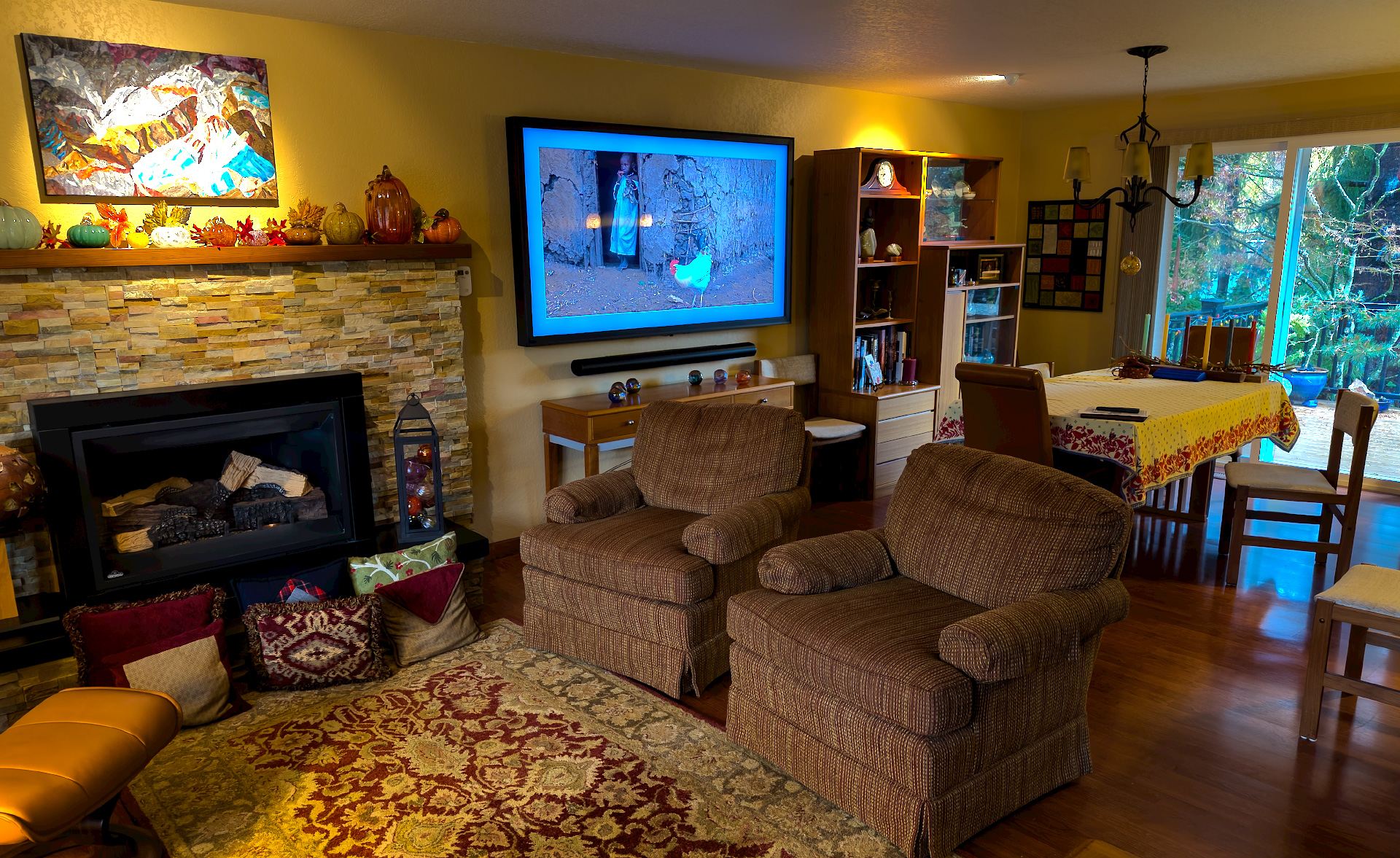
I've done a lot of printing over the years, so our walls have many of my pictures, but I sold my Epson 7900 years ago and haven't printed any of my new work. My wife and I have been talking about getting a large acrylic print made for our living room, but couldn't decided on a picture. The cost would mean it would likely be a once in a life time purchase. The digital frame set-up shown below cost much more, but can show unlimited pictures, and of course doubles as a TV.
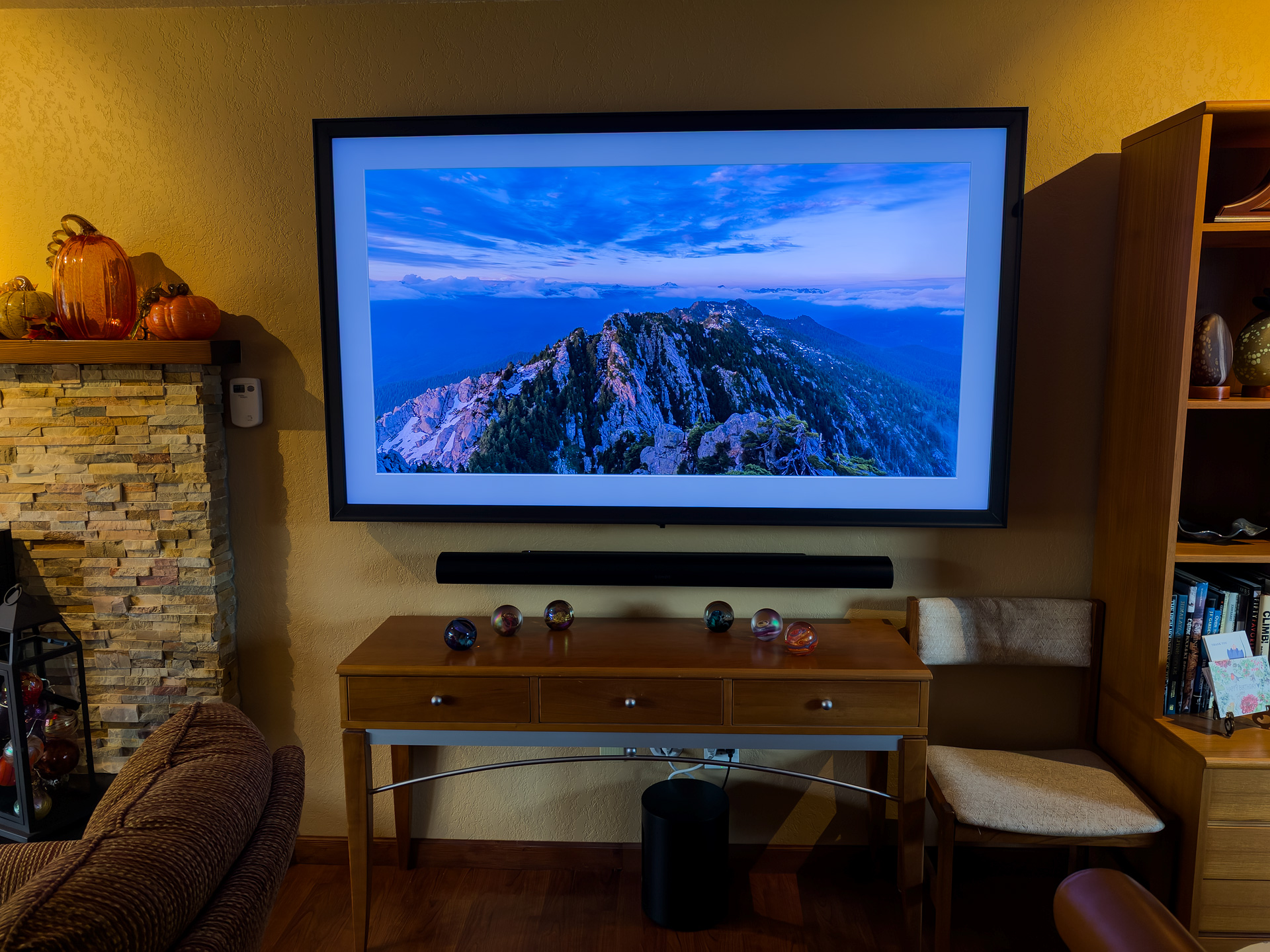
A while back I posted about setting up a TV as a digital picture frame. At the time I was undecided on brand and size, but had decided against Samsung's The Frame. When I called B&H to discuss they gave me a good price on a 75" Sony Bravia 9 along with a Sonos sound system (Arc Ultra soundbar, mini-sub, 2 x Era 300) so I decided to get us an early Christmas present.
I hired an excellent installer to mount the TV and sound bar with hidden wires using this system. The TV is mounted using a Sanus Full Motion Mount so that on the rare occasions that my wife and I might want to watch TV in this room we can pull it out and turn it toward our seating.
We had the TV up for a week running the media player on the TV to show my pictures that were loaded on a memory stick in the USB port on back of the TV. I was blown away by the picture quality - pretty much the way I processed them on my computer. There are some refections if many nearby lights are turned on (more than Samsung's matte finish) but with window light it is perfection.
The final touch was installing the Leon Studio Frame that runs an art mode (with optional mats) on the TV with an on/off based on motion detection. It took a while to dial in the software, and I'm disappointed with the 20 picture limit on how many of your own pictures you can upload to the TV at a time, but they can be pretty easily changed at any time from a memory stick. It would be great if they could set-up a cloud based gallery where you could upload more pictures. I've written them with this idea.
Sonos soundbar under TV
One constraint in using this system is to maximize the screen a 16/9 ratio works best. I have 4K crop set up in Photoshop now and an action to save the resulting jpg to a folder dedicated to TV pictures. It is fun to go back and find the best crop on my older pictures.
p.1 #3 · The End of Printing - Digital Picture Frame (near) Perfection
EBH, not sure what you mean by motor to go vertical, to twist the TV into portrait mode? No, don't think anyone has got that yet. Landscape orientation only for the TV. Like you say, it would be possible to combine two or three verticals in post to make a triptych which you then load into the TV I would think you would want that without the mat effect.
p.1 #4 · The End of Printing - Digital Picture Frame (near) Perfection
Good luck enjoying it for some time. At least you can still watch normal TV on it.
I bought one of those desktop digital frames years ago. After the initial viewing episodes it got put away for years and I think I finally gave it away. If your unit only allows 10 images to be uploaded at a time, that is pitiful and ridiculous. I could upload hundreds of images on my little cheapo unit and play them as a slideshow.
These gizmos seem to go the way of old home movies and slideshows.
p.1 #5 · The End of Printing - Digital Picture Frame (near) Perfection
There are 8TB USB drives, so that should be plenty of storage for jpegs.
I'd want a motor, but it's more of a nice to have. (If you are already are using it for TV, then no real costs.)
p.1 #6 · The End of Printing - Digital Picture Frame (near) Perfection
I have an old LG tv (probably 15 years old. At least) that I run from my Mac mini. I just put photos on my screensavers folder. They tend to distract guests during conversation (wait, where's that photo?....oh, it's gone now), but that's fine. The other week the audio failed so that I could only get audio through the Mac mini or bluetooth speakers & I started TV shopping, settling on a Sony Bravia 8. But the sound came back (I have Klipsch speakers hooked up), so I'm back to procrastinating. It's good to hear that you had no problems with shipping across the countrty w/B&H as I've been gunshy after reading so many reviews about shipping damaged units.
p.1 #7 · The End of Printing - Digital Picture Frame (near) Perfection
Can a TV display a photo? Of course.
Is a blue-light bombardment of pixels with a glossy screen over it even close to an ideal way to display one's work? Not in my estimation.
The coldness of the TV vs the warmness of your room is quite garish, and hopefully not so stark in person. That is one of the beauties of a physical print, the way it can change and shift in the different light of the day.
p.1 #9 · The End of Printing - Digital Picture Frame (near) Perfection
I don't think it would be hard to rig it up to a media player that has access to more photos, if it's a smart TV, most likely you have most of the nuts and bots already.
p.1 #10 · The End of Printing - Digital Picture Frame (near) Perfection
The first image with the lights reflecting on the screen is why a screen will never replace a picture on my walls. Where’s the texture on the screen that I can see when I come up to my photos? What about other rooms in the house…bare walls or will there be prints on them or a bunch of tv’s?
p.1 #11 · The End of Printing - Digital Picture Frame (near) Perfection
Jim, enjoy viewing your images in any media form that you prefer. The 'prints-are-better preachers' can do the same. Those preachers are usually the same people that peddle selling prints. Their own images also get more viewing on this site than on their own walls.
Just like projected or backlit Kodachromes look more vibrant than prints, so do images on computer screens. Today 99% of all still photos are viewed on computer monitors, cellphones, TV's, and movie screens. They become much more vibrant and alive on those media than dull, flat prints hanging on walls.
Prints can also give unpleasant reflections depending on a room's lighting, which is why many get non-reflective glass slapped over them. As for any blue cast on your TV images, one would hope that could be remedied on your TV, just like it can on your computer monitor.
p.1 #12 · The End of Printing - Digital Picture Frame (near) Perfection
People that claim prints are dull have no idea about how to light a print. They obviously never went into a Lik gallery to see how a print can shine. These same people most likely try to simulate matte using part of the image thinking that’s also better than a real matted print.
It’s obvious some have different standards than others.
p.1 #13 · The End of Printing - Digital Picture Frame (near) Perfection
Imagemaster wrote:
Good luck enjoying it for some time. At least you can still watch normal TV on it.
I bought one of those desktop digital frames years ago. After the initial viewing episodes it got put away for years and I think I finally gave it away. If your unit only allows 10 images to be uploaded at a time, that is pitiful and ridiculous. I could upload hundreds of images on my little cheapo unit and play them as a slideshow.
These gizmos seem to go the way of old home movies and slideshows.
Yeah, I was tempted by the Samsung The Frame TV, but learned that you can load less than 100 photos (depending on size and resolution), which is ridiculous.
Before I retired, I configured the screensaver for the computer in my office at work to randomly cycle through a couple thousand of my wildlife images. My colleagues enjoyed it more than I did, because the screensaver rarely activated when I was in front of the computer, but it was a fun diversion.
I'm now considering getting the smallest computer I can find that has an HDMI connection some storage (or connection for a USB drive) and connecting it to my TV to do the same thing.
p.1 #14 · The End of Printing - Digital Picture Frame (near) Perfection
vbnut wrote:
Before I retired, I configured the screensaver for the computer in my office at work to randomly cycle through a couple thousand of my wildlife images. My colleagues enjoyed it more than I did, because the screensaver rarely activated when I was in front of the computer, but it was a fun diversion.
I'm now considering getting the smallest computer I can find that has an HDMI connection some storage (or connection for a USB drive) and connecting it to my TV to do the same thing.
Great ideas.
With dull prints on your walls you have to select a correct lighting source and direct it in the right direction, as well as take into account the angle the viewer is looking at the print. Or you can go to a gallery that has special lighting to make the dull prints shine. Ho Hum.
p.1 #15 · The End of Printing - Digital Picture Frame (near) Perfection
Imagemaster wrote:
Great ideas.
With dull prints on your walls you have to select a correct lighting source and direct it in the right direction, as well as take into account the angle the viewer is looking at the print. Or you can go to a gallery that has special lighting to make the dull prints shine. Ho Hum.
Dull prints originate from dull images…you seem to be quite the expert on this matter. If one needs over saturated, over contrasting display devices to make one’s images shine…well ho hummm.
p.1 #16 · The End of Printing - Digital Picture Frame (near) Perfection
chez wrote:
Dull prints originate from dull images…you seem to be quite the expert on this matter. If one needs over saturated, over contrasting display devices to make one’s images shine…well ho hummm.
Yet here you are, posting images and looking at other members' images despite them being displayed on over-saturated and over-contrasty displays that are making those images shine.
That must be such a hardship for you, an expert on everything.
I guess all the FM members posting their images here just can't produce prints that are up to your high standards, eh?
p.1 #17 · The End of Printing - Digital Picture Frame (near) Perfection
Jim Dockery wrote:
This is the culmination of a lot of thought over the years on, "What to do with all the dang pictures I take?!!". For the most part I am the only one who sees most of them while I'm processing (at times I call my wife down to my computer room to view). In many ways that is enough - like most of you I get a lot of pleasure from the whole process, but it does make me wonder why I spend so much money and time on it. I share some phone shots to update friends and family while we are on trips, and I post Google Albums to share with my climbing/ski partners after a trip. I also make computer slide shows for those partners, and to show mostly to my wife on our TV. After that though they get filed away on various back-ups that I rarely revisit.
I've done a lot of printing over the years, so our walls have many of my pictures, but I sold my Epson 7900 years ago and haven't printed any of my new work. My wife and I have been talking about getting a large acrylic print made for our living room, but couldn't decided on a picture. The cost would mean it would likely be a once in a life time purchase. The digital frame set-up shown below cost much more, but can show unlimited pictures, and of course doubles as a TV.
A while back I posted about setting up a TV as a digital picture frame. At the time I was undecided on brand and size, but had decided against Samsung's The Frame. When I called B&H to discuss they gave me a good price on a 75" Sony Bravia 9 along with a Sonos sound system (Arc Ultra soundbar, mini-sub, 2 x Era 300) so I decided to get us an early Christmas present.
I hired an excellent installer to mount the TV and sound bar with hidden wires using this system. The TV is mounted using a Sanus Full Motion Mount so that on the rare occasions that my wife and I might want to watch TV in this room we can pull it out and turn it toward our seating.
We had the TV up for a week running the media player on the TV to show my pictures that were loaded on a memory stick in the USB port on back of the TV. I was blown away by the picture quality - pretty much the way I processed them on my computer. There are some refections if many nearby lights are turned on (more than Samsung's matte finish) but with window light it is perfection.
The final touch was installing the Leon Studio Frame that runs an art mode (with optional mats) on the TV with an on/off based on motion detection. It took a while to dial in the software, and I'm disappointed with the 20 picture limit on how many of your own pictures you can upload to the TV at a time, but they can be pretty easily changed at any time from a memory stick. It would be great if they could set-up a cloud based gallery where you could upload more pictures. I've written them with this idea.
One constraint in using this system is to maximize the screen a 16/9 ratio works best. I have 4K crop set up in Photoshop now and an action to save the resulting jpg to a folder dedicated to TV pictures. It is fun to go back and find the best crop on my older pictures....Show more →
A few things…
While a photograph, properly made and processed, can look great on a screen… it will never look the same as a printed photograph. As a friend notes, the screen image “glows from within” while the top-lit print relies on the brightness of the underlying paper and the capability of inks. So a screen image will never look exactly like a printed image and vice versa.
While I’m not at all against using a screen to display photographs, the experience is different in some other ways, too, at least if you use the screen presentation as most people seem to — to cycle through a set of best photographs. A single print on the wall has a physical presence, and because it is always there awaiting your active engagement with it, it eventually becomes a part of your environment in a very specific way. On the other hand, a screen used to present a rotating set of images doesn’t have this kind of “solidity” — it is more of a show than an image.
I don’t know if it is an asset or a liability, but it is easier to make a photograph that looks good on a screen than to make one that looks good as a print.
As to the “end of printing,” while it may well mark an end to your ptinting (and I can understand your perspective) I think it would be premature to predict that the we are seeing the end of singular prints.
YMMV.
- - -
Imagemaster wrote:
That must be such a hardship for you, an expert on everything.
p.1 #18 · The End of Printing - Digital Picture Frame (near) Perfection
By the time I've made a finished print I've spent around 15 minutes to over an hour in the computer on it. After looking at the print for 10 minutes, I don't need to see it again for quite a while. The value of the display would be that it can rotate thousands of images. I would be using a small, cheap computer (4x4x2 inch) specifically for that purpose, so I could use a Spyder or X-rite calibrator to dial in the display without impacting other inputs for TV/video. That example in the room looks way too cool (high color temp) for my tastes. You can run various slide shows with low-cost or free tools and vary them over time. The main reason I never did something like this is not having any easy way to do verticals. Ideally the image file tag could be used to trigger the rotation from 0-90°.
p.1 #19 · The End of Printing - Digital Picture Frame (near) Perfection
EB-1 wrote:
By the time I've made a finished print I've spent around 15 minutes to over an hour in the computer on it. After looking at the print for 10 minutes, I don't need to see it again for quite a while. The value of the display would be that it can rotate thousands of images. I would be using a small, cheap computer (4x4x2 inch) specifically for that purpose, so I could use a Spyder or X-rite calibrator to dial in the display without impacting other inputs for TV/video. That example in the room looks way too cool (high color temp) for my tastes. You can run various slide shows with low-cost or free tools and vary them over time. The main reason I never did something like this is not having any easy way to do verticals. Ideally the image file tag could be used to trigger the rotation from 0-90°.