SOLVED - Strange EXIF with Megadap ETZ21 PRO+
p.1 #1SOLVED - Strange EXIF with Megadap ETZ21 PRO+
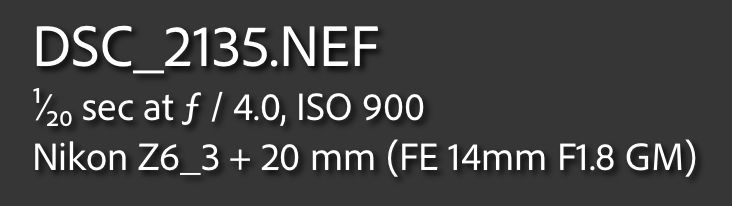
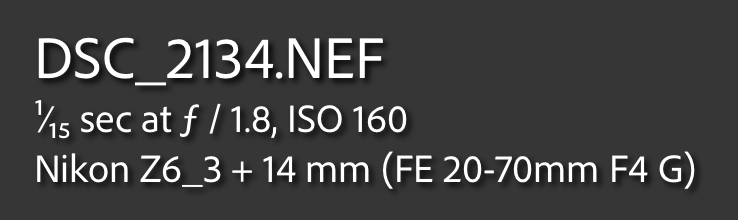
I was trying different lenses with the Megadap on my Z6iii and noticed this odd mix-up of the EXIF lens data (as seen in Lightroom). It shows the correct focal length, but wrong lens.
The Megadap has the latest, 2.0.1, firmware. Anyone else encountered this?
EDIT - SOLVED -
It turns out you need to remove the adapter from the camera, then change the e-mount lens, then remount the combo to the Nikon body. This avoids 'confused' metadata.

The Megadap has the latest, 2.0.1, firmware. Anyone else encountered this?
EDIT - SOLVED -
It turns out you need to remove the adapter from the camera, then change the e-mount lens, then remount the combo to the Nikon body. This avoids 'confused' metadata.
Aug 29, 2025 at 07:41 AM
p.1 #2SOLVED - Strange EXIF with Megadap ETZ21 PRO+
Haven't seen that yet. The only weirdness I've noticed is slightly incorrect aperture on the Voigtlander 28/1.5 (reads as 1.4).
Aug 29, 2025 at 01:20 PM
p.1 #3SOLVED - Strange EXIF with Megadap ETZ21 PRO+
I don't have the +, I only have the ETZ pro but I always assumed that with any adapter any EXIF was a bonus despite how annoying I find that.
Apart from EXIF, how are you finding the +?
It is on my list to buy as no longer having to swap between the Neewer for MF confirmation on vintage glass and the Megadap for my Batis lenses is an absolute no brainer for me.
Apart from EXIF, how are you finding the +?
It is on my list to buy as no longer having to swap between the Neewer for MF confirmation on vintage glass and the Megadap for my Batis lenses is an absolute no brainer for me.
Aug 31, 2025 at 12:25 PM
p.1 #4SOLVED - Strange EXIF with Megadap ETZ21 PRO+
I have the ETZ21 PRO (not +) with the latest firmware and it doesn't do that.
Aug 31, 2025 at 10:13 PM
p.1 #5SOLVED - Strange EXIF with Megadap ETZ21 PRO+
I think if figured it out. It seems that if I leave the adapter attached to the body (so it has power) it sometimes seems to remember the last lens that was mounted. If I remove the adapter, attach it to the lens, then mount it, the EXIF is recorded correctly.
Sep 10, 2025 at 11:14 AM
RoamingScott
Offline
Activity
[X]
Details
p.1 #6SOLVED - Strange EXIF with Megadap ETZ21 PRO+
MikeEvangelist wrote:
I think if figured it out. It seems that if I leave the adapter attached to the body (so it has power) it sometimes seems to remember the last lens that was mounted. If I remove the adapter, attach it to the lens, then mount it, the EXIF is recorded correctly.
In my experience, Nikons really don't like the adapter (even FTZ) being mounted without a lens, I should have thought to mention this
Sep 10, 2025 at 11:44 AM
p.1 #7SOLVED - Strange EXIF with Megadap ETZ21 PRO+
MikeEvangelist wrote:
I think if figured it out. It seems that if I leave the adapter attached to the body (so it has power) it sometimes seems to remember the last lens that was mounted. If I remove the adapter, attach it to the lens, then mount it, the EXIF is recorded correctly.
I’m heading out for a 2-3 month landscape shooting trip and am adding a Z5II w/Megdap Pro+ to my Sony kit for fun, but I’m not happy to hear that I can’t simply leave the Megadap attached fulltime to the Z5II if I want correct EXIF. So each time I change to a different lens I have to removed both lens and adapter, take adapter off and attach it to new lens, then remount the combo? Repeatedly? This is the kind of extra hassle that makes me hate adapting.
Sep 11, 2025 at 11:37 AM
p.1 #8SOLVED - Strange EXIF with Megadap ETZ21 PRO+
Ross Martin wrote:
I’m heading out for a 2-3 month landscape shooting trip and am adding a Z5II w/Megdap Pro+ to my Sony kit for fun, but I’m not happy to hear that I can’t simply leave the Megadap attached fulltime to the Z5II if I want correct EXIF. So each time I change to a different lens I have to removed both lens and adapter, take adapter off and attach it to new lens, then remount the combo? Repeatedly? This is the kind of extra hassle that makes me hate adapting.
I don't know for certain that you have to do it each time. The odd EXIF behavior I got was a bit random. Could be as simple as making sure the camera is off when changing the lens on the adapter; I haven't had time to troubleshoot it to that level. I just know that taking the adapter off seems to eliminate the issue.
MikeEvangelist wrote
I think if figured it out. It seems that if I leave the adapter attached to the body (so it has power) it sometimes seems to remember the last lens that was mounted. If I remove the adapter, attach it to the lens, then mount it, the EXIF is recorded correctly.I don't know for certain that you have to do it each time. The odd EXIF behavior I got was a bit random. Could be as simple as making sure the camera is off when changing the lens on the adapter; I haven't had time to troubleshoot it to that level. I just know that taking the adapter off seems to eliminate the issue.
Sep 11, 2025 at 11:45 AM
|
p.1 #9SOLVED - Strange EXIF with Megadap ETZ21 PRO+
MikeEvangelist wrote:
I’m heading out for a 2-3 month landscape shooting trip and am adding a Z5II w/Megdap Pro+ to my Sony kit for fun, but I’m not happy to hear that I can’t simply leave the Megadap attached fulltime to the Z5II if I want correct EXIF. So each time I change to a different lens I have to removed both lens and adapter, take adapter off and attach it to new lens, then remount the combo? Repeatedly? This is the kind of extra hassle that makes me hate adapting.I don't know for certain that you have to do it each time. The odd EXIF behavior I got was a bit random. Could be as simple as making sure the camera is off when changing the lens on the adapter; I haven't had time to troubleshoot it to that level. I just know that taking the adapter off seems to eliminate the issue.
Ok thanks Mike, perhaps there is hope I can leave the Megadap on the body all the time as long as I turn off the camera before lens changing. I’ll test it out when I get a chance next week.
Ross Martin wrote
MikeEvangelist wrote
I think if figured it out. It seems that if I leave the adapter attached to the body (so it has power) it sometimes seems to remember the last lens that was mounted. If I remove the adapter, attach it to the lens, then mount it, the EXIF is recorded correctly.Ok thanks Mike, perhaps there is hope I can leave the Megadap on the body all the time as long as I turn off the camera before lens changing. I’ll test it out when I get a chance next week.
Sep 11, 2025 at 11:52 AM
RoamingScott
Offline
Activity
[X]
Details
p.1 #10SOLVED - Strange EXIF with Megadap ETZ21 PRO+
You should be powering the camera off on every lens change anyways, purely for dust reasons!
Sep 11, 2025 at 12:07 PM
p.1 #11SOLVED - Strange EXIF with Megadap ETZ21 PRO+
The behavior described by @MikeEvangelist persists even if you power the camera off. Probably because the Z8 is never truly 100% off. It seems that the body, when it detects the lens change event, queries the lens for metadata, so if the body doesn't know you've changed lenses, it won't refresh.
In practice this is not as big of an inconvenience as it may appear. When I change lenses in the field, I first mount a new lens, then I press the lens-unock button on the body and twist the adapter in place back/fro slightly and lock it. This adds maybe an extra half a second to the lens changing time, and feels natural ergonomically, because two release buttons are 180 degrees from eath other, so you'll use the same hand in one fluid motion. Slightly annoying... just slightly. Some lens caps/hoods give me far more trouble.
My biggest issue with the latest Megadap Pro+ is that it "sticks" to MF when you try to use AF mode button (the one at the bottom left on the Z8). Changing AF mode (AF-S, AF-C, M) via the menus works fine, but the usual hold+dial rotate doesn't -- it switches to MF and sits there. I have the latest firmware for both the body (3.01) and the adapter (2.01). This is far more annoying.
Sep 21, 2025 at 12:44 PM
p.1 #12SOLVED - Strange EXIF with Megadap ETZ21 PRO+
old-gregg wrote:
My biggest issue with the latest Megadap Pro+ is that it "sticks" to MF when you try to use AF mode button (the one at the bottom left on the Z8). Changing AF mode (AF-S, AF-C, M) via the menus works fine, but the usual hold+dial rotate doesn't -- it switches to MF and sits there. I have the latest firmware for both the body (3.01) and the adapter (2.01). This is far more annoying.
I don't see this behavior on my Z8 with the Megadap Pro+. Focus mode can be changed normally with the button. I do however have later camera firmware, 3.10, which came out last week. Can't believe that would be the difference though.
Sep 21, 2025 at 01:52 PM
p.1 #13SOLVED - Strange EXIF with Megadap ETZ21 PRO+
@MikeEvangelist I just upgraded to 3.10 and this glitch disappeared. The focus mode button now works as intended. Thanks for the tip!
Sep 21, 2025 at 08:54 PM
p.1 #14SOLVED - Strange EXIF with Megadap ETZ21 PRO+
old-gregg wrote:
I just upgraded to 3.10 and this glitch disappeared.
That's great! (and surprising)
I just upgraded to 3.10 and this glitch disappeared.
That's great! (and surprising)
Sep 21, 2025 at 09:52 PM
RoamingScott
Offline
Activity
[X]
Details
p.1 #15SOLVED - Strange EXIF with Megadap ETZ21 PRO+
3.0 actually caused a bunch of adapters to break so not that surprising. Nikon must have rolled back whatever broke them in 3.1
Sep 21, 2025 at 10:02 PM
p.1 #16SOLVED - Strange EXIF with Megadap ETZ21 PRO+
I had the same problem that my nikon ZR remembers the earlier lens in the exif. Removing the adapter every time I change lens seems to be very tedious and cause a lot more wear and tear. My previously magadap adapter has contact issue so I had to replace it....
AI told me that popping out the battery works too. And I tested it, and it works. I just need to remember to pop out the battery.
Is there any other shortcuts that can force ZR to recognise the new camera? AI suggested weird stuff like triggering sensor clean by ZR does not seem to have that option
AI told me that popping out the battery works too. And I tested it, and it works. I just need to remember to pop out the battery.
Is there any other shortcuts that can force ZR to recognise the new camera? AI suggested weird stuff like triggering sensor clean by ZR does not seem to have that option
Oct 20, 2026 at 08:08 PM