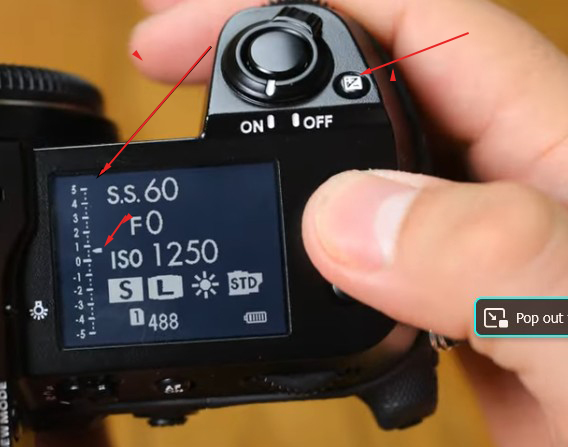
I have decided to shoot in the "M" mode. Problem is when I turn on the camera the top lcd shows the ExpComp grid on the far left. The bar is always moving and as I dial in my aperature it continues to adjust. I can also see it adj on the rear lcd.
I am coming from Canon dslrs'. I press the "+/-" and manually adj for only that image.
Can you shut of Fuji's ExP comp completely and set it manually? The manual tells a different story leaving out that the user might not want to manually set the ExC grid.
Thanks!
Dan
RoamingScott wrote:
Congrats, you found my 2nd most hated aspect of GFX
The bar is telling you that your shot is overexposed if you see it like that, not that EC is necessarily engaged and set to that.
There can be times that your EC value is set away from 0 and you can't tell...absolutely infuriating interface they have going on with it.
Scott, I apologize..this is NOT what is dipicting happening on my camera..this was just the top lcd and showing the index I am speak of....My lcd is showing the bar all over the place despite me NOT pressing the +/- button.
I just want to know if I can shut the darn "thing" off not adjust it. I want to manually adjust that index by some means(Fn or Cfn) but for now..I would like it OFF! I'm, olde, I get confused easily!
Thanks!
Dan
Hey Dan, expanding on what Scott said, the EC doesn't do anything when you are in Manual mode. The scale is showing its interpretation of exposure with your manual settings, which in the picture, is slightly over-exposed. You can prove this to yourself by turning the SS speed dial and the EC should move up or down. I don't hate this feature but don't use it either. Obviously when you are in manual mode you can see what the exposure is in front of you. Easy fix to just ignore it.
SGinNorcal wrote:
Hey Dan, expanding on what Scott said, the EC doesn't do anything when you are in Manual mode. The scale is showing its interpretation of exposure with your manual settings, which in the picture, is slightly over-exposed. You can prove this to yourself by turning the SS speed dial and the EC should move up or down. I don't hate this feature but don't use it either. Obviously when you are in manual mode you can see what the exposure is in front of you. Easy fix to just ignore it.
Fine...as I stated the image I posted is just the top display copy. My actual lcd shows the bar moving all over the place. If it aint doing nuttin, I will ignore it.
Thanks!
Dan
I mean, it IS doing something...it's showing you how under/overexposed your image is while in M mode. It's helpful, especially if you don't want to have the histogram displayed.
And Steve, I could have sworn that EC still changed a value (maybe ISO) while in M...but it's been a bit.
Yep, point it at a window outside, the EC scale goes up, point it into a dark spot and it goes down. Its not doing anything. I went through this too when I first started shooting my 50S, I thought something was wrong with the camera till I noticed it was simply reacting to available light and my settings. You might be able to remove from the EVF display but I haven't tried it.
RoamingScott wrote:
If you want your brain to hurt, try to figure out what the camera does when in full manual set to DR400
I don't want that. I just returned from an epic week long backpack in the Idaho Sawtooth wilderness. My brain is the only thing that doesn't hurt Its peaceful and calm but I haven't yet turned on the news.
Zero is the proper exposure according tto the in cam meter. As you change aperture (or SS or EC amount or iso), the needle moves to show over and under exposure. If you’re using auto iso it won’t move until you exceed the high or low limit of your iso range.
SGinNorcal wrote:
Hey Dan, expanding on what Scott said, the EC doesn't do anything when you are in Manual mode. The scale is showing its interpretation of exposure with your manual settings, which in the picture, is slightly over-exposed. You can prove this to yourself by turning the SS speed dial and the EC should move up or down. I don't hate this feature but don't use it either. Obviously when you are in manual mode you can see what the exposure is in front of you. Easy fix to just ignore it.
That sounds like what my old Canon 5DsR does in full manual. (It isn’t an always-on display though.) A “correct exposure” (according to the camera) in manual mode puts the indicator right in the middle.
It is useful for me (on my camera) in full manual, since i can often look at a scene and estimate that I might want to, say, underexpose by a third or two-thirds of a stop… and I can use this display to get it. (Yes, for tricker stuff I’ll consult the histogram.)
Thank you EVERYONE!!!!
I need to take a break and "reset my logic". The heat and humidity here is intolerable for an old fart.
I just need to get out and shoot and try everyones suggestions in the field.
Maryland is supposed to get a taste of Fall weather by the end of the week. Low 80's-70's and no humidity.
Maybe I can get out then!
Again THANKS!!!
Dan
Danpbphoto wrote:
Maryland is supposed to get a taste of Fall weather by the end of the week. Low 80's-70's and no humidity…
Dan
Sounds good. Am I right that you’ve had some unusually hot weather out there in your part of the country? (We’ve actually had a coupe of weeks of cooler than normal temps in more-or-less-costal California.)
gdanmitchell wrote:
Sounds good. Am I right that you’ve had some unusually hot weather out there in your part of the country? (We’ve actually had a coupe of weeks of cooler than normal temps in more-or-less-costal California.)
It has been BRUTAL Dan!
I don't remember a summer being so dam hot and humid! At 78 I just can't take it! My plants hate it also! I religiously water them daily. But it has been so hot that by the next morning everything is drooping from lack of water!
I must now water them in the morning AND evening for them to survive.
There are some nice venues to go out and try to get my camera(100sii) and brain in sync but my body is revolting against me!
I will wait...
For now I want to get the camera dumbed down to my level. Everything simple, ISO, SS,aperature..that's is it! Once I am comfortable with the camera and me handling the basics, I will venture elsewhere. I do love the files the Fuji makes. My 1st intro went very well with a few "faux pas" encountered but pretty nice.
The images members are posting on the GFX forum are just outstanding!
Thanks again for your help and interaction!... makes for a more pleasant realization that maybe I am NOT going crazy!! Now Suzaane may disagree with me but I do NOT want to venture into that discussion...I will LOOSE!
Dan
gdanmitchell wrote:
That sounds like what my old Canon 5DsR does in full manual. (It isn’t an always-on display though.) A “correct exposure” (according to the camera) in manual mode puts the indicator right in the middle.
It is useful for me (on my camera) in full manual, since i can often look at a scene and estimate that I might want to, say, underexpose by a third or two-thirds of a stop… and I can use this display to get it. (Yes, for tricker stuff I’ll consult the histogram.)
I have 2 5DSR's and I love them. I shoot Av. No problems at all adjusting any setting I want to. Everything is very straight forward! I shoot 100% raw and leave all the "adjustments" to ACR/Br....works for me.
Dan
Fujifilm needs to add an option to turn off EC display when you move to manual mode. But given its current state, you just have to switch mindsets from it being an EC display to being an old school film camera exposure meter that moves up and down as you move the camera around and the light changes. That's how the old meters worked. It's not EC any longer in manual.
In case it helps, you can turn off the EC display completely in the Wrench Icon > Screen Setting > Disp. Custom Setting > then check or uncheck "Expo. Comp (Scale)". You can also turn on/off "Expo. Comp (Digit)", which is a less distracting form of EC display. I don't have a GFX with a top screen to verify, but hopefully these options also affect the top display. If not, hopefully there's a separate menu for what that displays.
Thank you "hdm"! I have found that out after re-reviewing a YT video on the 100s ii. Yes the "distraction" is more annoying than the actual setting.
I just need to get off my butt and get into the field to work around this. It has been just waaaayyyy to hot and humid and that lessens the "adventure" trying to work through the issue and fixing it.
THANKS!
Dan




 Its peaceful and calm but I haven't yet turned on the news.