p.1 #1 · Lightroom Classic 14.4 Colors not accurate with Sony A1 II
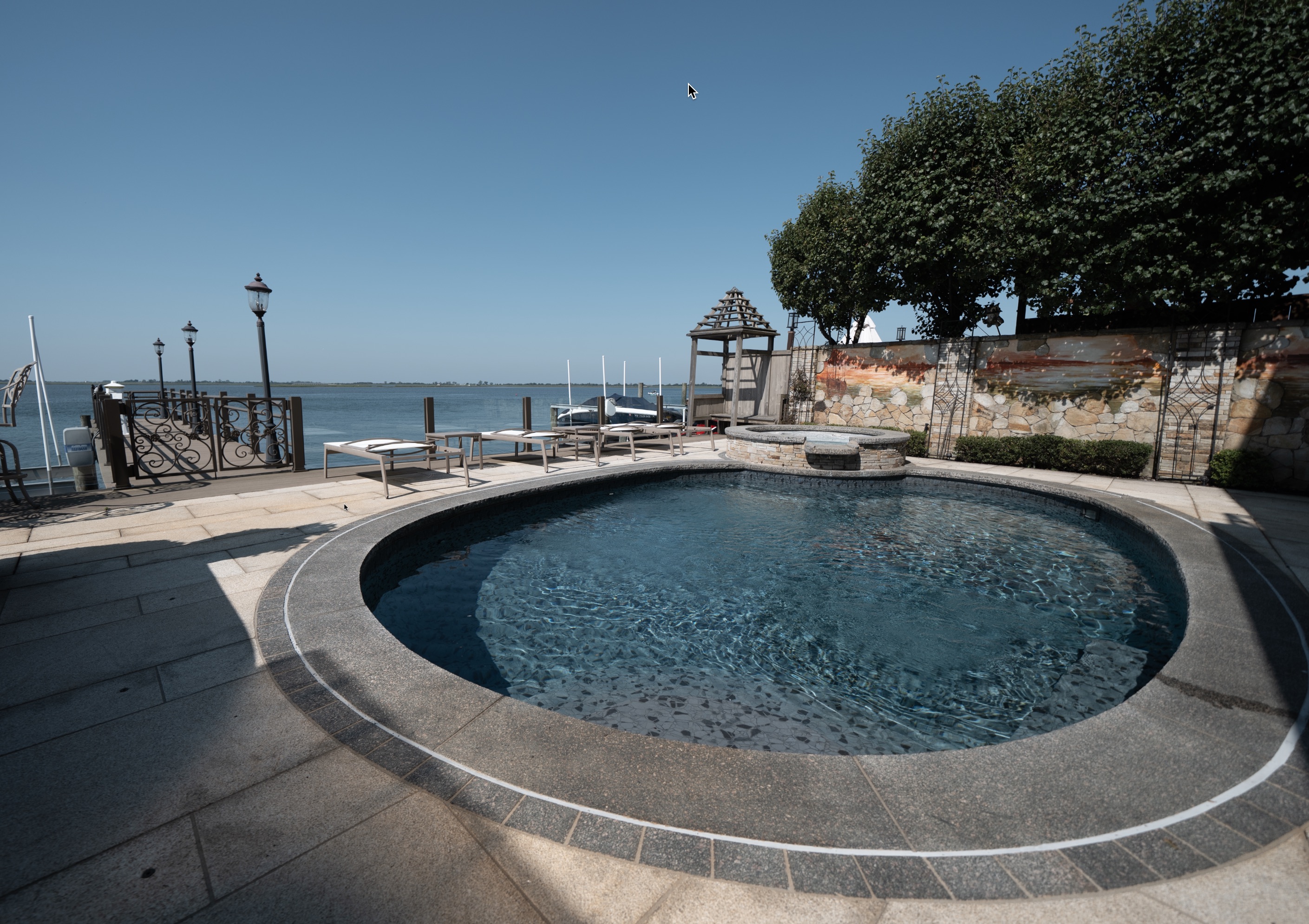
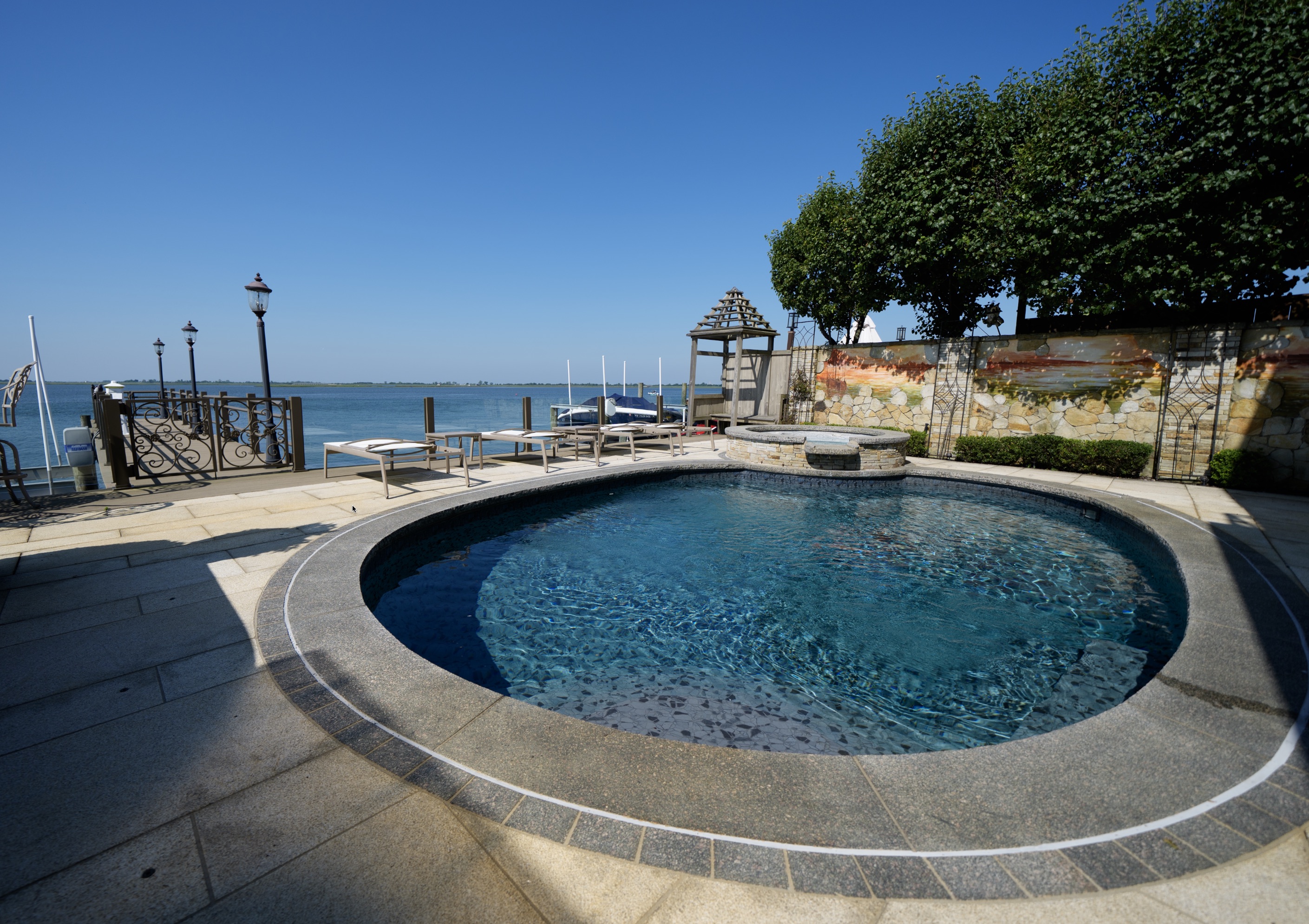
Hello, since version lightroom 14.2 the color of the raw files on the Sony A1 II is completely degraded and this makes editing more complicated whereas on my Sony A7 IV no problem,
on the photos I supply, the greens are completely wrong and don't match reality compared to my Sony A7 IV.
I tried lightroom version 14.1 and the Sony A1 II files are perfectly interpreted! since February, several people have alerted me to this problem and no one has done anything since version 14.2.
no problem on capture one the A7IV and Sony A1 II files look exactly alike.
the attached photos were used with the same lens (Sony 24-70 GM II) with the same iso speed etc.. I'm running Mac OS 15.5 with Lightroom 14.4 on a MacBook Pro M3 MAX.
Honestly, I think it's outrageous for Adobe not to correct this problem.
I give you a google drive link with RAW to Jpeg exports without retouching, screenshots and raw files, also blue is affected, in fact all colors are no longer good after LR 14.1.
p.1 #2 · Lightroom Classic 14.4 Colors not accurate with Sony A1 II
Which profile are you using for this comparison?
This is interesting because a month or two ago a friend mentioned this to me and I started to look more closely at the colours and really didn't like what the Adobe Color profile was doing. It was no where close to the Sony embedded jpegs. I couldn't wrap my head around how I hadn't noticed this previously but if there was a change from 14.1 to 14.2 then maybe that is why I hadn't noticed it before.
I've switched to using Camera NT and adjusting from there and that seems to be closer to Sony's jpeg processing. I've been using Adobe Color for years with A1 and for the first while with A1II.
But when did 14.2 come out? Because the A1II only shipped later Feb? Was 14.1 the version that added A1II support and then 14.2 changed things?
AI has this answer: "Lightroom Classic version 14.2 added support for the Sony a1 Mark II (a1 II) files. While version 14.1 included preliminary support, version 14.2 finalized the support and addressed some color issues."
So I guess the addressing of color issues actually went backwards??
p.1 #3 · Lightroom Classic 14.4 Colors not accurate with Sony A1 II
I use the adobe color profile on lightroom for all my cameras. I even made a raw to jpeg export with adobe color in version 14.1 and 14.2 to show the difference and degradation.
Yes exactly they've done things backwards since the 14.2 update and put a bad profile.
I've also compared dxo and capture one, which are still good in this area, and lightroom version 14.1 comes close to both of them, but for some completely inexplicable reason version 14.2, 14.3 or 14.4 is still bad.
p.1 #8 · Lightroom Classic 14.4 Colors not accurate with Sony A1 II
@Donzo98 I've created and bought a lot of presets for lightroom and they are all based on adobe color so when I browse my presets to choose which one to apply it looks terrible compared to my a7 iv.
p.1 #9 · Lightroom Classic 14.4 Colors not accurate with Sony A1 II
Matck06 wrote:
@Donzo98@ I've created and bought a lot of presets for lightroom and they are all based on adobe color so when I browse my presets to choose which one to apply it looks terrible compared to my a7 iv.
In my shots above... the Camera ST works better. I'm not a high volume shooter, so I don't mind taking a bit more time to edit.
If you shoot a ton... I can definitely see where this is a big problem.
Can you just create, or choose a better profile... and set that as a default... so LR just opens the RAW image with it?
p.1 #10 · Lightroom Classic 14.4 Colors not accurate with Sony A1 II
This is interesting. I find my RAW files to be quite vibrant and saturated, including the greens (in the latest version of LR). I wouldn't want them to be any more saturated than they currently are. My images never look as color muted as in Donzo98' example.
Of course, I am now curious. I just set my A1 II to JPG+RAW and will see how the images compare on my next shoot.
Of course, this would not be the first time that Adobe has imbedded bad profiles in LR. The worst case I experienced was when I shot the Canon 5DSR. Forums were filled with complaints about this problem on this camera. Adobe was notified and never corrected it. I simply took some time and created my own correction profile, so it was not an ongoing problem, for me.
p.1 #11 · Lightroom Classic 14.4 Colors not accurate with Sony A1 II
InFocus2014 wrote:
This is interesting. I find my RAW files to be quite vibrant and saturated, including the greens (in the latest version of LR). I wouldn't want them to be any more saturated than they currently are. My images never look as color muted as in Donzo98' example.
Of course, I am now curious. I just set my A1 II to JPG+RAW and will see how the images compare on my next shoot.
I never shoot JPG.
Take a look and see the difference between the Camera ST and Adobe Standard... I'm curious to see how big the difference is with your A1II.
With that said... it's clearly an Adobe issue... not a Sony one.
Threads in community forums are a good way to find others who empathize/sympathize with you. Everyone impacted needs to open a case with Adobe support. It's the only way problems like this get solved.
p.1 #14 · Lightroom Classic 14.4 Colors not accurate with Sony A1 II
Here is a report from someone who measured the delta E of the sony A1II with the adobe color profile with the latest lightroom update compared to the sony A1 1st of the name
"Ya create a custom profile. It's an Adobe thing. Posting my reply from another thread here as it might be useful.
Yeah, Adobe's color rendering for the Sony A1 II seems quite off at the moment. Especially compared to how much more accurate the Adobe default profile was with the Sony A1.
Sony A1
Adobe Color (Default)
Profile created from chart
Sony A1 II
Adobe Color (Default)
Profile created from chart
The two profiles created from charts match each other closely, with an average DeltaE difference of just 1.15, with the worst 10% of samples having a difference of 2.74.
However, comparing Adobe Color defaults against chart-based profiles:
Sony A1: Average DeltaE difference is 3.01; the worst 10% of samples have a difference of 8.02.
p.1 #15 · Lightroom Classic 14.4 Colors not accurate with Sony A1 II
there is already a post on the adobe forum in the “bug” section but still no action, I have just recreated a post on adobe but I have the impression that they are not going to do anything since february the problem and what is annoying is that version 14.1 works perfectly and makes editing with my other sony super easy.
if you want this color problem corrected please come to my post and comment so we can get it over with.
p.1 #16 · Lightroom Classic 14.4 Colors not accurate with Sony A1 II
InFocus2014 wrote:
OK, I just reproduced what you are describing in LR, by selecting the different profiles. At least I now know which profiles to avoid.
p.1 #17 · Lightroom Classic 14.4 Colors not accurate with Sony A1 II
Donzo98 wrote:
You see how big the difference is?
I do! I just started looking at skin tones on portraits. That now opens a whole new 'can of worms'. When I have time, I'll create a custom profile, as I doubt that Adobe will be responsive to this problem. I have a shoot this week - I prefer shooting the a1 II, but it looks like I will need to shoot my A7R5. I could process in C1, but I use it so seldomly, I am a bit clumsy using it.
p.1 #18 · Lightroom Classic 14.4 Colors not accurate with Sony A1 II
Good evening everyone, I have finally found a solution for the color problem of the sony A1 II and it works as on version 14.1 or capture one without color desaturation for more realistic colors.
I downloaded version 14.1 on another mac and I retrieved in “/Applications/Adobe Lightroom Classic/Adobe Lightroom Classic.app/Contents/Resources/CameraProfiles/adobe standard” the adobe DCP profile of the SONY ILCE-1M2 and I replaced it on my version 14.4 and no more worries.
Proceed in the same way for each new version of lightroom if adobe doesn't fix the problem, so keep the dcp file in your documents to replace it if necessary.
to avoid having to recover the dcp file for version 14.1, I've put it on my drive to help you
p.1 #19 · Lightroom Classic 14.4 Colors not accurate with Sony A1 II
Matck06 wrote:
Good evening everyone, I have finally found a solution for the color problem of the sony A1 II and it works as on version 14.1 or capture one without color desaturation for more realistic colors.
I downloaded version 14.1 on another mac and I retrieved in “/Applications/Adobe Lightroom Classic/Adobe Lightroom Classic.app/Contents/Resources/CameraProfiles/adobe standard” the adobe DCP profile of the SONY ILCE-1M2 and I replaced it on my version 14.4 and no more worries.
Proceed in the same way for each new version of lightroom if adobe doesn't fix the problem, so keep the dcp file in your documents to replace it if necessary.
to avoid having to recover the dcp file for version 14.1, I've put it on my drive to help you