p.4 #1 · Any Issues With Firmware 1.0.3 on a R5MkII?
I went the other way as my curiosity was just killing me. I backward loaded the 1.0.2 just to see what some folks have experienced. I lower light indoors some tests I've run with many a camera seems to indicate indeed it may grab a bit snappier with the older firmware. I want to confirm this outdoors trying to track birds before I make any confirmed statements. But indeed where people are concerned in a picture from a distance as well as my pet bunny's eyes it grabs faster and more confidently. We shall see.
I'm using an R5II with 1.0.2 and am holding off updating to 1.0.3. While I haven't experienced problems to the extent identified with 1.0.3, I have had at least a couple instances during day-long events when the camera appeared to be focusing/tracking (AF box was blue) but wasn't actually focused on the subject (most recently with the 28-70/2). I have also had this happen randomly and rarely with my R6II, also with the 28-70, but probably also with the adapted EF 200-400. And probably also with the R6, but don't specifically remember. In every case I turned off the camera and/or pulled the battery to 'reboot' it. Afterwards AF works correctly.
How are those with the 1.0.3 problem getting the camera to work correctly again? Reboot?
I also tend to have sleep set to a longer delay, if not outright off. The R5II I'm using is a power hog and I continue to run it at multi-hour events directly from a power brick, which allows the luxury of disabling sleep.
p.4 #3 · Any Issues With Firmware 1.0.3 on a R5MkII?
dcisive wrote:
I went the other way as my curiosity was just killing me. I backward loaded the 1.0.2 just to see what some folks have experienced. I lower light indoors some tests I've run with many a camera seems to indicate indeed it may grab a bit snappier with the older firmware. I want to confirm this outdoors trying to track birds before I make any confirmed statements. But indeed where people are concerned in a picture from a distance as well as my pet bunny's eyes it grabs faster and more confidently. We shall see.
Can you please share how did you load the 1.0.2. I would like to try that out too.
I did set the Auto power off to 10 minutes and it has improved the AF performance, but it is still not where it is supposed to be. Thanks for the tip.
p.4 #4 · Any Issues With Firmware 1.0.3 on a R5MkII?
Re: downgrading to a previous firmware version
Not sure how he went back to an older firmware. I believe Canon removed the "swap out SD cards" method (especially since the R5ii has a CF B and SD card slots vs. two SD card slots). So it may involve "dropping the battery" which...is inherently risky (Google at your own peril).
Re: the "theoretical fix" (unproven, just an anecdote from a small group of users on the Canon Rumors forum)
Essentially disable all power saving features. Their working theory is that the power saving feature is somehow disabling AF (why? how? who knows). So Yellow Menu, 4th tab from left, Power Saving menu option. Set Screen dimmer, Screen off, Auto power off and Viewfinder off all to "disabled".
Or do what I did: buy a second body and only update to 1.0.2.
Just kidding, I needed and bought a second body for my workflow, not just to test an older firmware version.
p.4 #6 · Any Issues With Firmware 1.0.3 on a R5MkII?
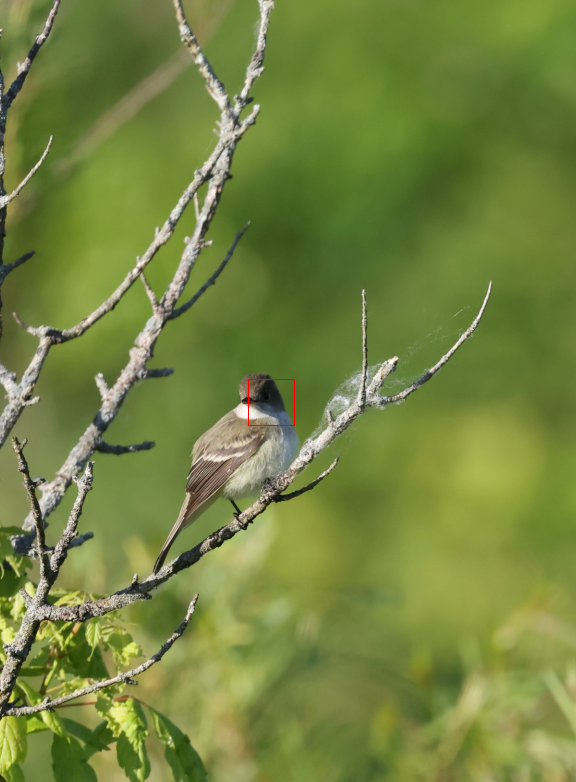
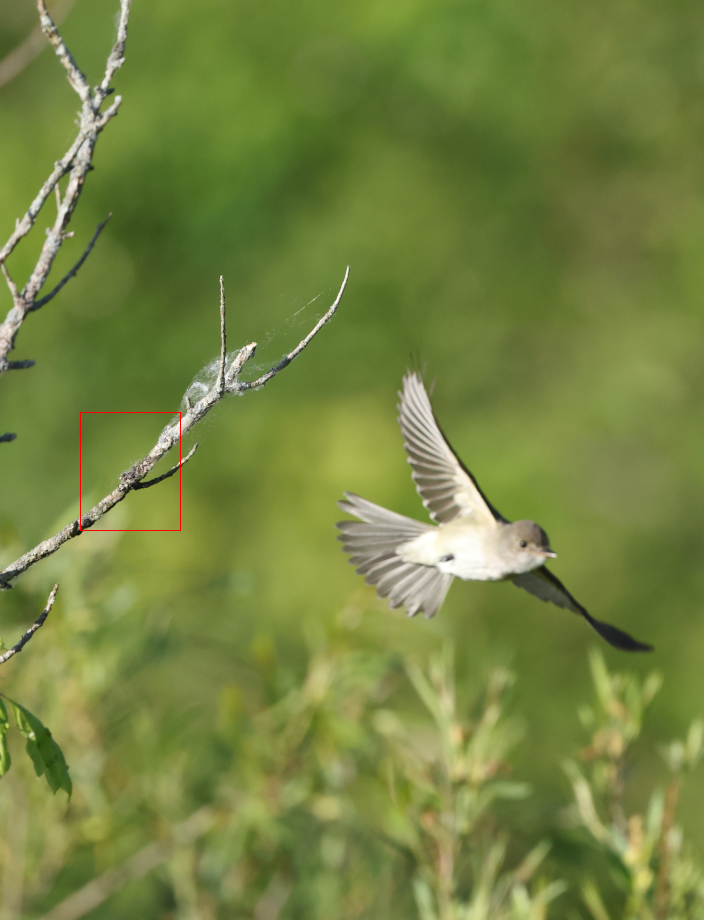
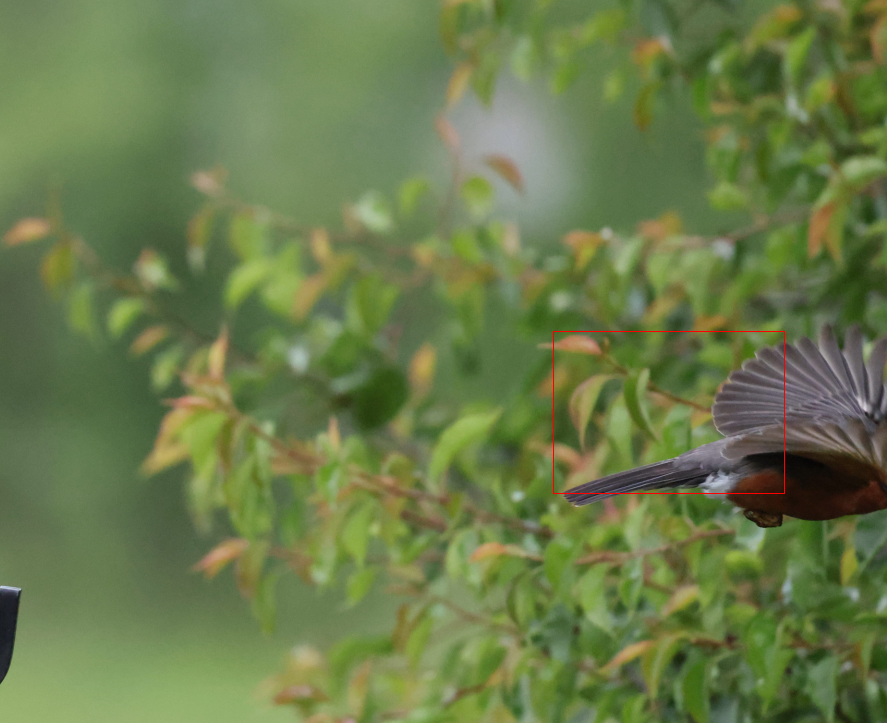
Here are 2 pictures demonstrating the problem with 1.0.3. You can clearly see the small square is tracking the bird and sticks with the branch when the bird takes off. This was not the case with 1.0.2. Ideally in Servo AF, the focus should have stuck with the bird. I have tried several sensitivity settings in AF case menu and there is little to no difference.
p.4 #7 · Any Issues With Firmware 1.0.3 on a R5MkII?
I went out yesterday and was shooting some Heron's in the area. It did a fine job. A Heron that got a tad closer to me tracked blurry which I wasn't used to so have no idea if that was a 1.0.2 ver. fault or not. I noted in my living room last night in relatively lower light shooting some subjects around the room on several occasions with a 24-105 f4L lens it locked up out of focus and in some cases would not lock focus on subjects (the wood on a grandfather clock and the frame of door on a wall which was white against a taupe color). I'd not experienced this before but can't confirm that the 1.0.3 wouldn't do the same. I might be sorely tempted to go back to 1.0.3 just to confirm the so called superiority of the 1.0.2 as I didn't really have problems with the 1.0.3 in the first place.
The method used to get to 1.0.2 from 1.0.3 is online. They took one card and placed the new firmware on it, the other the old. You start by placing the new firmware card in place and entering the firmware update from the menu. Choose OK to what it is asking, then the trick is to literally simultaneously hit the OK button to commit to the upgrade while you are popping open the card door, Exchange the new firmware card with the old firmware card, then close the door. It enters the Firmware Update Program and shows 1.0.3 with an arrow pointing to 1.0.2 and you hit OK and sit back and watch the show for about 10 or so minutes. It's all about how quickly you open that card door when hitting the OK button to commence the process or it won't work. I got it the 2nd time.
p.4 #8 · Any Issues With Firmware 1.0.3 on a R5MkII?
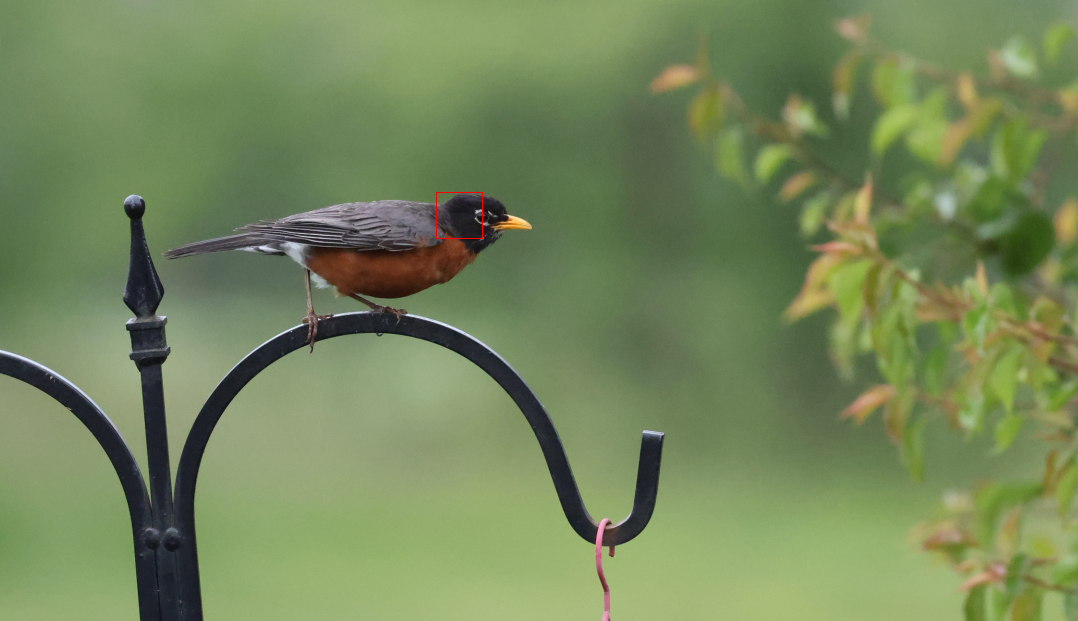
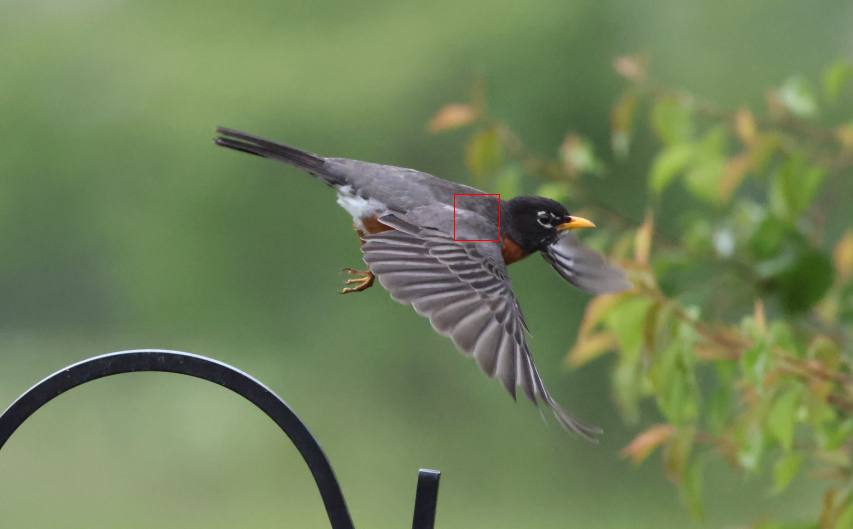
That’s great—I downgraded to version 1.0.2 and did a quick test in the backyard. It looks like the focus now tracks the bird properly, which definitely wasn’t happening during my tests over the weekend with version 1.0.3.
These are just quick proof-of-concept shots. The images are screen grabs that show focus points from the RAW files using Canon DPP. I didn’t worry too much about camera settings this time—my main goal was to confirm if the focus would lock on and follow the bird, and with 1.0.2, it clearly does.
p.4 #9 · Any Issues With Firmware 1.0.3 on a R5MkII?
Carlo_M wrote:
Re: downgrading to a previous firmware version
Not sure how he went back to an older firmware. I believe Canon removed the "swap out SD cards" method (especially since the R5ii has a CF B and SD card slots vs. two SD card slots). So it may involve "dropping the battery" which...is inherently risky (Google at your own peril).
Re: the "theoretical fix" (unproven, just an anecdote from a small group of users on the Canon Rumors forum)
Essentially disable all power saving features. Their working theory is that the power saving feature is somehow disabling AF (why? how? who knows). So Yellow Menu, 4th tab from left, Power Saving menu option. Set Screen dimmer, Screen off, Auto power off and Viewfinder off all to "disabled".
Or do what I did: buy a second body and only update to 1.0.2.
Just kidding, I needed and bought a second body for my workflow, not just to test an older firmware version. ...Show more →
p.4 #10 · Any Issues With Firmware 1.0.3 on a R5MkII?
chillpons wrote:
I am still eyeing that R1
Let us know if you end up pulling the trigger! I have to admit that, 1.0.3 focusing kerfuffle aside, I realized how much I like the R5ii when I had the chance to buy a second body due to some positive developments at work. I could have saved for another month or two and bought an R1...but I realized the R5ii just did pretty much everything I wanted out of a camera. The main reasons I didn't decide to get an R1 were:
1. 8K video. Yeah I don't use it very often, but it's nice to know I *can* use it.
2. Smaller form factor.
3. Muscle memory. I pretty much have the button configs identical between my two R5iis and can operate both without thinking too much about it, even if I have one set up for video and the other for stills, or one set up for medium-to-wide stills and the other for telephoto. The R1 I'd have to re-learn, and knowing how my brain works, I can see myself messing up shots by not remembering which button does what while going from R1 to R5ii.
4. Consistent workflow in Lr/Ps/Dpp. Same MP size, same RAW format, etc.
But don't get me wrong. If I come across another work bonus later this year or next...I'll definitely be tempted by an R1. Unless Canon makes good on finally releasing a telephoto lens in the $5K-$7K range like a 200-600 f/5.6 or 6.3 or whatever the latest rumor is. That would take priority.
p.4 #11 · Any Issues With Firmware 1.0.3 on a R5MkII?
So, I tried the power saving feature thing and haven't seen any difference. With my dog running at me in an open filed the camera will see her, recognize her but take absolutely forever to pull into focus.
What I did do last night that a made a difference, was disable "subject" detection. I tried the good ol' DSLR style AF and it was substantially better at initial AF acquisition. I used all the different size AF areas and points and as soon as I pointed it at her the camera pull right in and lock on. Switched back and was right back tot he same issues.
p.4 #12 · Any Issues With Firmware 1.0.3 on a R5MkII?
That's unfortunate since one of the major reasons for cameras like the R5II is to be able to use the excellent subject detection/tracking AF!
I'm wondering if some cameras are just unfortunate. For example, I'm borrowing a Canon rep's R5II again and in comfortable ambient indoor temperature environments, the camera sucks through batteries like crazy. It also gets quite warm in some place around the body, and this most recently was during a couple 2-hour events where batteries dropped to 1/3 power before the end of the event after a few hundred photos. Point being it's not just a problem in cold environments that other users have complained about.
That camera is still on FW 1.0.2 though and AF has been consistently reliable.
p.4 #13 · Any Issues With Firmware 1.0.3 on a R5MkII?
rscheffler wrote:
That's unfortunate since one of the major reasons for cameras like the R5II is to be able to use the excellent subject detection/tracking AF!
I'm wondering if some cameras are just unfortunate. For example, I'm borrowing a Canon rep's R5II again and in comfortable ambient indoor temperature environments, the camera sucks through batteries like crazy. It also gets quite warm in some place around the body, and this most recently was during a couple 2-hour events where batteries dropped to 1/3 power before the end of the event after a few hundred photos. Point being it's not just a problem in cold environments that other users have complained about.
That camera is still on FW 1.0.2 though and AF has been consistently reliable....Show more →
Maybe mine is cursed! lol the only issue i had prior to the firmware was the lock ups. Now it hasn't locked up once but it doesn't A...doh!
p.4 #14 · Any Issues With Firmware 1.0.3 on a R5MkII?
This issue is such an odd one. I had more issues with 1.0.2 when I downgraded just to see what this was all about. It locked up when trying to focus low light indoors with a 24-105 4L which it did NOT do under the identical situation with 1.0.3 added. Also it refused to focus on a off white colored door frame and wood base of a grandfather clock. I reloaded 1.0.3 and it nailed it no issues. So while I'm not about to point fingers at this with issues with ver. 1.0.3 all I can say is with MY sample of R5MkII 1.0.3 is doing the job. Tracking birds, people, motorcycles and static subjects. I'm staying put awaiting a 1.0.4 down the road. Ordinary Filmmaker on Youtube just reported today Canon is at work preparing the next firmware for the R5MkII and it is supposed to be a more major one with some additions. Should be interesting.
p.4 #15 · Any Issues With Firmware 1.0.3 on a R5MkII?
It bears reinforcing: Canon is in uncharted territory with R5ii (and R1) firmware updates. They have ballooned to 250MB (280+MB for the R1) in size and complexity. R5 firmware was under 60MB. Even the R3 firmware was 90MB. There is so much more going on with the R5ii/R1
They will make mistakes. They will fix a lot of things and in doing so, inadvertently break something else--that's nearly a universal constant in programming. What's the last piece of (advanced) software you used that never needed updating to fix something?
It makes sense that a bug would slip through that only affected a small percentage of people using X type of hardware combinations and Y type of setting configurations. Why? Because if the firmware bug affected everyone's ability to track and focus at 500mm, *they'd likely have caught it in QC*. The problem is that there are thousands (tens of thousands?) of different settings combinations that a user can have, in addition to dozens of lenses to test at hundreds of different focal lengths that it's impossible for a company to test them all. Most of the time they'll program a fix, check against a wide range of lenses, focal lengths, settings, etc. and can extrapolate that if it works in those hundreds of test scenarios, it will work fine at all settings. But obviously that's not always the case--heck they're still fixing things on the latest R3 and R5 firmware and those cameras have been out for several years. Occasionally something slips through and it won't be until it's in the hands of thousands of users that a small subset of users find the bug.
p.4 #16 · Any Issues With Firmware 1.0.3 on a R5MkII?
Just for safety sake I did go with setting all the power saving modes to DISABLE except of course the viewfinder which I set to 30sec. Some were saying that seemed to cure the issue. Perhaps this way at least I'm dodging the bullet. It would certainly make sense that some manner of power level could easily effect the camera's abilities to focus properly. We shall see...........