p.6 #1 · New Apple Studio Machines-Which one for LR/Photoshop with Sony A7RV?
UKBob wrote:
Yes I got a Mac Studio M4 Max last week to replace my 2019 iMac all in one Not really had a chance to put it through it's paces but I did think long and hard about the Mini In the end I went for the Studio for the connectivity and it might sound silly but I use external desktop speakers and I didn't want the headphone jack permanently sticking out the front of the Mini
I overspecced my last iMac 5yrs ago but it had been struggling with upsampling lately and of course it would soon be no longer supported . So I think you have to allow some headroom for future requirements to avoid having to upgrade again in 2 or 3yrs ...Show more →
The same...
- I often use external speakers which are much better
- USB A - I still have at least 10 Drives with USB A and I don't like dongles which also cost good chunk of money
- Thermal... very often, if I don't use AC, my room can get as hot as 90F ( so I prefer have computer which desk not overheat )
p.6 #3 · New Apple Studio Machines-Which one for LR/Photoshop with Sony A7RV?
I just picked up my M4 Max Studio (64GB RAM/2TB SSD, 16CPU/40GPU) a few days ago. As has been the case in the past, the transfer is anything but smooth, albeit fast, even with the two machines connected with a Thunderbolt 4 cable and the migration assistant app. Fortunately, most of the issues are relatively minor, such as re-entering passwords and reviewing settings in LR Classic and Photoshop. There were some minor problems with Carbon Copy Cloner too. I was also able to put my OWC docks in the closet as the ports on the back are sufficient, a much neater desk!
I decided to use my 13 year old NEC PA271W monitor with 14k hours. Happily, with the addition of a USB-A USB-B cable, I was able to profile it with my Spectraview II puck and the Spectraview II software to a Delta E of 0.4 and there's a pretty good print-screen match; I saved some serious money over getting a new monitor as well.
To gdanmitchell, I probably over bought but less so than in the past. The only AI I do is masks in Lightroom Classic and some corrections in Photoshop. I've never added anything to my images with AI, eg "put a penguin in this landscape" and likely never will. It's too soon to tell how much the speed improvements over my previous 2020 iMac with an i9 will be but I'm pleased so far.
It really is a great time to be a photographer, whatever level of interest and expertise one has.
Thanks for all the helpful comments, this is a great group!
p.6 #4 · New Apple Studio Machines-Which one for LR/Photoshop with Sony A7RV?
doc4x5 wrote:
I just picked up my M4 Max Studio (64GB RAM/2TB SSD, 16CPU/40GPU) a few days ago. As has been the case in the past, the transfer is anything but smooth, albeit fast, even with the two machines connected with a Thunderbolt 4 cable and the migration assistant app. Fortunately, most of the issues are relatively minor, such as re-entering passwords and reviewing settings in LR Classic and Photoshop. There were some minor problems with Carbon Copy Cloner too. I was also able to put my OWC docks in the closet as the ports on the back are sufficient, a much neater desk!
I decided to use my 13 year old NEC PA271W monitor with 14k hours. Happily, with the addition of a USB-A USB-B cable, I was able to profile it with my Spectraview II puck and the Spectraview II software to a Delta E of 0.4 and there's a pretty good print-screen match; I saved some serious money over getting a new monitor as well.
To gdanmitchell, I probably over bought but less so than in the past. The only AI I do is masks in Lightroom Classic and some corrections in Photoshop. I've never added anything to my images with AI, eg "put a penguin in this landscape" and likely never will. It's too soon to tell how much the speed improvements over my previous 2020 iMac with an i9 will be but I'm pleased so far.
It really is a great time to be a photographer, whatever level of interest and expertise one has.
Thanks for all the helpful comments, this is a great group!
Regarding transfers from an older Mac to one of the newer M4 Macs, I agree that the ideal approach is not immediately obvious. In most cases I think it is to use Thunderbolt to connect the older machine to the new one as an external drive and then use the software that Apple provides to do the transfer. You can transfer by using a Time Machine backup, but that wasn’t going to be a good option for me since I connect to my Time Machine backup wirelessly… and it wold be S L O W!
Some people recommend doing a completely “clean” setup on a new M4, especially if you are coming from an older Intel Mac, as I was. This reportedly reduces the number of oddball “gotchas” that you might have to deal with. (I encountered a few.) But that has its own downsides, including the time/effort necessary to reinstall all applications and the potential loss of some configuration settings.
I encountered a few little issues, and others should not be surprised if they do, too. In addition to Time Machine I do separate backups using Super Duper (which is similar to Carbon Copy Cloner in some ways). I ended up dup having to erase and reformat some of the drives I was using for that to get it to work on the new machine.
I also had a minor issue with my Epson P9000 printer. The computer saw the printer, but any print files I sent to it simply got stuck in the queue. I resolved it by deleting the printer, downloading new drivers, and adding it back in.
On the other hand the update solved one longstanding issue I’ve had with one external drive. Spotlight indexing would never work on it, despite my research into the reasons and application of a bunch of supposed solutions. However, it now works on the new machine!
p.6 #5 · New Apple Studio Machines-Which one for LR/Photoshop with Sony A7RV?
So, the new Mac Studio M4 Max is in post and doing daily service. It is much faster than the old i5 iMac -- blazing fast with Topaz for example -- typically 5x faster on a whole range of tasks. But the Lightroom improvement is not as much as the other apps, more like 3x than 5x. I have the Apple Silicon version of the LRC app but I wonder if there are some further settings I can change to optimise the performance for the new machine. It may be that I inadvertently migrated some old settings which could now be improved.
Any thoughts or experiences?
p.6 #6 · New Apple Studio Machines-Which one for LR/Photoshop with Sony A7RV?
rob_ww wrote:
So, the new Mac Studio M4 Max is in post and doing daily service. It is much faster than the old i5 iMac -- blazing fast with Topaz for example -- typically 5x faster on a whole range of tasks. But the Lightroom improvement is not as much as the other apps, more like 3x than 5x. I have the Apple Silicon version of the LRC app but I wonder if there are some further settings I can change to optimise the performance for the new machine. It may be that I inadvertently migrated some old settings which could now be improved.
Any thoughts or experiences?...Show more →
I have a similar reaction to the speed up of Adobe applications, in my case the Bridge/ACR/Photoshop combo. It is definitely faster on the M4 machines, but it isn’t “knock your socks off” faster.
That’s not a complaint about the machines — not at all. But it may be a reality check after all of the online hype.
p.6 #7 · New Apple Studio Machines-Which one for LR/Photoshop with Sony A7RV?
Is the Studio base model enough ?
I can buy this one now in Mexico for total of $ 2,034 * ( and the one I really wanted will cost me $3616 ) Does it really make sense to pay such difference for not too much gain ?
Anyone with base model ? Sale for base model ( $500) ends in few days
1) $ 2,034
Apple M4 Max chip with 14‑core CPU, 32‑core GPU, 16‑core Neural Engine
36GB unified memory
512GB SSD storage
2) $3616
Apple M4 Max chip with 16‑core CPU, 40‑core GPU, 16‑core Neural Engine
48GB unified memory
1TB SSD storage
p.6 #8 · New Apple Studio Machines-Which one for LR/Photoshop with Sony A7RV?
PIOK wrote:
Is the Studio base model enough ?
I can buy this one now in Mexico for total of $ 2,034 * ( and the one I really wanted will cost me $3616 ) Does it really make sense to pay such difference for not too much gain ?
Anyone with base model ? Sale for base model ( $500) ends in few days
1) $ 2,034
Apple M4 Max chip with 14‑core CPU, 32‑core GPU, 16‑core Neural Engine
36GB unified memory
512GB SSD storage
2) $3616
Apple M4 Max chip with 16‑core CPU, 40‑core GPU, 16‑core Neural Engine
48GB unified memory
1TB SSD storage
I have the base model and use mainly LR with occasional PS and have no issues with the performance of the system. I have an A7r3 camera. I don’t batch anything, working on one image at a time. Yeh, it takes some time to import a bunch of images…but I just start up the import and go do something else.
I’m not one to pay a bunch more money to squeak out negligible gains in performance. Computers are an area where you pay a lot to get top most performance.
p.6 #9 · New Apple Studio Machines-Which one for LR/Photoshop with Sony A7RV?
PIOK wrote:
Is the Studio base model enough ?
I can buy this one now in Mexico for total of $ 2,034 * ( and the one I really wanted will cost me $3616 ) Does it really make sense to pay such difference for not too much gain ?
Anyone with base model ? Sale for base model ( $500) ends in few days
1) $ 2,034
Apple M4 Max chip with 14‑core CPU, 32‑core GPU, 16‑core Neural Engine
36GB unified memory
512GB SSD storage
2) $3616
Apple M4 Max chip with 16‑core CPU, 40‑core GPU, 16‑core Neural Engine
48GB unified memory
1TB SSD storage
I would say it depends on what you are currently using, and how many years you plan to keep it for. For example, if you are still using an Intel Mac and plan to keep the new Mac for about 3 years, the one for 2.034 will probably be a big improvement, and more than good enough for at least a few years. If you're using an M2 Max already, and want a computer that's faster and would be good for 5+ years, it's probably better to go with the more expensive option.
p.6 #10 · New Apple Studio Machines-Which one for LR/Photoshop with Sony A7RV?
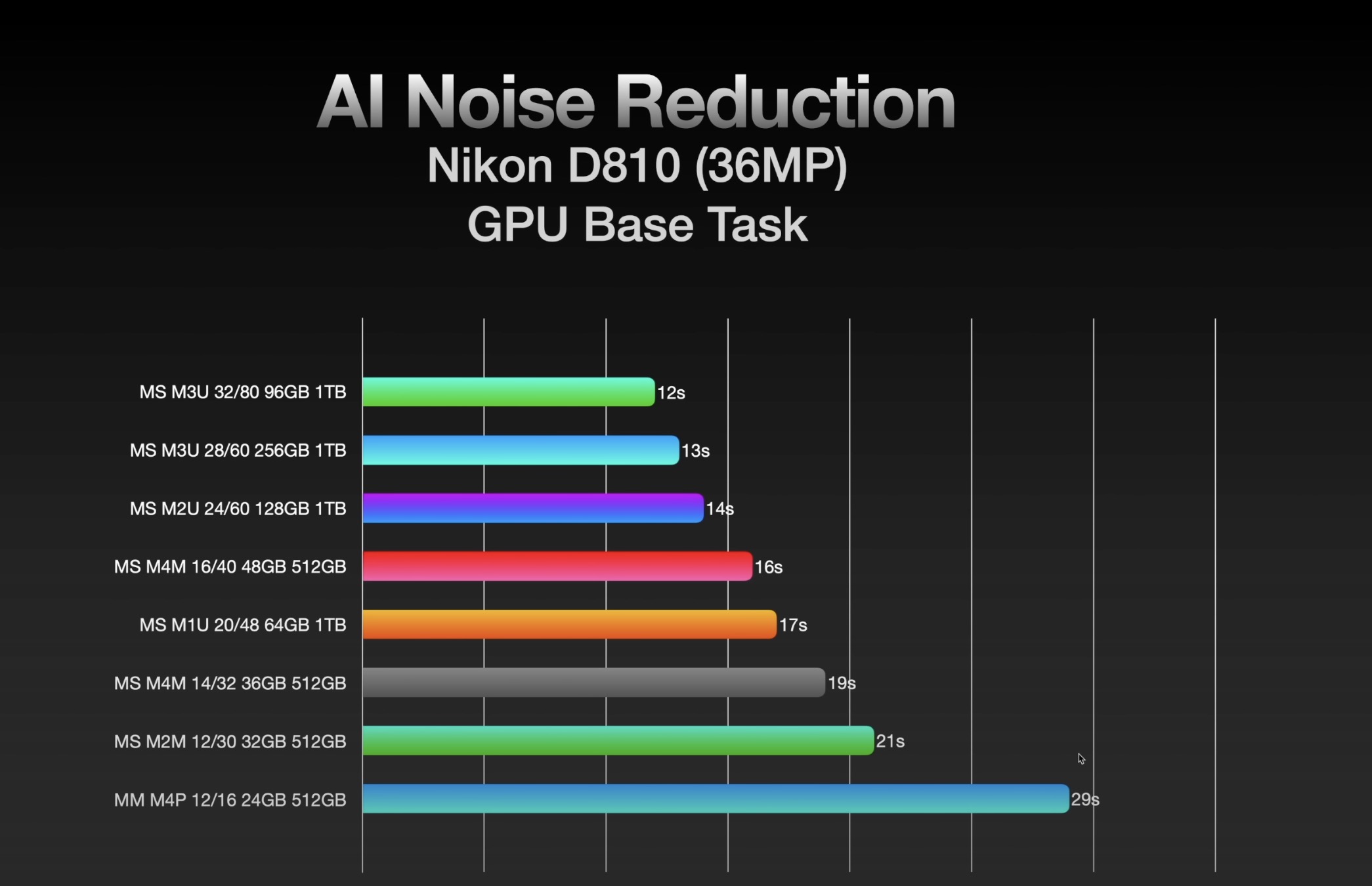
If you use LR Denoise AI feature than with the latest LR update locking you out from doing anything else while running Denoise it would be wise to max out your GPU as that is the main factor in LR Denoise speed.
My 24GPU in the OG M1Max MBP estimates 25s and takes ~29s for an A1II file.
My friends 60GPU in an M2Ultra studio estimates ~4s but in reality takes ~13FPS.
ArtisRight has done numerous tests on LR Denoise and the fastest time he has achieved with a 36MP D850 file is 12s with the latest 80GPU in a Studio. But that is only 1-2s faster than his time with a 60GPU. So gains are marginal at the top end. But compared to my 24GPU the gains are significant now that LR forces you to stare at a progress bar for the entire time. Prior to the latest update you could keep doing other things while Denoise ran in the background.
p.6 #11 · New Apple Studio Machines-Which one for LR/Photoshop with Sony A7RV?
arbitrage wrote:
If you use LR Denoise AI feature than with the latest LR update locking you out from doing anything else while running Denoise it would be wise to max out your GPU as that is the main factor in LR Denoise speed.
My 24GPU in the OG M1Max MBP estimates 25s and takes ~29s for an A1II file.
My friends 60GPU in an M2Ultra studio estimates ~4s but in reality takes ~13FPS.
ArtisRight has done numerous tests on LR Denoise and the fastest time he has achieved with a 36MP D850 file is 12s with the latest 80GPU in a Studio. But that is only 1-2s faster than his time with a 60GPU. So gains are marginal at the top end. But compared to my 24GPU the gains are significant now that LR forces you to stare at a progress bar for the entire time. Prior to the latest update you could keep doing other things while Denoise ran in the background....Show more →
With my two choices we are talking about 19s vs 16s
Right now my computer shows me 1 min for 45 MP file and 35s for 24 MP file. I will use DeNoise from time to time. Yesterday I applied to 70 photos ( 24 MP Body ) at the same time and it took about 40 min - 45 min ?
p.6 #12 · New Apple Studio Machines-Which one for LR/Photoshop with Sony A7RV?
PIOK wrote:
With my two choices we are talking about 19s vs 16s
Right now my computer shows me 1 min for 45 MP file and 35s for 24 MP file. I will use DeNoise from time to time. Yesterday I applied to 70 photos ( 24 MP Body ) at the same time and it took about 40 min - 45 min ?
Yeah, I guess they are really close. Either way you will see a huge improvement over your current setup.
p.6 #13 · New Apple Studio Machines-Which one for LR/Photoshop with Sony A7RV?
I have a new MS M4M with 48Gb etc. Some LRC AI processes take up to 20 seconds, but most are much faster. I haven't measured de-noise but it only takes a few seconds, not enough to disrupt workflow or send me off for a cup of coffee.
AFAIK the M4M is as fast as you can get without spending further big bucks on an Ultra.
p.6 #14 · New Apple Studio Machines-Which one for LR/Photoshop with Sony A7RV?
PIOK wrote:
With my two choices we are talking about 19s vs 16s
Right now my computer shows me 1 min for 45 MP file and 35s for 24 MP file. I will use DeNoise from time to time. Yesterday I applied to 70 photos ( 24 MP Body ) at the same time and it took about 40 min - 45 min ?
Unless that 3s difference really adds up for your needs, it sounds like option 1 would be a great improvement over your current setup, and you can save 1,500 towards buying something even faster a few years down the road if needed. Usually, you are paying a big premium for the fastest computer available at the time. For example, in 3 years time, the M4 Max is now faster than the M1 Ultra.
p.6 #15 · New Apple Studio Machines-Which one for LR/Photoshop with Sony A7RV?
DWOfPaul wrote:
Unless that 3s difference really adds up for your needs, it sounds like option 1 would be a great improvement over your current setup, and you can save 1,500 towards buying something even faster a few years down the road if needed. Usually, you are paying a big premium for the fastest computer available at the time. For example, in 3 years time, the M4 Max is now faster than the M1 Ultra.
Yes I decided to got this base model for really good price from Costco - 3 days Deal was really good ( all other stores including Apple MX sell this specific model for $600 USD more. I hope they will send me soon because now they show regular price and backordered - I guess some people ordered this as well because it was really good deal)
I also think future proof Apple computer does not make sense anymore. I just wish I have 1TB SSD but it will cost me $750 more - no way I see any value for this upgrade


 ) Does it really make sense to pay such difference for not too much gain ?