fredmiranda.com
Login

Moderated by: Fred Miranda
  New fredmiranda.com Mobile Site
  New Feature: SMS Notification alert
  New Feature: Buy & Sell Watchlist
  

FM Forums | Photo Critique | Join Upload & Sell

       2       3       end
  

Twilight Photo


hanay78
Offline
• • •
Upload & Sell: Off
p.1 #1 · Twilight Photo


Dear all,

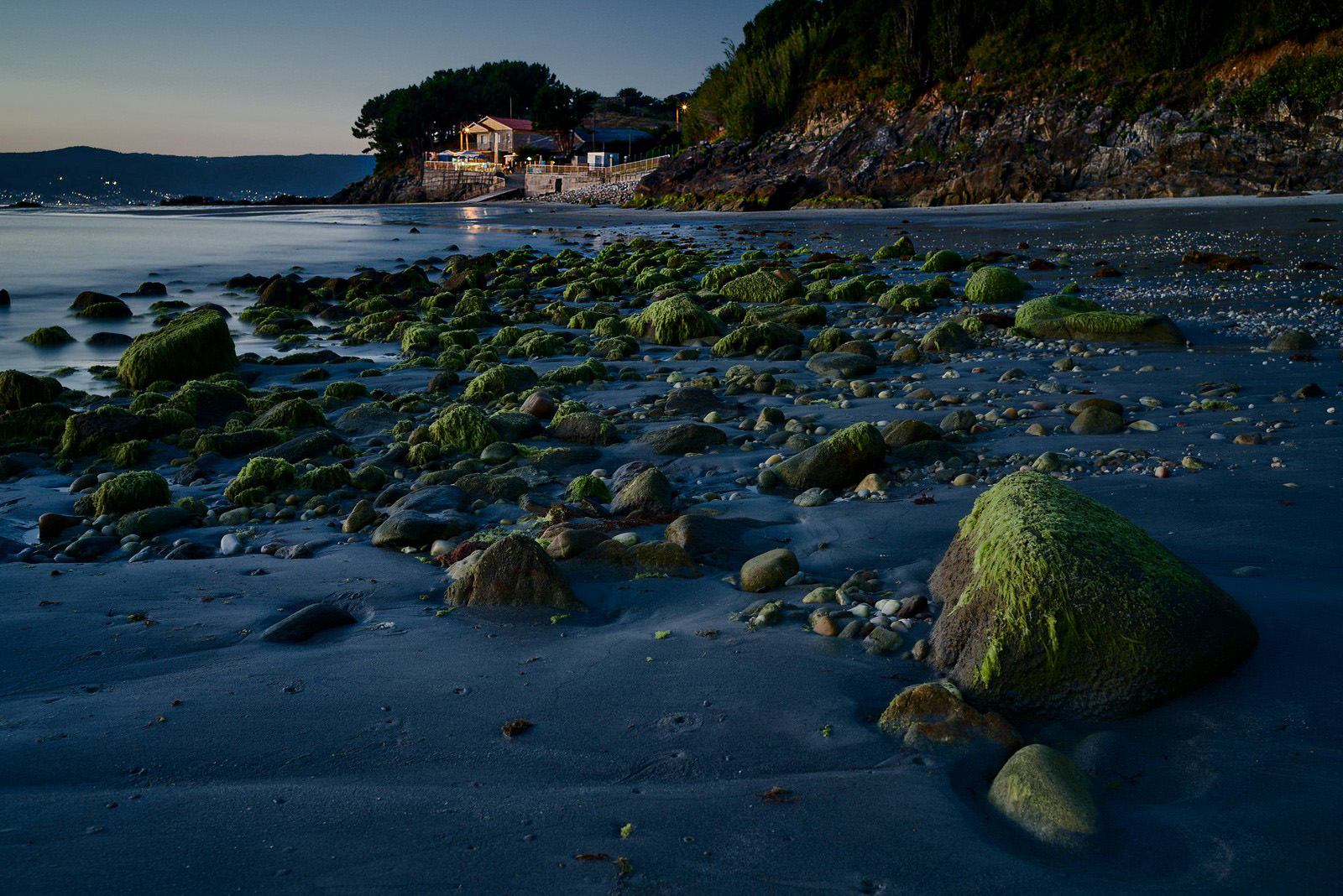
I want to ask any suggestion regarding the post processing of this photograph.

I used an A7RII, mounted in tripod, with a Loxia 35mm lens at f8 shooting at 30s.

The deep of field is not enough, I know This is a constant in many of my photographs lately. A technical camera, for an enthusiast, is probably too expensive, large and heavy. I am not so sure about the possibility to focus stack. The tripod in wet sand in a beach is not so stable. Then one have the huge change in the light conditions at this time of this day, with exposures of 30 seconds. Should I get TS-lenses for such photographs? I am not sure I will bring them to any trip. Maybe too large and heavy.

As usual when post-processing landscapes images in twilight, I never know if I did too much or too little to render this image beautiful.

Thanks in advance

Caillous by Jorge_78, en Flickr


Nov 24, 2024 at 02:45 PM
RustyBug
Offline
• • • • • • •
Upload & Sell: On
p.1 #2 · Twilight Photo


Judging from the tone of you message, it sounds like you are desiring sharp focus, equally throughout the dof from foreground to background. I'm not certain that's a necessity, but in the vein of that notion ...

Given that you exposed this for 30 seconds, you probably could have easily shot a second frame with a hyperfocal focus point, closer to infinity (yet not all the way there), for a reasonable two-shot stack.

As to a T&S lens ... it is an option. There is a small learning curve to using the tilt function of the T&S. Most folks want to apply too much tilt when they first get started. The key there is to understand the "wedge" that gets created from the tilt.

I do think that someone does owe it to themselves to shoot with a T&S lens at least once in their life ... even, if only as an academic exercise. Granted, they cost a penny ... but, certainly less than a technical camera.

I enjoyed mine ... but, I came to realize that I didn't need it as my "bread and butter" lens, so I moved away from it. If you are going to be doing this as your main approach, then I do think it is worth exploring. They tend to hold their value well (if bought used), but the resale market is "slow" for them, so patience is part of the puzzle there.

As to the image itself ... anything I would have would only be my preferences. In other words ... if you have landed it where you like it, then it looks good to me. My salient thought would just be wrt to time of day for twilight can be civil, nautical, astronomical ... which gives you latitude for where you land the amount of "blue" vs. "black" in the color of your light, etc ... vs. neutral WB, et al.

So, here again ... I think you're looking good, if that's the time of day / mood / vibe you want to present.


Nov 24, 2024 at 08:23 PM
grandmas
Offline
• • • •
Upload & Sell: Off
p.1 #3 · Twilight Photo


Not sure what you are going for, but you can always do some selective sharpening when you want different degrees of sharpening in some areas of the image. I made some color adjustments to give the image more pop.

Edited on Feb 21, 2025 at 06:37 PM · View previous versions


Nov 24, 2024 at 09:24 PM
RustyBug
Offline
• • • • • • •
Upload & Sell: On
p.1 #4 · Twilight Photo


Another aspect ... working from what you have ... still on the subject of your desire for dof from FG to BG, is your PP.

Not sure what PP software you are using, but here's an example of using a gradient / mask to apply additional sharpening / texture to your BG, and "reverse gradient masking" the sharpening to feather against the natural occurring optical sharpening as it diminishes more distant from your plane of focus.

Likely you can achieve better results working from your raw, but hopefully you get the gist that you've got some latitude to boost the BG sharpening. Alternatively (I did not on this one), you can apply a FG > BG gradient and "take the edge off" the FG, if you can't get the BG to sharpen up to match the FG.

Takes a bit of practice to dial it in (separate layer / separate mask helps), but it is an approach that doesn't require a technical camera or TS lens. Works reasonably well, once you get a feel for your PP adjustments. Advice would be (lens dependent) to keep your aperture f/11 or f/8 so diffraction doesn't soften things much. Then, you've got the most info to work with when you apply your sharpening variance between BG vs. FG.

HTH


Nov 24, 2024 at 09:56 PM
Shasoc
Offline
• • • • • • •
Upload & Sell: On
p.1 #5 · Twilight Photo


It’s hard to give you some suggestions on how to edit this image, not knowing what you are aiming for. Are you using PS or a different editing program? Is this the unedited file or your edited photo? Unedited, raw files work better if you need some suggestions.

One way that can help your edit is to ask yourself why you took the picture, what attracted you in this scene, and guide your editing so you can show the viewer how you felt about this image emphasizing the element/s that made you take the shot enhancing or altering its colors and/or light.
I also am not sure what you mean by a twilight photo. Do you mean sunrise or sunset? Was it golden hour? The blue hour?

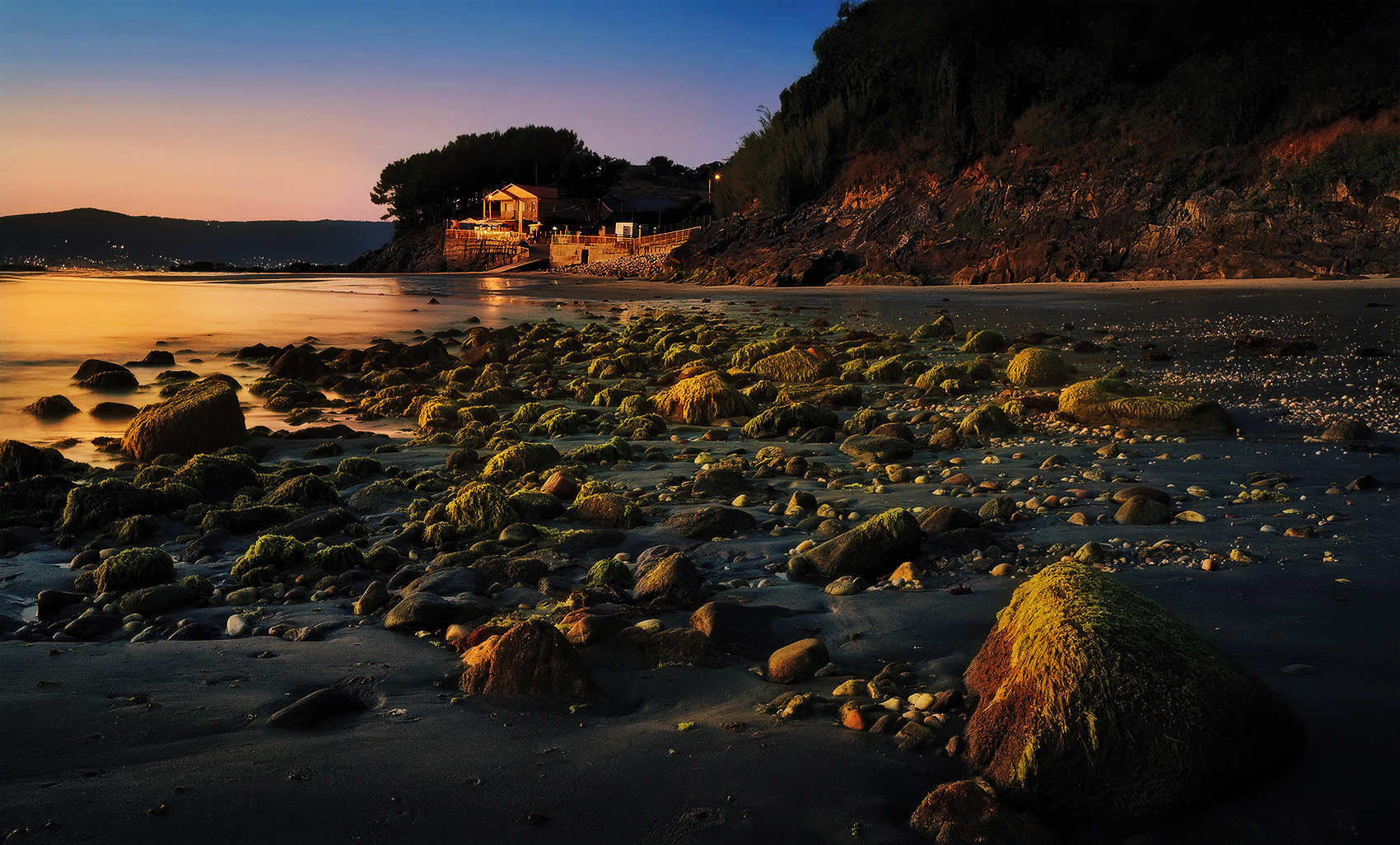
Here is an example of golden hour (type) edit. A very different, exaggerated, direction from your original photo. I am not sure this is what you are looking for so, I am just trying to give you a very different perspective and what can be achieved in PP. Warm colors are always pleasing, pull the viewer in and give a sense of "beauty", while cool colors sort of push the viewer out. The choice is only yours. I hope it helps somehow.

Socrate


Nov 24, 2024 at 11:06 PM
hanay78
Offline
• • •
Upload & Sell: Off
p.1 #6 · Twilight Photo


Dear all, thanks for your suggestions.

@RustyBug Thank you for the trick with the sharpness mask. It looks like a nice way to recover things A second frame with different focus is the easier solution, but in my experience, and considering the other shots I took that day, done between seconds, they look dramatically darker. You made the photograph lighter, slightly lighter in the foreground I believe, and I like this. f11 was too much for this photograph, probably would have been more than a minute.

@grandmas Selective sharpening, as a way of making the rocks pop a little bit more. Interesting. I never play with the sharpening, but with color, lightness contrast,... Probably results would be similar to adding structure?

@Shasoc thanks for the suggestion. It is already a post-processed image. I was trying to make a late twilight picture, definitely blue hour. I like a lot your post-processing in golden hour direction, but it is very far away of the conditions of the light that day there.

In general: I was trying to make a realistic twilight capture, of subtle calm light. I have trials, considering a stronger contrast, color contrast, and more pop of the moss. But in most of the cases the moss take a "radioactive" look, kind of fluorescent. This is of course not desired.

I almost never apply sharpening to my images. I have the impression that this creates artifacts, that I do not want. Your examples proof me that this is a technique I need to take into account.

I really thank you a lot for the help to improve


Nov 25, 2024 at 08:51 AM
Shasoc
Offline
• • • • • • •
Upload & Sell: On
p.1 #7 · Twilight Photo


hanay78 wrote:
@Shasoc@ thanks for the suggestion. It is already a post-processed image. I was trying to make a late twilight picture, definitely blue hour. I like a lot your post-processing in golden hour direction, but it is very far away of the conditions of the light that day there.

In general: I was trying to make a realistic twilight capture, of subtle calm light. I have trials, considering a stronger contrast, color contrast, and more pop of the moss. But in most of the cases the moss take a "radioactive" look, kind of fluorescent. This is of course not desired.

I
...Show more


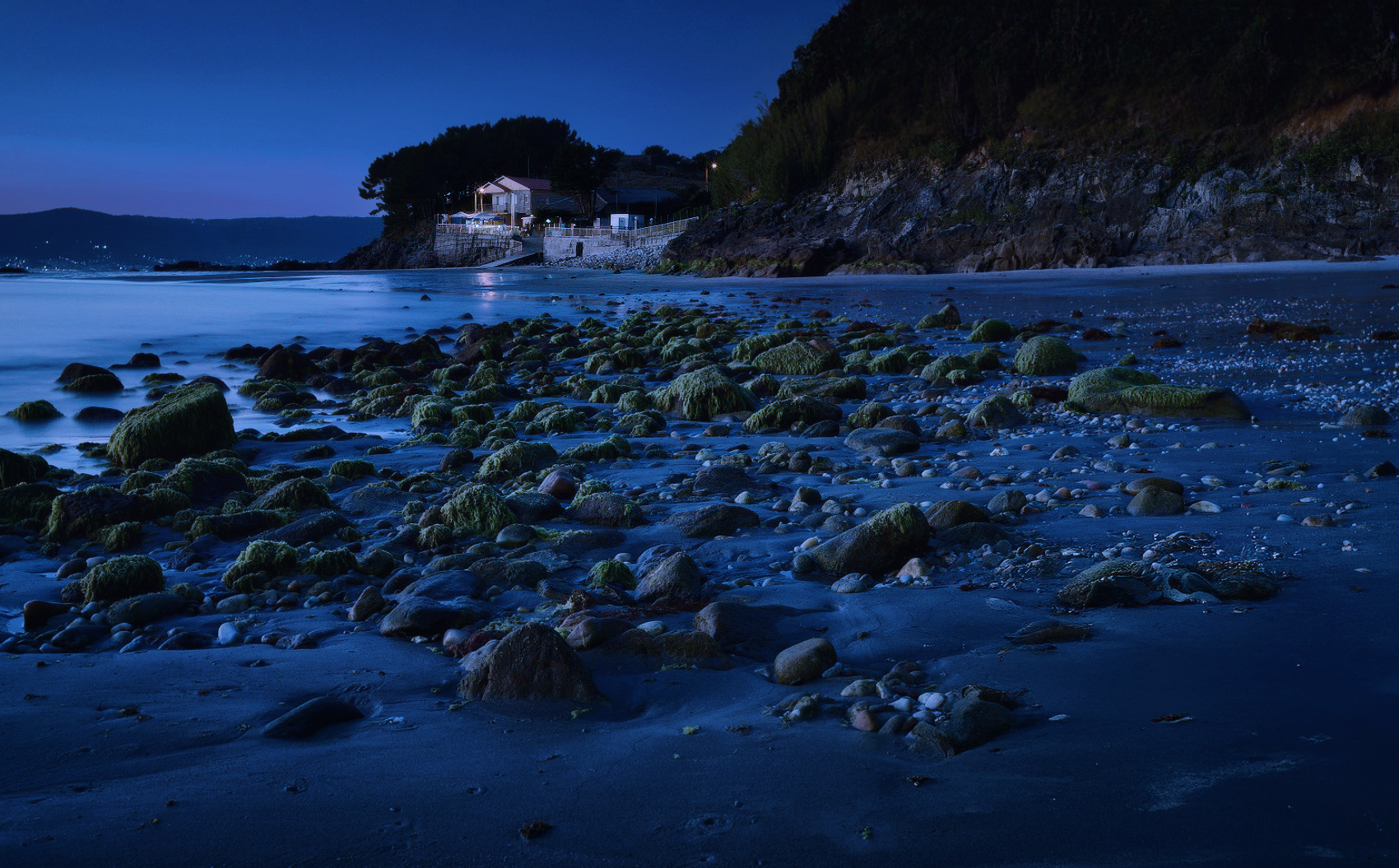
Got you. Blue hour. Which refers to the hour right after the sunset (or before the sun rises), rather than the hour right before the sunset/sunrise as I was thinking. That means no direct lighting, so, my suggestion would be that your editing should be aimed to reduce the brightness, reduce the highlights, and slightly reduce your shadows and contrast. May be a bit of less Sat of the greens.

Then you need to create a bluish cast, that can be achieved using the Temperature slide in CR, curves in PS, using a cooling filter, or better, using the color grading tool in CR.

As far as the sharpness is concerned you may need to resort to AI programs if you want to get some good results w/o creating artifacts.

De latere, I find the FG stone very intruding and distracting in your image. Cloning it out will get you a better feel/composition of the scene, but that could just be a personal taste, and you may just want to de-sat and darken it.

Here is an example in that direction. Using your edited image didn't get me where I wanted to, so it is just a visual aid. You should get better results using the unedited file.

Socrate


Nov 25, 2024 at 03:39 PM
hanay78
Offline
• • •
Upload & Sell: Off
p.1 #8 · Twilight Photo


@Shasoc, I am impressed by the quality of the photograph you generated. The visual impression is incredible. The color variation in the rocks is impressive, completely impressive.

I very much envy your mastery of post-processing

Shasoc wrote:
Got you. Blue hour. Which refers to the hour right after the sunset (or before the sun rises), rather than the hour right before the sunset/sunrise as I was thinking. That means no direct lighting, so, my suggestion would be that your editing should be aimed to reduce the brightness, reduce the highlights, and slightly reduce your shadows and contrast. May be a bit of less Sat of the greens.

Then you need to create a bluish cast, that can be achieved using the Temperature slide in CR, curves in PS, using a cooling filter, or better, using the color grading
...Show more


Nov 25, 2024 at 05:51 PM
Shasoc
Offline
• • • • • • •
Upload & Sell: On
p.1 #9 · Twilight Photo


hanay78 wrote:
@Shasoc@, I am impressed by the quality of the photograph you generated. The visual impression is incredible. The color variation in the rocks is impressive, completely impressive.

I very much envy your mastery of post-processing


Thank you for the kind words. I appreciate it. I’m glad my suggestions have been helpful.

Socrate


Nov 25, 2024 at 11:49 PM
Camperjim
Offline
• • • • •
Upload & Sell: On
p.1 #10 · Twilight Photo


I like your original presentation, except for the lack of focus on the building/walls. Since they are the main areas of interest, I would like to see better sharpness. That should be an easy fix by selective sharpening without oversharpening anything else.

It sounds like you did not want to shoot at 30s but did so because of the low light. As you pointed out that can be an issue with a tripod in the sand.

I would recommend doing some experimentation using higher ISOs. There is no reason with modern cameras to be stuck at ISO 100. My simple Canon 90D or R7 do really well up to ISO 6400 and even higher when needed. If noise becomes an issue, I can clean it up and still retain sharpness and resolution, using either Canon DPP4 software or Topaz Sharpen AI. There are lots of other options that can work equally well.

Edited on Dec 11, 2024 at 08:15 AM · View previous versions


Nov 26, 2024 at 06:56 AM


Search in Used Dept. 

hanay78
Offline
• • •
Upload & Sell: Off
p.1 #11 · Twilight Photo


Thank you very much for your answer!

Camperjim wrote:
I like your original presentation, except for the lack of focus on the building/walls. Since they are the main areas of interest, I would like to see better sharpness. That should be an easy fix by selective sharpening without oversharpening anything else.


yes, this is a point i have learnt thanks to the suggestions of the previous answers. Actually, I have tried to make focus stacking in shots made slightly earlier. The difference in light quality were very significant.

Probably this was the motive why I did not tried with shots made later in the blue hour.

I like the composition of this photograph more than the others in which I could do focus-staking. With focus staking I have a bad relation. One is of course the foliage, that moves. This means nothing for this photo, but in the ones with threes, etc., this is a important issue.

Scheimpflug effect probably is the best way to take such a photograph, but I do not have the equipment, and probably even if I would have had it, I would not have carried it to Galicia for my summer holiday.


It sounds like you did not want to shoot at 30s but did so because of the low light. As you pointed out that can be an issue with a tripod in the sand.


I wanted to do a long exposure, to remove any traces of waves. In the pictures taken earlier that evening I was using ND filters. But 6-10 seconds were enough, as far as I remember. 30s for the conditions of the light at this time was a significant underexposure of the foreground. That was the reason to go f8 and not f11. I never understood why the Sony camera do not provide longer exposures. Of course I have an IR control, but that day I recalled that stayed at home.

It depends of the sand. The one of this beach was quite wet. I had several pictures that were not sharp. Touching the camera again would have made, IMHO, movement of the setup between two shots.


I would recommend doing some experimentation using higher ISOs. There is no reason with modern cameras to be stuck at ISO 100. My simple Canon 90D or R7 do really well up to ISO 6400 and even higher when needed.


Apart of the noise, the amount of recoverable shadow decreases exponentially as far as I remember with high ISO.


If noise becomes and issue, I can clean it up and still retain sharpness and resolution, using either Canon DPP4 software or Topaz Sharpen AI. There are lots of other options that can work equally well.


I know a lot of people use this software. Pitifully, mostly does not work under Linux and although the software can be utilized with a virtual machine with windows, this makes it more cumbersome, and thus less desirable IMHO. In my trials utilizing several of these software, depending on the photograph one can obtain very good or less good results, although I am not very experience in its usage, and thus my opinion is not to be taken into account.


Nov 26, 2024 at 08:38 AM
IndyFab
Offline
• • • • •
Upload & Sell: Off
p.1 #12 · Twilight Photo


A far as DOF, the tripod in the wet sand is not a problem, now if there was waves coming in hitting the feet of the tripod, then I could agree there may be an issue. Even then, there are ways to minimize that.

With todays mirrorless cameras you can always check your image in camera on the back screen or in your view finder to see if you captured the correct DOF & Sharpness for the image you are taking. If your having DOF issues, drop down in F stop, try f11 f16. I prefer to keep the best fstop for the lens I use, and focus stack.

A classic blue hour capture with excellent use of forground. Post processing is subjective, for me in this case I would of opened the shadows selectively a bit more,vs global, as well as sharpness.


Nov 26, 2024 at 11:59 AM
hanay78
Offline
• • •
Upload & Sell: Off
p.1 #13 · Twilight Photo


IndyFab wrote:
A far as DOF, the tripod in the wet sand is not a problem, now if there was waves coming in hitting the feet of the tripod, then I could agree there may be an issue. Even then, there are ways to minimize that.


This can be tricky, and I agree one can minimize that.

If the sand is saturated with water, tends to expel the liquid under pressure. This happens if I was walking or standing nearby, the weight of the tripod itself... Here there was also a source of water, coming from an upper part of the beach, than tends to remove a little bit of sand under the feet of the tripod. This can be minimizing putting the tripod on top or rocks, or something like that, if they are available. Got several shots that were not sharp due to movement, in the 30s of exposition.


With todays mirrorless cameras you can always check your image in camera on the back screen or in your view finder to see if you captured the correct DOF & Sharpness for the image you are taking. If your having DOF issues, drop down in F stop, try f11 f16. I prefer to keep the best fstop for the lens I use, and focus stack.

A classic blue hour capture with excellent use of forground. Post processing is subjective, for me in this case I would of opened the shadows selectively a bit more,vs global, as well as sharpness.


Yes, I agree with you, the photograph improves if shadows are opened a little. But not equally in all monitors. In the one of my laptop, it is almost ok so. In the desktop monitor a little lighter shadows, like the ones of the examples of the other members, are much better.

Maybe somebody can explain me something about it, how different my desktop and laptop monitors handle the shadows. I have calibrated both with x-rite, but still so different behavior. Is one of my monitors much worse than the other? Cheaper monitors handle worse shadows? I really have a very limited knowledge about it.


Nov 28, 2024 at 05:37 AM
IndyFab
Offline
• • • • •
Upload & Sell: Off
p.1 #14 · Twilight Photo


hanay78 wrote:
This can be tricky, and I agree one can minimize that.

If the sand is saturated with water, tends to expel the liquid under pressure. This happens if I was walking or standing nearby, the weight of the tripod itself... Here there was also a source of water, coming from an upper part of the beach, than tends to remove a little bit of sand under the feet of the tripod. This can be minimizing putting the tripod on top or rocks, or something like that, if they are available. Got several shots that were not sharp due to movement,
...Show more

Calibration is only 1 part of the equastion

Its about the nit/lumen Brighness output each monitot has, as well as Image Resolution 2K vs 4K, Panel Type, Color Accuracy, Contrast Ratio,

Key points to consider when evaluating image quality:

Resolution:
1080p (Full HD): Considered the baseline for most everyday tasks.
1440p (QHD): Offers significantly improved clarity compared to 1080p, good for graphic design and gaming.
4K (Ultra HD): The highest standard, providing exceptional detail for demanding applications like video editing and high-resolution content viewing.

Panel type:
IPS (In-Plane Switching): Widely used, offering good color accuracy and viewing angles.
VA (Vertical Alignment): Known for high contrast ratios, but viewing angles can be limited.
OLED (Organic Light Emitting Diode): Offers superior color accuracy, deep blacks, and excellent viewing angles.

Color accuracy:
Measured by Delta E values, where a lower number indicates more accurate color reproduction.

Brightness:
Measured in nits, higher values mean a brighter screen, but too much brightness can cause eye strain.

Contrast ratio:
The difference between the darkest and lightest shades a monitor can display, a higher ratio indicates better detail in dark areas.

Nit / Lumens
https://szledworld.com/nits-vs-lumens.html#:~:text=Lumens%20is%20measuring%20light%20that's,chips%20in%20an%20LED%20monitor.


Nov 28, 2024 at 11:34 AM
Camperjim
Offline
• • • • •
Upload & Sell: On
p.1 #15 · Twilight Photo


hanay78 wrote:
Yes, I agree with you, the photograph improves if shadows are opened a little. But not equally in all monitors. In the one of my laptop, it is almost ok so. In the desktop monitor a little lighter shadows, like the ones of the examples of the other members, are much better.

Maybe somebody can explain me something about it, how different my desktop and laptop monitors handle the shadows. I have calibrated both with x-rite, but still so different behavior. Is one of my monitors much worse than the other? Cheaper monitors handle worse shadows? I really have a
...Show more

Monitors tend to be overly bright and also have a blue tint. This is intentional and works well when doing word processing and reading text. When we post process using an uncalibrated monitor, it is likely that we will find our prints are overly dark and with hues that are too warm. Shadow details that we see on an overly bright monitor can be totally blocked out on a print or when viewing on a calibrated monitor. That will also be noticeable if someone else views those files with a calibrated monitor. When viewing with an uncalibrated monitor, you can never be sure what you will get.

Monitors also vary greatly due to quality issues. Laptop monitors are often very poor although they do continue to get better. Years ago I struggled with post processing on a laptop while I was traveling and did not have access to a desktop computer. A slight change in the viewing angle of the screen made a huge difference in both brightness and color saturatation and hues. I was constantly checking to be sure I was viewing the screen at exactly 90 degrees.


Nov 29, 2024 at 06:54 AM
hanay78
Offline
• • •
Upload & Sell: Off
p.1 #16 · Twilight Photo


Thanks @IndyFab & @Camperjim for the info on the monitors. After the last difficulties, I have got an Eizo CS2731, to try to overcome my deficiencies. I have calibrated it, choosing a luminosity of 90 cd/m^2 which feels comfortable for my room. The colors of the monitor are fantastic, the 2k resolution is on the limit, maybe I should have got the 4k brother.

But I have a question regarding the previous photographs.

I have read in the internet that regarding the luminosity the standard way is to set a luminosity between 80-120 cd/m2. Would you agree with this limits?

Now at 90 cd/m2 the original photograph I edited is ok for me (could be brighter or punchier, according to taste, but it seems more or less ok).

Now, in my opinion, to obtain a "realistic" scene, the histogram of the twilight photographs should be centered below 2/3 of the total luminosity for the areas illuminated by the dim light of the twilight sky. More, in my opinion, gives the impression of a very powerful light source. Here, in the photograph originating this thread, for the bar with its light is ok to be lighter that 2/3 but the rest I would say should even remain under 1/2 if one pursuit the tonalities of a natural scene. Would you, as experienced people, agree with this statement?

For these photographs, in which one gives up on purpose to cover the full spectrum (at least in most of the areas of the photograph) I have the impression that the luminosity of the monitor is a key parameter on the perception of the photograph. So that another person with the same monitor, calibrated at 120 cd/m^2 would see the photograph as unrealistically light, whist other with a monitor working at 70 cd/m^2 would see like a cavern.

Do you share this impressions? I am absolutely not experienced, so any comments are very welcome.


Dec 10, 2024 at 05:45 PM
RustyBug
Offline
• • • • • • •
Upload & Sell: On
p.1 #17 · Twilight Photo


hanay78 wrote:
Thanks @IndyFab@ & @Camperjim@ for the info on the monitors. After the last difficulties, I have got an Eizo CS2731, to try to overcome my deficiencies. I have calibrated it, choosing a luminosity of 90 cd/m^2 which feels comfortable for my room. The colors of the monitor are fantastic, the 2k resolution is on the limit, maybe I should have got the 4k brother.

But I have a question regarding the previous photographs.

I have read in the internet that regarding the luminosity the standard way is to set a luminosity between 80-120 cd/m2. Would you agree with this limits?

Now at
...Show more

+1 you can't control what others have set their monitors to.

Ultimately, what matters is how it pertains to your printing. And, that also depends on the lighting in which the print is displayed, also.

As to the web and other folks ... when I'm concerned, I just pick up my phone and look at what I posted. If it strikes me as too dark for what I want to convey, then I "might" make an edit to brighten it up for the web. Long time members know that I have a bent for the dark, so ... yeah, I get it that what I create and what others think they (don't) see ... may not always be the same thing.

At 90 cd/m^2 ... just roll with it as it suits you, to your needs. Horseshoes and hand grenades ... close enough. It's not like you're playing with 200 cd/m^2 territory (iirc, the photo setpoint on my MBP is around 160 cd/m^2 ... i.e. too bright, but I've learned to mentally compensate). The other thing ... is to read the histogram. That, and to read your RGB values. The numbers are the numbers. If your values are in the 220-235 range, they are whites. If they are in the 235-255 range, they are specular highlights. If they are 0-10 ... probably too dark for anyone to see anything. 11-25, blacks, etc. You get the gist. Learning to land your numbers where you like them ... the cd/m^2 is less important, particularly when you understand human visual accommodation is "variable", also. Land your numbers / histo where you want it. THAT is in YOUR control. What others have their monitors set at ... NOT in your control.

BTW, I brought some of my work to a master printer on Eizo's (I forget what what setpoint he was using) and he wanted to brighten up my work, to bring it to a "proper" exposure and tonal range. That was fine, except ... I wanted it darker for the mood the darker rendering conveyed. So, yeah ... can't always go by what others think. Land your numbers where YOU want them.


Dec 10, 2024 at 06:15 PM
hanay78
Offline
• • •
Upload & Sell: Off
p.1 #18 · Twilight Photo


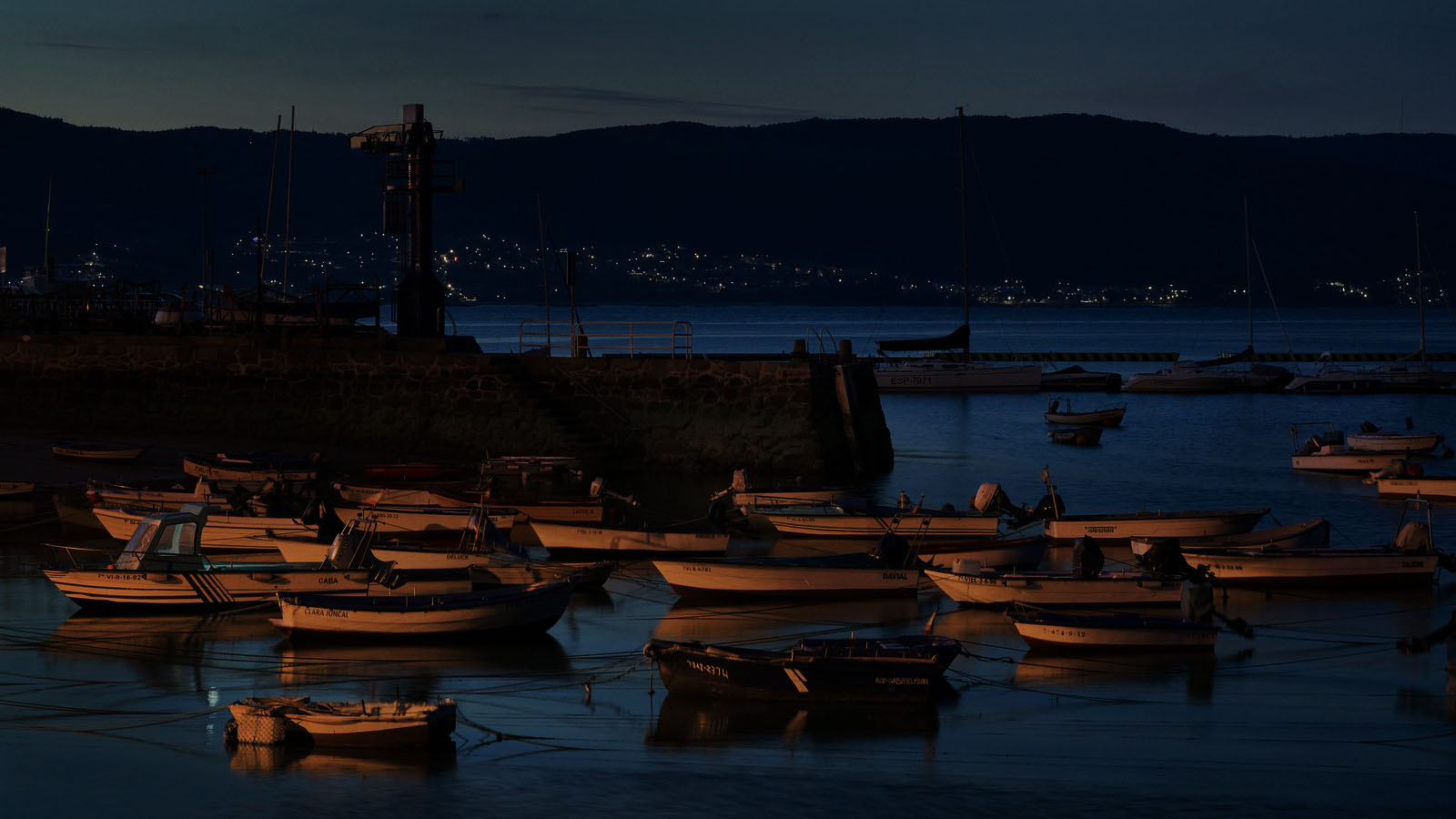
This one is even worse. I have been struggling with it for days. Maybe I feel now more confident to discuss about it. The lightest parts of the barges in Lab have L=60. Lighter, it make them completely unrealistic (in my 90 cd/m^2 monitor is sRBG). There was a dim sodium light in the port that illuminated them dimly. More that 60 is to make them be lighted by a sunset, not dim twilight. There is some shadow clipping. It is a tricky struggle for me to get a reasonable twilight illumination...


Dec 10, 2024 at 06:36 PM
RustyBug
Offline
• • • • • • •
Upload & Sell: On
p.1 #19 · Twilight Photo


Twilight ... is tricky.

But, since there are actually THREE (3) twilights (civil / nautical / astronomical), the range of which you can land it, and it still be "twilight" gives you plenty of latitude.

Imo, there are a few considerations that you have to decide among. Chief among those decisions is are you landing it to showcase the subject matter being illuminated by the twilight lighting (soft, dim, cool), and are trying to offset / correct / adjust for that soft, dim, cool illumination to present your subject well.

OR, are you landing it to showcase the "time of day" ... which during twilight is a time in which it is "difficult" to see things (soft, dim, cool light).

Imo, that is foremost understanding of what your objective for twilight is. Without that clarity of direction for your goals, it is very easy to get caught in "no man's land" between the two. I understand it can be an "odd" thing, to think "I want to make it so folks can't see it very well." But, in the realm of twilight ... that's part of the essence of its presence. The question is then ... does that jive with what you are trying to convey (i.e. mood / time of day)?

Here's a very quick edit. Duplicate Layer (using PS). Blending mode set to "Multiply". Opacity at 70% (dial to taste).

Shadow clipping ... who cares ... it IS freakin' DARK in the shadows during twilight.


Dec 10, 2024 at 06:52 PM
hanay78
Offline
• • •
Upload & Sell: Off
p.1 #20 · Twilight Photo


Dear @RustyBug thank you very very much for your answer!!!!!!

RustyBug wrote:
Twilight ... is tricky.

But, since there are actually THREE (3) twilights (civil / nautical / astronomical), the range of which you can land it, and it still be "twilight" gives you plenty of latitude.


I have checked with suncalc. That day, when I took the photograph, the sun was 6.5 degrees under the horizon. That is, the moment represents the interface between the civil and the nautical twilight.

This is a moment in which I like a lot to shoot, since it represents the interface between seeing something and not seeing anything Also, in terms of public lighting, it is already working, bulbs are hot delivering full light power, and landscape is still partially visible in a dim light. I suppose that the later, for many photographers, could be considered a boring light. I like it, but I find it very challenging


Imo, there are a few considerations that you have to decide among. Chief among those decisions is are you landing it to showcase the subject matter being illuminated by the twilight lighting (soft, dim, cool), and are trying to offset / correct / adjust for that soft, dim, cool illumination to present your subject well.

OR, are you landing it to showcase the "time of day" ... which during twilight is a time in which it is "difficult" to see things (soft, dim, cool light).


I do not want to correct for "good" lighting. I hope I know how to do it. Aesthetically, I do not like that at all. I want to present the subject in soft dim lighting. I cannot visually share the feeling of cool colors in twilight in general. But maybe this is me, or better said, that I cannot interpret what I see at twilight in terms of cool colors.


Imo, that is foremost understanding of what your objective for twilight is. Without that clarity of direction for your goals, it is very easy to get caught in "no man's land" between the two. I understand it can be an "odd" thing, to think "I want to make it so folks can't see it very well." But, in the realm of twilight ... that's part of the essence of its presence. The question is then ... does that jive with what you are trying to convey (i.e. mood / time of day)?


I can state my intentions as: I want to represent the beauty of a place with the delicacy of the dim soft colors of the twilight. For me this is a rich palette, and not forcefully a cold one thanks to westerly sky lighting, reflection of this in clouds, and public lighting. In terms of L, in Lab, I want things to be seen good enough but in the threshold of dimness. This is what I perceive in the field. That is also were I struggle with the equipment and my own incapacity, that gives me, with different equipment, very different results IMHO.

From what I read, in the field, my perception make a kind of HDR treatment. It produces, in the conditions in which I took these photographs, no shadow clipping in the field with my eyes. It produces deep shadows with texture, something I would recognize as zones 1 to 2. This is not in my photographs, in which deep shadows are much darker. I prefer aesthetically darker punchier deep shadows.

I am discussing not only this photograph but in general how to systematize the post-processing of these images, where I struggle systematically.

To reproduce a realistic dim light scene, in the threshold of civil and nautic twilight, what is in your opinion, the adequate L value of white things illuminated with natural light?


Here's a very quick edit. Duplicate Layer (using PS). Blending mode set to "Multiply". Opacity at 70% (dial to taste).

Shadow clipping ... who cares ... it IS freakin' DARK in the shadows during twilight.


Dec 11, 2024 at 08:15 AM
       2       3       end


FM Forums | Photo Critique | Join Upload & Sell

       2       3       end


Welcome back
Log in to your account