This topic is in the 2024 archive. You can read it and like its posts here. It is read only.
Archive 2024What Film Simulations are you using?
p.2 #1What Film Simulations are you using?
Sharona wrote:
This recipe yields the best results when using a white balance preset like Daylight, but it also comes close with auto white balance (AWB). Adding clarity is up to you, it's optional.
I also created a Nostagic Neg that it's very close to the Fuji's. It's a good option for those with older cameras without these new profiles. Achieving a perfect match is impossible since Fuji's RAW Studio doesn't allow for individual color adjustments; it only offers temperature and tint controls. However, one can come close to replicating the colors and tones.Fred - Did you share the Nostalgic Neg anywhere? I'd love to add it to my V. Thanks!
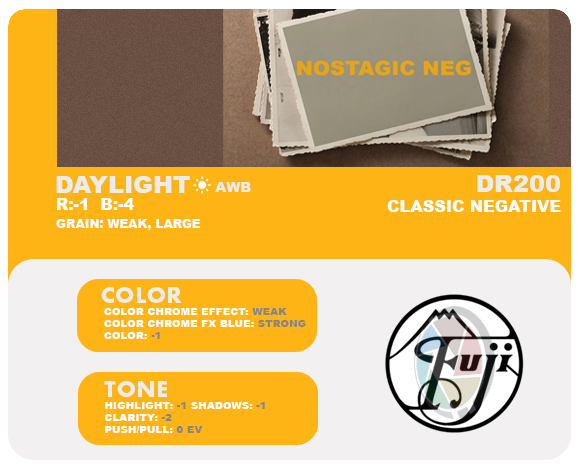
Here is the Nostalgic Negative simulation recipe for those without this profile on their cameras. I'm getting great accuracy with the Fuji version. Although Daylight or a Preset WB is preferable, it works great with AWB as well.
Fred Miranda wrote
I experimented with it today and managed to achieve a result that closely resembles the Fuji Reala Ace simulation. While I've come across some online recipes using Classic Neg as base, they don't quite match the new Reala sim. For accurate greens and reds, it's preferable to start with Classic Chrome.This recipe yields the best results when using a white balance preset like Daylight, but it also comes close with auto white balance (AWB). Adding clarity is up to you, it's optional.
I also created a Nostagic Neg that it's very close to the Fuji's. It's a good option for those with older cameras without these new profiles. Achieving a perfect match is impossible since Fuji's RAW Studio doesn't allow for individual color adjustments; it only offers temperature and tint controls. However, one can come close to replicating the colors and tones.
Here is the Nostalgic Negative simulation recipe for those without this profile on their cameras. I'm getting great accuracy with the Fuji version. Although Daylight or a Preset WB is preferable, it works great with AWB as well.
Mar 09, 2024 at 12:32 PM
p.2 #2What Film Simulations are you using?
There is plenty of very good SOOC recipes 
https://www.ivanyolo.com/fujifilm-recipes/
https://www.ivanyolo.com/fujifilm-recipes/
Mar 09, 2024 at 12:35 PM
p.2 #3What Film Simulations are you using?
For stock sims, I am a diehard Classic Chrome lover. Nos Neg would be next.
For recipes, my absolute fav is Vericolor Warm on Fuji Weekly, its a great warm tone on later afternoon shots. I found a recipe that mimics Leica that is a touch colorful, Pro400H is my other color.
I shoot my X-H2 a ton in B&W, I have an Acros-G recipe that I absolutely love.
For recipes, my absolute fav is Vericolor Warm on Fuji Weekly, its a great warm tone on later afternoon shots. I found a recipe that mimics Leica that is a touch colorful, Pro400H is my other color.
I shoot my X-H2 a ton in B&W, I have an Acros-G recipe that I absolutely love.
Mar 10, 2024 at 04:08 PM
p.2 #4What Film Simulations are you using?
kenbennett wrote:
I've been using Astia for many years, and lately have been playing with Nostalgic Negative. I shoot raw, though, so I'm not really worried about which color profile the camera sets.
Based on a lot of the recipes I see online, Astia doesn't get enough love. I have been trying it out a bit more recently and really enjoy it with just the default settings. Sometimes I will punch up the H & S by +1 to get some more contrast as well.
I've been using Astia for many years, and lately have been playing with Nostalgic Negative. I shoot raw, though, so I'm not really worried about which color profile the camera sets.
Based on a lot of the recipes I see online, Astia doesn't get enough love. I have been trying it out a bit more recently and really enjoy it with just the default settings. Sometimes I will punch up the H & S by +1 to get some more contrast as well.
Mar 11, 2024 at 12:32 PM
p.2 #5What Film Simulations are you using?
sherril8 wrote:
Based on a lot of the recipes I see online, Astia doesn't get enough love. I have been trying it out a bit more recently and really enjoy it with just the default settings. Sometimes I will punch up the H & S by +1 to get some more contrast as well.
For landscape photography, I favor Astia over Velvia. Astia has slightly less saturation, which helps prevent colors from becoming too intense and losing detail (clipping). It also has lower contrast, which is important for retaining highlight detail.
kenbennett wrote
I've been using Astia for many years, and lately have been playing with Nostalgic Negative. I shoot raw, though, so I'm not really worried about which color profile the camera sets.For landscape photography, I favor Astia over Velvia. Astia has slightly less saturation, which helps prevent colors from becoming too intense and losing detail (clipping). It also has lower contrast, which is important for retaining highlight detail.
Mar 11, 2024 at 04:52 PM
p.2 #6What Film Simulations are you using?
Nostalgic Negative is far and away my favorite, followed by Acros.
Mar 13, 2024 at 08:46 AM
p.2 #7What Film Simulations are you using?
I normally use Provia, or Velvia if I'm processing with DxO or C1, and sometimes Astia or Across.
The rest of the "recipes" look too much like the processing mistakes I spent several decades learning not to make.
The rest of the "recipes" look too much like the processing mistakes I spent several decades learning not to make.
Mar 18, 2024 at 11:16 AM
p.2 #8What Film Simulations are you using?
I use ones that mimics
1. Tri-X pushed called Luigi B&W
2. Portra 400 tweaked for melanated skin tones called Reggie's Portra
3. Fujichrome slide for sunsets and skies or anytime I want to create that slide film shading
4. Superia 400 for cloudy days and indoors
5. Reala Ace for pastel colors
6. Kodak Gold for warm colors
7. Cinestill 800T for nightlights
1. Tri-X pushed called Luigi B&W
2. Portra 400 tweaked for melanated skin tones called Reggie's Portra
3. Fujichrome slide for sunsets and skies or anytime I want to create that slide film shading
4. Superia 400 for cloudy days and indoors
5. Reala Ace for pastel colors
6. Kodak Gold for warm colors
7. Cinestill 800T for nightlights
Mar 24, 2024 at 10:58 PM
p.2 #9What Film Simulations are you using?
From the Fujifilm standard film simulations available on my X-S10 and also on C1 Pro for my X-S10 raw files, I like Astia, Classic Chrome and Classic Neg the most. Would be nice to have the newer ones like Nostalgic Neg and Reala Ace too but X-S10 is too old to get those. I don't use the B&W sims at all.
Other than picking from the built-in film simulations, I don't use SOOC recipes and I don't try to get the final result with in-camera JPEGs, I pretty much always export from raw via C1 Pro and I pick and choose the final film simulation there either from the Fuji standard options or from a number of other filmic looks that I have as C1 Pro presets + I may do other adjustments at the same time.
All lens compensation settings (including vignetting compensation) seem to be applied automatically on SOOC JPEGs based on EXIF data provide by the lens (at least with my X-S10 + my X-mount CV lenses) and there's no UI control that would allow e.g. disabling of vignetting compensation in-camera, so I prefer to do the PP in C1 Pro where all those things can be controlled. In most cases I like to keep vignetting as-is without compensating for it.
Other than picking from the built-in film simulations, I don't use SOOC recipes and I don't try to get the final result with in-camera JPEGs, I pretty much always export from raw via C1 Pro and I pick and choose the final film simulation there either from the Fuji standard options or from a number of other filmic looks that I have as C1 Pro presets + I may do other adjustments at the same time.
All lens compensation settings (including vignetting compensation) seem to be applied automatically on SOOC JPEGs based on EXIF data provide by the lens (at least with my X-S10 + my X-mount CV lenses) and there's no UI control that would allow e.g. disabling of vignetting compensation in-camera, so I prefer to do the PP in C1 Pro where all those things can be controlled. In most cases I like to keep vignetting as-is without compensating for it.
Mar 25, 2024 at 04:46 AM
p.2 #10What Film Simulations are you using?
Juha Kannisto wrote:
All lens compensation settings (including vignetting compensation) seem to be applied automatically on SOOC JPEGs based on EXIF data provide by the lens (at least with my X-S10 + my X-mount CV lenses) and there's no UI control that would allow e.g. disabling of vignetting compensation in-camera, so I prefer to do the PP in C1 Pro where all those things can be controlled. In most cases I like to keep vignetting as-is without compensating for it.
Yup, that's one of the biggest flaws with Fuji JPG's. You are not allowed to turn vignetting correction off, and the correction is so aggressive (100%) that it looks bad. :-/
All lens compensation settings (including vignetting compensation) seem to be applied automatically on SOOC JPEGs based on EXIF data provide by the lens (at least with my X-S10 + my X-mount CV lenses) and there's no UI control that would allow e.g. disabling of vignetting compensation in-camera, so I prefer to do the PP in C1 Pro where all those things can be controlled. In most cases I like to keep vignetting as-is without compensating for it.
Yup, that's one of the biggest flaws with Fuji JPG's. You are not allowed to turn vignetting correction off, and the correction is so aggressive (100%) that it looks bad. :-/
Mar 25, 2024 at 04:48 AM
p.2 #11What Film Simulations are you using?
Makten wrote:
Yup, that's one of the biggest flaws with Fuji JPG's. You are not allowed to turn vignetting correction off, and the correction is so aggressive (100%) that it looks bad. :-/
I agree. It would be nice to see natural lens vignetting for the JPGs.
Juha Kannisto wrote
All lens compensation settings (including vignetting compensation) seem to be applied automatically on SOOC JPEGs based on EXIF data provide by the lens (at least with my X-S10 + my X-mount CV lenses) and there's no UI control that would allow e.g. disabling of vignetting compensation in-camera, so I prefer to do the PP in C1 Pro where all those things can be controlled. In most cases I like to keep vignetting as-is without compensating for it.I agree. It would be nice to see natural lens vignetting for the JPGs.
Mar 25, 2024 at 10:29 AM
p.2 #12What Film Simulations are you using?
Juha Kannisto wrote:
From the Fujifilm standard film simulations available on my X-S10 and also on C1 Pro for my X-S10 raw files, I like Astia, Classic Chrome and Classic Neg the most. Would be nice to have the newer ones like Nostalgic Neg and Reala Ace too but X-S10 is too old to get those. I don't use the B&W sims at all.
Other than picking from the built-in film simulations, I don't use SOOC recipes and I don't try to get the final result with in-camera JPEGs, I pretty much always export from raw via C1 Pro and I pick and...Show more →
My X-Pro3 also lacks Reala Ace and Nostalgic Neg simulations. However, in my opinion, when comparing the outputs side by side, the settings I shared on this thread for those two simulations are quite similar to what Fuji offers, especially if you're using an X-Trans IV sensor.
From the Fujifilm standard film simulations available on my X-S10 and also on C1 Pro for my X-S10 raw files, I like Astia, Classic Chrome and Classic Neg the most. Would be nice to have the newer ones like Nostalgic Neg and Reala Ace too but X-S10 is too old to get those. I don't use the B&W sims at all.
Other than picking from the built-in film simulations, I don't use SOOC recipes and I don't try to get the final result with in-camera JPEGs, I pretty much always export from raw via C1 Pro and I pick and...Show more →
My X-Pro3 also lacks Reala Ace and Nostalgic Neg simulations. However, in my opinion, when comparing the outputs side by side, the settings I shared on this thread for those two simulations are quite similar to what Fuji offers, especially if you're using an X-Trans IV sensor.
Mar 25, 2024 at 10:32 AM
p.2 #13What Film Simulations are you using?
Ritchie Roesch at FujiX Weekly has a Reala Ace recipe. https://fujixweekly.com/2024/03/23/the-new-reala-ace-film-simulation-is-actually/
Mar 25, 2024 at 01:13 PM
p.2 #14What Film Simulations are you using?
TENOG wrote:
Ritchie Roesch at FujiX Weekly has a Reala Ace recipe. https://fujixweekly.com/2024/03/23/the-new-reala-ace-film-simulation-is-actually/
I've given that specific one a go, but unfortunately, it doesn't quite hit the mark compared to Fuji's Reala Ace, not even close. The same goes for their Negative Neg. Now, don't get me wrong, I really appreciate many of Richie's simulations, such as his Ektar, Portra 400, and Kodachrome II -- they're spot on. But, some of them just miss the mark when it comes to capturing Fuji's own simulations or specific film looks.
Ritchie Roesch at FujiX Weekly has a Reala Ace recipe. https://fujixweekly.com/2024/03/23/the-new-reala-ace-film-simulation-is-actually/
I've given that specific one a go, but unfortunately, it doesn't quite hit the mark compared to Fuji's Reala Ace, not even close. The same goes for their Negative Neg. Now, don't get me wrong, I really appreciate many of Richie's simulations, such as his Ektar, Portra 400, and Kodachrome II -- they're spot on. But, some of them just miss the mark when it comes to capturing Fuji's own simulations or specific film looks.
Mar 25, 2024 at 03:00 PM
p.2 #15What Film Simulations are you using?
I haven't found a good simulation of Cinestill 800T yet. I really like that film and I'm trying hard to recreate its appearance as accurately as possible. However, it's challenging to get a perfect match because Fuji doesn't provide individual color adjustment settings, only white balance fine-tuning.
Here is what I got so far but still may tweak a bit. I'm waiting to develop a recent Cinestill roll under various lighting to confirm the settings. Feel free to try it.
Film Simulation: Classic Neg
Grain Effect: Strong, Large
Color Chrome Effect: Strong
Color Chrome FX Blue: Strong
White Balance: (Fluorecent Light 2), -5 Red & -4 Blue
Highlight Tone: -1
Shadow Tone: +2
Color: +4
Sharpness: -2
Noise Reduction: -4
Clarity: -5 (to soften the edges and enhance the halation effect)
Dynamic Range: DR200
PS: If you're not a fan of using clarity, you can opt for a diffusion filter instead.
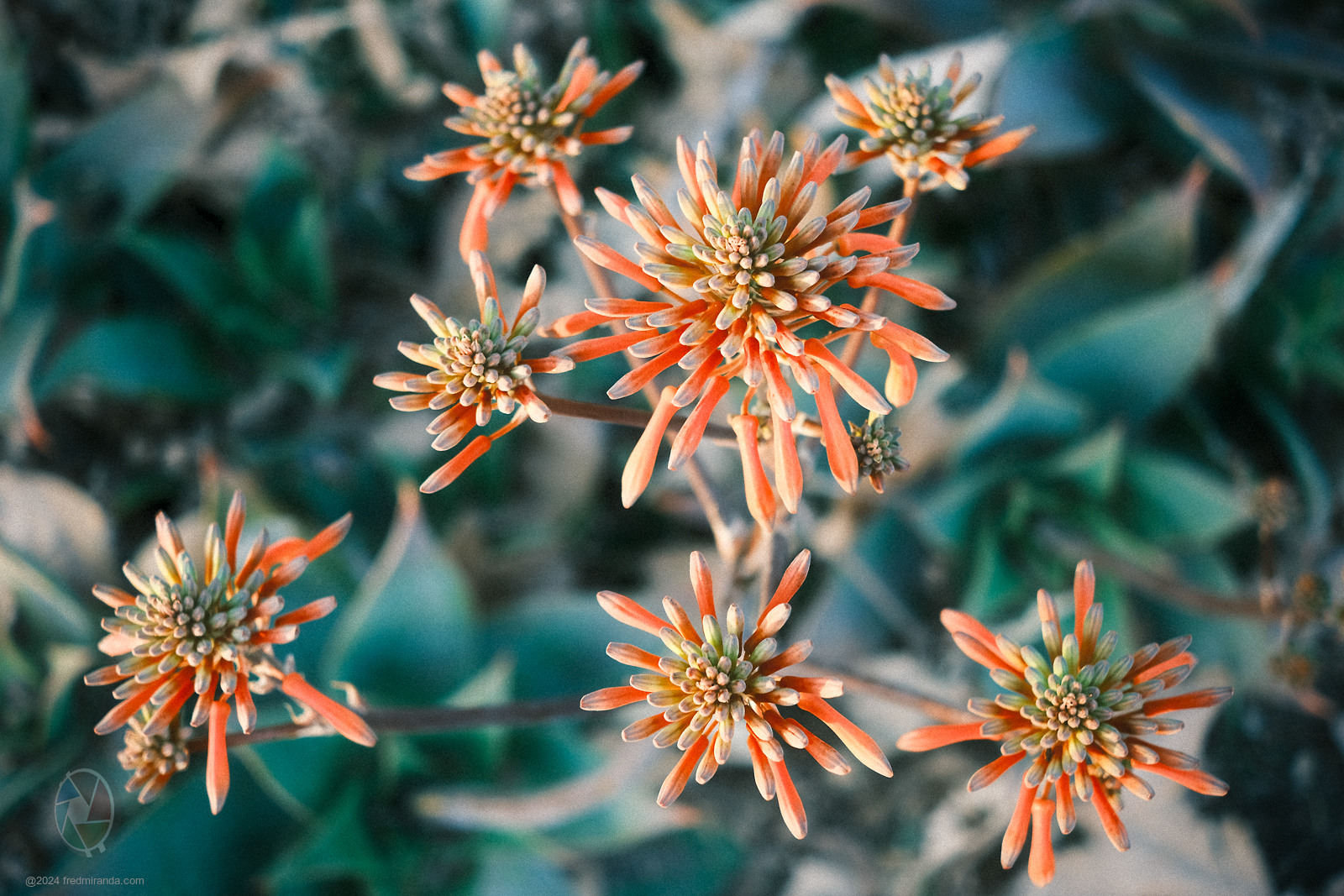
Here is a sample shot during the day
Here is what I got so far but still may tweak a bit. I'm waiting to develop a recent Cinestill roll under various lighting to confirm the settings. Feel free to try it.
Film Simulation: Classic Neg
Grain Effect: Strong, Large
Color Chrome Effect: Strong
Color Chrome FX Blue: Strong
White Balance: (Fluorecent Light 2), -5 Red & -4 Blue
Highlight Tone: -1
Shadow Tone: +2
Color: +4
Sharpness: -2
Noise Reduction: -4
Clarity: -5 (to soften the edges and enhance the halation effect)
Dynamic Range: DR200
PS: If you're not a fan of using clarity, you can opt for a diffusion filter instead.
 |
||
 |
||
|
Here is a sample shot during the day
Mar 25, 2024 at 03:03 PM
p.2 #16What Film Simulations are you using?
Putting in a vote for Classic Cuban Neg by osanbilgi on Reddit: https://www.reddit.com/r/fujifilm/comments/19d709x/new_film_recipe_by_osanbilgi_shot_on_xt5_and/
Classic Cuban Negative:
Dynamic Range: 400%
Film Sim: Classic Negative
Grain Effect: Weak, Large
Color Chrome Effect: Weak
Color Chrome Blue Effect: Strong
White-balance: Auto R:4 B:-5
Highlights: -2
Shadows: -0.5
Color: +4
Clarity: -3
Color Space: sRBG
Some test shots with it:
Classic Cuban Negative:
Dynamic Range: 400%
Film Sim: Classic Negative
Grain Effect: Weak, Large
Color Chrome Effect: Weak
Color Chrome Blue Effect: Strong
White-balance: Auto R:4 B:-5
Highlights: -2
Shadows: -0.5
Color: +4
Clarity: -3
Color Space: sRBG
Some test shots with it:
 |
||
| https://photos.smugmug.com/Holidays/Classic-Cuban-Neg-Test-X-T5/i-bjXPXxD/0/C66JrRxnpr2fcCdtKqkmhjf78GNVQvbpNz5JwpSC2/X5/DSCF2078-X5.jpg | ||
|
|
||
| https://photos.smugmug.com/Holidays/Classic-Cuban-Neg-Test-X-T5/i-QQgxpKt/0/NXWCRVbrqJH7zcFRJPHTjKSk6JTqwFG7SXKx3hFV/X5/DSCF2088-X5.jpg | ||
|
|
||
| https://photos.smugmug.com/Holidays/Classic-Cuban-Neg-Test-X-T5/i-VXhLdkB/0/NHPH39S8qv7fHmgJLfzPhT3QzTqZ6GmBsbwkBkrn/X5/DSCF2094-X5.jpg | ||
|
|
||
| https://photos.smugmug.com/Holidays/Classic-Cuban-Neg-Test-X-T5/i-X5jJhNr/0/CZSWL9JdR9x58qVVZXs776BvWMw9hkLWz3LbjRHmL/X5/DSCF2098-X5.jpg | ||
|
|
||
| https://photos.smugmug.com/Holidays/Classic-Cuban-Neg-Test-X-T5/i-dP6CrFV/0/FN66f3NTCXkqBB7QQvQQ9f8tdXdShjGCHg7pqWBgt/X5/DSCF2102-X5.jpg | ||
|
Mar 25, 2024 at 11:42 PM
p.2 #17What Film Simulations are you using?
Sorry, not used to posting pics here so I don't know how to make them resize to fit the window.
Mar 25, 2024 at 11:44 PM
p.2 #18What Film Simulations are you using?
Hello fellow photographers! Have someone noticed colourcast Cobalt Elite sims/recipes to LR or close ones. In thread of these presets by Fred Miranda's i'm really excited by their Pro Neg Hi or Portra 400. Digged all over the web - it seems everyone use darkened Classic Chrome(90%), bleach Provia(5%), oversaturrated Velvia(5%) Non one to close to these...
https://www.cobalt-image.com/product/cobalt-elite-portra/
Sorry, not native english
https://www.cobalt-image.com/product/cobalt-elite-portra/
Sorry, not native english
Mar 26, 2024 at 12:47 AM
p.2 #19What Film Simulations are you using?
BadlonMondo wrote:
Hello fellow photographers! Have someone noticed colourcast Cobalt Elite sims/recipes to LR or close ones. In thread of these presets by Fred Miranda's i'm really excited by their Pro Neg Hi or Portra 400. Digged all over the web - it seems everyone use darkened Classic Chrome(90%), bleach Provia(5%), oversaturrated Velvia(5%) Non one to close to these...
https://www.cobalt-image.com/product/cobalt-elite-portra/
Sorry, not native english
I'm not entirely certain if I've grasped your question correctly, but if you're not using a GFX100 II camera, which these Cobalt Elite profiles were originally designed for, you'll likely need to adjust the tint by adding approximately +10 and decrease the saturation to about -15 for the Cobalt Elite Fujifilm profile to match the Fuji JPEGs.
Hello fellow photographers! Have someone noticed colourcast Cobalt Elite sims/recipes to LR or close ones. In thread of these presets by Fred Miranda's i'm really excited by their Pro Neg Hi or Portra 400. Digged all over the web - it seems everyone use darkened Classic Chrome(90%), bleach Provia(5%), oversaturrated Velvia(5%) Non one to close to these...
https://www.cobalt-image.com/product/cobalt-elite-portra/
Sorry, not native english
I'm not entirely certain if I've grasped your question correctly, but if you're not using a GFX100 II camera, which these Cobalt Elite profiles were originally designed for, you'll likely need to adjust the tint by adding approximately +10 and decrease the saturation to about -15 for the Cobalt Elite Fujifilm profile to match the Fuji JPEGs.
Mar 26, 2024 at 08:36 AM
p.2 #20What Film Simulations are you using?
deadwolfbones wrote:
Putting in a vote for Classic Cuban Neg by osanbilgi on Reddit: https://www.reddit.com/r/fujifilm/comments/19d709x/new_film_recipe_by_osanbilgi_shot_on_xt5_and/
Classic Cuban Negative:
Dynamic Range: 400%
Film Sim: Classic Negative
Grain Effect: Weak, Large
Color Chrome Effect: Weak
Color Chrome Blue Effect: Strong
White-balance: Auto R:4 B:-5
Highlights: -2
Shadows: -0.5
Color: +4
Clarity: -3
Color Space: sRBG
That's quite neat! It's essentially a Classic Negative profile but with more vibrant colors, reduced contrast, and a warmer temperature. I particularly enjoy the rich reds produced by the Classic Negative profile, although I'm not a fan of the greens. It would be fantastic if Fuji could introduce the option to adjust individual colors in the future. This feature would enable us to achieve even closer matches to different film types.
Putting in a vote for Classic Cuban Neg by osanbilgi on Reddit: https://www.reddit.com/r/fujifilm/comments/19d709x/new_film_recipe_by_osanbilgi_shot_on_xt5_and/
Classic Cuban Negative:
Dynamic Range: 400%
Film Sim: Classic Negative
Grain Effect: Weak, Large
Color Chrome Effect: Weak
Color Chrome Blue Effect: Strong
White-balance: Auto R:4 B:-5
Highlights: -2
Shadows: -0.5
Color: +4
Clarity: -3
Color Space: sRBG
That's quite neat! It's essentially a Classic Negative profile but with more vibrant colors, reduced contrast, and a warmer temperature. I particularly enjoy the rich reds produced by the Classic Negative profile, although I'm not a fan of the greens. It would be fantastic if Fuji could introduce the option to adjust individual colors in the future. This feature would enable us to achieve even closer matches to different film types.
Mar 26, 2024 at 08:40 AM