This topic is in the 2024 archive. You can read it and like its posts here. It is read only.
Archive 2024What Film Simulations are you using?
p.1 #1What Film Simulations are you using?
What film sims are you using and/or adding to your X100VI or other Fujifilm camera?
I started setting some up last night. I set my film sim bracket to Eterna, Classic Chrome and Acros
I started adding some custom recipes mostly from Fuji X Weekly. But some from a few other places I have found too.
I'm setting these up first:
Reggie’s Portra Recipe
Kodachrome 64
Kodak Ultramax 400
Ilford FP4
Do you have any favorite film sims or recipes?
I started setting some up last night. I set my film sim bracket to Eterna, Classic Chrome and Acros
I started adding some custom recipes mostly from Fuji X Weekly. But some from a few other places I have found too.
I'm setting these up first:
Reggie’s Portra Recipe
Kodachrome 64
Kodak Ultramax 400
Ilford FP4
Do you have any favorite film sims or recipes?
Mar 03, 2024 at 02:10 PM
p.1 #2What Film Simulations are you using?
I use Classic Chrome or Provia (color) and Acros (black and white). Then I upload the images in Adobe Lightroom and adjust.
I don’t do recipes.
Edited on Mar 03, 2024 at 03:00 PM · View previous versions
I don’t do recipes.
Edited on Mar 03, 2024 at 03:00 PM · View previous versions
Mar 03, 2024 at 02:59 PM
p.1 #3What Film Simulations are you using?
Most of my favorite are from FB groups, but don't forget about film.recipes - https://film.recipes/
I like Loki for a moody, gritty (but still warm) feel - https://film.recipes/2023/05/29/loki-by-mehdi-berrada/
I like Loki for a moody, gritty (but still warm) feel - https://film.recipes/2023/05/29/loki-by-mehdi-berrada/
Mar 03, 2024 at 02:59 PM
RoamingScott
Offline
Activity
[X]
Details
p.1 #4What Film Simulations are you using?
https://www.scotttuckerphoto.com/blog/my-kodak-gold-200-recipe-for-fuji-cameras and https://www.scotttuckerphoto.com/blog/ilford-xp2-recipe-for-fuji-cameras are my default color and mono recipes.
Currently making a new recipe based off Reala as well I’ll post when ready.
Edit: it's ready! https://www.scotttuckerphoto.com/blog/fujisuperia-400-recipe-for-fuji-cameras
Edited on Mar 11, 2024 at 05:44 PM · View previous versions
Currently making a new recipe based off Reala as well I’ll post when ready.
Edit: it's ready! https://www.scotttuckerphoto.com/blog/fujisuperia-400-recipe-for-fuji-cameras
Edited on Mar 11, 2024 at 05:44 PM · View previous versions
Mar 03, 2024 at 03:13 PM
p.1 #5What Film Simulations are you using?
Classic Negative
Reala Ace
Acros
Scott's Kodak Gold
Reala Ace
Acros
Scott's Kodak Gold
Mar 03, 2024 at 04:08 PM
p.1 #6What Film Simulations are you using?
I use Provia, with +1 colour for people shots or when I don't want a film look. The rest of my custom slots are loaded with recipes from Fuji X weekly. Typically I will have Velvia, Kodachrome 64, Regies Portra, Cinestill 800T, and Fuji Superia 800 loaded. One which I use a lot which is not from Fuji X is Goughie's Astia.
I'm getting pretty good at picking which film sim to use in which situation and rarely do any post processing.
Reggies Portra is pretty versatile for a Kodak look, and Goughie's Astia is pretty good for travel and landscapes when Velvia is too garish.
Kodachrome 64 works well when the light is not too contrasty and can produce a really special look. Fuji Superia 800 is great for photos in places like Chinatown. It's hard to describe but has a kind of Asian colours look. Cinestill 800T is great for cinematic night scenes.
Edited on Mar 04, 2024 at 04:26 PM · View previous versions
I'm getting pretty good at picking which film sim to use in which situation and rarely do any post processing.
Reggies Portra is pretty versatile for a Kodak look, and Goughie's Astia is pretty good for travel and landscapes when Velvia is too garish.
Kodachrome 64 works well when the light is not too contrasty and can produce a really special look. Fuji Superia 800 is great for photos in places like Chinatown. It's hard to describe but has a kind of Asian colours look. Cinestill 800T is great for cinematic night scenes.
Edited on Mar 04, 2024 at 04:26 PM · View previous versions
Mar 03, 2024 at 05:30 PM
p.1 #7What Film Simulations are you using?
I've been using Astia for many years, and lately have been playing with Nostalgic Negative. I shoot raw, though, so I'm not really worried about which color profile the camera sets.
Mar 03, 2024 at 09:09 PM
p.1 #8What Film Simulations are you using?
kenbennett wrote:
I've been using Astia for many years, and lately have been playing with Nostalgic Negative. I shoot raw, though, so I'm not really worried about which color profile the camera sets.
Me too. NN is the only profile that isn't ice cold and too green with normal white balance.
Edit: I do however always change the blues towards more purple in post (raw, that is).
I've been using Astia for many years, and lately have been playing with Nostalgic Negative. I shoot raw, though, so I'm not really worried about which color profile the camera sets.
Me too. NN is the only profile that isn't ice cold and too green with normal white balance.
Edit: I do however always change the blues towards more purple in post (raw, that is).
Mar 04, 2024 at 04:47 AM
p.1 #9What Film Simulations are you using?
I experimented with it today and managed to achieve a result that closely resembles the Fuji Reala Ace simulation. While I've come across some online recipes using Classic Neg as base, they don't quite match the new Reala sim. For accurate greens and reds, it's preferable to start with Classic Chrome.
This recipe yields the best results when using a white balance preset like Daylight, but it also comes close with auto white balance (AWB). Adding clarity is up to you, it's optional.
I also created a Nostagic Neg that it's very close to the Fuji's. It's a good option for those with older cameras without these new profiles. Achieving a perfect match is impossible since Fuji's RAW Studio doesn't allow for individual color adjustments; it only offers temperature and tint controls. However, one can come close to replicating the colors and tones.
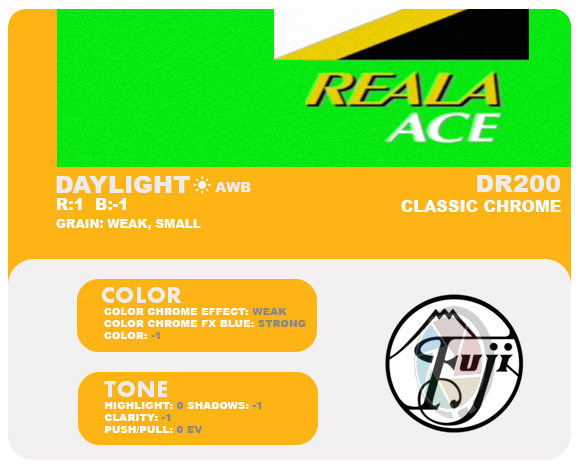
This recipe yields the best results when using a white balance preset like Daylight, but it also comes close with auto white balance (AWB). Adding clarity is up to you, it's optional.
I also created a Nostagic Neg that it's very close to the Fuji's. It's a good option for those with older cameras without these new profiles. Achieving a perfect match is impossible since Fuji's RAW Studio doesn't allow for individual color adjustments; it only offers temperature and tint controls. However, one can come close to replicating the colors and tones.
Mar 08, 2024 at 11:16 PM
p.1 #10What Film Simulations are you using?
I like this one
**NEW AMERICA - BY ØYVIND NORDHAGEN**
Instagram:
/ oyvindwashere
Astia
Dynamic Range: DR200
Highlight: +1
Shadow: -0.5
Color: 0
Noise Reduction: +4
Sharpness: -4
Clarity: 0
Grain Effect: Weak / Large
Color Chrome Effect: Strong
Color Chrome Effect Blue: Weak
White Balance: Auto, +3 Red & -4 Blue
Exposure Compensation: +1/3 to +2/3
**NEW AMERICA - BY ØYVIND NORDHAGEN**
Instagram:
/ oyvindwashere
Astia
Dynamic Range: DR200
Highlight: +1
Shadow: -0.5
Color: 0
Noise Reduction: +4
Sharpness: -4
Clarity: 0
Grain Effect: Weak / Large
Color Chrome Effect: Strong
Color Chrome Effect Blue: Weak
White Balance: Auto, +3 Red & -4 Blue
Exposure Compensation: +1/3 to +2/3
Mar 09, 2024 at 12:34 AM

p.1 #11What Film Simulations are you using?
I confess I have no idea how to save recipes. I like Classic Chrome and Classic Negative a lot, but I also shoot both raw+jpeg so I usually wind up editing a raw file. I admit that all this chatter about the new VI has me playing with my V a little more and I've actually picked up a few new tips.
Once you get all of those settings put together, how do you save them? Thanks!
Once you get all of those settings put together, how do you save them? Thanks!
Mar 09, 2024 at 08:37 AM
p.1 #12What Film Simulations are you using?
Sharona wrote:
Once you get all of those settings put together, how do you save them? Thanks!
https://fujifilm-dsc.com/en-int/manual/x100v/menu_shooting/image_quality_setting/index.html#edit-save_custom_setting
Once you get all of those settings put together, how do you save them? Thanks!
https://fujifilm-dsc.com/en-int/manual/x100v/menu_shooting/image_quality_setting/index.html#edit-save_custom_setting
Mar 09, 2024 at 08:47 AM
p.1 #13What Film Simulations are you using?
Thanks! Given that I never use them, I must have skipped this. Good to know it's in the manual!
Mar 09, 2024 at 09:03 AM
RoamingScott
Offline
Activity
[X]
Details
p.1 #14What Film Simulations are you using?
When developing sims on the V, I noticed that sometimes changes wouldn’t stick unless you immediately took a single shot after saving the settings. Luckily the VI hasn’t shown this behavior.
Mar 09, 2024 at 09:30 AM
p.1 #15What Film Simulations are you using?
Fred Miranda wrote:
I experimented with it today and managed to achieve a result that closely resembles the Fuji Reala Ace simulation. While I've come across some online recipes using Classic Neg as base, they don't quite match the new Reala sim. For accurate greens and reds, it's preferable to start with Classic Chrome.
This recipe yields the best results when using a white balance preset like Daylight, but it also comes close with auto white balance (AWB). Adding clarity is up to you, it's optional.
I also created a Nostagic Neg that it's very close to the Fuji's. It's a good option for...Show more →
Fred - Did you share the Nostalgic Neg anywhere? I'd love to add it to my V. Thanks!
I experimented with it today and managed to achieve a result that closely resembles the Fuji Reala Ace simulation. While I've come across some online recipes using Classic Neg as base, they don't quite match the new Reala sim. For accurate greens and reds, it's preferable to start with Classic Chrome.
This recipe yields the best results when using a white balance preset like Daylight, but it also comes close with auto white balance (AWB). Adding clarity is up to you, it's optional.
I also created a Nostagic Neg that it's very close to the Fuji's. It's a good option for...Show more →
Fred - Did you share the Nostalgic Neg anywhere? I'd love to add it to my V. Thanks!
Mar 09, 2024 at 10:09 AM
p.1 #16What Film Simulations are you using?
Just another question from a non-techy person before I try Fred's Reala Ace: Looks like from the manual, I just hit reset and it will go back to my current camera settings?
ETA: Re-reading, that looks wrong. How do I go back to my original settings after saving a sim?
ETA: Re-reading, that looks wrong. How do I go back to my original settings after saving a sim?
Mar 09, 2024 at 10:15 AM
RoamingScott
Offline
Activity
[X]
Details
p.1 #17What Film Simulations are you using?
You should save base settings as a sim slot as well so you can toggle back-and-forth easily.
Sharona wrote:
Just another question from a non-techy person before I try Fred's Reala Ace: Looks like from the manual, I just hit reset and it will go back to my current camera settings?
ETA: Re-reading, that looks wrong. How do I go back to my original settings after saving a sim?
Sharona wrote:
Just another question from a non-techy person before I try Fred's Reala Ace: Looks like from the manual, I just hit reset and it will go back to my current camera settings?
ETA: Re-reading, that looks wrong. How do I go back to my original settings after saving a sim?
Mar 09, 2024 at 10:53 AM
p.1 #18What Film Simulations are you using?
Thank you. What a kerfluffle though. Is there a custom function button set to get to these then, or do you have to go into the menu every time to apply your sim?
Mar 09, 2024 at 11:12 AM
RoamingScott
Offline
Activity
[X]
Details
p.1 #19What Film Simulations are you using?
I had it set to my menu on the V and have it set to a button on the VI. It’s called “select custom setting” on the VI but I don’t recall that being an option on the V.
Sharona wrote:
Thank you. What a kerfluffle though. Is there a custom function button set to get to these then, or do you have to go into the menu every time to apply your sim?
Sharona wrote:
Thank you. What a kerfluffle though. Is there a custom function button set to get to these then, or do you have to go into the menu every time to apply your sim?
Mar 09, 2024 at 11:20 AM
p.1 #20What Film Simulations are you using?
Thanks - OK - But where I am creating and saving these (I've just added Fred's Reala), is also called custom settings and there are 7 slots for them. Am I doing it correctly? I am just playing around so this is not urgent but it's kind of fun.
Mar 09, 2024 at 11:27 AM