This topic is in the 2024 archive. You can read it and like its posts here. It is read only.
Archive 2024Nikon Z8 firmware 2.0
p.8 #1Nikon Z8 firmware 2.0
newyork wrote:
I put mine on my desktop. Then just dragged it into the z8 icon that comes up when I plug my card reader in.
Closed out card reader and put card back In. Went to firmware and it asked if I wanted to update.
When it’s done it says to remove card free powering down. Then reinsert and turn on the camera and check firmware.
The file won't drop into the Z8 icon
I put mine on my desktop. Then just dragged it into the z8 icon that comes up when I plug my card reader in.
Closed out card reader and put card back In. Went to firmware and it asked if I wanted to update.
When it’s done it says to remove card free powering down. Then reinsert and turn on the camera and check firmware.
The file won't drop into the Z8 icon
Feb 08, 2024 at 06:24 PM
p.8 #2Nikon Z8 firmware 2.0
RoamingScott wrote:
Just use the mobile app to update if dragging and dropping the file doesn’t work.
Can you explain how to use the mobile app? Wasn't even aware there was a mobile app ??
Thanks
Just use the mobile app to update if dragging and dropping the file doesn’t work.
uintaangler wrote
Can you explain how to use the mobile app? Wasn't even aware there was a mobile app ??
Thanks
Feb 08, 2024 at 06:27 PM
RoamingScott
Offline
Activity
[X]
Details
p.8 #3Nikon Z8 firmware 2.0
It’s called SnapBridge. You link your camera to it via Bluetooth and there is a FW update option within the app. It’s fairly self explanatory for each step.
uintaangler wrote:
Can you explain how to use the mobile app? Wasn't even aware there was a mobile app ??
Thanks
uintaangler wrote:
RoamingScott wrote
Just use the mobile app to update if dragging and dropping the file doesn’t work.uintaangler wrote
Thanks
Feb 08, 2024 at 06:30 PM
p.8 #4Nikon Z8 firmware 2.0
uintaangler wrote:
I am having trouble installing 2.0 on my Z8
I downloaded the correct file onto my Mac but cannot do Step 2: see below
"Using a card reader, copy “Z_8_0200.bin” to a memory card that has been formatted in the camera.
Note: Be sure to copy the firmware to the root (top-most) directory of the memory card. The camera will not recognize the new firmware if it is placed in a folder under the root directory."
When I click on the file to open it I get this error message: "Unable to expand Z_8_0200.bin. It is in an unsupported format>
When I attempt to drag...Show more →
Why are you clicking on the bin file trying to open it? All you need to do is drag or copy the file as is to the top of the CF CARD, not to a sub directory of the card. If you follow NIKON’s instructions below, you should have no problems.
“ Download the following firmware file to your computer.
Please make sure you have the downloaded firmware file on your computer.
• Z_8_0200.bin (the camera firmware)
Using a card reader, copy “Z_8_0200.bin” to a memory card that has been formatted in the camera.
Note: Be sure to copy the firmware to the root (top-most) directory of the memory card. The camera will not recognize the new firmware if it is placed in a folder under the root directory.
Insert the memory card into Slot 1 on the camera and turn the camera on.
Select [Firmware version] in the [SETUP MENU] and follow the on-screen instructions to complete the firmware update.
Once the update is complete, turn the camera off and remove the memory card.
Confirm that the firmware has been updated to the new version.”
I am having trouble installing 2.0 on my Z8
I downloaded the correct file onto my Mac but cannot do Step 2: see below
"Using a card reader, copy “Z_8_0200.bin” to a memory card that has been formatted in the camera.
Note: Be sure to copy the firmware to the root (top-most) directory of the memory card. The camera will not recognize the new firmware if it is placed in a folder under the root directory."
When I click on the file to open it I get this error message: "Unable to expand Z_8_0200.bin. It is in an unsupported format>
When I attempt to drag...Show more →
Why are you clicking on the bin file trying to open it? All you need to do is drag or copy the file as is to the top of the CF CARD, not to a sub directory of the card. If you follow NIKON’s instructions below, you should have no problems.
“ Download the following firmware file to your computer.
Please make sure you have the downloaded firmware file on your computer.
• Z_8_0200.bin (the camera firmware)
Using a card reader, copy “Z_8_0200.bin” to a memory card that has been formatted in the camera.
Note: Be sure to copy the firmware to the root (top-most) directory of the memory card. The camera will not recognize the new firmware if it is placed in a folder under the root directory.
Insert the memory card into Slot 1 on the camera and turn the camera on.
Select [Firmware version] in the [SETUP MENU] and follow the on-screen instructions to complete the firmware update.
Once the update is complete, turn the camera off and remove the memory card.
Confirm that the firmware has been updated to the new version.”
Feb 08, 2024 at 07:23 PM

p.8 #5Nikon Z8 firmware 2.0
Laslo Varadi wrote:
Why are you clicking on the bin file trying to open it? All you need to do is drag or copy the file as is to the top of the CF CARD, not to a sub directory of the card. If you follow NIKON’s instructions below, you should have no problems.
This. Normally Nikon provides firmware as a self extracting archive, so you have to click it to extract it 1st, but this time for whatever reason it's a .bin file that can be just copied to the memory card without any additional steps. Follow the provided instructions and everything will be all right. Unless some other weirdness of wonderful macOS is making card in the reader not available to copy files to.
Why are you clicking on the bin file trying to open it? All you need to do is drag or copy the file as is to the top of the CF CARD, not to a sub directory of the card. If you follow NIKON’s instructions below, you should have no problems.
This. Normally Nikon provides firmware as a self extracting archive, so you have to click it to extract it 1st, but this time for whatever reason it's a .bin file that can be just copied to the memory card without any additional steps. Follow the provided instructions and everything will be all right. Unless some other weirdness of wonderful macOS is making card in the reader not available to copy files to.
Feb 08, 2024 at 08:25 PM
p.8 #6Nikon Z8 firmware 2.0
RoamingScott wrote:
It’s called SnapBridge. You link your camera to it via Bluetooth and there is a FW update option within the app. It’s fairly self explanatory for each step.
Can you explain how to use the mobile app? Wasn't even aware there was a mobile app ??
Thanks
Worked!
Thanks
It’s called SnapBridge. You link your camera to it via Bluetooth and there is a FW update option within the app. It’s fairly self explanatory for each step.
uintaangler wrote
RoamingScott wrote
Just use the mobile app to update if dragging and dropping the file doesn’t work.uintaangler wrote
Thanks
Worked!
Thanks
Feb 08, 2024 at 11:56 PM
p.8 #7Nikon Z8 firmware 2.0
lukemeup wrote:
This. Normally Nikon provides firmware as a self extracting archive, so you have to click it to extract it 1st, but this time for whatever reason it's a .bin file that can be just copied to the memory card without any additional steps. Follow the provided instructions and everything will be all right. Unless some other weirdness of wonderful macOS is making card in the reader not available to copy files to.
I do remember when they provided the firmware as self extracting. I have been away from Nikon for several years and just added the Z8. I guess they changed the process.
Laslo Varadi wrote
Why are you clicking on the bin file trying to open it? All you need to do is drag or copy the file as is to the top of the CF CARD, not to a sub directory of the card. If you follow NIKON’s instructions below, you should have no problems.I do remember when they provided the firmware as self extracting. I have been away from Nikon for several years and just added the Z8. I guess they changed the process.
Feb 09, 2024 at 06:33 AM
p.8 #8Nikon Z8 firmware 2.0
Nikon changed that recently to avoid confusion as I imagine that is where most people get confused and contact support staff every single time a FW update is released (normally it was always in a ZIP).
If it's in a ZIP folder you need to extract it (manually or automatically if available), you can't just drag & drop it out of there. To add to the confusion, the ZIP file remains in addition to the extracted file. Now that it's just the BIN file, all you need to do is copy it to the root directory of your memory card.
If it's in a ZIP folder you need to extract it (manually or automatically if available), you can't just drag & drop it out of there. To add to the confusion, the ZIP file remains in addition to the extracted file. Now that it's just the BIN file, all you need to do is copy it to the root directory of your memory card.
Feb 09, 2024 at 10:45 AM
p.8 #9Nikon Z8 firmware 2.0
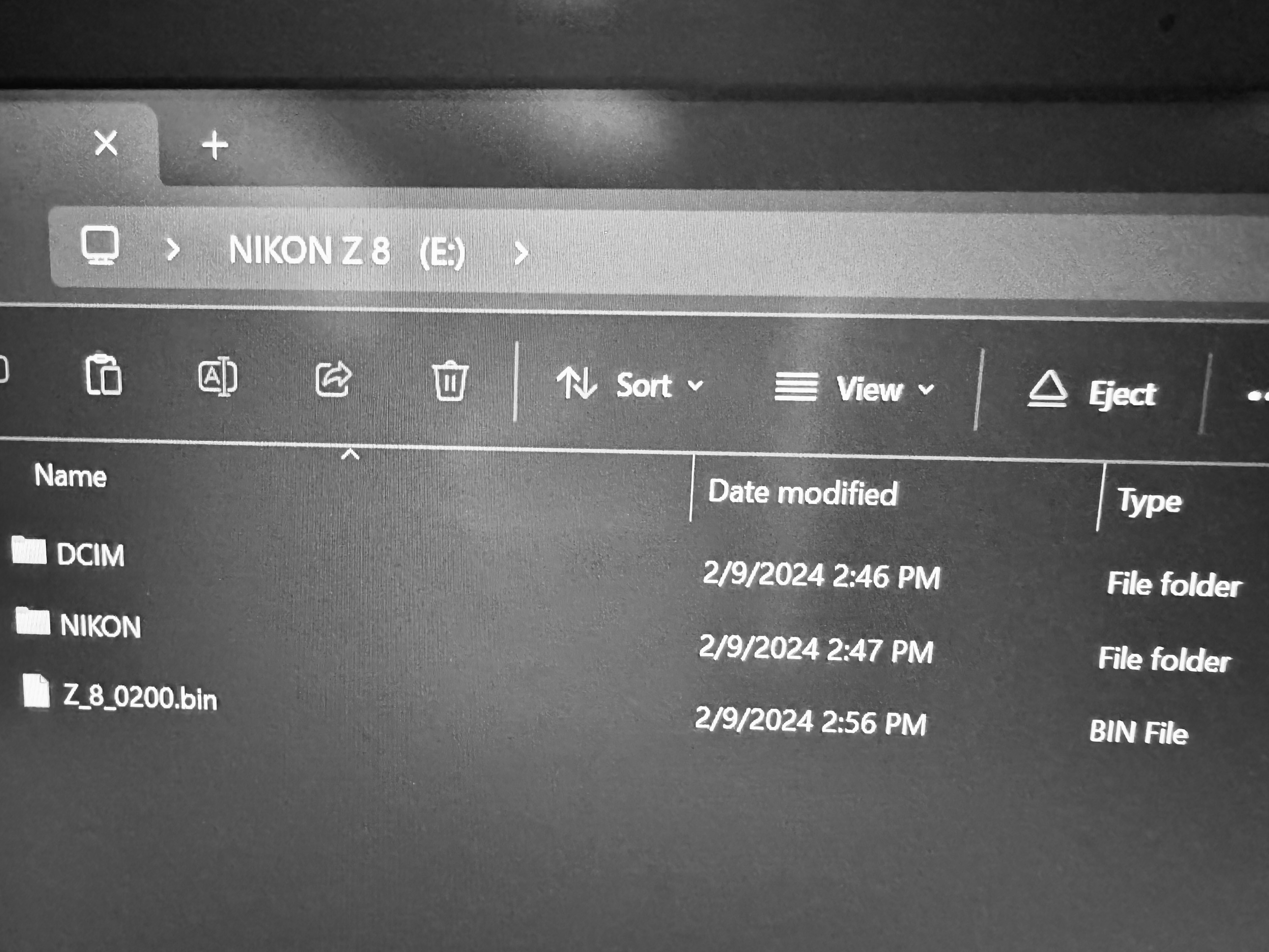
I've placed the bin in the root of the directory after formatting my card, and I can't get the camera to recognize and run the update. Never had a problem before with firmware updates, but I'm unsure what it is I am doing wrong here.
Feb 09, 2024 at 03:53 PM
RoamingScott
Offline
Activity
[X]
Details
p.8 #10Nikon Z8 firmware 2.0
gilgabo wrote:
I've placed the bin in the root of the directory after formatting my card, and I can't get the camera to recognize and run the update. Never had a problem before with firmware updates, but I'm unsure what it is I am doing wrong here.
It will only look for the FW file in the slot 1 card FWIW.
I've placed the bin in the root of the directory after formatting my card, and I can't get the camera to recognize and run the update. Never had a problem before with firmware updates, but I'm unsure what it is I am doing wrong here.
It will only look for the FW file in the slot 1 card FWIW.
Feb 09, 2024 at 04:07 PM
p.8 #11Nikon Z8 firmware 2.0
RoamingScott wrote:
It will only look for the FW file in the slot 1 card FWIW.
That was the issue. I just switched the setting for primary card slot, and bingo.
Thank you.
gilgabo wrote
I've placed the bin in the root of the directory after formatting my card, and I can't get the camera to recognize and run the update. Never had a problem before with firmware updates, but I'm unsure what it is I am doing wrong here.That was the issue. I just switched the setting for primary card slot, and bingo.
Thank you.
Feb 09, 2024 at 04:11 PM
p.8 #12Nikon Z8 firmware 2.0
I am definitely looking forwards to giving the new firmware a try this weekend! I think these big firmware updates are a very smart move by Nikon.
Cameras are basically computers now, and just like our phones a lot of usability improvements can be made in software alone. It would be nice if we eventually get to a time where we know our cameras will get feature improvements for X years after release. It will help keep our cameras relevant longer, and probably help keep resale value up too.
A perfect example I can think of is auto capture. I don't see using it right now since my Z8 is my main camera, but I am sure eventually there will be a Z8 II or another camera I will upgrade too and then I can definitely see messing with auto capture. Just like how in the past my first camera with a built in intervalometer eventually became my time lapse camera.
Cameras are basically computers now, and just like our phones a lot of usability improvements can be made in software alone. It would be nice if we eventually get to a time where we know our cameras will get feature improvements for X years after release. It will help keep our cameras relevant longer, and probably help keep resale value up too.
A perfect example I can think of is auto capture. I don't see using it right now since my Z8 is my main camera, but I am sure eventually there will be a Z8 II or another camera I will upgrade too and then I can definitely see messing with auto capture. Just like how in the past my first camera with a built in intervalometer eventually became my time lapse camera.
Feb 09, 2024 at 05:28 PM
p.8 #13Nikon Z8 firmware 2.0
Nikon is doing it in order to deliver additional value to their clients but also because they can.
The reason why they can while other camera manufacturers apparently cannot is because Nikon now has the most modern agile firmware development platform which is fully able to deliver features for multiple bodies in parallel while ensuring quality. Just like Tesla they have understood better than others the fundamental shift and seen the opportunities.
It’s a major transformation and one that takes years to complete successfully.
Cheers,
Bernard
The reason why they can while other camera manufacturers apparently cannot is because Nikon now has the most modern agile firmware development platform which is fully able to deliver features for multiple bodies in parallel while ensuring quality. Just like Tesla they have understood better than others the fundamental shift and seen the opportunities.
It’s a major transformation and one that takes years to complete successfully.
Cheers,
Bernard
Feb 10, 2024 at 01:11 PM
RoamingScott
Offline
Activity
[X]
Details
p.8 #14Nikon Z8 firmware 2.0
It’s not the other manufacturers are incapable, it’s that they no longer prioritize it. Fuji used to lead the way for years in this regard with their legendary, but now abandoned, “kaizen” philosophy, Sony delivered a massive EyeAF update to the then aging A7R3, etc. Nikon is down in the market and needs to be very aggressive to both maintain their base and to grow it.
Feb 10, 2024 at 01:30 PM
p.8 #15Nikon Z8 firmware 2.0

Installed Version 2.0 on my Z8, went to use it for the first time after install and my monitor ceased functioning!
Anybody else experience this problem?
Any suggestions about what I can do to get it working again?

Feb 10, 2024 at 04:33 PM
p.8 #16Nikon Z8 firmware 2.0
RoamingScott wrote:
It’s not the other manufacturers are incapable, it’s that they no longer prioritize it. Fuji used to lead the way for years in this regard with their legendary, but now abandoned, “kaizen” philosophy, Sony delivered a massive EyeAF update to the then aging A7R3, etc. Nikon is down in the market and needs to be very aggressive to both maintain their base and to grow it.
There is a significant difference btwn delivering point updates related to a function (eyeaF for example) and coming up with a continued stream of new functions. Points updates are akin to bug fixes.
But as I said it takes both intent and capability and you are probably right that other manufacturers do not want to deliver such value to their clients. My point is that even if they wanted they probably wouldn’t be able to with the depth and breath Nikon has been showing the past 2 years.
Nikon market share in the high end segment they are focusing on is good. It’s in the low end that they decided not to join the price race to the bottom Canon started with APS-C bodies. Still Nikon sold more mirrorless lenses than Canon in Japan in 2023 and Canon had to lower their high end bodies prices for the first time ever amidst a strong inflation. That dioesn’t scream market leadership…
Cheers,
Bernard
Feb 10, 2024 at 04:52 PM
p.8 #17Nikon Z8 firmware 2.0
I spent a few hours today using the Nikon Z8 with firmware 2.0 and Megadap ETZ21 Pro on firmware 1.33, and had no noticeable issues. If anyone has issues with the Megadap adapter after updating there Z8 make sure your Megadap firmware is up to date.
The bird AF definitely feels like a nice improvement.
The enhanced bracketing options are nice to have. Now I just wish Nikon made an option to use the intervalometer continuously so you could fire off a bracket without the 0.5 sec delay between each photo. Or I would take a mode like Sony's continuous bracketing where you press the shutter once and it fires off the whole bracket as quick as it can. With fast shutter speeds holding down the shutter button is not an issue, but with longer exposures holding down the shutter can add shake.
The bird AF definitely feels like a nice improvement.
The enhanced bracketing options are nice to have. Now I just wish Nikon made an option to use the intervalometer continuously so you could fire off a bracket without the 0.5 sec delay between each photo. Or I would take a mode like Sony's continuous bracketing where you press the shutter once and it fires off the whole bracket as quick as it can. With fast shutter speeds holding down the shutter button is not an issue, but with longer exposures holding down the shutter can add shake.
Feb 10, 2024 at 05:49 PM
p.8 #18Nikon Z8 firmware 2.0
I think this is a very welcome and classy action on Nikon's part. As an early owner of the Z8, I was given notice for both recalls. Fortunately, though indicated to be among the effected cameras, mine has not shown any issues as of now, and I am hoping it remains that way. I will only deal with them if/when necessary. Quick response and upfront notification rather than denial go a long way towards good will and trust. So do the recent updates for Z8 and Z9.
The 2.0 release was as welcome as it was surprising for me. I anticipated an update at some point, but certainly not one the magnitude of that released for the Z9. From film days to DSLRs, we played a game, regardless of brand, where new cameras arrived on the market, and many of us went back and forth regarding choices as it would seem no matter what our choices, another camera would have X but not Y that we wanted or needed and our chosen camera would not and could not be changed or upgraded as such. Buy and Sell was the answer most of the time with rinse and repeat following shortly.
From the very first mirrorless releases by Nikon, it seems they have taken a different approach from prior years and are being much more responsive to needed/wanted changes. The power of software to implement change is being utilized in a most welcome way regardless of motivation. When Nikon entered mirrorless, it seems they came to play and play to win.
BYW, I will be most happy if/when Nikon updates my Zf with the new non-CPU lens update the Z8 just got! Just saying. Hint, hint!
Mary
The 2.0 release was as welcome as it was surprising for me. I anticipated an update at some point, but certainly not one the magnitude of that released for the Z9. From film days to DSLRs, we played a game, regardless of brand, where new cameras arrived on the market, and many of us went back and forth regarding choices as it would seem no matter what our choices, another camera would have X but not Y that we wanted or needed and our chosen camera would not and could not be changed or upgraded as such. Buy and Sell was the answer most of the time with rinse and repeat following shortly.
From the very first mirrorless releases by Nikon, it seems they have taken a different approach from prior years and are being much more responsive to needed/wanted changes. The power of software to implement change is being utilized in a most welcome way regardless of motivation. When Nikon entered mirrorless, it seems they came to play and play to win.
BYW, I will be most happy if/when Nikon updates my Zf with the new non-CPU lens update the Z8 just got! Just saying. Hint, hint!
Mary
Feb 10, 2024 at 06:01 PM
duncang
Offline
Activity
[X]
Details
p.8 #19Nikon Z8 firmware 2.0
bernardl wrote:
There is a significant difference btwn delivering point updates related to a function (eyeaF for example) and coming up with a continued stream of new functions. Points updates are akin to bug fixes.
But as I said it takes both intent and capability and you are probably right that other manufacturers do not want to deliver such value to their clients. My point is that even if they wanted they probably wouldn’t be able to with the depth and breath Nikon has been showing the past 2 years.
Nikon market share in the high end segment they are focusing on is good....Show more →
Lets just conveniently ignore the fact that Sony has release a new hardware/software platform that the A7rv, A7iv and a6700 are based on - they didn't need to deliver a constant stream of updates to get things to work at an acceptable level. These camera's came with all features working right out of the box.
And then of course they have also delivered the BEAST - the performance of which is just staggering - and no doubt the A1ii will see a similar performance jump. Now that's delivering real value to their customers.
RoamingScott wrote
It’s not the other manufacturers are incapable, it’s that they no longer prioritize it. Fuji used to lead the way for years in this regard with their legendary, but now abandoned, “kaizen” philosophy, Sony delivered a massive EyeAF update to the then aging A7R3, etc. Nikon is down in the market and needs to be very aggressive to both maintain their base and to grow it.But as I said it takes both intent and capability and you are probably right that other manufacturers do not want to deliver such value to their clients. My point is that even if they wanted they probably wouldn’t be able to with the depth and breath Nikon has been showing the past 2 years.
Nikon market share in the high end segment they are focusing on is good....Show more →
Lets just conveniently ignore the fact that Sony has release a new hardware/software platform that the A7rv, A7iv and a6700 are based on - they didn't need to deliver a constant stream of updates to get things to work at an acceptable level. These camera's came with all features working right out of the box.
And then of course they have also delivered the BEAST - the performance of which is just staggering - and no doubt the A1ii will see a similar performance jump. Now that's delivering real value to their customers.
Feb 11, 2024 at 03:39 AM
p.8 #20Nikon Z8 firmware 2.0
DWOfPaul wrote:
The enhanced bracketing options are nice to have. Now I just wish Nikon made an option to use the intervalometer continuously so you could fire off a bracket without the 0.5 sec delay between each photo. Or I would take a mode like Sony's continuous bracketing where you press the shutter once and it fires off the whole bracket as quick as it can. With fast shutter speeds holding down the shutter button is not an issue, but with longer exposures holding down the shutter can add shake.
Would MC-30A cable in CH mode not work? I don't do much automatic bracketing.
The enhanced bracketing options are nice to have. Now I just wish Nikon made an option to use the intervalometer continuously so you could fire off a bracket without the 0.5 sec delay between each photo. Or I would take a mode like Sony's continuous bracketing where you press the shutter once and it fires off the whole bracket as quick as it can. With fast shutter speeds holding down the shutter button is not an issue, but with longer exposures holding down the shutter can add shake.
Would MC-30A cable in CH mode not work? I don't do much automatic bracketing.
Feb 11, 2024 at 04:53 AM