This topic is in the 2024 archive. You can read it and like its posts here. It is read only.
Archive 2024Nikon Z8 firmware 2.0
p.6 #1Nikon Z8 firmware 2.0
Can anyone do a versus of a pixel shift image and regular image? Curious to see that 180mp difference pixel peep
Feb 07, 2024 at 04:34 PM
p.6 #2Nikon Z8 firmware 2.0
Pixel shift isn’t just about getting larger images. You can also shoot at regular resolution with a true colour image, that’s a major thing for me and like it on my Zf and hope it’s coming for my Z9 soon 🤞
Feb 07, 2024 at 04:49 PM
p.6 #3Nikon Z8 firmware 2.0
Unable to access this feature? Still shows 200% as max after update?
• The maximum shooting display zoom ratio is now 400%.
• The maximum shooting display zoom ratio is now 400%.
Feb 07, 2024 at 05:00 PM
p.6 #4Nikon Z8 firmware 2.0
Jawnathin wrote:
I've not tested out the Nikon pixel shift yet, but I shoot product photography, mostly flat lays. My camera is often set up on an overhead boom. With Sony, It wasn't even close. The slightest vibration and it didn't work. Even just walking on the floor near the camera was enough to mess it up. I'm curious to see if Nikon has a more tolerant implementation of this.
Useful for product photography where the entire subject can fit into the frame.
I've not tested out the Nikon pixel shift yet, but I shoot product photography, mostly flat lays. My camera is often set up on an overhead boom. With Sony, It wasn't even close. The slightest vibration and it didn't work. Even just walking on the floor near the camera was enough to mess it up. I'm curious to see if Nikon has a more tolerant implementation of this.
Feb 07, 2024 at 05:49 PM
p.6 #5Nikon Z8 firmware 2.0
nhmorgan wrote:
I've not tested out the Nikon pixel shift yet, but I shoot product photography, mostly flat lays. My camera is often set up on an overhead boom. With Sony, It wasn't even close. The slightest vibration and it didn't work. Even just walking on the floor near the camera was enough to mess it up. I'm curious to see if Nikon has a more tolerant implementation of this.
Did that include the latest version of Sony Pixel Shift?
https://diglloyd.com/blog/2022/20221218_0730-SonyA7R_V-PixelShift-MotionCorrection.html
Jawnathin wrote
Useful for product photography where the entire subject can fit into the frame.
Did that include the latest version of Sony Pixel Shift?
https://diglloyd.com/blog/2022/20221218_0730-SonyA7R_V-PixelShift-MotionCorrection.html
Feb 07, 2024 at 05:53 PM
p.6 #6Nikon Z8 firmware 2.0
For anyone interested I did a deep dive into pixel shift on the Zf:
https://www.fredmiranda.com/forum/topic/1839937/
https://www.fredmiranda.com/forum/topic/1839937/
Feb 07, 2024 at 06:25 PM
p.6 #7Nikon Z8 firmware 2.0
CanadaMark wrote:
Maybe I don't have a good read on the market in that area, but I've never got the sense pixel shift was that popular. Not only does it require proprietary software to use (I assume you have to use NX Studio), which is clunky and adds time/hassle, but if anything in the frame is moving (like a breeze during your landscape shot), you're better off using a different method. I guess for archival or studio/product photography it could be nice, but 45-60MP is already plenty for most use cases, and up-res software these days is quite good should the end...Show more →
I think pixel shift is one of those halo features that many like in principle and might experiment with a few times but find the workflow a bit annoying, ie having to create the composite on the computer using a Nikon app they don't normally use. It's much more convenient on bodies that do the compositing in-camera, which the Panasonic and Olympus bodies support.
snapsy wrote
I'm really shocked Nikon added pixel shift to the Z8, from a business perspective. That's a key feature that would've driven camera upgrades for a Z8 Mark II. Nikon really has turned the corner on their strategy regarding firmware updates.
I think pixel shift is one of those halo features that many like in principle and might experiment with a few times but find the workflow a bit annoying, ie having to create the composite on the computer using a Nikon app they don't normally use. It's much more convenient on bodies that do the compositing in-camera, which the Panasonic and Olympus bodies support.
Feb 07, 2024 at 06:28 PM
p.6 #8Nikon Z8 firmware 2.0
CanadaMark wrote:
Looks like we can just shoot birds in auto area AF like Sony's Wide areaYou've always been able to - I've been using it for a couple years now on the Z9  Auto Area is better now than it was at launch thanks to the regular FW updates but it has always been very good. Back on earlier FW I found it to be especially good for small fast birds like swallows where it was difficult to keep them within a smaller AF box. If you wanted an "it just works" AF mode for most subjects, Auto Area AF has always been good for that.
One thing to note in Jan's videos is if...Show more →
Well, that was not my experience with Z8. Lots of time when AF-On button pressed with wide area or auto, I'd just see a green dot (not an AF point) in the center and camera won't do anything. After pressing AF-On button few times, camera may find the subject and start tracking. So I was depending 3D tracking which was way better.
Anyway the improvement is huge. Now I can see the camera start focusing immediately. Very happy. I can't say it's A1 level or not. Missed focus for couple of shots in a sequence, But I didn't have many birds flying except this osprey. Little blue (Flying) is back focused.
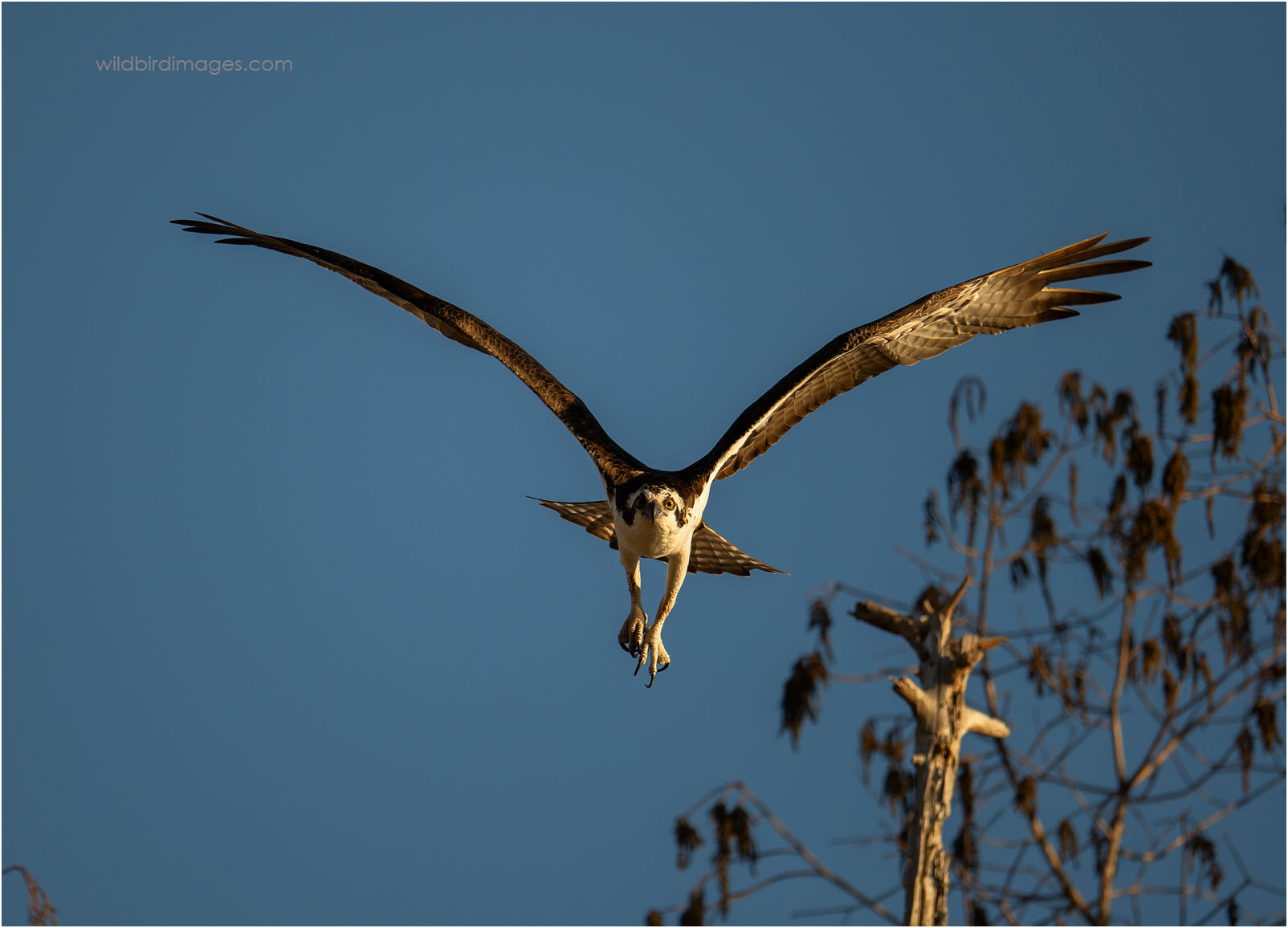
Z 8 and Z 400mm f/4.5 VR S @ 1/3200sec, f/4.5, ISO 800, 13.7MP(4356X3137), Effective FL 760mm, Distance 121ft
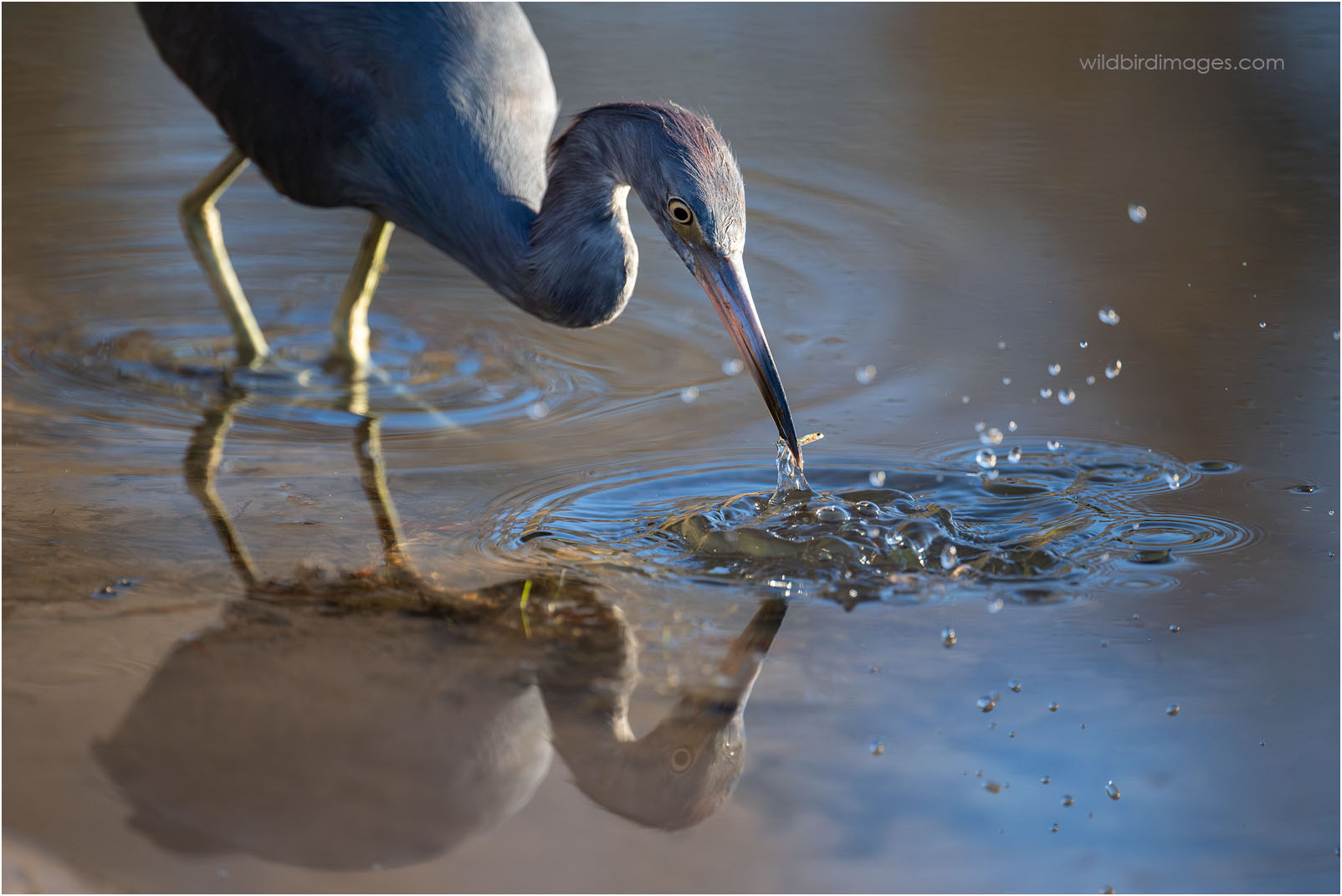
Z 8 and Z 400mm f/4.5 VR S @ 1/3200sec, f/4.5, ISO 4000, 45.4MP(8256X5504), Effective FL 400mm, Distance 17ft
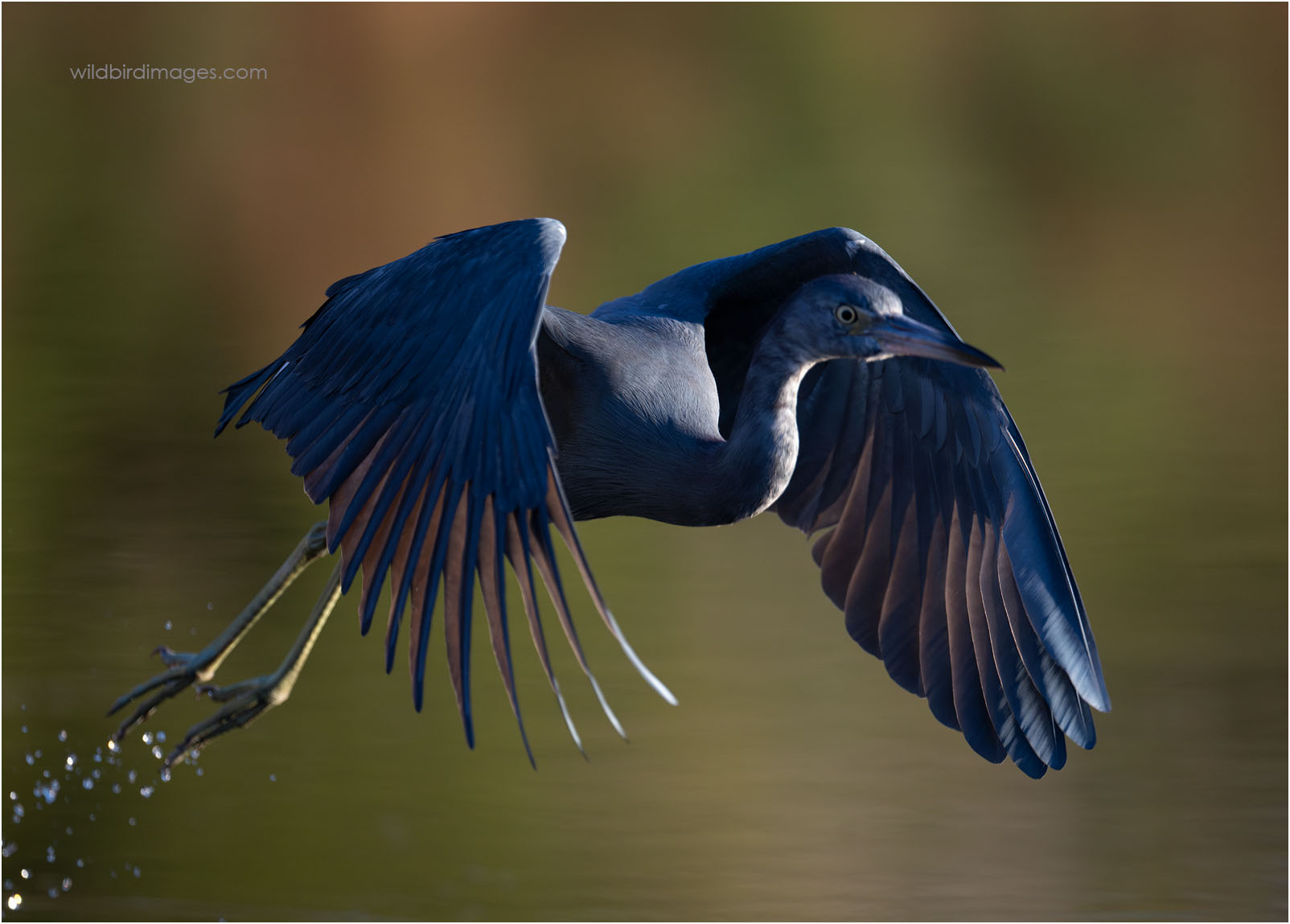
Z 8 and Z 400mm f/4.5 VR S @ 1/3200sec, f/4.5, ISO 2000, 34.8MP(6972X4988), Effective FL 470mm, Distance 25ft
Jemini wrote
He's a canon shooter. I trust his opinion.Looks like we can just shoot birds in auto area AF like Sony's Wide area
Auto Area is better now than it was at launch thanks to the regular FW updates but it has always been very good. Back on earlier FW I found it to be especially good for small fast birds like swallows where it was difficult to keep them within a smaller AF box. If you wanted an "it just works" AF mode for most subjects, Auto Area AF has always been good for that.One thing to note in Jan's videos is if...Show more →

Well, that was not my experience with Z8. Lots of time when AF-On button pressed with wide area or auto, I'd just see a green dot (not an AF point) in the center and camera won't do anything. After pressing AF-On button few times, camera may find the subject and start tracking. So I was depending 3D tracking which was way better.
Anyway the improvement is huge. Now I can see the camera start focusing immediately. Very happy. I can't say it's A1 level or not. Missed focus for couple of shots in a sequence, But I didn't have many birds flying except this osprey. Little blue (Flying) is back focused.
Z 8 and Z 400mm f/4.5 VR S @ 1/3200sec, f/4.5, ISO 800, 13.7MP(4356X3137), Effective FL 760mm, Distance 121ft
Z 8 and Z 400mm f/4.5 VR S @ 1/3200sec, f/4.5, ISO 4000, 45.4MP(8256X5504), Effective FL 400mm, Distance 17ft
Z 8 and Z 400mm f/4.5 VR S @ 1/3200sec, f/4.5, ISO 2000, 34.8MP(6972X4988), Effective FL 470mm, Distance 25ft
Feb 07, 2024 at 08:17 PM
p.6 #9Nikon Z8 firmware 2.0
I wasted quite a bit of time with pixel shift on the Fuji GFX-100s and was never convinced by the results. To the extend that I have not even tried it on the GFX-100II.
I will give it a try with the Z8 but my expectations are low although Ricci seems to have had nice results.
Cheers,
Bernard
I will give it a try with the Z8 but my expectations are low although Ricci seems to have had nice results.
Cheers,
Bernard
Feb 07, 2024 at 08:32 PM

p.6 #10Nikon Z8 firmware 2.0
Took it for a quick walk at a nearby lake today - there's indeed a noticeable improvement in the AF performance. While in the past I'd barely use auto-af - this will be my primary mode now. The camera recognizes birds from further away and the af is considerably more sticky. Definitely not a placebo effect - more like getting a gen 2 upgrade for free. Way to go, Nikon.
While in the past I'd barely use auto-af - this will be my primary mode now. The camera recognizes birds from further away and the af is considerably more sticky. Definitely not a placebo effect - more like getting a gen 2 upgrade for free. Way to go, Nikon.Feb 07, 2024 at 09:29 PM
p.6 #11Nikon Z8 firmware 2.0
Anyone also have a Canon R5 for Bird AF comparison? Also interested in how video bird AF performance compares.
Feb 07, 2024 at 10:05 PM
p.6 #12Nikon Z8 firmware 2.0
George Welch wrote:
Not sure what the Zf has to do with Firmware 2.0 on the Z8.
Aren’t there plenty of Zf threads?
Just be thankful it hasn't become a Sony thread…….yet. 😂
Not sure what the Zf has to do with Firmware 2.0 on the Z8.
Aren’t there plenty of Zf threads?
Just be thankful it hasn't become a Sony thread…….yet. 😂
Feb 08, 2024 at 06:04 AM
p.6 #13Nikon Z8 firmware 2.0
RoamingScott wrote:
Looks like we can just shoot birds in auto area AF like Sony's Wide areaThat's what we all said when Z9 went to 4.1...but sure, if Jan says so  Yes exactly! It is nice that we can now press a button to infinitely scroll through AF modes, but is there any Z9 user that uses anything other than auto area? I personally do not. In fact I have no fn buttons programmed any more. I like to just keep it simple and the camera gets out of the way.I definitely use other modes but not nearly as often. Auto is like 85% of my use case now.
Same, Auto area AF always unless it fails I'll fall back to 3D. Single point AF when I'm doing Landscapes. Nothing else.
Alistair1 wrote
RoamingScott wrote
Jemini wrote
He's a canon shooter. I trust his opinion.Looks like we can just shoot birds in auto area AF like Sony's Wide area
Same, Auto area AF always unless it fails I'll fall back to 3D. Single point AF when I'm doing Landscapes. Nothing else.
Feb 08, 2024 at 06:26 AM
p.6 #14Nikon Z8 firmware 2.0
AlphaPhotography wrote:
Anyone also have a Canon R5 for Bird AF comparison? Also interested in how video bird AF performance compares.
Jan's video linked one page back has some thoughts at the end of how it compares to his R5.
Anyone also have a Canon R5 for Bird AF comparison? Also interested in how video bird AF performance compares.
Jan's video linked one page back has some thoughts at the end of how it compares to his R5.
Feb 08, 2024 at 07:17 AM
p.6 #15Nikon Z8 firmware 2.0
I installed FW 2.0 yesterday and experienced the following problem today. The camera would first work normally but suddenly it would start showing a nearly white EVF image, overexposing by about 3 stops (there were some parts which showed traces of detail, but it was mostly white). The problem would not go away until I turned the camera off and then back on, after which the problem was gone. However, this problem repeated three times during about one hour of shooting. I was using the Z100-400 lens, MB-N12, aperture priority, auto ISO. I've used the camera since May 2023 and this type of an error has not occurred before the FW 2.0 update. I'm wondering if anyone else has had similar issues.
Feb 08, 2024 at 07:21 AM
p.6 #16Nikon Z8 firmware 2.0
ilkka_nissila wrote:
I installed FW 2.0 yesterday and experienced the following problem today. The camera would first work normally but suddenly it would start showing a nearly white EVF image, overexposing by about 3 stops (there were some parts which showed traces of detail, but it was mostly white). The problem would not go away until I turned the camera off and then back on, after which the problem was gone. However, this problem repeated three times during about one hour of shooting. I was using the Z100-400 lens, MB-N12, aperture priority, auto ISO. I've used the camera since May 2023 and...Show more →
Not the same symptoms, but here is what happened after installing FW 2.0 in my case. When pressing Fn1 or Fn2, the EVF would display no image (completely black), when it should have. I could still hear the lens working when moving, though. Changing the programming on these two buttons would not change anything. I went to the Monitor Mode setting, selected Auto Display Switch and re-deselected it, and then every thing came back to normal.
Otherwise, I am quite happy with the improvement, the AF seems to work much faster on the chickadees in my backyard.
I installed FW 2.0 yesterday and experienced the following problem today. The camera would first work normally but suddenly it would start showing a nearly white EVF image, overexposing by about 3 stops (there were some parts which showed traces of detail, but it was mostly white). The problem would not go away until I turned the camera off and then back on, after which the problem was gone. However, this problem repeated three times during about one hour of shooting. I was using the Z100-400 lens, MB-N12, aperture priority, auto ISO. I've used the camera since May 2023 and...Show more →
Not the same symptoms, but here is what happened after installing FW 2.0 in my case. When pressing Fn1 or Fn2, the EVF would display no image (completely black), when it should have. I could still hear the lens working when moving, though. Changing the programming on these two buttons would not change anything. I went to the Monitor Mode setting, selected Auto Display Switch and re-deselected it, and then every thing came back to normal.
Otherwise, I am quite happy with the improvement, the AF seems to work much faster on the chickadees in my backyard.
Feb 08, 2024 at 07:35 AM
p.6 #17Nikon Z8 firmware 2.0
fpoet wrote:
Not the same symptoms, but here is what happened after installing FW 2.0 in my case. When pressing Fn1 or Fn2, the EVF would display no image (completely black), when it should have. I could still hear the lens working when moving, though. Changing the programming on these two buttons would not change anything. I went to the Monitor Mode setting, selected Auto Display Switch and re-deselected it, and then every thing came back to normal.
Otherwise, I am quite happy with the improvement, the AF seems to work much faster on the chickadees in my backyard.
Thanks! I will try that. Nikon's response was that I should test the camera with several lenses to see if the problem was lens or camera related, and then take the component which is responsible for the problem to service. However, I'll try the monitor mode cycle trick to see if that does anything for me.
ilkka_nissila wrote
I installed FW 2.0 yesterday and experienced the following problem today. The camera would first work normally but suddenly it would start showing a nearly white EVF image, overexposing by about 3 stops (there were some parts which showed traces of detail, but it was mostly white). The problem would not go away until I turned the camera off and then back on, after which the problem was gone. However, this problem repeated three times during about one hour of shooting. I was using the Z100-400 lens, MB-N12, aperture priority, auto ISO. I've used the camera since May 2023 and this type of an error has not occurred before the FW 2.0 update. I'm wondering if anyone else has had similar issues.Otherwise, I am quite happy with the improvement, the AF seems to work much faster on the chickadees in my backyard.
Thanks! I will try that. Nikon's response was that I should test the camera with several lenses to see if the problem was lens or camera related, and then take the component which is responsible for the problem to service. However, I'll try the monitor mode cycle trick to see if that does anything for me.
Feb 08, 2024 at 08:05 AM
p.6 #18Nikon Z8 firmware 2.0
This update has rendered my Megadap useless for the time being I’m really not happy about it. I really hope there’s a firmware update that comes out for the adapter shortly.
Feb 08, 2024 at 09:40 AM
RoamingScott
Offline
Activity
[X]
Details
p.6 #19Nikon Z8 firmware 2.0
Yikes, you’re the first to mention that. Hope they get it updated soon! You might make a dedicated thread for that so other Megadap users don't bite the bullet on 2.0 vs it getting lost in here.
3catsinky wrote:
This update has rendered my Megadap useless for the time being I’m really not happy about it. I really hope there’s a firmware update that comes out for the adapter shortly.
3catsinky wrote:
This update has rendered my Megadap useless for the time being I’m really not happy about it. I really hope there’s a firmware update that comes out for the adapter shortly.
Feb 08, 2024 at 09:43 AM
p.6 #20Nikon Z8 firmware 2.0
Jemini wrote:
Well, that was not my experience with Z8. Lots of time when AF-On button pressed with wide area or auto, I'd just see a green dot (not an AF point) in the center and camera won't do anything. After pressing AF-On button few times, camera may find the subject and start tracking. So I was depending 3D tracking which was way better.
Anyway the improvement is huge. Now I can see the camera start focusing immediately. Very happy. I can't say it's A1 level or not. Missed focus for couple of shots in a sequence, But I didn't have many...Show more →
Oh weird, that is very strange behavior indeed, assuming I am understanding your description correctly. I have not seen the camera freeze on a green dot with either the Z8 or Z9 in any AF mode.
Regardless, it sounds like the FW fixed whatever issue you were having so that's good to hear! Great shots as well
Well, that was not my experience with Z8. Lots of time when AF-On button pressed with wide area or auto, I'd just see a green dot (not an AF point) in the center and camera won't do anything. After pressing AF-On button few times, camera may find the subject and start tracking. So I was depending 3D tracking which was way better.
Anyway the improvement is huge. Now I can see the camera start focusing immediately. Very happy. I can't say it's A1 level or not. Missed focus for couple of shots in a sequence, But I didn't have many...Show more →
Oh weird, that is very strange behavior indeed, assuming I am understanding your description correctly. I have not seen the camera freeze on a green dot with either the Z8 or Z9 in any AF mode.
Regardless, it sounds like the FW fixed whatever issue you were having so that's good to hear! Great shots as well
Feb 08, 2024 at 11:57 AM